

Microsoft began rolling out Windows 11 Experimental Preview Build 26300.8493 on May 15, 2026, giving Windows Insiders the ability to move the taskbar to the top, left, right, or bottom of the screen. The change restores one of the most visible pieces of desktop agency that Windows 11 removed at launch in October 2021. It is not merely a cosmetic concession; it is Microsoft admitting that the Windows shell’s “modernization” went too far when it treated decades of muscle memory as technical debt. For a company now talking openly about winning back Windows fans, the taskbar has become a surprisingly effective test of whether that promise means anything.
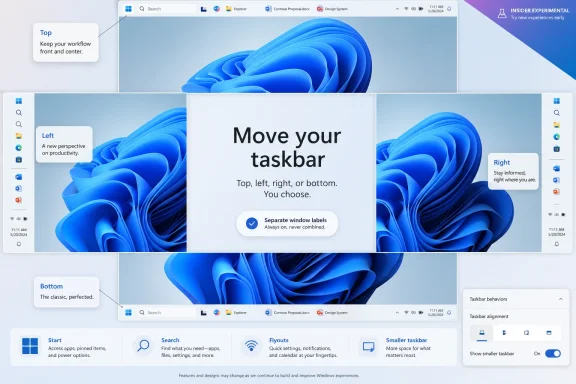
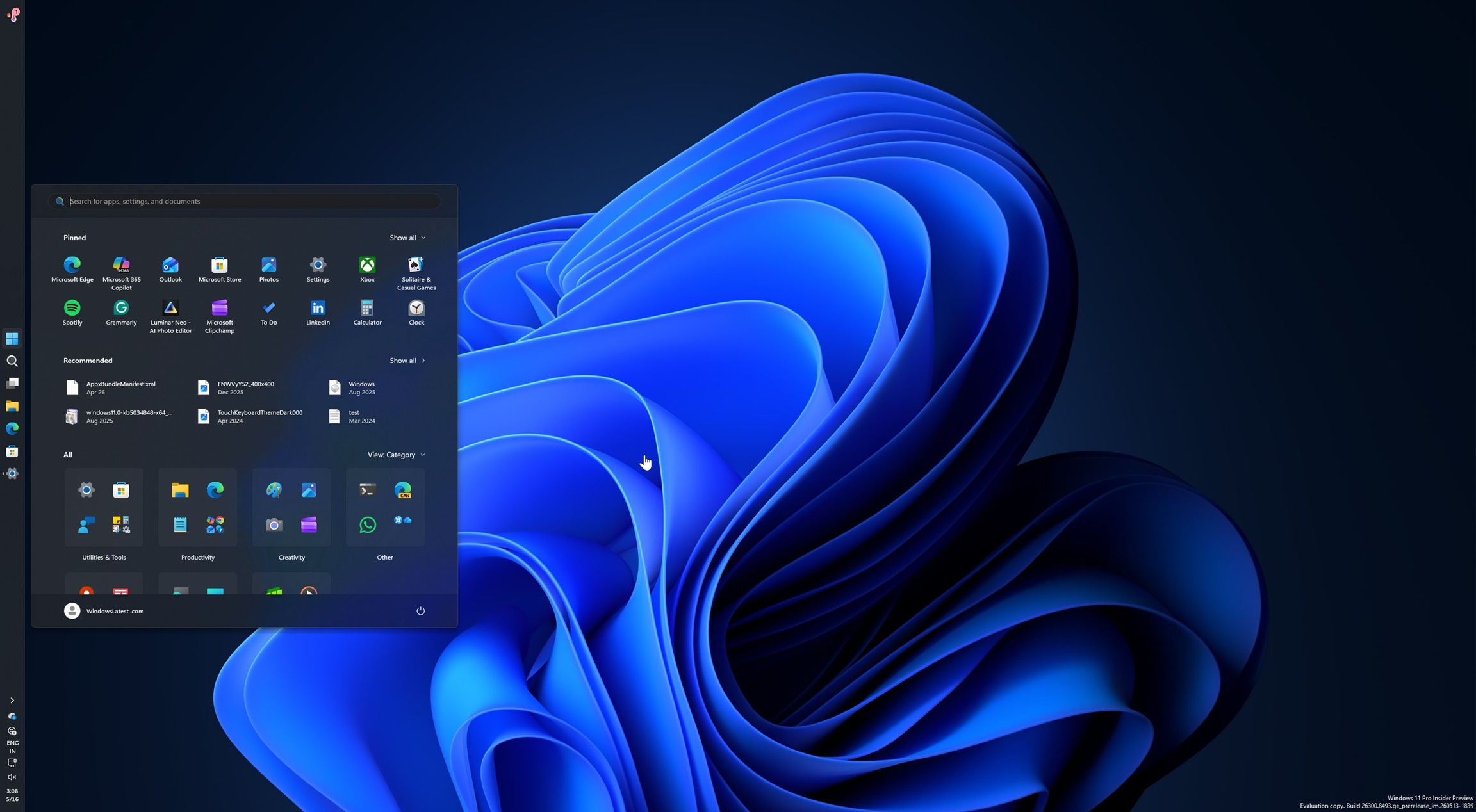
The movable taskbar is back, at least for testers living in the Windows Insider Program’s Experimental channel. Users can place it at the bottom, top, left, or right edge, and Windows 11 now adapts core shell elements such as Start, Search, flyouts, labels, and alignment to the selected position.
That sounds almost absurdly modest for a 2026 Windows headline. Windows users could do this for generations before Windows 11 arrived with a redesigned shell and a fixed bottom taskbar. Yet the modesty is the point: Microsoft is not unveiling a new AI sidebar, a cloud sync vision, or another subscription upsell. It is returning a basic desktop behavior that many users assumed should never have disappeared.
The new implementation is broader than simply dragging a bar to another side of the display. Microsoft is testing per-position icon alignment, a smaller taskbar option, and support for “Never combine” behavior that lets each window appear separately with labels. On a vertical taskbar, that can turn the taskbar into something closer to a window list, a workflow many power users have been trying to preserve through third-party tools since Windows 11’s first public builds.
The catch is that this is still preview software. Microsoft’s own framing leaves plenty of room for delay, revision, or partial rollout. Experimental channel features are, by design, not promises to the general public. But when the feature in question is the taskbar’s location, the risk is less that Microsoft is exploring an exotic future and more that it is finally cleaning up a self-inflicted wound.
In daily use, however, the tidy shell came with a long list of omissions. Users lost the ability to move the taskbar to the sides or top. Small taskbar buttons disappeared. Labels and uncombined windows were missing at launch. Drag-and-drop behaviors were limited. Context menus were pared down. The new shell looked polished in isolation, but it also told experienced users that their established workflows were now second-class.
That tradeoff was always going to land badly with the part of the Windows audience that treats the OS as a workstation rather than an appliance. A bottom-centered taskbar may be fine on a consumer laptop, but it is not a universal ideal. On ultrawide monitors, vertical taskbars make practical use of abundant horizontal space. On multi-monitor setups, users often develop precise habits around where system affordances live. On administrative desktops with many windows open, labels and non-combined buttons can matter more than visual minimalism.
Microsoft’s defense in the early Windows 11 era was that rebuilding the shell required prioritization. That argument was not entirely frivolous. A movable taskbar touches Start placement, flyout positioning, notification surfaces, touch hit targets, animations, search, system tray behavior, and app assumptions. But for users, the explanation mostly sounded like a large software company needed years to restore something it had already shipped before.
The result was predictable: third-party utilities moved into the gap. StartAllBack, ExplorerPatcher, Windhawk modules, and other tweaks became part of the Windows 11 enthusiast toolkit. Some users did not merely customize Windows 11; they installed a layer of corrective surgery on day one and never looked back. That is not the mark of a shell redesign that successfully carried its most loyal users forward.
That is why this reversal carries more symbolic weight than its feature list suggests. For nearly five years, Windows 11 users who wanted a top or side taskbar were told, in effect, to adapt, hack around it, or stay on Windows 10. The company did restore some missing taskbar behavior over time, including better drag-and-drop and ungrouping options, but position remained the glaring holdout.
The delay made the issue bigger than itself. Every missing customization option became evidence in a broader case that Microsoft had deprioritized desktop fundamentals. Every Start menu recommendation that felt like an ad, every account prompt, every web-connected surface inside a local workflow, and every unexplained UI simplification fed the same story: Windows was becoming less like an operating system users controlled and more like a surface Microsoft programmed at them.
That is an uncomfortable story for Microsoft because Windows still serves multiple constituencies at once. It is a consumer platform, an enterprise platform, a gaming platform, a developer workstation, a management target, and a legacy compatibility layer. A design decision that feels elegant in one context can be a tax in another. The taskbar’s immobility became a clean example of Microsoft choosing the simple default over the configurable system.
Restoring the option does not erase the intervening years. It does, however, show that the company has decided this particular hill is no longer worth defending. In Windows terms, that is a meaningful concession.
For enthusiasts, that makes the feature available now. For production users, it means patience remains the sane posture. Preview channels can carry regressions, incomplete UX, and compatibility quirks that are unacceptable on a primary work machine. The new taskbar already has known limitations, and Microsoft is still evaluating features that longtime users will consider part of the complete package.
Per-monitor positioning is not currently part of the build. Drag-and-drop repositioning is also not the primary experience in this first wave. Touch gestures and the full search box for non-bottom positions are expected to evolve later. Microsoft has also acknowledged alignment issues, including rough edges when the taskbar sits on the left.
Those caveats are not minor, but they are also unsurprising. A horizontal bottom taskbar can hide a lot of assumptions in the shell. Move it left or right and the geometry changes everywhere: Start opens from a different edge, flyouts need new anchor points, window labels behave differently, and available space becomes vertical rather than horizontal. A taskbar that merely moves but leaves the rest of the shell confused would be worse than no official option at all.
That is why the next few months matter. Microsoft should not rush an unfinished taskbar into stable builds just to claim it listened. The company spent years making users wait; it can afford to spend a few more preview cycles ensuring the restored feature is not a museum piece bolted onto a modern shell.
A real smaller taskbar is different from merely shrinking icons while leaving the bar itself tall. Users asking for density usually want to reclaim pixels, not decorate the same footprint with smaller glyphs. If Microsoft is now addressing the taskbar’s physical size as well as its icon size, it is acknowledging that the Windows desktop serves more than one ergonomic model.
This is especially relevant as laptop displays vary wildly. A 13-inch productivity machine, a 16-inch creator laptop, a 27-inch desktop monitor, and a 49-inch ultrawide do not benefit from identical taskbar assumptions. Windows historically won loyalty in part because it could stretch across those contexts. Windows 11’s early shell felt narrower, as if it had chosen a preferred posture and treated the rest as edge cases.
The “Never combine” behavior reinforces the same shift. Combined icons are visually clean, but they hide window identity behind hover states and thumbnails. For people juggling terminals, documents, remote sessions, browser profiles, and admin tools, a labeled list can be faster than a prettier stack. The return of labels and separated buttons is not nostalgia; it is information density.
Microsoft is not wrong to keep the default simple. Most users likely benefit from a clean taskbar that avoids overwhelming them. The problem was never the default. The problem was removing the escape hatches.
The renaming of Recommended to Recent is particularly telling. “Recommended” has always carried baggage because it implies Microsoft is curating suggestions for the user, and in Windows 11 that area has at times blurred the line between useful recency and promotional placement. “Recent” is a more honest label if the area is primarily about recent files, recent activity, and relevant items.
The name change will not satisfy users who want Start to contain only what they explicitly put there. But language matters in interface design because it reveals the product’s posture. “Recommended” says the OS has opinions about what should be in front of you. “Recent” says the OS is reflecting your activity. One is paternalistic; the other is at least defensible.
Section-level toggles are also a practical improvement for organizations. Administrators often want predictable Start layouts, fewer distractions, and fewer surfaces that generate support questions. A Start menu that can be made smaller, quieter, and more relevant is easier to justify in managed environments.
Still, Microsoft should be careful not to confuse configurability with absolution. If users feel they must turn off half the Start menu to make it tolerable, that is useful feedback about the default experience. The best customization options rescue edge cases; they should not be required to civilize the product.
The taskbar changes are the most concrete Windows example so far. They are not glamorous. They will not headline an AI keynote. They do not require a new silicon class or a subscription tier. They are the kind of product work that says someone inside Microsoft is reading the feedback that power users have been shouting for years.
That does not mean Microsoft has suddenly changed character. The company still has strong incentives to promote cloud accounts, Microsoft 365, Edge, Copilot, OneDrive, Game Pass, and its own content surfaces inside Windows. The tension between Windows as a neutral platform and Windows as a distribution channel is not going away.
But there is a difference between monetizing a platform and antagonizing its caretakers. Enthusiasts, sysadmins, developers, and IT pros shape Windows perception far beyond their headcount. They are the people relatives ask for upgrade advice, the people businesses rely on for deployment judgment, and the people who notice when a workflow regression is being spun as simplification.
Winning them back does not require Microsoft to freeze Windows in 2009. It requires the company to stop treating long-standing desktop capabilities as clutter merely because they complicate a design spec. The movable taskbar is a small feature with a large message: the old Windows bargain may still be negotiable.
If Microsoft ships these options broadly later in 2026, administrators will need to decide whether to standardize them, leave them user-configurable, or restrict them through policy if management hooks appear. A movable taskbar sounds harmless until multiplied across help desks, training materials, screenshots, remote support sessions, and documentation. A technician asking a user to “click the Start button” has a slightly different job when Start might be on any edge of any monitor.
That is not an argument against the feature. It is an argument for management clarity. Windows should expose these settings in ways that can be audited, scripted, documented, and reset. Enterprise flexibility works best when IT can choose between a locked-down default and user freedom without relying on unsupported registry spelunking.
There is also an accessibility dimension. Some users genuinely work better with a top taskbar, a vertical window list, larger labels, smaller density, or a cleaner Start menu. Others need consistency more than customization. Microsoft’s job is not to decide that one group is the true Windows audience; it is to make the shell adaptable without making it chaotic.
The restored taskbar also matters for Windows 10 migration psychology. As Windows 10 exits mainstream support pressure, some holdouts are not objecting to Windows 11’s kernel, security model, or application compatibility. They are objecting to the daily feel of the shell. Every restored option lowers the emotional cost of the move.
The new taskbar controls will not instantly kill those tools. Enthusiast utilities tend to move faster, expose more knobs, and serve users who want Windows to behave in very particular ways. If Microsoft’s implementation launches with missing per-monitor support, incomplete touch behavior, or rough search placement, third-party developers will still have room to compete.
But the value proposition changes when the most visible missing feature becomes official. A user who installed a shell replacement only to move the taskbar or get labels back may eventually prefer the built-in route, especially on work machines where third-party shell modifications can raise reliability or support concerns. Official support matters, even when the unofficial implementation got there first.
The bigger lesson for Microsoft is that the enthusiast ecosystem can function as a warning system. When a large number of users install unsupported tools to reverse a design decision, the signal is not that users hate modern design. It is that the design removed something they considered part of the product’s contract.
If Microsoft is serious about fundamentals, it should treat these tools less as nuisances and more as market research. The Windows community has been writing a bug report in executable form for years.
For Windows users deciding what to do today, the sensible answer depends on tolerance for preview risk. Enthusiasts with test machines can try the Experimental channel and send feedback. Production users should wait for stable builds. Administrators should start thinking about policy, documentation, and support implications, but not act as though the feature has already landed everywhere.
 Microsoft Finally Rediscovers the Edge of the Screen
The movable taskbar is back, at least for testers living in the Windows Insider Program’s Experimental channel. Users can place it at the bottom, top, left, or right edge, and Windows 11 now adapts core shell elements such as Start, Search, flyouts, labels, and alignment to the selected position.That sounds almost absurdly modest for a 2026 Windows headline. Windows users could do this for generations before Windows 11 arrived with a redesigned shell and a fixed bottom taskbar. Yet the modesty is the point: Microsoft is not unveiling a new AI sidebar, a cloud sync vision, or another subscription upsell. It is returning a basic desktop behavior that many users assumed should never have disappeared.
The new implementation is broader than simply dragging a bar to another side of the display. Microsoft is testing per-position icon alignment, a smaller taskbar option, and support for “Never combine” behavior that lets each window appear separately with labels. On a vertical taskbar, that can turn the taskbar into something closer to a window list, a workflow many power users have been trying to preserve through third-party tools since Windows 11’s first public builds.
The catch is that this is still preview software. Microsoft’s own framing leaves plenty of room for delay, revision, or partial rollout. Experimental channel features are, by design, not promises to the general public. But when the feature in question is the taskbar’s location, the risk is less that Microsoft is exploring an exotic future and more that it is finally cleaning up a self-inflicted wound.
Windows 11’s Clean Slate Was Too Clean
Windows 11 launched with a deliberate break from Windows 10’s more flexible taskbar model. The icons were centered by default, the Start menu was simplified, live tiles were gone, and the taskbar became visually calmer. Microsoft wanted a modern, coherent shell, and in screenshots the result was tidy.In daily use, however, the tidy shell came with a long list of omissions. Users lost the ability to move the taskbar to the sides or top. Small taskbar buttons disappeared. Labels and uncombined windows were missing at launch. Drag-and-drop behaviors were limited. Context menus were pared down. The new shell looked polished in isolation, but it also told experienced users that their established workflows were now second-class.
That tradeoff was always going to land badly with the part of the Windows audience that treats the OS as a workstation rather than an appliance. A bottom-centered taskbar may be fine on a consumer laptop, but it is not a universal ideal. On ultrawide monitors, vertical taskbars make practical use of abundant horizontal space. On multi-monitor setups, users often develop precise habits around where system affordances live. On administrative desktops with many windows open, labels and non-combined buttons can matter more than visual minimalism.
Microsoft’s defense in the early Windows 11 era was that rebuilding the shell required prioritization. That argument was not entirely frivolous. A movable taskbar touches Start placement, flyout positioning, notification surfaces, touch hit targets, animations, search, system tray behavior, and app assumptions. But for users, the explanation mostly sounded like a large software company needed years to restore something it had already shipped before.
The result was predictable: third-party utilities moved into the gap. StartAllBack, ExplorerPatcher, Windhawk modules, and other tweaks became part of the Windows 11 enthusiast toolkit. Some users did not merely customize Windows 11; they installed a layer of corrective surgery on day one and never looked back. That is not the mark of a shell redesign that successfully carried its most loyal users forward.
The Taskbar Became a Referendum on Trust
The Windows taskbar is not just a launcher. It is the spatial anchor of the operating system, the thing a user’s hand and eye return to hundreds of times a day. When Microsoft changes it, the change is felt less like a feature update and more like furniture being rearranged in a room where the lights are off.That is why this reversal carries more symbolic weight than its feature list suggests. For nearly five years, Windows 11 users who wanted a top or side taskbar were told, in effect, to adapt, hack around it, or stay on Windows 10. The company did restore some missing taskbar behavior over time, including better drag-and-drop and ungrouping options, but position remained the glaring holdout.
The delay made the issue bigger than itself. Every missing customization option became evidence in a broader case that Microsoft had deprioritized desktop fundamentals. Every Start menu recommendation that felt like an ad, every account prompt, every web-connected surface inside a local workflow, and every unexplained UI simplification fed the same story: Windows was becoming less like an operating system users controlled and more like a surface Microsoft programmed at them.
That is an uncomfortable story for Microsoft because Windows still serves multiple constituencies at once. It is a consumer platform, an enterprise platform, a gaming platform, a developer workstation, a management target, and a legacy compatibility layer. A design decision that feels elegant in one context can be a tax in another. The taskbar’s immobility became a clean example of Microsoft choosing the simple default over the configurable system.
Restoring the option does not erase the intervening years. It does, however, show that the company has decided this particular hill is no longer worth defending. In Windows terms, that is a meaningful concession.
The Experimental Channel Is a Promise Written in Pencil
The new taskbar controls are arriving first in the Experimental channel, part of Microsoft’s reshaped Insider structure. That matters. Experimental is where Microsoft can test broad platform and shell changes without committing every idea to the stable channel.For enthusiasts, that makes the feature available now. For production users, it means patience remains the sane posture. Preview channels can carry regressions, incomplete UX, and compatibility quirks that are unacceptable on a primary work machine. The new taskbar already has known limitations, and Microsoft is still evaluating features that longtime users will consider part of the complete package.
Per-monitor positioning is not currently part of the build. Drag-and-drop repositioning is also not the primary experience in this first wave. Touch gestures and the full search box for non-bottom positions are expected to evolve later. Microsoft has also acknowledged alignment issues, including rough edges when the taskbar sits on the left.
Those caveats are not minor, but they are also unsurprising. A horizontal bottom taskbar can hide a lot of assumptions in the shell. Move it left or right and the geometry changes everywhere: Start opens from a different edge, flyouts need new anchor points, window labels behave differently, and available space becomes vertical rather than horizontal. A taskbar that merely moves but leaves the rest of the shell confused would be worse than no official option at all.
That is why the next few months matter. Microsoft should not rush an unfinished taskbar into stable builds just to claim it listened. The company spent years making users wait; it can afford to spend a few more preview cycles ensuring the restored feature is not a museum piece bolted onto a modern shell.
Smaller Is Not a Minor Feature
The smaller taskbar option may sound less emotionally charged than location, but it belongs to the same argument. Windows 11’s default taskbar was designed for visual comfort, touch friendliness, and modern spacing. On compact laptops and dense workstations, that comfort can feel like wasted space.A real smaller taskbar is different from merely shrinking icons while leaving the bar itself tall. Users asking for density usually want to reclaim pixels, not decorate the same footprint with smaller glyphs. If Microsoft is now addressing the taskbar’s physical size as well as its icon size, it is acknowledging that the Windows desktop serves more than one ergonomic model.
This is especially relevant as laptop displays vary wildly. A 13-inch productivity machine, a 16-inch creator laptop, a 27-inch desktop monitor, and a 49-inch ultrawide do not benefit from identical taskbar assumptions. Windows historically won loyalty in part because it could stretch across those contexts. Windows 11’s early shell felt narrower, as if it had chosen a preferred posture and treated the rest as edge cases.
The “Never combine” behavior reinforces the same shift. Combined icons are visually clean, but they hide window identity behind hover states and thumbnails. For people juggling terminals, documents, remote sessions, browser profiles, and admin tools, a labeled list can be faster than a prettier stack. The return of labels and separated buttons is not nostalgia; it is information density.
Microsoft is not wrong to keep the default simple. Most users likely benefit from a clean taskbar that avoids overwhelming them. The problem was never the default. The problem was removing the escape hatches.
Start Menu Repair Shows Microsoft Knows Where the Bruise Is
The Start menu changes arriving alongside the taskbar work are just as revealing. Microsoft is testing section-level toggles that let users disable Pinned apps, the Recommended or “Recent” area, and the full All Apps list independently. That is a more granular model than the current all-or-nothing compromises that often make Start feel like a committee product.The renaming of Recommended to Recent is particularly telling. “Recommended” has always carried baggage because it implies Microsoft is curating suggestions for the user, and in Windows 11 that area has at times blurred the line between useful recency and promotional placement. “Recent” is a more honest label if the area is primarily about recent files, recent activity, and relevant items.
The name change will not satisfy users who want Start to contain only what they explicitly put there. But language matters in interface design because it reveals the product’s posture. “Recommended” says the OS has opinions about what should be in front of you. “Recent” says the OS is reflecting your activity. One is paternalistic; the other is at least defensible.
Section-level toggles are also a practical improvement for organizations. Administrators often want predictable Start layouts, fewer distractions, and fewer surfaces that generate support questions. A Start menu that can be made smaller, quieter, and more relevant is easier to justify in managed environments.
Still, Microsoft should be careful not to confuse configurability with absolution. If users feel they must turn off half the Start menu to make it tolerable, that is useful feedback about the default experience. The best customization options rescue edge cases; they should not be required to civilize the product.
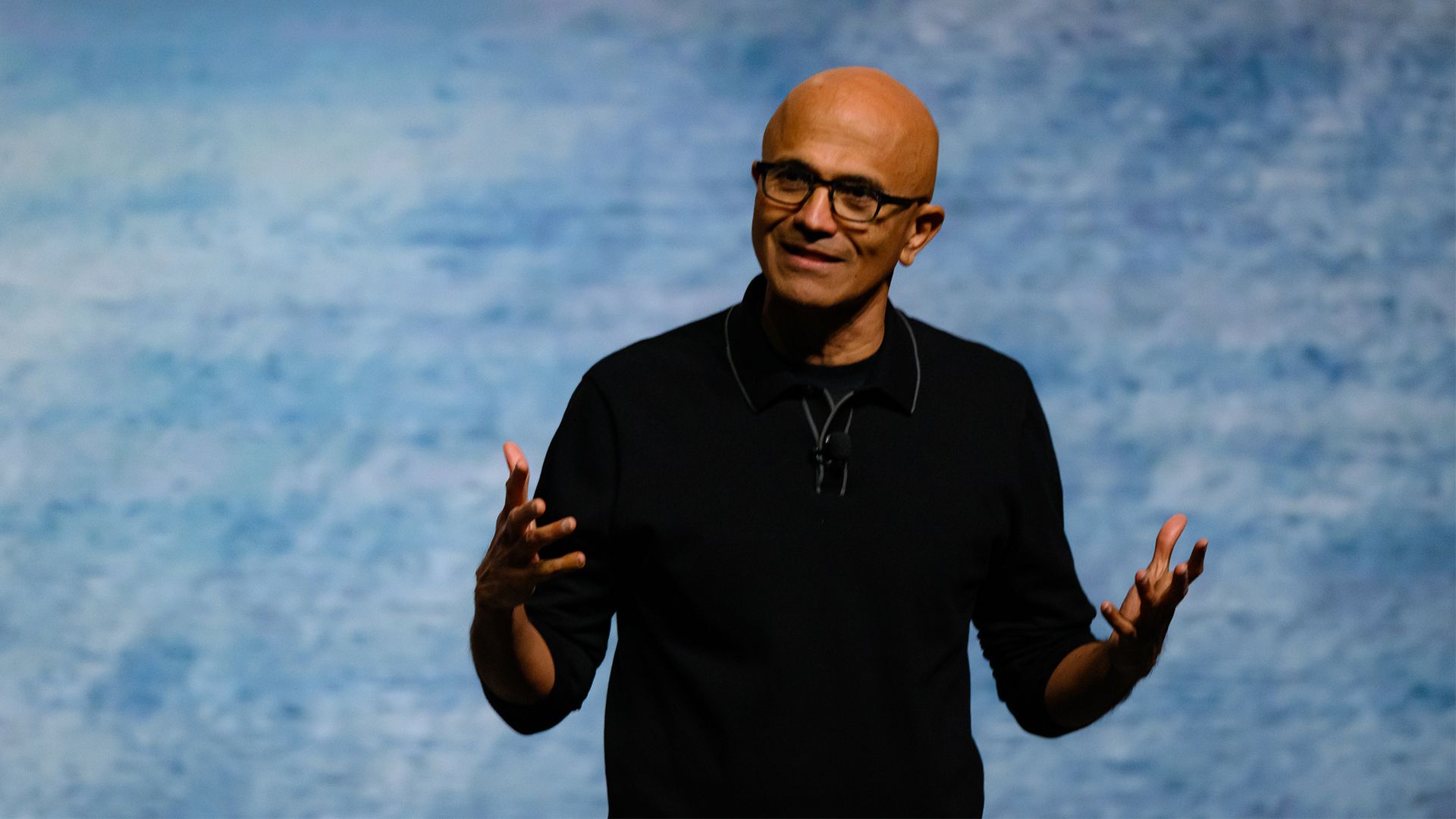
Nadella’s “Win Back Fans” Line Now Has a Desktop Test
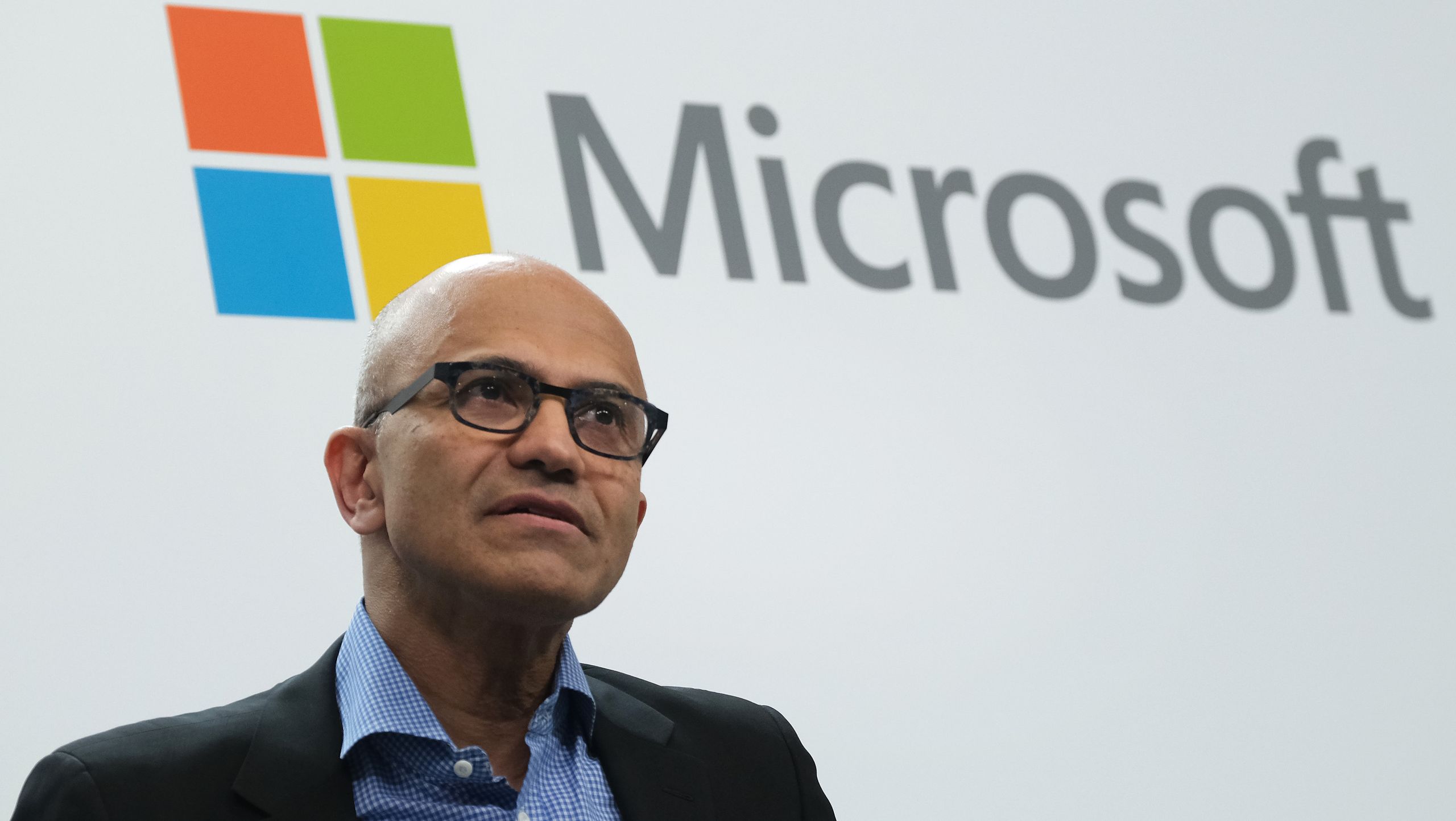
Satya Nadella’s recent comment about doing the foundational work required to win back fans across Microsoft’s consumer businesses landed because it sounded unusually candid. Windows, Xbox, Bing, and Edge have all faced versions of the same problem: Microsoft can build technically capable products that still leave loyal users feeling managed rather than served.The taskbar changes are the most concrete Windows example so far. They are not glamorous. They will not headline an AI keynote. They do not require a new silicon class or a subscription tier. They are the kind of product work that says someone inside Microsoft is reading the feedback that power users have been shouting for years.
That does not mean Microsoft has suddenly changed character. The company still has strong incentives to promote cloud accounts, Microsoft 365, Edge, Copilot, OneDrive, Game Pass, and its own content surfaces inside Windows. The tension between Windows as a neutral platform and Windows as a distribution channel is not going away.
But there is a difference between monetizing a platform and antagonizing its caretakers. Enthusiasts, sysadmins, developers, and IT pros shape Windows perception far beyond their headcount. They are the people relatives ask for upgrade advice, the people businesses rely on for deployment judgment, and the people who notice when a workflow regression is being spun as simplification.
Winning them back does not require Microsoft to freeze Windows in 2009. It requires the company to stop treating long-standing desktop capabilities as clutter merely because they complicate a design spec. The movable taskbar is a small feature with a large message: the old Windows bargain may still be negotiable.
Enterprise IT Will Wait for the Boring Version
For enterprise administrators, the news is interesting but not yet operational. Experimental channel builds are not deployment targets, and no responsible IT department should move production machines to preview software because the taskbar can sit on the left again. The real story for enterprise is what this suggests about Windows 11’s direction over the next stable release cycle.If Microsoft ships these options broadly later in 2026, administrators will need to decide whether to standardize them, leave them user-configurable, or restrict them through policy if management hooks appear. A movable taskbar sounds harmless until multiplied across help desks, training materials, screenshots, remote support sessions, and documentation. A technician asking a user to “click the Start button” has a slightly different job when Start might be on any edge of any monitor.
That is not an argument against the feature. It is an argument for management clarity. Windows should expose these settings in ways that can be audited, scripted, documented, and reset. Enterprise flexibility works best when IT can choose between a locked-down default and user freedom without relying on unsupported registry spelunking.
There is also an accessibility dimension. Some users genuinely work better with a top taskbar, a vertical window list, larger labels, smaller density, or a cleaner Start menu. Others need consistency more than customization. Microsoft’s job is not to decide that one group is the true Windows audience; it is to make the shell adaptable without making it chaotic.
The restored taskbar also matters for Windows 10 migration psychology. As Windows 10 exits mainstream support pressure, some holdouts are not objecting to Windows 11’s kernel, security model, or application compatibility. They are objecting to the daily feel of the shell. Every restored option lowers the emotional cost of the move.
Third-Party Shell Tools Just Lost Their Best Advertisement
StartAllBack and similar utilities succeeded because they solved real problems. They restored behaviors Microsoft removed, often with a speed and specificity the official product lacked. The existence of that market is not embarrassing for Windows; the size of the demand was.The new taskbar controls will not instantly kill those tools. Enthusiast utilities tend to move faster, expose more knobs, and serve users who want Windows to behave in very particular ways. If Microsoft’s implementation launches with missing per-monitor support, incomplete touch behavior, or rough search placement, third-party developers will still have room to compete.
But the value proposition changes when the most visible missing feature becomes official. A user who installed a shell replacement only to move the taskbar or get labels back may eventually prefer the built-in route, especially on work machines where third-party shell modifications can raise reliability or support concerns. Official support matters, even when the unofficial implementation got there first.
The bigger lesson for Microsoft is that the enthusiast ecosystem can function as a warning system. When a large number of users install unsupported tools to reverse a design decision, the signal is not that users hate modern design. It is that the design removed something they considered part of the product’s contract.
If Microsoft is serious about fundamentals, it should treat these tools less as nuisances and more as market research. The Windows community has been writing a bug report in executable form for years.
The Five-Year Detour Leaves a Map
The practical facts are now fairly clear, even if the final shipping schedule remains subject to Microsoft’s preview process. The movable taskbar is real in Insider testing, but it is incomplete. The Start menu is becoming more configurable, but Microsoft’s defaults will still matter. The company is signaling a renewed focus on fundamentals, but trust will be rebuilt only through repeated decisions, not one high-profile reversal.For Windows users deciding what to do today, the sensible answer depends on tolerance for preview risk. Enthusiasts with test machines can try the Experimental channel and send feedback. Production users should wait for stable builds. Administrators should start thinking about policy, documentation, and support implications, but not act as though the feature has already landed everywhere.
- Microsoft restored taskbar positioning in Windows 11 Insider testing with support for bottom, top, left, and right placement.
- The current rollout is limited to the Experimental channel, so stable-channel users should treat it as a preview rather than an imminent guaranteed feature.
- The new taskbar work includes smaller sizing, independent alignment behavior, and better support for uncombined labeled windows.
- Several expected pieces, including per-monitor positioning, drag-and-drop repositioning, touch refinements, and full search behavior away from the bottom edge, are still works in progress.
- Start menu customization is improving through section-level toggles and the shift from “Recommended” toward a more activity-based “Recent” model.
- The change is less about nostalgia than about Microsoft restoring user agency after Windows 11 narrowed too many desktop workflows at launch.
References
- Primary source: The FPS Review
Published: Mon, 18 May 2026 20:19:04 GMT

Microsoft Finally Lets You Move the Windows 11 Taskbar After Nearly Five Years
It only took about five years, but Microsoft has finally relented. Windows Insiders in the Experimental channel can now move the Windows 11 taskbar to the top, bottom, left, or right of the screen, restoring a feature that Windows users had for decades before Windows 11 launched in October 2021... www.thefpsreview.com
- Related coverage: windowscentral.com

The movable taskbar is finally back in Windows 11 — and yes, you can try it right now
Windows 11 Build 26300.8493 introduces the ability to move the Taskbar and resize icons, reversing a major launch-day limitation. www.windowscentral.com
- Related coverage: windowslatest.com
Microsoft rolls out Windows 11's movable and smaller taskbar 5 years after killing it (hands on experience)
Microsoft is finally rolling out two of the most requested features in Windows 11: the ability to move the taskbar and make it smaller. www.windowslatest.com
- Official source: blogs.windows.com

Improving Windows quality: Making Taskbar and Start more personal
In our commitment to Windows quality, we outlined our plans to deliver improvements in performance, reliability, and craft. We are also committed to blogs.windows.com
- Related coverage: dataconomy.com

Windows 11 update adds major Start menu customization options
Microsoft is testing updates for Windows 11 that will enhance customization options for the Start menu and taskbar, with rollouts dataconomy.com
- Related coverage: tech.yahoo.com
Windows 11 Is Finally Testing a Movable, Shrinkable Taskbar
While Windows 10 allowed users to drag the taskbar from edge to edge, moving it in Windows 11 requires a trip to Settings.tech.yahoo.com
- Related coverage: arstechnica.com
Five years later, Windows 11 brings back much-missed taskbar options (and more)
Microsoft is also testing a smaller taskbar and more customizable Start menu. arstechnica.com
- Related coverage: theregister.com

Microsoft remembers that taskbars used to move
Experimental Windows 11 build restores some old favorites, though the rough edges are still showingwww.theregister.com
- Related coverage: geekchamp.com
How to Move Windows 11 Taskbar to Top, Left, and Right Sides of the Screen - GeekChamp
Windows 11 looks cleaner than Windows 10 in many ways, but it removed one of the taskbar’s most useful old... geekchamp.com
- Related coverage: timesofindia.indiatimes.com

Windows 11 finally lets you move the taskbar, and resize the Start menu - The Times of India
The Times of India brings the Latest & Top Breaking News on Politics and Current Affairs in India & around the World, Cricket, Sports, Business, Bollywood News and Entertainment, Science, Technology, Health & Fitness news & opinions from leading columnists. timesofindia.indiatimes.com
- Related coverage: windowsforum.com

Windows 11 Experimental Build 26300.8493 Restores Top, Left, Right Taskbar
Microsoft began rolling out Windows 11 Experimental build 26300.8493 on May 15, 2026, giving Windows Insiders the ability to place the taskbar on the top, left, right, or bottom edge of the screen and to enable a smaller taskbar button mode. The change is not just a nostalgic checkbox for... windowsforum.com
- Related coverage: windowsnews.ai
Windows 11 Insider Tests: Move Taskbar, Smaller Height, and New Start Menu Controls
Windows 11 Insider build 26200.1405 brings movable taskbar, adjustable height, and new Start menu controls. Experimental channel testers can finally dock...windowsnews.ai
- Related coverage: moneycontrol.com
- Related coverage: pcgamer.com
Microsoft says it's focusing on the fundamentals with Windows
An attempt to 'win back fans'.www.pcgamer.com
- Related coverage: tomshardware.com
Microsoft simplifies Windows Insider program — fewer channels, and switching without wiping your device
The company will also make it easier to ensure you get all of the latest features.www.tomshardware.com
- Related coverage: itpro.com
'We are focused on fundamentals, prioritizing quality, and serving our core users better': Satya Nadella teases big Windows improvements – and changes could come this year
Satya Nadella told analysts that Microsoft is doing “foundational work to win back fans” across Windows, Xbox, Bing, and Edge www.itpro.com
