

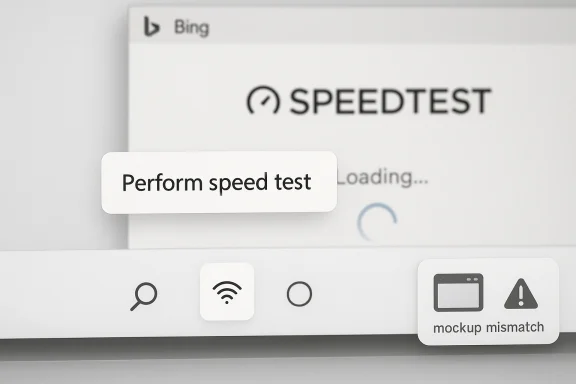
Microsoft’s latest Windows 11 speed-test integration is not a secret peek at “Windows vNext” so much as a familiar case of a product team using the wrong visual mockup at the wrong moment. The feature itself is real: Microsoft and Ookla have expanded their partnership so Windows users can launch a network speed check from the taskbar, building on the Bing-hosted experience that has existed since 2023. What set off the chatter was an image in Ookla’s own press material that appears to show a macOS-style window sitting inside a Windows context, prompting a joke from Windows commentator Rafael Rivera that some readers mistook for a leak. The best reading is far less dramatic: this looks like a marketing asset problem, not a Windows 12 revelation. son this story caught fire is simple: Windows design rumors always attract attention, and anything involving the shell, the taskbar, or a supposedly new UI immediately triggers speculation about the next Windows release. But the underlying product change is actually modest and practical. Microsoft has been testing a taskbar-level speed test in Windows 11 preview builds, where right-clicking the network icon or opening the Wi-Fi and cellular quick settings surfaces a “Perform speed test” option. That control launches a browser experience, not a native networking utility embedded directly in the OS.
That distinction matters because it explains both the excitement and the disappointment. To casual users, a taskbar shortcut feels like a long-awaited quality-of-life upgrade. To power users, administrators, and privacy-minded readers, it feels more like a link to a web widget than a true diagnostic tool. In other words, Microsoft is improving access, but not necessarily reinventing how the test works. The feature is convenient, but it is not a hidden sign of a radically different Windows shell.
The macOS-looking mockup adds a second layer of confusion. Press images often use staged UI representations, and those representations are not always faithful to the target platform. Here, the mconspicuous because the product being discussed is a Windows taskbar integration, yet the illustration appears to borrow a Mac-like window frame. That kind of visual slippage is exactly the sort of thing that fuels “leak” narratives, even when there is no substantive leak at all.
It is also worth noting that the broader partnership is not new in concept. Microsoft has already integrated Speedtest into Bing, and the current Windows taskbar feature seems to extend that same web-first measurement path into the OS surface people are most likely to use when connectivity looks suspicious. The result is less a new Windows technology than a new entry point into an existing one.
Windows has been moving steadily toward “service-like” convenience features for years, especially in places where users expect immediate answers. Taskbar networking is a perfect example. If your Wi‑Fi looks weak or your downloads crawl, the taskbar is one of the first places you check, so putting a speed test there makes obvious product sense. Microsoft has already been testing that idea through Windows Insider channels, and reporting around February 2026 showed the feature entering preview builds before broader rollout discussions began.
The real story behind this feature is not that Windows suddenly gained a sophisticated new networking stack. It is that Microsoft is increasingly comfortable using browser-delivered experiences to solve operating-system problems. That approach shows up everywhere from post-update tours to cloud-connected help surfaces, and now it is appearing in a taskbar utility that should, in an ideal world, feel native and self-contained. The strategic idea is clear: reduce friction, keep the OS lighter, and reuse services Microsoft already operates. The trade-off is equally clear: the more Windows relies on web layers, the more users questi native.
The Bing/Speedtest relationship also helps explain why this story is more about branding than engineering. Speedtest has long been a recognized consumer name, while Bing provides the Microsoft-owned distribution surface. Combine the two, and Microsoft gets a neat on-ramp for a tool that already has name recognition. But if the illustration in the press release looks like a Mac, that branding polish is undercut by a very old problem: Windows users are unusually sensitive to visual authenticity. They know when something feels borrowed.
There is also a broader context around Windows 11 UI criticism. Microsoft has spent the past few years trying to make the OS look cleaner, more modern, and more coherent, while also walking back some of the rigidity that frustrate company’s shell changes often feel incremental rather than transformative, which is why a random mockup can trigger exaggerated expectations. When people are primed for “Windows vNext,” a bad asset can look like evidence of a secret redesign.
The broader lesson is that modern UI announcements are judged as much by imagery as by text. If the picture does not match the platform, readers assume they are being shown a prototype, a hidden build, or a future design direction. In reality, many of these assets are created by non-engineering teams whose priority is storyfect fidelity. That mismatch is often where the rumor cycle begins.
That choice makes sense for Microsoft because it is cheaper to maintain, easier to update, and more consistent across devices. It also gives the company room to refine the experience server-side without shipping a new OS component every time. But it also means the feature feels less like a Windows utility and more like an integrated service shortcut. That difference matters to users who want the OS to stay out of their browser unless absolutely necessary. That is the central tension here.
One reason the theory feels plausible is that Microsoft has been refining the Windows 11 shell in visible ways across Insider channels. The company has been adjusting Start, taskbar behaviors, and quality-of-life surfaces while trying to make the desktop feel more responsive and less cluttered. When users already know changes are underway, a weird screenshot can look like a breadcrumb rather than a mistake.
That does not mean the community is being irrational. It means the market has been conditioned to expect that Windows UI changes arrive piecemeal, via previews, mockups, and accidental teases. In that environment, even a joke can feel like a clue. Sometimes the rumor is the product of the platform’s own communication style.
That has advantages. Microsoft gets a familiar brand in Ookla, a familiar search layer in Bing, and a familiar OS surface in the Windows taskbar. Users get a one-click path to a test they probably already trust. For ordinary consumers, that is enough. For IT pros, the interesting question is whether the shortcut reveals anything more useful than the browser page already did.
The “browser first” design also suggests that Microsoft is prioritizing br deep OS instrumentation. That is a sensible trade if the goal is to get a dependable result on as many systems as possible. But it does mean the experience is only superficially native. Under the hood, it still behaves like a service handshake between the OS, the browser, and Microsoft’s web infrastructure.
This matters more than it might seem because Windows design discourse is highly visual. Usrners, icon spacing, window frames, and layout behavior with almost forensic interest. A sloppy asset can do more damage than a dozen paragraphs of careful explanation can fix. That is especially true when the product is already surrounded by speculation about next-generation UI work.
That is a cautionary tale for Microsoft and its partners. When the audience is primed to dissect every pixel, you cannot rely on generic mockups and expect them to be interpreted generously. The best case is confusion. The worst case is that users assume the company is detached from its own design system. Neither outcome helps a Windows launch.
Windows has long won by being flexible and broadly compatible, not by being the most elegant platform. But Windows 11 has been trying to close the elegance gap without losing that flexibility. A taskbar speed test does not solve that problem, but it does reinforce the idea that Microsoft wants the shell to feel more serviceable, less cluttered, and more responsive to everyday pain points.
The next question is whether the company uses this same pattern elsewhere in the shell. If taskbar utilities, update flows, and help surfaces all keep moving toward browser-delivered experiences, the overall direction of Windows will become clearer: more service integration, less local tooling, and a stronger dependence on Microsoft’s web stack. That may make Windows easier to maintain, but it will also sharpen the debate over what counts as a native experience.
What to watch next:
Source: Windows Central Ookla’s Windows 11 Speedtest mockup looks suspiciously like macOS
That distinction matters because it explains both the excitement and the disappointment. To casual users, a taskbar shortcut feels like a long-awaited quality-of-life upgrade. To power users, administrators, and privacy-minded readers, it feels more like a link to a web widget than a true diagnostic tool. In other words, Microsoft is improving access, but not necessarily reinventing how the test works. The feature is convenient, but it is not a hidden sign of a radically different Windows shell.
The macOS-looking mockup adds a second layer of confusion. Press images often use staged UI representations, and those representations are not always faithful to the target platform. Here, the mconspicuous because the product being discussed is a Windows taskbar integration, yet the illustration appears to borrow a Mac-like window frame. That kind of visual slippage is exactly the sort of thing that fuels “leak” narratives, even when there is no substantive leak at all.
It is also worth noting that the broader partnership is not new in concept. Microsoft has already integrated Speedtest into Bing, and the current Windows taskbar feature seems to extend that same web-first measurement path into the OS surface people are most likely to use when connectivity looks suspicious. The result is less a new Windows technology than a new entry point into an existing one.
 Background
Windows has been moving steadily toward “service-like” convenience features for years, especially in places where users expect immediate answers. Taskbar networking is a perfect example. If your Wi‑Fi looks weak or your downloads crawl, the taskbar is one of the first places you check, so putting a speed test there makes obvious product sense. Microsoft has already been testing that idea through Windows Insider channels, and reporting around February 2026 showed the feature entering preview builds before broader rollout discussions began.The real story behind this feature is not that Windows suddenly gained a sophisticated new networking stack. It is that Microsoft is increasingly comfortable using browser-delivered experiences to solve operating-system problems. That approach shows up everywhere from post-update tours to cloud-connected help surfaces, and now it is appearing in a taskbar utility that should, in an ideal world, feel native and self-contained. The strategic idea is clear: reduce friction, keep the OS lighter, and reuse services Microsoft already operates. The trade-off is equally clear: the more Windows relies on web layers, the more users questi native.
The Bing/Speedtest relationship also helps explain why this story is more about branding than engineering. Speedtest has long been a recognized consumer name, while Bing provides the Microsoft-owned distribution surface. Combine the two, and Microsoft gets a neat on-ramp for a tool that already has name recognition. But if the illustration in the press release looks like a Mac, that branding polish is undercut by a very old problem: Windows users are unusually sensitive to visual authenticity. They know when something feels borrowed.
There is also a broader context around Windows 11 UI criticism. Microsoft has spent the past few years trying to make the OS look cleaner, more modern, and more coherent, while also walking back some of the rigidity that frustrate company’s shell changes often feel incremental rather than transformative, which is why a random mockup can trigger exaggerated expectations. When people are primed for “Windows vNext,” a bad asset can look like evidence of a secret redesign.
What Actually Happened
The immediate trigger was a joke post from Rafael Rivera, who suggested that Ookla might have “leaked” the UI for a future Windows version. The joke works because the image is awkward enough to invite exactly that interpretation. But the availablether way: it is much more likely a marketing visual mistake than a preview of any new shell language.The press-release image problem
Press-release illustrations are often assembled quickly, and they can fall into the trap of showing “a computer” rather than the exact platform being discussed. That is especially risky in Windows news, where a single visual inconsistency can spawn pages of speculation. In thears to show a macOS-style window chrome inside a Windows taskbar context, which is enough to make enthusiasts stop and squint. That doesn’t make it a leak; it makes it a bad mockup.The broader lesson is that modern UI announcements are judged as much by imagery as by text. If the picture does not match the platform, readers assume they are being shown a prototype, a hidden build, or a future design direction. In reality, many of these assets are created by non-engineering teams whose priority is storyfect fidelity. That mismatch is often where the rumor cycle begins.
Why the joke landed
Rivera’s post resonated because the Windows community has a long memory for accidental platform mismatches. People remember when OEMs, ad agencies, and even large vendors have shown the wrong desktop environment, the wrong browser, or the wrong system skin in promotional materials. Once that pattern is in the public mind, every odd-looking screenshot becomes a candidate for “real or fake?” speculation. The answer here still appears to be: fake-looking, but not fake-news-worthy.- The feature is real.
- The mockup looks suspicious.
- The joke was plausible because the visual mismatch was obvious.
- The rumor escalated because “Windows vNext” remains an irresistible phrase.
- The evidence points to a marketing artifact, not a secret UI reveal.
The Feature Itself
Set aside the image, and the underlying capability is straightforward: Windows 11 is gaining a faster way to reach a speed test from the taskbar. In the February 2026 preview cycle, Microsoft started surfacing the option in Insider builds, and broader reporting later connected it to the March 2026 servicing wave. The shortcut is convenient because it lives exactly where users expect to look when the network feels off.Taskbar convenience versus native utility
This is where expectations and implementation diverge. A native tool would measure the connection inside Windows itself, using OS-level interfaces and presenting results without leaving the shell. Instead, the taskbar option opens a browser path to the Bing/Speedtest experience, which means the test is still mediated by web content. That is not inherently bad, but it changes the product from “built-in diagnostic” to “very accessible launcher.”That choice makes sense for Microsoft because it is cheaper to maintain, easier to update, and more consistent across devices. It also gives the company room to refine the experience server-side without shipping a new OS component every time. But it also means the feature feels less like a Windows utility and more like an integrated service shortcut. That difference matters to users who want the OS to stay out of their browser unless absolutely necessary. That is the central tension here.
Rollout mechanics
The feature has appeared in preview and release-preview contexts, with Microsoft and third-party reporting tying it to builds in the 26100 and 26200 families. That matters because it shows the company is still validating the experience before pushing it broadly. In practice, that is classic Windows: preview first, user reactions next, broad deployment later.- It is easy to access from the taskbar.
- It is likely designed to reduce support friction.
- It probably improves consumer troubleshooting more than enterprise diagnostics.
- It depends on browser delivery rather than a new OS engine.
- It extends an existing Bing/Speedtest relationship into Windows itself.
Why People Think It Could Be a Windows vNext Clue
Rumors about a next-generation Windows UI always spread fastest when they attach to a visible, everyday control. The taskbar is exactly that kind of control. Because the taskbar is both familiar and politically sensitive, even a small cosmetic oddity can be interpreted as a sign of a bigger redesign. That is especially true wheto broader talk about “Windows vNext” or “Windows 12.”One reason the theory feels plausible is that Microsoft has been refining the Windows 11 shell in visible ways across Insider channels. The company has been adjusting Start, taskbar behaviors, and quality-of-life surfaces while trying to make the desktop feel more responsive and less cluttered. When users already know changes are underway, a weird screenshot can look like a breadcrumb rather than a mistake.
The psychology of leak hunting
Leak culture thrives on ambiguity. A screenshot that is slightly off is often more powerful than a clean official announcement because it invites interpretation. Readers start filling in the gaps with everything they already hope or fear about the platform: more AI, more cloud, more web, more design churn, more Apple-like polish, or more Windows-like flexibility. The image in question seems to have hit that sweet spot of looking familiar enough to be believable and wrong enough to be suspicious.That does not mean the community is being irrational. It means the market has been conditioned to expect that Windows UI changes arrive piecemeal, via previews, mockups, and accidental teases. In that environment, even a joke can feel like a clue. Sometimes the rumor is the product of the platform’s own communication style.
Why Windows users are especially alert
Windows users tend to care about the shell more than many people on other platforms because the shell is where they spend their whole workday. A search bar, a taskbar icon, a Start menu, a notification flyout — these are not decorative details. They are the system’s public face, and any inconsistency makes the OS feel unfinished. That sensitivity is part of why Microsoft gets scrutinized so heavily when it posts what should have been an ordinary partnership announcement.- The taskbar is one of Windows’ most watched surfaces.
- UI errors in official material create outsized speculation.
- “Windows vNext” remains a magnet for rumor traffic.
- People already expect Microsoft to keep evolving the shell.
- A visual mismatch can look intentional even when it is accidental.
The Role of Bing and Ookla
The reason this integration exists at all is that Microsoft wants the speed test to feel immediate while retaining the reliability of a known measurement engine. Bing has hosted an Ookla-powered speed test for years, and the taskbar shortcut simply makes that existing capability easier to reach. This is classic platform strategy: move the entrance point closer to the user without rebuilding the backend from scratch.That has advantages. Microsoft gets a familiar brand in Ookla, a familiar search layer in Bing, and a familiar OS surface in the Windows taskbar. Users get a one-click path to a test they probably already trust. For ordinary consumers, that is enough. For IT pros, the interesting question is whether the shortcut reveals anything more useful than the browser page already did.
Consumer value versus enterprise value
For home users, the main win is speed and simplicity. If the laptop feels disconnected, being able to test the connection in a couple of clicks is genuinely handy. For enterprise environments, the value is more limited unless Microsoft eventually exposes richer integration, logging, or admin-facing diagnostics. Right now, the feature feels designed primarily for convenience, not fleet management.The “browser first” design also suggests that Microsoft is prioritizing br deep OS instrumentation. That is a sensible trade if the goal is to get a dependable result on as many systems as possible. But it does mean the experience is only superficially native. Under the hood, it still behaves like a service handshake between the OS, the browser, and Microsoft’s web infrastructure.
Why Ookla still matters
Ookla matters because Speedtest remains a recognized and broadly understood benchmark for consumers. Microsoft can build as many convenience layers as it wants, but a familiar test name lowers friction and reduces the need to explain what users are looking at. That branding logic is probably as important as the technical integration itself. When users trust the label, they arion the path.- Bing provides distribution.
- Ookla provides recognition.
- Windows provides placement.
- The browser provides delivery.
- Microsoft gets a low-friction feature with minimal OS overhead.
The Visual-Mockup Problem
The most embarrassing part of this whole episd leak; it is the fact that a press image made the wrong platform look plausible. That is a branding problem, a design problem, and a credibility problem all at once. If you are announcing a Windows feature, your visual language should not accidentally suggest macOS unless you are deliberately trying to evoke a generic desktop aesthetic.This matters more than it might seem because Windows design discourse is highly visual. Usrners, icon spacing, window frames, and layout behavior with almost forensic interest. A sloppy asset can do more damage than a dozen paragraphs of careful explanation can fix. That is especially true when the product is already surrounded by speculation about next-generation UI work.
Marketing assets can distort technical stories
Product teams often assume that if the feature is good, the image only needs to be “good enough.” But in a market as opinionated as Windows, “good enough” is often read as “suspicious.” People use visuals to infer not only what the product does, but how seriously the company takes its own platform identity. In this case, the visual mistake overshadowed the actual announcement.That is a cautionary tale for Microsoft and its partners. When the audience is primed to dissect every pixel, you cannot rely on generic mockups and expect them to be interpreted generously. The best case is confusion. The worst case is that users assume the company is detached from its own design system. Neither outcome helps a Windows launch.
Why cross-platform cues are risky
Borrowing a macOS-like frame for a Windows story creates the wrong signal even if the rest of the content is accurate. It suggests either platform indifference or a lack of attention to detail. In a Windows community, where identity and workflow are part of the product conversation, that’s enough to trigger ridicule. The joke then becomes the headline, and the actual feature gets buried.- Bad visuals can eclipse good news.
- Platform cues matter more than marketers sometimes realize.
- Windows audiences notice small inconsistMisleading mockups feed speculation.
- A better asset would have prevented most of the drama.
Competitive Implications
From a market perspective, this change is less about speed tests and more about how Microsoft frames Windows as a modern operating environment. Apple, ChromeOS, and Linux all compete on the promise that everyday interactions can be simpler, more predictable, or more polished. Microsoft’s answer here is to make a utility feel instantly available without making the OS feel heavier. That is a valid competitive move, even if it is not a flashy one.Windows has long won by being flexible and broadly compatible, not by being the most elegant platform. But Windows 11 has been trying to close the elegance gap without losing that flexibility. A taskbar speed test does not solve that problem, but it does reinforce the idea that Microsoft wants the shell to feel more serviceable, less cluttered, and more responsive to everyday pain points.
Against macOS
The irony of this story is that the leaked-looking image may resemble Apple more than Microsoft, even as the feature itself is part of Microsoft’s effort to improve user convenience. macOS tends to emphasize consistency and restraint, while Windows tends to emphasize utility and breadth. A browser-hosted speed test launched from the taskbar fits the Windows philosophy, but the visual blunder made it look like the opposite.Against ChromeOS and web-first desktops
ChromeOS and web-first environments normalize the idea that the browser is the operating environment. Microsoft is not there yet, and probably does not want to be there in a pure sense. But every time Windows leans on a web-rendered feature for a basic workflow, it inches closer to that mental model. That may be strategically useful, but it is also where some users begin to feel nervous about the future of the desktop.Strengths and Opportunities
The upside here is bigger than the feature itself. Microsoft is taking a small, visible annoyance and turning it into a moment of convenience, which is often the best kind of OS improvement. If the implementation stays fast and the branding stays cleaner than the press image, this can be filed as one of those quiet Windows wins that users appreciate more than they celebrate. The broader opportunity is to show that Windows 11 can modernize without becoming more complicated. That is a worthwhile message for both consumers and enterprises.- Makes troubleshooting easier for everyday users.
- Reduces the number of steps needed to validate connectivity.
- Leverages a trusted third-party measurement brand.
- Fits Microsoft’s broader “convenience through integration” strategy.
- Reinforces the taskbar as a useful daily surface.
- Avoids the overhead of a brand-new native networking utility.
- Can be improved server-side without major OS surgery.
Risks and Concerns
The main risk is overreading a convenience feature as a design revolution. That sort of hype can leave users disappointed when the real implementation turns out to be a browser shortcut rather than a system-native utility. The other risk is reputational: if Microsoft and its partners cannot keep platform visuals consistent, they make even ordinary announcements look sloppy. That damages trust in small but cumulative ways, especially among the power users who notice these details first.- Users may feel misled if they expected a native OS tool.
- Browser dependence can be read as a lack of polish.
- Visual inconsistencies fuel rumor culture.
- Enterprise admins may see limited practical value.
- Privacy-conscious users may dislike web-mediated diagnostics.
- Weak mockups can make a routine announcement look amateurish.
- Hype around “vNext” can distort expectations for months.
Looking Ahead
The important thing to watch is whether Microsoft keeps this feature lightweight and clearly documented. If it stays a simple launcher to a known test, most users will accept it as a handy improvement. If Microsoft starts layering in more prompts, more web detours, or more promotional framing, the goodwill could evaporate quickly. Windows users are remarkably patient with useful features, but they are not very forgiving of clutter.The next question is whether the company uses this same pattern elsewhere in the shell. If taskbar utilities, update flows, and help surfaces all keep moving toward browser-delivered experiences, the overall direction of Windows will become clearer: more service integration, less local tooling, and a stronger dependence on Microsoft’s web stack. That may make Windows easier to maintain, but it will also sharpen the debate over what counts as a native experience.
What to watch next:
- Whether Microsoft clarifies the feature in more detailed release notes.
- Whether the mockup in the press material gets quietly replaced.
- Whether the speed test remains browser-based in final rollout.
- Whether enterprise tooling gets any additional diagnostics.
- Whether this integration expands beyond a simple taskbar shortcut.
Source: Windows Central Ookla’s Windows 11 Speedtest mockup looks suspiciously like macOS
