

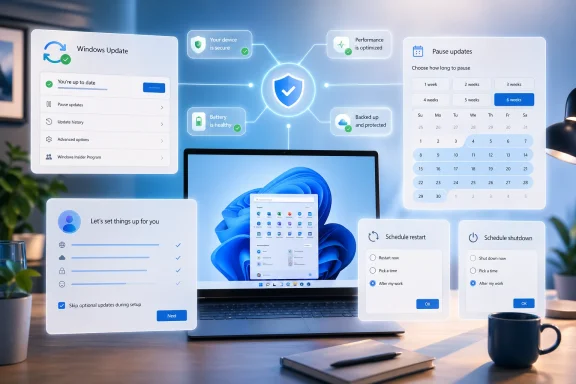
Microsoft is preparing one of the most consequential user-experience shifts in Windows 11 in years, and it is doing it in a place most people notice only when something goes wrong: Windows Update. The company’s reported plan includes longer pauses, more flexible scheduling, the ability to skip some update prompts during setup, and clearer control over restarts and shutdowns. That sounds modest on paper, but it directly addresses one of the oldest frustrations in Windows: the feeling that the PC decides when maintenance happens, not the person using it. The broader significance is bigger than convenience, because Microsoft appears to be recasting update behavior as a trust issue rather than a purely technical servicing problem.
Windows Update has always sat at the intersection of three competing priorities: security, reliability, and user control. Microsoft has spent more than a decade pushing Windows toward a more continuously serviced model, and that approach has delivered real benefits, especially for patch compliance and vulnerability response. But it also created a persistent emotional problem for users, who often experienced updates as interruption, not protection. The new Windows 11 direction suggests Microsoft finally understands that the update experience is not just about what gets installed; it is about when, how, and whether the user feels in control while it happens.
That shift did not happen overnight. Microsoft already made substantial update reforms during the Windows 10 era, including clearer update controls and a pause option that could last up to 35 days. Those changes acknowledged backlash, but they did not fully solve the core complaint: updates could still feel invasive, especially during shutdowns, restarts, and the first-run setup process. Windows 11 has inherited that same tension, even as Microsoft has continued to improve servicing quality and reduce some of the rough edges. The April 2026 changes look like a deeper attempt to rebalance the model rather than merely smooth its surface.
The user feedback loop matters here too. Microsoft has been encouraging more direct feedback through Insider channels and other mechanisms, and recent forum discussion reflects a broader company effort to identify the daily friction points that make Windows feel less dependable. Update interruptions are exactly the kind of issue that power users complain about loudly, but that average users may simply tolerate until frustration accumulates. In that sense, the update changes are not just a product tweak; they are a signal that Microsoft is willing to respond to repeated criticism where it hurts most.
A final piece of context is important: Microsoft is not abandoning automatic updates, and it should not. Consumer Windows security depends on broad adoption of patches, and enterprise IT still needs strong management controls. What appears to be changing is the tone of the system. Instead of acting like Windows Update is something users endure, Microsoft seems to be trying to make it behave like a planned service with visible guardrails. That is a subtle difference, but for Windows, subtle differences often define entire eras.
The practical gain is obvious: fewer buyers will be stuck waiting while the device downloads and installs updates before they can log in. That makes the setup process feel lighter, especially for consumer laptops, family PCs, and replacement machines bought in a hurry. It also helps Microsoft compete against operating systems that have historically felt quicker and less ceremonial during onboarding. In a market where perception shapes loyalty, shaving friction off setup is not trivial.
At the same time, Microsoft is clearly trying to avoid making patching feel optional in a dangerous way. The company still needs devices to stay current, and broad pause controls can become a security problem if users treat them as a way to ignore maintenance indefinitely. The challenge is to provide enough control to reduce resentment without giving people a false sense that updates are negotiable forever. That balance is where many update systems fail, and where Windows will be judged most harshly if the implementation is clumsy.
The update changes are also a good example of Microsoft trying to repair confidence through small but meaningful wins. Not every major platform correction comes through a headline feature. Sometimes the most valuable improvements are the ones users experience every day without thinking about them much: fewer interruptions, clearer choices, faster setup, and less ambiguity about what the system is doing. Those are the kinds of changes that can turn skepticism into grudging respect.
The branding implication is significant. Windows 11 has been sold as a more refined, more modern version of Windows, yet many people still associate refinement with cosmetics rather than behavior. If Microsoft can make update handling feel polished too, it strengthens the claim that Windows 11 is not just prettier but better behaved. That is the sort of platform-level improvement that shapes long-term loyalty.
The broader enterprise implication is that Microsoft may be trying to harmonize the lived experience of consumer and managed Windows rather than leaving them in separate worlds. That could improve predictability across deployments, but it also raises the bar for Microsoft’s documentation and UX design. If the controls are presented badly, or if they behave differently by edition in ways users cannot understand, confusion will erase much of the goodwill.
That said, it is too simplistic to argue that more control automatically means less security. In practice, the opposite can happen when people feel the system respects their time. Users who are less frustrated are often more willing to leave automatic updates enabled, because they trust the process more. Microsoft is likely betting that a less antagonistic update model will improve compliance overall, even if it gives individuals more say on the margins. That is a behavioral security argument as much as a technical one.
The key is that Microsoft must keep the controls understandable. If the interface makes it easy to see what is delayed, what is required, and when the system will insist on moving forward, then the company can gain trust without weakening its patching posture. If the logic is opaque, though, users will treat the feature as another confusing Windows layer and either ignore it or misuse it. The difference between those outcomes is enormous.
This matters because Windows has always lived in a hybrid world. It is a consumer OS, a business OS, and increasingly a managed platform all at once. Microsoft’s challenge is not merely to satisfy one constituency, but to avoid making each constituency feel that the other is getting all the attention. The update changes suggest the company is trying to serve both groups by making the default experience less hostile without taking away IT’s ability to govern fleets.
By 2019, Microsoft had already conceded that user anger was not just noise. The company introduced clearer update controls and a pause option, which was an admission that people needed at least some breathing room. But those reforms still left many complaints intact, especially around restart timing and setup behavior. Windows 11 inherited that legacy, and because it was marketed as a cleaner, more elegant desktop, those lingering rough edges became even more visible.
The important point is that the problem was never just the patches themselves. It was the relationship between the machine and the user. Windows became more secure, but it also became more assertive. The new Windows 11 changes appear to be an attempt to keep the security gains while softening the tone of the operating system. That is a hard design problem, but it is the right one to solve.
That correction phase is not glamorous, but it is often more important than splashy features. People live inside operating systems in long, repetitive routines. If Microsoft can make those routines less annoying, it gets credit every single day. The update changes are part of that larger effort to make Windows 11 feel less like a system that interrupts and more like a system that cooperates.
The reputational dimension matters just as much. Windows has enormous inertia, but reputation still affects upgrade timing, device satisfaction, and long-term platform trust. If users increasingly feel that Windows Update is manageable rather than hostile, Microsoft will have less brand drag around the OS. That can matter in consumer sales, PC refresh cycles, and even enterprise device standardization decisions.
This is especially important for Windows on modern laptops, where mobility, battery life, and short setup expectations all amplify frustration. A machine that boots quickly but then pauses for updates before first use sends a mixed message. Microsoft’s changes suggest it understands that perceived speed is part of platform competitiveness, not just raw performance metrics.
That is not just a cosmetic branding fix. In the PC market, trust is cumulative. A small annoyance repeated hundreds of times can do more damage than a single large defect. Microsoft is therefore making a strategic bet that better update behavior will pay dividends far beyond the settings panel where the changes appear.
If Microsoft sustains this direction, it could also reduce the emotional baggage that accumulates around future updates. Users are more forgiving when a system behaves predictably, even if it still asks them to do inconvenient things sometimes. That is the kind of goodwill that compounds over time.
Another concern is confusion. Windows already carries a reputation for complexity, and poorly explained update controls could reinforce the idea that patch management is a maze. If users cannot tell what is being delayed, what remains mandatory, or when the device will finally insist on installing updates, the goodwill evaporates quickly. The feature has to be obvious, not just available.
There is also a reputational risk if the change lands with bugs or weird edge cases. Microsoft can survive a conservative rollout, but it cannot afford to make a trust-building feature behave untrustworthily. That would undercut the entire message behind the update.
The next test is consistency. Users will care less about the buzz around the feature and more about whether it behaves the same way in setup, in Settings, during shutdown, and after a restart prompt. That consistency is what turns an isolated improvement into a durable platform improvement. If Microsoft gets it right, the change will fade into the background — which, in operating system design, is often the highest compliment.
Source: Thurrott.com windows-update-changes - Thurrott.com
 Overview
Windows Update has always sat at the intersection of three competing priorities: security, reliability, and user control. Microsoft has spent more than a decade pushing Windows toward a more continuously serviced model, and that approach has delivered real benefits, especially for patch compliance and vulnerability response. But it also created a persistent emotional problem for users, who often experienced updates as interruption, not protection. The new Windows 11 direction suggests Microsoft finally understands that the update experience is not just about what gets installed; it is about when, how, and whether the user feels in control while it happens.That shift did not happen overnight. Microsoft already made substantial update reforms during the Windows 10 era, including clearer update controls and a pause option that could last up to 35 days. Those changes acknowledged backlash, but they did not fully solve the core complaint: updates could still feel invasive, especially during shutdowns, restarts, and the first-run setup process. Windows 11 has inherited that same tension, even as Microsoft has continued to improve servicing quality and reduce some of the rough edges. The April 2026 changes look like a deeper attempt to rebalance the model rather than merely smooth its surface.
The user feedback loop matters here too. Microsoft has been encouraging more direct feedback through Insider channels and other mechanisms, and recent forum discussion reflects a broader company effort to identify the daily friction points that make Windows feel less dependable. Update interruptions are exactly the kind of issue that power users complain about loudly, but that average users may simply tolerate until frustration accumulates. In that sense, the update changes are not just a product tweak; they are a signal that Microsoft is willing to respond to repeated criticism where it hurts most.
A final piece of context is important: Microsoft is not abandoning automatic updates, and it should not. Consumer Windows security depends on broad adoption of patches, and enterprise IT still needs strong management controls. What appears to be changing is the tone of the system. Instead of acting like Windows Update is something users endure, Microsoft seems to be trying to make it behave like a planned service with visible guardrails. That is a subtle difference, but for Windows, subtle differences often define entire eras.
What Microsoft Is Changing
The most important part of the new plan is not a single feature but the combination of controls. Microsoft appears to be broadening update flexibility across three user moments: setup, daily use, and shutdown/restart behavior. In practice, that means users can get to the desktop faster after buying or resetting a PC, delay maintenance more intelligently during work, and avoid the old frustration of having a simple power action transform into an unexpected install session. That package is notable because it goes after the most visible pain points rather than only adjusting background servicing rules.Setup-time control matters most
The “skip updates during setup” piece may sound like a convenience checkbox, but it addresses a long-standing onboarding problem. On a new device, time-to-desktop shapes first impressions, and Windows has often been slow to hand control to the user because it insists on catching the machine up before anyone really gets started. That made sense from a patching standpoint, but it also made the setup flow feel bureaucratic. Microsoft now seems to be acknowledging that the first five minutes of a new PC matter as much as the next five months of servicing.The practical gain is obvious: fewer buyers will be stuck waiting while the device downloads and installs updates before they can log in. That makes the setup process feel lighter, especially for consumer laptops, family PCs, and replacement machines bought in a hurry. It also helps Microsoft compete against operating systems that have historically felt quicker and less ceremonial during onboarding. In a market where perception shapes loyalty, shaving friction off setup is not trivial.
Restart and shutdown behavior
Microsoft is also trying to reduce the old “update and shut down” trap, where a user tries to end a session and gets dragged into a maintenance flow instead. That annoyance has been a Windows meme for years because it symbolized a deeper problem: the PC felt like it was negotiating with the user instead of obeying them. By separating power actions from update actions more cleanly, Microsoft can make shutdown feel like shutdown again. That is a small UI change with an outsized psychological effect.Pause and schedule flexibility
The longer pause windows and better scheduling controls are the more traditional part of the story, but they still matter. Users do not object to patching in principle; they object to patching at the wrong time. Better timing controls let people line up maintenance with travel, meetings, presentations, rendering jobs, or periods when a machine is shared by multiple users. That turns updates from a surprise into an appointment, which is a major improvement in how Windows presents itself.At the same time, Microsoft is clearly trying to avoid making patching feel optional in a dangerous way. The company still needs devices to stay current, and broad pause controls can become a security problem if users treat them as a way to ignore maintenance indefinitely. The challenge is to provide enough control to reduce resentment without giving people a false sense that updates are negotiable forever. That balance is where many update systems fail, and where Windows will be judged most harshly if the implementation is clumsy.
Why This Matters for Windows 11
Windows 11 has often been criticized for being cleaner in appearance but still too prescriptive in behavior. The taskbar redesign, the shell restrictions, and the occasional update friction all fed the perception that Microsoft was simplifying the interface at the expense of flexibility. The new update controls help close that gap by restoring a sense that Windows is a configurable desktop platform, not just a managed appliance. That matters because the emotional contract of Windows has always been personal control.The update changes are also a good example of Microsoft trying to repair confidence through small but meaningful wins. Not every major platform correction comes through a headline feature. Sometimes the most valuable improvements are the ones users experience every day without thinking about them much: fewer interruptions, clearer choices, faster setup, and less ambiguity about what the system is doing. Those are the kinds of changes that can turn skepticism into grudging respect.
Perception is part of product quality
Windows has an unusually visible relationship with maintenance because updates often happen in the middle of actual work. A bad restart prompt can feel like a betrayal, even if the patch itself is necessary and well-tested. When that happens repeatedly, users stop judging the update logic on technical merit and start judging the entire OS on temperament. Microsoft seems to be trying to change that narrative by making update behavior feel calmer and more intentional.The branding implication is significant. Windows 11 has been sold as a more refined, more modern version of Windows, yet many people still associate refinement with cosmetics rather than behavior. If Microsoft can make update handling feel polished too, it strengthens the claim that Windows 11 is not just prettier but better behaved. That is the sort of platform-level improvement that shapes long-term loyalty.
Enterprise and consumer expectations diverge
For consumers, the appeal is obvious: fewer forced interruptions and more immediate access to the desktop. For enterprise IT, the story is more nuanced. Businesses already have robust tools for update management, so the consumer-facing improvements are less about capability than consistency and user acceptance. Still, if ordinary users become less antagonistic toward updates, that can reduce help-desk friction and make managed devices easier to keep compliant.The broader enterprise implication is that Microsoft may be trying to harmonize the lived experience of consumer and managed Windows rather than leaving them in separate worlds. That could improve predictability across deployments, but it also raises the bar for Microsoft’s documentation and UX design. If the controls are presented badly, or if they behave differently by edition in ways users cannot understand, confusion will erase much of the goodwill.
The Security Trade-Off
Every time Microsoft loosens the user-facing grip on updates, the same concern returns: will people delay patches too long? That is the obvious risk, and it should not be dismissed. Windows security works best when updates are deployed broadly and relatively quickly, especially in a threat environment where exploited vulnerabilities can spread fast. More flexible controls can help users, but they can also create new pockets of exposure if people abuse them.That said, it is too simplistic to argue that more control automatically means less security. In practice, the opposite can happen when people feel the system respects their time. Users who are less frustrated are often more willing to leave automatic updates enabled, because they trust the process more. Microsoft is likely betting that a less antagonistic update model will improve compliance overall, even if it gives individuals more say on the margins. That is a behavioral security argument as much as a technical one.
More control can improve compliance
There is a deep logic to Microsoft’s approach. When users feel ambushed, they look for ways to dodge the system, disable prompts, or postpone maintenance until it becomes inconvenient to ignore. When the process is predictable, they are more likely to cooperate. So while longer pauses seem like a relaxation, they may actually reduce the urge to fight the system, which could help patch adoption in the real world.The key is that Microsoft must keep the controls understandable. If the interface makes it easy to see what is delayed, what is required, and when the system will insist on moving forward, then the company can gain trust without weakening its patching posture. If the logic is opaque, though, users will treat the feature as another confusing Windows layer and either ignore it or misuse it. The difference between those outcomes is enormous.
The enterprise view is more pragmatic
In managed environments, IT departments already know how to control timing through policy, rings, and deadlines. The consumer improvements therefore matter less as raw tooling and more as a cultural shift. They show that Microsoft is willing to make update timing a mainstream usability question, not just an admin concern. That can help align expectations across personal and corporate devices, especially for people who use both.This matters because Windows has always lived in a hybrid world. It is a consumer OS, a business OS, and increasingly a managed platform all at once. Microsoft’s challenge is not merely to satisfy one constituency, but to avoid making each constituency feel that the other is getting all the attention. The update changes suggest the company is trying to serve both groups by making the default experience less hostile without taking away IT’s ability to govern fleets.
Historical Context: How We Got Here
To understand why these changes matter, it helps to remember how Windows updates evolved. Older versions of Windows treated patching as a more manual and visible process, but that approach became harder to sustain as security threats accelerated and software supply chains grew more complex. Windows 10 was the era when Microsoft moved more aggressively toward always-on servicing, automatic delivery, and a more opinionated update model. That solved some problems and created others.By 2019, Microsoft had already conceded that user anger was not just noise. The company introduced clearer update controls and a pause option, which was an admission that people needed at least some breathing room. But those reforms still left many complaints intact, especially around restart timing and setup behavior. Windows 11 inherited that legacy, and because it was marketed as a cleaner, more elegant desktop, those lingering rough edges became even more visible.
Windows 10 set the pattern
Windows 10 normalized the idea that patches should arrive quickly and broadly, even if that meant more automated behavior. From a platform management standpoint, that made sense. From a user standpoint, it often felt like the OS had become too eager to impose its own schedule. That perception became one of the defining complaints of the Windows 10 era, and Microsoft has never fully escaped it.The important point is that the problem was never just the patches themselves. It was the relationship between the machine and the user. Windows became more secure, but it also became more assertive. The new Windows 11 changes appear to be an attempt to keep the security gains while softening the tone of the operating system. That is a hard design problem, but it is the right one to solve.
Windows 11 is the correction phase
Windows 11 has increasingly looked like Microsoft’s effort to correct the social contract of Windows rather than rewrite the technical foundation. We have seen this in UI refinements, in Explorer and shell improvements, and now in update behavior. The company seems to have recognized that a modern Windows strategy cannot rely on technical correctness alone. It also has to feel respectful.That correction phase is not glamorous, but it is often more important than splashy features. People live inside operating systems in long, repetitive routines. If Microsoft can make those routines less annoying, it gets credit every single day. The update changes are part of that larger effort to make Windows 11 feel less like a system that interrupts and more like a system that cooperates.
Competitive Implications
Microsoft does not operate in a vacuum, and this update shift has competitive implications even if it does not look like a classic product launch. Competing desktop platforms have long benefited from perceptions of smoother onboarding and less intrusive maintenance. By reducing update friction, Microsoft is trying to remove one of the easiest comparison points critics use against Windows. That may not win converts on its own, but it reduces a visible disadvantage.The reputational dimension matters just as much. Windows has enormous inertia, but reputation still affects upgrade timing, device satisfaction, and long-term platform trust. If users increasingly feel that Windows Update is manageable rather than hostile, Microsoft will have less brand drag around the OS. That can matter in consumer sales, PC refresh cycles, and even enterprise device standardization decisions.
Better friction management is a strategic asset
Microsoft’s rivals often sell simplicity by implication: fewer interruptions, faster setup, cleaner maintenance, and less visible administration. Windows does not need to copy every part of that story, but it does need to avoid looking cumbersome. Update control is one of the most effective places to show progress because almost everyone feels the pain when it is missing.This is especially important for Windows on modern laptops, where mobility, battery life, and short setup expectations all amplify frustration. A machine that boots quickly but then pauses for updates before first use sends a mixed message. Microsoft’s changes suggest it understands that perceived speed is part of platform competitiveness, not just raw performance metrics.
The brand cost of being bossy
Windows has often been criticized not because it lacks capability, but because it can feel bossy in moments when users want autonomy. That emotional cost has become a recurring theme in coverage, user forums, and feedback channels. By easing update friction, Microsoft is trying to reduce the number of times Windows is remembered as the thing that got in the way.That is not just a cosmetic branding fix. In the PC market, trust is cumulative. A small annoyance repeated hundreds of times can do more damage than a single large defect. Microsoft is therefore making a strategic bet that better update behavior will pay dividends far beyond the settings panel where the changes appear.
Strengths and Opportunities
Microsoft’s update changes are strongest where they address actual user pain instead of abstract platform goals. They reduce friction at setup, during shutdown, and around planned maintenance, which are exactly the moments when people feel most annoyed by Windows. If the rollout is handled well, this could become one of those quietly important changes that improves the whole OS experience without requiring users to learn anything new.- Less onboarding friction for new PCs and fresh installs.
- Better trust because users feel more in control of maintenance.
- Fewer surprise reboots during work, travel, or presentations.
- Cleaner alignment between Windows 11’s polished look and its behavior.
- Potentially better update compliance if users resist the system less.
- Improved enterprise optics even if businesses already had stronger tools.
- A stronger narrative that Microsoft is listening to long-running feedback.
A rare win-win possibility
The most appealing outcome is a genuine win for both consumers and IT. Consumers get a calmer, less intrusive OS, while organizations keep the underlying security model intact. That kind of compromise is hard to achieve in a platform as old and complex as Windows, which is why the opportunity here is so significant.If Microsoft sustains this direction, it could also reduce the emotional baggage that accumulates around future updates. Users are more forgiving when a system behaves predictably, even if it still asks them to do inconvenient things sometimes. That is the kind of goodwill that compounds over time.
Risks and Concerns
The biggest risk is obvious: if Microsoft makes pausing or delaying updates too easy, some users will overuse the controls and leave systems exposed longer than intended. That is the classic tension between convenience and safety, and it does not disappear just because the interface is nicer. Microsoft will have to design the feature so that it encourages thoughtful use rather than avoidance.Another concern is confusion. Windows already carries a reputation for complexity, and poorly explained update controls could reinforce the idea that patch management is a maze. If users cannot tell what is being delayed, what remains mandatory, or when the device will finally insist on installing updates, the goodwill evaporates quickly. The feature has to be obvious, not just available.
- Users may pause updates too long and increase exposure to threats.
- Organizations may need to retrain users on new update options.
- The controls could be inconsistently implemented across editions or devices.
- Microsoft may create decision fatigue if too many options appear at once.
- A bug or confusing wording could turn a good idea into another complaint.
- More user control could produce support complexity for help desks.
- The changes could be seen as too little, too late by skeptical users.
Implementation quality will decide everything
The feature’s success will depend less on its headline description than on the details of execution. If the controls are clean, consistent, and predictable, Microsoft gets credit for listening. If they are buried, ambiguous, or different depending on device type, the old story returns: Windows still makes simple things feel complicated.There is also a reputational risk if the change lands with bugs or weird edge cases. Microsoft can survive a conservative rollout, but it cannot afford to make a trust-building feature behave untrustworthily. That would undercut the entire message behind the update.
Looking Ahead
The main question is whether this is a one-off quality-of-life change or part of a broader redesign of how Windows handles maintenance. The evidence so far points to the latter. Microsoft has been gradually making the servicing model more flexible, and user-facing timing control fits naturally into that direction. If the company keeps going, Windows Update may eventually feel less like a command system and more like a negotiated service.The next test is consistency. Users will care less about the buzz around the feature and more about whether it behaves the same way in setup, in Settings, during shutdown, and after a restart prompt. That consistency is what turns an isolated improvement into a durable platform improvement. If Microsoft gets it right, the change will fade into the background — which, in operating system design, is often the highest compliment.
- Whether the feature reaches all Windows 11 users or rolls out in stages.
- How long the new pause and delay windows actually are.
- Whether setup-time skipping applies equally across consumer and managed devices.
- How clearly Microsoft explains the new controls in Settings and OOBE.
- Whether update reminders become less intrusive after the rollout.
- How IT departments adjust documentation and user guidance.
- Whether users trust the new controls enough to keep updating normally.
Source: Thurrott.com windows-update-changes - Thurrott.com
