

Microsoft has not abolished Windows Update, and it has not suddenly become a libertarian operating-system vendor. But the change now rolling through Windows Insider builds is still a meaningful retreat from one of the most resented assumptions of the Windows 10 and Windows 11 era: that Microsoft, not the person sitting at the keyboard, ultimately decides when the machine must change state. By allowing Windows 11 users to re-pause updates in repeatable 35-day blocks, skip updates during setup, and shut down or restart without being ambushed by installation, Microsoft is conceding that “secure by default” cannot keep meaning “surprising by default.”
For years, the Windows update debate has been framed as a fight between responsible security engineering and irresponsible users who do not patch. That framing was always too convenient. Most people objecting to forced updates were not asking to run an unpatched machine forever; they were asking Windows not to reboot during a deadline, derail a game session, break a driver before a presentation, or turn a simple shutdown into a maintenance window.
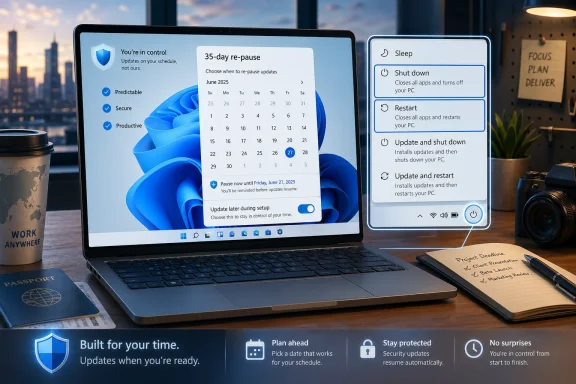
The new Windows 11 model does not remove the familiar 35-day pause unit. Instead, it changes what that unit means. Previously, the clock functioned as a leash: pause for a few weeks, and then Windows would eventually insist on catching up. Now, according to Microsoft’s own Insider messaging, users can re-pause for up to 35 days at a time with no stated limit on how many times the pause end date can be reset.
That is not quite a “disable updates forever” switch, and Microsoft is unlikely ever to describe it that way. But in practical terms, repeatable 35-day deferrals turn pause from a cooling-off period into a standing operating mode. The company has preserved the language of temporary delay while giving users a mechanism that can behave like indefinite postponement.
That distinction matters because Microsoft is still trying to hold two positions at once. It wants credit for giving users control, but it also wants to maintain the security posture that made automatic updates central to modern Windows. The result is a compromise with Microsoft’s fingerprints all over it: user freedom, but packaged inside a calendar, a warning label, and a recurring reminder that you really should patch eventually.
The new calendar picker is deceptively important. Instead of treating update deferral as a vague toggle, Windows will let users choose a specific pause date up to 35 days away. That makes the update mechanism fit actual human scheduling: travel, exams, production deadlines, conferences, field deployments, or the simple desire not to introduce new variables into a working machine during a busy week.
The bigger shift is that the user can reset the pause again. Microsoft could have increased the ceiling to 60 or 90 days and still kept the old philosophy intact. By making the pause repeatable, it is acknowledging that update readiness is contextual, not universal.
This is the part that will make security professionals twitch. A repeatable pause is only one missed reminder away from becoming a neglected machine. But Microsoft’s previous approach also created its own risk: users learned to distrust Windows Update, delay restarts through hacks, disable services, meter connections, or rely on third-party tools that were never part of the supported servicing model. A visible, official pause control may be safer than a population of angry users fighting the operating system with registry edits and folklore.
This sounds obvious until you remember how often Windows has violated that expectation. The power menu became a negotiation, especially on unmanaged consumer and prosumer systems. Users learned to scan for “Update and shut down” and “Update and restart” with suspicion, because the absence of a clean option often meant the machine had already decided the next power action belonged to Windows Update.
Separating power actions from update actions is a small interface change with large trust implications. It restores a basic contract between user and machine. If a user wants to install updates, the explicit update options remain. If the user simply needs the PC off before boarding a plane, leaving a studio, or packing up after a late-night job, Windows should not reinterpret that command as consent to service the OS.
This is where Microsoft’s language about predictability is doing real work. Windows does not merely need to be more secure; it needs to be more legible. A predictable PC is easier to maintain, easier to trust, and easier to recommend. The forced-update era damaged that trust not because updates were unnecessary, but because Windows sometimes behaved as though user intent was advisory.
That matters more than it sounds. Anyone who has provisioned a stack of laptops, rebuilt a gaming rig, or helped a family member set up a new PC knows that OOBE delays can turn a simple handoff into a half-hour wait. Updates during setup are defensible in theory: a new PC should not begin life missing critical fixes. But the experience becomes hostile when the user has no meaningful choice and no clear estimate of how long the process will take.
The “Update later” path is Microsoft recognizing that first boot is not always the right time for maintenance. A user may need to verify hardware, recover files, install accessibility tools, join a network, or simply get to a working desktop before surrendering the machine to patches. The old model treated setup as Microsoft’s window of maximum leverage. The new model treats it as the user’s first interaction with a machine they just bought.
There are caveats. Microsoft says the skip option does not apply in some managed commercial scenarios or where updates are required for the device to function. That is reasonable. But the consumer experience is changing in the right direction: setup should establish trust, not immediately test patience.
That is the smarter long-term play. The deepest problem with Windows Update has never been merely that it installs patches. It is that Windows maintenance can feel fragmented: a cumulative update here, a driver there, a firmware push later, a .NET update somewhere in the pile, and then a notification that another restart is waiting. Users do not distinguish between these components. They experience them as “Windows interrupted me again.”
Collapsing available updates into a clearer Windows Update view and aligning restarts may do more to improve compliance than coercion ever did. People are more likely to accept maintenance when they understand what is happening and when the system behaves consistently. A single predictable servicing moment is easier to plan around than a rolling series of nags.
This is also where Microsoft’s enterprise instincts show through. Corporate IT has long relied on rings, deferrals, maintenance windows, and staged rollout controls. Consumer Windows has often been treated as the place where Microsoft can move fastest because there is no IT department in the way. The new model borrows a little of that enterprise respect for timing and brings it to ordinary users.
But Microsoft is not surrendering the servicing model. Updates will still download, wait, notify, and eventually matter. Security fixes, emergency out-of-band updates, and optional updates remain part of the system. The change is not an end to Windows as a service; it is a softening of Windows as a service at your expense.
The danger is that the new freedom will be interpreted as permission to ignore patching indefinitely. Some users will do exactly that. They will pause, re-pause, and forget why the update was pending in the first place. A machine that never patches is not a principled stand against coercive UX; it is an aging liability connected to the internet.
Still, the security argument cannot be used to excuse every product decision. A security model that depends on overriding user intent will eventually create resistance. The more Windows behaves like an adversary, the more users search for ways around it. That is how you get disabled services, blocked update domains, broken Store components, and systems stuck on unsupported builds because their owners do not trust the next one.
The better security posture is not maximum force. It is maximum compliance through minimum resentment. Microsoft’s revised approach seems to recognize that reality. Give users a supported way to delay updates when the timing is bad, make the consequences clear, and make the eventual update process less disruptive. That is not perfect, but it is more mature than pretending every PC is available for servicing whenever Redmond says so.
For sysadmins, the story is more nuanced. Managed devices already have policy-based ways to control update behavior, and many organizations use Windows Update for Business, Intune, WSUS, Autopatch, or other management layers to stage deployments. The consumer-facing pause control is less important in those environments than the philosophy behind it.
If Microsoft is serious about reducing update noise and coordinating restarts, enterprises benefit indirectly. Fewer unexpected user complaints mean fewer tickets. Clearer update states mean fewer confused calls. A more predictable restart cadence means better communication between IT and employees.
But IT departments will also want to know exactly how these controls interact with policy. A repeatable pause button is empowering on a personal laptop; on a fleet machine, it can become a compliance gap if not governed correctly. Microsoft’s carve-outs for managed commercial devices suggest the company knows this. The question is whether the implementation will be clean enough that admins do not have to explain yet another exception matrix.
The most likely outcome is a split personality. Home and lightly managed Pro systems get more visible freedom. Fully managed business devices remain subject to organizational policy. That is the right division, but Windows has not always been elegant about explaining when a setting is user-controlled, admin-controlled, or temporarily unavailable because the servicing stack has other plans.
Update control is one of the few places where Microsoft can make a concrete concession that nearly everyone understands. No one needs a product brief to grasp why “Restart without updating” is better than being cornered into an install. No one needs telemetry slides to understand why a pause that can be extended is more useful than a pause that eventually expires into compulsion.
That makes this change symbolically larger than its settings page. It says Microsoft is willing, at least in this domain, to give up some paternalism. It also gives the company a cleaner answer to years of criticism: Windows updates are still important, but the PC belongs to you.
The timing is not accidental. Windows is under pressure from multiple directions. macOS continues to own the premium laptop narrative. ChromeOS remains attractive in education and low-management environments. Linux has become less exotic for developers and gaming enthusiasts than it used to be. Meanwhile, Windows 10’s long tail keeps reminding Microsoft that users will resist migration when the replacement feels more demanding than beneficial.
Against that backdrop, making Windows 11 feel less bossy is not charity. It is product strategy.
The key test is whether Windows honors the new power-menu contract every time. If “Shut down” sometimes still becomes “Update and shut down” because an update has crossed some invisible threshold, the trust gain evaporates. Users will not parse servicing-state edge cases. They will remember that Microsoft promised one thing and the PC did another.
The pause model also needs clarity. If users can re-pause indefinitely, Windows should say so plainly enough that people do not mistake the 35-day picker for the old hard ceiling. At the same time, the warnings around security exposure need to be useful rather than scolding. A good update UI should help users make a decision, not nag them into reflexively dismissing it.
There is also a question of quality. Giving users more control over when updates install does not solve the deeper problem of bad updates shipping in the first place. If a cumulative update breaks a VPN client, a game anti-cheat driver, a scanner, or a business-critical app, the ability to pause helps contain the blast radius, but it does not absolve Microsoft of the breakage. Control is not a substitute for reliability.
Still, control changes the emotional economics. A flawed update that users can defer feels like a risk to manage. A flawed update that installs at the worst possible moment feels like a betrayal.
The best update system is boring. It is visible when it needs consent, quiet when it does not, accurate about time, reversible where possible, and respectful of the user’s immediate task. Microsoft’s new controls move Windows closer to that standard, even if they do not fully reach it.
There is an irony here. By loosening its grip, Microsoft may get more users to update sooner. People who know they can delay a patch during a critical week may be more willing to install it the next week. People who can shut down without being trapped may be less likely to keep a laptop sleeping for days to avoid an update. People who trust the OS are less likely to sabotage its maintenance mechanisms.
That is the lesson Microsoft should take from this shift. Trust is not created by hiding choices or narrowing exits. It is created when the system does what it says, explains what it needs, and leaves the final timing in human hands whenever the risk allows.
Microsoft’s Windows 11 update changes are not the end of forced updates so much as the end of pretending that force was the only responsible design. The company is still right that patching matters, and users who turn repeatable pauses into permanent neglect will be making their systems less safe. But Windows has needed this recalibration for years: fewer surprises, clearer choices, and a power button that obeys. If Microsoft can carry that philosophy beyond Insider builds and into the everyday Windows experience, the next phase of Windows Update may be defined less by compliance theater and more by earned cooperation.
Source: hi-Tech.ua Microsoft is changing the rules of the game: updates are no longer forced in Windows 11
 Microsoft Finally Admits the Update War Was About Control
For years, the Windows update debate has been framed as a fight between responsible security engineering and irresponsible users who do not patch. That framing was always too convenient. Most people objecting to forced updates were not asking to run an unpatched machine forever; they were asking Windows not to reboot during a deadline, derail a game session, break a driver before a presentation, or turn a simple shutdown into a maintenance window.The new Windows 11 model does not remove the familiar 35-day pause unit. Instead, it changes what that unit means. Previously, the clock functioned as a leash: pause for a few weeks, and then Windows would eventually insist on catching up. Now, according to Microsoft’s own Insider messaging, users can re-pause for up to 35 days at a time with no stated limit on how many times the pause end date can be reset.
That is not quite a “disable updates forever” switch, and Microsoft is unlikely ever to describe it that way. But in practical terms, repeatable 35-day deferrals turn pause from a cooling-off period into a standing operating mode. The company has preserved the language of temporary delay while giving users a mechanism that can behave like indefinite postponement.
That distinction matters because Microsoft is still trying to hold two positions at once. It wants credit for giving users control, but it also wants to maintain the security posture that made automatic updates central to modern Windows. The result is a compromise with Microsoft’s fingerprints all over it: user freedom, but packaged inside a calendar, a warning label, and a recurring reminder that you really should patch eventually.
The 35-Day Limit Has Become a Ritual, Not a Wall
The old 35-day limit was one of those Windows compromises that satisfied almost nobody. It gave Microsoft a line to point to when critics said updates were too aggressive, but it did not give power users, small businesses, lab operators, musicians, streamers, or sysadmins outside full enterprise management the confidence that Windows would stay still when they needed it to stay still.The new calendar picker is deceptively important. Instead of treating update deferral as a vague toggle, Windows will let users choose a specific pause date up to 35 days away. That makes the update mechanism fit actual human scheduling: travel, exams, production deadlines, conferences, field deployments, or the simple desire not to introduce new variables into a working machine during a busy week.
The bigger shift is that the user can reset the pause again. Microsoft could have increased the ceiling to 60 or 90 days and still kept the old philosophy intact. By making the pause repeatable, it is acknowledging that update readiness is contextual, not universal.
This is the part that will make security professionals twitch. A repeatable pause is only one missed reminder away from becoming a neglected machine. But Microsoft’s previous approach also created its own risk: users learned to distrust Windows Update, delay restarts through hacks, disable services, meter connections, or rely on third-party tools that were never part of the supported servicing model. A visible, official pause control may be safer than a population of angry users fighting the operating system with registry edits and folklore.
The Shutdown Button Is Being Returned to Its Owner
The most emotionally satisfying part of the change may not be the update pause at all. It is Microsoft’s promise that standard shutdown and restart actions will remain available even when updates are pending. In plain terms, “Shut down” should mean shut down, and “Restart” should mean restart — not “install whatever Windows has staged and then maybe do what you asked.”This sounds obvious until you remember how often Windows has violated that expectation. The power menu became a negotiation, especially on unmanaged consumer and prosumer systems. Users learned to scan for “Update and shut down” and “Update and restart” with suspicion, because the absence of a clean option often meant the machine had already decided the next power action belonged to Windows Update.
Separating power actions from update actions is a small interface change with large trust implications. It restores a basic contract between user and machine. If a user wants to install updates, the explicit update options remain. If the user simply needs the PC off before boarding a plane, leaving a studio, or packing up after a late-night job, Windows should not reinterpret that command as consent to service the OS.
This is where Microsoft’s language about predictability is doing real work. Windows does not merely need to be more secure; it needs to be more legible. A predictable PC is easier to maintain, easier to trust, and easier to recommend. The forced-update era damaged that trust not because updates were unnecessary, but because Windows sometimes behaved as though user intent was advisory.
Setup Is No Longer a Toll Booth
The change also reaches the out-of-box experience, where Windows 11 has increasingly behaved like a device-activation ceremony rather than a quick path to the desktop. Microsoft has been testing or rolling out an option to skip updates during initial setup, letting users land on the desktop sooner and update later.That matters more than it sounds. Anyone who has provisioned a stack of laptops, rebuilt a gaming rig, or helped a family member set up a new PC knows that OOBE delays can turn a simple handoff into a half-hour wait. Updates during setup are defensible in theory: a new PC should not begin life missing critical fixes. But the experience becomes hostile when the user has no meaningful choice and no clear estimate of how long the process will take.
The “Update later” path is Microsoft recognizing that first boot is not always the right time for maintenance. A user may need to verify hardware, recover files, install accessibility tools, join a network, or simply get to a working desktop before surrendering the machine to patches. The old model treated setup as Microsoft’s window of maximum leverage. The new model treats it as the user’s first interaction with a machine they just bought.
There are caveats. Microsoft says the skip option does not apply in some managed commercial scenarios or where updates are required for the device to function. That is reasonable. But the consumer experience is changing in the right direction: setup should establish trust, not immediately test patience.
Microsoft Is Trying to Reduce Reboots Without Giving Up Servicing Discipline
The update-control changes are arriving alongside a broader attempt to make Windows maintenance feel less chaotic. Microsoft says it is working to coordinate driver, .NET, and firmware updates with the monthly quality update, with the goal of reducing the user-visible update experience to a single monthly restart where possible.That is the smarter long-term play. The deepest problem with Windows Update has never been merely that it installs patches. It is that Windows maintenance can feel fragmented: a cumulative update here, a driver there, a firmware push later, a .NET update somewhere in the pile, and then a notification that another restart is waiting. Users do not distinguish between these components. They experience them as “Windows interrupted me again.”
Collapsing available updates into a clearer Windows Update view and aligning restarts may do more to improve compliance than coercion ever did. People are more likely to accept maintenance when they understand what is happening and when the system behaves consistently. A single predictable servicing moment is easier to plan around than a rolling series of nags.
This is also where Microsoft’s enterprise instincts show through. Corporate IT has long relied on rings, deferrals, maintenance windows, and staged rollout controls. Consumer Windows has often been treated as the place where Microsoft can move fastest because there is no IT department in the way. The new model borrows a little of that enterprise respect for timing and brings it to ordinary users.
But Microsoft is not surrendering the servicing model. Updates will still download, wait, notify, and eventually matter. Security fixes, emergency out-of-band updates, and optional updates remain part of the system. The change is not an end to Windows as a service; it is a softening of Windows as a service at your expense.
The Security Clause Is Not Fine Print
There is an uncomfortable truth at the center of all this: Microsoft’s old argument was not wrong. Updates do often contain critical security fixes. Delaying them for weeks or months can leave systems exposed to vulnerabilities that are already known, already weaponized, or likely to be incorporated into commodity attack chains.The danger is that the new freedom will be interpreted as permission to ignore patching indefinitely. Some users will do exactly that. They will pause, re-pause, and forget why the update was pending in the first place. A machine that never patches is not a principled stand against coercive UX; it is an aging liability connected to the internet.
Still, the security argument cannot be used to excuse every product decision. A security model that depends on overriding user intent will eventually create resistance. The more Windows behaves like an adversary, the more users search for ways around it. That is how you get disabled services, blocked update domains, broken Store components, and systems stuck on unsupported builds because their owners do not trust the next one.
The better security posture is not maximum force. It is maximum compliance through minimum resentment. Microsoft’s revised approach seems to recognize that reality. Give users a supported way to delay updates when the timing is bad, make the consequences clear, and make the eventual update process less disruptive. That is not perfect, but it is more mature than pretending every PC is available for servicing whenever Redmond says so.
Power Users Win, But Enterprises Will Still Read the Policy Notes
For Windows enthusiasts and standalone Pro users, this is an obvious win. It gives them breathing room after Patch Tuesday, time to watch for reports of broken printers or GPU oddities, and the ability to hold a stable configuration during work that cannot tolerate surprises. Gamers, creators, streamers, developers, and hobbyists running niche hardware will see the value immediately.For sysadmins, the story is more nuanced. Managed devices already have policy-based ways to control update behavior, and many organizations use Windows Update for Business, Intune, WSUS, Autopatch, or other management layers to stage deployments. The consumer-facing pause control is less important in those environments than the philosophy behind it.
If Microsoft is serious about reducing update noise and coordinating restarts, enterprises benefit indirectly. Fewer unexpected user complaints mean fewer tickets. Clearer update states mean fewer confused calls. A more predictable restart cadence means better communication between IT and employees.
But IT departments will also want to know exactly how these controls interact with policy. A repeatable pause button is empowering on a personal laptop; on a fleet machine, it can become a compliance gap if not governed correctly. Microsoft’s carve-outs for managed commercial devices suggest the company knows this. The question is whether the implementation will be clean enough that admins do not have to explain yet another exception matrix.
The most likely outcome is a split personality. Home and lightly managed Pro systems get more visible freedom. Fully managed business devices remain subject to organizational policy. That is the right division, but Windows has not always been elegant about explaining when a setting is user-controlled, admin-controlled, or temporarily unavailable because the servicing stack has other plans.
This Is Also a Reputation Repair Campaign
It would be naïve to treat this purely as a technical update. Microsoft is also managing sentiment. Windows 11 has spent much of its life fighting complaints about hardware requirements, advertising surfaces, account pressure, Copilot integration, Start menu changes, default app behavior, and the general sense that the OS is increasingly a vehicle for Microsoft’s priorities rather than the user’s.Update control is one of the few places where Microsoft can make a concrete concession that nearly everyone understands. No one needs a product brief to grasp why “Restart without updating” is better than being cornered into an install. No one needs telemetry slides to understand why a pause that can be extended is more useful than a pause that eventually expires into compulsion.
That makes this change symbolically larger than its settings page. It says Microsoft is willing, at least in this domain, to give up some paternalism. It also gives the company a cleaner answer to years of criticism: Windows updates are still important, but the PC belongs to you.
The timing is not accidental. Windows is under pressure from multiple directions. macOS continues to own the premium laptop narrative. ChromeOS remains attractive in education and low-management environments. Linux has become less exotic for developers and gaming enthusiasts than it used to be. Meanwhile, Windows 10’s long tail keeps reminding Microsoft that users will resist migration when the replacement feels more demanding than beneficial.
Against that backdrop, making Windows 11 feel less bossy is not charity. It is product strategy.
The Real Test Will Come After the Insider Glow Fades
Insider announcements often describe the ideal version of a feature. The real judgment comes later, when the change lands on ordinary machines with messy drivers, half-installed updates, aging firmware, vendor utilities, and users who do not read release notes.The key test is whether Windows honors the new power-menu contract every time. If “Shut down” sometimes still becomes “Update and shut down” because an update has crossed some invisible threshold, the trust gain evaporates. Users will not parse servicing-state edge cases. They will remember that Microsoft promised one thing and the PC did another.
The pause model also needs clarity. If users can re-pause indefinitely, Windows should say so plainly enough that people do not mistake the 35-day picker for the old hard ceiling. At the same time, the warnings around security exposure need to be useful rather than scolding. A good update UI should help users make a decision, not nag them into reflexively dismissing it.
There is also a question of quality. Giving users more control over when updates install does not solve the deeper problem of bad updates shipping in the first place. If a cumulative update breaks a VPN client, a game anti-cheat driver, a scanner, or a business-critical app, the ability to pause helps contain the blast radius, but it does not absolve Microsoft of the breakage. Control is not a substitute for reliability.
Still, control changes the emotional economics. A flawed update that users can defer feels like a risk to manage. A flawed update that installs at the worst possible moment feels like a betrayal.
Windows Update Becomes Less of a Villain by Becoming Less Dramatic
The most promising part of Microsoft’s move is that it makes updating less theatrical. For too long, Windows Update has occupied a weirdly dramatic place in the user experience: countdowns, warnings, restart prompts, surprise delays, and the dreaded discovery that a quick reboot is no longer quick. Maintenance became an event.The best update system is boring. It is visible when it needs consent, quiet when it does not, accurate about time, reversible where possible, and respectful of the user’s immediate task. Microsoft’s new controls move Windows closer to that standard, even if they do not fully reach it.
There is an irony here. By loosening its grip, Microsoft may get more users to update sooner. People who know they can delay a patch during a critical week may be more willing to install it the next week. People who can shut down without being trapped may be less likely to keep a laptop sleeping for days to avoid an update. People who trust the OS are less likely to sabotage its maintenance mechanisms.
That is the lesson Microsoft should take from this shift. Trust is not created by hiding choices or narrowing exits. It is created when the system does what it says, explains what it needs, and leaves the final timing in human hands whenever the risk allows.
Microsoft’s Windows 11 update changes are not the end of forced updates so much as the end of pretending that force was the only responsible design. The company is still right that patching matters, and users who turn repeatable pauses into permanent neglect will be making their systems less safe. But Windows has needed this recalibration for years: fewer surprises, clearer choices, and a power button that obeys. If Microsoft can carry that philosophy beyond Insider builds and into the everyday Windows experience, the next phase of Windows Update may be defined less by compliance theater and more by earned cooperation.
Source: hi-Tech.ua Microsoft is changing the rules of the game: updates are no longer forced in Windows 11
