

Microsoft is changing Windows Update in 2026 to make restarts more predictable, combining more update types into a monthly reboot rhythm while adding clearer pause, shutdown, restart, and setup controls for Windows 11 users and managed fleets. The move is not a revolution in patching so much as an admission that the old bargain has worn thin. Windows users have tolerated forced restarts because security required them; they have resented them because Windows too often behaved as if their time was incidental. Microsoft’s new approach tries to preserve the security imperative while conceding that control is now part of operating-system quality.
For years, Windows Update has been discussed as plumbing: servicing stacks, cumulative packages, driver delivery, reboot orchestration, deferrals, active hours, compliance deadlines. That language makes sense inside Microsoft and inside IT departments, but it misses the thing ordinary users remember. They remember the laptop that would not shut down cleanly before a flight, the meeting room PC that chose the worst possible moment to install, or the workstation that presented “Update and restart” as less of an option than a command.
The latest Windows Update changes are important because they attack that memory. Microsoft is not merely promising that updates will be smaller or faster, though it has been working on those fronts too. It is changing the rituals around updates: when they appear, how many restarts they trigger, and whether a user can simply shut down without being dragged into an install session.
That matters because Windows Update has become one of the places where Microsoft’s relationship with its users is most visibly negotiated. A desktop operating system can have excellent security architecture and still feel hostile if it interrupts work at the wrong time. In that sense, “less disruption” is not marketing fluff; it is Microsoft acknowledging that reliability includes social reliability — the sense that the machine will not ambush you.
The company’s phrasing, “fewer disruptions, more clarity, more control,” is carefully chosen. It does not promise total freedom. It does not say updates are optional. It says Windows should be less chaotic about the way it moves users from unpatched to patched.
That is a pragmatic shift. Security updates often need reboots because Windows cannot replace certain files, drivers, or low-level components while they are running. Pretending that the reboot can simply disappear would be dishonest, especially on a platform that supports decades of hardware, applications, drivers, management tools, and deployment styles.
But a single restart window changes the emotional texture of Windows maintenance. One reboot after Patch Tuesday is a chore. Three or four restarts across a month feel like harassment. The difference is not only technical; it is psychological.
The monthly cadence also reflects how Windows has already evolved. Cumulative updates replaced an older world of scattered patches, and the modern servicing model has tried to make Windows more predictable for administrators. Now Microsoft is extending that logic from update packages to user interruptions: if the system can consolidate the payload, it should consolidate the pain.
This is especially relevant for hybrid work. A laptop may move between office networks, home Wi-Fi, cellular hotspots, docking stations, and airplane mode in a single week. The old assumption that Windows can quietly wait for a convenient maintenance window is weaker than it used to be. A more disciplined monthly restart model is Microsoft’s way of admitting that modern PCs are mobile, personal, and often in use at inconvenient hours.
For years, Windows has nudged users toward “Update and shut down” or “Update and restart” at precisely the moment they are trying to leave. The user is done; Windows has one more thing. In homes, that is annoying. In businesses, schools, retail counters, clinics, labs, and production environments, it can be operationally expensive.
Separating power actions from update actions restores a distinction that should never have become blurry. Shutting down a machine is not the same thing as consenting to a maintenance operation. Restarting to clear a glitch is not the same thing as agreeing to install pending updates. Microsoft’s new behavior recognizes that users sometimes need the machine to obey the immediate command, not reinterpret it as an update opportunity.
This is a small interface change with a large symbolic payload. Windows has often treated update compliance as the higher-order goal and user intent as something to be shaped around it. The new power menu model reverses the posture, at least in the moment: the user’s command is allowed to mean what it says.
There will still be guardrails, and there should be. A PC that can postpone security fixes forever is not a personal liberty machine; it is a future botnet participant. But there is a meaningful difference between “you cannot ignore updates indefinitely” and “you cannot shut down your laptop without starting an install right now.” Microsoft appears to be moving from the second posture toward the first.
That limit will annoy the people who want Windows to behave like a fully manual operating system. They will argue, not without reason, that a machine they own should not resume updates on Microsoft’s schedule. Windows power users have been making some version of that argument since Windows 10 turned automatic updating into a central pillar of the consumer servicing model.
Microsoft’s counterargument is also strong. Unpatched Windows devices are not isolated personal choices. They sit on networks, sync credentials, store tokens, access corporate resources, run browsers, mount shared drives, and increasingly participate in identity systems that assume endpoints are not hopelessly stale. A long tail of unpatched consumer machines is a public security problem.
The 35-day pause is therefore best understood as a cooling-off period, not a veto. It lets a user get through travel, a project deadline, a fragile driver situation, a live event, or a school exam week. It does not let the user convert Windows Update into a once-a-year activity.
That distinction will matter in how these changes are received. Microsoft is not surrendering control of the update pipeline. It is trying to make that control feel less arbitrary. The machine may still insist eventually, but it should interrupt less often and explain itself more clearly.
OOBE is a strange place to perform maintenance. The user has not yet established trust in the machine. They may be standing in a store, configuring a child’s school laptop, preparing a fleet device, or trying to make a new PC usable before a meeting. If Windows immediately disappears into update land, the first impression is not security; it is delay.
Microsoft still has good reasons to update new devices quickly. A PC may have been imaged months earlier, shipped through multiple channels, and arrived missing critical fixes. The company cannot simply ignore that reality, especially as supply chains and retail inventory introduce unpredictable lag between factory image and first boot.
But the better answer is not always to force the update during setup. Sometimes the right answer is to let the user reach the desktop, then present a clear patching path. The OOBE change recognizes that time to usefulness is itself a quality metric.
For IT departments, the setup change may be less dramatic because many already control provisioning with Autopilot, Intune, imaging, or deployment rings. For consumers, though, it chips away at one of Windows 11’s least charming first-run experiences. The machine should introduce itself before it starts demanding patience.
Driver updates are also where trust breaks most easily. A bad display driver can cause flicker, black screens, broken sleep states, or performance regressions. A storage driver problem can be catastrophic. Audio, Bluetooth, Wi-Fi, GPU, printer, and chipset updates may fix real bugs, but they can also create new ones in configurations that no lab matrix fully captured.
A unified monthly cycle could help by reducing scatter. Instead of users seeing drivers arrive at odd moments, drivers can ride the same predictable maintenance wave. That gives administrators and advanced users a clearer expectation of when change is likely to occur.
But it also raises the stakes of each monthly update event. If the OS update, framework update, and driver update all land together, troubleshooting becomes more complex when something breaks. Was it the cumulative update? The GPU driver? The .NET change? A firmware interaction? Consolidation reduces restarts, but it may compress the blast radius of change into a single maintenance window.
That is why Microsoft’s quality push has to be more than interface polish. The new Windows Update experience will only earn trust if the updates themselves are reliable. Fewer interruptions are welcome; fewer broken updates are better.
A single monthly restart rhythm could make communications cleaner. IT can tell users to expect one reboot cycle, align it with maintenance policy, and measure compliance against a more predictable operational pattern. That is easier to support than a rolling series of small interruptions that users learn to distrust.
The improved power menu also reduces one class of help-desk irritation. A user who needs to shut down before traveling should not be trapped into an update. A field worker should not need to choose between catching a plane and letting a laptop churn through installation. These are the mundane frictions that rarely appear in strategic roadmaps but consume real support time.
Still, managed environments will not treat these changes as a blanket win until they understand the policy surface. Enterprises care about the difference between what Windows shows consumers and what administrators can enforce. They will ask how the new controls interact with Windows Update for Business, Intune update rings, Autopatch, deadlines, grace periods, restart notifications, driver policies, and compliance reporting.
The best version of this change gives IT more predictable restarts without weakening patch discipline. The worst version creates another layer of user-visible controls that conflict with organizational policy. Microsoft’s job is to ensure that “more control” does not mean “more ambiguity” for fleets.
That is a hard balance. Security teams want fast adoption. Users want fewer interruptions. Administrators want predictability. Hardware vendors want compatibility. Microsoft has to satisfy all of them while keeping a platform of enormous scale moving forward.
The Secure Boot certificate transition is a useful reminder that Windows Update is not merely a monthly bug-fix pipe. It is also how Microsoft rotates trust anchors, updates platform security assumptions, and moves the installed base through changes that cannot be postponed forever. When those changes surface as warnings or extra restarts, the user experience becomes part of the security story.
If Microsoft trains users to fear updates, users will avoid them. If it trains users to understand updates, users may still grumble, but they are more likely to cooperate. That is the real strategic value of clarity.
The red warning language around required action is part of that shift. A warning should be visible, specific, and rare enough to matter. If every update prompt feels urgent, none of them do. Microsoft’s challenge is to reserve alarm for genuine risk while making ordinary patching feel routine.
For enthusiasts, Windows 11 has often felt like an operating system caught between priorities. It wants to be a modern secure platform. It wants to be an AI showcase. It wants to be a services funnel. It wants to be a familiar desktop. Too often, the user can feel those ambitions colliding.
Windows Update is where that collision becomes physical. A Copilot icon can be ignored. A recommendation in Settings can be dismissed. A reboot cannot. When Windows Update behaves badly, it confirms the suspicion that Microsoft’s priorities sit above the user’s.
That is why this “less disruption” push is more important than its modest feature list suggests. It is Microsoft saying that the fundamentals are not beneath its attention. The company is, in effect, admitting that a better Windows is not only the one with more features; it is the one that interrupts less.
There is a lesson here for the rest of the OS. Users do not need every Microsoft ambition removed from Windows. They need clearer boundaries. They need to know when the system is helping, when it is selling, when it is securing, and when it is simply obeying.
But the price was goodwill. Users learned that Windows might take control at awkward moments. They learned to distrust shutdown prompts. They learned that “active hours” did not always align with real life. They learned that update settings could feel less like preferences and more like suggestions Windows might overrule.
That history matters because Microsoft is now asking users to believe in a softer Windows Update. Trust does not return because a blog post says the right words. It returns when the next six months of updates are quieter, clearer, and less likely to hijack a workday.
The company also has to avoid overclaiming. A monthly restart rhythm will not eliminate all reboot surprises. Emergency out-of-band patches will still happen. Driver issues will still happen. Some updates will still require urgent action, especially in enterprise environments facing active exploitation.
The right promise is not perfection. The right promise is proportion. Windows should interrupt in proportion to the risk, the urgency, and the user’s context. That would be a meaningful improvement over the blunt-force update culture that has defined too much of the last decade.
If pause is easy to find, rollback guidance is clear, and restart prompts are honest, the new system will feel like progress even during trouble. If Windows still funnels users into opaque install loops, the new language will look cosmetic. Update trust is built during failure, not during smooth demos.
Microsoft also needs to make sure that the single restart cadence does not hide complexity. If multiple components update together, Settings should make the contents legible. Users do not need a servicing-stack dissertation, but they do deserve to know whether Windows is installing a security update, a driver, a firmware change, or a framework patch.
For IT pros, the same principle applies at fleet scale. Dashboards must distinguish pending download, pending install, pending restart, paused, blocked, failed, and remediated states with enough precision to act. A prettier consumer update flow is not enough if enterprise telemetry remains muddy.
The irony is that Microsoft has all the incentives in the world to get this right. A quieter Windows Update improves security compliance because users are less tempted to fight the system. Annoyance is not just a UX problem; it is a patch adoption problem.
Source: Trusted Reviews Microsoft’s new Windows Update approach could make restarts less annoying
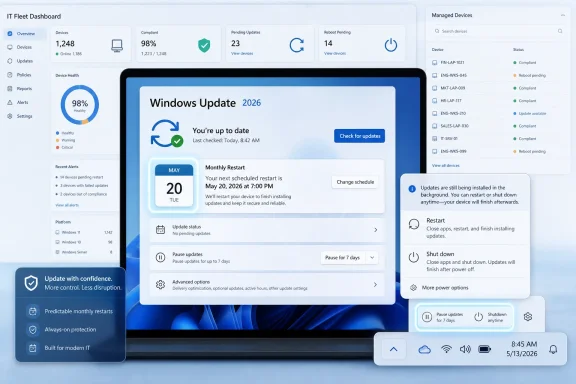 Microsoft Finally Treats the Restart as a User Experience Problem
For years, Windows Update has been discussed as plumbing: servicing stacks, cumulative packages, driver delivery, reboot orchestration, deferrals, active hours, compliance deadlines. That language makes sense inside Microsoft and inside IT departments, but it misses the thing ordinary users remember. They remember the laptop that would not shut down cleanly before a flight, the meeting room PC that chose the worst possible moment to install, or the workstation that presented “Update and restart” as less of an option than a command.The latest Windows Update changes are important because they attack that memory. Microsoft is not merely promising that updates will be smaller or faster, though it has been working on those fronts too. It is changing the rituals around updates: when they appear, how many restarts they trigger, and whether a user can simply shut down without being dragged into an install session.
That matters because Windows Update has become one of the places where Microsoft’s relationship with its users is most visibly negotiated. A desktop operating system can have excellent security architecture and still feel hostile if it interrupts work at the wrong time. In that sense, “less disruption” is not marketing fluff; it is Microsoft acknowledging that reliability includes social reliability — the sense that the machine will not ambush you.
The company’s phrasing, “fewer disruptions, more clarity, more control,” is carefully chosen. It does not promise total freedom. It does not say updates are optional. It says Windows should be less chaotic about the way it moves users from unpatched to patched.
The Monthly Reboot Is Microsoft’s New Truce
The most consequential idea is the push toward a single monthly restart cycle. Microsoft wants to bundle operating system updates, .NET updates, and driver updates so that a Windows PC does not keep returning to the user with separate reboot demands throughout the month. The target is not “never restart”; it is “restart once, predictably.”That is a pragmatic shift. Security updates often need reboots because Windows cannot replace certain files, drivers, or low-level components while they are running. Pretending that the reboot can simply disappear would be dishonest, especially on a platform that supports decades of hardware, applications, drivers, management tools, and deployment styles.
But a single restart window changes the emotional texture of Windows maintenance. One reboot after Patch Tuesday is a chore. Three or four restarts across a month feel like harassment. The difference is not only technical; it is psychological.
The monthly cadence also reflects how Windows has already evolved. Cumulative updates replaced an older world of scattered patches, and the modern servicing model has tried to make Windows more predictable for administrators. Now Microsoft is extending that logic from update packages to user interruptions: if the system can consolidate the payload, it should consolidate the pain.
This is especially relevant for hybrid work. A laptop may move between office networks, home Wi-Fi, cellular hotspots, docking stations, and airplane mode in a single week. The old assumption that Windows can quietly wait for a convenient maintenance window is weaker than it used to be. A more disciplined monthly restart model is Microsoft’s way of admitting that modern PCs are mobile, personal, and often in use at inconvenient hours.
The Power Menu Becomes a Small Act of Rebellion
The change that will get the most approving nods from longtime Windows users is simpler: “Restart” and “Shut down” should remain available even when updates are pending. That sounds almost embarrassingly basic. It is also the kind of basic thing that defines whether an operating system feels respectful.For years, Windows has nudged users toward “Update and shut down” or “Update and restart” at precisely the moment they are trying to leave. The user is done; Windows has one more thing. In homes, that is annoying. In businesses, schools, retail counters, clinics, labs, and production environments, it can be operationally expensive.
Separating power actions from update actions restores a distinction that should never have become blurry. Shutting down a machine is not the same thing as consenting to a maintenance operation. Restarting to clear a glitch is not the same thing as agreeing to install pending updates. Microsoft’s new behavior recognizes that users sometimes need the machine to obey the immediate command, not reinterpret it as an update opportunity.
This is a small interface change with a large symbolic payload. Windows has often treated update compliance as the higher-order goal and user intent as something to be shaped around it. The new power menu model reverses the posture, at least in the moment: the user’s command is allowed to mean what it says.
There will still be guardrails, and there should be. A PC that can postpone security fixes forever is not a personal liberty machine; it is a future botnet participant. But there is a meaningful difference between “you cannot ignore updates indefinitely” and “you cannot shut down your laptop without starting an install right now.” Microsoft appears to be moving from the second posture toward the first.
The 35-Day Limit Reveals the Boundary of Microsoft’s Patience
The pause controls are the clearest example of Microsoft’s compromise. Users can pause updates, and the experience is becoming easier to find and easier to use. But the pause is not unlimited: the familiar ceiling of up to 35 days remains the outer boundary for many update scenarios.That limit will annoy the people who want Windows to behave like a fully manual operating system. They will argue, not without reason, that a machine they own should not resume updates on Microsoft’s schedule. Windows power users have been making some version of that argument since Windows 10 turned automatic updating into a central pillar of the consumer servicing model.
Microsoft’s counterargument is also strong. Unpatched Windows devices are not isolated personal choices. They sit on networks, sync credentials, store tokens, access corporate resources, run browsers, mount shared drives, and increasingly participate in identity systems that assume endpoints are not hopelessly stale. A long tail of unpatched consumer machines is a public security problem.
The 35-day pause is therefore best understood as a cooling-off period, not a veto. It lets a user get through travel, a project deadline, a fragile driver situation, a live event, or a school exam week. It does not let the user convert Windows Update into a once-a-year activity.
That distinction will matter in how these changes are received. Microsoft is not surrendering control of the update pipeline. It is trying to make that control feel less arbitrary. The machine may still insist eventually, but it should interrupt less often and explain itself more clearly.
Setup Is No Longer Sacred Ground for Updates
The out-of-box experience change is smaller, but it speaks to the same philosophy. New PCs can now allow users to skip or pause updates during initial setup so they can reach the desktop faster. Anyone who has unboxed a Windows laptop and watched setup detour into update work will understand why this matters.OOBE is a strange place to perform maintenance. The user has not yet established trust in the machine. They may be standing in a store, configuring a child’s school laptop, preparing a fleet device, or trying to make a new PC usable before a meeting. If Windows immediately disappears into update land, the first impression is not security; it is delay.
Microsoft still has good reasons to update new devices quickly. A PC may have been imaged months earlier, shipped through multiple channels, and arrived missing critical fixes. The company cannot simply ignore that reality, especially as supply chains and retail inventory introduce unpredictable lag between factory image and first boot.
But the better answer is not always to force the update during setup. Sometimes the right answer is to let the user reach the desktop, then present a clear patching path. The OOBE change recognizes that time to usefulness is itself a quality metric.
For IT departments, the setup change may be less dramatic because many already control provisioning with Autopilot, Intune, imaging, or deployment rings. For consumers, though, it chips away at one of Windows 11’s least charming first-run experiences. The machine should introduce itself before it starts demanding patience.
Drivers Are the Wild Card in the New Rhythm
Bundling driver updates into a monthly restart rhythm sounds sensible, but drivers are where the neat story gets complicated. Operating system updates are Microsoft’s domain. .NET updates live close enough to that orbit. Drivers, by contrast, are the messy borderland where Microsoft, hardware vendors, silicon partners, OEMs, and peripheral makers all meet.Driver updates are also where trust breaks most easily. A bad display driver can cause flicker, black screens, broken sleep states, or performance regressions. A storage driver problem can be catastrophic. Audio, Bluetooth, Wi-Fi, GPU, printer, and chipset updates may fix real bugs, but they can also create new ones in configurations that no lab matrix fully captured.
A unified monthly cycle could help by reducing scatter. Instead of users seeing drivers arrive at odd moments, drivers can ride the same predictable maintenance wave. That gives administrators and advanced users a clearer expectation of when change is likely to occur.
But it also raises the stakes of each monthly update event. If the OS update, framework update, and driver update all land together, troubleshooting becomes more complex when something breaks. Was it the cumulative update? The GPU driver? The .NET change? A firmware interaction? Consolidation reduces restarts, but it may compress the blast radius of change into a single maintenance window.
That is why Microsoft’s quality push has to be more than interface polish. The new Windows Update experience will only earn trust if the updates themselves are reliable. Fewer interruptions are welcome; fewer broken updates are better.
Enterprise IT Will See Both Relief and New Risk
For enterprise administrators, the appeal of fewer restarts is obvious. Restart compliance is one of the dullest recurring battles in endpoint management. Users delay, devices sleep, VPNs disconnect, remote workers miss maintenance windows, and dashboards fill with machines that are technically targeted but not actually remediated.A single monthly restart rhythm could make communications cleaner. IT can tell users to expect one reboot cycle, align it with maintenance policy, and measure compliance against a more predictable operational pattern. That is easier to support than a rolling series of small interruptions that users learn to distrust.
The improved power menu also reduces one class of help-desk irritation. A user who needs to shut down before traveling should not be trapped into an update. A field worker should not need to choose between catching a plane and letting a laptop churn through installation. These are the mundane frictions that rarely appear in strategic roadmaps but consume real support time.
Still, managed environments will not treat these changes as a blanket win until they understand the policy surface. Enterprises care about the difference between what Windows shows consumers and what administrators can enforce. They will ask how the new controls interact with Windows Update for Business, Intune update rings, Autopatch, deadlines, grace periods, restart notifications, driver policies, and compliance reporting.
The best version of this change gives IT more predictable restarts without weakening patch discipline. The worst version creates another layer of user-visible controls that conflict with organizational policy. Microsoft’s job is to ensure that “more control” does not mean “more ambiguity” for fleets.
Security Is the Reason Microsoft Will Not Let Go
The timing of this update rethink is not accidental. Microsoft is simultaneously pushing major security transitions across the Windows ecosystem, including certificate and Secure Boot work that can require attention from users and administrators. The company is trying to make updates less irritating at the same moment it needs users to take them seriously.That is a hard balance. Security teams want fast adoption. Users want fewer interruptions. Administrators want predictability. Hardware vendors want compatibility. Microsoft has to satisfy all of them while keeping a platform of enormous scale moving forward.
The Secure Boot certificate transition is a useful reminder that Windows Update is not merely a monthly bug-fix pipe. It is also how Microsoft rotates trust anchors, updates platform security assumptions, and moves the installed base through changes that cannot be postponed forever. When those changes surface as warnings or extra restarts, the user experience becomes part of the security story.
If Microsoft trains users to fear updates, users will avoid them. If it trains users to understand updates, users may still grumble, but they are more likely to cooperate. That is the real strategic value of clarity.
The red warning language around required action is part of that shift. A warning should be visible, specific, and rare enough to matter. If every update prompt feels urgent, none of them do. Microsoft’s challenge is to reserve alarm for genuine risk while making ordinary patching feel routine.
Windows 11’s Quality Reset Has Become a Trust Campaign
These update changes fit into a broader Windows 11 course correction. Microsoft has been talking more openly in 2026 about fundamentals: performance, reliability, reduced clutter, fewer unnecessary Copilot surfaces, and a more disciplined user experience. That framing matters because Windows 11’s reputation problem has not been one single failure.For enthusiasts, Windows 11 has often felt like an operating system caught between priorities. It wants to be a modern secure platform. It wants to be an AI showcase. It wants to be a services funnel. It wants to be a familiar desktop. Too often, the user can feel those ambitions colliding.
Windows Update is where that collision becomes physical. A Copilot icon can be ignored. A recommendation in Settings can be dismissed. A reboot cannot. When Windows Update behaves badly, it confirms the suspicion that Microsoft’s priorities sit above the user’s.
That is why this “less disruption” push is more important than its modest feature list suggests. It is Microsoft saying that the fundamentals are not beneath its attention. The company is, in effect, admitting that a better Windows is not only the one with more features; it is the one that interrupts less.
There is a lesson here for the rest of the OS. Users do not need every Microsoft ambition removed from Windows. They need clearer boundaries. They need to know when the system is helping, when it is selling, when it is securing, and when it is simply obeying.
The Old Windows Update Bargain Had Run Out of Goodwill
Windows Update became aggressive for understandable reasons. The pre-Windows 10 world left too many machines permanently unpatched. Optional updates and user-driven patching were not enough to protect the ecosystem. Automatic updating improved baseline security and reduced fragmentation.But the price was goodwill. Users learned that Windows might take control at awkward moments. They learned to distrust shutdown prompts. They learned that “active hours” did not always align with real life. They learned that update settings could feel less like preferences and more like suggestions Windows might overrule.
That history matters because Microsoft is now asking users to believe in a softer Windows Update. Trust does not return because a blog post says the right words. It returns when the next six months of updates are quieter, clearer, and less likely to hijack a workday.
The company also has to avoid overclaiming. A monthly restart rhythm will not eliminate all reboot surprises. Emergency out-of-band patches will still happen. Driver issues will still happen. Some updates will still require urgent action, especially in enterprise environments facing active exploitation.
The right promise is not perfection. The right promise is proportion. Windows should interrupt in proportion to the risk, the urgency, and the user’s context. That would be a meaningful improvement over the blunt-force update culture that has defined too much of the last decade.
The Real Test Will Come After the First Bad Patch
Every Windows Update reform looks good before the first messy rollout. The serious test comes when an update breaks VPN connections, printers, domain controllers, BitLocker recovery flows, audio devices, game performance, or sleep states. At that moment, users and admins will discover whether Microsoft’s new control model is genuinely resilient.If pause is easy to find, rollback guidance is clear, and restart prompts are honest, the new system will feel like progress even during trouble. If Windows still funnels users into opaque install loops, the new language will look cosmetic. Update trust is built during failure, not during smooth demos.
Microsoft also needs to make sure that the single restart cadence does not hide complexity. If multiple components update together, Settings should make the contents legible. Users do not need a servicing-stack dissertation, but they do deserve to know whether Windows is installing a security update, a driver, a firmware change, or a framework patch.
For IT pros, the same principle applies at fleet scale. Dashboards must distinguish pending download, pending install, pending restart, paused, blocked, failed, and remediated states with enough precision to act. A prettier consumer update flow is not enough if enterprise telemetry remains muddy.
The irony is that Microsoft has all the incentives in the world to get this right. A quieter Windows Update improves security compliance because users are less tempted to fight the system. Annoyance is not just a UX problem; it is a patch adoption problem.
The New Patch Bargain Windows Users Should Expect
The practical message for Windows users is that Microsoft is not making updates optional; it is making them less presumptuous. That is a good bargain if the company follows through. The new Windows Update experience should be judged less by whether it removes every annoyance and more by whether it makes the remaining annoyances understandable.- Windows 11 is moving toward a more predictable monthly restart cycle that combines operating system, .NET, and driver update work where possible.
- The power menu should more consistently preserve plain “Restart” and “Shut down” choices, even when update actions are pending.
- Pause controls are becoming more visible and useful, but the 35-day ceiling keeps security updates from being deferred indefinitely.
- New PC setup should become less likely to stall on updates before the user reaches the desktop.
- Enterprises will benefit most if Microsoft aligns the new user controls cleanly with Intune, Windows Update for Business, Autopatch, and restart compliance policies.
- The credibility of the whole effort depends on update quality, because fewer restarts will not matter much if the bundled monthly change breaks critical workflows.
Source: Trusted Reviews Microsoft’s new Windows Update approach could make restarts less annoying
