

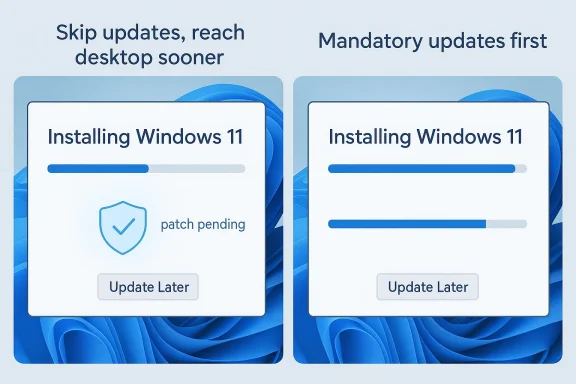
Microsoft’s latest Windows 11 setup tweak is small in appearance but significant in practice: after months of tightening the Out-of-Box Experience, the company is now letting some users skip post-installation updates and go straight to the desktop with an “Update Later” option. That may sound like a modest quality-of-life improvement, but it marks an important shift in Microsoft’s balancing act between security, control, and user convenience. It also comes less than a year after Microsoft made setup-time security updates mandatory and unskippable, so the reversal is striking.
The Windows setup flow, known as the Out-of-Box Experience or OOBE, has gradually become one of the most scrutinized parts of the operating system. What once felt like a straightforward path to a usable PC now includes account sign-in prompts, privacy screens, network checks, device-specific configuration steps, and increasingly, update enforcement. For enthusiasts, IT admins, and even ordinary home users performing a fresh install, the process has often felt longer than it should be.
Microsoft’s decision to introduce an “Update Later” path is notable because it comes after a period in which the company leaned hard the other way. In September 2025, Windows 11 setup-time security updates were rolled out as mandatory and unskippable, with the goal of making sure a newly installed system was protected before the user got settled in. That policy reflected Microsoft’s long-standing security-first posture, but it also turned OOBE into something more like a forced maintenance window than an onboarding flow.
The new change, reported by PCWorld and said to be rolling out officially, appears aimed at reducing friction for people who simply want to get back to work or testing as quickly as possible. It also fits with Microsoft’s earlier promise to cut down on unnecessary prompts and recommendations during setup and deliver a more “relaxed experience,” which is a telling phrase. The company seems to be acknowledging a basic truth: if setup feels punitive, users will resent the platform before they even reach the desktop.
At the same time, this is not a clean ideological reversal. Microsoft is not abandoning updates; it is creating a narrower choice about when to take them. That distinction matters because it preserves the company’s security message while giving users and technicians one more lever to control installation timing. In the Windows ecosystem, timing often matters as much as policy, and this change is really about timing.
Security has been the major counterweight to that trend. Microsoft has repeatedly pushed to make Windows more secure out of the box, especially as attacks targeting fresh installs, unpatched systems, and weak defaults have become more common. From Microsoft’s perspective, the argument is straightforward: the moment a device gets online, it should be as protected as possible. That logic is hard to dismiss, especially in managed environments and on consumer PCs that may sit unpatched for days or weeks.
But the company’s security stance has often collided with user expectations around control. A fresh installation is one of the few times users expect to be able to make decisions quickly and cleanly. When setup suddenly becomes a download marathon, especially on slower connections or older hardware, the experience feels less like empowerment and more like waiting in line. That frustration is part of why “Update Later” is likely to be popular even among users who generally support automatic patching.
Microsoft’s OOBE changes have also arrived against a broader backdrop of Windows 11 rollout pressure. The company is still trying to move the installed base toward newer builds and tighter account integration, while also responding to criticism about complexity and bloat. In that sense, the new skip option may be less a tactical retreat than an admission that more control can be a form of simplification.
What makes this especially interesting is the contrast with Microsoft’s earlier posture. In the recent past, once those setup-time security updates were introduced, they were effectively non-optional. That was meant to ensure the first boot state was hardened. The new option does not undo that security philosophy, but it does relax the enforcement point, and that is a meaningful policy change.
For users, the biggest benefit is obvious: shorter setup. For technicians, it can mean less waiting on machines that need to be imaged, tested, or handed off quickly. For Microsoft, the benefit is subtler: it may reduce complaints that Windows setup feels bloated and slow. In other words, the change is as much about perception as it is about mechanics.
That means the change is best understood as a trust-based adjustment rather than a security model change. Microsoft is assuming that informed users will know when skipping is acceptable and when it is reckless. In a home lab or offline deployment workflow, that may be reasonable. On a general-purpose consumer laptop, it is less comforting.
There is also a broader ecosystem effect here. The more Microsoft allows users to defer setup-time updates, the more responsibility shifts to the user to understand patching discipline. For experienced readers, that may seem trivial. For ordinary users, it raises the odds of a device being used for hours or days without essential fixes.
Enterprises are also more likely than consumers to understand the consequences of delayed patching. A machine deployed into a corporate environment without its latest fixes is not just an inconvenience; it can be a compliance problem. That means the option to skip updates is probably most useful when paired with a strong management platform, not when used as a shortcut. In that sense, Microsoft may be giving admins a little more room to design their own sequencing.
At the same time, the change could complicate support expectations. If an employee receives a newly imaged PC that reaches the desktop immediately but later exhibits issues due to deferred updates, the help desk has to explain the difference between usable and fully secured. That distinction is obvious to professionals and invisible to many users.
That said, consumers are also the group most likely to defer updates too long. Many home users do not think about patching until a problem occurs. Allowing them to skip setup-time updates could be a net usability win, but it also increases the chance that the system will remain exposed longer than Microsoft would like. Ease and discipline do not always travel together.
There is also a subtle messaging issue. If Microsoft encourages people to finish setup faster, some users may infer that updates are less urgent than they really are. That would be a mistake. The option may be convenient, but it does not reduce the priority of patching after first boot.
Microsoft has already been trimming and reshaping OOBE in other ways, including efforts to reduce unnecessary prompts and make the onboarding experience feel more relaxed. At the same time, it has continued to push account sign-in requirements, cloud connectivity, and build-level enforcement where it sees fit. The company is not retreating from control; it is reallocating control.
That matters because Windows remains a platform that has to serve everybody from casual home users to enterprise IT departments to testers, OEMs, and developers. A one-size-fits-all setup flow always ends up annoying somebody. The latest adjustment suggests Microsoft is trying to reduce the number of users who feel forced into a workflow they did not want.
But the company has also repeatedly learned that coercion has limits. Users tolerate automation when it works quietly. They resist it when it makes the system feel slow, unpredictable, or controlling. The OOBE update policy changes are a good example of that tension. What looks admirable in a security briefing can look irritating on a consumer laptop sitting at 65 percent and “preparing updates.”
The new option also arrives in a period when Microsoft is closely watching Windows adoption dynamics. With Windows 10’s end-of-support horizon looming in the broader market and Windows 11 still under scrutiny for its requirements and UI decisions, the company has a strong incentive to make the newer OS feel less hostile. A smoother install experience will not solve all adoption challenges, but it can remove one more complaint from the pile.
This is especially true for consumer laptop buyers who may not care about patch sequencing but absolutely notice delays before they can browse, sign in, and start working. If Microsoft can make Windows feel less ceremonial, it gains a small but meaningful advantage in perception. Perception influences brand loyalty, and brand loyalty influences retention. That chain is simple, but it is powerful.
Still, the competitive story should not be overstated. Windows remains dominant because of compatibility, enterprise depth, and software breadth, not because OOBE is elegant. The new option is unlikely to change platform choice by itself. What it can do is reduce irritation at the exact moment when users are forming their first or renewed impression of the operating system.
We should also watch how the rollout behaves in the real world. Microsoft’s staged releases often look straightforward in theory but take time to reach everyone in practice, and that uncertainty matters for people planning refreshes or deployments. If the new option is inconsistent across editions, channels, or hardware families, then the benefit will be uneven and the confusion will linger.
Source: PCWorld Microsoft is finally letting you skip updates during Windows 11 setup
 Overview
The Windows setup flow, known as the Out-of-Box Experience or OOBE, has gradually become one of the most scrutinized parts of the operating system. What once felt like a straightforward path to a usable PC now includes account sign-in prompts, privacy screens, network checks, device-specific configuration steps, and increasingly, update enforcement. For enthusiasts, IT admins, and even ordinary home users performing a fresh install, the process has often felt longer than it should be.Microsoft’s decision to introduce an “Update Later” path is notable because it comes after a period in which the company leaned hard the other way. In September 2025, Windows 11 setup-time security updates were rolled out as mandatory and unskippable, with the goal of making sure a newly installed system was protected before the user got settled in. That policy reflected Microsoft’s long-standing security-first posture, but it also turned OOBE into something more like a forced maintenance window than an onboarding flow.
The new change, reported by PCWorld and said to be rolling out officially, appears aimed at reducing friction for people who simply want to get back to work or testing as quickly as possible. It also fits with Microsoft’s earlier promise to cut down on unnecessary prompts and recommendations during setup and deliver a more “relaxed experience,” which is a telling phrase. The company seems to be acknowledging a basic truth: if setup feels punitive, users will resent the platform before they even reach the desktop.
At the same time, this is not a clean ideological reversal. Microsoft is not abandoning updates; it is creating a narrower choice about when to take them. That distinction matters because it preserves the company’s security message while giving users and technicians one more lever to control installation timing. In the Windows ecosystem, timing often matters as much as policy, and this change is really about timing.
Background
To understand why this matters, it helps to remember how Microsoft has been evolving Windows setup. OOBE used to be mostly about language, keyboard, account, and a few basic privacy settings. Over time, however, Microsoft layered in more cloud integration, more recommendation screens, more AI-related nudges, and more opportunities to steer users toward Microsoft services. The result has been a setup process that feels more like a product funnel than a pure operating-system install.Security has been the major counterweight to that trend. Microsoft has repeatedly pushed to make Windows more secure out of the box, especially as attacks targeting fresh installs, unpatched systems, and weak defaults have become more common. From Microsoft’s perspective, the argument is straightforward: the moment a device gets online, it should be as protected as possible. That logic is hard to dismiss, especially in managed environments and on consumer PCs that may sit unpatched for days or weeks.
But the company’s security stance has often collided with user expectations around control. A fresh installation is one of the few times users expect to be able to make decisions quickly and cleanly. When setup suddenly becomes a download marathon, especially on slower connections or older hardware, the experience feels less like empowerment and more like waiting in line. That frustration is part of why “Update Later” is likely to be popular even among users who generally support automatic patching.
Microsoft’s OOBE changes have also arrived against a broader backdrop of Windows 11 rollout pressure. The company is still trying to move the installed base toward newer builds and tighter account integration, while also responding to criticism about complexity and bloat. In that sense, the new skip option may be less a tactical retreat than an admission that more control can be a form of simplification.
Why OOBE Became a Battleground
OOBE is now the point where multiple Microsoft priorities collide. It is where the company tries to enforce sign-in policies, encourage cloud services, ensure device health, and seed the system with the latest patches. That makes it a powerful choke point, but also a highly visible one. Every extra minute spent in OOBE becomes a minute when the user is judging Windows by its most annoying behavior.- Security pushes Microsoft toward mandatory updates.
- Convenience pushes users toward immediate desktop access.
- Support costs push IT teams toward predictable first-boot states.
- Product strategy pushes Microsoft toward more account and service integration.
What Changed
The practical change is simple: during Windows 11 setup, users can now choose “Update Later” instead of waiting for post-installation updates to finish before reaching the desktop. According to the reporting, the rollout is official but gradual, which means not every installer will see it immediately. That is classic Microsoft feature delivery: broad in intent, uneven in timing.What makes this especially interesting is the contrast with Microsoft’s earlier posture. In the recent past, once those setup-time security updates were introduced, they were effectively non-optional. That was meant to ensure the first boot state was hardened. The new option does not undo that security philosophy, but it does relax the enforcement point, and that is a meaningful policy change.
For users, the biggest benefit is obvious: shorter setup. For technicians, it can mean less waiting on machines that need to be imaged, tested, or handed off quickly. For Microsoft, the benefit is subtler: it may reduce complaints that Windows setup feels bloated and slow. In other words, the change is as much about perception as it is about mechanics.
The User Experience Impact
The desktop is where users feel that an install is “done,” even if updates still need to be applied later. By allowing that transition earlier, Microsoft is restoring some psychological momentum to the setup process. That matters because a setup that ends quickly feels more modern and less punitive.- Users can reach the desktop sooner.
- IT teams can continue post-install tasks in parallel.
- Slow connections become less disruptive during initial setup.
- First impressions may improve, especially on retail PCs.
Security Tradeoffs
Microsoft’s own logic for mandatory updates was never difficult to follow: an unpatched machine is a weaker machine. That is especially true immediately after a clean install, when the system may be exposed to vulnerabilities already known to attackers. The new “Update Later” option does not change that underlying reality. It just gives users permission to postpone the fix.That means the change is best understood as a trust-based adjustment rather than a security model change. Microsoft is assuming that informed users will know when skipping is acceptable and when it is reckless. In a home lab or offline deployment workflow, that may be reasonable. On a general-purpose consumer laptop, it is less comforting.
There is also a broader ecosystem effect here. The more Microsoft allows users to defer setup-time updates, the more responsibility shifts to the user to understand patching discipline. For experienced readers, that may seem trivial. For ordinary users, it raises the odds of a device being used for hours or days without essential fixes.
Security in Practice
The risk is not theoretical. A freshly installed machine can be exposed to flaws that are already patched in the wild, and those flaws can remain open until the user manually updates. That is why security teams usually prefer the device to ingest updates before it joins a production network. The convenience of fast setup is real, but so is the exposure window.- Skipped updates can leave known vulnerabilities open.
- First-boot protection is weaker if the device is connected immediately.
- Consumer users may forget to update later.
- Enterprises may need to enforce their own compliance steps.
Enterprise Implications
For businesses, this change may actually be more useful than it first appears. Many deployment pipelines already handle updates separately through endpoint management tools, imaging workflows, or post-provision scripts. If OOBE no longer insists on doing everything itself, that can reduce duplication and improve control. For managed fleets, control is often more valuable than convenience.Enterprises are also more likely than consumers to understand the consequences of delayed patching. A machine deployed into a corporate environment without its latest fixes is not just an inconvenience; it can be a compliance problem. That means the option to skip updates is probably most useful when paired with a strong management platform, not when used as a shortcut. In that sense, Microsoft may be giving admins a little more room to design their own sequencing.
At the same time, the change could complicate support expectations. If an employee receives a newly imaged PC that reaches the desktop immediately but later exhibits issues due to deferred updates, the help desk has to explain the difference between usable and fully secured. That distinction is obvious to professionals and invisible to many users.
Managed Deployment Scenarios
In labs, call centers, schools, and retail rollouts, shaving minutes off setup can save real time across dozens or hundreds of devices. That is why an “Update Later” option may be attractive to administrators who already schedule patching centrally. It creates a cleaner handoff from provisioning to policy enforcement.- Faster imaging cycles.
- Better alignment with offline or staged deployment.
- Reduced waiting time during device handoff.
- More predictable provisioning in controlled environments.
Consumer Impact
For consumers, the story is more emotionally charged. A person reinstalling Windows at home usually wants one thing: the machine back in working order with as little ceremony as possible. Waiting for updates during setup can feel like a penalty for doing the right thing. Microsoft’s new option may therefore be popular precisely because it returns some agency to the person in front of the screen.That said, consumers are also the group most likely to defer updates too long. Many home users do not think about patching until a problem occurs. Allowing them to skip setup-time updates could be a net usability win, but it also increases the chance that the system will remain exposed longer than Microsoft would like. Ease and discipline do not always travel together.
There is also a subtle messaging issue. If Microsoft encourages people to finish setup faster, some users may infer that updates are less urgent than they really are. That would be a mistake. The option may be convenient, but it does not reduce the priority of patching after first boot.
What Home Users Should Take Away
The most responsible interpretation is this: use the skip option if you need the desktop immediately, but treat it as a temporary detour. Once you are in Windows, updates should be among the first tasks you perform. That is especially true if the device will connect to the internet, sign in to personal accounts, or handle sensitive data.- Skip only when time or bandwidth matters.
- Update as soon as practical after first boot.
- Recheck Windows Update before installing key apps.
- Avoid leaving a fresh install unpatched overnight if possible.
Microsoft’s Broader Strategy
This change fits a pattern that has become increasingly clear in 2025 and 2026: Microsoft is trying to make Windows 11 both more opinionated and less obnoxious. Those goals are not always in conflict, but they often pull in opposite directions. A more secure platform usually wants more enforcement, while a more pleasant platform usually wants fewer interruptions.Microsoft has already been trimming and reshaping OOBE in other ways, including efforts to reduce unnecessary prompts and make the onboarding experience feel more relaxed. At the same time, it has continued to push account sign-in requirements, cloud connectivity, and build-level enforcement where it sees fit. The company is not retreating from control; it is reallocating control.
That matters because Windows remains a platform that has to serve everybody from casual home users to enterprise IT departments to testers, OEMs, and developers. A one-size-fits-all setup flow always ends up annoying somebody. The latest adjustment suggests Microsoft is trying to reduce the number of users who feel forced into a workflow they did not want.
The Balance Between Control and Choice
Microsoft’s long-term challenge is to preserve security defaults without making Windows feel like a locked-down appliance. The “Update Later” button is a tiny piece of interface design, but it reflects a larger philosophy shift: guidance is still allowed, but some decisions can now be deferred. That is often how platform companies recover goodwill.- More choice can reduce resistance.
- Less friction can improve first impressions.
- Deferred updates can preserve some flexibility.
- Security messaging must remain explicit.
Historical Context
It is worth remembering that Windows has been moving toward stricter update behavior for years. What began as a mostly manual maintenance process evolved into a largely automatic one, especially as threat actors got faster and more professional. Microsoft’s shift was not arbitrary; it was a response to a security environment in which stale systems became easy targets.But the company has also repeatedly learned that coercion has limits. Users tolerate automation when it works quietly. They resist it when it makes the system feel slow, unpredictable, or controlling. The OOBE update policy changes are a good example of that tension. What looks admirable in a security briefing can look irritating on a consumer laptop sitting at 65 percent and “preparing updates.”
The new option also arrives in a period when Microsoft is closely watching Windows adoption dynamics. With Windows 10’s end-of-support horizon looming in the broader market and Windows 11 still under scrutiny for its requirements and UI decisions, the company has a strong incentive to make the newer OS feel less hostile. A smoother install experience will not solve all adoption challenges, but it can remove one more complaint from the pile.
A Pattern of Oscillation
If the last year of Windows behavior feels inconsistent, that is because Microsoft has been oscillating between enforcement and flexibility. It has tightened some setup requirements, relaxed others, and kept refining its timing. This is not necessarily confusion; it is iterative platform management. But to users, it can look like the company is constantly changing its mind.- Enforce security when the risk is highest.
- Ease off when usability complaints spike.
- Preserve optional paths where possible.
- Keep the default posture conservative.
Competitive Implications
Although this is a Windows-specific change, it has competitive implications for Microsoft’s broader ecosystem. A smoother install flow reduces one of the easier arguments critics use against Windows: that it takes too long to get a machine ready for real use. In a world where Apple, ChromeOS, and even some Linux distributions emphasize quick onboarding, setup friction matters more than it used to.This is especially true for consumer laptop buyers who may not care about patch sequencing but absolutely notice delays before they can browse, sign in, and start working. If Microsoft can make Windows feel less ceremonial, it gains a small but meaningful advantage in perception. Perception influences brand loyalty, and brand loyalty influences retention. That chain is simple, but it is powerful.
Still, the competitive story should not be overstated. Windows remains dominant because of compatibility, enterprise depth, and software breadth, not because OOBE is elegant. The new option is unlikely to change platform choice by itself. What it can do is reduce irritation at the exact moment when users are forming their first or renewed impression of the operating system.
Why Small UX Changes Matter
In operating systems, first impressions are sticky. Users remember whether a setup felt fast, whether it interrupted them, and whether it respected their time. That memory can color every future interaction. Microsoft knows this, which is why even tiny changes to onboarding deserve attention.- Faster first boot improves perceived quality.
- Fewer forced waits reduce frustration.
- Better setup flow helps renew confidence.
- Frictionless onboarding can support upgrade messaging.
Strengths and Opportunities
Microsoft’s new setup option offers a real usability gain without abandoning the company’s security stance. If handled well, it could improve user satisfaction, help IT teams, and make Windows 11 feel more polished at a moment when Microsoft badly needs its onboarding story to feel calmer. The opportunity is not just to shorten setup; it is to make Windows seem less overbearing.- Faster access to the desktop for home users and technicians.
- Better alignment with enterprise imaging and managed update workflows.
- Reduced frustration during clean installs and reinstalls.
- More flexibility for offline, low-bandwidth, or staged deployments.
- Improved first impressions for Windows 11 on new hardware.
- A softer security posture that still preserves patching as a priority.
- Potential goodwill boost among power users who value control.
Risks and Concerns
The biggest risk is that convenience will outpace caution. If users interpret “Update Later” as “Update Whenever,” Microsoft could end up with more freshly installed but underpatched machines in the wild. That would create a security gap the company has spent years trying to close, and it could also generate support issues that are hard to trace back to the original choice.- Delayed patching leaves systems exposed longer.
- Consumer users may forget to update after first boot.
- Help desk confusion may rise when deferred updates cause issues.
- Security messaging can become muddled if the option is misunderstood.
- Microsoft may face criticism for loosening protection after making it mandatory.
- Deployment inconsistency could appear across rollout stages.
- Opt-in flexibility might still feel insufficient to users who want full control.
Looking Ahead
The key thing to watch is whether Microsoft treats this as a one-off concession or as part of a broader rethinking of Windows setup. If the company continues simplifying OOBE, reducing unnecessary prompts, and giving users more sensible deferral options, Windows 11 could become noticeably less irritating to install and reinstall. If not, this may end up as just another small toggle in a setup flow that still feels too busy.We should also watch how the rollout behaves in the real world. Microsoft’s staged releases often look straightforward in theory but take time to reach everyone in practice, and that uncertainty matters for people planning refreshes or deployments. If the new option is inconsistent across editions, channels, or hardware families, then the benefit will be uneven and the confusion will linger.
- Whether the “Update Later” button appears broadly or only in select builds.
- Whether Microsoft pairs the change with fewer setup prompts overall.
- Whether enterprise deployment tools adapt around the new behavior.
- Whether security guidance becomes more explicit to prevent misuse.
- Whether future OOBE updates continue moving toward a calmer flow.
Source: PCWorld Microsoft is finally letting you skip updates during Windows 11 setup
