

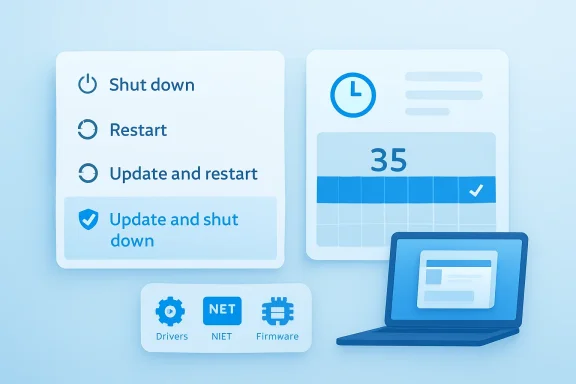
Microsoft is testing one of the most user-friendly Windows Update changes in years: a clearer split between ordinary power actions and update-triggering actions, plus a more flexible way to pause updates for up to 35 days at a time. For anyone who has watched a quick restart turn into a forced installation ritual, the promise is simple: Shut down should mean shut down, and Restart should mean restart. The changes are rolling out first to Windows Insiders in the Dev, Beta, and new Experimental testing paths, but the larger message is aimed at every Windows 11 user who has felt that Windows Update too often behaves like an interruption rather than a service.
Windows Update has always carried a difficult burden: it must patch hundreds of millions of machines quickly enough to blunt malware campaigns, while also respecting the fact that PCs are personal and business-critical devices. That tension became sharper with Windows 10, when Microsoft shifted Windows toward a more service-like model. Updates became more frequent, more automatic, and more tightly integrated into the operating system’s security posture.
The result was better fleet-wide patch velocity, but also years of complaints. Users objected not merely to updates themselves, but to the timing, ambiguity, and occasional unpredictability of the process. A PC that demands attention during a work deadline, a game session, a presentation, or a travel day can make even a well-intentioned security update feel hostile.
Microsoft has gradually softened the roughest edges. Active hours, restart scheduling, update pausing, smaller update packages, and enterprise deadline policies all helped. Yet the core frustration remained: when an update was pending, the Power menu could make normal shutdown and restart behavior feel conditional.
The newly tested update experience is therefore more than a cosmetic tweak. It represents a notable shift in Microsoft’s tone: from Windows knows best toward Windows should ask clearly. That does not mean Microsoft is abandoning automatic patching, but it does suggest the company has accepted that trust is part of security.
For years, Windows users have built rituals around avoiding surprise updates. Some delay restarts, some hibernate instead of shutting down, and others simply leave machines running to avoid triggering a patch cycle. Those behaviors are not ideal for security, reliability, or energy use.
The new layout creates a more honest contract between the system and the person using it. If the user chooses a plain restart, Windows should restart without installing the pending update. If the user is ready to install, the update-specific options remain available.
The practical use cases are obvious. A student can avoid a major update during exam week. A consultant can protect a machine before client travel. A gamer can keep a tournament weekend free from surprise restarts. A small business owner can avoid patch changes during payroll, inventory, or a major sales event.
This does not mean users should treat indefinite pausing as a good long-term habit. Security updates exist because vulnerabilities are real, and the longer a machine remains unpatched, the more exposed it becomes. But the new model recognizes that not every week is equal.
A more flexible pause system could also reduce risky workarounds. Users who feel trapped often search for registry hacks, metered connection tricks, service-disabling tools, or third-party utilities. Giving people a supported way to delay updates may keep more devices within Microsoft’s intended update framework.
Today, update fatigue often comes from fragmentation. A user may install a Windows cumulative update, then later see a driver update, then a .NET update, then a firmware package from the device maker. Each may carry its own installation logic, risk profile, and restart prompt.
A more coordinated monthly cadence would make Windows feel less needy. It would also align better with how many organizations already think about patch management: one regular maintenance window, one validation cycle, and one predictable user communication. For consumers, it turns updates into something closer to a routine appointment.
Better labels reduce anxiety. If a user sees that an update is for audio, they can connect it to a recent headset issue or decide to wait if everything is working. If an update is for the display adapter, a gamer or creative professional may choose a more careful moment to install.
This is also a subtle win for troubleshooting. When a driver update causes a regression, users and support communities need to know what changed. A label that says display or battery provides a faster starting point than a mystery package name.
The clearer classification may help forum-based support as well. Windows communities often spend time translating driver titles into plain English. If Windows itself provides better context, support threads can focus on symptoms, rollback paths, and known issues rather than basic identification.
That balance is difficult. If Microsoft is too aggressive, users resent the system and look for ways around it. If Microsoft is too permissive, unpatched PCs become soft targets for ransomware, credential theft, botnets, and browser-to-kernel exploit chains. The new approach tries to make cooperation easier.
The 35-day pause model is especially telling. Microsoft is allowing repeated pauses, but in defined blocks rather than a single permanent off switch. That keeps the user returning to the decision point, where Windows can remind them that updates are waiting.
For enterprise administrators, this approach echoes existing concepts such as deferrals, deadline policies, grace periods, and deployment rings. The consumer-facing version is simpler, but the underlying philosophy is similar: updates should be controlled through supported policy and scheduling mechanisms, not avoidance hacks.
The ability to choose plain Restart or Shut down is particularly useful for power users who reboot frequently. Many troubleshooting workflows require restarts that should not also become patch events. Separating restart intent from update intent keeps the user in control of the diagnostic process.
For gamers, driver updates remain a mixed blessing. A graphics driver may improve performance in one title while breaking overlays, HDR behavior, frame generation, or anti-cheat compatibility in another. Clearer labels and better timing controls give enthusiasts more room to wait for community feedback before installing.
Developers also benefit from predictability. A build environment, emulator stack, WSL setup, or local database can be sensitive to updates. When a machine is mid-project, the priority is often stability, not novelty.
For managed devices, user freedom must coexist with compliance. A regulated organization cannot allow every employee to pause updates indefinitely without guardrails. A hospital, financial firm, school district, or government agency needs assurance that pause controls do not undermine patch baselines.
The most likely outcome is a layered model. Consumers get direct calendar-based pause controls. Managed devices may expose some of the same experience, but bounded by administrator policy. That would preserve Microsoft’s usability gains without giving up enterprise governance.
IT administrators will want answers to several questions. Can the new pause behavior be disabled or limited? Will power menu choices respect compliance deadlines? How will firmware and driver coordination appear in reporting dashboards? Will update grouping change maintenance window planning?
Historically, Insider builds have sometimes frustrated testers because announced features did not always appear on every machine at once. Microsoft has been trying to address that with more visible feature controls and a more deliberate channel strategy. If testers can actually test the features being discussed, feedback becomes more meaningful.
This is especially important for update behavior. A power menu change, pause calendar, or grouped update presentation must be judged across hardware types, languages, device states, and user habits. The edge cases are where Windows Update earns or loses trust.
The Experimental channel also gives Microsoft room to try ideas that may not ship exactly as first shown. That is healthy, provided Microsoft communicates clearly. With Windows Update, users care less about novelty than about reliability.
The bigger competitive issue is trust. Microsoft is pushing Windows deeper into cloud accounts, AI features, Copilot experiences, Recall-style concepts, Microsoft Store services, and subscription-connected workflows. In that context, every forced-feeling system behavior becomes part of a larger narrative about whether Windows respects user agency.
Reducing update friction helps Microsoft argue that Windows 11 is becoming more responsive to feedback. That matters to enthusiasts, but it also matters to OEMs selling laptops and desktops into a cautious market. A smoother update story makes new Windows PCs easier to recommend.
There is also a gaming angle. Handheld gaming PCs, living-room PCs, and portable creator laptops all depend on appliance-like reliability. If Windows wants to compete in more console-like and mobile-like scenarios, it cannot surprise users with desktop-era maintenance interruptions.
The taskbar is a good example. Windows 11 simplified and modernized the shell, but it also removed or limited options that long-time users valued. If Microsoft restores more placement flexibility, it would signal that design consistency no longer automatically outweighs user preference.
Copilot is another flashpoint. AI assistance can be useful, but users resist when entry points feel excessive, promotional, or difficult to ignore. Reducing unnecessary Copilot surfaces would be a recognition that powerful features work best when they are available, not unavoidable.
Seen together, update controls, taskbar flexibility, and a quieter AI footprint suggest a more pragmatic Microsoft. The company still wants to move Windows forward, but it may be learning that forward motion cannot come at the expense of everyday comfort.
Microsoft should also communicate carefully about security. The company can give users more control without implying that updates are optional forever. The strongest message would be: choose the right time, but do not ignore the update indefinitely.
What to watch next:
Source: PCMag UK Microsoft Will Finally Give You More Control Over Windows Updates
 Background
Windows Update has always carried a difficult burden: it must patch hundreds of millions of machines quickly enough to blunt malware campaigns, while also respecting the fact that PCs are personal and business-critical devices. That tension became sharper with Windows 10, when Microsoft shifted Windows toward a more service-like model. Updates became more frequent, more automatic, and more tightly integrated into the operating system’s security posture.The result was better fleet-wide patch velocity, but also years of complaints. Users objected not merely to updates themselves, but to the timing, ambiguity, and occasional unpredictability of the process. A PC that demands attention during a work deadline, a game session, a presentation, or a travel day can make even a well-intentioned security update feel hostile.
Microsoft has gradually softened the roughest edges. Active hours, restart scheduling, update pausing, smaller update packages, and enterprise deadline policies all helped. Yet the core frustration remained: when an update was pending, the Power menu could make normal shutdown and restart behavior feel conditional.
The newly tested update experience is therefore more than a cosmetic tweak. It represents a notable shift in Microsoft’s tone: from Windows knows best toward Windows should ask clearly. That does not mean Microsoft is abandoning automatic patching, but it does suggest the company has accepted that trust is part of security.
The Power Menu Finally Says What It Means
A small UI change with big psychological impact
The headline change is deceptively simple: Windows will now clearly separate ordinary power actions from update actions. Users should see normal Restart and Shut down options even when an update is waiting, alongside explicit choices such as Update and restart or Update and shut down. That clarity matters because users should not have to decode whether a basic power command is secretly an update command.For years, Windows users have built rituals around avoiding surprise updates. Some delay restarts, some hibernate instead of shutting down, and others simply leave machines running to avoid triggering a patch cycle. Those behaviors are not ideal for security, reliability, or energy use.
The new layout creates a more honest contract between the system and the person using it. If the user chooses a plain restart, Windows should restart without installing the pending update. If the user is ready to install, the update-specific options remain available.
- Restart means restart without applying the pending update.
- Shut down means power off without beginning installation.
- Update and restart remains available when the user is ready.
- Update and shut down remains available for planned patching.
- Choice becomes visible instead of implied.
Pause Updates Becomes a Planning Tool
From emergency brake to calendar control
Microsoft is also changing the pause experience so users can choose a specific pause end date, up to 35 days away. More importantly, users will be able to extend that pause again in additional 35-day windows, reportedly with no fixed limit on how many times they can reset the end date. That makes update pausing less of a one-time escape hatch and more of a genuine scheduling tool.The practical use cases are obvious. A student can avoid a major update during exam week. A consultant can protect a machine before client travel. A gamer can keep a tournament weekend free from surprise restarts. A small business owner can avoid patch changes during payroll, inventory, or a major sales event.
This does not mean users should treat indefinite pausing as a good long-term habit. Security updates exist because vulnerabilities are real, and the longer a machine remains unpatched, the more exposed it becomes. But the new model recognizes that not every week is equal.
A more flexible pause system could also reduce risky workarounds. Users who feel trapped often search for registry hacks, metered connection tricks, service-disabling tools, or third-party utilities. Giving people a supported way to delay updates may keep more devices within Microsoft’s intended update framework.
- Choose a pause date in Windows Update settings.
- Confirm the pause window, up to 35 days.
- Resume updates manually when convenient.
- Extend the pause again if the timing is still bad.
- Install critical updates as soon as practical.
Fewer Restarts Could Change the Monthly Rhythm
Bundling driver, .NET, firmware, and quality updates
Microsoft says it is working to coordinate driver, .NET, and firmware updates with the monthly Windows quality update. The goal is to reduce the update experience to a single monthly restart for mainstream retail users who are not seeking early updates. That could be a major quality-of-life improvement if it works consistently.Today, update fatigue often comes from fragmentation. A user may install a Windows cumulative update, then later see a driver update, then a .NET update, then a firmware package from the device maker. Each may carry its own installation logic, risk profile, and restart prompt.
A more coordinated monthly cadence would make Windows feel less needy. It would also align better with how many organizations already think about patch management: one regular maintenance window, one validation cycle, and one predictable user communication. For consumers, it turns updates into something closer to a routine appointment.
- Quality updates remain the security and reliability backbone.
- Driver updates can be grouped more intelligibly.
- Firmware updates may become less disruptive when coordinated.
- .NET updates can ride the same monthly rhythm.
- Restart prompts should appear less frequently.
Driver Updates Get Easier to Understand
Device class labels reduce mystery
Another useful change involves driver update labeling. Windows will display the device class next to driver titles, helping users understand whether an update applies to display, audio, battery, storage, extension, or other hardware categories. This matters because driver updates have long appeared to many users as cryptic strings of vendor names, version numbers, and opaque identifiers.Better labels reduce anxiety. If a user sees that an update is for audio, they can connect it to a recent headset issue or decide to wait if everything is working. If an update is for the display adapter, a gamer or creative professional may choose a more careful moment to install.
This is also a subtle win for troubleshooting. When a driver update causes a regression, users and support communities need to know what changed. A label that says display or battery provides a faster starting point than a mystery package name.
The clearer classification may help forum-based support as well. Windows communities often spend time translating driver titles into plain English. If Windows itself provides better context, support threads can focus on symptoms, rollback paths, and known issues rather than basic identification.
- Display updates can affect gaming, color, brightness, and multi-monitor setups.
- Audio updates can change headset, microphone, or speaker behavior.
- Battery updates may affect charging, reporting, or power management.
- Firmware updates can touch low-level device behavior.
- Extension drivers often support vendor-specific hardware features.
Security by Default Still Drives the Strategy
Microsoft is not abandoning automatic patching
The new controls should not be mistaken for a retreat from Microsoft’s security-first update philosophy. Windows remains a massive target, and the company cannot simply let hundreds of millions of PCs drift indefinitely without patches. The changes are better understood as an attempt to preserve secure by default behavior while making the experience less disruptive.That balance is difficult. If Microsoft is too aggressive, users resent the system and look for ways around it. If Microsoft is too permissive, unpatched PCs become soft targets for ransomware, credential theft, botnets, and browser-to-kernel exploit chains. The new approach tries to make cooperation easier.
The 35-day pause model is especially telling. Microsoft is allowing repeated pauses, but in defined blocks rather than a single permanent off switch. That keeps the user returning to the decision point, where Windows can remind them that updates are waiting.
For enterprise administrators, this approach echoes existing concepts such as deferrals, deadline policies, grace periods, and deployment rings. The consumer-facing version is simpler, but the underlying philosophy is similar: updates should be controlled through supported policy and scheduling mechanisms, not avoidance hacks.
- Security updates still matter most.
- Emergency patches may override normal expectations.
- Pausing updates should be temporary, not habitual.
- Clear prompts can improve voluntary compliance.
- Trust is now part of the update strategy.
What This Means for Gamers and Power Users
Less fear before a session, build, or render
Gamers, creators, developers, and PC enthusiasts may feel the change more sharply than casual users. These groups often run workloads where timing matters: multiplayer sessions, livestreams, long code builds, video exports, virtual machines, benchmarks, and firmware-sensitive hardware setups. A badly timed update can mean lost work, lost rankings, or wasted hours.The ability to choose plain Restart or Shut down is particularly useful for power users who reboot frequently. Many troubleshooting workflows require restarts that should not also become patch events. Separating restart intent from update intent keeps the user in control of the diagnostic process.
For gamers, driver updates remain a mixed blessing. A graphics driver may improve performance in one title while breaking overlays, HDR behavior, frame generation, or anti-cheat compatibility in another. Clearer labels and better timing controls give enthusiasts more room to wait for community feedback before installing.
Developers also benefit from predictability. A build environment, emulator stack, WSL setup, or local database can be sensitive to updates. When a machine is mid-project, the priority is often stability, not novelty.
- Schedule updates after tournaments, streams, or major sessions.
- Avoid firmware changes before travel or presentations.
- Restart for troubleshooting without triggering update installation.
- Wait for early reports on driver regressions.
- Keep security patches moving once critical work is complete.
Enterprise IT Gets a Signal, Not the Whole Roadmap
Commercial controls will be the real test
Microsoft has indicated that more information is coming for commercial customers and administrators. That matters because enterprise update management is not the same as consumer update convenience. IT teams need policy controls, reporting, deadlines, exceptions, rollback strategies, and integration with tools such as Intune, Group Policy, Autopatch, and Windows Update reporting.For managed devices, user freedom must coexist with compliance. A regulated organization cannot allow every employee to pause updates indefinitely without guardrails. A hospital, financial firm, school district, or government agency needs assurance that pause controls do not undermine patch baselines.
The most likely outcome is a layered model. Consumers get direct calendar-based pause controls. Managed devices may expose some of the same experience, but bounded by administrator policy. That would preserve Microsoft’s usability gains without giving up enterprise governance.
IT administrators will want answers to several questions. Can the new pause behavior be disabled or limited? Will power menu choices respect compliance deadlines? How will firmware and driver coordination appear in reporting dashboards? Will update grouping change maintenance window planning?
- Admins need policy visibility for pause behavior.
- Compliance deadlines must remain enforceable.
- Update grouping should appear clearly in reports.
- Driver and firmware coordination needs rollback planning.
- User-facing messages should match organizational policy.
The Windows Insider Overhaul Matters Here
Experimental and Beta channels create a cleaner test bed
These update changes arrive alongside Microsoft’s broader reshaping of the Windows Insider Program. The new Experimental and Beta structure is meant to make preview testing clearer and more predictable. That matters because Windows Update itself is now being tested not just as a plumbing component, but as a user experience.Historically, Insider builds have sometimes frustrated testers because announced features did not always appear on every machine at once. Microsoft has been trying to address that with more visible feature controls and a more deliberate channel strategy. If testers can actually test the features being discussed, feedback becomes more meaningful.
This is especially important for update behavior. A power menu change, pause calendar, or grouped update presentation must be judged across hardware types, languages, device states, and user habits. The edge cases are where Windows Update earns or loses trust.
The Experimental channel also gives Microsoft room to try ideas that may not ship exactly as first shown. That is healthy, provided Microsoft communicates clearly. With Windows Update, users care less about novelty than about reliability.
- Insider feedback can catch confusing wording early.
- Hardware diversity helps expose driver-update edge cases.
- Feature flags may reduce confusion over rollout status.
- Beta testing can validate near-final behavior.
- Experimental builds can reveal unintended restart scenarios.
Competitive Pressure and the Broader PC Market
Windows must feel less intrusive in an AI-heavy era
Microsoft’s update changes arrive at a moment when the PC market is already under pressure from several directions. macOS has long leaned on a reputation for polished update presentation, ChromeOS emphasizes managed simplicity, and Linux distributions appeal to users who want transparent package control. Windows remains dominant, but dominance does not erase dissatisfaction.The bigger competitive issue is trust. Microsoft is pushing Windows deeper into cloud accounts, AI features, Copilot experiences, Recall-style concepts, Microsoft Store services, and subscription-connected workflows. In that context, every forced-feeling system behavior becomes part of a larger narrative about whether Windows respects user agency.
Reducing update friction helps Microsoft argue that Windows 11 is becoming more responsive to feedback. That matters to enthusiasts, but it also matters to OEMs selling laptops and desktops into a cautious market. A smoother update story makes new Windows PCs easier to recommend.
There is also a gaming angle. Handheld gaming PCs, living-room PCs, and portable creator laptops all depend on appliance-like reliability. If Windows wants to compete in more console-like and mobile-like scenarios, it cannot surprise users with desktop-era maintenance interruptions.
- macOS competes on polish and predictability.
- ChromeOS competes on simplicity and managed updates.
- Linux competes on transparency and user control.
- Windows competes on compatibility, scale, and ecosystem depth.
- Better update behavior strengthens the Windows value proposition.
The Copilot and Taskbar Context
A broader course correction may be underway
Microsoft has also teased other Windows 11 adjustments, including fewer unnecessary Copilot entry points and more flexibility around the currently constrained taskbar. These hints matter because they point to a pattern: Microsoft may be responding to a wave of feedback that Windows 11 sometimes feels too prescriptive.The taskbar is a good example. Windows 11 simplified and modernized the shell, but it also removed or limited options that long-time users valued. If Microsoft restores more placement flexibility, it would signal that design consistency no longer automatically outweighs user preference.
Copilot is another flashpoint. AI assistance can be useful, but users resist when entry points feel excessive, promotional, or difficult to ignore. Reducing unnecessary Copilot surfaces would be a recognition that powerful features work best when they are available, not unavoidable.
Seen together, update controls, taskbar flexibility, and a quieter AI footprint suggest a more pragmatic Microsoft. The company still wants to move Windows forward, but it may be learning that forward motion cannot come at the expense of everyday comfort.
- Update controls address interruption.
- Taskbar flexibility addresses muscle memory.
- Copilot restraint addresses feature fatigue.
- Insider changes address testing trust.
- Driver labels address transparency.
Strengths and Opportunities
Microsoft’s Windows Update overhaul has the potential to improve daily computing because it tackles the exact moments where users feel most powerless. The best updates are not only smaller or faster; they are predictable, understandable, and respectful of context.- Clear power actions reduce confusion when users only want to restart or shut down.
- Repeatable 35-day pauses give people a practical way to plan around important events.
- Coordinated monthly restarts could reduce update fatigue across mainstream PCs.
- Driver class labels make hardware updates easier to interpret and troubleshoot.
- Insider testing gives Microsoft a chance to refine edge cases before broad rollout.
- Enterprise policy alignment could make the same ideas useful in managed environments.
- Trust restoration may improve voluntary update compliance over time.
Risks and Concerns
The risks are real because Windows Update sits at the intersection of user choice, security urgency, and hardware complexity. A feature designed to reduce disruption could create new problems if communication, policy, or implementation falls short.- Indefinite pausing behavior may encourage some users to avoid security updates too long.
- Emergency patches could still interrupt users if Microsoft needs to respond to active threats.
- Driver bundling may complicate troubleshooting if multiple components change at once.
- Firmware coordination raises stakes because failed firmware updates can be more serious than ordinary patches.
- Enterprise ambiguity remains until Microsoft details commercial controls.
- Inconsistent rollout behavior could frustrate users if the feature appears on some PCs but not others.
- User expectations will rise quickly once Windows promises more predictable power actions.
Looking Ahead
The next phase will depend on how Microsoft moves from Insider testing to mainstream Windows 11 releases. The company needs to prove that the Power menu behaves exactly as advertised, that pause controls remain understandable, and that grouped updates do not obscure important details. A good idea implemented inconsistently would quickly become another Windows Update complaint.Microsoft should also communicate carefully about security. The company can give users more control without implying that updates are optional forever. The strongest message would be: choose the right time, but do not ignore the update indefinitely.
What to watch next:
- Whether these controls reach stable Windows 11 builds quickly or remain in preview for extended testing.
- How Microsoft exposes the same features to commercial customers through policy and management tools.
- Whether grouped monthly restarts actually reduce prompts on real-world consumer PCs.
- How emergency security updates behave when pause windows are active.
- Whether Microsoft follows through on taskbar flexibility and reduced Copilot clutter.
Source: PCMag UK Microsoft Will Finally Give You More Control Over Windows Updates
