

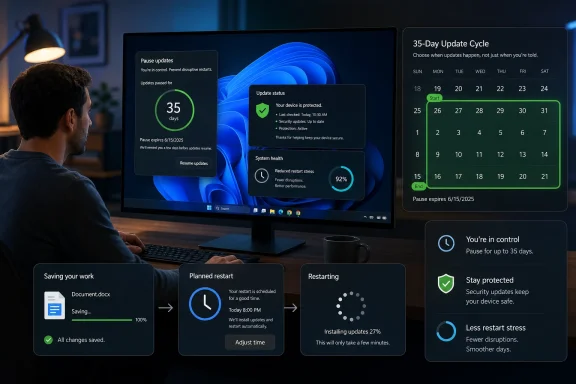
Microsoft’s latest Windows 11 update-control changes, now appearing in Insider testing in spring 2026, let users pause updates in repeatable 35-day blocks while Microsoft tries to reduce forced restarts and make shutdown choices less coercive. That is a real concession after a decade of Windows Update resentment. It is also not a permission slip to turn patching into a lifestyle. The smartest answer is not “never pause” or “always install immediately,” but “pause deliberately, briefly, and with a plan.”
For years, Windows Update has been defended as a security necessity and experienced by many users as an ambush. The complaint was never merely that Microsoft shipped patches. It was that the operating system too often behaved as if the user’s meeting, render job, lab instrument, game session, or remote desktop connection was an implementation detail.
The new pause model is Microsoft’s tacit admission that trust matters as much as telemetry. A user who believes the machine may restart at the wrong time learns to fear updates, and a user who fears updates eventually starts looking for ways to disable them entirely. The old bargain — Microsoft knows best, Windows will decide — may have improved fleet security on paper, but it also trained consumers and small businesses to treat Patch Tuesday as a threat.
That is why the 35-day repeatable pause is more than a settings tweak. It changes the emotional contract. Windows is no longer saying, “You may postpone this until we run out of patience.” It is saying, “You may choose the next window, but the responsibility is now visible.”
The danger is that a better snooze button can become a permanent off switch in disguise. Microsoft has solved one class of user-hostility problem by creating a new class of user-discipline problem.
That matters because update fatigue is cumulative. Users do not remember the hundred patches that installed cleanly. They remember the one update that rebooted while a document was open, broke a driver before a presentation, or turned a five-minute shutdown into a firmware-and-cumulative-update séance.
Microsoft’s newer approach also appears to separate two frustrations that have long been tangled together: installing updates and restarting to complete them. A Windows PC that downloads patches quietly is tolerable. A Windows PC that corners the user at shutdown with only “update and restart” style options feels punitive.
The company is right to attack that experience. Good security engineering does not merely ship fixes; it removes the incentives that make people avoid fixes. If Windows Update becomes less intrusive, fewer users will look for registry hacks, disabled services, third-party blockers, or “metered connection” workarounds.
But Microsoft’s design problem has always had a second half. It must give users control without implying that delay is harmless. The new interface may succeed at the first task and fail at the second if “pause until later” becomes the path of least resistance every time a notification appears.
The uncomfortable truth is that Patch Tuesday is now part of the public vulnerability economy. Once Microsoft publishes a fix, defenders get a patch — but attackers get a diff. Skilled threat actors can compare old and new code, infer what changed, and build working exploits for systems that have not yet updated.
That is the logic behind the industry phrase N-day vulnerability. A zero-day is dangerous because defenders do not yet have a fix. An N-day is dangerous because defenders do have a fix, but many machines have not installed it. At scale, the second category can be more attractive: the attacker knows the bug, knows the patch exists, and knows a large population will lag.
This is why experts quoted in the GB News report are right to warn against treating indefinite pause as a safety valve without consequences. A home PC that delays a cumulative update for six months is not merely missing a new icon or a taskbar refinement. It may be carrying a stack of known defects that have already been described, patched, indexed, and in some cases weaponized.
The practical risk varies by user. A gaming PC behind a consumer router is not the same as a domain-joined laptop used by a payroll administrator. But the principle holds: the longer the delay, the more your machine becomes a museum of solved problems that attackers still hope you have not solved.
A home user can lose an evening to a bad driver. A small business can lose a point-of-sale terminal. A school can lose a classroom cart. A sysadmin can lose a morning to BitLocker recovery prompts, VPN weirdness, printing failures, domain controller issues, or application compatibility regressions that were not visible in Microsoft’s test matrix.
Microsoft has improved Windows servicing dramatically compared with the chaotic early Windows 10 years, but “better” is not “risk-free.” The company’s cumulative update model means fixes arrive bundled. You often do not get to accept one security fix while declining one problematic behavior change. For many users, the update is a single opaque package with an uncertain blast radius.
That is why a pause button is legitimate. The right to delay is not anti-security; it is part of sane change management. Enterprises have long used rings, pilots, deferrals, maintenance windows, and rollback plans. Microsoft is now giving ordinary users a primitive version of the same idea.
The issue is not whether pausing is bad. It is whether pausing has an owner. A pause used to avoid a reboot during travel, exams, a deadline week, or an active production job is reasonable. A pause renewed every 35 days because the update screen is annoying is negligence with a friendly UI.
A practical home rule is to install routine updates within a few days and avoid stretching beyond one monthly cycle unless there is a known problem affecting your device. If reports emerge that a particular update breaks your hardware configuration, a short pause is sensible. If no such problem exists, waiting indefinitely buys little and compounds risk.
The average user should also distinguish between fear of updates and fear of restarts. If the machine is active, plugged in, backed up, and not in the middle of work, installing updates is usually uneventful. The pain comes when Windows chooses the timing poorly or when the user has not saved work and left the PC in a fragile state.
Backups change the calculation. A user with cloud-synced documents, restore points, current recovery keys, and a second device can tolerate update risk far better than someone whose only copy of critical data lives on one aging laptop. If you do not trust your update process, the answer is not permanent delay. The answer is to make recovery less terrifying.
For that group, Microsoft’s repeatable pause is both useful and dangerous. It gives the business a way to avoid updates during payroll, month-end close, a trade show, tax filing, or seasonal rush. It also makes it easy for every machine to drift into a different patch state because nobody owns the calendar.
Small businesses should treat the new control as a lightweight maintenance-window tool. Pick a recurring patch day. Update one or two less-critical machines first. Wait long enough to catch obvious problems. Then update the rest before the month gets away from you.
The worst pattern is random user choice. If each employee decides whether their own laptop updates, the business no longer has a patch policy; it has a hope policy. Attackers do not care that the office manager clicked pause because Windows interrupted a Zoom call three weeks ago.
For enterprise IT, the Microsoft change is still culturally significant. It reflects the same pressure administrators face internally: users want more control, security teams want faster patching, and operations teams want fewer surprise incidents. Every patch cycle is a negotiation among those three forces.
The best enterprise patch programs already assume that immediate universal deployment is risky and indefinite deferral is worse. They use staged rollout, telemetry, exception handling, and deadlines. They do not ask whether updates should be installed. They ask how quickly each class of update can be safely absorbed.
That distinction matters. A critical actively exploited flaw may justify emergency deployment and weekend work. A feature update can move more slowly. A preview update may be skipped entirely outside test groups. Lumping all of these under “Windows updates” is how consumer advice becomes enterprise malpractice.
When a user asks whether to skip updates, they may be thinking about a security patch. They may also be thinking about a feature change, a driver update, an optional preview release, or a cumulative update that includes all of the above. Microsoft’s categories are technically meaningful, but the user experience often collapses them into one button.
Security updates deserve urgency. Feature updates deserve planning. Driver updates deserve caution when hardware is stable. Optional previews deserve skepticism unless they fix a problem you actually have. Out-of-band emergency fixes deserve attention because they usually exist for a reason.
Microsoft has tried to improve this with release notes, known-issue dashboards, safeguard holds, and clearer language in Windows Update. But the interface still asks ordinary users to make risk decisions with limited context. “Download and install” is easy. Understanding whether the update fixes an actively exploited vulnerability or merely previews next month’s non-security changes is not.
The new pause system should therefore be judged not only by how much control it gives, but by how much judgment it supports. A calendar picker is useful. A calendar picker paired with clearer risk signals would be better.
Users have seen updates fail. Admins have watched a stable fleet turn unstable after a cumulative release. Gamers have seen drivers regress. Remote workers have been trapped by BitLocker recovery screens they did not know existed. The phrase “just patch” can sound glib when the person hearing it is the one who will sit through the outage.
At the same time, the anti-update folklore in enthusiast circles can be reckless. A bad patch is visible. A prevented compromise is invisible. The machine that updates and avoids ransomware does not produce a dramatic anecdote. The machine that updates and loses audio for a day does.
This asymmetry distorts the debate. Update failures are memorable and social. Successful patching is quiet and boring. Attackers thrive in the gap between the risks people feel and the risks they actually carry.
The better message is not “never pause.” It is “pause like you would postpone a medical appointment, not like you would ignore junk mail.” Sometimes rescheduling is reasonable. Pretending the appointment does not matter is how manageable problems become emergencies.
The less charitable reading is that Microsoft is offloading more responsibility onto users while preserving the complexity that made them resent Windows Update in the first place. If something goes wrong after a delayed patch, the answer can become, “You had control.” That may be true, but it is not sufficient.
The real test will be defaults. If Windows continues to install important updates automatically for most users while making pause easier to manage during bad moments, this is progress. If the new control encourages a large population to live months behind on cumulative patches, it will become a security own goal.
Microsoft also has to resist turning update trust into a communications problem alone. Users do not need warmer blog posts if updates keep surprising them. They need predictable restarts, accurate time estimates, reliable rollback, better hardware-driver discipline, plain-English severity signals, and fewer bundled surprises.
The company’s ambition should be that pausing becomes less necessary, not merely easier. Control is useful because Windows Update is imperfect. The long-term goal should be an update system trustworthy enough that most people rarely touch the pause button at all.
Microsoft has finally given Windows users a pause button that feels like control rather than a temporary stay of execution, and that is worth applauding. But the safer future is not one where everyone learns to defer updates forever; it is one where Windows becomes predictable enough that pausing is a rare act of scheduling, not a standing vote of no confidence.
Source: GB News Should you skip your Windows 11 updates? Experts weigh in on Microsoft's recent change
 Microsoft Finally Admits the Reboot Was the Product Problem
For years, Windows Update has been defended as a security necessity and experienced by many users as an ambush. The complaint was never merely that Microsoft shipped patches. It was that the operating system too often behaved as if the user’s meeting, render job, lab instrument, game session, or remote desktop connection was an implementation detail.The new pause model is Microsoft’s tacit admission that trust matters as much as telemetry. A user who believes the machine may restart at the wrong time learns to fear updates, and a user who fears updates eventually starts looking for ways to disable them entirely. The old bargain — Microsoft knows best, Windows will decide — may have improved fleet security on paper, but it also trained consumers and small businesses to treat Patch Tuesday as a threat.
That is why the 35-day repeatable pause is more than a settings tweak. It changes the emotional contract. Windows is no longer saying, “You may postpone this until we run out of patience.” It is saying, “You may choose the next window, but the responsibility is now visible.”
The danger is that a better snooze button can become a permanent off switch in disguise. Microsoft has solved one class of user-hostility problem by creating a new class of user-discipline problem.
The Pause Button Was Never the Real Story
The most important part of this change is not that users can delay updates in 35-day blocks. Windows already had pause mechanics, enterprise deferrals, active hours, restart scheduling, and management policies. The meaningful shift is that the consumer-facing experience is being redesigned around consent rather than interruption.That matters because update fatigue is cumulative. Users do not remember the hundred patches that installed cleanly. They remember the one update that rebooted while a document was open, broke a driver before a presentation, or turned a five-minute shutdown into a firmware-and-cumulative-update séance.
Microsoft’s newer approach also appears to separate two frustrations that have long been tangled together: installing updates and restarting to complete them. A Windows PC that downloads patches quietly is tolerable. A Windows PC that corners the user at shutdown with only “update and restart” style options feels punitive.
The company is right to attack that experience. Good security engineering does not merely ship fixes; it removes the incentives that make people avoid fixes. If Windows Update becomes less intrusive, fewer users will look for registry hacks, disabled services, third-party blockers, or “metered connection” workarounds.
But Microsoft’s design problem has always had a second half. It must give users control without implying that delay is harmless. The new interface may succeed at the first task and fail at the second if “pause until later” becomes the path of least resistance every time a notification appears.
Patching Is No Longer Housekeeping
There was a time when skipping updates felt mostly like postponing bug fixes. That era is over. Modern Windows updates carry fixes for privilege escalation, remote code execution, browser engine flaws, kernel driver abuse, authentication weaknesses, and vulnerabilities that attackers may begin probing within days or hours of disclosure.The uncomfortable truth is that Patch Tuesday is now part of the public vulnerability economy. Once Microsoft publishes a fix, defenders get a patch — but attackers get a diff. Skilled threat actors can compare old and new code, infer what changed, and build working exploits for systems that have not yet updated.
That is the logic behind the industry phrase N-day vulnerability. A zero-day is dangerous because defenders do not yet have a fix. An N-day is dangerous because defenders do have a fix, but many machines have not installed it. At scale, the second category can be more attractive: the attacker knows the bug, knows the patch exists, and knows a large population will lag.
This is why experts quoted in the GB News report are right to warn against treating indefinite pause as a safety valve without consequences. A home PC that delays a cumulative update for six months is not merely missing a new icon or a taskbar refinement. It may be carrying a stack of known defects that have already been described, patched, indexed, and in some cases weaponized.
The practical risk varies by user. A gaming PC behind a consumer router is not the same as a domain-joined laptop used by a payroll administrator. But the principle holds: the longer the delay, the more your machine becomes a museum of solved problems that attackers still hope you have not solved.
The Case for Pausing Is Stronger Than Microsoft Likes to Admit
If the security argument were the whole story, the answer would be simple: install everything immediately. But Windows users know why that advice feels detached from reality. Updates sometimes break things, and the systems most harmed by breakage are often the systems least able to absorb surprise.A home user can lose an evening to a bad driver. A small business can lose a point-of-sale terminal. A school can lose a classroom cart. A sysadmin can lose a morning to BitLocker recovery prompts, VPN weirdness, printing failures, domain controller issues, or application compatibility regressions that were not visible in Microsoft’s test matrix.
Microsoft has improved Windows servicing dramatically compared with the chaotic early Windows 10 years, but “better” is not “risk-free.” The company’s cumulative update model means fixes arrive bundled. You often do not get to accept one security fix while declining one problematic behavior change. For many users, the update is a single opaque package with an uncertain blast radius.
That is why a pause button is legitimate. The right to delay is not anti-security; it is part of sane change management. Enterprises have long used rings, pilots, deferrals, maintenance windows, and rollback plans. Microsoft is now giving ordinary users a primitive version of the same idea.
The issue is not whether pausing is bad. It is whether pausing has an owner. A pause used to avoid a reboot during travel, exams, a deadline week, or an active production job is reasonable. A pause renewed every 35 days because the update screen is annoying is negligence with a friendly UI.
Home Users Need a Weekend Rule, Not a Forever Rule
For most home users, the best strategy is boring: let security and quality updates install, but choose a time when the machine can reboot without drama. If you need to pause, pause for a specific reason and unpause at the first quiet moment. The calendar should be a calendar, not a hiding place.A practical home rule is to install routine updates within a few days and avoid stretching beyond one monthly cycle unless there is a known problem affecting your device. If reports emerge that a particular update breaks your hardware configuration, a short pause is sensible. If no such problem exists, waiting indefinitely buys little and compounds risk.
The average user should also distinguish between fear of updates and fear of restarts. If the machine is active, plugged in, backed up, and not in the middle of work, installing updates is usually uneventful. The pain comes when Windows chooses the timing poorly or when the user has not saved work and left the PC in a fragile state.
Backups change the calculation. A user with cloud-synced documents, restore points, current recovery keys, and a second device can tolerate update risk far better than someone whose only copy of critical data lives on one aging laptop. If you do not trust your update process, the answer is not permanent delay. The answer is to make recovery less terrifying.
Small Businesses Sit in the Worst Middle Ground
The Windows update debate is hardest for small businesses because they inherit enterprise-level exposure without enterprise-level tooling. They may have ten to fifty PCs, no full-time IT staff, a few line-of-business applications, shared printers, remote access software, and one person who “knows computers” until something breaks.For that group, Microsoft’s repeatable pause is both useful and dangerous. It gives the business a way to avoid updates during payroll, month-end close, a trade show, tax filing, or seasonal rush. It also makes it easy for every machine to drift into a different patch state because nobody owns the calendar.
Small businesses should treat the new control as a lightweight maintenance-window tool. Pick a recurring patch day. Update one or two less-critical machines first. Wait long enough to catch obvious problems. Then update the rest before the month gets away from you.
The worst pattern is random user choice. If each employee decides whether their own laptop updates, the business no longer has a patch policy; it has a hope policy. Attackers do not care that the office manager clicked pause because Windows interrupted a Zoom call three weeks ago.
Enterprise IT Already Has Better Levers
Large organizations should not be making strategy from the consumer Settings app. They have Windows Update for Business, Intune, Autopatch-style services, WSUS in some legacy environments, rings, compliance reporting, deadline policies, and controls that can prevent users from pausing updates at all. Their challenge is not lack of buttons. It is governance.For enterprise IT, the Microsoft change is still culturally significant. It reflects the same pressure administrators face internally: users want more control, security teams want faster patching, and operations teams want fewer surprise incidents. Every patch cycle is a negotiation among those three forces.
The best enterprise patch programs already assume that immediate universal deployment is risky and indefinite deferral is worse. They use staged rollout, telemetry, exception handling, and deadlines. They do not ask whether updates should be installed. They ask how quickly each class of update can be safely absorbed.
That distinction matters. A critical actively exploited flaw may justify emergency deployment and weekend work. A feature update can move more slowly. A preview update may be skipped entirely outside test groups. Lumping all of these under “Windows updates” is how consumer advice becomes enterprise malpractice.
Microsoft’s Own Cadence Creates the Confusion
One reason users struggle with update decisions is that Microsoft uses Windows Update for too many jobs. It is the security patch channel, the bug-fix channel, the feature-delivery channel, the driver channel, the AI-feature channel, and sometimes the “please finish setting up services you did not ask about” channel. That bundling weakens trust.When a user asks whether to skip updates, they may be thinking about a security patch. They may also be thinking about a feature change, a driver update, an optional preview release, or a cumulative update that includes all of the above. Microsoft’s categories are technically meaningful, but the user experience often collapses them into one button.
Security updates deserve urgency. Feature updates deserve planning. Driver updates deserve caution when hardware is stable. Optional previews deserve skepticism unless they fix a problem you actually have. Out-of-band emergency fixes deserve attention because they usually exist for a reason.
Microsoft has tried to improve this with release notes, known-issue dashboards, safeguard holds, and clearer language in Windows Update. But the interface still asks ordinary users to make risk decisions with limited context. “Download and install” is easy. Understanding whether the update fixes an actively exploited vulnerability or merely previews next month’s non-security changes is not.
The new pause system should therefore be judged not only by how much control it gives, but by how much judgment it supports. A calendar picker is useful. A calendar picker paired with clearer risk signals would be better.
The Security Industry Is Right, But It Sometimes Talks Past Users
Security professionals often respond to update skepticism with a kind of moral impatience: patch faster, stop complaining, the threat landscape is hostile. They are not wrong about the threat landscape. But they sometimes underestimate how much update avoidance is rooted in lived experience rather than ignorance.Users have seen updates fail. Admins have watched a stable fleet turn unstable after a cumulative release. Gamers have seen drivers regress. Remote workers have been trapped by BitLocker recovery screens they did not know existed. The phrase “just patch” can sound glib when the person hearing it is the one who will sit through the outage.
At the same time, the anti-update folklore in enthusiast circles can be reckless. A bad patch is visible. A prevented compromise is invisible. The machine that updates and avoids ransomware does not produce a dramatic anecdote. The machine that updates and loses audio for a day does.
This asymmetry distorts the debate. Update failures are memorable and social. Successful patching is quiet and boring. Attackers thrive in the gap between the risks people feel and the risks they actually carry.
The better message is not “never pause.” It is “pause like you would postpone a medical appointment, not like you would ignore junk mail.” Sometimes rescheduling is reasonable. Pretending the appointment does not matter is how manageable problems become emergencies.
The New Windows Deal: Control in Exchange for Discipline
The most charitable reading of Microsoft’s move is that the company is maturing. It has learned that forced convenience is still force, and that users who feel bullied by their operating system will eventually retaliate against the system’s security model. Giving people more control may produce better outcomes if it makes updates feel less adversarial.The less charitable reading is that Microsoft is offloading more responsibility onto users while preserving the complexity that made them resent Windows Update in the first place. If something goes wrong after a delayed patch, the answer can become, “You had control.” That may be true, but it is not sufficient.
The real test will be defaults. If Windows continues to install important updates automatically for most users while making pause easier to manage during bad moments, this is progress. If the new control encourages a large population to live months behind on cumulative patches, it will become a security own goal.
Microsoft also has to resist turning update trust into a communications problem alone. Users do not need warmer blog posts if updates keep surprising them. They need predictable restarts, accurate time estimates, reliable rollback, better hardware-driver discipline, plain-English severity signals, and fewer bundled surprises.
The company’s ambition should be that pausing becomes less necessary, not merely easier. Control is useful because Windows Update is imperfect. The long-term goal should be an update system trustworthy enough that most people rarely touch the pause button at all.
The 35-Day Button Should Come With a Mental Expiry Date
The concrete advice is simple, but it depends on admitting that not all updates and not all users are alike. Treat Microsoft’s new flexibility as a maintenance tool, not an ideology.- You should not skip routine Windows 11 security updates indefinitely, because every missed month increases exposure to vulnerabilities that attackers can study after patches are released.
- You can reasonably pause updates for travel, deadlines, presentations, production work, or a known bad patch, but the pause should have a planned end date.
- You should install urgent security and out-of-band fixes much faster than feature updates, optional previews, or driver updates that do not address a problem you have.
- You should keep backups, recovery keys, and restore options current before major updates, because confidence in recovery makes timely patching less frightening.
- Small businesses should centralize update timing instead of letting every employee renew a 35-day pause independently.
- Enterprises should continue using managed rings, deadlines, and compliance reporting rather than relying on user-facing pause controls.
Microsoft has finally given Windows users a pause button that feels like control rather than a temporary stay of execution, and that is worth applauding. But the safer future is not one where everyone learns to defer updates forever; it is one where Windows becomes predictable enough that pausing is a rare act of scheduling, not a standing vote of no confidence.
Source: GB News Should you skip your Windows 11 updates? Experts weigh in on Microsoft's recent change
