

Microsoft has explained in May 2026 that some Windows 11 updates may take longer to finish after downloading because the operating system now performs real-time recovery work during installation when it detects that an update is struggling to complete. That is the plain answer, but it is not the whole story. The more interesting answer is that Microsoft is quietly changing the bargain Windows users have lived with since the Windows 10 era: less visible failure, more background intervention, and—at least in testing—more control over when the whole thing happens.
The spinning circle after a restart has always been one of the least trusted screens in computing. It tells you almost nothing, asks for your patience, and appears at exactly the moment when the operating system has maximum control over your machine and you have almost none. Microsoft’s new explanation is meant to calm users who see an update linger there longer than expected, but it also reveals the company’s broader strategy: Windows Update is being redesigned not only to be faster, but to fail less publicly.
The key phrase in Microsoft’s explanation is not “takes longer.” It is “without user intervention.” Windows 11 is no longer treating every installation problem as a hard stop that should throw the user back into Settings with a cryptic hexadecimal error code. Instead, the update process can attempt recovery while the installation is still underway.
That matters because Windows updates do not simply copy a few files into place. A cumulative update may include operating system binaries, servicing stack changes, drivers, security mitigations, application framework components, and feature payloads that apply differently depending on the machine. The download may be quick because the network path was clean or because only part of the package was needed, but the installation phase is local, stateful, and deeply dependent on the condition of the device.
A Windows PC is not a sealed appliance. It may have third-party antivirus software touching files at the wrong moment, old drivers, low disk space, a damaged component store, pending reboots, corporate policy settings, flaky firmware, or an unlucky combination of all of the above. The update engine has to reconcile what Microsoft thinks the machine should look like with what years of real-world use have actually done to it.
The old user-facing pattern was familiar: download, install, restart, fail, roll back, report a code, and leave the user to search forums for answers. The new pattern is more subtle. Windows may slow down during that post-restart phase because it is trying to repair the path forward before declaring defeat.
This is not magic, and it will not save every broken installation. But it changes the psychology of the update process. A long wait at the spinner no longer necessarily means Windows is frozen; it may mean Windows is doing extra work precisely to avoid freezing, rolling back, or dumping the user into an error page.
Downloading an update is the logistics phase. Installing it is the surgery. The operating system has to stage files, validate components, replace binaries that may be in use, update manifests, preserve rollback options, and sometimes perform operations that cannot safely occur while Windows is fully running. That is why the reboot phase still exists even in an age of fast SSDs and gigabit broadband.
The mismatch has grown sharper as cumulative updates have become larger and more complex. Monthly Windows 11 packages can appear enormous from the outside, sometimes several gigabytes, even though the actual payload applied to a given machine may be smaller. Microsoft’s servicing model is designed so a single cumulative update can bring a system current without requiring users to install a chain of older patches one by one. That simplicity comes at a cost: the package is broad, and the local applicability logic is doing real work.
So when users say, “It downloaded instantly but took forever to install,” they are describing a real experience, but often drawing the wrong conclusion. The bottleneck is not the internet connection. It is the machine’s local state.
That local state is exactly where Microsoft’s new recovery behavior is aimed. If the installation process detects a problem, the system may try alternate steps, retry operations, or recover from partial failure conditions before surfacing the issue. From a user’s chair, that looks like a longer update. From Microsoft’s telemetry dashboard, it may look like a prevented failure.
The tradeoff is obvious: users get fewer visible errors, but the silent phase becomes even more opaque. The spinning circle now means “installing,” “recovering,” “retrying,” or “please keep waiting,” and Windows is not especially good at telling users which one is happening.
That distrust did not appear overnight. Windows 10’s “Windows as a service” model normalized a more aggressive update cadence, with Microsoft pushing security fixes, quality updates, and feature changes through a pipeline that increasingly expected machines to remain current. The security argument was strong: a fragmented Windows installed base is a gift to attackers. The user-experience argument was weaker: people do not like being told that their computer has a better idea of when it should restart than they do.
Windows 11 inherited that tension and added its own complications. The operating system arrived with stricter hardware requirements, a redesigned interface that not everyone wanted, and an increasingly visible layer of Microsoft services, recommendations, AI features, and account nudges. In that environment, every forced update feels larger than the patch itself. It becomes part of a broader complaint that Windows is doing things to the user rather than for the user.
That is why Microsoft’s recent update changes are worth treating as more than a servicing tweak. The company is not simply optimizing a pipeline. It is trying to repair trust in one of the most emotionally charged parts of the operating system.
When Microsoft says it wants to improve Windows and win back fans, Windows Update is the obvious place to start. Users may argue about the Start menu, Copilot, widgets, or ads in Settings, but updates touch everyone. They are the operating system’s recurring test of whether Microsoft respects the user’s time.
If Windows can recover from an update failure in real time, most users should never need to know the failure almost happened. That is good design when it works. A user does not want a lesson in component servicing; they want the machine patched and back at the desktop.
But there is a danger in overcorrecting toward invisibility. IT professionals know that silence can be expensive. If an update takes unusually long because the system is repeatedly recovering from installation problems, that information may matter. It can point to disk health, corruption, driver conflicts, endpoint security interference, or other fleet-level issues.
For consumers, the absence of detail may be acceptable. For administrators, it is another reason telemetry, logs, and management reporting matter. A smoother user-facing update flow does not eliminate the need to know which devices are unhealthy. It may actually increase the need, because the user is less likely to report a problem if the machine eventually succeeds.
Microsoft’s apparent calculation is that the average Windows user is better served by a successful slow update than a fast failed one. That is probably correct. But it makes the spinner screen carry even more responsibility, and Windows still lacks a humane vocabulary for “this is taking longer because we are fixing something.”
That sounds like a small settings change. It is not. It attacks one of the core grievances of modern Windows: the sense that “pause” never really meant pause, but merely “delay until Windows decides the bill is due.”
Under the existing model, Windows 11 users can pause updates for a limited period, commonly up to five weeks. When that period ends, the device generally has to take updates before another pause can be applied. In practice, this means the user can schedule a delay, but not truly opt into a longer maintenance rhythm. The operating system eventually reasserts control.
The new calendar approach changes the symbolism. Microsoft still caps each pause period at 35 days, which preserves a security-friendly outer boundary. But if users can extend that pause repeatedly without first being forced through an update cycle, the cap becomes a planning unit rather than a trapdoor.
For home users, that means vacations, exams, travel, presentations, and busy work weeks can be protected more reliably. For enthusiasts and power users, it means they can watch a patch mature before taking it. For small businesses without full enterprise management tooling, it offers a crude but meaningful maintenance window.
The real question is whether Microsoft will keep the promise intact. If “pause again” becomes conditional, confusing, or available only in certain builds or editions, the backlash will be immediate. Windows users have long memories when it comes to update semantics.
Microsoft’s reported change to stop shutdown and restart actions from bypassing deferred update settings is therefore more than a convenience. It is a concession that language matters. If a button says shut down, users expect the machine to shut down. If a setting says updates are paused, users expect that pause to apply consistently.
This is the kind of design issue that seems trivial until it breaks someone’s day. A forced update at the wrong moment can cost a meeting, a class, a livestream, a flight check-in, or a field-service appointment. The damage is not always measured in data loss or downtime reports; often it is measured in the user’s willingness to trust the operating system next time.
By respecting deferred update settings across power actions, Microsoft can reduce one of Windows Update’s most visible betrayals. The company may still believe, correctly, that patched systems are safer systems. But safety policy and user intent have to coexist, especially on machines that people carry into unpredictable real-world schedules.
There is an enterprise lesson here too. Corporate IT has long used maintenance windows, deferral rings, deadline policies, and update compliance reporting because unmanaged patch timing is chaos. Microsoft is now bringing a faint version of that logic to ordinary users: choose a date, plan around disruption, and avoid surprise installation moments.
That is not giving up on updates. It is admitting that updates are more likely to happen smoothly when users believe the schedule is real.
A faster download is useful. A smaller effective payload is useful. A more resilient install path is useful. But the emotional center of Windows Update is the reboot, because the reboot is when control changes hands.
Before the reboot, the user can still close Settings, save files, reschedule, or walk away. After the reboot begins, the machine belongs to Windows until Windows gives it back. That is why even a ten-minute update can feel risky if the timing is bad, and why a forty-minute update can feel catastrophic if the user expected two minutes.
Microsoft’s recovery mechanism may improve completion rates, but it also makes duration less predictable. A normal update may finish quickly. A troubled update may take longer because Windows is attempting to fix the problem midstream. Both may show the same vague progress experience.
The company should treat that as a design challenge, not merely a documentation issue. Users do not need kernel-level detail, but they do need better signals. “This is taking longer than usual while Windows completes recovery steps” would be more reassuring than a spinner that appears indifferent to human anxiety.
Windows has improved its update messaging over the years, but it still too often speaks in percentages that stall, generic assurances, and screens that discourage intervention without explaining what is actually happening. If Microsoft is going to make the update process more intelligent, it should make it more communicative too.
Windows remains the default operating system for huge numbers of businesses, schools, hospitals, governments, and home users. Attackers know that. Delayed patching is not an abstract hygiene problem; it is one of the most common ways real incidents spread.
That is the strongest argument against unlimited user control. If every annoyed user can postpone updates forever, many will. Some will do so knowingly, but many will do so because the prompt appeared at a bad time and never became convenient later. Security maintenance competes badly against human procrastination.
Microsoft’s 35-day repeatable pause is therefore a compromise, not a surrender. It gives users a planning horizon but keeps the system oriented around regular reminders and finite intervals. The calendar model says: you may choose when, but you must keep choosing.
That is a reasonable balance if implemented honestly. The worst version of Windows Update is one that surprises users into compliance. The second-worst version is one that lets users silently drift into permanent exposure. The better version is one that makes patching predictable enough that people stop fighting it.
For managed environments, the answer remains policy, rings, testing, and reporting. For consumers, the answer has to be less paternalistic but not negligent. Microsoft appears to be inching toward that middle ground.
But admins will want to know what “recovery” means in practice. Did Windows retry a failed file replacement? Did it repair component corruption? Did it work around a locked file? Did it trigger an additional reboot? Did it mask a condition that will return next month?
Those details matter because update failures are often symptoms. A machine that repeatedly requires recovery during cumulative updates may be drifting out of compliance in ways that should be remediated. If the user sees only a successful update and the admin sees only a green compliance state, a deeper reliability problem may remain hidden.
Microsoft has the tools to address this, at least in managed ecosystems. Windows Update for Business, Intune, Autopatch, event logs, and diagnostic data can expose more than the consumer UI ever will. The question is whether the new behavior is reported clearly enough for admins to distinguish “normal longer install” from “recovered from trouble.”
The consumer story is about reassurance. The enterprise story is about observability. Microsoft needs both, because Windows Update is no longer just a patch delivery mechanism; it is part of the operational fabric of modern Windows fleets.
If the company can reduce failure rates without hiding fleet health signals, admins will accept a slower spinner. If not, they will treat the new smoothness as another abstraction to peel back.
The automatic recovery feature says Microsoft will take on more of the technical burden. The repeatable pause calendar says users may get more scheduling authority. The shutdown and restart changes say Microsoft is willing to stop treating power actions as loopholes for patch enforcement.
Taken together, these changes suggest a new bargain: Windows will try harder not to fail, and users will be given more room to choose the moment of disruption. That is a better bargain than the old one, where Windows too often demanded trust while offering little transparency.
But the bargain is fragile. If updates still break systems, no pause calendar will save Microsoft’s reputation. If recovery makes installations longer without meaningful messaging, users will still assume the machine is stuck. If the new pause behavior is rolled out inconsistently or walked back under the banner of security, the trust deficit will deepen.
The company has to execute on both engineering and tone. It is not enough for Windows Update to be statistically more successful. It has to feel less hostile.
That is a harder problem than reducing download size or adding a calendar picker. It requires Microsoft to design for the moment when the user is staring at a frozen-looking animation, wondering whether to wait, force power off, or start mentally composing an angry post.
That does not mean users should wait forever. A machine that sits for hours with no disk activity, no progress, repeated reboot loops, or obvious error screens may still need troubleshooting. But the old assumption that “longer than usual” equals “stuck” is now less reliable.
This distinction is particularly important for devices that are not online every day. A laptop pulled from a drawer after weeks of disuse may have more update work to reconcile than a desktop that patches regularly. A device on poor connectivity may download opportunistically and then spend more time installing once it finally has the payload staged.
Users should also separate the download phase from the install phase in their expectations. A quick download does not guarantee a quick reboot. The two stages stress different parts of the system, and the installation phase is where Windows discovers whether the machine’s local state is clean.
For enthusiasts, the lesson is to watch the next few cumulative updates closely. Microsoft’s claims about higher success rates and faster experiences should show up not in marketing language, but in fewer failed installs, fewer rollback events, and fewer forum threads that begin with “stuck at the spinning circle.”
The more important shift is that Microsoft appears to be aligning three pieces of the update experience that have often worked against each other: reliability, scheduling, and user consent. That alignment is incomplete, but it is visible enough to matter.
Source: Windows Latest Microsoft reveals why some Windows 11 updates can take a while to install, even after a quick download
The spinning circle after a restart has always been one of the least trusted screens in computing. It tells you almost nothing, asks for your patience, and appears at exactly the moment when the operating system has maximum control over your machine and you have almost none. Microsoft’s new explanation is meant to calm users who see an update linger there longer than expected, but it also reveals the company’s broader strategy: Windows Update is being redesigned not only to be faster, but to fail less publicly.
 Microsoft Is Turning the Update Screen Into a Repair Shop
The key phrase in Microsoft’s explanation is not “takes longer.” It is “without user intervention.” Windows 11 is no longer treating every installation problem as a hard stop that should throw the user back into Settings with a cryptic hexadecimal error code. Instead, the update process can attempt recovery while the installation is still underway.That matters because Windows updates do not simply copy a few files into place. A cumulative update may include operating system binaries, servicing stack changes, drivers, security mitigations, application framework components, and feature payloads that apply differently depending on the machine. The download may be quick because the network path was clean or because only part of the package was needed, but the installation phase is local, stateful, and deeply dependent on the condition of the device.
A Windows PC is not a sealed appliance. It may have third-party antivirus software touching files at the wrong moment, old drivers, low disk space, a damaged component store, pending reboots, corporate policy settings, flaky firmware, or an unlucky combination of all of the above. The update engine has to reconcile what Microsoft thinks the machine should look like with what years of real-world use have actually done to it.
The old user-facing pattern was familiar: download, install, restart, fail, roll back, report a code, and leave the user to search forums for answers. The new pattern is more subtle. Windows may slow down during that post-restart phase because it is trying to repair the path forward before declaring defeat.
This is not magic, and it will not save every broken installation. But it changes the psychology of the update process. A long wait at the spinner no longer necessarily means Windows is frozen; it may mean Windows is doing extra work precisely to avoid freezing, rolling back, or dumping the user into an error page.
The Quick Download Was Always the Misleading Part
For years, users have judged updates by download speed because that is the part they can understand. A progress bar moves, bandwidth is consumed, and the user’s mental model says: once the file is here, the job should be nearly done. Windows has never worked that way.Downloading an update is the logistics phase. Installing it is the surgery. The operating system has to stage files, validate components, replace binaries that may be in use, update manifests, preserve rollback options, and sometimes perform operations that cannot safely occur while Windows is fully running. That is why the reboot phase still exists even in an age of fast SSDs and gigabit broadband.
The mismatch has grown sharper as cumulative updates have become larger and more complex. Monthly Windows 11 packages can appear enormous from the outside, sometimes several gigabytes, even though the actual payload applied to a given machine may be smaller. Microsoft’s servicing model is designed so a single cumulative update can bring a system current without requiring users to install a chain of older patches one by one. That simplicity comes at a cost: the package is broad, and the local applicability logic is doing real work.
So when users say, “It downloaded instantly but took forever to install,” they are describing a real experience, but often drawing the wrong conclusion. The bottleneck is not the internet connection. It is the machine’s local state.
That local state is exactly where Microsoft’s new recovery behavior is aimed. If the installation process detects a problem, the system may try alternate steps, retry operations, or recover from partial failure conditions before surfacing the issue. From a user’s chair, that looks like a longer update. From Microsoft’s telemetry dashboard, it may look like a prevented failure.
The tradeoff is obvious: users get fewer visible errors, but the silent phase becomes even more opaque. The spinning circle now means “installing,” “recovering,” “retrying,” or “please keep waiting,” and Windows is not especially good at telling users which one is happening.
Windows Update’s Reputation Was Earned the Hard Way
Microsoft’s problem is not merely technical. It is reputational. Windows Update has been the punchline of too many interrupted meetings, surprise restarts, sluggish patch days, and failed cumulative updates for users to grant it the benefit of the doubt.That distrust did not appear overnight. Windows 10’s “Windows as a service” model normalized a more aggressive update cadence, with Microsoft pushing security fixes, quality updates, and feature changes through a pipeline that increasingly expected machines to remain current. The security argument was strong: a fragmented Windows installed base is a gift to attackers. The user-experience argument was weaker: people do not like being told that their computer has a better idea of when it should restart than they do.
Windows 11 inherited that tension and added its own complications. The operating system arrived with stricter hardware requirements, a redesigned interface that not everyone wanted, and an increasingly visible layer of Microsoft services, recommendations, AI features, and account nudges. In that environment, every forced update feels larger than the patch itself. It becomes part of a broader complaint that Windows is doing things to the user rather than for the user.
That is why Microsoft’s recent update changes are worth treating as more than a servicing tweak. The company is not simply optimizing a pipeline. It is trying to repair trust in one of the most emotionally charged parts of the operating system.
When Microsoft says it wants to improve Windows and win back fans, Windows Update is the obvious place to start. Users may argue about the Start menu, Copilot, widgets, or ads in Settings, but updates touch everyone. They are the operating system’s recurring test of whether Microsoft respects the user’s time.
Automatic Recovery Is a Bet That Silence Beats Failure
The new recovery behavior reflects a classic platform-owner instinct: hide complexity, absorb failure, and present the user with a cleaner outcome. Apple does this throughout macOS and iOS. Google does it with ChromeOS. Microsoft has always had a harder job because Windows supports a wider hardware and software universe, but the goal is the same.If Windows can recover from an update failure in real time, most users should never need to know the failure almost happened. That is good design when it works. A user does not want a lesson in component servicing; they want the machine patched and back at the desktop.
But there is a danger in overcorrecting toward invisibility. IT professionals know that silence can be expensive. If an update takes unusually long because the system is repeatedly recovering from installation problems, that information may matter. It can point to disk health, corruption, driver conflicts, endpoint security interference, or other fleet-level issues.
For consumers, the absence of detail may be acceptable. For administrators, it is another reason telemetry, logs, and management reporting matter. A smoother user-facing update flow does not eliminate the need to know which devices are unhealthy. It may actually increase the need, because the user is less likely to report a problem if the machine eventually succeeds.
Microsoft’s apparent calculation is that the average Windows user is better served by a successful slow update than a fast failed one. That is probably correct. But it makes the spinner screen carry even more responsibility, and Windows still lacks a humane vocabulary for “this is taking longer because we are fixing something.”
The 35-Day Calendar Is the Real Trust Test
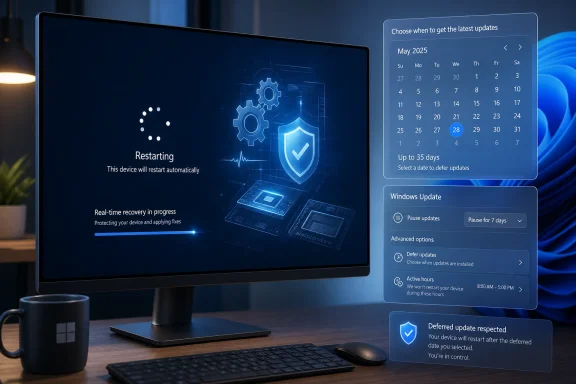
The second half of Microsoft’s update story may prove more important than the first. Alongside the recovery work, Microsoft is testing or rolling out a redesigned pause experience that lets users pick a date up to 35 days away and then extend the pause again, rather than being forced to install updates before pausing once more.That sounds like a small settings change. It is not. It attacks one of the core grievances of modern Windows: the sense that “pause” never really meant pause, but merely “delay until Windows decides the bill is due.”
Under the existing model, Windows 11 users can pause updates for a limited period, commonly up to five weeks. When that period ends, the device generally has to take updates before another pause can be applied. In practice, this means the user can schedule a delay, but not truly opt into a longer maintenance rhythm. The operating system eventually reasserts control.
The new calendar approach changes the symbolism. Microsoft still caps each pause period at 35 days, which preserves a security-friendly outer boundary. But if users can extend that pause repeatedly without first being forced through an update cycle, the cap becomes a planning unit rather than a trapdoor.
For home users, that means vacations, exams, travel, presentations, and busy work weeks can be protected more reliably. For enthusiasts and power users, it means they can watch a patch mature before taking it. For small businesses without full enterprise management tooling, it offers a crude but meaningful maintenance window.
The real question is whether Microsoft will keep the promise intact. If “pause again” becomes conditional, confusing, or available only in certain builds or editions, the backlash will be immediate. Windows users have long memories when it comes to update semantics.
The Shutdown Button Needed a Treaty
One of the most infuriating Windows behaviors has been the way “Shut down” and “Restart” can become update delivery mechanisms in disguise. Users go to power off a laptop before travel, reboot before a meeting, or shut down at the end of the day, only to discover that Windows has decided this is the moment to install pending patches.Microsoft’s reported change to stop shutdown and restart actions from bypassing deferred update settings is therefore more than a convenience. It is a concession that language matters. If a button says shut down, users expect the machine to shut down. If a setting says updates are paused, users expect that pause to apply consistently.
This is the kind of design issue that seems trivial until it breaks someone’s day. A forced update at the wrong moment can cost a meeting, a class, a livestream, a flight check-in, or a field-service appointment. The damage is not always measured in data loss or downtime reports; often it is measured in the user’s willingness to trust the operating system next time.
By respecting deferred update settings across power actions, Microsoft can reduce one of Windows Update’s most visible betrayals. The company may still believe, correctly, that patched systems are safer systems. But safety policy and user intent have to coexist, especially on machines that people carry into unpredictable real-world schedules.
There is an enterprise lesson here too. Corporate IT has long used maintenance windows, deferral rings, deadline policies, and update compliance reporting because unmanaged patch timing is chaos. Microsoft is now bringing a faint version of that logic to ordinary users: choose a date, plan around disruption, and avoid surprise installation moments.
That is not giving up on updates. It is admitting that updates are more likely to happen smoothly when users believe the schedule is real.
Faster Updates Are Not Enough If Users Fear the Reboot
Microsoft says it has also reduced download and installation time on many devices, with particular benefit for machines that spend less time online or operate in areas with poor connectivity. That is an important engineering goal, but it does not fully address the user’s lived experience.A faster download is useful. A smaller effective payload is useful. A more resilient install path is useful. But the emotional center of Windows Update is the reboot, because the reboot is when control changes hands.
Before the reboot, the user can still close Settings, save files, reschedule, or walk away. After the reboot begins, the machine belongs to Windows until Windows gives it back. That is why even a ten-minute update can feel risky if the timing is bad, and why a forty-minute update can feel catastrophic if the user expected two minutes.
Microsoft’s recovery mechanism may improve completion rates, but it also makes duration less predictable. A normal update may finish quickly. A troubled update may take longer because Windows is attempting to fix the problem midstream. Both may show the same vague progress experience.
The company should treat that as a design challenge, not merely a documentation issue. Users do not need kernel-level detail, but they do need better signals. “This is taking longer than usual while Windows completes recovery steps” would be more reassuring than a spinner that appears indifferent to human anxiety.
Windows has improved its update messaging over the years, but it still too often speaks in percentages that stall, generic assurances, and screens that discourage intervention without explaining what is actually happening. If Microsoft is going to make the update process more intelligent, it should make it more communicative too.
The Security Argument Still Has Teeth
It is easy to mock forced updates until the next wormable vulnerability, exploited zero-day, or widely abused driver flaw arrives. Microsoft’s update policy did not become aggressive because the company enjoys annoying people. It became aggressive because an unpatched Windows ecosystem is dangerous at global scale.Windows remains the default operating system for huge numbers of businesses, schools, hospitals, governments, and home users. Attackers know that. Delayed patching is not an abstract hygiene problem; it is one of the most common ways real incidents spread.
That is the strongest argument against unlimited user control. If every annoyed user can postpone updates forever, many will. Some will do so knowingly, but many will do so because the prompt appeared at a bad time and never became convenient later. Security maintenance competes badly against human procrastination.
Microsoft’s 35-day repeatable pause is therefore a compromise, not a surrender. It gives users a planning horizon but keeps the system oriented around regular reminders and finite intervals. The calendar model says: you may choose when, but you must keep choosing.
That is a reasonable balance if implemented honestly. The worst version of Windows Update is one that surprises users into compliance. The second-worst version is one that lets users silently drift into permanent exposure. The better version is one that makes patching predictable enough that people stop fighting it.
For managed environments, the answer remains policy, rings, testing, and reporting. For consumers, the answer has to be less paternalistic but not negligent. Microsoft appears to be inching toward that middle ground.
Enterprises Will Like the Reliability and Distrust the Ambiguity
For IT administrators, the automatic recovery work is both welcome and suspicious. Higher update success rates are valuable. Every device that patches without a help desk ticket is a win, especially in distributed environments where users may be remote, intermittently connected, or far from hands-on support.But admins will want to know what “recovery” means in practice. Did Windows retry a failed file replacement? Did it repair component corruption? Did it work around a locked file? Did it trigger an additional reboot? Did it mask a condition that will return next month?
Those details matter because update failures are often symptoms. A machine that repeatedly requires recovery during cumulative updates may be drifting out of compliance in ways that should be remediated. If the user sees only a successful update and the admin sees only a green compliance state, a deeper reliability problem may remain hidden.
Microsoft has the tools to address this, at least in managed ecosystems. Windows Update for Business, Intune, Autopatch, event logs, and diagnostic data can expose more than the consumer UI ever will. The question is whether the new behavior is reported clearly enough for admins to distinguish “normal longer install” from “recovered from trouble.”
The consumer story is about reassurance. The enterprise story is about observability. Microsoft needs both, because Windows Update is no longer just a patch delivery mechanism; it is part of the operational fabric of modern Windows fleets.
If the company can reduce failure rates without hiding fleet health signals, admins will accept a slower spinner. If not, they will treat the new smoothness as another abstraction to peel back.
The New Windows Update Bargain Is Conditional Trust
Microsoft’s update changes arrive during a broader effort to soften Windows 11’s image. After years of complaints about performance, ads, AI clutter, taskbar limitations, hardware requirements, and update behavior, the company has been signaling that it understands some of the backlash. Windows Update is the place where that understanding becomes measurable.The automatic recovery feature says Microsoft will take on more of the technical burden. The repeatable pause calendar says users may get more scheduling authority. The shutdown and restart changes say Microsoft is willing to stop treating power actions as loopholes for patch enforcement.
Taken together, these changes suggest a new bargain: Windows will try harder not to fail, and users will be given more room to choose the moment of disruption. That is a better bargain than the old one, where Windows too often demanded trust while offering little transparency.
But the bargain is fragile. If updates still break systems, no pause calendar will save Microsoft’s reputation. If recovery makes installations longer without meaningful messaging, users will still assume the machine is stuck. If the new pause behavior is rolled out inconsistently or walked back under the banner of security, the trust deficit will deepen.
The company has to execute on both engineering and tone. It is not enough for Windows Update to be statistically more successful. It has to feel less hostile.
That is a harder problem than reducing download size or adding a calendar picker. It requires Microsoft to design for the moment when the user is staring at a frozen-looking animation, wondering whether to wait, force power off, or start mentally composing an angry post.
The Spinner Now Means More Than Waiting
The practical advice for users is simpler than the engineering behind it: if a Windows 11 update seems to take longer after restart, that does not automatically mean it is broken. Microsoft says Windows may be performing background recovery steps to help the update complete successfully. Interrupting that process too early can create the very failure the system is trying to avoid.That does not mean users should wait forever. A machine that sits for hours with no disk activity, no progress, repeated reboot loops, or obvious error screens may still need troubleshooting. But the old assumption that “longer than usual” equals “stuck” is now less reliable.
This distinction is particularly important for devices that are not online every day. A laptop pulled from a drawer after weeks of disuse may have more update work to reconcile than a desktop that patches regularly. A device on poor connectivity may download opportunistically and then spend more time installing once it finally has the payload staged.
Users should also separate the download phase from the install phase in their expectations. A quick download does not guarantee a quick reboot. The two stages stress different parts of the system, and the installation phase is where Windows discovers whether the machine’s local state is clean.
For enthusiasts, the lesson is to watch the next few cumulative updates closely. Microsoft’s claims about higher success rates and faster experiences should show up not in marketing language, but in fewer failed installs, fewer rollback events, and fewer forum threads that begin with “stuck at the spinning circle.”
Microsoft’s Patch Tuesday Detente Has a Few Hard Edges
The most concrete change here is not that updates will always be faster. They will not. Some may take longer precisely because Windows is trying to avoid failure.The more important shift is that Microsoft appears to be aligning three pieces of the update experience that have often worked against each other: reliability, scheduling, and user consent. That alignment is incomplete, but it is visible enough to matter.
- Windows 11 may take longer during the post-restart installation phase because it is attempting real-time recovery from update installation trouble.
- A fast download does not predict a fast installation, because the installation phase depends on local system state, component servicing, file replacement, and reboot-time operations.
- Microsoft’s calendar-based pause model allows users to pick a date up to 35 days out and reportedly extend that pause again, changing the 35-day limit from a forced checkpoint into a planning window.
- Shutdown and restart actions are being adjusted so they do not override deferred update settings in the same frustrating way users have complained about for years.
- The update experience will only regain trust if Microsoft pairs higher success rates with clearer messaging when an installation takes longer than expected.
- IT administrators should welcome fewer visible failures but watch carefully for whether automatic recovery events are observable enough to diagnose unhealthy devices.
Source: Windows Latest Microsoft reveals why some Windows 11 updates can take a while to install, even after a quick download
