

A VPN on Windows 11 does not stop Microsoft from tracking activity tied to Windows, Edge, or a signed-in Microsoft account. It changes the network path for traffic; it does not erase the identity, account data, service logs, or diagnostic data generated after the connection reaches Microsoft.
That distinction is the central point in a new Hardware Secrets explainer on Windows 11 privacy. A VPN can be valuable, particularly on public Wi-Fi or when users want to limit what their ISP can infer from browsing. But it is not an all-purpose privacy switch.
With a properly configured VPN, a local network operator or ISP sees an encrypted connection to the VPN provider rather than a series of direct connections to websites. It can still see that the customer is connected, the VPN server’s IP address, connection timing, and total traffic volume.
The practical benefit is that ordinary browsing destinations and DNS lookups should be less visible to the ISP, provided DNS requests are also routed through the tunnel. That caveat matters: DNS leaks can expose the domains a PC requests even where web-page content remains encrypted.
Windows supports both full and split-tunnel VPN designs. Microsoft’s Windows VPN documentation defines split tunneling as a configuration in which only specified routes use the VPN while other traffic uses the normal physical network interface. For privacy-oriented consumer use, that means a VPN icon alone is not proof that all traffic is protected.
Microsoft’s own Windows privacy documentation also makes clear that diagnostic data is a separate control plane. Windows sends required diagnostic data to keep the OS secure, current, and functional; users can decline optional diagnostic data in Settings > Privacy & security > Diagnostics & feedback. Microsoft says optional Windows diagnostic data can include additional device health, usage, and browsing-related information.
That last category has a direct Edge implication. Microsoft’s Edge documentation says optional diagnostic data on Windows 11 follows the Windows diagnostic-data setting, and can include feature usage, performance data, site load times, and website information. Routing that data through a VPN does not stop the browser or operating system from sending it.
That distinction is the central point in a new Hardware Secrets explainer on Windows 11 privacy. A VPN can be valuable, particularly on public Wi-Fi or when users want to limit what their ISP can infer from browsing. But it is not an all-purpose privacy switch.
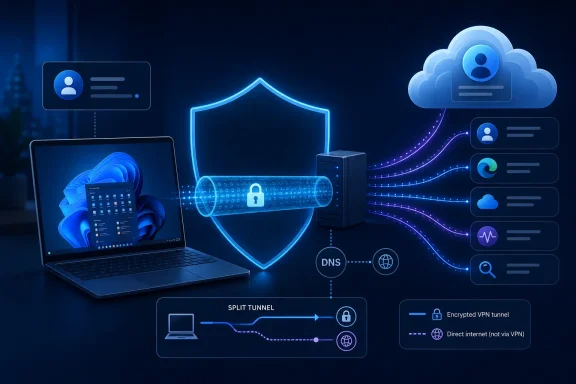 What the VPN actually changes
With a properly configured VPN, a local network operator or ISP sees an encrypted connection to the VPN provider rather than a series of direct connections to websites. It can still see that the customer is connected, the VPN server’s IP address, connection timing, and total traffic volume.The practical benefit is that ordinary browsing destinations and DNS lookups should be less visible to the ISP, provided DNS requests are also routed through the tunnel. That caveat matters: DNS leaks can expose the domains a PC requests even where web-page content remains encrypted.
Windows supports both full and split-tunnel VPN designs. Microsoft’s Windows VPN documentation defines split tunneling as a configuration in which only specified routes use the VPN while other traffic uses the normal physical network interface. For privacy-oriented consumer use, that means a VPN icon alone is not proof that all traffic is protected.
What Microsoft can still receive
A Microsoft account continues to identify activity in services where the user signs in. That includes OneDrive sync, Outlook, Microsoft Store purchases, Bing searches, and Edge synchronization. A VPN server IP may replace a home IP address, but it does not prevent Microsoft from associating a service request with the account that made it.Microsoft’s own Windows privacy documentation also makes clear that diagnostic data is a separate control plane. Windows sends required diagnostic data to keep the OS secure, current, and functional; users can decline optional diagnostic data in Settings > Privacy & security > Diagnostics & feedback. Microsoft says optional Windows diagnostic data can include additional device health, usage, and browsing-related information.
That last category has a direct Edge implication. Microsoft’s Edge documentation says optional diagnostic data on Windows 11 follows the Windows diagnostic-data setting, and can include feature usage, performance data, site load times, and website information. Routing that data through a VPN does not stop the browser or operating system from sending it.
The privacy controls that matter
Users seeking less Microsoft-linked activity need to manage the services and settings that generate it, rather than relying on a VPN alone:- Set Windows diagnostic data to required only where appropriate.
- Review Edge sync, optional diagnostic data, search, shopping, and personalization settings.
- Check Microsoft account privacy controls and activity history.
- Use separate browser profiles for work, personal accounts, and sensitive research.
- Confirm the VPN handles DNS and understand whether split tunneling is enabled.
- Remove unnecessary browser extensions, which can see far more browsing activity than an ISP can.