

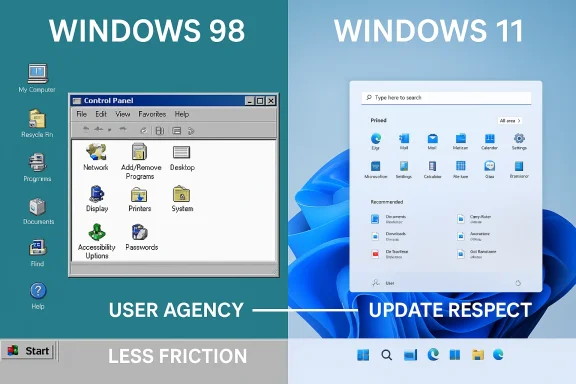
Flexibility in Windows has always been more than a cosmetic preference. It is part of the platform’s identity, and recent Windows 11 criticism has made that clearer than ever. Microsoft’s move to restore taskbar flexibility, reduce intrusive Copilot surfacing, and soften update friction suggests the company is finally acknowledging that a “modern” desktop cannot succeed by stripping away control. That is the real story behind the current debate: not that Windows 98 was magically better in every respect, but that older Windows versions often treated customization as a core feature rather than an afterthought. The uploaded material shows that this argument is now being made in earnest across enthusiast coverage, with taskbar repositioning, Start menu tuning, and update behavior all framed as returns to user agency rather than flashy new features a Windows 98 is “better than Windows 11” because of settings flexibility taps into a long-running tension inside Windows itself: simplicity versus control. Windows 11’s redesign made the desktop cleaner, but it also removed or narrowed controls that power users had relied on for years, especially in taskbar placement and shell behavior. That loss felt like more than a UI simplification. It felt like Microsoft deciding that users should adapt to the OS instead of the OS adapting to users, which is exactly the kind of trade-off that generates lasting backlash.
The file search results reinforce that point with multiple internal-style feature analyses: Windows 11 launched with a bottom-locked taskbar, a more opinionated Start menu, and fewer customization options, while newer insider and roadmap discussions focus on restoring choice and reducing friction. The repeated theme is that Microsoft is now trying to reclaim trust by giving users back some of the freedom it took away. That shift matters because desktop operating systems are not disposable apps. They are habit machines, and when habits are broken, users remember the loss far longer than the visual refresh.
There is also a historical layer here. Classic Windows versions, including Windows 98, exposed a dense Control Panel ecosystem and a deeper sense that the owner of the PC was in charge. Microsoft documentation and Windows-era references in the search results show that even as far back as Windows 98, the platform supported granular mouse and menu behavior adjustments, and the desktop shell was far more openly configurable than today’s Settings-first approach . That does not mean Windows 98 was objectively superior overall. It does mean the old model gave advanced users a stronger feeling of command.
The modern debate is therefore less about nostalgia than about philosophy. Windows 11 can look cleaner and still feel more restrictive. Windows 98 can look dated and still feel more transparent. Enthusiasts who praise the older system are usually not arguing that the entire operating system was better in every technical sense; they are arguing that its architecture trusted them more. That distinction is important, because it explains why even a single obscure setting can become a symbol in a broader fight over the shape of the Windows desktop.
The reason this argument refuses to die is that customization is not a fringe concern for many Windows users. For casual users, a curated interface can feel approachable. For power users, it can feel paternalistic. Windows has always had to serve both camps, and when Microsoft leans too hard toward visual polish, enthusiasts notice the loss immediately.
The uploaded discussion threads repeatedly frame the taskbar, Start menu, Search, Widgets, and update prompts as the places where Windows 11 most visibly irritated users. Those are not obscure developer toggles. They are daily touchpoints. Once users feel friction at those contact points, they start comparing the current shell to older Windows versions where more could be tuned, moved, hidden, or reconfigured.
That helps explain the persistence of Windows 98 praise. Users remember the feeling of ownership more than the exact menus. A platform that lets you shape the environment feels empowering even if it is technically rougher around the edges. The inverse is also true: a polished platform can feel cold if it keeps saying no.
That is why the uploaded material repeatedly links taskbar flexibility to real productivity concerns. It improves reachability, preserves screen space, and reduces dependence on third-party tools like shell replacements or patch utilities . In other words, the debate is not about nostalgia for nostalgia’s sake. It is about prers identity, not decoration**
The file search results underline how much of the current criticism is really about that older style of transparency. References to Control Panel, mouse properties, and shell flexibility all point to a time when users expected to have more direct access to configuration surfaces. Microsoft’s move toward a more centralized Settings app has made some things easier, but it has also reduced the sense that everything is reachable and editable in one’s own terms.
If a system lets you alter mouse behavior, menu behavior, and shell layout in ways that match your habits, it feels accommodating. If it hides or removes those controls, it feels opinionated. The uploaded materials repeatedly suggest that Windows 11 has drifted toward the second model, even as Microsoft now appears to be correcting course .
That older approach had obvious drawbacks: instability, weaker security, and a much rougher out-of-box experience. But for enthusiasts, the tradeoff often felt worthwhile. The machine belonged to them, and the interface didn’t constantly remind them that it had its own opinions.
The uploaded search results make clear that this is where the criticism turned from mild annoyance into identity-level frustration. Users weren’t just asking for a design tweak. They were asking why a desktop operating system should behave like a curated appliance. That is a far more serious complaint, because it challenges the basic promise of Windows as a general-purpose platform.
This is why even a small restoration matters so much. The issue is not the placement itself. It is the principle that a core shell component should not be frozen in place unl. Without that reason, the restriction reads as design dogma.
That matters because Windows users rarely judge a release on one feature. They judge it on cumulative annoyance. If several small decisions all reduce control, the result feels larger than any single omission.
That shift is not automatically bad. Many modern users benefit from simpler interfaces. But the cost is a reduced sense of agency. In the uploaded analysis, Microsoft’s move away from Control Panel-era transparency is repeatedly described as a trade-off that may serve newcomers while alienating experts . That framing is hard to dismiss because it maps directly onto years of user feedback.
That’s why Microsoft’s gradual migration of mouse and pointer options into Settings has become a recurring topic. The company is still trying to modernize the interface without losing the configurability that longtime users expect. Recent documentation and commentary show that the migration is ongoing, not complete .
Microsoft’s own accessibility materials show that Windows 11 still offers broad customization, but often through a more guided structure than older versions did . That is a good thing if you value discoverability. It is a less good thing if you value speed and breadth of choice.
This is especially noticeable in the taskbar story. Allowing repositioning again would not be a groundbreaking innovation. It would be a restoration of trust. The same is true for reducing forced AI surfaces in everyday apps. The point is not to eliminate Copilot. The point is to stop making it feel unavoidable.
The uploaded materials say this directly in multiple places, noting that taskbar placement affects ergonomics, multi-monitor setups, and screen-space usage, not just aesthetics . That makes the feature a practical win and a political one.
Users do not hate upd hat respects timing feels mature. A platform that insists on its own schedule feels adversarial.
The uploaded results repeatedly point out that better customization can reduce the need for third-party shell tools and unsupported workarounds. That is especially relevant in enterprise environments, where unofficial fixes complicate support and security posture . Native flexibility is usually safer than patch-based customization.
That is why enthusiasts care so much about things like taskbar placement and Start menu density. These are not vanity preferences. They are workfl # Enterprise value
For enterprises, the value is more nuanced. IT departments do not necessarily want every endpoint customized in every way. They do want the OS to offer supported options, so they can meet accessibility needs, accommodate different device classes, and reduce user frustration without resorting to hacks.
A more adaptable Windows can also reduce the gap between policy and preference. When the platform offers enough native control, administrators can standardize the important parts while still allowing some local fit. That is often the best compromise between security and satisfaction.
The uploaded analyses are explicit about this. They describe customization as part of Windows’ brand strength and note that reducing friction helps Microsoft defend its core desktop audience against rival platforms that market simplicity or control in different ways .
That is why restoring user choice matters. It keeps Windows distinct as the customizable mainstream desktop.
The uploaded material frames that risk clearly. Windows’ dominance has historically rested on configurability, and a less opinionated shell helps preserve that position .
There is also a security risk if update flexibility becomes too permissive. Users want control, but the platform still needs to stay protected. Microsoft has to thread that needle carefully.
The broader lesson is that Windows does not need to become smaller to become better. It needs to become less intrusive and more respectful of the person using it. That is a subtle difference, but it is the one that will decide whether Windows 11 is remembered as a polished detour or as the moment Microsoft relearned why users valued Windows in the first place.
Source: GameGPU https://en.gamegpu.com/news/zhelezo/gibkost-nastroek-delaet-windows-98-luchshe-aktualnoj-windows-11/
The file search results reinforce that point with multiple internal-style feature analyses: Windows 11 launched with a bottom-locked taskbar, a more opinionated Start menu, and fewer customization options, while newer insider and roadmap discussions focus on restoring choice and reducing friction. The repeated theme is that Microsoft is now trying to reclaim trust by giving users back some of the freedom it took away. That shift matters because desktop operating systems are not disposable apps. They are habit machines, and when habits are broken, users remember the loss far longer than the visual refresh.
There is also a historical layer here. Classic Windows versions, including Windows 98, exposed a dense Control Panel ecosystem and a deeper sense that the owner of the PC was in charge. Microsoft documentation and Windows-era references in the search results show that even as far back as Windows 98, the platform supported granular mouse and menu behavior adjustments, and the desktop shell was far more openly configurable than today’s Settings-first approach . That does not mean Windows 98 was objectively superior overall. It does mean the old model gave advanced users a stronger feeling of command.
The modern debate is therefore less about nostalgia than about philosophy. Windows 11 can look cleaner and still feel more restrictive. Windows 98 can look dated and still feel more transparent. Enthusiasts who praise the older system are usually not arguing that the entire operating system was better in every technical sense; they are arguing that its architecture trusted them more. That distinction is important, because it explains why even a single obscure setting can become a symbol in a broader fight over the shape of the Windows desktop.
 Why This Debate Keeps Coming Back
The reason this argument refuses to die is that customization is not a fringe concern for many Windows users. For casual users, a curated interface can feel approachable. For power users, it can feel paternalistic. Windows has always had to serve both camps, and when Microsoft leans too hard toward visual polish, enthusiasts notice the loss immediately.The uploaded discussion threads repeatedly frame the taskbar, Start menu, Search, Widgets, and update prompts as the places where Windows 11 most visibly irritated users. Those are not obscure developer toggles. They are daily touchpoints. Once users feel friction at those contact points, they start comparing the current shell to older Windows versions where more could be tuned, moved, hidden, or reconfigured.
The psychology of control
People often describe old Windows versions as “more flexible,” but that word covers several different emotional reactions. It can mean faster workflows, less pointer travel, more compact layouts, or simply the relief of being able to set things up the way one prefers. When Microsoft locks a feature down, it is not just removing an option. It is taking away a small piece of desktop authorship.That helps explain the persistence of Windows 98 praise. Users remember the feeling of ownership more than the exact menus. A platform that lets you shape the environment feels empowering even if it is technically rougher around the edges. The inverse is also true: a polished platform can feel cold if it keeps saying no.
Why enthusiasts amplify it
Enthusiasts amplify these complaints because they are the people most likely to notice regressions early. They also tend to build workflows around small efficiencies that casual users never need. A top or side taskbar, for example, may sound cosmetic until you work on ultrawide displays, multi-monitor rigs, or dense productivity layouts.That is why the uploaded material repeatedly links taskbar flexibility to real productivity concerns. It improves reachability, preserves screen space, and reduces dependence on third-party tools like shell replacements or patch utilities . In other words, the debate is not about nostalgia for nostalgia’s sake. It is about prers identity, not decoration**
- Friction accumulates at the interface layer
- Power users notice losses first
- Old Windows felt user-owned
- Modern Windows often feels managed
- Small settings can carry outsized symbolic weight
What Windows 98 Represents in the Argument
Windows 98 is often invoked not because it was flawless, but because it represents a different design ethic. The classic desktop was an environment where settings were visible, menus were dense, and many controls were exposed rather than hidden behind simplified layers. That created complexity, but it also created trust for people who wanted to understand and shape the machine.The file search results underline how much of the current criticism is really about that older style of transparency. References to Control Panel, mouse properties, and shell flexibility all point to a time when users expected to have more direct access to configuration surfaces. Microsoft’s move toward a more centralized Settings app has made some things easier, but it has also reduced the sense that everything is reachable and editable in one’s own terms.
The meaning of “deep settings”
When users praise “deep settings,” they are usually referring to more than the number of available toggles. They mean the availability of low-level control without needing hacks, registry edits, or third-party software. That matters because it changes the relationship between the user and the operating system.If a system lets you alter mouse behavior, menu behavior, and shell layout in ways that match your habits, it feels accommodating. If it hides or removes those controls, it feels opinionated. The uploaded materials repeatedly suggest that Windows 11 has drifted toward the second model, even as Microsoft now appears to be correcting course .
What Windows 98 did right for enthusiasts
Windows 98’s strongest advantage was not raw performance by modern standards. It woould see more of the system, adjust more of its behavior, and rely less on Microsoft making the experience “nice” on their behalf.That older approach had obvious drawbacks: instability, weaker security, and a much rougher out-of-box experience. But for enthusiasts, the tradeoff often felt worthwhile. The machine belonged to them, and the interface didn’t constantly remind them that it had its own opinions.
- Older Windows exposed more of the machine
- Control Panel culture mattered
- Direct access reduced dependence on workarounds
- User trust grew from visibility
- Flexibility often mattered more than polish
- The old model favored ownership over guidance
Why Windows 11 Triggered the Backlash
Windows 11 did not cause the flexibility debate from nowhere. It amplified an existing concern that Windows was becoming less adaptable in exchange for a cleaner look. The most visible examples were taskbar restrictions, Start menu changes, and the broader sense that Microsoft wanted to simplify the desktop by narrowing what users could do.The uploaded search results make clear that this is where the criticism turned from mild annoyance into identity-level frustration. Users weren’t just asking for a design tweak. They were asking why a desktop operating system should behave like a curated appliance. That is a far more serious complaint, because it challenges the basic promise of Windows as a general-purpose platform.
Taskbar lock-in became symbolic
The taskbar became the clearest symbol of this shift because it is so central to daily use. In older Windows versions, users could move it to different edges of the screen. In Windows 11, that flexibility was removed, and the backlash lasted because the omission affected muscle memory, ergonomics, and personalization all at once .This is why even a small restoration matters so much. The issue is not the placement itself. It is the principle that a core shell component should not be frozen in place unl. Without that reason, the restriction reads as design dogma.
Start menu and search also mattered
The Start menu debate is similar. Windows 11’s menu is visually neat, but many users see it as less efficient because it reduces density and adds friction. Search likewise became a point of complaint when users felt local workflow was being interrupted by web results, promotional surfaces, or inconsistent behavior. The uploaded analyses repeatedly describe these as everyday pain points rather than abstract design critiques .That matters because Windows users rarely judge a release on one feature. They judge it on cumulative annoyance. If several small decisions all reduce control, the result feels larger than any single omission.
Msing part is that Microsoft now seems to be reversing some of these choices. The uploaded results reference taskbar repositioning, more Start menu control, quieter Copilot surfaces, and gentler update behavior as signs of a broader reset toward usability . That tells us Microsoft understands the backlash is not only aesthetic. It is philosophical.
- Windows 11 optimized for polish
- Users wanted configurability
- Taskbar rigidity became a flashpoint
- Search and Start became friction points
- *g
- The correction is more important than the original promise
The Settings Philosophy Behind the Complaint
The specific complaint in the user-provided article about a “unique system setting” is less important than the larger implication: older Windows treated obscure controls as normal. If a setting existed, it was often visible to the user. In modern Windows, more of that power is hidden behind layers of simplification, context-sensitive panels, or gradually migrated surfaces.That shift is not automatically bad. Many modern users benefit from simpler interfaces. But the cost is a reduced sense of agency. In the uploaded analysis, Microsoft’s move away from Control Panel-era transparency is repeatedly described as a trade-off that may serve newcomers while alienating experts . That framing is hard to dismiss because it maps directly onto years of user feedback.
Control Panel versus Settings
Control Panel represented a dense, older style of Windows administration. Settings represents a more streamlined and visually modern direction. The problem is that moving a feature to a friendlier surface can also flatten nuance. If the user can’t reach fine-grained controls quickly, the platform starts to feel less capable even if the underlying capability still exists.That’s why Microsoft’s gradual migration of mouse and pointer options into Settings has become a recurring topic. The company is still trying to modernize the interface without losing the configurability that longtime users expect. Recent documentation and commentary show that the migration is ongoing, not complete .
Accessibility is part of the story
A key irony is that some of the same controls viewed as “power user” features are also accessibility features. Mouse behavior, pointer visibility, click assistance, and interface density all matter to users with different needs. When those controls are harder to find or less flexible, accessibility can suffer.Microsoft’s own accessibility materials show that Windows 11 still offers broad customization, but often through a more guided structure than older versions did . That is a good thing if you value discoverability. It is a less good thing if you value speed and breadth of choice.
The deeper principle
The core issue is not whether modern Windows is customizable. It is whether customization feels native or negotiated. If a user must keep hunting for exceptions or turning to third-party tools, the platform has already conceded too much ground.- Simplification can reduce discoverability
- Visibility often equals trust
- Accessibility and power-user needs overlap
- Modern surfaces can flatten nuance
- Native control feels better than workaround control
- The best settings are the ones users can actually find
Microsoft’s Current Countermove
Microsoft’s current strategy appears to be a partial retreat from the rigid version of Windows 11 without abandoning its broader design goals. The uploaded results repeatedly mention taskbar flexibility, quieter Copilot placement, and more flexible update behavior as evidence that Microsoft is listening. That is an important shift because it suggests the company now sees restraint as a feature, not a compromise.This is especially noticeable in the taskbar story. Allowing repositioning again would not be a groundbreaking innovation. It would be a restoration of trust. The same is true for reducing forced AI surfaces in everyday apps. The point is not to eliminate Copilot. The point is to stop making it feel unavoidable.
Taskbar flexibility as a signal
Taskbar repositioning is a small change with a large symbolic effect. It tells users that Microsoft is willing to restore classic desktop behavior when enough people make the case. That matters because it reestablishes a principle: the OS can evolve without confiscating user habits.The uploaded materials say this directly in multiple places, noting that taskbar placement affects ergonomics, multi-monitor setups, and screen-space usage, not just aesthetics . That makes the feature a practical win and a political one.
Update behavior as respect
Windows Update is another area where Microsoft seems to be adjusting its posture. The discussion in the retrieved materials emphasizes more pause options, better restart behavior, and the ability to avoid being forced into an update at the worst possible moment . That is a quality-of-life issue, but it is also a trust issue.Users do not hate upd hat respects timing feels mature. A platform that insists on its own schedule feels adversarial.
Copilot restraint matters too
The more subtle part of the reset is Copilot visibility. Microsoft still wants AI to be part of the Windows story, but the concern in the uploaded coverage is that the company previously overexposed it across surfaces where k at hand. Reducing that clutter may be just as important as restoring classic UI controls because it shows Microsoft understands attention is finite.- Taskbar control restores agency
- Update flexibility reduces resentment
- Copilot restraint lowers noise
- Microsoft is shifting from promotion to utility
- The company is trying to look less prescriptive
- Small fixes can change platform perception
Enterprise Versus Consumer Impact
The flexibility debate is not identical for consumers and enterprises, but it affects both groups. Consumers want comfort, convenience, and the feeling that their desktop matches their preferences. Enterprises want predictability, supportability, and manageable policy surfaces. Windows 11’s rigid choices made life easier to standardize in some ways, but they also produced user dissatisfaction that can bleed into support burden and adoption resistance.The uploaded results repeatedly point out that better customization can reduce the need for third-party shell tools and unsupported workarounds. That is especially relevant in enterprise environments, where unofficial fixes complicate support and security posture . Native flexibility is usually safer than patch-based customization.
Consumer value
For consumers, the benefit is emotional as much as practical. People spend hours a day in Windows, and tiny annoyances become major irritants over time. If the OS can be shaped to fit how someone works, it feels more like a tool and less like a platform policy document.That is why enthusiasts care so much about things like taskbar placement and Start menu density. These are not vanity preferences. They are workfl # Enterprise value
For enterprises, the value is more nuanced. IT departments do not necessarily want every endpoint customized in every way. They do want the OS to offer supported options, so they can meet accessibility needs, accommodate different device classes, and reduce user frustration without resorting to hacks.
A more adaptable Windows can also reduce the gap between policy and preference. When the platform offers enough native control, administrators can standardize the important parts while still allowing some local fit. That is often the best compromise between security and satisfaction.
Why the market notices
The broader market notices because these choices influence how Windows is perceived relative to macOS, ChromeOS, and Linux desktops. Windows wins when it feels both capable and accommodating. It loses appeal when it feels curated in the wrong way.- Consumers value comfort and fit
- Enterprises value supportability
- Native options reduce hack dependence
- Standardization does not require rigidity
- Better UX can lower support burden
- Perception affects platform loyalty
Competitive Implications
Customization is not just an internal UI question. It is a competitive signal. If Windows feels less controllable, rivals can present themselves as more respectful of user preference. That does not mean Windows users will defect in large numbers because of one taskbar setting. It does mean the platform’s reputation can erode at the margins, especially among enthusiasts and professionals who influence broader opinion.The uploaded analyses are explicit about this. They describe customization as part of Windows’ brand strength and note that reducing friction helps Microsoft defend its core desktop audience against rival platforms that market simplicity or control in different ways .
macOS as the polished competitor
macOS competes by offering coherence, consistency, and a controlled design language. Windows does not need to copy that model, but it does need to avoid becoming too rigid while trying to look similarly polished. If Windows gives up flexibility without matching macOS-level elegance, it has simply lost a unique advantage.That is why restoring user choice matters. It keeps Windows distinct as the customizable mainstream desktop.
Linux as the control competitor
Linux desktop environments compete on theoes not need Linux’s complexity, but it does need to preserve enough freedom that advanced users do not feel pushed out. If Microsoft removes too many native controls, it encourages tinkering communities to look elsewhere.The uploaded material frames that risk clearly. Windows’ dominance has historically rested on configurability, and a less opinionated shell helps preserve that position .
ChromeOS and the simplicity story
ChromeOS competes by being straightforward and low-friction. Windows cannot out-ChromeOS ChromeOS, but it can avoid appearing needlessly cluttered or hostile. The more Windows 11 behaves like a trusted tool, the less room rivals have to argue that simplicity automatically means better usability.- Windows must defend its flexibility advantage
- macOS wins on consistency
- Linux wins on configurability
- ChromeOS wins on simplicity
- Windows needs to be both capable and accommodating
- **User trust is part of platform competittMicrosoft’s best opportunity is to turn a long criticism into a visible course correction. If it restores key controls, makes updates less disruptive, and reduces AI clutter where it does not help, Windows 11 can start to feel like a mature desktop again. That would be good for consumers, enterprise deployers, and the broader Windows brand.
- Restores core desktop control
- Reduces dependence on third-party shell tools
- Improves trust around updates
- Makes the OS feel less intrusive
- Supports power users without harming casual users
- Helps Windows 11 look more complete
- Reinforces Windows as a configurable platform
Risks and Concerns
The biggest risk is that Microsoft could deliver partial fixes and call it a philosophy shift. Users are already skeptical, and they will not be impressed by limited rollouts, hidden toggles, or features that work only in certain builds. A half-finished restoration can sometimes be worse than none at all because it raises expectations without solving the underlying problem.There is also a security risk if update flexibility becomes too permissive. Users want control, but the platform still needs to stay protected. Microsoft has to thread that needle carefully.
- Partial rollouts could frustrate users
- Hidden controls weaken the trust narrative
- Security could suffer if updates are too easy to defer
- Taskbar changes may create edge-case bugs
- Copilot restraint could be inconsistent across apps
- Enterprise admins need predictable policies
- Performance improvements must be real, not rhetorical
Looking Ahead
The next phase of this story will be judged not by what Microsoft says, but by what users can actually do in stable builds. If taskbar repositioning arrives cleanly, if Start and Search become less opinionated, and if update prompts become less hostile, the company will have taken a real step toward repairing the Windows 11 experience. If those changes arrive in fragments, the skepticism will harden.The broader lesson is that Windows does not need to become smaller to become better. It needs to become less intrusive and more respectful of the person using it. That is a subtle difference, but it is the one that will decide whether Windows 11 is remembered as a polished detour or as the moment Microsoft relearned why users valued Windows in the first place.
- Watch taskbar repositioning in Insider and stable channels
- Watch whether Recommended can be minimized or hidden
- Watch for less disruptive update behavior
- Watch how Copilot surfaces are reduced
- Watch whether File Explorer and Search feel faster
- Watch whether Microsoft keeps restoring classic control surfaces
Source: GameGPU https://en.gamegpu.com/news/zhelezo/gibkost-nastroek-delaet-windows-98-luchshe-aktualnoj-windows-11/
Last edited:
