

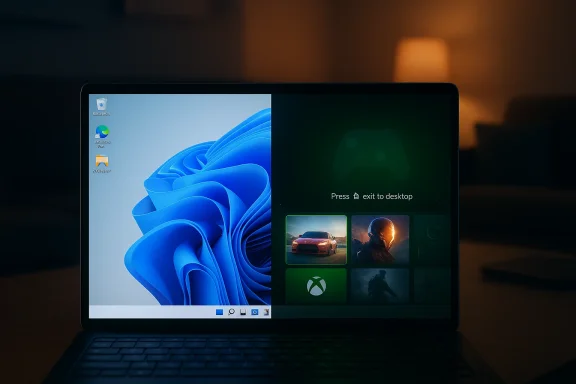
Microsoft is putting the finishing touches on a feature that may prove far more important than its name suggests. What began life as the Xbox Full Screen Experience is now being reframed as Xbox mode, and the latest Windows 11 Insider builds show Microsoft expanding, refining, and normalizing the idea across more device classes. That matters because the company is no longer treating the feature as a niche handheld experiment; it is increasingly positioning it as a broader Windows gaming layer that can sit on top of the desktop without replacing it.
The timing is significant. Microsoft said at GDC 2026 that Xbox mode would begin rolling out in April to users in select markets across all Windows 11 PC form factors, including laptops, desktops, and tablets. That announcement reframed the feature from a handheld convenience into a more general Windows gaming experience, one that aims to reduce friction when players want to move quickly from the desktop into a full-screen, controller-friendly environment.
In the Insider builds now arriving for Dev and Beta Channel testers, Microsoft is effectively stress-testing that future. The company is also pushing light updates in Canary, where the emphasis remains on platform plumbing, minor UI additions, and validation work rather than headline features. That split is classic Microsoft: the nearer channels get the consumer-facing polish, while Canary continues to absorb the rougher, more experimental work.
What makes this interesting is not just the feature itself, but the strategy behind it. Windows has long been criticized for being too busy, too interrupt-driven, and too prone to pulling attention away from play. By giving users a dedicated shell that is still recognizably Windows, Microsoft is trying to capture some of the value of Steam’s Big Picture mode without abandoning the flexibility of the desktop. The company is also tying the experience into its broader gaming narrative, which now spans handhelds, Arm PCs, conventional notebooks, and even the next generation of Xbox hardware.
That broader context matters because the Windows gaming story in 2026 is no longer just about performance. It is about discovery, launch flow, controller ergonomics, and how quickly a user can get into a game without feeling like they have entered a different operating system. Microsoft is clearly betting that the right answer is not to build a separate gaming platform, but to make Windows itself feel more like one when the situation calls for it.
The feature’s value is partly psychological. If users can enter a lean-back environment without abandoning Windows, they may be more willing to treat the PC as a living-room gaming machine rather than a desk-bound productivity device. That is a subtle but meaningful shift, because it places Microsoft in a better position to compete for time spent, not just software installed.
This is also why the feature may have a longer runway than many people expect. Users do not need to trust Microsoft with a totally new platform; they simply need the company to make the front door less chaotic. In an ecosystem where small usability wins often decide whether people adopt a feature, that is a smart compromise. It is not glamorous, but it is practical.
Microsoft has been steadily expanding this feature’s footprint since it first appeared on Xbox-branded handhelds. The Windows Insider Blog in late 2025 described the full screen experience rolling out to additional devices such as laptops, desktops, and tablets, with access through Game Bar, Task View, or the Win + F11 hotkey. That earlier move set the stage for the broader April rollout announced at GDC 2026.
That distinction matters because adoption depends on confidence. People are more willing to turn on a mode than to experiment with a feature they think might break their normal workflow. The rebrand signals maturity, even if the software is still being tuned in Insider channels. That is exactly the impression Microsoft wants to create.
That combination is telling. Microsoft is not just shipping gaming changes; it is also threading in interaction improvements that make Windows feel more tactile and intentional. Haptic feedback in UI actions like snapping windows or hovering over the Close button is the kind of small polish that can make the desktop feel more premium, even if most users will never consciously label it as such.
That is a notable shift from the old Windows playbook, where gaming features often felt bolted on after the fact. Here, Microsoft appears to be designing for the idea that the PC is a multipurpose device with different operating moods. A gamer should be able to move between those moods without feeling like they have changed platforms.
This is especially relevant in the era of handheld PCs and touch-capable devices. As Windows increasingly spreads across laptops, tablets, convertibles, and gaming handhelds, the traditional keyboard-and-mouse assumption weakens. Haptics can serve as a bridge between old desktop metaphors and newer, more physical interaction models.
If done well, these touches can make Windows feel more coherent and premium. If done poorly, they risk feeling ornamental, inconsistent, or distracting. That is the challenge with any sensory feedback layer: it must justify itself every single time it appears.
Windows Protected Print Mode is part of Microsoft’s broader modern print platform effort. Microsoft Support describes it as a way for enterprise administrators to secure and simplify printer management, and notes that incompatible printers may be uninstalled when the mode is enabled. That is a strong reminder that many Windows improvements are not merely cosmetic; they often carry ecosystem tradeoffs.
Microsoft’s challenge is to modernize without becoming alienating. Every new security mode, driver rule, or device compatibility layer has the potential to inconvenience someone. Yet the company seems to believe that a cleaner platform will ultimately help gaming too, because players want fewer interruptions and fewer failures.
That may sound uneventful, but it is exactly what Canary is for. Microsoft uses this channel to validate platform direction, collect feedback, and keep experimental builds moving without burdening them with mainstream expectations. In other words, the lack of flashy features is itself a feature.
A build that mainly delivers bug fixes is not a sign of stagnation. It is often a sign that Microsoft is shifting from invention to stabilization. That is usually the point at which a feature starts looking real.
The Thurrott framing is probably fair: Xbox mode is not yet as refined as Steam’s equivalent, but it already has a solid foundation. That distinction matters because maturity in this space is less about one dramatic feature and more about the accumulation of small polish points, performance consistency, and navigation quality.
The open question is whether Microsoft can achieve the same emotional clarity as Steam’s gaming-first design language. Big Picture feels like a destination. Xbox mode will need to convince users that it is equally coherent, especially once it lands on mainstream laptops and desktops.
For enterprises, the story is more nuanced. Most businesses will not care about Xbox mode directly, but they will care about the Windows platform behaviors that come along with it: input handling, shell consistency, device compatibility, and security modernization. Anything that improves the base OS without destabilizing it is usually welcome in managed environments.
The risk, of course, is that consumer gaming flourishes while enterprise administrators become more cautious about driver, shell, or device changes. Microsoft has to prove that these additions are additive rather than disruptive. That balance will determine how fast it can scale beyond Insiders.
Then there is the evergreen Windows problem: hardware and driver inconsistency. Any feature that touches input, controller handling, display states, or shell transitions can expose weak spots on older or less common hardware. That makes cautious rollout wise, but it also slows momentum.
What will matter most is whether the company can make Xbox mode feel like an obvious part of Windows rather than a temporary gaming layer. If it can, the feature may quietly become one of the more consequential UX additions in Windows 11’s current cycle. If it cannot, it may be remembered as another promising idea that arrived a little before its time.
Source: thurrott.com Xbox Full Screen Experience Becomes 'Xbox mode' in Latest Windows 11 Insider Builds
 Overview
The timing is significant. Microsoft said at GDC 2026 that Xbox mode would begin rolling out in April to users in select markets across all Windows 11 PC form factors, including laptops, desktops, and tablets. That announcement reframed the feature from a handheld convenience into a more general Windows gaming experience, one that aims to reduce friction when players want to move quickly from the desktop into a full-screen, controller-friendly environment.In the Insider builds now arriving for Dev and Beta Channel testers, Microsoft is effectively stress-testing that future. The company is also pushing light updates in Canary, where the emphasis remains on platform plumbing, minor UI additions, and validation work rather than headline features. That split is classic Microsoft: the nearer channels get the consumer-facing polish, while Canary continues to absorb the rougher, more experimental work.
What makes this interesting is not just the feature itself, but the strategy behind it. Windows has long been criticized for being too busy, too interrupt-driven, and too prone to pulling attention away from play. By giving users a dedicated shell that is still recognizably Windows, Microsoft is trying to capture some of the value of Steam’s Big Picture mode without abandoning the flexibility of the desktop. The company is also tying the experience into its broader gaming narrative, which now spans handhelds, Arm PCs, conventional notebooks, and even the next generation of Xbox hardware.
That broader context matters because the Windows gaming story in 2026 is no longer just about performance. It is about discovery, launch flow, controller ergonomics, and how quickly a user can get into a game without feeling like they have entered a different operating system. Microsoft is clearly betting that the right answer is not to build a separate gaming platform, but to make Windows itself feel more like one when the situation calls for it.
Why Xbox Mode Matters
At a basic level, Xbox mode is Microsoft’s answer to a simple problem: Windows is powerful, but it is not always relaxing. For gamers sitting on a couch, using a handheld, or navigating with a controller, the standard desktop experience can feel like overkill. A mode that foregrounds a game library, launch shortcuts, and quick switching is a way of reducing that cognitive overhead.The feature’s value is partly psychological. If users can enter a lean-back environment without abandoning Windows, they may be more willing to treat the PC as a living-room gaming machine rather than a desk-bound productivity device. That is a subtle but meaningful shift, because it places Microsoft in a better position to compete for time spent, not just software installed.
A Familiar Shell, Not a Separate OS
The most important design choice is that Xbox mode does not try to turn Windows into a console clone. Instead, it keeps the desktop close at hand while reorganizing the front-end around gaming. That hybrid approach is likely to appeal to PC users who want convenience, but not confinement.This is also why the feature may have a longer runway than many people expect. Users do not need to trust Microsoft with a totally new platform; they simply need the company to make the front door less chaotic. In an ecosystem where small usability wins often decide whether people adopt a feature, that is a smart compromise. It is not glamorous, but it is practical.
- It reduces friction between work and play.
- It keeps Windows accessible for multitasking.
- It makes controller-first navigation more natural.
- It supports handhelds without excluding larger PCs.
- It gives Microsoft a clearer gaming identity on Windows.
From Full Screen Experience to Xbox Mode
The name change is more than branding. Xbox Full Screen Experience described what the interface looked like, but Xbox mode describes what it does: it changes the operating posture of the device. That is a cleaner message for consumers, especially for users who do not care whether the implementation is technically a shell, a mode, a launcher, or a game overlay.Microsoft has been steadily expanding this feature’s footprint since it first appeared on Xbox-branded handhelds. The Windows Insider Blog in late 2025 described the full screen experience rolling out to additional devices such as laptops, desktops, and tablets, with access through Game Bar, Task View, or the Win + F11 hotkey. That earlier move set the stage for the broader April rollout announced at GDC 2026.
Why the Rebrand Helps
A simpler label makes the feature easier to explain in stores, support pages, and marketing materials. “Mode” is also less intimidating than “experience,” which can sound vague or provisional. Microsoft probably wants users to think of this as a built-in state of Windows, not an add-on or a special preview toy.That distinction matters because adoption depends on confidence. People are more willing to turn on a mode than to experiment with a feature they think might break their normal workflow. The rebrand signals maturity, even if the software is still being tuned in Insider channels. That is exactly the impression Microsoft wants to create.
- The new name is easier to market.
- It sounds more integrated with Windows.
- It suggests maturity rather than novelty.
- It lowers the barrier to trial.
- It aligns better with the console brand.
What’s New in the Insider Builds
The Dev and Beta Channel rollout is the clearest sign that Microsoft believes the core experience is nearly ready for more public scrutiny. According to the latest Insider notes, compatible devices can now test the Xbox mode rollout, while also receiving other changes such as haptic feedback support in certain interactions and a printer indicator for Windows Protected Print Mode.That combination is telling. Microsoft is not just shipping gaming changes; it is also threading in interaction improvements that make Windows feel more tactile and intentional. Haptic feedback in UI actions like snapping windows or hovering over the Close button is the kind of small polish that can make the desktop feel more premium, even if most users will never consciously label it as such.
Dev and Beta Get the User-Facing Work
The Dev and Beta Channels are where Microsoft is most visibly blending gaming with broader usability. The Xbox mode rollout sits alongside interface enhancements and security-adjacent print changes, suggesting the company sees gaming as part of the same user-experience continuum rather than a separate product line.That is a notable shift from the old Windows playbook, where gaming features often felt bolted on after the fact. Here, Microsoft appears to be designing for the idea that the PC is a multipurpose device with different operating moods. A gamer should be able to move between those moods without feeling like they have changed platforms.
- Xbox mode is rolling out to Dev and Beta testers.
- Haptic feedback is being tested for supported input devices.
- Windows Protected Print Mode is gaining a clearer settings indicator.
- The build cadence suggests Microsoft is preparing for wider availability.
- The experience remains tied to Xbox Insider participation in some cases.
Haptics, Input, and the Feel of Windows
One of the more intriguing additions is the test of haptic feedback for certain actions in Windows 11. The examples Microsoft provided — aligning objects in PowerPoint, snapping windows, resizing windows, and hovering over the Close button — are mundane on the surface, but they reveal a lot about the company’s thinking. The goal is to make the system feel more alive and more legible through touch.This is especially relevant in the era of handheld PCs and touch-capable devices. As Windows increasingly spreads across laptops, tablets, convertibles, and gaming handhelds, the traditional keyboard-and-mouse assumption weakens. Haptics can serve as a bridge between old desktop metaphors and newer, more physical interaction models.
Beyond Gaming: A Platform Signal
The fact that the haptic tests are not limited to gaming is important. Microsoft is experimenting with input fidelity across productivity and system UI, which suggests it sees tactile feedback as a general Windows capability rather than a niche gaming accessory. That could have implications for accessibility, device differentiation, and premium hardware experiences.If done well, these touches can make Windows feel more coherent and premium. If done poorly, they risk feeling ornamental, inconsistent, or distracting. That is the challenge with any sensory feedback layer: it must justify itself every single time it appears.
- Haptics can reinforce interface actions.
- They may improve confidence on touch-first devices.
- They could help make Windows feel more premium.
- They may be especially useful on handheld PCs.
- Inconsistent implementation would undercut the benefit.
Printing, Security, and the Modern Windows Stack
The Insider build for Dev Channel also adds a new icon indicating where a printer supports Windows Protected Print Mode. On paper, that seems unrelated to gaming, but it speaks to a much larger theme: Microsoft is trying to modernize Windows in layers, not in a single dramatic leap. Security, input, and gaming are all being nudged forward in parallel.Windows Protected Print Mode is part of Microsoft’s broader modern print platform effort. Microsoft Support describes it as a way for enterprise administrators to secure and simplify printer management, and notes that incompatible printers may be uninstalled when the mode is enabled. That is a strong reminder that many Windows improvements are not merely cosmetic; they often carry ecosystem tradeoffs.
Why This Matters to Gamers Too
Gaming users may not think about printer policies often, but they benefit from the same core platform stability and trust improvements. A stronger Windows security baseline can reduce system friction over time, especially in managed environments where laptops are used for both work and play. The more reliable the OS stack, the less likely a user is to encounter odd legacy behavior that breaks immersion.Microsoft’s challenge is to modernize without becoming alienating. Every new security mode, driver rule, or device compatibility layer has the potential to inconvenience someone. Yet the company seems to believe that a cleaner platform will ultimately help gaming too, because players want fewer interruptions and fewer failures.
- The print update shows Microsoft’s platform-wide modernization push.
- Enterprises gain clearer printer support information.
- Consumers benefit indirectly from more stable system behavior.
- Legacy compatibility can still become a point of friction.
- Modernization is being threaded into normal Insider releases.
Canary Channel: Small Changes, Big Meaning
The Canary Channel remains the place where Microsoft can afford to be understated. The latest build 28020.1803 adds the ability for pen users to configure the pen tail button to open the same app as the Copilot key, and that feature has already been seen in other channels. Meanwhile, build 29560.1000 for users on the 29500 series is mostly about under-the-hood platform changes and bug fixes.That may sound uneventful, but it is exactly what Canary is for. Microsoft uses this channel to validate platform direction, collect feedback, and keep experimental builds moving without burdening them with mainstream expectations. In other words, the lack of flashy features is itself a feature.
The Role of Canary in the Xbox Strategy
It is tempting to judge the Xbox mode story only by the Dev and Beta builds, but Canary still matters because it reflects the engine room of Windows. The more stable Microsoft wants Xbox mode to feel in April, the more it needs the lower layers of the OS to be predictable now.A build that mainly delivers bug fixes is not a sign of stagnation. It is often a sign that Microsoft is shifting from invention to stabilization. That is usually the point at which a feature starts looking real.
- Canary is still serving as a proving ground.
- Pen and Copilot input integration continues to evolve.
- Platform fixes matter more than visible changes at this stage.
- Stabilization usually precedes broader launch readiness.
- The absence of big features can signal maturity.
How It Compares to Steam Big Picture
Microsoft’s Xbox mode inevitably invites comparison with Steam Big Picture, and that comparison is both helpful and imperfect. Steam’s interface has had years to mature into a living-room friendly launcher that feels purpose-built for controller input, while Microsoft is still in the process of broadening and normalizing its own version.The Thurrott framing is probably fair: Xbox mode is not yet as refined as Steam’s equivalent, but it already has a solid foundation. That distinction matters because maturity in this space is less about one dramatic feature and more about the accumulation of small polish points, performance consistency, and navigation quality.
Where Microsoft Can Catch Up
Microsoft has an advantage in one area that Valve cannot fully replicate: deep OS integration. Windows can surface games, system settings, Game Bar, and desktop switching in a way that is native to the operating system rather than layered on top of it. That gives Microsoft room to make the experience feel seamless when the rest of the OS cooperates.The open question is whether Microsoft can achieve the same emotional clarity as Steam’s gaming-first design language. Big Picture feels like a destination. Xbox mode will need to convince users that it is equally coherent, especially once it lands on mainstream laptops and desktops.
- Steam has the maturity advantage.
- Microsoft has tighter OS integration.
- Xbox mode may feel more native on Windows.
- Controller navigation must be consistently excellent.
- Visual polish will determine whether it feels premium.
Consumer Impact Versus Enterprise Impact
For consumers, the appeal is obvious. Xbox mode makes Windows feel more approachable for gaming, especially on handhelds and living-room PCs, and it reduces the distance between desktop use and game launch. If Microsoft gets the flow right, players may spend less time thinking about the OS and more time actually using it.For enterprises, the story is more nuanced. Most businesses will not care about Xbox mode directly, but they will care about the Windows platform behaviors that come along with it: input handling, shell consistency, device compatibility, and security modernization. Anything that improves the base OS without destabilizing it is usually welcome in managed environments.
Different Audiences, Same Platform
That duality is one of Microsoft’s oldest strengths. The company can push consumer-facing features that make the platform more attractive while also using the same engineering work to improve policy, security, and manageability. The new print indicator is a small example of how those two worlds overlap.The risk, of course, is that consumer gaming flourishes while enterprise administrators become more cautious about driver, shell, or device changes. Microsoft has to prove that these additions are additive rather than disruptive. That balance will determine how fast it can scale beyond Insiders.
- Consumers gain a more console-like Windows experience.
- Enterprises may benefit indirectly from platform cleanup.
- Managed devices need stability, not just novelty.
- Security and compatibility still dominate corporate priorities.
- Broad rollout depends on trust across both segments.
Strengths and Opportunities
Microsoft is arriving at this moment with several advantages. It has a huge Windows installed base, a gaming brand with global recognition, and the ability to integrate the feature across multiple device types. If it executes well, Xbox mode could become one of the most visible examples of Windows adapting to modern gaming habits rather than merely accommodating them.- Strong branding through the Xbox name.
- Deep Windows integration across shell, Game Bar, and device states.
- Cross-device potential spanning handhelds, laptops, desktops, and tablets.
- Lean-back appeal for couch gaming and handheld play.
- Incremental rollout that allows Microsoft to refine the experience.
- Platform synergy with broader Windows input and security improvements.
- Competitive differentiation against generic launcher overlays.
Risks and Concerns
The biggest risk is that Xbox mode becomes a nice idea that never quite feels finished. Gaming interfaces live or die on polish, and users will notice immediately if navigation is clumsy, loading is slow, or exiting back to the desktop feels awkward. Microsoft is right to compare itself with Steam’s Big Picture mode, because users will do the same.Compatibility and Perception Risks
There is also the risk of fragmentation. A feature that rolls out in select markets, across different channels, and on a device-by-device basis can become confusing if the messaging is not crystal clear. Microsoft will need to avoid the impression that Xbox mode is simultaneously everywhere and nowhere.Then there is the evergreen Windows problem: hardware and driver inconsistency. Any feature that touches input, controller handling, display states, or shell transitions can expose weak spots on older or less common hardware. That makes cautious rollout wise, but it also slows momentum.
- Incomplete polish could hurt first impressions.
- Channel fragmentation may confuse users.
- Hardware compatibility remains a challenge.
- Steam Big Picture is a high bar.
- Consumers may still prefer familiar launchers.
- Enterprises may dislike another optional shell state.
- Branding alone cannot rescue a weak UX.
Looking Ahead
The next few weeks should tell us whether Microsoft is preparing a broad consumer launch or simply staging a longer Insider dress rehearsal. The April target for select markets makes the trajectory clear, but the quality of the final rollout will depend on how much Microsoft can smooth out before it pushes the feature more widely.What will matter most is whether the company can make Xbox mode feel like an obvious part of Windows rather than a temporary gaming layer. If it can, the feature may quietly become one of the more consequential UX additions in Windows 11’s current cycle. If it cannot, it may be remembered as another promising idea that arrived a little before its time.
Key things to watch
- Whether Xbox mode becomes available beyond select markets in April.
- How much polish Microsoft adds before broader general availability.
- Whether haptics and input refinements continue expanding.
- How quickly Microsoft clarifies the rollout on non-handheld PCs.
- Whether the experience feels integrated enough to rival Steam’s UI approach.
Source: thurrott.com Xbox Full Screen Experience Becomes 'Xbox mode' in Latest Windows 11 Insider Builds
