
A slick fan-made mockup called “Windows 26” has reignited a familiar debate: should Microsoft chase a glittering, agentic future powered by on-device AI, or return to the fundamentals Windows users keep asking for — speed, consistency, and less bloat? The short answer: both visions coexist in the public imagination, but the technical, product, and social realities that separate a gorgeous concept reel from a deliverable operating system are wide and consequential.
The last two years have been defined by Microsoft’s push toward embedding AI into Windows: Copilot as a native assistant, the Copilot+ PC program that requires dedicated NPUs, and public language from Windows leadership describing the OS as evolving into a more “ambient” or agentic platform. These signals have accelerated both OEM hardware plans and fan speculation, while sharpening the divide between enthusiasts who want practical polish and those concerned about forced AI bloat.
At the same time, a hard deadline — Windows 10 end‑of‑support on October 14, 2025 — has made the migration conversation urgent for millions of users and organizations. That reality reshapes product timing and raises the stakes for hardware and software compatibility choices Microsoft and its partners make now.
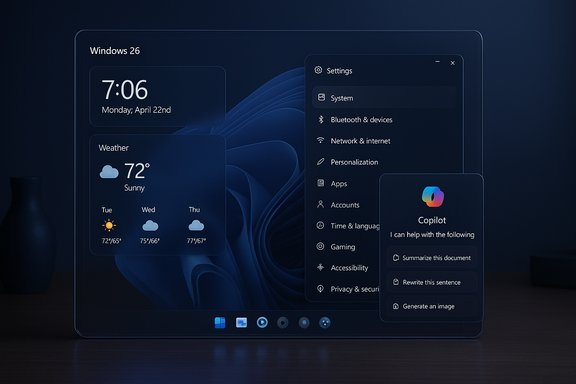
Key visible elements in the concept:
Why NPUs matter:
Two dynamics are especially important:
Windows in 2026 and beyond will be shaped as much by hardware economics and enterprise migration budgets as by design taste. The future many fans want is possible, but it will arrive through staged engineering choices rather than a single cinematic reveal. The fastest, cleanest, and most respectful route forward is one that treats AI as a tool — powerful, optional, and accountable — not an unavoidable default.
Source: Neowin New concept shows what Windows may be like in 2026 and beyond
 Background
The last two years have been defined by Microsoft’s push toward embedding AI into Windows: Copilot as a native assistant, the Copilot+ PC program that requires dedicated NPUs, and public language from Windows leadership describing the OS as evolving into a more “ambient” or agentic platform. These signals have accelerated both OEM hardware plans and fan speculation, while sharpening the divide between enthusiasts who want practical polish and those concerned about forced AI bloat.At the same time, a hard deadline — Windows 10 end‑of‑support on October 14, 2025 — has made the migration conversation urgent for millions of users and organizations. That reality reshapes product timing and raises the stakes for hardware and software compatibility choices Microsoft and its partners make now.
Overview: What the “Windows 26” concept shows
The “Windows 26” reel from designer Abdi (AR 4789) is a crisp, cinematic mockup that emphasizes visual harmony, floating widgets, and a restrained, contextual role for Copilot. It borrows heavily from Aero-era translucency — reimagined as a “liquid glass” surface — and layers in features fans have been requesting for years: a less obtrusive Copilot, consistent dark mode, movable widgets, richer quick settings, and a merged Settings/Control Panel experience. The video presents these ideas as a single, coherent design language rather than a scattershot list of features.Key visible elements in the concept:
- Liquid glass shell with uniform translucency and consistent corner radii.
- Floating, dockable widgets that can be placed anywhere on the desktop.
- Auto dark mode and cohesive theming across system surfaces and first‑party apps.
- Contextual Copilot that appears where it’s useful rather than as an always‑on overlay.
- Collectzone-style grouping for project assets and quick context switching.
Design analysis: why the concept resonates
Visual coherence and emotional impact
The concept nails what good UI design often forgets: visual consistency reduces cognitive load. By unifying translucency, motion, and spacing, the mockup gives the OS a single voice — it looks like the work of one design system rather than decades of accreted surfaces. Short, purposeful animations emphasize state without being intrusive, which creates a perception of quality even before functionality is evaluated.Practical feature decisions
Many of the mockup’s features are small, high‑impact ideas that solve everyday friction:- Merging Control Panel and Settings removes redundancy.
- Floating widgets and per‑desktop theming improve discoverability and personalization.
- Rethinking Quick Settings to be actionable directly addresses small but frequent workflow pain points.
These are not fantasy-features; they are pragmatic UX moves that would likely be widely appreciated if executed with performance and accessibility in mind.
The restrained Copilot
Instead of a Copilot that dominates the screen, the concept shows contextual Copilot: an assistant that surfaces where it helps and stays out of the way otherwise. That design philosophy addresses a key criticism many users have voiced about earlier Copilot integrations: perceived intrusiveness and UI clutter. The mockup suggests a middle path — helpful AI, optional, and discoverable.The hardware reality: Copilot+ PCs and NPUs
The distance between cinematic mockups and shipping software is measured partly in silicon. Microsoft’s Copilot+ PC program defines a hardware baseline intended to deliver low‑latency, on‑device AI: dedicated Neural Processing Units (NPUs) with performance measured in TOPS (trillions of operations per second). Public documents and industry reporting point to a 40+ TOPS threshold as a common target for Copilot+ functionality, plus minimum memory and storage requirements for a full local-AI experience.Why NPUs matter:
- On‑device inference reduces round‑trip latency and can preserve privacy by limiting cloud dependence.
- NPUs are energy‑efficient for ML workloads compared with CPU/GPU execution for certain models.
- Hardware variability means features may be staged or gated by device class to preserve performance expectations.
Feasibility: can Windows 26’s ideas ship?
From a pure engineering standpoint, many of the mockup’s surface ideas are feasible in the near term. The challenge is less about crafting translucent visuals and more about making them work reliably across the enormous legacy surface that Windows carries:- Legacy UI debt: decades‑old components, third‑party shell extensions, and OEM dialogs are not trivially restylable. A wholesale visual flip risks regressions.
- Accessibility constraints: translucency and motion must meet contrast and screen‑reader requirements. Polished visuals that obscure text or controls harm users and invite compliance problems.
- Performance tradeoffs: richer shell effects and AI services consume CPU/GPU/NPU resources; on low‑end machines this can erode responsiveness — the exact opposite of what many users want.
Community sentiment: why backlash matters
The reaction to Microsoft’s language about an “agentic OS” — and the continuing push for Copilot+ hardware — has not been universally positive. Many users want a lighter, faster Windows that feels responsive on commodity hardware; they’re skeptical of a vision that appears to trade performance for continuous AI presence. That skepticism shows up in social comments, forum debates, and the popularity of fan concepts that emphasize restraint.Two dynamics are especially important:
- Perception of bloat: When AI becomes highly visible in the shell, users fear increased background resource usage, telemetry, and complex permission surfaces.
- Migration friction: Windows 10’s end‑of‑support has forced many to upgrade hardware or accept significant UI and service changes, increasing resistance to further forced changes that demand fresh silicon.
Risks: privacy, performance, and fragmentation
Privacy and data governance
Agentic features that act on users’ behalf — especially anything resembling a persistent “Recall” timeline or deeper contextual indexing — raise legitimate privacy questions. Microsoft has signaled commitments to encryption, local-first processing where feasible, and opt‑in models, but details and guardrails matter. Any design that makes the OS “remember” user activity needs transparent UX for consent, clear per‑feature controls, and robust isolation so enterprise and shared devices aren’t collecting or exposing sensitive context.Performance and battery life
High‑polish visuals and always‑available agents demand compute. On-device NPUs help, but they are not universal. If Microsoft ships richer AI experiences by default on all Windows SKUs, legacy devices will feel slower; if it gates them to Copilot+ hardware, it risks fragmenting Windows experiences by hardware class. Neither option is cost‑free.Ecosystem fragmentation
A tiered Windows — Copilot+ vs Classic/Lite — solves some engineering problems but complicates support and app compatibility. Developers must know which experiences to target, ISVs must test multiple device classes, and enterprise management tooling must adjust to mixed fleets. All of this adds friction for the very customers Microsoft cannot afford to alienate.What Microsoft can do (and likely will)
If Microsoft wants to move toward the best of both worlds — the visual polish of Windows 26 and the performance-first ethos users demand — several pragmatic strategies stand out:- Modular OS components: ship AI-first, visually rich components as optional packages that detect NPUs and install only on compatible Copilot+ devices, leaving a lean base OS for older hardware.
- Clear opt-in UX and privacy defaults: ensure agentic features are off by default or require explicit enablement during OOBE, with concise explanations for admins and end users.
- Phased rollouts + compatibility pilots: broader visual changes should go through enterprise pilots and accessibility verification before mass enablement, avoiding the shock of sudden regressions.
- Developer and API support: publish stable APIs and migration tooling that lets developers adapt to new UI primitives and agent surfaces without breaking legacy apps.
Short checklist for users and IT teams
If you’re choosing devices or planning upgrades in the coming year, consider this pragmatic sequence:- Inventory hardware and identify machines that cannot meet Copilot+ NPU thresholds (40+ TOPS).
- Decide which endpoints truly need Copilot+ experiences — prioritize creators, hybrid workers, and devices used for collaboration/media.
- Pilot agentic features on a small set of Copilot+ machines and monitor performance, privacy, and compatibility.
- For remaining PCs, enforce a minimal baseline: the latest Windows 11 servicing, trimmed startup items, and clear tooling for telemetry/privacy settings.
- Communicate changes and opt-in paths clearly to end users to avoid surprise UIs or background behavior.
Critical takeaways
- The “Windows 26” concept is valuable because it reframes the conversation: users want optional, task-focused AI and a return to careful visual polish. The mockup packages those desires into a compelling narrative that highlights real UX gaps.
- Microsoft’s hardware-first Copilot+ strategy is real and technically significant: NPUs and a 40+ TOPS baseline enable low‑latency on‑device AI, but they also introduce fragmentation and migration friction.
- The biggest product risks are not the visuals themselves but the delivery model: forcing agentic features onto all machines, failing to provide clear privacy controls, or fragmenting the ecosystem without robust compatibility tooling would undercut user trust.
- A pragmatic, staged strategy — modular components, opt‑in agents, enterprise pilots, and developer support — can let Microsoft capture the best of the concept while minimizing downside.
Final verdict
Concept videos like AR 4789’s “Windows 26” do more than entertain: they provide a focused, user‑centered critique of current priorities and a clear wishlist for what many customers would happily adopt. The challenge for Microsoft is turning that clarity into ship‑ready engineering and trustworthy product policy. Delivering the glossy, liquid‑glass aesthetics and flexible Copilot behavior seen in the mockup is feasible — but only if the company couples those ambitions with modular deployment, strict privacy guardrails, and a plan to avoid leaving the vast installed base behind.Windows in 2026 and beyond will be shaped as much by hardware economics and enterprise migration budgets as by design taste. The future many fans want is possible, but it will arrive through staged engineering choices rather than a single cinematic reveal. The fastest, cleanest, and most respectful route forward is one that treats AI as a tool — powerful, optional, and accountable — not an unavoidable default.
Source: Neowin New concept shows what Windows may be like in 2026 and beyond
