

Windows 7 Windows 7 display problems, not sure how to describe

lightofshados

New Member
Joined
May 1, 2010
Messages
2
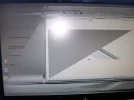
Well I just got a new desktop last week and came back from being out in the field for a week (USMC) and it doesnt work. The screen tends to go all crazy on me. I called dell and they installed the lastest drivers for the video card. Computer has an NVIDIA Geforce 260 GTX video card. I dont even know how to describe what it does but I tried adjusting the resolution, changed from VGA cable to HDMI and back. Tried adjusting the refresh rate 50/60hz, did a system restore and have not had any success. A picture of the forementioned is posted below. Thanks for your help!
 

Attachments

  • 100_1594.webp
    100_1594.webp
    284 KB · Views: 430
Solution
Do you observe the same behavior in safe mode ?


I called dell and they installed the lastest drivers for the video card. Computer has an NVIDIA Geforce 260 GTX video card.


Have you tried:

1. Latest NVIDIA driver (uninstall your old driver first)
2. Latest driver for your monitor

cybercore

New Member
Joined
Jul 7, 2009
Messages
15,641
Do you observe the same behavior in safe mode ?


I called dell and they installed the lastest drivers for the video card. Computer has an NVIDIA Geforce 260 GTX video card.


Have you tried:

1. Latest NVIDIA driver (uninstall your old driver first)
2. Latest driver for your monitor
 

Solution

My1stvmax

Senior Member
Joined
May 25, 2010
Messages
2
Same thing happens to me

I have found this same situation when trying to remotely assist my mother with her laptop. That's the only time and have yet to find a solution. Her laptop works fine any other time until I remotely connect to it from my desktop. It will connect, but I the display is at a stretched out diagonal and in black and white. It's very unreadable. Anyone have any suggestions?
 

Back
Top