

Microsoft’s interface course-corrections and a simultaneous, urgent fix cycle in its virtualization stack illustrate two recurring truths about modern Windows: the company still moves UI-first features experimentally into server builds long before desktop rollouts, and high-impact server bugs can force out-of-band patches that rewrite administrators’ patching playbooks overnight.
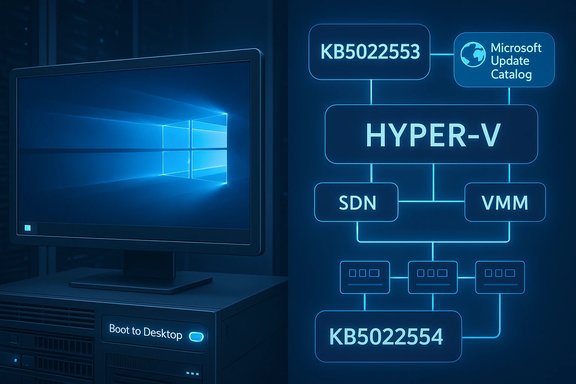
Windows 8.1’s return of a visible Start button and the addition of a “boot to desktop” option were first widely noticed in previews and server builds in mid‑2013, months before the consumer rollout—an early signal that Microsoft was responding to desktop users’ backlash against Windows 8’s tile-first flow. This behavior was documented in contemporary reporting on the Server 2012 R2 preview where the button and navigation options were visible in the Taskbar’s new Navigation tab. Separately, in December 2022 Microsoft faced an operational snafu: routine cumulative updates introduced regressions that broke certain Hyper‑V + Software Defined Networking (SDN) workflows when hosts were managed by System Center Virtual Machine Manager (VMM). The company published emergency, out‑of‑band cumulative updates—KB5022553 (Windows Server 2022) and KB5022554 (Windows Server 2019)—to reverse those failures and restore SDN/VMM interoperability. Those fixes were made available through the Microsoft Update Catalog rather than via automatic Windows Update.
For product teams and desktop users the lesson is clear: small, visible UI concessions can go a long way toward easing adoption friction—but clarity of expectation matters.
For operations teams the message is operational: prepare for the occasional out‑of‑band update. Make sure your change management, staging, and automation pipelines can absorb manual patches quickly and safely. When Microsoft publishes critical remediation packages to the Update Catalog rather than via Windows Update, it is not a recommendation to delay action; it is a call to apply discipline—test fast, deploy in controlled waves, and monitor aggressively.
The two stories taken together form a blueprint: plan for features to arrive by detour (server previews → desktop), and plan for fixes to arrive by exception (manual, out‑of‑band KBs). In both cases, the decisive factor for minimizing business disruption is the rigor of your operational process.
Source: BetaNews https://betanews.com/article/new-wi...rgency-patches-for-windows-hyper-v-problems/]
 Background
Windows 8.1’s return of a visible Start button and the addition of a “boot to desktop” option were first widely noticed in previews and server builds in mid‑2013, months before the consumer rollout—an early signal that Microsoft was responding to desktop users’ backlash against Windows 8’s tile-first flow. This behavior was documented in contemporary reporting on the Server 2012 R2 preview where the button and navigation options were visible in the Taskbar’s new Navigation tab. Separately, in December 2022 Microsoft faced an operational snafu: routine cumulative updates introduced regressions that broke certain Hyper‑V + Software Defined Networking (SDN) workflows when hosts were managed by System Center Virtual Machine Manager (VMM). The company published emergency, out‑of‑band cumulative updates—KB5022553 (Windows Server 2022) and KB5022554 (Windows Server 2019)—to reverse those failures and restore SDN/VMM interoperability. Those fixes were made available through the Microsoft Update Catalog rather than via automatic Windows Update. Why these two stories matter now
Both narratives—one UI/UX, one low‑level virtualization stability—are instructive for sysadmins, IT decision‑makers and power users because they highlight how Microsoft:- experiments with desktop-facing features in server/preview channels, and
- must sometimes issue manual, narrowly scoped emergency fixes to avoid massive enterprise disruption.
Windows 8.1: Start button and “boot to desktop” — the facts
What showed up, where, and when
- A visible Start button (a desktop Taskbar anchor) and a “boot to desktop” option were observed in the Server 2012 R2 preview and in the Windows 8.1 preview cycle in June 2013. Reporters using Server preview images on Azure saw immediate desktop boots and the Taskbar Start button behavior before the public ISO release.
- Functionally, the button did not reinstate the classic Windows 7‑style pop‑up Start menu. Instead it acted as a consistent anchor to switch between Desktop and the Modern/Start surface, and exposed the power‑user right‑click “Windows + X” menu for quick administrative tasks. This design choice (button without the old menu) was confirmed in multiple contemporaneous articles and the Windows blog posts that guided the 8.1 preview narrative.
Where the setting lives
- The boot to desktop toggle is located in the Taskbar Properties → Navigation tab. From there you can configure sign‑in/boot behavior so the system goes directly to the desktop rather than the Start screen. That remedy addressed one of the most frequent enterprise and desktop complaints about Windows 8.
Community context and reaction
- The change calmed a broad swath of desktop‑focused users and IT professionals who had resisted Metro/Modern as the default entry point. Community threads from that period show heavy discussion around whether the visible Start button was a cosmetic easing of pain or a meaningful usability improvement. Many early adopters described “boot to desktop” as the single largest practical improvement for desktop and enterprise workflows.
Hyper‑V, SDN, VMM and emergency patches: technical timeline and impact
The sequence of events (concrete dates)
- December 13, 2022 — Microsoft released monthly cumulative updates (for example KB5021237 and KB5021249) that later were found to cause SDN/VMM failures on certain Hyper‑V hosts. Administrators began reporting errors when creating or attaching virtual NICs to VMs in VMM‑managed SDN environments.
- December 20–23, 2022 — Microsoft published out‑of‑band cumulative updates: KB5022553 (Windows Server 2022) and KB5022554 (Windows Server 2019) as remediation packages. These were not deployed automatically; affected administrators were instructed to download them from the Microsoft Update Catalog and install manually.
The failure modes
Administrators with SCVMM‑managed Hyper‑V hosts using SDN reported:- failures to create a new VM when the VM’s network adapter is joined to a VM network;
- failures to add or attach a vNIC to existing VMs;
- warnings or errors during workflows such as live migration or VM creation tied to the host’s SDN configuration.
How Microsoft responded
- Microsoft identified the regression and released targeted cumulative updates for the affected server SKUs, explicitly stating the changes were available only from the Microsoft Update Catalog and would not come down via Windows Update automatically. This decision forced admins to evaluate and apply the patches manually or import them into WSUS/ConfigMgr for controlled distribution.
Critical analysis — what worked, what didn’t
Strengths: fast detection and targeted remediation
- Microsoft’s monitoring and field feedback loop flagged a specific regression quickly, and the company produced targeted, cumulative OOB packages (KB5022553/KB5022554) to fix the problem without waiting for the next monthly cycle. This rapid triage avoided longer outages and demonstrated commitment to enterprise reliability.
- The decision to ship cumulative, single‑purpose fixes minimizes the chance of introducing unrelated changes when trying to correct a regression, which is prudent for virtualization hosts that demand determinism.
Weaknesses and operational risks
- Distribution method: by making the fixes manual downloads from the Microsoft Update Catalog, Microsoft forced organizations to alter their patching workflow mid‑stream. While conservative from a stability standpoint (you avoid mass automatic regressions), it increased the chance some environments remained vulnerable to the regression longer because the update was not automatic. This trade‑off routinely burdens smaller IT teams and increases variance in remediation timelines.
- Communication clarity: the messaging required precise environment triage (is your environment SCVMM + SDN? which host builds are affected? and some administrators reported confusion assessing whether they were impacted. Mixed messages or late discovery of the scope increase risk of incorrect remediation decisions (apply or defer). The System Center blog post and the KB notices are comprehensive, but operational teams still needed to map those instructions to their specific topologies.
- Regression risk from emergency fixes: out‑of‑band patches are by definition fast, and less time for extensive QA increases the potential for follow‑on issues. Admins applying OOB fixes must accept a residual risk and therefore need rollback plans and tighter monitoring after installation.
Practical guidance: what administrators should do now
Below is a pragmatic, prioritized checklist for sysadmins facing an analogous situation—either a UI/preview surprise (less urgent) or a virtualization regression (urgent).Immediate checklist for Hyper‑V/SDN/VMM incidents
- Confirm your topology:
- Do you use System Center Virtual Machine Manager (VMM) to manage Hyper‑V hosts?
- Are those hosts configured with Software Defined Networking (SDN)?
- Which OS/build numbers are installed on Hyper‑V hosts? (Collect via inventory/CMDB.
- If your environment matches the impacted scenario, prepare for manual remediation:
- Download the appropriate KB from the Microsoft Update Catalog: KB5022553 (Server 2022) or KB5022554 (Server 2019).
- Import the packages into WSUS or Configuration Manager if you control updates centrally.
- Test in a staging cluster:
- Apply the OOB update to a non‑production host first.
- Validate workflows: new VM creation, attach vNIC, live migration, and any NIC/Load Balancer features specific to your SDN topology.
- Schedule maintenance and roll-out:
- Use small cohorts, observe telemetry and logs, then escalate the deployment.
- Preserve snapshots/backups and document rollback steps.
- Monitoring and verification:
- Monitor System Center logs, Hyper‑V event logs, and network pathing for the first 72 hours post‑patch.
- Re‑run common VMM runbooks that previously failed.
- Communicate:
- Inform stakeholders about the patch, the business impact, and expected maintenance windows.
Longer‑term operational improvements
- Treat out‑of‑band updates as a trigger to review your change control playbook: how quickly can you stage, test and deploy emergency fixes?
- Maintain a mitigation playbook and a runbook that maps Microsoft KB IDs to action items.
- Use automated inventory and detection to reduce the time between vendor advisory and remediation.
Why manual distribution matters — and why it’s a problem
Distributing OOB fixes via the Microsoft Update Catalog rather than Windows Update is a conservative but deliberate choice:- Pros:
- Prevents wide automatic rollouts that might break previously healthy environments.
- Gives admins control to test before broad deployment.
- Cons:
- Places heavier procedural burden on administrators who must manually find, vet, and apply patches—particularly painful for smaller teams.
- Increases the chance for “partial remediation” across a distributed estate where some clusters are patched and others are not, creating inconsistent behavior and troubleshooting complexity.
Lessons from the Windows 8.1 UI pivot
The Start button and boot behavior changes in Windows 8.1 illustrate a different lesson: feature discoverability and expectation management matter.- Microsoft’s visible Start button in Windows 8.1 was a design compromise: it restored a familiar visual anchor without restoring the exact old Start menu behavior. The result placated many users but also sparked debate about how much backward compatibility is appropriate versus moving forward with a new interface paradigm. Contemporary coverage showed the feature eased adoption friction but didn’t fully reconcile divergent expectations from desktop purists and Modern app proponents.
- Lesson for product teams: incremental, visible concessions (a button, a toggle to boot to desktop) can be powerful. But they must be communicated precisely to avoid misinterpretation (for example: “Start button ≠ Windows 7 Start menu”).
Recommended policy updates for IT teams
- Maintain a dedicated “Emergency Patch” decision matrix that includes:
- Who approves OOB updates.
- Minimum test plan for a staging cluster.
- Timing windows and rollback authority.
- Incorporate vendor KB monitoring into the daily SOC / SRE brief to reduce lead time.
- Automate environment detection so you can quickly identify whether the specific combination of roles and features (e.g., SCVMM + SDN + patched Hyper‑V) that triggers a KB’s impact exists.
- Keep an “Update Catalog ingest” pipeline for organizations using WSUS / ConfigMgr so manual packages can be quickly published internally.
A few cautions and unverifiable edge cases
- When reading historical preview reports (for example, Server 2012 R2 preview showing Windows 8.1 UI cues), understand that preview behavior may not map 1:1 to final consumer deployments. Early server builds can include features that are later adjusted or omitted. Treat server-preview observations as indicative rather than definitive.
- In the Hyper‑V case, vendor guidance narrowed the impact to a specific set of conditions. If your environment looks similar but is customized heavily (third‑party SDN overlays, bespoke VMM integrations, or non‑standard feature flags), you may encounter behaviors not covered in the public advisories. Those scenarios cannot be exhaustively verified without access to your environment—assess carefully.
Quick reference: KBs, links and identifiers (for operational teams)
- KB5021237 and KB5021249 — December 13, 2022 monthly cumulative updates that introduced the regression in some environments.
- KB5022553 — Out‑of‑band cumulative update for Windows Server 2022 that addresses the Hyper‑V/SDN issue (available via Microsoft Update Catalog).
- KB5022554 — Out‑of‑band cumulative update for Windows Server 2019 (also available via Microsoft Update Catalog).
Conclusion
The juxtaposition of a user‑facing UI correction (Windows 8.1’s Start button and boot‑to‑desktop option) and a back‑end operational emergency (Hyper‑V/SDN regressions and KB5022553/KB5022554) underlines a perennial truth for Microsoft’s sprawling platform: feature and update cycles touch both ergonomics and infrastructure stability, and each requires distinct but coordinated response strategies.For product teams and desktop users the lesson is clear: small, visible UI concessions can go a long way toward easing adoption friction—but clarity of expectation matters.
For operations teams the message is operational: prepare for the occasional out‑of‑band update. Make sure your change management, staging, and automation pipelines can absorb manual patches quickly and safely. When Microsoft publishes critical remediation packages to the Update Catalog rather than via Windows Update, it is not a recommendation to delay action; it is a call to apply discipline—test fast, deploy in controlled waves, and monitor aggressively.
The two stories taken together form a blueprint: plan for features to arrive by detour (server previews → desktop), and plan for fixes to arrive by exception (manual, out‑of‑band KBs). In both cases, the decisive factor for minimizing business disruption is the rigor of your operational process.
Source: BetaNews https://betanews.com/article/new-wi...rgency-patches-for-windows-hyper-v-problems/]
