

Windows 8 was not a throwaway experiment — it was an ambitious, uneven attempt to fuse a touchscreen-forward “Metro” experience with a four-decade-old desktop model, and that collision explains why it polarized users so fiercely. Thirteen years later, revisiting Windows 8 shows an OS that did some things very well (startup speed, resource efficiency and the tile paradigm) and some things very poorly (UX coherence, app ecosystem management and discoverability). The story of Windows 8 is therefore neither simple vindication nor outright failure; it is a cautionary case study in platform transitions, human-computer interaction, and product messaging.
Windows 8 launched in 2012 as Microsoft’s big bet to unify PC, tablet and phone interfaces around a modern tile-based design language (initially called Metro). The goal was to bring phone/tablet-style apps, touch-first navigation, and a single platform philosophy to a sprawling desktop ecosystem. But the OS landed in the middle of two entrenched expectations: legacy desktop behaviors and a new, mobile-shaped paradigm. Reaction was immediate and loud — some users praised performance and the new design language, while many others bristled at lost muscle memory and discoverability problems. Contemporary user threads capture this polarizing reaction in real time, from early adopters who loved the new model to long-time desktop users who felt disoriented.
Microsoft later issued Windows 8.1 (October 2013) as a substantial update, restoring some desktop affordances and addressing particular complaints — but by then public perception had hardened and Windows 8’s reputation had already shaped OEM decisions and upgrade choices across enterprises and consumers. Market analysis and reporting at the time documented slower-than-expected uptake and cautious corporate adoption as businesses deferred deployment.
When revisiting the platform today, the takeaway is nuanced: Windows 8 deserves credit for trying to chart the future of personal computing, but it also deserves critique for how that future was presented and forced on millions of users without smoother transition mechanisms. The subsequent evolution of Windows shows Microsoft learned and adjusted — a pragmatic recognition that design revolutions in mass-market platforms are most successful when they respect the past while gently steering users to the future.
Source: How-To Geek Was Windows 8 really that bad? I gave it another shot 13 years later
 Background
Windows 8 launched in 2012 as Microsoft’s big bet to unify PC, tablet and phone interfaces around a modern tile-based design language (initially called Metro). The goal was to bring phone/tablet-style apps, touch-first navigation, and a single platform philosophy to a sprawling desktop ecosystem. But the OS landed in the middle of two entrenched expectations: legacy desktop behaviors and a new, mobile-shaped paradigm. Reaction was immediate and loud — some users praised performance and the new design language, while many others bristled at lost muscle memory and discoverability problems. Contemporary user threads capture this polarizing reaction in real time, from early adopters who loved the new model to long-time desktop users who felt disoriented.Microsoft later issued Windows 8.1 (October 2013) as a substantial update, restoring some desktop affordances and addressing particular complaints — but by then public perception had hardened and Windows 8’s reputation had already shaped OEM decisions and upgrade choices across enterprises and consumers. Market analysis and reporting at the time documented slower-than-expected uptake and cautious corporate adoption as businesses deferred deployment.
Installation and the onboarding contrast with modern Windows
One of the recurring observations when retro-testing Windows 8 today is how fast and offline-friendly its installation felt compared with the current Windows installer flow.- Windows 8’s standard installation image once allowed quick, straightforward local installations: burn ISO, boot, install, create a local account — done. That onboarding could complete in minutes on modern hardware.
- Modern Windows (Windows 11) emphasizes online-first setup, encourages or enforces a Microsoft account for Home/consumer editions, and performs extended Out-Of-Box Experience (OOBE) configuration that includes online sign-in, privacy choices, OneDrive prompts and, in some cases, recommended “default” settings — steps that lengthen the setup window. Reporters and end-users have documented the increasing emphasis on an online account during Windows 11’s OOBE and Microsoft’s moves to close previously available local-account bypasses.
First impressions: two UIs in one
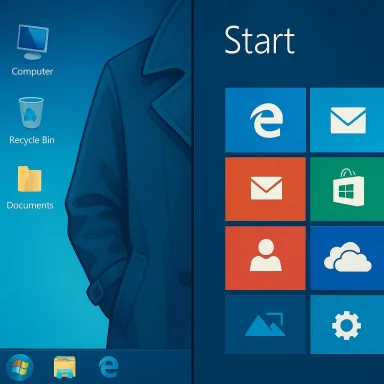
Windows 8 is best understood visually and behaviorally as “two operating systems wearing a trench coat.” The desktop retained many of Windows 7’s graphical elements (icons, the system tray, and familiar desktop metaphors), while Metro introduced full-screen, tile-based apps that assumed touch or tile navigation. The result was a jarring context switch for many users:- The taskbar and desktop survive, but many core features (Start, app launching, search) now have tile-first behaviors that can hide the taskbar or fill the screen.
- Multiple entry points for Start and app switching—keyboard shortcuts, the now-iconic Start tile, the invisible edge gestures and the Charms bar (in early releases) — created inconsistent muscle memory. Users reported multiple “Start” mechanisms and confusing corner gestures as serious discoverability issues. Contemporary forum threads document the frustration of hunting for familiar controls and the perception that the UI had been “bolted on” without a single coherent navigation model.
Metro’s strengths and shortcomings
Metro had several strengths that were later absorbed into the broader Windows design language:- Clean, high-contrast tiles and content-first app layouts that favored clarity and scalability across small and large screens.
- An emphasis on touch gestures and larger hit targets that improved usability on tablets and hybrids.
- Live tiles, which offered glanceable information (weather, calendar, mail) without launching apps.
- The app experience relied heavily on a fresh, vibrant Windows Store ecosystem that never fully matured on par with iOS/Android stores.
- Many Metro apps expected or required a Microsoft account for syncing data and unlocking features, which became a source of friction for offline or privacy-minded users. The need to sign into a Microsoft Account to open certain built-in experiences (Calendar, Mail, store-protected apps) was a recurring complaint, and the death of Windows 8’s Store backend after end-of-support made some of those experiences degrade or stop working entirely.
The app ecosystem: a missed bet
Arguably Windows 8’s biggest structural problem was its app ecosystem. Microsoft imagined a Windows Store-driven world with Metro-style apps, but the ecosystem never achieved the network effects Microsoft hoped for:- Developer momentum went elsewhere. For consumer-first apps, iOS and Android dominated the market; for classic productivity apps and games, developers continued to support the desktop Win32 environment. Developers had little incentive to write Metro-only apps for a platform that lacked a large, homogeneous mobile user base.
- The Windows Store itself was hamstrung by platform fragmentation (desktop-first habits vs. touch-first expectations), and the Store’s lifecycle on Windows 8/8.1 ended as Microsoft deprecated the platform. Microsoft’s lifecycle guidance states that after January 10, 2023 support for Windows 8.1 ended, and that installed Store apps would stop receiving purchases and in-app purchases after that date; publisher updates for installed apps were available only for a limited period after end-of-support. That support end materially worsened the utility of built-in Metro apps on legacy devices.
- User-facing lock-in to Microsoft accounts for many app experiences made offline usage brittle, and once the Store backend retired or publishers stopped updating apps, many experiences simply stopped functioning correctly. The How-To Geek reviewer could not get many of the native Metro apps to work because Store services and account-dependent features had been retired. (Practical consequence of end-of-support and Store changes.
Usability: discoverability, muscle memory and control surface chaos
When people say Windows 8 “got in the way,” they usually mean one of three things:- Discoverability: essential tasks like shutting down, switching apps, or finding system settings required new gestures or hidden UI elements. Early adopters learned shortcuts and gestures, but non-technical users found these affordances invisible. Forum posts from the launch period show repeated confusion about how to do everyday tasks, and many users expressed a desire to “go back” to the familiar Start menu and desktop flows.
- Duplicated controls: Metro introduced new system apps that duplicated Control Panel functionality (the new Settings app vs. legacy Control Panel), generating fractured discoverability and settings duplication that made troubleshooting harder for mainstream users.
- Forced workflows: some Metro apps were designed to work best when tied to a Microsoft account. For an offline user or someone protective of their data, being asked to sign into a service to access basic functionality (e.g., calendar or weather) created a sense of coercion, particularly if the Store services behind those apps were later disabled by Microsoft’s lifecycle decisions.
Enterprise and market consequences
Enterprises were cautious. IT departments care about predictable management, compatibility, and minimal training overhead. The tile-first model offered little immediate advantage to line-of-business Windows desktops and presented training and compatibility risks. Reuters-era reporting and enterprise analysis suggested that many large organizations planned limited or no broad Windows 8 deployments until the design stabilized and long-lived management tools were available. This conservative posture reduced channel momentum and OEM enthusiasm for tile-first hardware in the PC market. Windows 8’s market performance had real business and product consequences: Microsoft responded by reintroducing desktop affordances in Windows 8.1 and ultimately changing course with Windows 10, which restored a Start menu hybrid and emphasized desktop continuity while retaining design lessons from Metro. Many commentators later argued that Windows 10 effectively represented “Windows 8, but fixed” by reconciling the desktop-first mental model with app-store and touch-friendly capabilities.What Windows 8 got right
It’s worth separating the idea from the execution. Windows 8’s design experiments seeded innovations that survived and matured:- Modern design language: flat artwork, content-first tiles, and a simplified iconography informed later Windows releases and the broader OS design trend away from heavy skeuomorphism.
- Performance and boot improvements: Windows 8 introduced significant improvements to boot behavior and power management that benefited devices across the Windows ecosystem.
- Touch and hybrid readiness: the OS pushed OEMs into experimenting with convertible form factors and hybrids that are now mainstream in the Windows PC market.
Security, support lifecycles and the modern reality
An important part of reassessing Windows 8 is acknowledging the lifecycle realities. Microsoft formally ended support for Windows 8.1 on January 10, 2023, which means the platform no longer receives security updates, technical support or Store purchases, and installed Store apps stopped supporting new purchases after that date. Microsoft’s lifecycle documentation explicitly recommends migrating to Windows 10 or Windows 11 to remain supported. For users who want a secure, supported platform, continued use of Windows 8.1 is a known security risk unless mitigations (network isolation, application whitelisting) are in place. On the other side, Microsoft’s modern installer direction — prioritizing cloud, accounts and automatic provisioning in Windows 11 — introduces trade-offs of its own: stronger integration with Microsoft services and improved device provisioning for cloud-managed environments, at the cost of reduced frictionless offline installation and fewer straightforward local-account options for mainstream users. The company has steadily tightened OOBE behavior and removed many local-account bypasses; outlets documenting those changes explain the rationale Microsoft gives (device configuration completeness and security) but also highlight the user-choice trade-off.Final analysis: Was Windows 8 really that bad?
Short answer: no — but it was mishandled.- Windows 8 was not broken at a system level. It shipped with performance improvements and design experiments that were legitimate and, in several cases, prescient.
- The fundamental problem was a mismatch between how Microsoft rolled out the change and how most users expect desktop transitions to behave. The company attempted a rapid shift in interaction metaphors without providing a sufficiently gentle bridge for desktop users or cultivating an app ecosystem that would make the Metro paradigm obviously superior for the majority of daily tasks.
- The product management error was twofold: (1) inadequate recognition that desktop users relied on learned behaviors and (2) an over-reliance on a Store ecosystem that never matured fast enough to justify forcing users into a new interaction model.
What users and IT should take away
- For everyday users who value predictability and minimal retraining, Windows 8 was an abrupt and costly change. The subsequent popularity of Windows 10’s hybrid Start menu validates that.
- For designers and product managers, Windows 8 is a reminder that compelling ideas need careful migration pathways. Radical UI changes can succeed only if they either (a) offer a clear and immediate win for the user’s most common tasks, or (b) provide a gradual, discoverable migration path that doesn’t invalidate existing workflows.
- For historians of software design, Windows 8 is not a dead end but a bridge: many of its visual and interaction innovations live on in modern Windows releases, just recombined with a more conservative, desktop-respectful approach.
Conclusion
Windows 8 was not an unmitigated disaster of engineering — it was a bold reimagining that collided with long-established desktop expectations and an undercooked developer ecosystem. The OS’s strengths (performance improvements, modern visual language, tablet readiness) were real and influential; its weaknesses (discoverability, friction for desktop users, dependence on a nascent Store and account model) were equally real and consequential.When revisiting the platform today, the takeaway is nuanced: Windows 8 deserves credit for trying to chart the future of personal computing, but it also deserves critique for how that future was presented and forced on millions of users without smoother transition mechanisms. The subsequent evolution of Windows shows Microsoft learned and adjusted — a pragmatic recognition that design revolutions in mass-market platforms are most successful when they respect the past while gently steering users to the future.
Source: How-To Geek Was Windows 8 really that bad? I gave it another shot 13 years later
