

Windows 95 detected likely setup programs with a simple but consequential guess: it looked for installer-like words in the program name, fell back to checking whether the program was running from a setup-like path, and then used that signal to decide when to check whether protected system files had been replaced. The point was not to identify malware. It was to recover from ordinary installers that could overwrite shared Windows components.
The mechanism was blunt. Windows 95 looked for names such as
For today’s administrators and technical readers, the useful takeaway is concrete: installation is a high-risk state because the meaningful system change may not happen while the first setup program is still running. A setup executable can be only the opening step in a longer sequence involving restart-time or outside-Windows work. Windows 95’s answer was primitive by modern standards, but the operational lesson remains recognizable: do not judge an install only by whether the installer exits cleanly. Check the machine after the full install sequence has completed.
The most revealing part of the Windows 95 behavior is not that it used a heuristic. It is how plain the heuristic was. If the words
That is a practical 1990s solution: local, cheap, string-based, and aimed at catching a large class of real-world behavior. It did not require a formal package declaration or a reliable statement from the program about what it intended to do. It looked at the words software vendors and users were already using.
The detector also included localized variants. That detail matters because Windows was not only looking for one English convention and calling the job done. Even a primitive installer detector had to acknowledge that Windows was an international product and that the word “setup” was not the only way developers named installation tools.
Still, the design was only a guess. A program named
That distinction is important. Windows 95 was not trying to classify every executable perfectly. It was trying to notice a moment when system files might have been changed by a setup program and then verify the resulting state. The filename and path rules were triggers for follow-up, not proof of wrongdoing.
That made setup programs a special case. They were supposed to change the computer. They were expected to copy files, configure components, and sometimes require a restart. But because setup programs had a legitimate reason to alter the system, they also had more opportunity to break it.
If a third-party setup program replaced a newer system component with an older one, the user might not connect the later failure to the installer. The problem could look like Windows instability. The user installed one program, then something unrelated stopped working. From the operating system’s point of view, the challenge was not only preventing bad writes. It was recognizing that a setup-like event had occurred and checking the system afterward.
Windows 95’s answer was to tolerate some installer behavior and then verify. The filename detector helped Windows decide when to inspect. For programs that matched the setup-name heuristic or the setup-path fallback, the file check could be delayed until the next start. That delay was not incidental. It was tied to how some installers actually completed their work.
That workflow meant a live check immediately after the setup program exited could be too early. The setup program might have only staged the real work. The batch file could perform the file replacement after Windows had exited. If Windows checked before that phase, it could miss the actual change.
Waiting until the next start gave Windows a better point of observation. By then, the setup sequence had finished, the MS-DOS batch-file phase had already run if it was going to run, and Windows could inspect the final file state. The restart transformed Windows from a participant in the install sequence back into an auditor of what had been left behind.
This is the most important operational detail in the story. The name heuristic answered, “Did something that looks like setup activity just happen?” The delayed next-start check answered, “After the whole setup sequence is complete, are the protected files still in the expected state?”
Those are different questions. A setup program’s visible exit was not always the end of the install. In the
For the installer, this was practical. If Windows had a file open or locked, replacing it from the running Windows session might fail. Moving the replacement into a DOS batch-file phase gave the setup program a way to finish the job.
For Windows, that same workaround created a monitoring problem. The operating system could not fully protect itself during a period when the installer had deliberately left the Windows environment. If the damaging replacement happened during the DOS phase, a check performed before that phase would provide false reassurance.
That is why the delayed next-start check was part of the design. Windows 95 could not rely only on “the installer process ended, so now check.” The process ending might merely start the next phase. A restart-aware check allowed Windows to evaluate the system after the setup program, the batch file, and the return to Windows had all played out.
For admins, this is the part of the story that still translates cleanly. Restart-required installers should be treated as incomplete until the restart has happened and post-restart validation is done. A clean installer exit code is not the same as a verified machine state.
That exception matters because it shows the mechanism was not one universal rule applied blindly to every kind of install. Windows recognized at least one install path where the check happened live rather than being delayed until the next start. Multimedia driver installation through INF files was handled as its own case.
The difference appears to be tied to control and timing. If the risky file replacement was happening through an INF-based multimedia driver install while Windows could still observe and respond, a live check made sense. If a general setup program might leave Windows, run a batch file, and then restart, a delayed next-start check made more sense.
That makes the design more concrete than the phrase “Windows guessed” might suggest. Windows 95 guessed that a setup-like program had run, but it did not treat every installation path identically. It had a delayed path for likely setup executables and setup directories, and a live-check exception for multimedia INF installs.
The important lesson is not that the multimedia exception was broad or elegant. It is that Windows 95’s protection depended on where and when the risky change occurred. If the change happened while Windows could check it, Windows could check live. If the change might happen after Windows exited, Windows needed to wait until it started again.
This table captures the mechanism without overstating it. Windows 95 did not need perfect knowledge of intent. It needed enough of a clue to decide whether to check protected files.
The first path looked at the executable name. That caught the obvious cases: programs actually called setup or installer, and abbreviated names containing
The timing column is the most important part. For the name and path heuristics, the check could wait until the next start because the setup program might have scheduled work through
That separation keeps the story grounded. Windows 95 did not simply panic whenever it saw the word setup. It used setup-like evidence to decide when a system-file check was warranted, and it accounted for the possibility that the real file changes might happen after Windows temporarily exited.
This is not an elegant contract between the operating system and applications. It is pattern matching. But for the problem Windows 95 was trying to solve, pattern matching could be useful. A vendor might not provide a clean declaration of installer intent, but the same vendor might still name the program in a way that revealed what it was.
The broad
That asymmetry is important. If Windows checked after a false positive, the cost was extra work. If Windows failed to check after a false negative, the cost could be a damaged Windows installation. The heuristic leaned toward catching more setup-like activity because missed repairs were more dangerous than unnecessary checks.
This does not make the rule perfect. It makes it understandable. Windows 95 was using the signals it had: names, paths, localized naming patterns, install context, and restart timing.
Installers expected to copy files and configure the system. If Windows blocked too much, an installer might fail, leave an application half-installed, or present the user with an error that looked like Windows incompatibility. In that environment, a repair-afterward model could be less disruptive than a hard stop.
The setup detector fit that model. Let the installer run. If it looked like setup activity, check the system afterward. If the installer used the MS-DOS batch-file route, check after Windows came back. If the install was a multimedia INF case, perform the live check attached to that path.
This was not a broad security framework. It was a targeted compatibility and reliability mechanism. It tried to reduce damage from installers without assuming that every installer could be forced into a clean modern packaging model.
There are limits to that approach. A heuristic can miss cases. A repair step can hide the original cause of the damage. A user or admin may not immediately understand why a file changed and then changed back. But the mechanism reflects the constraints of the time: Windows had to run existing software, and existing software sometimes treated shared system files as something it could replace.
A simplified sequence looked like this:
This sequence explains why “check when the setup program exits” was not always sufficient. The setup program’s exit could be the handoff to the batch file. The damage, if any, could occur after the point where a live Windows check would have run.
The delayed next-start check was therefore a timing fix. It did not prevent the installer from using the DOS route. It waited until that route had finished and then examined what was left.
For anyone managing Windows endpoints today, the practical parallel is limited but useful: treat post-restart state as part of the install result. If an installer says a reboot is required, the installation has not really finished until the reboot is complete and the machine has been checked afterward.
First, installer names and paths can be operational clues. Windows 95 used them because many setup programs named themselves predictably. Today, admins should not depend on names as a security boundary, but names and paths can still help identify which processes are part of an installation chain during packaging tests or troubleshooting.
Second, the first executable is not always the whole install. Windows 95 had to account for setup programs that used
Third, live validation and post-restart validation answer different questions. A live check can catch changes that occur while the operating system is supervising the install. A post-restart check can catch the final result after deferred work has completed. Windows 95 needed both patterns because different install paths changed files at different times.
Fourth, compatibility mechanisms are often ugly because they are built around real software behavior. The Windows 95 rule was not elegant, but it was tied to observable installer patterns: setup-like names, setup-like paths, localized variants, MS-DOS batch-file replacement, and a specific multimedia INF install exception.
The mistake would be to turn this into a broad claim that modern Windows works the same way. The better reading is more specific: Windows 95 had a concrete problem with installers replacing system files, and it used simple signals to decide when to check for that damage.
Windows 95 was not trying to solve every trust problem. It was trying to solve a specific reliability problem caused by installers that could replace system files. The operating system needed to know when setup had probably happened, and it needed to check at the right time. If the installer stayed within a path Windows could inspect live, Windows could perform a live check. If the installer used
That is the durable part of the story. Good endpoint management is not only about blocking bad activity. It is also about understanding when risky activity occurs, when the final state is visible, and when validation actually means something.
Windows 95 used filenames and paths because those were useful clues in the environment it had. It delayed checks because setup programs could finish their work outside the live Windows session. It made an exception for multimedia INF installs because that path could be checked live. None of that requires grand theory. It is a concrete example of an operating system adapting to the behavior of real installers.
The forward-looking lesson is simple: installation is not a single moment. It is a sequence. For Windows 95, that sequence could include a setup program, a path heuristic, a localized name match, an exit to MS-DOS, a batch file, a restart, and a file check on the next start. For today’s admins, the tools and platforms are different, but the discipline is the same: follow the whole sequence, validate after it completes, and treat setup as one of the riskiest ordinary things a computer does.
The mechanism was blunt. Windows 95 looked for names such as
setup, installer, and inst. It also accounted for localized variants rather than assuming every installer used English naming. If the executable name did not look like an installer, Windows could still treat it as suspicious if setup appeared in the path leading to the program. For many setup programs, the actual file check was delayed until the next start, because some installers exited Windows, ran a batch file from MS-DOS, changed files there, and then restarted Windows. A separate exception existed for multimedia driver installs through INF files, where Windows performed a live file check.For today’s administrators and technical readers, the useful takeaway is concrete: installation is a high-risk state because the meaningful system change may not happen while the first setup program is still running. A setup executable can be only the opening step in a longer sequence involving restart-time or outside-Windows work. Windows 95’s answer was primitive by modern standards, but the operational lesson remains recognizable: do not judge an install only by whether the installer exits cleanly. Check the machine after the full install sequence has completed.
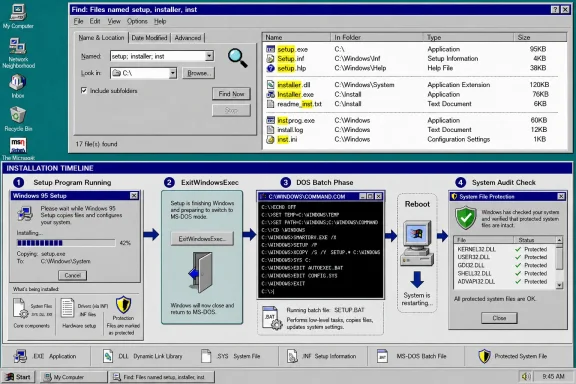 Microsoft Solved a Trust Problem With a Filename Guess
The most revealing part of the Windows 95 behavior is not that it used a heuristic. It is how plain the heuristic was. If the words setup, installer, or inst appeared in the executing program’s name, Windows 95 treated the program as likely to be an installer. If the executable name did not match, Windows could fall back to checking whether setup appeared somewhere in the path leading to the executable.That is a practical 1990s solution: local, cheap, string-based, and aimed at catching a large class of real-world behavior. It did not require a formal package declaration or a reliable statement from the program about what it intended to do. It looked at the words software vendors and users were already using.
The detector also included localized variants. That detail matters because Windows was not only looking for one English convention and calling the job done. Even a primitive installer detector had to acknowledge that Windows was an international product and that the word “setup” was not the only way developers named installation tools.
Still, the design was only a guess. A program named
setup.exe could be harmless. A program with no obvious installer word in its name could still overwrite files. A folder named setup could contain a tool that was not an installer at all. The point was not certainty. The point was to decide when Windows should perform a protective check after a program that looked like setup activity had run.That distinction is important. Windows 95 was not trying to classify every executable perfectly. It was trying to notice a moment when system files might have been changed by a setup program and then verify the resulting state. The filename and path rules were triggers for follow-up, not proof of wrongdoing.
The Problem Was the Installer
Modern readers often associate system-file protection with attackers. In this Windows 95 case, the practical problem was often ordinary setup software. Installers could copy shared components, replace files, and leave Windows with older or unexpected versions of files that other parts of the system depended on. The installer did not need to be malicious to create damage.That made setup programs a special case. They were supposed to change the computer. They were expected to copy files, configure components, and sometimes require a restart. But because setup programs had a legitimate reason to alter the system, they also had more opportunity to break it.
If a third-party setup program replaced a newer system component with an older one, the user might not connect the later failure to the installer. The problem could look like Windows instability. The user installed one program, then something unrelated stopped working. From the operating system’s point of view, the challenge was not only preventing bad writes. It was recognizing that a setup-like event had occurred and checking the system afterward.
Windows 95’s answer was to tolerate some installer behavior and then verify. The filename detector helped Windows decide when to inspect. For programs that matched the setup-name heuristic or the setup-path fallback, the file check could be delayed until the next start. That delay was not incidental. It was tied to how some installers actually completed their work.
Why the Check Was Sometimes Delayed Until the Next Start
The delayed check is the key to understanding the mechanism. Some setup programs found that a target file could not be replaced while Windows was running. Their workaround was to useExitWindowsExec to exit Windows, run a batch file from MS-DOS, and then start Windows again.That workflow meant a live check immediately after the setup program exited could be too early. The setup program might have only staged the real work. The batch file could perform the file replacement after Windows had exited. If Windows checked before that phase, it could miss the actual change.
Waiting until the next start gave Windows a better point of observation. By then, the setup sequence had finished, the MS-DOS batch-file phase had already run if it was going to run, and Windows could inspect the final file state. The restart transformed Windows from a participant in the install sequence back into an auditor of what had been left behind.
This is the most important operational detail in the story. The name heuristic answered, “Did something that looks like setup activity just happen?” The delayed next-start check answered, “After the whole setup sequence is complete, are the protected files still in the expected state?”
Those are different questions. A setup program’s visible exit was not always the end of the install. In the
ExitWindowsExec pattern, the important changes could occur after Windows had shut down and before it came back. Windows 95’s delayed check was a way to catch that final state rather than a temporary state in the middle of the install.ExitWindowsExec Explains Why a Live-Only Model Was Not Enough
ExitWindowsExec sits at the center of the more technical part of the behavior. The setup program could exit Windows back to MS-DOS, run a batch file, and then return to Windows. That gave installers a way to replace files that were otherwise in use.For the installer, this was practical. If Windows had a file open or locked, replacing it from the running Windows session might fail. Moving the replacement into a DOS batch-file phase gave the setup program a way to finish the job.
For Windows, that same workaround created a monitoring problem. The operating system could not fully protect itself during a period when the installer had deliberately left the Windows environment. If the damaging replacement happened during the DOS phase, a check performed before that phase would provide false reassurance.
That is why the delayed next-start check was part of the design. Windows 95 could not rely only on “the installer process ended, so now check.” The process ending might merely start the next phase. A restart-aware check allowed Windows to evaluate the system after the setup program, the batch file, and the return to Windows had all played out.
For admins, this is the part of the story that still translates cleanly. Restart-required installers should be treated as incomplete until the restart has happened and post-restart validation is done. A clean installer exit code is not the same as a verified machine state.
The Multimedia INF Exception Was Different
The setup-name and setup-path rules were not the only path. Windows 95 also performed a live file check for multimedia driver installs through INF files.That exception matters because it shows the mechanism was not one universal rule applied blindly to every kind of install. Windows recognized at least one install path where the check happened live rather than being delayed until the next start. Multimedia driver installation through INF files was handled as its own case.
The difference appears to be tied to control and timing. If the risky file replacement was happening through an INF-based multimedia driver install while Windows could still observe and respond, a live check made sense. If a general setup program might leave Windows, run a batch file, and then restart, a delayed next-start check made more sense.
That makes the design more concrete than the phrase “Windows guessed” might suggest. Windows 95 guessed that a setup-like program had run, but it did not treat every installation path identically. It had a delayed path for likely setup executables and setup directories, and a live-check exception for multimedia INF installs.
The important lesson is not that the multimedia exception was broad or elegant. It is that Windows 95’s protection depended on where and when the risky change occurred. If the change happened while Windows could check it, Windows could check live. If the change might happen after Windows exited, Windows needed to wait until it started again.
The Three Ways Windows 95 Decided Setup Had Happened
Windows 95’s behavior can be understood as three related detection paths rather than one magic rule.| Detection path | Trigger Windows 95 looked for | Why it mattered | When the file check happened |
|---|---|---|---|
| Program-name heuristic | setup, installer, or inst in the executing program’s name, along with localized variants | The program was treated as likely setup software | Delayed until the next start |
| Path fallback | setup in the path leading to the executable | The executable might be part of a setup directory even if its own name did not match | Delayed until the next start |
| Multimedia INF install | Multimedia driver installation through INF files | That install path had its own file-check handling | Live file check |
The first path looked at the executable name. That caught the obvious cases: programs actually called setup or installer, and abbreviated names containing
inst. The second path caught a different pattern: a program whose own filename did not look like setup but which lived in a setup directory. The third path was not based on a generic executable-name guess. It applied to multimedia driver installs through INF files and triggered a live check.The timing column is the most important part. For the name and path heuristics, the check could wait until the next start because the setup program might have scheduled work through
ExitWindowsExec and a batch file. For multimedia INF installs, Windows performed the check live.That separation keeps the story grounded. Windows 95 did not simply panic whenever it saw the word setup. It used setup-like evidence to decide when a system-file check was warranted, and it accounted for the possibility that the real file changes might happen after Windows temporarily exited.
The Trick Worked Because Installer Naming Was Predictable
The whole mechanism depended on a simple observation: setup programs were often named in predictable ways. Developers commonly used words likesetup, installer, or abbreviated installation terms. Setup files also often lived in folders named setup. Localized variants extended that idea beyond English.This is not an elegant contract between the operating system and applications. It is pattern matching. But for the problem Windows 95 was trying to solve, pattern matching could be useful. A vendor might not provide a clean declaration of installer intent, but the same vendor might still name the program in a way that revealed what it was.
The broad
inst match is especially telling. It could catch installer-related names that did not literally contain setup or installer. It could also catch names that were not setup programs. That is the trade-off in a heuristic. It may run checks unnecessarily, or it may miss some real installers. The likely design bet was that an extra check was less harmful than failing to check after a setup program replaced a system component.That asymmetry is important. If Windows checked after a false positive, the cost was extra work. If Windows failed to check after a false negative, the cost could be a damaged Windows installation. The heuristic leaned toward catching more setup-like activity because missed repairs were more dangerous than unnecessary checks.
This does not make the rule perfect. It makes it understandable. Windows 95 was using the signals it had: names, paths, localized naming patterns, install context, and restart timing.
Why Windows Did Not Simply Block Everything
A natural question is why Windows 95 did not simply stop third-party installers from replacing protected files in the first place. The answer is that setup compatibility was part of the problem.Installers expected to copy files and configure the system. If Windows blocked too much, an installer might fail, leave an application half-installed, or present the user with an error that looked like Windows incompatibility. In that environment, a repair-afterward model could be less disruptive than a hard stop.
The setup detector fit that model. Let the installer run. If it looked like setup activity, check the system afterward. If the installer used the MS-DOS batch-file route, check after Windows came back. If the install was a multimedia INF case, perform the live check attached to that path.
This was not a broad security framework. It was a targeted compatibility and reliability mechanism. It tried to reduce damage from installers without assuming that every installer could be forced into a clean modern packaging model.
There are limits to that approach. A heuristic can miss cases. A repair step can hide the original cause of the damage. A user or admin may not immediately understand why a file changed and then changed back. But the mechanism reflects the constraints of the time: Windows had to run existing software, and existing software sometimes treated shared system files as something it could replace.
The MS-DOS Batch-File Path Made the Timing Hard
TheExitWindowsExec and batch-file path is what makes the delayed check more than a minor implementation detail. It shows that Windows 95 was dealing with setup programs that could move work outside the live Windows session.A simplified sequence looked like this:
| Step | What happened | Why it mattered |
|---|---|---|
| 1 | A setup-like program ran in Windows | Windows could detect the program name or setup-like path |
| 2 | The setup program found a file it could not replace while Windows was running | The installer needed another way to make the change |
| 3 | The setup program used ExitWindowsExec | Windows exited and control moved to the next phase |
| 4 | A batch file ran from MS-DOS | The actual file replacement could happen outside the live Windows session |
| 5 | Windows started again | Windows could now check the final file state |
The delayed next-start check was therefore a timing fix. It did not prevent the installer from using the DOS route. It waited until that route had finished and then examined what was left.
For anyone managing Windows endpoints today, the practical parallel is limited but useful: treat post-restart state as part of the install result. If an installer says a reboot is required, the installation has not really finished until the reboot is complete and the machine has been checked afterward.
What This Means for Today’s Readers
The Windows 95 behavior should not be stretched into a claim about every modern Windows protection mechanism. Its value is narrower and more practical: it shows how much damage can occur during installation, and how important timing is when validating a system after setup.First, installer names and paths can be operational clues. Windows 95 used them because many setup programs named themselves predictably. Today, admins should not depend on names as a security boundary, but names and paths can still help identify which processes are part of an installation chain during packaging tests or troubleshooting.
Second, the first executable is not always the whole install. Windows 95 had to account for setup programs that used
ExitWindowsExec, a batch file, and a restart. In modern administrative terms, the takeaway is to track the whole sequence: initial launch, child processes, scheduled actions, restart behavior, and post-restart state.Third, live validation and post-restart validation answer different questions. A live check can catch changes that occur while the operating system is supervising the install. A post-restart check can catch the final result after deferred work has completed. Windows 95 needed both patterns because different install paths changed files at different times.
Fourth, compatibility mechanisms are often ugly because they are built around real software behavior. The Windows 95 rule was not elegant, but it was tied to observable installer patterns: setup-like names, setup-like paths, localized variants, MS-DOS batch-file replacement, and a specific multimedia INF install exception.
The mistake would be to turn this into a broad claim that modern Windows works the same way. The better reading is more specific: Windows 95 had a concrete problem with installers replacing system files, and it used simple signals to decide when to check for that damage.
What Admins Should Take Away
This story is not an invitation to manage current Windows systems as though they were Windows 95 machines. It is a reminder that installation remains a special change event. Any process that copies shared files, changes drivers, schedules restart-time work, or modifies system configuration deserves more scrutiny than an ordinary application launch.Admin checklist
- Treat installers and updaters as privileged change events, even when they come from trusted vendors.
- Validate the machine after the full install sequence, not just after the first setup executable exits.
- Pay close attention to installers that require a restart, because important changes may occur after the visible installer has finished.
- During application packaging tests, capture before-and-after state for system files, drivers, services, shared runtimes, and startup actions.
- Test legacy packages in isolated environments before deploying them broadly.
- Prefer vendor-supported deployment methods over renamed, repackaged, or manually chained setup files.
- Record child processes, restart actions, and post-restart behavior during troubleshooting.
- When an install breaks an unrelated component, consider whether a shared file or driver changed during setup.
- Build rollback plans around the complete installation path, including deferred or restart-time actions.
- Do not assume that a successful installer exit code means the endpoint is in a healthy final state.
A Small Mechanism With a Clear Lesson
The Windows 95 setup detector sounds almost comically simple: look forsetup, installer, inst, localized variants, or a setup-like path; then check files later if needed. But the simplicity is what makes the lesson clear.Windows 95 was not trying to solve every trust problem. It was trying to solve a specific reliability problem caused by installers that could replace system files. The operating system needed to know when setup had probably happened, and it needed to check at the right time. If the installer stayed within a path Windows could inspect live, Windows could perform a live check. If the installer used
ExitWindowsExec and a batch file to do work after Windows exited, the better check point was the next start.That is the durable part of the story. Good endpoint management is not only about blocking bad activity. It is also about understanding when risky activity occurs, when the final state is visible, and when validation actually means something.
Windows 95 used filenames and paths because those were useful clues in the environment it had. It delayed checks because setup programs could finish their work outside the live Windows session. It made an exception for multimedia INF installs because that path could be checked live. None of that requires grand theory. It is a concrete example of an operating system adapting to the behavior of real installers.
The forward-looking lesson is simple: installation is not a single moment. It is a sequence. For Windows 95, that sequence could include a setup program, a path heuristic, a localized name match, an exit to MS-DOS, a batch file, a restart, and a file check on the next start. For today’s admins, the tools and platforms are different, but the discipline is the same: follow the whole sequence, validate after it completes, and treat setup as one of the riskiest ordinary things a computer does.
References
- Primary source: Neowin
Published: 2026-07-08T07:20:08.101081
Windows 95 used a very basic "trick" to detect setup files - Neowin
Windows 95 relied on surprisingly simple tricks to spot setup files, revealing an unexpected design choice behind its defenses. www.neowin.net
- Related coverage: techspot.com
Did you know? Windows 95 used three different operating systems during setup | TechSpot
Experienced PC users may be well aware of the peculiar relationship between MS-DOS code and the GUI environment within the Win9x ecosystem. However, according to Chen, the...www.techspot.com - Related coverage: windowscentral.com
Windows 95’s hidden backup folder saved users from chaos | Windows Central
Microsoft built a hidden SYSBCKUP folder in Windows 95 to fix broken installs.www.windowscentral.com - Related coverage: theregister.com
Microsoft man on how the Windows 95 setup worked
MS-DOS, a minimal Windows 3.1, and finally the teal delight of Windows 95 awaited installerswww.theregister.com - Related coverage: windowsforum.com
Windows 95 sysbckup: How Windows repaired installer file overwrites | Windows Forum
Windows 95’s file-protection tricks were never glamorous, but they were a surprisingly effective answer to one of the platform’s most annoying problems...windowsforum.com - Related coverage: hwupgrade.it
Windows 95 e l'anarchia degli installer: il trucco segreto di Microsoft è stato geniale | Hardware Upgrade
Raymond Chen svela i retroscena tecnici sulla stabilità di Windows 95 e la gestione della cartella SYSBCKUP, un sistema di difesa necessario per neutralizzare gli installer che sovrascrivevano i file di sistema con versioni obsoletewww.hwupgrade.it
- Related coverage: golem.de
- Related coverage: windowsreport.com
Windows 95 Had a Smart Fix for App Installers That Broke System Files
Learn how Windows 95 fixed system file conflicts using SYSBCKUP, preventing broken apps from overwriting critical files. windowsreport.com
- Related coverage: ftpmirror1.infania.net
- Related coverage: bitsavers.computerhistory.org
- Official source: devblogs.microsoft.com
Windows Installer Supportability - Visual Studio Setup
Because newer versions of Windows Installer are released with new functionality dependent on operating system features, and older versions of Windows reach the end of their support lifecycle, different versions of Windows Installer are supported on different versions of Windows. Below is the...devblogs.microsoft.com