

Microsoft’s Windows Admin Center has taken another meaningful step toward becoming a one‑stop control plane for on‑premises and hybrid Windows Server operations with the public preview of version 2511, delivering restored installer automation, noticeably snappier VM management, a first‑party VM conversion path from VMware to Hyper‑V, expanded security tooling aligned to Windows Server 2025, and ecosystem extensions that simplify large‑scale migrations.
Windows Admin Center (WAC) is Microsoft’s browser‑based management console for Windows Server, Hyper‑V, and related platform services. Over the last two years WAC has been modernized from a .NET Framework gateway to a .NET 8 backend and expanded with a second‑generation extension model and more aggressive security tooling aimed at Windows Server 2025-era requirements. That modernization drove important performance and security benefits but also introduced transition issues—most notably around the installer/upgrade experience and high‑availability gateway deployments—which the 2511 update explicitly addresses. The 2511 release is published as a public preview at the time of the announcement, with Microsoft signalling that some enterprise pieces (notably HA) will be fully restored in the forthcoming general‑availability build. Administrators should therefore treat 2511 as a validation and test milestone in production planning rather than a drop‑in patch for critical HA environments until the GA build is available.
Source: Windows Report Windows Admin Center 2511 Launches With Faster VM Tools and New Security Features
 Background
Windows Admin Center (WAC) is Microsoft’s browser‑based management console for Windows Server, Hyper‑V, and related platform services. Over the last two years WAC has been modernized from a .NET Framework gateway to a .NET 8 backend and expanded with a second‑generation extension model and more aggressive security tooling aimed at Windows Server 2025-era requirements. That modernization drove important performance and security benefits but also introduced transition issues—most notably around the installer/upgrade experience and high‑availability gateway deployments—which the 2511 update explicitly addresses. The 2511 release is published as a public preview at the time of the announcement, with Microsoft signalling that some enterprise pieces (notably HA) will be fully restored in the forthcoming general‑availability build. Administrators should therefore treat 2511 as a validation and test milestone in production planning rather than a drop‑in patch for critical HA environments until the GA build is available. What’s new at a glance
- Restored silent installer support and purposeful command‑line arguments for automated deployments.
- Installer logging to the Windows Event Log for enterprise auditing and troubleshooting.
- Improved VM management UX and performance, including faster VM lists, better import/export workflows, backend validation, and affinity rule handling.
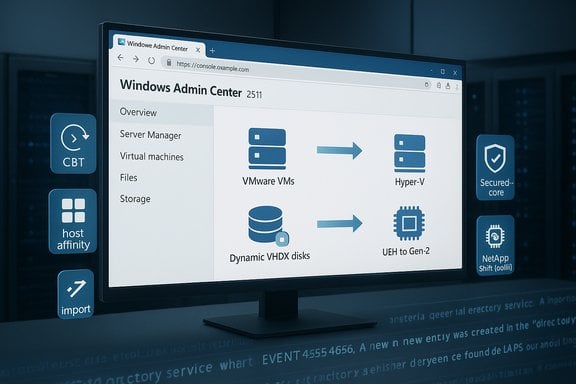
- VM Conversion extension (public preview) for agentless, two‑phase migrations from VMware vCenter/ESXi to Hyper‑V.
- Shift Toolkit / third‑party migration integrations to automate cross‑hypervisor migration and disk format conversion workflows.
- Remote Desktop (RDP) tool improvements: expanded support for 30+ international keyboard layouts and faster, more reliable RDP sessions.
- New security tooling targeted at Windows Server 2025: Silicon Assisted Security (secured‑core visibility), a Security Baseline enforcement tool (OSConfig‑backed), and Windows LAPS integration for automated local admin password management.
Installer, automation, and diagnostics
Silent install and automation restored
After feedback from Server Core and script‑driven deployments, WAC 2511 restores command‑line silent install parameters that had been omitted in the 2410 backend conversion. The installer now accepts:- /Silent
- /VerySilent
- /HTTPSPortNumber
- /CertificateThumbprint
Enterprise logging
The installer now writes diagnostic and operational details to the Windows Event Log under the WindowsAdminCenter channel, enabling centralized event collection, SIEM ingestion, and compliance evidence in enterprise environments. This logging is valuable for both troubleshooting and audit trails during large rollouts.PowerShell configuration module
Windows Admin Center ships a PowerShell configuration module and path for scripted changes—%Program Files%\WindowsAdminCenter\PowerShellModules\Microsoft.WindowsAdminCenter.Configuration—so administrators can automate configuration changes post‑install or during lifecycle operations. This aligns with the trend toward infrastructure as code for management plane software.Virtual machine management and performance
UX and responsiveness improvements
The VM tool in 2511 focuses on practical friction points: the VM list loads faster, import/export dialog flows and file handling are smoother, host settings receive backend validation to avoid misconfigurations, and affinity rule handling is improved. These are largely incremental but high‑impact fixes that reduce the time admins spend in GUI workarounds or debugging edge cases.Validation and misconfiguration reduction
Backend validation for host and affinity settings helps prevent user errors that can cause VM scheduling failures or cluster disagreements. This is a small but meaningful quality‑of‑life improvement for teams that use the GUI for day‑to‑day VM configuration.The VM Conversion extension — what it does
One of the most significant additions is the VM Conversion extension (public preview). This Microsoft‑first feature provides an agentless, two‑phase replication workflow to move VMs from vCenter/ESXi into Hyper‑V:- Agentless discovery using vSphere APIs.
- Initial bulk replication while source VMs remain online.
- Change Block Tracking (CBT)‑enabled delta sync and final cutover after a controlled shutdown to minimize downtime.
- Boot mapping (BIOS → Gen‑1, UEFI → Gen‑2) and destination disks written as dynamically expanding VHDX by default.
- Batch migration support (preview docs list up to 10 VMs per batch; later updates increase batch sizes and add queuing).
Prerequisites and operational notes
The VM Conversion docs list concrete prerequisites and operational constraints that matter for planning:- Requires specific VDDK package placement on the gateway (VDDK 8.0.3 called out).
- VMware PowerCLI and Microsoft Visual C++ redistributables must be available on the gateway host.
- Change Block Tracking must be available on source VMs for efficient delta sync.
- The browser session must remain active for final migration steps; long migrations require session persistence or careful orchestration.
Third‑party migration tooling: Shift Toolkit and NetApp integration
Microsoft’s ecosystem approach is evident in extensions such as the integration with NetApp’s Shift Toolkit, a GUI utility that automates VM migrations and performs disk format conversions (for example, VMDK → VHDX) within storage infrastructure for rapid conversions. NetApp’s Shift Toolkit advertises agentless conversion workflows and integration with WAC so administrators can manage migrations through a single pane of glass. NetApp’s blueprinting, clone‑based conversion, and volume‑level conversion approaches are designed to minimize data movement and downtime by leveraging storage‑side capabilities. That makes the Shift Toolkit particularly attractive in environments where NetApp ONTAP is the primary storage back end. However, such integrations are storage‑dependent and impose their own prerequisites and architectural constraints.Remote Desktop tool: internationalization and reliability
Remote management receives a focused update: the RDP tool now supports 30+ international keyboard layouts through heuristic detection that combines timezone, language, and keyboard pattern analysis, plus more reliable fallback mapping. Microsoft also fixed a loading stall reported in previous builds so RDP sessions start faster and hang less frequently. For global teams and administrators who travel across regions this reduces a persistently irritating source of friction.Security: Windows Server 2025 features surfaced in WAC
Security is the dominant theme of this release. WAC 2511 adds three tightly related areas of functionality:Silicon Assisted Security (Secured‑core visibility)
The Silicon Assisted Security tool consolidates secured‑core requirements and hardware recommendations—VBS, HVCI, Secure Launch/System Guard, Secure Boot, TPM 2.0, and DMA protections—into a single UI for monitoring and configuring protections on supported hardware. This provides an operations‑friendly view of hardware‑rooted security posture and helps teams address gaps between hardware capabilities and OS configuration.Security Baseline enforcement (OSConfig + drift control)
WAC integrates with the Security Baseline model and OSConfig to enable policy application, ongoing drift detection, and remediation. Administrators can apply Microsoft‑recommended baselines and recognized standards (CIS, DISA STIG, FIPS) with enforcement and periodic compliance checks. This moves baseline enforcement into the management plane, reducing reliance on ad‑hoc scripting and manual checks. Important operational note: Baseline enforcement and automatic remediation are powerful but potentially dangerous if applied without testing—policy changes can affect service behavior, performance, or driver compatibility. Implement baselines in staged waves with rollback plans.Windows LAPS integration
Windows LAPS integration allows administrators to reveal, copy, reset, and bulk‑manage local administrator passwords and their expirations for Entra‑joined or AD‑joined devices within WAC. For domain controllers, Windows LAPS can manage and expose the DSRM password when appropriately configured. Built‑in visibility and bulk operations lower the operational burden of rotating local credentials.High availability and gateway clustering
One of the most consequential enterprise changes from the .NET upgrade was the temporary disruption of High Availability (HA) for the WAC gateway. Microsoft’s team has been explicit: HA is not supported in the .NET 8 backend as it stood in 2410 and preview builds, and HA support is planned to return with the 2511 GA build. That means organizations relying on active‑passive gateway clusters should not perform an immediate switch to preview unless they have validated alternative resilience patterns. Administrators planning to adopt 2511 should:- Validate HA behavior in a lab or staging environment.
- Keep a fallback plan to the last GA build if HA is required in production.
- Track the GA announcement for the exact HA restoration guidance and any cluster configuration changes required by the .NET 8 gateway architecture.
Localization, upgrade path, and known issues
The 2410 → .NET 8 conversion introduced a localization bug in certificate handling that caused some upgrade failures; 2511 addresses many of these migration blockers, although a Japanese language‑specific connection migration issue remains noted and is being worked. The release notes list specific known limitations—administrators should review those before upgrading.Cross‑checking the claims — what the documentation and partners say
Microsoft’s TechCommunity announcement is the authoritative product summary for 2511 and explicitly lists the installer flags, logging behavior, VM tool changes, VM Conversion preview, RDP updates, and security tools summarized above. The VM Conversion extension documentation on Microsoft Learn provides the operational details, prerequisites (VDDK, PowerCLI, redistributables), and the exact migration workflow including CBT‑based delta sync and the requirement to remain signed into the browser for final cutover phases. These docs are critical reading for planners and confirm the public‑preview nature and constraints of the tool. Third‑party provider NetApp publicly documents a WAC extension and Shift Toolkit integration that performs storage‑assisted conversions and blueprint‑driven migrations to Hyper‑V; NetApp’s design targets minimal downtime by leveraging storage cloning technologies when available. This demonstrates that Microsoft and ecosystem partners are aligning on GUI‑driven migration experiences inside Windows Admin Center. Independent community and vendor coverage (technical blogs and forums) echo these points and add practical user reports—validation that the release is focused on stability and operational tooling rather than dramatic new architecture. Administrators should combine Microsoft documentation with real‑world community feedback during pilots.Risks, limitations, and caveats
- Preview status: 2511 is public preview for many features. Relying on preview builds for critical services (especially HA or large migration waves) carries operational risk.
- HA not yet GA: High availability for the .NET 8 gateway is explicitly not supported in preview; enterprises must wait for the GA build to recover supported HA topologies.
- Migration prerequisites: The VM Conversion tool requires VDDK placement, PowerCLI, and correct CBT support. Missing prerequisites can stall migrations or increase downtime.
- Security enforcement risk: Applying security baselines with drift control can cause unexpected service disruptions if not tested; baseline enforcement must be staged.
- Third‑party dependence: Tools like NetApp Shift Toolkit provide excellent acceleration but couple migrations to specific storage vendors and features; architecture teams should weigh vendor lock‑in and operational dependencies.
Practical guidance: an evaluation and migration playbook
Below is a pragmatic, sequential plan for teams evaluating 2511 for production use or migration projects:- Inventory and risk assessment
- Identify WAC gateways, HA dependencies, and current gateway versions.
- Catalogue VM conversions candidates and their dependencies (drivers, VMware tools, CBT availability, snapshots).
- Build a test lab
- Replicate a representative subset of your environment (vCenter, Hyper‑V hosts, storage systems).
- Install WAC 2511 preview in the lab, enable VM Conversion and Shift Toolkit if applicable.
- Validate prerequisites and end‑to‑end migration
- Ensure VDDK 8.0.3 (or the documented version) is installed on the gateway.
- Verify PowerCLI and redistributables.
- Execute a single VM pilot, perform initial replication and final cutover, and measure downtime and data integrity.
- Security baseline staging
- Apply Security Baseline to non‑production machines first, monitor for drift and service impact, and refine baseline exceptions.
- Plan HA and production migration timing
- Do not upgrade production HA gateways to preview—wait for GA or confirm architects’ acceptance of reduced gateway HA until GA is released.
- Rollout and automation
- Use the restored silent installer arguments to script deployment in controlled waves and collect installation events via Event Log centralization.
Business and strategic implications
Windows Admin Center is evolving from a handy GUI into a more opinionated, enterprise management surface that surfaces hardware‑rooted security, baseline enforcement, and first‑party migration tooling. That has several strategic meanings:- Organizations standardizing on Microsoft virtualization and server stacks have a lower‑cost, first‑party migration path to Hyper‑V and tighter tooling for securing servers to Windows Server 2025 recommendations.
- The inclusion of partner toolkits (NetApp Shift Toolkit) underlines a cooperative model where Microsoft provides the management surface and partners provide specialized migration capabilities—valuable for customers with significant vendor relationships.
- The new security features (silicon visibility, baselines, LAPS) accelerate compliance programs but require change control and operational discipline. Uncoordinated baseline enforcement can cause outages or support headaches.
Final assessment
Windows Admin Center 2511 represents a pragmatic, operations‑first update: it restores important automation and logging features, improves VM management performance and validation, delivers a major operational capability in the VM Conversion preview, and centralizes hardware security and baseline enforcement for Windows Server 2025. The release balances feature additions with stability work—an appropriate approach for a management plane product used across tens of thousands of servers. That said, the preview status and the explicit HA caveat are real constraints. Enterprises should adopt a staged approach: run pilots for VM conversion and baseline enforcement, leverage the silent installer and Event Log improvements for automation, and wait for the GA release before changing HA gateway topologies in production. Using WAC as a central management plane is compelling—especially with partner toolkits—but success will depend on thorough prechecks, staged policy application, and robust fallbacks during migrations.Postscript — broader Microsoft investments
The 2511 release arrives alongside a larger strategic push by Microsoft into AI and cloud infrastructure, including a major multi‑billion investment package for Canada (C$19 billion commitment through 2027) and other country‑level investments. This underscores Microsoft’s continued focus on hybrid cloud, sovereign capacity, and partner ecosystems—factors that will influence enterprise choices for on‑prem management tooling and cloud migration pathways over the coming years. Administrators should weigh WAC modernization in the context of these long‑term platform investments and partner ecosystems. Windows Admin Center 2511 is ready for pilots and early adopters; it is a clearly operational release that emphasizes the day‑to‑day realities of server management—automation, diagnostics, secure defaults, and migration tooling—while reminding admins to proceed cautiously around HA and production migrations until GA stability is confirmed.Source: Windows Report Windows Admin Center 2511 Launches With Faster VM Tools and New Security Features
