

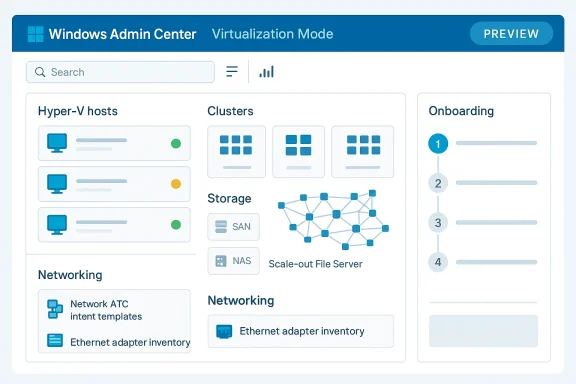
Microsoft is pushing Windows Admin Center further into virtualization with a new Virtualization Mode preview, and the timing is telling. After the original preview exposed the shape of the product, this update focuses on what enterprise admins actually care about: cleaner deployment, smoother upgrades, better visibility into health and resources, and a more coherent onboarding flow for Hyper‑V environments. It is the kind of iteration that does not grab headlines with flashy visuals, but it can materially change how teams manage virtual infrastructure at scale. Microsoft’s own preview notes show the company is still refining the path toward a more unified management plane for hosts, clusters, storage, and networking.
Windows Admin Center has long been Microsoft’s answer to the problem of modern server management without the baggage of older MMC-style tools. It is browser-based, works across on-premises and hybrid environments, and is designed to centralize common administrative tasks that otherwise force IT teams to bounce between multiple consoles. In practice, that means it can serve as the control point for Windows Server, Hyper‑V, failover clusters, storage, networking, updates, and a growing set of infrastructure workflows. The virtualization preview is the latest step in turning that general-purpose admin surface into something more fabric-aware and less fragmented.
The important context is that Microsoft did not arrive here overnight. The first public preview of Virtualization Mode was announced around Ignite 2025, and the company framed it as a purpose-built experience for managing on-premises Windows Server Hyper‑V at scale while also bridging into Azure Arc for hybrid administration. That framing matters because it signals a strategic shift: Windows Admin Center is no longer just a server dashboard, but increasingly a fabric manager that tries to unify virtualization operations under one interface.
The new preview builds are also part of a broader pattern in Microsoft’s server tooling: reduce manual effort, tighten the automation story, and make the first-run experience less brittle. The earlier Virtualization Mode update laid the groundwork for agent updates, but it also required existing users to uninstall before adopting the new build. Microsoft’s newer public preview work is clearly aimed at removing those kinds of rough edges. That makes the release interesting not just as a feature update, but as evidence that the team is treating deployment friction as a product problem rather than an afterthought.
There is also a competitive subtext. Hyper‑V remains a meaningful platform for organizations that want tighter Windows integration, and Microsoft knows that management experience can be just as decisive as raw virtualization capability. If Windows Admin Center can make Hyper‑V feel more unified, more automated, and more observable, then Microsoft improves the case for keeping virtualization workloads inside its own ecosystem. That is especially relevant in mixed estates where admins compare the simplicity of a management layer as much as they compare hypervisor features.
Finally, the preview sits at the intersection of enterprise operations and product feedback. Microsoft is explicitly asking admins to test the release and report back, which is consistent with the way the company has been shaping Windows Server and Windows admin tooling through iterative public previews. That means this is not just a shipping story; it is a signal of where Microsoft wants the operational model to go next.
The preview language makes clear that this is meant for serious environments, not a toy dashboard. Microsoft says vMode supports up to 1,000 hosts and 25,000 virtual machines, which puts the product squarely in the conversation for medium to large virtualization estates. That scale target suggests Microsoft is not merely polishing an admin shell; it is building a platform that can be used as the daily operating surface for real infrastructure teams.
That is especially true for Hyper‑V, where many organizations still rely on a mix of native tools, PowerShell, and third-party utilities. A better control surface can help newer admins get productive faster while giving experienced operators a quicker path through common tasks. It will not replace deep scripting, but it can reduce how often scripting is the only sane option. That is a meaningful improvement if Microsoft can keep the surface accurate and trustworthy.
The preview also reflects a broader Microsoft design trend: bring more infrastructure logic into guided workflows, but keep the underlying platform accessible for advanced users. That balance is hard to strike, because too much abstraction can hide important details, while too little abstraction leaves you with the same old fragmented admin experience. Virtualization Mode is Microsoft’s latest attempt to sit in the middle.
The upgrade story is also better than it was in the first preview. Earlier users had to uninstall the existing vMode build before moving forward, but the new preview streamlines that process so admins can install the newer setup over the existing one. That kind of adjustment may sound minor to outside readers, yet it is often the difference between a product that feels experimental and one that feels operationally usable. Enterprise buyers are very sensitive to upgrade pain because deployment friction tends to multiply across fleets.
It also makes the product easier to integrate into broader enterprise workflows. Admins can stage it alongside other configuration management tasks, tie it into maintenance scripts, and reduce the number of ad hoc manual installs. That may not be glamorous, but it is the sort of change that determines whether a preview becomes a pilot candidate or just another test artifact.
The install and upgrade improvements also hint at Microsoft’s broader support strategy for Virtualization Mode. Once deployment becomes more automation-friendly, Microsoft can reasonably expect more admins to test it in semi-realistic environments instead of only in isolated labs. That should produce better feedback, which in turn should improve the next release cycle. It is a healthy loop if Microsoft keeps the installer stable.
That matters because onboarding is where most management platforms either win trust or lose it. If the wizard is confusing, admins back away and use old methods. If it is clear, structured, and reliable, it becomes the bridge between legacy operations and the new experience. Microsoft appears to be betting that a better guided path can reduce the “where do I start?” friction that usually slows adoption.
For admins, this lowers the number of separate tools needed to stand up a new virtualization fabric. It is also more aligned with how many deployments actually happen: a few standalone systems first, then cluster expansion once the hardware and network layers are ready. If Microsoft can keep the wizard accurate, this could become one of Virtualization Mode’s most valuable additions.
The onboarding flow also shows how much Microsoft is leaning on orchestration logic rather than just UI. The wizard now validates networking and handles some operational prep work during onboarding, which means the product is taking responsibility for more of the setup sequence. That is useful, but it also raises the stakes: if the logic is wrong, the whole experience feels less like a helper and more like a gatekeeper.
The storage side is just as important. Microsoft has been working to make the wizard more capable in handling SAN and NAS scenarios, including auto-configuring LUNs into CSVs and creating a Scale-out File Server in the storage profile. That matters because virtualization infrastructure does not live on compute alone; it depends on storage behavior that is visible, consistent, and ideally automatable.
The automatic handling of test-environment overrides is another thoughtful touch. When the wizard detects virtual machines, it disables the NetworkDirect RDMA adapter property override automatically so testing behaves more sensibly. That is the kind of detail that tells you Microsoft understands people are likely to evaluate vMode inside nested or simulated environments before they deploy it in production.
There is also a strategic angle here. By making storage objects first-class citizens inside vMode, Microsoft is attempting to connect the storage layer to the virtualization layer more directly. That gives the platform more authority over the full stack and makes the management experience feel less fragmented. It is a stronger story than simply calling out “Hyper‑V support” in isolation.
Health visibility matters even more when the tool is used for clusters and large estates. In those environments, an admin does not just need to know that something is unhealthy; they need to know whether the issue is in compute, storage, networking, or a dependency between them. Microsoft’s preview language suggests the product is trying to surface that distinction more clearly. That is a sign of maturity.
This is especially relevant when onboarding new resources. Microsoft now validates the networking intent before onboarding completes, and it surfaces deployment status during the process. That means the tool is trying to fail earlier, and with more context, rather than letting a bad configuration limp along until it becomes a downstream issue. That is a very enterprise-friendly design choice.
The broader implication is that Microsoft wants Virtualization Mode to become a troubleshooting front end, not just a provisioning front end. That is a subtle but important distinction. Provisioning gets you to “running”; visibility tells you whether you should trust what is running.
Global search is particularly important because Microsoft says the product supports massive environments with thousands of hosts and tens of thousands of VMs. At that scale, a poor search model becomes an operational liability. If you cannot quickly locate a resource, the rest of the interface matters less because you spend your time hunting through it.
That matters because virtualization fleets are noisy. A single search result can match hosts, clusters, templates, VMs, and storage objects at once. Filtering by object type reduces accidental ambiguity and makes the interface feel more deliberate. It is a small feature on paper and a large feature in practice.
The search work also complements the broader navigation model. Microsoft is trying to define separate views for compute, storage, and networking, and then use search to cut across them when needed. That gives the product a more logical structure, which is exactly what you want if it is going to become the primary way admins interact with a virtualized fabric.
The appeal of that model is obvious: if your virtualization estate can be managed through a common control plane, then policy, inventory, and operational workflows become easier to standardize. Microsoft is clearly positioning vMode as a bridge between classic datacenter operations and broader hybrid administration. That is a sensible move, especially for organizations that already use Microsoft tools across the stack.
This also helps explain why Microsoft keeps pushing preview cycles rather than waiting for a grand launch. Hybrid management lives or dies on workflow confidence. If the management plane feels incomplete, administrators will not trust it in mixed environments. The preview model lets Microsoft prove utility piece by piece.
There is a competitive angle as well. Many vendors can claim virtualization features, but fewer can integrate those features into a broader governance story that spans local and cloud management. Microsoft is trying to turn that ecosystem advantage into a reason to stay in its platform family.
Consumer impact is much narrower, but not irrelevant. Windows enthusiasts and lab builders who use Hyper‑V at home will benefit from the same reduced setup friction and clearer resource views. In that sense, the preview can be seen as an advanced-user convenience feature as much as an enterprise tool. Still, the real return on the investment will be measured in datacenters, not living rooms.
The second group is IT teams that want to standardize virtualization operations across multiple sites. A more predictable control plane can support better documentation, better support handoffs, and better onboarding for new staff. That is an underrated benefit because operational consistency often matters more than raw feature count.
For smaller shops, the value is simpler: a better way to manage Hyper‑V without relying on a stack of disconnected utilities. Even if a shop never pushes the upper scale boundaries, a cleaner admin experience still saves time. Time saved on infrastructure tasks is often the only metric that matters.
Microsoft’s own wording suggests the company is still collecting feedback and preparing for more changes. That is encouraging, because it means the product is still being shaped with real-world admin input rather than frozen too early. The strongest versions of Microsoft’s infrastructure tools have always been the ones that evolve in response to operational reality, not just internal design goals.
Source: Petri IT Knowledgebase Windows Admin Center Gets New Virtualization Mode in Preview
 Background
Windows Admin Center has long been Microsoft’s answer to the problem of modern server management without the baggage of older MMC-style tools. It is browser-based, works across on-premises and hybrid environments, and is designed to centralize common administrative tasks that otherwise force IT teams to bounce between multiple consoles. In practice, that means it can serve as the control point for Windows Server, Hyper‑V, failover clusters, storage, networking, updates, and a growing set of infrastructure workflows. The virtualization preview is the latest step in turning that general-purpose admin surface into something more fabric-aware and less fragmented.The important context is that Microsoft did not arrive here overnight. The first public preview of Virtualization Mode was announced around Ignite 2025, and the company framed it as a purpose-built experience for managing on-premises Windows Server Hyper‑V at scale while also bridging into Azure Arc for hybrid administration. That framing matters because it signals a strategic shift: Windows Admin Center is no longer just a server dashboard, but increasingly a fabric manager that tries to unify virtualization operations under one interface.
The new preview builds are also part of a broader pattern in Microsoft’s server tooling: reduce manual effort, tighten the automation story, and make the first-run experience less brittle. The earlier Virtualization Mode update laid the groundwork for agent updates, but it also required existing users to uninstall before adopting the new build. Microsoft’s newer public preview work is clearly aimed at removing those kinds of rough edges. That makes the release interesting not just as a feature update, but as evidence that the team is treating deployment friction as a product problem rather than an afterthought.
There is also a competitive subtext. Hyper‑V remains a meaningful platform for organizations that want tighter Windows integration, and Microsoft knows that management experience can be just as decisive as raw virtualization capability. If Windows Admin Center can make Hyper‑V feel more unified, more automated, and more observable, then Microsoft improves the case for keeping virtualization workloads inside its own ecosystem. That is especially relevant in mixed estates where admins compare the simplicity of a management layer as much as they compare hypervisor features.
Finally, the preview sits at the intersection of enterprise operations and product feedback. Microsoft is explicitly asking admins to test the release and report back, which is consistent with the way the company has been shaping Windows Server and Windows admin tooling through iterative public previews. That means this is not just a shipping story; it is a signal of where Microsoft wants the operational model to go next.
What Virtualization Mode Is Trying to Solve
At a high level, Virtualization Mode is trying to collapse several distinct administrative jobs into one workflow. Instead of separately handling host onboarding, cluster creation, networking intent, storage configuration, and VM operations, Microsoft wants admins to do more of that through a single guided experience. That reduces context switching, which is often the real tax in infrastructure work. It also makes Microsoft’s management story feel more fabric-oriented and less like a bundle of unrelated tools.The preview language makes clear that this is meant for serious environments, not a toy dashboard. Microsoft says vMode supports up to 1,000 hosts and 25,000 virtual machines, which puts the product squarely in the conversation for medium to large virtualization estates. That scale target suggests Microsoft is not merely polishing an admin shell; it is building a platform that can be used as the daily operating surface for real infrastructure teams.
Why unified management matters
The practical value of unified management is not just convenience. It reduces the chance that different people use different tools to make related changes, which is a recipe for drift in complex environments. When compute, storage, and network intent are visible in one place, the system becomes easier to reason about and easier to support. In enterprise environments, clarity is a control mechanism, not just a UX benefit.That is especially true for Hyper‑V, where many organizations still rely on a mix of native tools, PowerShell, and third-party utilities. A better control surface can help newer admins get productive faster while giving experienced operators a quicker path through common tasks. It will not replace deep scripting, but it can reduce how often scripting is the only sane option. That is a meaningful improvement if Microsoft can keep the surface accurate and trustworthy.
The preview also reflects a broader Microsoft design trend: bring more infrastructure logic into guided workflows, but keep the underlying platform accessible for advanced users. That balance is hard to strike, because too much abstraction can hide important details, while too little abstraction leaves you with the same old fragmented admin experience. Virtualization Mode is Microsoft’s latest attempt to sit in the middle.
Installation and Upgrade Changes
One of the most useful changes in this preview is the improved installation path. Microsoft says administrators can now run unattended installations using simple INI configuration files, which makes the deployment model much friendlier to automation and repeatability. That is a big deal for teams that want to standardize rollout procedures across labs, pilot environments, and production clusters. It turns setup from an interactive chore into something that can be version-controlled and reproduced.The upgrade story is also better than it was in the first preview. Earlier users had to uninstall the existing vMode build before moving forward, but the new preview streamlines that process so admins can install the newer setup over the existing one. That kind of adjustment may sound minor to outside readers, yet it is often the difference between a product that feels experimental and one that feels operationally usable. Enterprise buyers are very sensitive to upgrade pain because deployment friction tends to multiply across fleets.
Why unattended installs matter
Unattended installation is not just about saving clicks. It enables repeatable build pipelines, reduces human error, and lets IT teams document exactly how a deployment should look in every environment. In the virtualization world, that matters because the management plane itself must be resilient and predictable. If the tool that controls the estate is itself hard to deploy reliably, confidence drops quickly.It also makes the product easier to integrate into broader enterprise workflows. Admins can stage it alongside other configuration management tasks, tie it into maintenance scripts, and reduce the number of ad hoc manual installs. That may not be glamorous, but it is the sort of change that determines whether a preview becomes a pilot candidate or just another test artifact.
The install and upgrade improvements also hint at Microsoft’s broader support strategy for Virtualization Mode. Once deployment becomes more automation-friendly, Microsoft can reasonably expect more admins to test it in semi-realistic environments instead of only in isolated labs. That should produce better feedback, which in turn should improve the next release cycle. It is a healthy loop if Microsoft keeps the installer stable.
Resource Onboarding and Cluster Creation
The most visible operational change in the preview is the refined Add Resource experience. Microsoft has been iterating on the onboarding wizard so it can do more than merely register existing systems. The current preview is explicitly better at handling hosts, clusters, storage, and networking during onboarding, which suggests Microsoft wants this flow to become the primary entry point into vMode.That matters because onboarding is where most management platforms either win trust or lose it. If the wizard is confusing, admins back away and use old methods. If it is clear, structured, and reliable, it becomes the bridge between legacy operations and the new experience. Microsoft appears to be betting that a better guided path can reduce the “where do I start?” friction that usually slows adoption.
Create clusters from standalone nodes
One of the more interesting preview changes is the ability to create a new Hyper‑V cluster from standalone nodes. In earlier iterations, the flow focused more on onboarding existing clusters, but now the same wizard can help build a compute cluster from scratch. That is a smart move because it expands the feature from “manage what already exists” to “help construct the environment itself.”For admins, this lowers the number of separate tools needed to stand up a new virtualization fabric. It is also more aligned with how many deployments actually happen: a few standalone systems first, then cluster expansion once the hardware and network layers are ready. If Microsoft can keep the wizard accurate, this could become one of Virtualization Mode’s most valuable additions.
The onboarding flow also shows how much Microsoft is leaning on orchestration logic rather than just UI. The wizard now validates networking and handles some operational prep work during onboarding, which means the product is taking responsibility for more of the setup sequence. That is useful, but it also raises the stakes: if the logic is wrong, the whole experience feels less like a helper and more like a gatekeeper.
Networking and Storage Improvements
Networking is one of the places where Virtualization Mode seems to be moving from presentation to actual control. Microsoft says the networking step uses Network ATC intent templates for management, compute, and storage traffic, and the preview improves how those templates are preserved and reused. In the first preview, losing the templates between onboarding attempts created unnecessary friction. Now the wizard remembers them, which is exactly the kind of quality-of-life improvement that turns a nice demo into a plausible admin tool.The storage side is just as important. Microsoft has been working to make the wizard more capable in handling SAN and NAS scenarios, including auto-configuring LUNs into CSVs and creating a Scale-out File Server in the storage profile. That matters because virtualization infrastructure does not live on compute alone; it depends on storage behavior that is visible, consistent, and ideally automatable.
What changed in networking
The preview now shows all physical Ethernet adapters, even if some are disconnected. That sounds small, but it is a real improvement because hidden adapters create ambiguity during onboarding. If you are mapping traffic intent to hardware, you want the whole inventory visible, not just what happens to be plugged in at that moment. Microsoft also prepopulates override defaults, which makes the resulting intent clearer before it is applied.The automatic handling of test-environment overrides is another thoughtful touch. When the wizard detects virtual machines, it disables the NetworkDirect RDMA adapter property override automatically so testing behaves more sensibly. That is the kind of detail that tells you Microsoft understands people are likely to evaluate vMode inside nested or simulated environments before they deploy it in production.
Why storage workflow matters
Storage automation is where a management platform starts to become genuinely useful. The preview’s ability to initialize disks, create GPT partitions, format them, add them to the cluster, and convert them into CSVs simplifies a sequence that usually requires careful manual work. That does not eliminate the need for storage expertise, but it does remove some of the repetitive procedure from the equation.There is also a strategic angle here. By making storage objects first-class citizens inside vMode, Microsoft is attempting to connect the storage layer to the virtualization layer more directly. That gives the platform more authority over the full stack and makes the management experience feel less fragmented. It is a stronger story than simply calling out “Hyper‑V support” in isolation.
Resource Health and Visibility
The new preview is also trying to improve how admins see the state of their infrastructure. Microsoft says it has refined resource health and visibility, which is a crucial change in any virtualization tool because the quality of the management experience is only as good as the quality of the telemetry presented to the operator. If the dashboard tells a clear story, problems get resolved faster. If it is vague, admins revert to lower-level tooling.Health visibility matters even more when the tool is used for clusters and large estates. In those environments, an admin does not just need to know that something is unhealthy; they need to know whether the issue is in compute, storage, networking, or a dependency between them. Microsoft’s preview language suggests the product is trying to surface that distinction more clearly. That is a sign of maturity.
Better signals, fewer blind spots
A good virtualization dashboard should do two things at once: summarize the system and expose the details that explain the summary. That is hard to achieve because too much detail overwhelms, while too little hides real problems. The preview’s health improvements appear aimed at striking that balance by clarifying host and cluster status without forcing admins to leave the main experience.This is especially relevant when onboarding new resources. Microsoft now validates the networking intent before onboarding completes, and it surfaces deployment status during the process. That means the tool is trying to fail earlier, and with more context, rather than letting a bad configuration limp along until it becomes a downstream issue. That is a very enterprise-friendly design choice.
The broader implication is that Microsoft wants Virtualization Mode to become a troubleshooting front end, not just a provisioning front end. That is a subtle but important distinction. Provisioning gets you to “running”; visibility tells you whether you should trust what is running.
VM Management and Global Search
The preview also continues to sharpen the day-to-day experience of working with virtual machines and other managed objects. Microsoft says it has refinements in VM operations, global search, and views for storage and networking. That may sound like ordinary polish, but in a tool built for large estates, search and navigation are core productivity features rather than incidental conveniences.Global search is particularly important because Microsoft says the product supports massive environments with thousands of hosts and tens of thousands of VMs. At that scale, a poor search model becomes an operational liability. If you cannot quickly locate a resource, the rest of the interface matters less because you spend your time hunting through it.
Search in large estates
Microsoft’s preview introduces more structured search behavior, including profile-based search, object search, and hierarchical search. That is a strong sign that the team is thinking about how administrators actually reason about infrastructure. People do not merely search for a name; they often search by role, location, or object type, then refine from there.That matters because virtualization fleets are noisy. A single search result can match hosts, clusters, templates, VMs, and storage objects at once. Filtering by object type reduces accidental ambiguity and makes the interface feel more deliberate. It is a small feature on paper and a large feature in practice.
The search work also complements the broader navigation model. Microsoft is trying to define separate views for compute, storage, and networking, and then use search to cut across them when needed. That gives the product a more logical structure, which is exactly what you want if it is going to become the primary way admins interact with a virtualized fabric.
Hybrid Strategy and Azure Arc
Even though the preview is centered on Hyper‑V, it still sits inside Microsoft’s hybrid story. The company’s messaging around Windows Admin Center and Virtualization Mode ties into Azure Arc, which is a clue that Microsoft sees on-premises virtualization management and hybrid governance as parts of the same overall platform narrative. That matters because many enterprise customers now expect local infrastructure to connect naturally to cloud-based governance.The appeal of that model is obvious: if your virtualization estate can be managed through a common control plane, then policy, inventory, and operational workflows become easier to standardize. Microsoft is clearly positioning vMode as a bridge between classic datacenter operations and broader hybrid administration. That is a sensible move, especially for organizations that already use Microsoft tools across the stack.
Why hybrid matters here
Hybrid is not just a marketing word in this case. It explains why Microsoft is investing in a browser-based admin surface that can span hosts, clusters, and related infrastructure without forcing administrators into a single legacy console model. The value is not that everything lives in one box; it is that the operational model can be more consistent regardless of where the workload runs.This also helps explain why Microsoft keeps pushing preview cycles rather than waiting for a grand launch. Hybrid management lives or dies on workflow confidence. If the management plane feels incomplete, administrators will not trust it in mixed environments. The preview model lets Microsoft prove utility piece by piece.
There is a competitive angle as well. Many vendors can claim virtualization features, but fewer can integrate those features into a broader governance story that spans local and cloud management. Microsoft is trying to turn that ecosystem advantage into a reason to stay in its platform family.
Enterprise vs Consumer Impact
The enterprise impact is obvious: this preview is aimed squarely at administrators, architects, and virtualization teams who want less friction in day-to-day operations. It improves the mechanics of deployment, cluster onboarding, and fabric visibility, all of which have direct value for IT departments. For teams with many hosts and clusters, a more unified interface can reduce operational overhead and improve the consistency of configuration.Consumer impact is much narrower, but not irrelevant. Windows enthusiasts and lab builders who use Hyper‑V at home will benefit from the same reduced setup friction and clearer resource views. In that sense, the preview can be seen as an advanced-user convenience feature as much as an enterprise tool. Still, the real return on the investment will be measured in datacenters, not living rooms.
Who benefits most
The most immediate winners are admins who manage heterogeneous or fast-changing environments. They will appreciate the unattended install path, the better onboarding wizard, and the less confusing visibility into networking and storage state. Those improvements reduce the chance that routine work turns into a string of shell commands and side tools.The second group is IT teams that want to standardize virtualization operations across multiple sites. A more predictable control plane can support better documentation, better support handoffs, and better onboarding for new staff. That is an underrated benefit because operational consistency often matters more than raw feature count.
For smaller shops, the value is simpler: a better way to manage Hyper‑V without relying on a stack of disconnected utilities. Even if a shop never pushes the upper scale boundaries, a cleaner admin experience still saves time. Time saved on infrastructure tasks is often the only metric that matters.
Strengths and Opportunities
Microsoft’s preview has several strong points, and the most important one is that the improvements reinforce each other. Better installation leads to easier testing, better onboarding leads to easier adoption, and better visibility leads to more confidence in the system once it is deployed. Those are the ingredients of a credible management platform, not just a feature checklist.- Unattended deployment via INI files makes rollout automation much easier.
- In-place upgrades reduce friction for existing preview users.
- Cluster creation from standalone nodes expands the product’s utility.
- Network ATC intent handling is becoming more visible and manageable.
- Storage auto-configuration simplifies a traditionally tedious workflow.
- Global search improvements make large environments easier to navigate.
- Hybrid alignment with Azure Arc strengthens Microsoft’s broader management story.
Risks and Concerns
The biggest risk is that Virtualization Mode may promise a lot before it is fully ready for the diversity of real enterprise environments. Hyper‑V estates vary widely, and onboarding logic that works well in a lab can become brittle when it meets messy DNS, uneven storage visibility, or partially standardized networking. Microsoft needs to ensure the wizard does not become overly opinionated in ways that block valid configurations.- Preview software can still change in ways that break workflows.
- Automation-friendly installs are only useful if they stay reliable across environments.
- Cluster onboarding logic may fail on edge cases or unusual topologies.
- Template persistence and network detection must handle messy real-world hardware.
- Visibility improvements are only valuable if the underlying data is accurate.
- Hybrid positioning could overpromise if integration depth remains limited.
- Admins may resist switching if the tool cannot match established PowerShell-driven habits.
Looking Ahead
What happens next will depend less on the headline features and more on execution quality. If the installer remains predictable, the onboarding wizard handles mixed environments well, and the resource views stay accurate, Virtualization Mode could become a genuinely important part of the Windows Server management stack. If not, it risks being remembered as a promising preview that never fully solved the everyday pain points it was designed to address.Microsoft’s own wording suggests the company is still collecting feedback and preparing for more changes. That is encouraging, because it means the product is still being shaped with real-world admin input rather than frozen too early. The strongest versions of Microsoft’s infrastructure tools have always been the ones that evolve in response to operational reality, not just internal design goals.
- Watch for further refinement of the Add Resource wizard.
- Watch for broader support around VM templates and DR failover.
- Watch for expanded handling of storage vendor integrations.
- Watch for more work on global search and navigation at scale.
- Watch for the next preview to clarify how far Microsoft intends to push automation.
Source: Petri IT Knowledgebase Windows Admin Center Gets New Virtualization Mode in Preview
