

Microsoft’s May 14, 2026 Release Preview builds for Windows 11 24H2 and 25H2 put a new performance change on deck for broad release, promising faster app launches and snappier shell surfaces such as Start, Search, and Action Center. The interesting part is not merely that Windows may feel quicker in June. It is that Microsoft is finally treating latency as a first-class Windows problem rather than a benchmarking footnote. For users who have watched Windows 11 become visually polished but intermittently lead-footed, that change in philosophy matters as much as the feature itself.
Windows 11 has spent much of its life asking users to accept a bargain: prettier surfaces, deeper cloud hooks, more modern plumbing, and, in exchange, a certain amount of friction. A menu hesitates. Search takes a beat. File Explorer opens with the theatrical pause of an app deciding whether it really wants to be there.
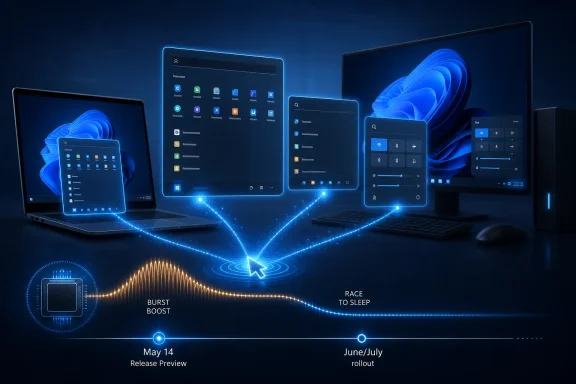
The new performance work appears aimed directly at that everyday irritation. Microsoft’s public wording is restrained, describing an update that “accelerates app launch and core shell experiences” including Start, Search, and Action Center. But the behavior being discussed across the Windows watcher ecosystem is more specific: a low latency scheduling profile that briefly drives the CPU to higher frequencies when the user initiates a foreground action.
That distinction is important. This is not the old Windows performance story of chasing throughput, scoring higher in a synthetic benchmark, or shaving seconds from a cold boot that happens once a day. It is about the moment after a click, when the user’s brain is waiting for the machine to acknowledge intent.
Modern PCs are absurdly powerful in aggregate and still capable of feeling sluggish in the small. The gulf between those two facts is where Windows 11 has struggled, especially on mainstream laptops, older desktops, and budget devices with limited RAM. Microsoft’s June update is an admission that perceived performance is not a cosmetic concern. It is the product.
That has not stopped the feature from becoming a small culture-war object among Windows users. Critics have framed it as a brute-force workaround for bloated software, the operating-system equivalent of flooring the accelerator because nobody tuned the engine. There is a kernel of truth hiding in the complaint: Windows 11 has accumulated enough layers of legacy compatibility, web-backed surfaces, framework transitions, and background services that skepticism is earned.
But the complaint also misses how modern client devices behave. Responsiveness is often improved not by keeping clocks high, but by being aggressive for extremely short windows of time. A processor that completes UI work quickly and idles again can be both faster-feeling and more power-efficient than one that ambles through the same task at a conservative frequency.
That is why Microsoft’s defense, including public comments from Scott Hanselman, landed with more force than the usual corporate reassurance. The company is not claiming that every Windows performance problem can be solved with scheduler policy. It is arguing that a responsive operating system must coordinate software intent with hardware behavior. That is not cheating; it is operating-system design.
What users do not forgive is latency that feels arbitrary. Opening Start should not feel like asking permission. Launching a built-in app should not feel dependent on the weather. Clicking a tray flyout should not produce a half-second of uncertainty on hardware that can run multiple virtual machines, decode 4K video, and keep dozens of browser tabs alive.
That is the category Microsoft is trying to clean up. The reported Low Latency Profile does not make a weak CPU into a workstation-class chip. It does not eliminate memory pressure, slow storage, bad drivers, or poorly written third-party apps. It changes the operating system’s response to foreground intent, and that is precisely where Windows 11 has often felt worse than its specifications suggest it should.
The timing also matters. Windows 10’s support deadline has pushed more users and organizations toward Windows 11, including plenty who delayed migration because the newer OS felt heavier. If Microsoft wants those users to arrive without resentment, it needs Windows 11 to feel better not only on premium hardware but on the ordinary PCs people actually own.
The likely path is familiar to Windows administrators. Microsoft often moves features from Release Preview into optional non-security preview updates before folding them into the next mandatory cumulative update. That would make late June 2026 a plausible window for eager users and July’s Patch Tuesday the more conservative expectation for everyone else.
There is still room for caution. Microsoft’s public changelog does not appear to brand the change as “Low Latency Profile,” and the company can tune, stage, or hold back features through controlled feature rollout mechanisms. Windows updates increasingly arrive as a combination of build numbers, enablement states, and server-side gating rather than a single clean line in the sand.
That ambiguity is frustrating, but it is also how Windows now ships. The practical takeaway is that Microsoft has acknowledged the performance target in a near-public channel, and users should expect the shell and app-launch work to start appearing on production systems soon. For IT departments, that means the June preview and July cumulative update deserve more attention than a routine quality patch.
That theory is credible, but it deserves real-world measurement. Laptop behavior varies wildly by processor generation, firmware tuning, thermal headroom, power mode, OEM utilities, and whether the device is plugged in. A burst that is invisible on a modern Ryzen or Core Ultra laptop may be more noticeable on a thin, older machine with an aggressive fan curve.
The bigger enterprise concern may not be battery life so much as consistency. Help desks will want to know whether the new behavior improves perceived performance without causing thermal complaints, fan noise, or odd interactions with power policies. In managed environments, even a good change needs predictable behavior across fleets.
Still, the risk should not be overstated. Windows, macOS, Linux, Android, and iOS all live in a world where power management is dynamic and context-sensitive. The novelty here is not that the CPU changes frequency. The novelty is that Windows may become more assertive about doing so at precisely the moments users notice.
That matters because scheduler tricks can only hide so much. If the code path behind a click is bloated, blocked on I/O, tangled in web content, or waiting on a sluggish service, a faster CPU burst becomes a partial mask rather than a fix. The best version of this update is not “Windows runs the same heavy code harder.” It is “Windows runs leaner code and gives it the hardware priority it needs at the right time.”
That combination is where the story becomes more than a quick patch. Microsoft has been trying for years to modernize the Windows interface without breaking the compatibility and administrative control that make Windows Windows. The result has often been a hybrid OS: old control panels beside new Settings pages, native components beside web-backed ones, modern frameworks beside legacy shell code.
Users do not care which framework draws a dialog box. They care whether it opens instantly, behaves consistently, and does not consume absurd resources. If Microsoft is serious about optimizing WinUI 3 while also teaching the scheduler to favor visible work, it is attacking the problem from both ends.
The push toward native performance is therefore politically useful as well as technically useful. Microsoft needs to show that modern Windows does not have to mean heavier Windows. A Start menu built on newer UI technology should not feel slower than a menu from 2009. A File Explorer with tabs and refreshed visuals should not make users nostalgic for stripped-down utilities.
The reported File Explorer and WinUI work is important because it suggests Microsoft understands this tension. Framework modernization cannot be sold as an abstraction. It has to arrive as lower memory use, shorter launch times, fewer pauses, and less jank when the shell is under load.
That is also why the June update will be judged harshly if it overpromises. The Windows community can be cynical, but it is also unusually good at noticing whether a change is real. If Start opens faster, users will know. If it merely benchmarks better while still feeling inconsistent, they will know that too.
The most sensible approach is to test the June optional update on a representative hardware pool. That means not only high-end developer workstations, but also the machines that generate tickets: older business laptops, devices with 8GB of RAM, systems running endpoint protection suites, and PCs with heavy startup loads. The feature is designed to improve foreground responsiveness, so testing should focus on user workflows rather than only synthetic benchmarks.
Admins should pay particular attention to thermals, fan behavior, sleep and resume, battery drain during interactive workloads, and whether any line-of-business applications behave oddly when launched under the new scheduling conditions. Most apps should not care. But enterprise Windows is a museum of edge cases with a procurement department attached.
There is also a communications angle. If users notice Windows feeling faster after an update, that is a rare chance for IT to bank goodwill. If users notice more fan noise, IT needs to know whether the cause is the OS change, firmware, background software, or coincidence. Either way, June and July should be treated as observability months.
That distinction will matter once the feature reaches millions of PCs. Some users will expect every part of Windows to feel transformed. Some publications will reduce the story to a percentage improvement. Some critics will declare the whole thing fake if one sluggish app remains sluggish.
The truth will be messier. The improvement should be most visible where the bottleneck is short-lived CPU availability during interactive UI work. It will be less dramatic where the bottleneck is disk, memory, network, server response, driver initialization, or framework overhead that Microsoft has not yet optimized.
That does not make the feature minor. It makes it targeted. The best operating-system improvements often feel small in isolation because they remove irritation rather than add spectacle. A faster Start menu will not sell a PC. But a slower Start menu can poison the entire experience.
The case for caution remains just as real. Microsoft has a habit of shipping promising Windows improvements through staggered rollouts that confuse users and administrators. It also has a habit of improving one surface while leaving another feeling unfinished. Windows 11’s performance reputation will not be repaired by one cumulative update.
Still, this update points in the right direction. It treats latency as a design failure, not a user attitude problem. It recognizes that perceived speed is built from dozens of tiny moments, many of which occur in the shell rather than in the applications people benchmark. And it suggests Microsoft is finally willing to use the whole stack — scheduler, framework, and native UI code — to make Windows feel immediate again.
Source: Windows Latest Microsoft confirms Windows 11 update that makes apps launch faster, releasing in June 2026
 Microsoft Stops Pretending Responsiveness Is Just a Hardware Problem
Windows 11 has spent much of its life asking users to accept a bargain: prettier surfaces, deeper cloud hooks, more modern plumbing, and, in exchange, a certain amount of friction. A menu hesitates. Search takes a beat. File Explorer opens with the theatrical pause of an app deciding whether it really wants to be there.The new performance work appears aimed directly at that everyday irritation. Microsoft’s public wording is restrained, describing an update that “accelerates app launch and core shell experiences” including Start, Search, and Action Center. But the behavior being discussed across the Windows watcher ecosystem is more specific: a low latency scheduling profile that briefly drives the CPU to higher frequencies when the user initiates a foreground action.
That distinction is important. This is not the old Windows performance story of chasing throughput, scoring higher in a synthetic benchmark, or shaving seconds from a cold boot that happens once a day. It is about the moment after a click, when the user’s brain is waiting for the machine to acknowledge intent.
Modern PCs are absurdly powerful in aggregate and still capable of feeling sluggish in the small. The gulf between those two facts is where Windows 11 has struggled, especially on mainstream laptops, older desktops, and budget devices with limited RAM. Microsoft’s June update is an admission that perceived performance is not a cosmetic concern. It is the product.
The CPU Burst Is Less Scandalous Than the Backlash Suggests
The phrase “maxes out your CPU” sounds alarming if treated as a permanent state. In this case, the idea is closer to a sprint than a marathon: raise frequency quickly, finish the visible task, then fall back to a lower-power idle state. The technique is often described as race to sleep, and it is neither exotic nor uniquely Microsoftian.That has not stopped the feature from becoming a small culture-war object among Windows users. Critics have framed it as a brute-force workaround for bloated software, the operating-system equivalent of flooring the accelerator because nobody tuned the engine. There is a kernel of truth hiding in the complaint: Windows 11 has accumulated enough layers of legacy compatibility, web-backed surfaces, framework transitions, and background services that skepticism is earned.
But the complaint also misses how modern client devices behave. Responsiveness is often improved not by keeping clocks high, but by being aggressive for extremely short windows of time. A processor that completes UI work quickly and idles again can be both faster-feeling and more power-efficient than one that ambles through the same task at a conservative frequency.
That is why Microsoft’s defense, including public comments from Scott Hanselman, landed with more force than the usual corporate reassurance. The company is not claiming that every Windows performance problem can be solved with scheduler policy. It is arguing that a responsive operating system must coordinate software intent with hardware behavior. That is not cheating; it is operating-system design.
Windows 11’s Real Sin Was the Pause After the Click
The reason this feature has attracted so much attention is that it targets a highly visible failure mode. Users forgive many kinds of slowness when they understand the cause. A large game takes time to load. A video export takes time to render. A giant spreadsheet takes time to calculate.What users do not forgive is latency that feels arbitrary. Opening Start should not feel like asking permission. Launching a built-in app should not feel dependent on the weather. Clicking a tray flyout should not produce a half-second of uncertainty on hardware that can run multiple virtual machines, decode 4K video, and keep dozens of browser tabs alive.
That is the category Microsoft is trying to clean up. The reported Low Latency Profile does not make a weak CPU into a workstation-class chip. It does not eliminate memory pressure, slow storage, bad drivers, or poorly written third-party apps. It changes the operating system’s response to foreground intent, and that is precisely where Windows 11 has often felt worse than its specifications suggest it should.
The timing also matters. Windows 10’s support deadline has pushed more users and organizations toward Windows 11, including plenty who delayed migration because the newer OS felt heavier. If Microsoft wants those users to arrive without resentment, it needs Windows 11 to feel better not only on premium hardware but on the ordinary PCs people actually own.
Release Preview Turns Rumor Into Roadmap
The May 14 Release Preview builds are not the same thing as a final public rollout, but they are close enough to change the conversation. Release Preview is where Microsoft validates updates before broader distribution, not where it usually experiments with wild, speculative platform behavior. When a performance change appears there, the question shifts from “is Microsoft really doing this?” to “how broadly and how quickly will it land?”The likely path is familiar to Windows administrators. Microsoft often moves features from Release Preview into optional non-security preview updates before folding them into the next mandatory cumulative update. That would make late June 2026 a plausible window for eager users and July’s Patch Tuesday the more conservative expectation for everyone else.
There is still room for caution. Microsoft’s public changelog does not appear to brand the change as “Low Latency Profile,” and the company can tune, stage, or hold back features through controlled feature rollout mechanisms. Windows updates increasingly arrive as a combination of build numbers, enablement states, and server-side gating rather than a single clean line in the sand.
That ambiguity is frustrating, but it is also how Windows now ships. The practical takeaway is that Microsoft has acknowledged the performance target in a near-public channel, and users should expect the shell and app-launch work to start appearing on production systems soon. For IT departments, that means the June preview and July cumulative update deserve more attention than a routine quality patch.
This Is Also a Battery-Life Bet
Any feature that raises CPU frequency invites a predictable question: what happens to battery life? Microsoft’s answer is implicit in the design. Short, high-priority bursts are supposed to make the system finish interactive work faster and return to idle, not keep the machine hot.That theory is credible, but it deserves real-world measurement. Laptop behavior varies wildly by processor generation, firmware tuning, thermal headroom, power mode, OEM utilities, and whether the device is plugged in. A burst that is invisible on a modern Ryzen or Core Ultra laptop may be more noticeable on a thin, older machine with an aggressive fan curve.
The bigger enterprise concern may not be battery life so much as consistency. Help desks will want to know whether the new behavior improves perceived performance without causing thermal complaints, fan noise, or odd interactions with power policies. In managed environments, even a good change needs predictable behavior across fleets.
Still, the risk should not be overstated. Windows, macOS, Linux, Android, and iOS all live in a world where power management is dynamic and context-sensitive. The novelty here is not that the CPU changes frequency. The novelty is that Windows may become more assertive about doing so at precisely the moments users notice.
Microsoft’s Better Argument Is Happening Below the Scheduler
The strongest defense of the CPU-burst strategy is not that other operating systems do it. It is that Microsoft appears to be pairing it with actual software work. Reports around WinUI 3 performance improvements point to reduced memory allocations and less time spent executing framework code in parts of the Windows interface.That matters because scheduler tricks can only hide so much. If the code path behind a click is bloated, blocked on I/O, tangled in web content, or waiting on a sluggish service, a faster CPU burst becomes a partial mask rather than a fix. The best version of this update is not “Windows runs the same heavy code harder.” It is “Windows runs leaner code and gives it the hardware priority it needs at the right time.”
That combination is where the story becomes more than a quick patch. Microsoft has been trying for years to modernize the Windows interface without breaking the compatibility and administrative control that make Windows Windows. The result has often been a hybrid OS: old control panels beside new Settings pages, native components beside web-backed ones, modern frameworks beside legacy shell code.
Users do not care which framework draws a dialog box. They care whether it opens instantly, behaves consistently, and does not consume absurd resources. If Microsoft is serious about optimizing WinUI 3 while also teaching the scheduler to favor visible work, it is attacking the problem from both ends.
Native Windows Has to Win Back Trust
There is a broader reputational issue here. Windows enthusiasts have become highly sensitive to anything that smells like a web wrapper, a delayed rewrite, or a UI surface optimized for Microsoft’s roadmap rather than the user’s machine. That skepticism is not irrational. Too many Windows 11 experiences have felt like they were designed in a meeting where nobody was using a five-year-old laptop.The push toward native performance is therefore politically useful as well as technically useful. Microsoft needs to show that modern Windows does not have to mean heavier Windows. A Start menu built on newer UI technology should not feel slower than a menu from 2009. A File Explorer with tabs and refreshed visuals should not make users nostalgic for stripped-down utilities.
The reported File Explorer and WinUI work is important because it suggests Microsoft understands this tension. Framework modernization cannot be sold as an abstraction. It has to arrive as lower memory use, shorter launch times, fewer pauses, and less jank when the shell is under load.
That is also why the June update will be judged harshly if it overpromises. The Windows community can be cynical, but it is also unusually good at noticing whether a change is real. If Start opens faster, users will know. If it merely benchmarks better while still feeling inconsistent, they will know that too.
Where IT Pros Should Watch the Rollout
For administrators, the immediate question is not whether the feature is philosophically valid. It is whether it changes support risk. Performance updates are usually welcome, but anything touching scheduling, power behavior, or shell responsiveness deserves controlled deployment before broad fleet adoption.The most sensible approach is to test the June optional update on a representative hardware pool. That means not only high-end developer workstations, but also the machines that generate tickets: older business laptops, devices with 8GB of RAM, systems running endpoint protection suites, and PCs with heavy startup loads. The feature is designed to improve foreground responsiveness, so testing should focus on user workflows rather than only synthetic benchmarks.
Admins should pay particular attention to thermals, fan behavior, sleep and resume, battery drain during interactive workloads, and whether any line-of-business applications behave oddly when launched under the new scheduling conditions. Most apps should not care. But enterprise Windows is a museum of edge cases with a procurement department attached.
There is also a communications angle. If users notice Windows feeling faster after an update, that is a rare chance for IT to bank goodwill. If users notice more fan noise, IT needs to know whether the cause is the OS change, firmware, background software, or coincidence. Either way, June and July should be treated as observability months.
The Feature Will Not Rescue Bad Apps
The most important limit is that Low Latency Profile is not a universal cure. It can make app launches and shell surfaces feel faster by reducing the delay between intent and visible response. It cannot turn a poorly optimized Electron app into a native one, eliminate network waits, or fix an application that spends startup time loading telemetry, plugins, and cloud authentication layers.That distinction will matter once the feature reaches millions of PCs. Some users will expect every part of Windows to feel transformed. Some publications will reduce the story to a percentage improvement. Some critics will declare the whole thing fake if one sluggish app remains sluggish.
The truth will be messier. The improvement should be most visible where the bottleneck is short-lived CPU availability during interactive UI work. It will be less dramatic where the bottleneck is disk, memory, network, server response, driver initialization, or framework overhead that Microsoft has not yet optimized.
That does not make the feature minor. It makes it targeted. The best operating-system improvements often feel small in isolation because they remove irritation rather than add spectacle. A faster Start menu will not sell a PC. But a slower Start menu can poison the entire experience.
June’s Speedup Is a Test of Microsoft’s Windows Discipline
The case for cautious optimism is stronger than it was a month ago. Microsoft has moved from rumor and hidden testing to public Release Preview language. Independent Windows watchers have reported visible responsiveness gains. The company is pairing scheduler behavior with native UI optimization rather than pretending the scheduler alone can absolve years of accumulated sluggishness.The case for caution remains just as real. Microsoft has a habit of shipping promising Windows improvements through staggered rollouts that confuse users and administrators. It also has a habit of improving one surface while leaving another feeling unfinished. Windows 11’s performance reputation will not be repaired by one cumulative update.
Still, this update points in the right direction. It treats latency as a design failure, not a user attitude problem. It recognizes that perceived speed is built from dozens of tiny moments, many of which occur in the shell rather than in the applications people benchmark. And it suggests Microsoft is finally willing to use the whole stack — scheduler, framework, and native UI code — to make Windows feel immediate again.
The Click-to-Response Era Gets Its Scorecard
The next few months will show whether Microsoft has built a real responsiveness platform or just a well-timed burst of good press. The June preview window and July’s wider update path give users and administrators a practical checklist.- Windows 11 24H2 and 25H2 Release Preview builds from May 14, 2026 include Microsoft’s public promise of faster app launches and core shell experiences.
- The performance change is widely understood to align with the reported Low Latency Profile, even though Microsoft’s public changelog uses more general wording.
- The expected rollout path points to an optional preview update in late June 2026 and broader automatic deployment through the July 2026 cumulative update cycle.
- The feature should help most where Windows currently hesitates after foreground user actions, especially app launches and shell surfaces such as Start, Search, and Action Center.
- The update is not a substitute for application optimization, driver quality, adequate memory, or native code improvements, but it can make those improvements more visible.
- IT teams should test the change on ordinary fleet hardware, not only premium devices, because the most meaningful gains and the most likely complaints will appear there.
Source: Windows Latest Microsoft confirms Windows 11 update that makes apps launch faster, releasing in June 2026
