

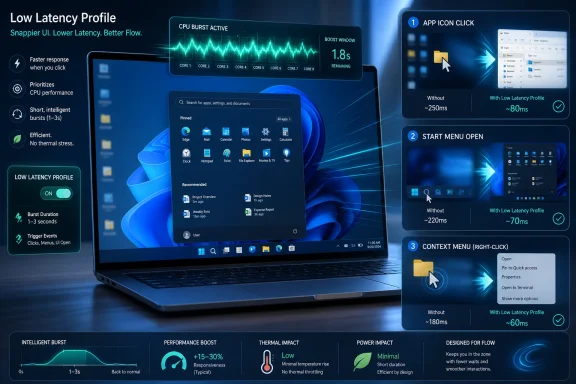
Microsoft is reportedly testing a Windows 11 “Low Latency Profile” that temporarily boosts CPU frequency for one to three seconds when users launch apps, open system flyouts, or trigger menus, with early claims of up to 40 percent faster launches for Edge and Outlook and up to 70 percent faster Start menu and context-menu interactions. The feature is not a new benchmark trophy so much as a confession: Windows 11’s problem has often been latency you can feel, not throughput you can chart. If Microsoft can make the operating system respond faster at the exact moment users ask it to do something, it may accomplish more for Windows 11’s reputation than another round of AI buttons ever could. But the bet is also risky, because “make the CPU sprint for a second” is only elegant if the rest of Windows stops tripping over its own shoelaces.
The genius of the reported Low Latency Profile, or LLP, is that it targets the kind of delay users interpret as disrespect. A spreadsheet recalculating for 20 seconds is work; the Start menu taking a beat to appear is Windows staring back at you. That distinction matters because modern PCs are often absurdly fast in the aggregate while still feeling oddly reluctant in the hand.
Windows 11 has suffered from this perception since launch. Its visual refresh, layered UI frameworks, rewritten shell components, and aggressive integration of cloud services gave Microsoft a more modern platform, but also created countless opportunities for tiny waits. A context menu here, a File Explorer search there, a settings page that paints in phases — none of these delays ruins the machine, but together they make a premium laptop feel like it is negotiating with itself.
LLP appears to attack that problem at the power-management layer. Instead of waiting for the processor and scheduler to decide that a short-lived foreground action deserves higher clocks, Windows would reportedly request a brief burst of CPU frequency when a high-priority interaction begins. In plain English: when you click something that should appear immediately, Windows tries to stop being polite about power saving for a couple of seconds.
That is not a dumb trick. It is a recognition that responsiveness is often about the first 100 to 500 milliseconds of a task, not the last five seconds of one. Users rarely notice that an app finished background initialization more gracefully; they notice whether the window appeared before their patience expired.
This is not a small reputational repair job. Windows 11 arrived with strict hardware requirements, a redesigned shell, and a promise of refinement, but the lived experience has too often been uneven. Enthusiasts complain about regressions from Windows 10. IT admins complain about churn and consumer-facing cruft. Gamers compare Windows handhelds with SteamOS and ask why Microsoft’s own platform feels heavier on the hardware it ostensibly owns.
K2’s importance is that it reframes Windows improvement around fundamentals rather than novelty. A faster Start menu is not a keynote feature in the classic Microsoft sense. It does not sell Copilot subscriptions, demo well under stage lighting, or let the marketing department invent a new category name. But it is exactly the kind of improvement that can change daily sentiment because it touches the user dozens of times a day.
That also explains why LLP is more interesting than its name suggests. “Low Latency Profile” sounds like a power-plan toggle buried in an OEM utility. In reality, if the reporting holds, it is part of a larger attempt to make Windows behave as though foreground intent matters. The user clicks; the system responds. That used to be the baseline. In 2026, it has somehow become a strategic objective.
But that critique can go too far. Modern processors are designed around opportunistic boosting. Intel and AMD chips already juggle frequency, voltage, core residency, thermal headroom, and workload classification at fine granularity. Mobile operating systems have long treated user interactions as special events that deserve immediate performance. The scandal is not that Windows might do this; the scandal is that Windows has often felt like it does not do it assertively enough.
The better analogy is not overclocking for bragging rights. It is turning on the lights when someone enters a room. The system does not need to run at full brightness all day; it needs to be ready at the moment of contact. A one-to-three-second CPU boost for app launch and shell interaction is a reasonable trade if it produces visible gains without punishing thermals or battery life.
That last condition is crucial. Laptop users have been trained to distrust anything that promises performance for free, because performance usually arrives with fan noise, heat, and battery anxiety. LLP’s reported short duration is the whole argument for why it might work. A burst measured in seconds can feel large to a user and small to a battery, especially if it prevents the system from lingering in a sluggish intermediate state.
That is why these claims should be treated as perception metrics as much as performance metrics. App launches and menu openings are not just workloads; they are signals. A system that reacts instantly gives the user confidence that everything underneath is healthy. A system that hesitates creates suspicion, even when CPU utilization is low and benchmark scores are excellent.
Microsoft’s challenge is that users have become fluent in micro-latency. They may not know the term, but they know the feeling. The delayed context menu. The Search panel that appears blank before filling. The File Explorer window that draws controls in stages. The Start menu that seems to animate before it is ready to be useful. These are small paper cuts, but Windows is used by hundreds of millions of people whose workflows are built from small actions repeated all day.
A burst-mode feature is well suited to that problem because it does not try to optimize the entire world. It focuses on the instant when Windows must prove it is awake. The danger, of course, is that big percentages in controlled scenarios can collapse into marginal gains in messy real machines filled with third-party shell extensions, endpoint security tools, sync clients, OEM utilities, and background update agents.
That difference is central to Windows 11’s problem. The operating system has to feel good on everything from premium workstations to $600 laptops with conservative thermal envelopes. It also has to contend with OEM power profiles, firmware decisions, and silicon-specific behavior that can make the same Windows build feel radically different across devices.
For mobile PCs, the issue is often not raw capability but hesitation. The processor can boost, but the system may delay ramping up because the workload looks small or short-lived. Unfortunately, the workloads humans care about are often small and short-lived. Opening Start, launching Outlook, invoking a right-click menu, expanding a flyout, or bringing up Search may not look like much to a scheduler, but it is the entire user experience in that moment.
If LLP gives Windows a more direct way to say “this one matters now,” it could smooth over one of the platform’s oldest laptop annoyances. The irony is that low-power machines often benefit most from intelligent bursts because they cannot afford sustained waste. A short sprint is better than a long stumble.
That comparison is useful because it separates responsiveness from peak performance. Nintendo did not transform the Switch into a new console. It made waiting less painful by using available headroom at the right moment. Microsoft appears to be chasing a similar effect for Windows: not more horsepower everywhere, but better timing.
The difference is that Windows is far messier than a console. It has a broader hardware matrix, a larger software ecosystem, more background services, deeper compatibility obligations, and an endless parade of third-party components hooking into the shell. A console vendor can tune for a few fixed hardware profiles. Microsoft has to tune for the laptop your employer bought in bulk, the boutique desktop built by an enthusiast, the mini PC under a television, and the tablet that wakes from standby twice a day.
That is why LLP should be judged less as a magic feature than as a policy improvement. It cannot make bad shell code good. It cannot fix every driver that blocks a UI thread. It cannot make a bloated security agent disappear. But it can reduce the penalty imposed by conservative power behavior during moments where the user is waiting directly on the system.
Inconsistency is poisonous because it teaches users to distrust the interface. A slow operation can be accepted if it is predictably slow and visibly doing work. A random hitch during a trivial action feels like decay. Users start blaming the operating system even when the culprit is a shell extension, driver, antivirus hook, or cloud sync process, because the operating system is the thing they touched.
LLP could help with the visible edge of that problem, but it will not solve the underlying complexity. If a context menu is delayed because a third-party handler is blocking enumeration, CPU frequency may help only a little. If Explorer is waiting on network paths, cloud hydration, or misbehaving extensions, a clock burst is a bandage. If the Start menu’s pipeline includes web-backed content, telemetry, recommendation surfaces, and UI framework overhead, the CPU is only one piece of the delay.
That is why K2 matters more than LLP alone. A low-latency power profile can make Windows more eager. A serious quality program has to make Windows less encumbered. The best outcome is not a shell that needs emergency boosts forever; it is a shell that uses boosts sparingly because the code path has already been cleaned up.
If LLP ships, Microsoft should avoid presenting it as a gamer-style “boost mode.” The word boost attracts the wrong expectations. Users will assume it is something to enable permanently, benchmark obsessively, or blame for heat. OEMs may be tempted to brand it, duplicate it, or override it with their own battery utilities. Enterprises may disable it out of caution before understanding what it does.
The right model is boring: Windows identifies short, foreground, user-initiated interactions and adjusts power behavior just long enough to complete them quickly. The feature should be measurable by analysts, manageable by admins if necessary, and invisible to normal users. The less it looks like a feature, the more successful it may be.
There is precedent for this kind of hidden improvement being undervalued. Scheduler changes, memory reductions, compositor work, framework optimizations, and I/O tuning rarely become household terms. But they are the difference between an operating system that feels expensive and one that feels patched together. Microsoft needs more of that invisible discipline.
Most of those concerns are probably manageable, but Microsoft should not hand-wave them. Corporate Windows deployments are full of machines where small changes have large operational consequences. A call-center laptop that spins its fan more often is not just a comfort issue; it is a support ticket. A field device with tighter battery margins may not tolerate even modest behavioral shifts if they occur frequently. A regulated environment may need deterministic performance profiles more than perceived snappiness.
The good news is that LLP’s reported design sounds narrow enough to be governable. One-to-three-second bursts around specific interaction classes are easier to reason about than a broad “performance mode.” Microsoft can expose policy controls without making the consumer experience more complicated. It can also document expected thermal and battery impacts in a way that gives admins confidence.
The bigger enterprise question is whether LLP becomes a substitute for fixing heavier problems. IT departments do not merely need Start to open faster. They need Windows Update to be predictable, File Explorer to stop blocking on edge cases, profile sign-ins to remain quick after months of use, and shell changes not to break muscle memory. LLP can improve the first impression. K2 has to improve the operating relationship.
Windows on handhelds has a responsiveness problem that cannot be solved only by faster GPUs. The shell must wake quickly, overlays must appear reliably, launchers must not drag, and power behavior must be intelligent under tight thermal limits. A burst-aware operating system is better suited to that world than one that treats every interaction like a generic desktop workload.
This is where SteamOS has embarrassed Windows in perception if not always in compatibility. Valve’s platform is narrower, but that narrowness lets it feel intentional. Windows remains the compatibility king, but compatibility is not a feeling. A handheld user who taps a menu and waits through desktop-era friction is not comforted by the fact that 30 years of Win32 software technically still works.
LLP will not turn Windows into SteamOS. But it suggests Microsoft is at least thinking in terms of touch, immediacy, and foreground intent — the same qualities that matter on handhelds, tablets, convertibles, and living-room PCs. If K2 makes Windows less of a general-purpose drag coefficient, Microsoft’s gaming platform story becomes more credible.
But real Windows workloads are messy. A boosted app launch may trigger background sync, update checks, web rendering, add-ins, indexing, telemetry, and cloud authentication. Outlook is not just an executable opening a window; it is a small civilization of services, accounts, stores, and plugins. Edge is both a browser and a platform host. The Start menu can involve local indexing, recommendations, icons, recent files, and policy-managed content.
If LLP merely accelerates the first part of those chains, the user may see a window faster but still wait for the app to become usable. That would still be an improvement, but it complicates the headline numbers. “Launch” is a slippery word. Does it mean process start, first paint, ready for input, content loaded, or fully settled? Microsoft will need to be precise if it wants credibility with technical users.
Thermals also vary dramatically by chassis. A large laptop may absorb short bursts silently. A thin fanless or near-fanless device may surface heat more quickly. A budget machine with poor firmware tuning may behave differently from a Surface or premium ultrabook. LLP’s success will depend on Microsoft coordinating with silicon vendors and OEMs rather than assuming Windows can paper over every firmware decision from above.
The Start menu in particular has carried too much symbolic weight in Windows 11. Microsoft redesigned it, centered it, simplified it, infused it with recommendations, and slowly adjusted it through updates. Some users adapted. Others saw it as a downgrade from Windows 10’s density and flexibility. Performance problems made every design complaint sharper because a limited menu that is also slow feels like an imposition.
Context menus have had a similar arc. Windows 11’s modern right-click menu looked cleaner but hid classic options behind an extra step, especially in the early releases. Microsoft has improved the situation, but the damage was done: power users learned to associate visual modernization with reduced efficiency. If LLP makes those menus appear faster, it helps, but Microsoft still has to remember that speed is not only animation time. It is also the number of clicks between intent and result.
That is the larger K2 lesson. Responsiveness is not just CPU frequency. It is latency, layout, information density, predictability, and respect for established workflows. A fast bad menu is still a bad menu. A fast good menu becomes invisible.
LLP is refreshing precisely because it is unglamorous. It does not ask users to change behavior. It does not require a Microsoft account story. It does not insert a chatbot into a workflow. It takes a complaint that users can feel and tries to remove it at the system level. That is the kind of platform work Microsoft should have been foregrounding all along.
There is a lesson here for Windows development culture. Users do not experience an operating system as a feature matrix. They experience it as a sequence of tiny negotiations: open this, move that, find this file, switch there, right-click here, wake now. If enough of those negotiations are smooth, the OS disappears. If enough are jagged, even useful features feel like clutter.
The reported Low Latency Profile is not proof that Microsoft has fixed Windows 11. It is evidence that Microsoft may finally be measuring the right pain. That distinction matters. A company can optimize what it values, and for too long Windows has seemed optimized for roadmap visibility rather than tactile trust.
Source: OC3D Microsoft aims to boost Windows 11 with "LLP" CPU burst mode - OC3D
 Microsoft Has Found the Milliseconds Users Actually Notice
The genius of the reported Low Latency Profile, or LLP, is that it targets the kind of delay users interpret as disrespect. A spreadsheet recalculating for 20 seconds is work; the Start menu taking a beat to appear is Windows staring back at you. That distinction matters because modern PCs are often absurdly fast in the aggregate while still feeling oddly reluctant in the hand.Windows 11 has suffered from this perception since launch. Its visual refresh, layered UI frameworks, rewritten shell components, and aggressive integration of cloud services gave Microsoft a more modern platform, but also created countless opportunities for tiny waits. A context menu here, a File Explorer search there, a settings page that paints in phases — none of these delays ruins the machine, but together they make a premium laptop feel like it is negotiating with itself.
LLP appears to attack that problem at the power-management layer. Instead of waiting for the processor and scheduler to decide that a short-lived foreground action deserves higher clocks, Windows would reportedly request a brief burst of CPU frequency when a high-priority interaction begins. In plain English: when you click something that should appear immediately, Windows tries to stop being polite about power saving for a couple of seconds.
That is not a dumb trick. It is a recognition that responsiveness is often about the first 100 to 500 milliseconds of a task, not the last five seconds of one. Users rarely notice that an app finished background initialization more gracefully; they notice whether the window appeared before their patience expired.
K2 Is Microsoft’s Apology Tour in Engineering Form
The reported LLP work sits inside what has been described as Microsoft’s broader Windows “K2” initiative, a quality push aimed at performance, reliability, and polish. That framing matters. Microsoft has spent years trying to convince users that Windows is becoming smarter, more cloud-connected, and more AI-native. K2 is the counter-message: perhaps Windows should first become less annoying.This is not a small reputational repair job. Windows 11 arrived with strict hardware requirements, a redesigned shell, and a promise of refinement, but the lived experience has too often been uneven. Enthusiasts complain about regressions from Windows 10. IT admins complain about churn and consumer-facing cruft. Gamers compare Windows handhelds with SteamOS and ask why Microsoft’s own platform feels heavier on the hardware it ostensibly owns.
K2’s importance is that it reframes Windows improvement around fundamentals rather than novelty. A faster Start menu is not a keynote feature in the classic Microsoft sense. It does not sell Copilot subscriptions, demo well under stage lighting, or let the marketing department invent a new category name. But it is exactly the kind of improvement that can change daily sentiment because it touches the user dozens of times a day.
That also explains why LLP is more interesting than its name suggests. “Low Latency Profile” sounds like a power-plan toggle buried in an OEM utility. In reality, if the reporting holds, it is part of a larger attempt to make Windows behave as though foreground intent matters. The user clicks; the system responds. That used to be the baseline. In 2026, it has somehow become a strategic objective.
The CPU Burst Is a Hack, but Not an Insulting One
There is an easy cynical read here: Microsoft made Windows heavy, so now it wants to spike CPU clocks to hide the bloat. That criticism is not entirely unfair. A truly lean shell should not need a mini-turbo mode to open a menu. If Windows has to wake the silicon like a drag racer at every right-click, perhaps the problem is not the power governor.But that critique can go too far. Modern processors are designed around opportunistic boosting. Intel and AMD chips already juggle frequency, voltage, core residency, thermal headroom, and workload classification at fine granularity. Mobile operating systems have long treated user interactions as special events that deserve immediate performance. The scandal is not that Windows might do this; the scandal is that Windows has often felt like it does not do it assertively enough.
The better analogy is not overclocking for bragging rights. It is turning on the lights when someone enters a room. The system does not need to run at full brightness all day; it needs to be ready at the moment of contact. A one-to-three-second CPU boost for app launch and shell interaction is a reasonable trade if it produces visible gains without punishing thermals or battery life.
That last condition is crucial. Laptop users have been trained to distrust anything that promises performance for free, because performance usually arrives with fan noise, heat, and battery anxiety. LLP’s reported short duration is the whole argument for why it might work. A burst measured in seconds can feel large to a user and small to a battery, especially if it prevents the system from lingering in a sluggish intermediate state.
The Numbers Sound Big Because the Baseline Is Small
The reported figures — up to 40 percent faster launches for apps like Edge and Outlook, and up to 70 percent faster shell surfaces such as Start and context menus — are both impressive and easy to misunderstand. A 70 percent improvement in a short UI delay does not mean your PC becomes 70 percent faster. It may mean a menu that previously took 300 milliseconds appears in something closer to 100 milliseconds, which is precisely the difference between “fine” and “why did that lag?”That is why these claims should be treated as perception metrics as much as performance metrics. App launches and menu openings are not just workloads; they are signals. A system that reacts instantly gives the user confidence that everything underneath is healthy. A system that hesitates creates suspicion, even when CPU utilization is low and benchmark scores are excellent.
Microsoft’s challenge is that users have become fluent in micro-latency. They may not know the term, but they know the feeling. The delayed context menu. The Search panel that appears blank before filling. The File Explorer window that draws controls in stages. The Start menu that seems to animate before it is ready to be useful. These are small paper cuts, but Windows is used by hundreds of millions of people whose workflows are built from small actions repeated all day.
A burst-mode feature is well suited to that problem because it does not try to optimize the entire world. It focuses on the instant when Windows must prove it is awake. The danger, of course, is that big percentages in controlled scenarios can collapse into marginal gains in messy real machines filled with third-party shell extensions, endpoint security tools, sync clients, OEM utilities, and background update agents.
Laptops Stand to Gain More Than Monster Desktops
OC3D’s analysis lands on an important point: LLP should matter most on laptops and low-power desktops, not on enthusiast towers already pinned to aggressive performance settings. A gaming rig with a high-performance power plan, generous cooling, and a processor that boosts eagerly may not have much headroom for Windows to exploit. A thin-and-light laptop trying to preserve battery life absolutely does.That difference is central to Windows 11’s problem. The operating system has to feel good on everything from premium workstations to $600 laptops with conservative thermal envelopes. It also has to contend with OEM power profiles, firmware decisions, and silicon-specific behavior that can make the same Windows build feel radically different across devices.
For mobile PCs, the issue is often not raw capability but hesitation. The processor can boost, but the system may delay ramping up because the workload looks small or short-lived. Unfortunately, the workloads humans care about are often small and short-lived. Opening Start, launching Outlook, invoking a right-click menu, expanding a flyout, or bringing up Search may not look like much to a scheduler, but it is the entire user experience in that moment.
If LLP gives Windows a more direct way to say “this one matters now,” it could smooth over one of the platform’s oldest laptop annoyances. The irony is that low-power machines often benefit most from intelligent bursts because they cannot afford sustained waste. A short sprint is better than a long stumble.
Windows Is Borrowing a Page From Consoles and Phones
The idea of boosting clocks for user-visible moments is not exotic. Phones have long used interaction-aware boosting to make touch input and app transitions feel immediate. Consoles have used targeted CPU boosts to reduce loading times without permanently raising the thermal budget. Nintendo’s 2019 Switch firmware update became a memorable example because it temporarily raised CPU clocks during loading, producing tangible reductions in wait times in games such as The Legend of Zelda: Breath of the Wild.That comparison is useful because it separates responsiveness from peak performance. Nintendo did not transform the Switch into a new console. It made waiting less painful by using available headroom at the right moment. Microsoft appears to be chasing a similar effect for Windows: not more horsepower everywhere, but better timing.
The difference is that Windows is far messier than a console. It has a broader hardware matrix, a larger software ecosystem, more background services, deeper compatibility obligations, and an endless parade of third-party components hooking into the shell. A console vendor can tune for a few fixed hardware profiles. Microsoft has to tune for the laptop your employer bought in bulk, the boutique desktop built by an enthusiast, the mini PC under a television, and the tablet that wakes from standby twice a day.
That is why LLP should be judged less as a magic feature than as a policy improvement. It cannot make bad shell code good. It cannot fix every driver that blocks a UI thread. It cannot make a bloated security agent disappear. But it can reduce the penalty imposed by conservative power behavior during moments where the user is waiting directly on the system.
The Real Enemy Is Not Slowness, It Is Inconsistency
Windows 11’s most frustrating performance trait is not that it is always slow. It is that it is often unpredictably fast or slow. The same menu may open instantly one minute and hesitate the next. File Explorer may feel crisp after a reboot and gummy after a day of work. Search may behave well on a clean machine and terribly on one with a deep OneDrive, Outlook, and corporate indexing footprint.Inconsistency is poisonous because it teaches users to distrust the interface. A slow operation can be accepted if it is predictably slow and visibly doing work. A random hitch during a trivial action feels like decay. Users start blaming the operating system even when the culprit is a shell extension, driver, antivirus hook, or cloud sync process, because the operating system is the thing they touched.
LLP could help with the visible edge of that problem, but it will not solve the underlying complexity. If a context menu is delayed because a third-party handler is blocking enumeration, CPU frequency may help only a little. If Explorer is waiting on network paths, cloud hydration, or misbehaving extensions, a clock burst is a bandage. If the Start menu’s pipeline includes web-backed content, telemetry, recommendation surfaces, and UI framework overhead, the CPU is only one piece of the delay.
That is why K2 matters more than LLP alone. A low-latency power profile can make Windows more eager. A serious quality program has to make Windows less encumbered. The best outcome is not a shell that needs emergency boosts forever; it is a shell that uses boosts sparingly because the code path has already been cleaned up.
Microsoft Must Resist Turning Responsiveness Into Another Toggle
The most encouraging part of the LLP reporting is that the feature is expected to operate invisibly in the background. That is how it should be. Windows already has too many settings whose names imply control while actually outsourcing product design decisions to users. Responsiveness should not require a checkbox, a registry edit, a vendor control panel, or a forum ritual.If LLP ships, Microsoft should avoid presenting it as a gamer-style “boost mode.” The word boost attracts the wrong expectations. Users will assume it is something to enable permanently, benchmark obsessively, or blame for heat. OEMs may be tempted to brand it, duplicate it, or override it with their own battery utilities. Enterprises may disable it out of caution before understanding what it does.
The right model is boring: Windows identifies short, foreground, user-initiated interactions and adjusts power behavior just long enough to complete them quickly. The feature should be measurable by analysts, manageable by admins if necessary, and invisible to normal users. The less it looks like a feature, the more successful it may be.
There is precedent for this kind of hidden improvement being undervalued. Scheduler changes, memory reductions, compositor work, framework optimizations, and I/O tuning rarely become household terms. But they are the difference between an operating system that feels expensive and one that feels patched together. Microsoft needs more of that invisible discipline.
Enterprise IT Will Ask the Questions Consumers Won’t
For consumers, the LLP pitch is simple: Windows feels faster and nothing bad happens. For enterprise IT, the pitch has to survive a more skeptical room. Fleet managers will want to know whether bursts affect battery-life estimates, fan behavior, thermals, device longevity, benchmark baselines, and user complaints about noise. Security teams will want clarity on whether the feature changes process prioritization in ways that affect monitoring tools or workload isolation.Most of those concerns are probably manageable, but Microsoft should not hand-wave them. Corporate Windows deployments are full of machines where small changes have large operational consequences. A call-center laptop that spins its fan more often is not just a comfort issue; it is a support ticket. A field device with tighter battery margins may not tolerate even modest behavioral shifts if they occur frequently. A regulated environment may need deterministic performance profiles more than perceived snappiness.
The good news is that LLP’s reported design sounds narrow enough to be governable. One-to-three-second bursts around specific interaction classes are easier to reason about than a broad “performance mode.” Microsoft can expose policy controls without making the consumer experience more complicated. It can also document expected thermal and battery impacts in a way that gives admins confidence.
The bigger enterprise question is whether LLP becomes a substitute for fixing heavier problems. IT departments do not merely need Start to open faster. They need Windows Update to be predictable, File Explorer to stop blocking on edge cases, profile sign-ins to remain quick after months of use, and shell changes not to break muscle memory. LLP can improve the first impression. K2 has to improve the operating relationship.
Gamers Will Notice the Philosophy More Than the Feature
The gaming angle is subtler than it first appears. LLP is not primarily a frame-rate feature, and gamers with tuned desktops may see little direct benefit. Yet the philosophy behind it matters enormously for Microsoft’s gaming ambitions, especially as handheld PCs and console-like Windows devices struggle against the clean focus of SteamOS.Windows on handhelds has a responsiveness problem that cannot be solved only by faster GPUs. The shell must wake quickly, overlays must appear reliably, launchers must not drag, and power behavior must be intelligent under tight thermal limits. A burst-aware operating system is better suited to that world than one that treats every interaction like a generic desktop workload.
This is where SteamOS has embarrassed Windows in perception if not always in compatibility. Valve’s platform is narrower, but that narrowness lets it feel intentional. Windows remains the compatibility king, but compatibility is not a feeling. A handheld user who taps a menu and waits through desktop-era friction is not comforted by the fact that 30 years of Win32 software technically still works.
LLP will not turn Windows into SteamOS. But it suggests Microsoft is at least thinking in terms of touch, immediacy, and foreground intent — the same qualities that matter on handhelds, tablets, convertibles, and living-room PCs. If K2 makes Windows less of a general-purpose drag coefficient, Microsoft’s gaming platform story becomes more credible.
The Battery-Life Promise Must Survive Real Machines
The reported claim that LLP should have minimal thermal and battery impact is plausible, but it deserves scrutiny. Short boosts can be efficient when they complete work quickly and let the processor return to low-power states. This is the classic race-to-idle argument: spend more power briefly, finish sooner, sleep longer. In many cases, that is better than crawling at low frequency while keeping components awake.But real Windows workloads are messy. A boosted app launch may trigger background sync, update checks, web rendering, add-ins, indexing, telemetry, and cloud authentication. Outlook is not just an executable opening a window; it is a small civilization of services, accounts, stores, and plugins. Edge is both a browser and a platform host. The Start menu can involve local indexing, recommendations, icons, recent files, and policy-managed content.
If LLP merely accelerates the first part of those chains, the user may see a window faster but still wait for the app to become usable. That would still be an improvement, but it complicates the headline numbers. “Launch” is a slippery word. Does it mean process start, first paint, ready for input, content loaded, or fully settled? Microsoft will need to be precise if it wants credibility with technical users.
Thermals also vary dramatically by chassis. A large laptop may absorb short bursts silently. A thin fanless or near-fanless device may surface heat more quickly. A budget machine with poor firmware tuning may behave differently from a Surface or premium ultrabook. LLP’s success will depend on Microsoft coordinating with silicon vendors and OEMs rather than assuming Windows can paper over every firmware decision from above.
The Start Menu Has Become a Symbol of Windows Drift
It is telling that the reported gains include the Start menu and context menus. These are not obscure surfaces. They are sacred Windows territory, the interface rituals that define how users begin tasks and manipulate objects. When they lag, the entire OS feels compromised.The Start menu in particular has carried too much symbolic weight in Windows 11. Microsoft redesigned it, centered it, simplified it, infused it with recommendations, and slowly adjusted it through updates. Some users adapted. Others saw it as a downgrade from Windows 10’s density and flexibility. Performance problems made every design complaint sharper because a limited menu that is also slow feels like an imposition.
Context menus have had a similar arc. Windows 11’s modern right-click menu looked cleaner but hid classic options behind an extra step, especially in the early releases. Microsoft has improved the situation, but the damage was done: power users learned to associate visual modernization with reduced efficiency. If LLP makes those menus appear faster, it helps, but Microsoft still has to remember that speed is not only animation time. It is also the number of clicks between intent and result.
That is the larger K2 lesson. Responsiveness is not just CPU frequency. It is latency, layout, information density, predictability, and respect for established workflows. A fast bad menu is still a bad menu. A fast good menu becomes invisible.
This Is the Right Kind of Microsoft Boring
For years, Microsoft’s Windows messaging has over-indexed on transformation. Windows was going to be more personal, more cloud-connected, more intelligent, more AI-assisted, more integrated with services most users did not ask to see in the shell. Some of that work may prove useful. Much of it arrived before the basics felt finished.LLP is refreshing precisely because it is unglamorous. It does not ask users to change behavior. It does not require a Microsoft account story. It does not insert a chatbot into a workflow. It takes a complaint that users can feel and tries to remove it at the system level. That is the kind of platform work Microsoft should have been foregrounding all along.
There is a lesson here for Windows development culture. Users do not experience an operating system as a feature matrix. They experience it as a sequence of tiny negotiations: open this, move that, find this file, switch there, right-click here, wake now. If enough of those negotiations are smooth, the OS disappears. If enough are jagged, even useful features feel like clutter.
The reported Low Latency Profile is not proof that Microsoft has fixed Windows 11. It is evidence that Microsoft may finally be measuring the right pain. That distinction matters. A company can optimize what it values, and for too long Windows has seemed optimized for roadmap visibility rather than tactile trust.
The LLP Bet Comes Down to These Concrete Wins
If Microsoft ships Low Latency Profile as part of the K2 push, the feature should be judged by how often users stop noticing Windows between intention and action. The early numbers are promising, but the real test will be ordinary PCs, old profiles, corporate images, OEM power plans, and the third-party software ecosystems that make Windows Windows.- Microsoft’s reported Low Latency Profile is designed to raise CPU frequency briefly during user-initiated actions such as app launches, Start menu openings, system flyouts, and context menus.
- The largest benefits should appear on laptops and power-conscious desktops where processors may otherwise ramp up more slowly for short foreground tasks.
- The feature sounds most credible if it remains automatic and invisible rather than becoming another consumer-facing performance toggle.
- The reported gains for Edge, Outlook, Start, and context menus should be understood as responsiveness improvements, not as a general claim that Windows 11 becomes dramatically faster everywhere.
- LLP can reduce perceived latency, but Microsoft still has to fix shell complexity, framework overhead, File Explorer stalls, and inconsistent UI behavior.
- K2 will succeed only if burst performance is paired with quieter, deeper engineering work that makes Windows less dependent on bursts in the first place.
Source: OC3D Microsoft aims to boost Windows 11 with "LLP" CPU burst mode - OC3D
