

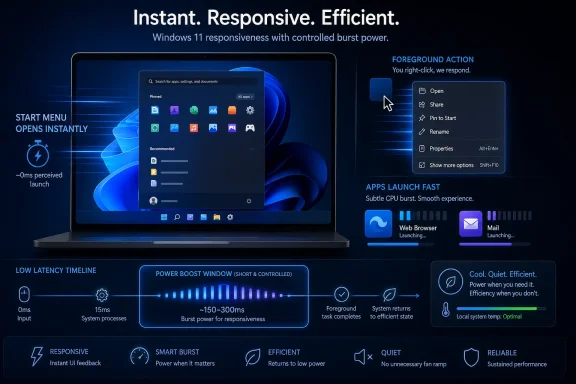
Microsoft is testing a Windows 11 feature called Low Latency Profile in Insider preview builds, reportedly using brief CPU boost windows to make app launches, Start Menu interactions, system flyouts, and context menus feel faster on PCs running the operating system. The idea is simple enough to sound almost suspicious: when the user asks Windows to do something visible, Windows briefly stops being polite about power management. If the reported numbers hold — roughly 40 percent faster launches for apps such as Edge and Outlook, and up to 70 percent faster Start Menu response — this is not a cosmetic tweak. It is Microsoft admitting that the feel of Windows is now a product problem, not just an engineering footnote.
For years, Windows performance debates have been dominated by the wrong units. Enthusiasts argue over boot times, background RAM usage, benchmark deltas, and whether a clean install feels “lighter” than an upgraded machine. Enterprise admins care about update duration, logon delays, and whether a fleet comes back from Patch Tuesday without opening tickets.
But the thing users notice most is often smaller and more damning: the little pause after a click.
That pause is where Windows 11 has lost an uncomfortable amount of goodwill. A Start Menu that hesitates, a context menu that blooms a beat too late, a system panel that feels animated around a delay rather than through it — these are not catastrophic failures. They are worse in a certain way because they are constant reminders that the machine is negotiating with itself before responding to the person in front of it.
Low Latency Profile appears designed for that gap. Instead of trying to make the whole operating system faster all the time, it reportedly raises CPU performance aggressively for very short windows when Windows detects a high-priority foreground action. The philosophy is not “run hot.” It is “stop dawdling when the user is waiting.”
That distinction matters. Modern CPUs are already built around burst behavior, racing to high clocks for brief work and then dropping back down. Microsoft is not inventing the concept of sprinting; it is allegedly teaching Windows to sprint at moments when human perception is most likely to punish hesitation.
That is why a reported 70 percent improvement in Start Menu responsiveness is more than a benchmark claim. It cuts straight into the daily ritual of using Windows. The Start button is not an advanced feature; it is the front door.
Microsoft has spent much of the Windows 11 era talking about modernity, AI, new silicon, new experiences, and the future of the PC. Yet a large chunk of user frustration has been pre-modern in the most basic sense: people want the interface to obey instantly. The gap between Microsoft’s ambitions and the lived experience of waiting for a menu has become impossible to ignore.
Low Latency Profile is interesting because it treats responsiveness as a first-class feature. That sounds obvious, but Windows history suggests otherwise. Microsoft has often optimized for compatibility, breadth, battery life, manageability, telemetry, monetization surfaces, and visual redesign before it optimizes for the hard-to-market feeling that a system is there when you touch it.
If this feature works, it may do more for Windows 11’s reputation than another Copilot button ever could.
But the reported design is not a permanent performance mode. It is closer to a targeted latency override, where Windows briefly favors immediacy over conservative power behavior. That is a familiar trade-off in computing, and usually a sensible one when done with discipline.
The reason is simple: finishing work quickly can be more efficient than doing it slowly. A CPU that spikes for one or two seconds and returns to idle may consume less total energy than a CPU that drags through the same task at a lower performance state while the rest of the system remains active. The user also gets the benefit in the place it matters most: the foreground.
The risk is not the concept. The risk is classification.
Windows must know which actions deserve the boost and which ones do not. Launching an app, opening Start, invoking a context menu, or rendering a shell flyout are good candidates because they are immediate, user-visible actions. A random background task, a scheduled updater, an advertising component, or an overactive helper process absolutely should not inherit the same privilege.
That is where Microsoft’s discipline will be tested. Windows already has a complicated relationship with background activity, and users have learned to be skeptical when the operating system promises that a hidden behavior is for their benefit. Low Latency Profile could feel like craft, or it could become another mysterious reason Task Manager briefly shows the system doing something dramatic.
A system can post excellent benchmark numbers and still feel laggy if the shell misses obvious moments. It can launch games well and still annoy users with File Explorer delays. It can support cutting-edge silicon and still lose the room when a right-click menu opens as though it has to check with legal first.
That is why Low Latency Profile fits into a broader reset reportedly known as Windows K2, Microsoft’s internal push to address Windows 11 quality, performance, reliability, user trust, and interface complaints through staged improvements rather than one grand annual reveal. Whether K2 becomes a real turning point or just another codename depends on whether Microsoft fixes the daily papercuts users can actually feel.
Performance is political inside an operating system. Every millisecond reflects a priority decision. Does the shell get the CPU now, or does a background service? Does a local result appear first, or does search wait for cloud-backed cleverness? Does the interface privilege fast intent, or does it pause to load a panel full of strategic goals?
Low Latency Profile answers one slice of that conflict by saying the user’s click should win. That is the right answer. It is also an answer Microsoft should have been giving more consistently since Windows 11 launched.
Still, the leak matters because it matches the shape of Microsoft’s current problem. Windows 11 does not need only new features; it needs repair work that feels humble. It needs fewer “look what the PC can become” moments and more “yes, the thing you already do 200 times a day is faster now” moments.
That is a less glamorous product story, but it is exactly the story Windows needs.
The reported lack of a visible toggle is also notable. If Low Latency Profile ships as an invisible operating-system behavior, Microsoft is effectively saying it should be part of the platform’s default responsiveness contract. That would be preferable to burying it in Settings under a name only enthusiasts understand.
But invisibility cuts both ways. If the feature works, users will simply think Windows got better. If it causes edge cases, battery anomalies, heat spikes, or confusing CPU graphs, users will not know what changed or how to control it. Microsoft will need telemetry, conservative rollout logic, and clear admin documentation before this belongs on managed fleets.
The reporting so far suggests Microsoft’s sources do not expect meaningful battery or thermal penalties. That may be true, especially if the boost is genuinely short, tightly scoped, and tuned against device class. But “little battery impact” is one of those claims that only survives contact with the field if Microsoft has done the boring work.
Windows runs on everything. That is its superpower and its curse. The same operating system must behave acceptably on premium laptops, cheap education devices, corporate desktops, gaming rigs, virtual machines, handhelds, and systems full of OEM power-management utilities that were not exactly composed like chamber music.
The danger is not that Low Latency Profile will melt laptops. It will not. The danger is that Microsoft tunes for median modern hardware and then discovers the outliers are loud enough to define the narrative.
A brief burst that opens Start faster but kicks a fan awake is not a win for everyone. A boost that makes Outlook launch faster but drains a marginal battery slightly quicker across a day of constant app switching may be noticed by the wrong kind of user. The performance team’s challenge is to make the feature feel like polish, not like a new bargain users never agreed to.
A managed Windows fleet is not a YouTube benchmark. It is thousands of machines with compliance agents, endpoint protection, VPN clients, line-of-business apps, browser policies, update rings, power plans, docked and undocked states, and users who file tickets when “the laptop sounds different.” Any OS-level behavior that changes CPU scheduling or boost patterns will eventually be asked to explain itself in an admin console.
Microsoft can avoid a lot of enterprise friction by being explicit. If Low Latency Profile ships broadly, IT departments should know what triggers it, whether it respects power mode and battery saver, whether it is exposed through policy, whether it differs between AC and battery power, and how it interacts with existing processor power management settings.
The best version of this feature probably needs no day-to-day management. Admins do not want another toggle to inventory. They want confidence that Microsoft has not introduced a hidden exception to carefully tuned fleet behavior.
That is especially true in environments where thermal stability, acoustic limits, battery runtime, or predictable performance matter more than shaving milliseconds off shell interactions. Call centers, classrooms, healthcare carts, frontline devices, and shared workstations can all have different definitions of “better.”
Low Latency Profile should ship with the confidence of a default but the humility of a policy. Microsoft should assume most people never need to touch it — and that some organizations absolutely will.
That criticism is not just nostalgia. Windows 11 removed or delayed familiar affordances, pushed web and AI integrations into places users did not ask for them, and made the shell feel heavier than it should on hardware that is objectively powerful. The result has been a strange contradiction: Windows remains indispensable, but affection for it has thinned.
K2, if the reporting is accurate, is Microsoft’s attempt to rebuild that affection through smaller, cumulative improvements. Faster File Explorer behavior, reduced idle memory use, fewer intrusive AI entry points, better update control, restored taskbar flexibility, and shell responsiveness all belong to the same category. They are not moonshots. They are trust repairs.
Low Latency Profile is arguably the most revealing of these because it is not about adding anything visible. There is no new panel to market, no subscription upsell, no generative flourish. It is a change whose success is measured by users noticing less friction.
That is the kind of work mature platforms must do. It is also the kind of work companies sometimes neglect because it does not demo well on stage. Nobody cheers because a context menu appears when it should. They only complain when it does not.
Modern users have been trained by mobile operating systems to expect instant reaction. A tap produces motion. A swipe follows the finger. An app may still load content, but the interface acknowledges intent immediately. Latency is not tolerated as a normal condition.
Windows, by contrast, still often behaves like a general-purpose machine first and a touchable, clickable appliance second. That is technically understandable. It is also emotionally costly.
Low Latency Profile is Microsoft narrowing that gap with a pragmatic trick. It cannot make Windows as vertically integrated as iOS or macOS. It cannot erase decades of compatibility layers, shell extensions, third-party services, and hardware variation. But it can make the front edge of interaction feel less mushy.
That front edge is where perception forms. Users rarely know whether a delay came from scheduling, disk I/O, framework overhead, GPU compositing, antivirus scanning, cloud search, or an app’s own startup path. They only know that Windows took a moment before it behaved like it heard them.
If Microsoft wants Windows 11 to feel modern, it has to win that moment.
A boost mechanism can hide latency, but it cannot replace architectural cleanup. If the Start Menu is slow because it is doing too much, the best answer is still to make it do less. If File Explorer hesitates because shell extensions, cloud integrations, and UI layers are fighting, a CPU burst may reduce the pain without curing the disease.
That does not make the feature bad. Medicine often starts with symptom relief. But Microsoft should not confuse a successful latency boost with a completed performance strategy.
The real win would be a combination: reduce unnecessary work, prioritize visible work, improve scheduling, slim down idle services, and stop inserting strategic distractions into system surfaces. Low Latency Profile addresses the “prioritize visible work” part. The rest of K2 has to carry the heavier moral burden.
Windows users are not asking for miracles. They are asking for a system that stops feeling like it is carrying hidden agendas into basic interactions. Faster clicks help. Cleaner design helps more.
Edge and Outlook are natural showcase examples because they are Microsoft apps, widely used, and already deeply integrated into the Windows ecosystem. But the more interesting test is third-party software: Electron apps, legacy Win32 tools, creative suites, admin consoles, security-heavy enterprise apps, and the kind of utilities enthusiasts actually use.
The Start Menu number is even more delicate. “Up to 70 percent faster” may represent a best-case scenario, a particular metric, or a specific path through the shell. That does not make it meaningless, but it does mean users should not expect every interaction to suddenly feel nearly twice as fast.
Microsoft’s challenge is to make the improvement broad enough that it is felt without being advertised. The most successful performance work disappears into a new baseline. After a week, users stop saying Windows is faster and start treating the old behavior as unacceptable.
That is the standard Microsoft has to meet. Not a benchmark screenshot. A new expectation.
Source: XDA Microsoft is testing a new Windows 11 feature that maxes out your CPU in short bursts to launch apps faster
 Microsoft Has Found the Millisecond Problem
For years, Windows performance debates have been dominated by the wrong units. Enthusiasts argue over boot times, background RAM usage, benchmark deltas, and whether a clean install feels “lighter” than an upgraded machine. Enterprise admins care about update duration, logon delays, and whether a fleet comes back from Patch Tuesday without opening tickets.But the thing users notice most is often smaller and more damning: the little pause after a click.
That pause is where Windows 11 has lost an uncomfortable amount of goodwill. A Start Menu that hesitates, a context menu that blooms a beat too late, a system panel that feels animated around a delay rather than through it — these are not catastrophic failures. They are worse in a certain way because they are constant reminders that the machine is negotiating with itself before responding to the person in front of it.
Low Latency Profile appears designed for that gap. Instead of trying to make the whole operating system faster all the time, it reportedly raises CPU performance aggressively for very short windows when Windows detects a high-priority foreground action. The philosophy is not “run hot.” It is “stop dawdling when the user is waiting.”
That distinction matters. Modern CPUs are already built around burst behavior, racing to high clocks for brief work and then dropping back down. Microsoft is not inventing the concept of sprinting; it is allegedly teaching Windows to sprint at moments when human perception is most likely to punish hesitation.
The Start Menu Is No Longer Just a Launcher
The Start Menu has become an oddly perfect symbol of Windows 11’s trust problem. It is supposed to be a portal, but for many users it has felt like a committee meeting: local apps, search indexing, web suggestions, cloud identity, recommendations, ads by another name, and animation all competing for the privilege of responding to a single click.That is why a reported 70 percent improvement in Start Menu responsiveness is more than a benchmark claim. It cuts straight into the daily ritual of using Windows. The Start button is not an advanced feature; it is the front door.
Microsoft has spent much of the Windows 11 era talking about modernity, AI, new silicon, new experiences, and the future of the PC. Yet a large chunk of user frustration has been pre-modern in the most basic sense: people want the interface to obey instantly. The gap between Microsoft’s ambitions and the lived experience of waiting for a menu has become impossible to ignore.
Low Latency Profile is interesting because it treats responsiveness as a first-class feature. That sounds obvious, but Windows history suggests otherwise. Microsoft has often optimized for compatibility, breadth, battery life, manageability, telemetry, monetization surfaces, and visual redesign before it optimizes for the hard-to-market feeling that a system is there when you touch it.
If this feature works, it may do more for Windows 11’s reputation than another Copilot button ever could.
Bursting the CPU Is a Blunt Tool With a Sharp Purpose
At first glance, “max out your CPU for short bursts” sounds like the sort of phrase that should make laptop users flinch. Nobody wants an operating system that treats every Start Menu click like a shader compilation. Nobody wants fans ramping up because Outlook needed to open five seconds sooner.But the reported design is not a permanent performance mode. It is closer to a targeted latency override, where Windows briefly favors immediacy over conservative power behavior. That is a familiar trade-off in computing, and usually a sensible one when done with discipline.
The reason is simple: finishing work quickly can be more efficient than doing it slowly. A CPU that spikes for one or two seconds and returns to idle may consume less total energy than a CPU that drags through the same task at a lower performance state while the rest of the system remains active. The user also gets the benefit in the place it matters most: the foreground.
The risk is not the concept. The risk is classification.
Windows must know which actions deserve the boost and which ones do not. Launching an app, opening Start, invoking a context menu, or rendering a shell flyout are good candidates because they are immediate, user-visible actions. A random background task, a scheduled updater, an advertising component, or an overactive helper process absolutely should not inherit the same privilege.
That is where Microsoft’s discipline will be tested. Windows already has a complicated relationship with background activity, and users have learned to be skeptical when the operating system promises that a hidden behavior is for their benefit. Low Latency Profile could feel like craft, or it could become another mysterious reason Task Manager briefly shows the system doing something dramatic.
Windows 11’s Performance Problem Was Never Only Raw Speed
The hard truth for Microsoft is that many Windows 11 complaints are not about whether the operating system can be fast. On good hardware, Windows 11 can be extremely fast. The problem is consistency.A system can post excellent benchmark numbers and still feel laggy if the shell misses obvious moments. It can launch games well and still annoy users with File Explorer delays. It can support cutting-edge silicon and still lose the room when a right-click menu opens as though it has to check with legal first.
That is why Low Latency Profile fits into a broader reset reportedly known as Windows K2, Microsoft’s internal push to address Windows 11 quality, performance, reliability, user trust, and interface complaints through staged improvements rather than one grand annual reveal. Whether K2 becomes a real turning point or just another codename depends on whether Microsoft fixes the daily papercuts users can actually feel.
Performance is political inside an operating system. Every millisecond reflects a priority decision. Does the shell get the CPU now, or does a background service? Does a local result appear first, or does search wait for cloud-backed cleverness? Does the interface privilege fast intent, or does it pause to load a panel full of strategic goals?
Low Latency Profile answers one slice of that conflict by saying the user’s click should win. That is the right answer. It is also an answer Microsoft should have been giving more consistently since Windows 11 launched.
The Feature Microsoft Has Not Announced Is Already Carrying a Lot of Weight
Microsoft has reportedly not formally announced Low Latency Profile, which is why the early framing deserves caution. Insider features change. Internal names disappear. Performance claims get narrowed, delayed, or quietly absorbed into other work. A feature that looks automatic in preview could ship behind policy, hardware gating, power-mode restrictions, or not at all.Still, the leak matters because it matches the shape of Microsoft’s current problem. Windows 11 does not need only new features; it needs repair work that feels humble. It needs fewer “look what the PC can become” moments and more “yes, the thing you already do 200 times a day is faster now” moments.
That is a less glamorous product story, but it is exactly the story Windows needs.
The reported lack of a visible toggle is also notable. If Low Latency Profile ships as an invisible operating-system behavior, Microsoft is effectively saying it should be part of the platform’s default responsiveness contract. That would be preferable to burying it in Settings under a name only enthusiasts understand.
But invisibility cuts both ways. If the feature works, users will simply think Windows got better. If it causes edge cases, battery anomalies, heat spikes, or confusing CPU graphs, users will not know what changed or how to control it. Microsoft will need telemetry, conservative rollout logic, and clear admin documentation before this belongs on managed fleets.
Laptop Users Will Judge This by Fans, Not Percentages
The most obvious anxiety around Low Latency Profile is thermal behavior. Desktop users may shrug at short CPU bursts, but thin-and-light laptops, fanless devices, handheld gaming PCs, and aging business machines live in a different reality. A performance strategy that feels invisible on a Core Ultra desktop replacement may be obnoxious on a compact laptop balanced on a couch.The reporting so far suggests Microsoft’s sources do not expect meaningful battery or thermal penalties. That may be true, especially if the boost is genuinely short, tightly scoped, and tuned against device class. But “little battery impact” is one of those claims that only survives contact with the field if Microsoft has done the boring work.
Windows runs on everything. That is its superpower and its curse. The same operating system must behave acceptably on premium laptops, cheap education devices, corporate desktops, gaming rigs, virtual machines, handhelds, and systems full of OEM power-management utilities that were not exactly composed like chamber music.
The danger is not that Low Latency Profile will melt laptops. It will not. The danger is that Microsoft tunes for median modern hardware and then discovers the outliers are loud enough to define the narrative.
A brief burst that opens Start faster but kicks a fan awake is not a win for everyone. A boost that makes Outlook launch faster but drains a marginal battery slightly quicker across a day of constant app switching may be noticed by the wrong kind of user. The performance team’s challenge is to make the feature feel like polish, not like a new bargain users never agreed to.
Enterprise IT Will Ask the Least Romantic Questions
For sysadmins, the important question is not whether the Start Menu feels 70 percent faster in a demo. It is whether the feature is predictable, supportable, measurable, and controllable.A managed Windows fleet is not a YouTube benchmark. It is thousands of machines with compliance agents, endpoint protection, VPN clients, line-of-business apps, browser policies, update rings, power plans, docked and undocked states, and users who file tickets when “the laptop sounds different.” Any OS-level behavior that changes CPU scheduling or boost patterns will eventually be asked to explain itself in an admin console.
Microsoft can avoid a lot of enterprise friction by being explicit. If Low Latency Profile ships broadly, IT departments should know what triggers it, whether it respects power mode and battery saver, whether it is exposed through policy, whether it differs between AC and battery power, and how it interacts with existing processor power management settings.
The best version of this feature probably needs no day-to-day management. Admins do not want another toggle to inventory. They want confidence that Microsoft has not introduced a hidden exception to carefully tuned fleet behavior.
That is especially true in environments where thermal stability, acoustic limits, battery runtime, or predictable performance matter more than shaving milliseconds off shell interactions. Call centers, classrooms, healthcare carts, frontline devices, and shared workstations can all have different definitions of “better.”
Low Latency Profile should ship with the confidence of a default but the humility of a policy. Microsoft should assume most people never need to touch it — and that some organizations absolutely will.
K2 Sounds Like an Apology Written in Engineering Work
The reported K2 initiative is the larger context that makes Low Latency Profile worth watching. Microsoft appears to be responding to a real reputational problem: Windows 11 has too often felt like an operating system whose roadmap was driven by Microsoft’s priorities before users’ priorities.That criticism is not just nostalgia. Windows 11 removed or delayed familiar affordances, pushed web and AI integrations into places users did not ask for them, and made the shell feel heavier than it should on hardware that is objectively powerful. The result has been a strange contradiction: Windows remains indispensable, but affection for it has thinned.
K2, if the reporting is accurate, is Microsoft’s attempt to rebuild that affection through smaller, cumulative improvements. Faster File Explorer behavior, reduced idle memory use, fewer intrusive AI entry points, better update control, restored taskbar flexibility, and shell responsiveness all belong to the same category. They are not moonshots. They are trust repairs.
Low Latency Profile is arguably the most revealing of these because it is not about adding anything visible. There is no new panel to market, no subscription upsell, no generative flourish. It is a change whose success is measured by users noticing less friction.
That is the kind of work mature platforms must do. It is also the kind of work companies sometimes neglect because it does not demo well on stage. Nobody cheers because a context menu appears when it should. They only complain when it does not.
Microsoft Is Learning From the Wrong Kind of Competition
The competitive pressure here is not simply macOS, though Apple’s tight hardware-software integration has long made Windows look messier in responsiveness comparisons. Nor is it only Linux, where tuned desktop environments and aggressive scheduler behavior can make modest hardware feel surprisingly direct. The bigger competitor is user expectation shaped by phones.Modern users have been trained by mobile operating systems to expect instant reaction. A tap produces motion. A swipe follows the finger. An app may still load content, but the interface acknowledges intent immediately. Latency is not tolerated as a normal condition.
Windows, by contrast, still often behaves like a general-purpose machine first and a touchable, clickable appliance second. That is technically understandable. It is also emotionally costly.
Low Latency Profile is Microsoft narrowing that gap with a pragmatic trick. It cannot make Windows as vertically integrated as iOS or macOS. It cannot erase decades of compatibility layers, shell extensions, third-party services, and hardware variation. But it can make the front edge of interaction feel less mushy.
That front edge is where perception forms. Users rarely know whether a delay came from scheduling, disk I/O, framework overhead, GPU compositing, antivirus scanning, cloud search, or an app’s own startup path. They only know that Windows took a moment before it behaved like it heard them.
If Microsoft wants Windows 11 to feel modern, it has to win that moment.
The Danger Is Treating a Symptom Like a Cure
There is a cynical reading of Low Latency Profile: Windows got heavier, so Microsoft is throwing more CPU at the problem. That reading is not entirely unfair.A boost mechanism can hide latency, but it cannot replace architectural cleanup. If the Start Menu is slow because it is doing too much, the best answer is still to make it do less. If File Explorer hesitates because shell extensions, cloud integrations, and UI layers are fighting, a CPU burst may reduce the pain without curing the disease.
That does not make the feature bad. Medicine often starts with symptom relief. But Microsoft should not confuse a successful latency boost with a completed performance strategy.
The real win would be a combination: reduce unnecessary work, prioritize visible work, improve scheduling, slim down idle services, and stop inserting strategic distractions into system surfaces. Low Latency Profile addresses the “prioritize visible work” part. The rest of K2 has to carry the heavier moral burden.
Windows users are not asking for miracles. They are asking for a system that stops feeling like it is carrying hidden agendas into basic interactions. Faster clicks help. Cleaner design helps more.
The Numbers Are Promising, but the Distribution Will Decide
A 40 percent faster app launch claim is eye-catching, but averages are not the story. The story is distribution: which apps, which machines, which power states, which background loads, and which user profiles.Edge and Outlook are natural showcase examples because they are Microsoft apps, widely used, and already deeply integrated into the Windows ecosystem. But the more interesting test is third-party software: Electron apps, legacy Win32 tools, creative suites, admin consoles, security-heavy enterprise apps, and the kind of utilities enthusiasts actually use.
The Start Menu number is even more delicate. “Up to 70 percent faster” may represent a best-case scenario, a particular metric, or a specific path through the shell. That does not make it meaningless, but it does mean users should not expect every interaction to suddenly feel nearly twice as fast.
Microsoft’s challenge is to make the improvement broad enough that it is felt without being advertised. The most successful performance work disappears into a new baseline. After a week, users stop saying Windows is faster and start treating the old behavior as unacceptable.
That is the standard Microsoft has to meet. Not a benchmark screenshot. A new expectation.
The Real Test Comes After the First Week of Faster Clicks
The most concrete lesson from Low Latency Profile is that Microsoft appears to be prioritizing perceived responsiveness as a Windows 11 product feature, not merely as a background optimization. That is overdue, but it is also encouraging.- Low Latency Profile reportedly boosts CPU performance briefly during foreground actions such as app launches, Start Menu openings, system flyouts, and context menus.
- Early reporting says Microsoft apps such as Edge and Outlook may launch around 40 percent faster under the feature.
- The Start Menu and related shell interactions may see larger gains, with reported improvements reaching as high as 70 percent in some cases.
- The feature is reportedly already present in Windows Insider preview testing, but Microsoft has not formally announced it or described final controls.
- Battery and thermal impact is expected to be limited if the boost windows remain short, selective, and properly tuned across device classes.
- Enterprise acceptance will depend on documentation, policy behavior, power-mode respect, and whether the feature remains predictable at fleet scale.
Source: XDA Microsoft is testing a new Windows 11 feature that maxes out your CPU in short bursts to launch apps faster
