

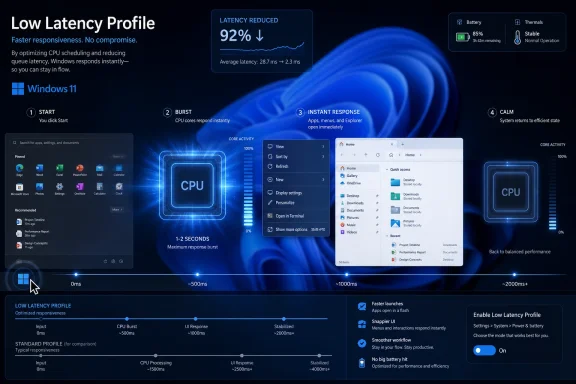
Microsoft is reportedly testing a Windows 11 “Low Latency Profile” that briefly boosts CPU frequency during common interactions such as launching apps, opening the Start menu, and invoking context menus, with early tests published in May 2026 claiming gains of up to 40 percent for some Microsoft app launches and 70 percent for parts of the shell. The important part is not the number, impressive as it sounds. It is that Microsoft appears to be treating latency as the defining Windows problem of the moment.
For years, the Windows performance conversation has been trapped between two unhelpful extremes. One side points to benchmarks and says modern PCs are absurdly fast; the other side clicks the Start menu on a capable machine and wonders why the most basic parts of the desktop still feel gummy. Low Latency Profile is Microsoft’s tacit admission that the second camp has a point.
Windows 11 has rarely been accused of being slow in the traditional sense. On a modern NVMe-equipped machine with a recent Intel, AMD, or Arm chip, it can compile code, encode video, render games, and juggle dozens of browser tabs without looking particularly embarrassed. Yet the operating system has often struggled with the smaller, more emotionally damaging failures: a delayed Start menu, a hesitant right-click menu, a File Explorer window that appears half a beat after the user expects it.
That distinction matters because users do not experience performance as an average. They experience it as a sequence of interruptions. A computer that can complete a synthetic workload quickly but hesitates on every little action feels worse than its spec sheet suggests.
Low Latency Profile, as described in current reporting, is aimed squarely at those interruptions. Rather than keeping the CPU running harder all the time, Windows would temporarily push the processor into a higher-performance state for a second or two when the user performs an action the system deems latency-sensitive. In plain English: click something important, get a short burst of CPU urgency, then return to normal.
This is not a revolutionary idea in computing. Phones, tablets, and modern laptops already live by similar logic, racing to finish short tasks quickly before dropping back into efficient idle states. But it is culturally significant for Windows because it reframes responsiveness as a first-class product feature rather than a side effect of buying a faster PC.
If those numbers hold up beyond early testing, they expose an awkward truth. Microsoft is not merely polishing the edges of Windows 11; it is trying to recover trust in the basic desktop contract. When the Start menu lags, users do not blame a rendering pipeline, a framework transition, or a power-management heuristic. They blame Windows.
The past several years have made that blame easier to assign. Windows 11 moved more visible shell pieces through modern UI frameworks, web-connected surfaces, recommendations, account prompts, search integration, and AI-era plumbing. Each individual change may have had a defensible product rationale. Together, they made the shell feel as if it had too many stakeholders and not enough mechanical sympathy.
Low Latency Profile does not erase that history. It does, however, suggest Microsoft knows that cosmetic redesigns and feature bundles cannot compensate for a desktop that feels reluctant. Responsiveness is not a luxury layer. It is the user interface.
There is a fair criticism buried inside the sarcasm. If a shell element feels slow because it is doing too much work, loading too many components, waiting on services, or dragging around avoidable abstraction overhead, then a CPU boost can look like a brute-force workaround. “Make the chip run harder” is not the same as “make the code leaner.”
But the backlash can also overstate the novelty. Modern processors are designed around dynamic frequency scaling, turbo behavior, heterogeneous cores, sleep states, and short bursts of work. The efficient computer is not the one that runs slowly all day; it is often the one that sprints briefly and returns to idle. In that sense, Microsoft’s defenders are right to say this is how contemporary devices already behave.
The real question is not whether a CPU burst is philosophically pure. The question is whether Windows is using that burst to mask architectural bloat or to align the scheduler and power policy with actual user intent. Those are very different stories, and early reporting does not yet prove which one dominates.
Windows lives in a more chaotic universe. It must run on premium ultrabooks, bargain-bin laptops, gaming towers, corporate desktops, handheld PCs, virtual machines, and aging hardware dragged across multiple OS generations. It has to negotiate OEM firmware choices, chipset drivers, third-party shell extensions, antivirus hooks, peripheral utilities, and decades of compatibility.
That complexity does not absolve Microsoft. It does explain why a Windows answer often looks less elegant than an Apple answer. Where Apple can tune a narrow stack, Microsoft frequently has to build adaptive behavior across a sprawling hardware and software ecosystem.
Low Latency Profile may therefore be best understood as a Windows-native compromise. It is not Apple-style vertical integration. It is a heuristic layered onto a messy platform, trying to make the most common interactions feel immediate across machines Microsoft does not fully control.
That matters commercially. Windows is not judged only on premium Snapdragon, Core Ultra, or Ryzen laptops. It is judged on the machines people actually buy in bulk: school laptops, entry-level retail systems, small-business desktops, family PCs, and corporate fleets configured for cost rather than delight.
If Low Latency Profile improves perceived speed on those systems without materially damaging battery life, heat, or fan noise, it could be one of the more meaningful Windows 11 changes of the year. Users may not know the feature exists. They will know whether the PC feels less irritating.
The risk is that cheap hardware often has the least thermal and battery headroom. A one-to-three-second CPU boost is harmless in isolation, but desktop usage is a chain of interactions: open Start, launch app, switch window, right-click file, open search, summon settings. If Windows repeatedly interprets normal navigation as boost-worthy, Microsoft will need careful tuning to avoid turning responsiveness into warmth and fan spin.
Those questions are not pedantry. Enterprise Windows environments are full of devices where predictable behavior matters more than a snappier animation. A call-center desktop, a shared lab PC, a medical workstation, and a developer laptop all have different tolerances for power draw, heat, responsiveness, and background workload interference.
Microsoft will also need to explain how Windows decides which actions deserve a boost. If the profile favors Microsoft’s own apps and shell surfaces while third-party applications see less benefit, developers and admins will notice. If it applies broadly, Microsoft must ensure the mechanism cannot be abused by poorly behaved software constantly asking for high-priority treatment.
The feature’s success in managed environments will depend less on the headline speedup than on boring documentation. IT departments will want policy controls, observability, and a clear explanation of failure modes. A faster Start menu is welcome; an unexplained new source of battery variance is a ticket storm.
Microsoft has spent much of the Windows 11 era asking users to accept a more modern desktop: centered taskbar, redesigned menus, deeper account integration, cloud-connected search, richer widgets, AI surfaces, and new app frameworks. The bargain was supposed to be that modernization would eventually produce a cleaner, faster, more coherent Windows. For many users, the bill arrived before the benefits.
That is why this feature is politically sensitive in the Windows community. It touches a nerve that has little to do with clock speeds. Enthusiasts are tired of being told that performance complaints are anecdotal when the anecdotes are shared by people with expensive machines and years of troubleshooting experience.
A good Low Latency Profile could help. It could make Windows feel more intentional, especially on machines that currently pause just long enough to break concentration. But Microsoft cannot let the feature become an excuse to stop reducing overhead elsewhere.
It also matters which apps and shell surfaces benefit. If Microsoft Edge, Outlook, Start, and context menus improve dramatically, that is useful but incomplete. Users live in Chrome, Discord, Slack, Steam, Visual Studio Code, Adobe apps, AutoCAD, line-of-business software, and a long tail of utilities that make Windows valuable precisely because it is not a walled garden.
There is also the question of repeatability. A benchmark that opens the same app repeatedly can show a clean gain, but daily computing is messy. Cold launches, warm launches, background indexing, update tasks, antivirus scans, network drives, shell extensions, and cloud sync clients all shape the experience.
The feature’s public reputation will be decided not by a best-case clip on social media but by whether users stop noticing hesitation. The highest praise for Low Latency Profile would be silence.
That dual view is healthier than the culture-war version of the debate. Calling Low Latency Profile “fake performance” ignores how modern power management works. Treating it as proof that Microsoft has solved responsiveness ignores years of user frustration with the Windows 11 desktop.
The right standard is practical: if the feature reduces latency without meaningful battery, heat, noise, or stability regressions, it is a win. If it merely hides avoidable sluggishness while the shell keeps getting heavier, it becomes another symptom of the disease.
Microsoft should ship the optimization, measure it honestly, and keep cutting the underlying overhead. Users deserve both the quick win and the deeper repair.
Source: stuff.tv Your Windows 11 PC will feel much faster after this forthcoming update | Stuff
For years, the Windows performance conversation has been trapped between two unhelpful extremes. One side points to benchmarks and says modern PCs are absurdly fast; the other side clicks the Start menu on a capable machine and wonders why the most basic parts of the desktop still feel gummy. Low Latency Profile is Microsoft’s tacit admission that the second camp has a point.
 Microsoft Is Finally Optimizing for the Click, Not the Benchmark
Windows 11 has rarely been accused of being slow in the traditional sense. On a modern NVMe-equipped machine with a recent Intel, AMD, or Arm chip, it can compile code, encode video, render games, and juggle dozens of browser tabs without looking particularly embarrassed. Yet the operating system has often struggled with the smaller, more emotionally damaging failures: a delayed Start menu, a hesitant right-click menu, a File Explorer window that appears half a beat after the user expects it.That distinction matters because users do not experience performance as an average. They experience it as a sequence of interruptions. A computer that can complete a synthetic workload quickly but hesitates on every little action feels worse than its spec sheet suggests.
Low Latency Profile, as described in current reporting, is aimed squarely at those interruptions. Rather than keeping the CPU running harder all the time, Windows would temporarily push the processor into a higher-performance state for a second or two when the user performs an action the system deems latency-sensitive. In plain English: click something important, get a short burst of CPU urgency, then return to normal.
This is not a revolutionary idea in computing. Phones, tablets, and modern laptops already live by similar logic, racing to finish short tasks quickly before dropping back into efficient idle states. But it is culturally significant for Windows because it reframes responsiveness as a first-class product feature rather than a side effect of buying a faster PC.
The Start Menu Has Become a Performance Referendum
The Start menu should be boring. It is one of the oldest metaphors in Windows, a launcher so familiar that users notice it only when it gets in their way. That is precisely why a claimed 70 percent speedup in Start menu and context-menu responsiveness lands with such force.If those numbers hold up beyond early testing, they expose an awkward truth. Microsoft is not merely polishing the edges of Windows 11; it is trying to recover trust in the basic desktop contract. When the Start menu lags, users do not blame a rendering pipeline, a framework transition, or a power-management heuristic. They blame Windows.
The past several years have made that blame easier to assign. Windows 11 moved more visible shell pieces through modern UI frameworks, web-connected surfaces, recommendations, account prompts, search integration, and AI-era plumbing. Each individual change may have had a defensible product rationale. Together, they made the shell feel as if it had too many stakeholders and not enough mechanical sympathy.
Low Latency Profile does not erase that history. It does, however, suggest Microsoft knows that cosmetic redesigns and feature bundles cannot compensate for a desktop that feels reluctant. Responsiveness is not a luxury layer. It is the user interface.
The CPU Burst Is Less Scandalous Than the Need for It
The most entertaining reaction to Low Latency Profile is also the most predictable: disbelief that Windows might need to goose the CPU just to open menus faster. The joke practically writes itself. It is 2026, processors have billions of transistors, and the Start menu still needs a pep talk.There is a fair criticism buried inside the sarcasm. If a shell element feels slow because it is doing too much work, loading too many components, waiting on services, or dragging around avoidable abstraction overhead, then a CPU boost can look like a brute-force workaround. “Make the chip run harder” is not the same as “make the code leaner.”
But the backlash can also overstate the novelty. Modern processors are designed around dynamic frequency scaling, turbo behavior, heterogeneous cores, sleep states, and short bursts of work. The efficient computer is not the one that runs slowly all day; it is often the one that sprints briefly and returns to idle. In that sense, Microsoft’s defenders are right to say this is how contemporary devices already behave.
The real question is not whether a CPU burst is philosophically pure. The question is whether Windows is using that burst to mask architectural bloat or to align the scheduler and power policy with actual user intent. Those are very different stories, and early reporting does not yet prove which one dominates.
Apple’s Lesson Was Never Just “Boost the Chip”
Comparisons to Apple are inevitable because macOS and iOS have long been praised for responsiveness that feels disproportionate to raw hardware differences. Apple benefits from controlling the silicon roadmap, firmware assumptions, display pipeline, app frameworks, and much of the user experience stack. That control lets it treat latency as a system property rather than a patch applied at the end.Windows lives in a more chaotic universe. It must run on premium ultrabooks, bargain-bin laptops, gaming towers, corporate desktops, handheld PCs, virtual machines, and aging hardware dragged across multiple OS generations. It has to negotiate OEM firmware choices, chipset drivers, third-party shell extensions, antivirus hooks, peripheral utilities, and decades of compatibility.
That complexity does not absolve Microsoft. It does explain why a Windows answer often looks less elegant than an Apple answer. Where Apple can tune a narrow stack, Microsoft frequently has to build adaptive behavior across a sprawling hardware and software ecosystem.
Low Latency Profile may therefore be best understood as a Windows-native compromise. It is not Apple-style vertical integration. It is a heuristic layered onto a messy platform, trying to make the most common interactions feel immediate across machines Microsoft does not fully control.
Budget PCs Stand to Gain the Most, but They Also Carry the Most Risk
The most compelling case for Low Latency Profile is not the owner of a high-end workstation. It is the person using a low-cost laptop with a modest CPU, conservative thermal limits, and background services competing for attention. On that class of machine, a short, well-timed boost could make the difference between “this feels cheap” and “this feels fine.”That matters commercially. Windows is not judged only on premium Snapdragon, Core Ultra, or Ryzen laptops. It is judged on the machines people actually buy in bulk: school laptops, entry-level retail systems, small-business desktops, family PCs, and corporate fleets configured for cost rather than delight.
If Low Latency Profile improves perceived speed on those systems without materially damaging battery life, heat, or fan noise, it could be one of the more meaningful Windows 11 changes of the year. Users may not know the feature exists. They will know whether the PC feels less irritating.
The risk is that cheap hardware often has the least thermal and battery headroom. A one-to-three-second CPU boost is harmless in isolation, but desktop usage is a chain of interactions: open Start, launch app, switch window, right-click file, open search, summon settings. If Windows repeatedly interprets normal navigation as boost-worthy, Microsoft will need careful tuning to avoid turning responsiveness into warmth and fan spin.
Enterprise IT Will Ask the Boring Questions That Matter
For administrators, the first reaction will not be excitement. It will be governance. Can this be configured? Can it be disabled? Does it interact with existing power plans, OEM tuning utilities, battery policies, thermal management, virtualization workloads, or endpoint monitoring agents?Those questions are not pedantry. Enterprise Windows environments are full of devices where predictable behavior matters more than a snappier animation. A call-center desktop, a shared lab PC, a medical workstation, and a developer laptop all have different tolerances for power draw, heat, responsiveness, and background workload interference.
Microsoft will also need to explain how Windows decides which actions deserve a boost. If the profile favors Microsoft’s own apps and shell surfaces while third-party applications see less benefit, developers and admins will notice. If it applies broadly, Microsoft must ensure the mechanism cannot be abused by poorly behaved software constantly asking for high-priority treatment.
The feature’s success in managed environments will depend less on the headline speedup than on boring documentation. IT departments will want policy controls, observability, and a clear explanation of failure modes. A faster Start menu is welcome; an unexplained new source of battery variance is a ticket storm.
The Performance Story Is Bigger Than One Hidden Mode
Low Latency Profile appears to fit into a broader 2026 effort to make Windows 11 feel more responsive, less resource-hungry, and less cluttered. That context is important because a CPU burst alone cannot fix Windows’ reputation. If the shell remains heavy, if File Explorer still hesitates under common workloads, if background features keep accumulating, the profile will be treated as a clever bandage on a self-inflicted wound.Microsoft has spent much of the Windows 11 era asking users to accept a more modern desktop: centered taskbar, redesigned menus, deeper account integration, cloud-connected search, richer widgets, AI surfaces, and new app frameworks. The bargain was supposed to be that modernization would eventually produce a cleaner, faster, more coherent Windows. For many users, the bill arrived before the benefits.
That is why this feature is politically sensitive in the Windows community. It touches a nerve that has little to do with clock speeds. Enthusiasts are tired of being told that performance complaints are anecdotal when the anecdotes are shared by people with expensive machines and years of troubleshooting experience.
A good Low Latency Profile could help. It could make Windows feel more intentional, especially on machines that currently pause just long enough to break concentration. But Microsoft cannot let the feature become an excuse to stop reducing overhead elsewhere.
The Numbers Are Promising, but the Fine Print Is the Product
The reported gains are impressive, but early performance claims deserve caution. We do not yet have broad independent testing across CPU vendors, laptop classes, desktops, power modes, battery states, thermals, third-party apps, and real user workloads. “Up to” numbers are useful for showing potential, not for predicting everyone’s experience.It also matters which apps and shell surfaces benefit. If Microsoft Edge, Outlook, Start, and context menus improve dramatically, that is useful but incomplete. Users live in Chrome, Discord, Slack, Steam, Visual Studio Code, Adobe apps, AutoCAD, line-of-business software, and a long tail of utilities that make Windows valuable precisely because it is not a walled garden.
There is also the question of repeatability. A benchmark that opens the same app repeatedly can show a clean gain, but daily computing is messy. Cold launches, warm launches, background indexing, update tasks, antivirus scans, network drives, shell extensions, and cloud sync clients all shape the experience.
The feature’s public reputation will be decided not by a best-case clip on social media but by whether users stop noticing hesitation. The highest praise for Low Latency Profile would be silence.
The Windows Community Should Welcome the Fix Without Letting Microsoft Off the Hook
There is no contradiction in wanting this feature to ship and still being annoyed that it is necessary. Windows users should not have to choose between engineering realism and product accountability. Modern systems do use short bursts of performance, and Windows should absolutely exploit hardware intelligently. Also, the Windows shell should be leaner than it often feels.That dual view is healthier than the culture-war version of the debate. Calling Low Latency Profile “fake performance” ignores how modern power management works. Treating it as proof that Microsoft has solved responsiveness ignores years of user frustration with the Windows 11 desktop.
The right standard is practical: if the feature reduces latency without meaningful battery, heat, noise, or stability regressions, it is a win. If it merely hides avoidable sluggishness while the shell keeps getting heavier, it becomes another symptom of the disease.
Microsoft should ship the optimization, measure it honestly, and keep cutting the underlying overhead. Users deserve both the quick win and the deeper repair.
The Start Menu Speedup Is the Headline, but the Test Is Trust
Low Latency Profile is interesting because it turns a vague complaint into an engineering target. Windows 11 does not merely need to finish big jobs quickly. It needs to respond to small human actions with less friction.- Microsoft is reportedly testing a Windows 11 Low Latency Profile that briefly raises CPU performance for common foreground actions.
- Early reports claim up to 40 percent faster launches for some Microsoft apps and up to 70 percent faster responsiveness for parts of the shell, including the Start menu and context menus.
- The technique is not inherently reckless, because modern devices already use short performance bursts to finish interactive work quickly and return to idle.
- The feature will be judged harshly if it improves Microsoft surfaces while leaving common third-party apps and real-world workflows untouched.
- Administrators will need policy controls, documentation, and telemetry before treating the feature as more than a consumer-facing responsiveness tweak.
- The best outcome is not a louder CPU but a Windows desktop that users stop accusing of lagging behind its own hardware.
Source: stuff.tv Your Windows 11 PC will feel much faster after this forthcoming update | Stuff
