

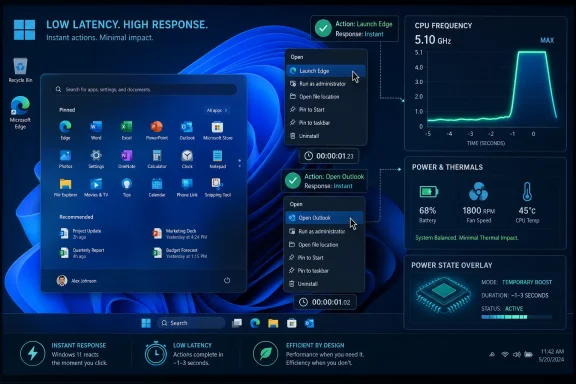
Microsoft is testing a Windows 11 “Low Latency Profile” in Insider builds that briefly drives CPU frequency to maximum for high-priority user actions, such as launching apps or opening menus, with early reports claiming faster starts for Edge, Outlook, Start, and context menus. The feature is small enough to sound like a power-management tweak, but it points at a larger admission: Windows does not merely need more features; it needs to feel less heavy. If Microsoft can make the system respond faster at the exact moment users ask it to do something, the company may improve Windows 11 more than another round of visual polish ever could.
For years, Windows performance arguments have been trapped between benchmark culture and lived experience. A modern PC can compile code, render video, and run games with astonishing throughput, yet still make the Start menu feel like it is arriving through customs. That contradiction is where the Low Latency Profile becomes interesting.
The reported mechanism is not mystical. When Windows detects a meaningful foreground action, it temporarily pushes the processor into a higher-performance state for roughly one to three seconds. The idea is to finish the interactive work quickly, then return to normal power behavior before the battery and fans pay too much of a price.
That sounds almost too obvious, which is why it lands with a sting. Users do not experience their PCs as average CPU utilization over a ten-minute window. They experience them as a chain of tiny negotiations: click, wait; type, wait; open, wait; search, wait. If Microsoft can compress those pauses, the machine feels faster even if its peak benchmark score does not change.
The early numbers being floated are attention-grabbing: up to 40 percent faster app launches for some Microsoft apps and as much as 70 percent improvement for select interface surfaces. Those figures should be treated as preliminary, because they come from an unannounced feature in testing rather than a public Microsoft performance paper. Still, the direction matters more than the marketing-ready percentage. Microsoft is looking at responsiveness as a first-class product problem.
The problem is that “fairness” is not always what a human wants. When a user opens the Start menu, they do not care that background indexing, Teams telemetry, a browser helper process, and a cloud sync client all have their own legitimate claims on the machine. The visible action has priority because it is the action the user is waiting on.
Other platforms have spent years leaning into this reality. Mobile operating systems learned early that touch input must feel immediate, even on constrained hardware. Apple’s platforms have long exposed quality-of-service ideas that let the system distinguish between background work and user-facing work. Android has its own performance-response machinery because phone users punish hesitation instantly.
Windows has had pieces of this philosophy for a long time, but Windows also carries decades of compatibility baggage and an ecosystem where any third-party app can behave like it owns the house. That makes a short, system-level burst attractive. It does not require every application developer to suddenly become a scheduler expert. It gives Windows a blunt but potentially effective way to privilege the foreground moment.
The phrase Low Latency Profile is telling. Microsoft is not describing this as raw speed mode. It is describing it as a latency intervention, and latency is what makes a fast computer feel slow. Throughput wins benchmarks; latency wins trust.
Windows 11’s Start menu has been criticized not just because of layout decisions, recommendations, and web-connected behavior, but because it can feel oddly overbuilt for something so basic. A menu that opens programs should not need an apology. Yet many Windows users have learned to expect a fractional delay that would have seemed absurd in earlier eras of desktop computing.
That is why a 70 percent improvement in menu responsiveness, if it survives broader testing, would matter beyond the number. It would be Microsoft admitting that the interface itself has become a performance workload. The shell is no longer a thin layer over the operating system; it is a modern app platform, a cloud-connected surface, a recommendation engine, and a search front end, all trying to appear instantaneous.
Low Latency Profile does not solve the architectural concern. If a menu is heavy because it is doing too much, boosting the CPU is a compensating mechanism rather than a cure. But compensating mechanisms are not automatically bad. Users do not care whether the menu opens quickly because Microsoft removed overhead, preloaded smarter, or spiked the CPU for two seconds. They care that it opens quickly.
The danger is that a successful burst feature could become a permission slip for further UI weight. Microsoft should resist that temptation. The right lesson is not “we can spend more cycles because we found a turbo button.” The right lesson is “responsiveness is a product feature, and regressions should be treated like bugs.”
That is exactly the class of machine where this idea could do the most good. Premium laptops already mask Windows overhead with fast storage, high turbo budgets, more RAM, and better cooling. Cheap laptops do not. They expose every design compromise in the OS, and they are the machines most likely to turn a small delay into a daily irritation.
The irony is that these are also the machines where power and thermals are most fragile. A short CPU burst may be efficient under the classic “race to idle” theory: finish work quickly, then return to low power. But low-cost hardware often has limited cooling, conservative firmware, and batteries that age poorly. A feature that behaves beautifully on one processor generation may produce fan noise or inconsistent behavior on another.
This is where Microsoft’s testing burden becomes real. Windows is not tuned for a single SoC family in the way iOS is, and it is not distributed across a relatively narrow laptop portfolio like macOS. Windows has to behave across Intel, AMD, Arm, old firmware, new firmware, gaming desktops, fanless tablets, corporate laptops, and bargain-bin machines sold with barely enough memory to breathe.
The feature’s success will depend on restraint. A one-second burst at the right moment may feel magical. A three-second burst triggered too often may feel like the laptop is coughing every time the user clicks. The difference between “snappy” and “twitchy” can be surprisingly small.
Administrators will want to know whether the feature is automatic, policy-controlled, tied to power mode, or exposed through configuration profiles. They will also want to know how it interacts with existing vendor utilities, endpoint security agents, virtualization tools, and power plans. A corporate laptop is rarely a clean Windows install; it is a stack of agents and policies negotiating with each other all day.
There is also a measurement problem. The subjective benefit may be obvious to users, but IT departments need evidence before changing fleet behavior. If Microsoft rolls this out silently, some users may praise the improvement while others report battery drain after a cumulative update. Without knobs or telemetry, the help desk gets the ambiguity.
Microsoft has been trying to make Windows a more cloud-managed, policy-driven platform, and this feature should follow that model. If Low Latency Profile becomes real, it should be visible enough for administrators to understand and controllable enough for sensitive environments. A hidden performance behavior is fine in an Insider experiment. It is less fine in a regulated fleet of tens of thousands of laptops.
The best version of this feature would not require constant admin attention. It would ship with sane defaults, respect existing power policies, and provide enough documentation for organizations to decide whether to leave it alone. But Microsoft should not confuse invisibility with simplicity. Enterprise Windows features become simple only after they are explainable.
Arm chips can be excellent at quick bursts of work, but the operating system has to cooperate. If Windows treats foreground actions with the same old desktop assumptions, the hardware advantage is blunted. A latency-aware Windows is better suited to the kind of heterogeneous processors now becoming standard across Arm and x86 alike.
This matters because the PC market is no longer just comparing spec sheets. Apple changed user expectations around sleep, wake, battery life, fan noise, and the feeling that the machine is ready before the user finishes opening the lid. Microsoft cannot answer that only with Copilot keys and AI demos. It has to make Windows feel more immediate.
Low Latency Profile is not an Arm-only story, and it may benefit conventional Intel and AMD machines just as much. But philosophically, it belongs to the same shift. The PC is becoming more mobile in its power behavior, more heterogeneous in its cores, and more dependent on OS-level judgment about what matters now.
If Microsoft gets that judgment right, Windows can feel modern without abandoning its compatibility advantage. If it gets it wrong, the OS risks becoming a layer that excellent hardware has to overcome.
There are understandable reasons for that. Microsoft experiments constantly, and not every experiment deserves a blog post. Insider builds contain unfinished code. Some features are A/B tested, staged, paused, renamed, or abandoned. Prematurely documenting all of them would create its own confusion.
Still, performance work deserves a different communication posture. Users are skeptical because Windows has accumulated years of tiny annoyances, and Microsoft’s public messaging often emphasizes new surfaces over refinements. When the company does meaningful under-the-hood work, it should say so clearly once the feature is mature enough to discuss.
The risk of silence is that expectations get set by leaks and worst-case interpretations. One user hears “40 percent faster” and expects every program to launch instantly. Another hears “maxes out the CPU” and assumes Microsoft is about to torch laptop battery life. In the absence of official framing, both reactions flourish.
Microsoft does not need to turn every scheduler experiment into a keynote. But if Low Latency Profile moves toward release, the company should explain what triggers it, what hardware it targets, how it has been measured, and what trade-offs it observed. Performance credibility is built with specifics.
But “papering over” is too simple. Operating systems have always used scheduling, caching, prefetching, prioritization, and power-state tricks to make computers feel faster than the hardware alone would suggest. The line between optimization and disguise is blurry. If the user-visible result is a faster foreground action with minimal downside, that is real engineering value.
The more important question is whether Microsoft treats this as one tool among many or as the whole answer. Low Latency Profile should sit alongside code cleanup, shell optimization, better app packaging, smarter startup behavior, and continued migration away from legacy bottlenecks. A CPU burst can shorten the wait; it cannot excuse inefficient work.
This distinction matters because Windows performance problems are not uniform. Some delays come from CPU frequency ramping. Others come from storage, network calls, antivirus scanning, app framework overhead, cloud authentication, GPU composition, or simple bad code. A single boost profile will not fix all of that, and Microsoft should not market it as though it will.
The best outcome is more modest and more valuable: Windows becomes better at recognizing the moments when the user is waiting and spends resources accordingly. That is not a revolution. It is a long-overdue correction.
The early reporting suggests Microsoft believes the thermal and battery impact should be minimal because the boost is short. That is plausible. A processor that completes work quickly and returns to idle can sometimes use less energy than one that lingers at a lower frequency. But the real world is messy, especially on laptops with aggressive vendor tuning.
Trigger frequency will matter as much as burst duration. If the feature activates only for clear foreground actions, it may be nearly invisible except in a good way. If it fires for too many UI events, users may get micro-bursts stacked into a pattern that is no longer micro. The operating system has to be selective.
Power mode integration will also matter. A user on battery saver should not get the same behavior as a user plugged into a workstation dock unless Microsoft has very strong evidence that the trade-off is still favorable. Likewise, gaming laptops, thin-and-light notebooks, and fanless devices may need different thresholds.
This is where Windows’ diversity becomes both a strength and a curse. The OS can improve millions of machines with one update, but it can also expose edge cases across hardware Microsoft does not fully control. A performance feature that cannot adapt will not survive contact with the PC ecosystem.
That is the kind of improvement Microsoft needs more of. Windows 11 has spent much of its life caught between design modernization, hardware requirements, AI ambition, and user irritation over changes that seemed to serve Microsoft more than the person at the keyboard. A responsiveness push is different because it aligns directly with what users feel.
It also has symbolic value for WindowsForum’s core audience. Enthusiasts and admins have long known how to tune power plans, disable startup junk, replace shell components, and chase latency gremlins through drivers and services. But ordinary users should not need a weekend project to make a new PC feel new. The operating system should do the obvious thing at the obvious moment.
There is a lesson here for Microsoft’s broader Windows strategy. The company can talk about AI PCs, neural processors, Copilot experiences, and cloud-connected workflows, but none of that lands well if the shell stutters. Responsiveness is the foundation on which every higher-level feature depends.
A fast Windows does not need to be minimalist. It does need to be respectful. When the user asks for something, the system should act like that request is the most important thing happening on the machine.
Source: PCMag Australia Microsoft Tests Windows Feature That Could Make App Startup Less of a Slog
 Microsoft Is Finally Attacking the Milliseconds Users Actually Feel
For years, Windows performance arguments have been trapped between benchmark culture and lived experience. A modern PC can compile code, render video, and run games with astonishing throughput, yet still make the Start menu feel like it is arriving through customs. That contradiction is where the Low Latency Profile becomes interesting.The reported mechanism is not mystical. When Windows detects a meaningful foreground action, it temporarily pushes the processor into a higher-performance state for roughly one to three seconds. The idea is to finish the interactive work quickly, then return to normal power behavior before the battery and fans pay too much of a price.
That sounds almost too obvious, which is why it lands with a sting. Users do not experience their PCs as average CPU utilization over a ten-minute window. They experience them as a chain of tiny negotiations: click, wait; type, wait; open, wait; search, wait. If Microsoft can compress those pauses, the machine feels faster even if its peak benchmark score does not change.
The early numbers being floated are attention-grabbing: up to 40 percent faster app launches for some Microsoft apps and as much as 70 percent improvement for select interface surfaces. Those figures should be treated as preliminary, because they come from an unannounced feature in testing rather than a public Microsoft performance paper. Still, the direction matters more than the marketing-ready percentage. Microsoft is looking at responsiveness as a first-class product problem.
The Scheduler Was Never Broken, but It Was Not Human Enough
Windows already knows how to scale CPU performance. Modern processors constantly move between idle states, efficiency states, and turbo frequencies, while the operating system scheduler decides which threads deserve attention and where they should run. On paper, this is an elegant balancing act between performance, heat, battery life, and fairness.The problem is that “fairness” is not always what a human wants. When a user opens the Start menu, they do not care that background indexing, Teams telemetry, a browser helper process, and a cloud sync client all have their own legitimate claims on the machine. The visible action has priority because it is the action the user is waiting on.
Other platforms have spent years leaning into this reality. Mobile operating systems learned early that touch input must feel immediate, even on constrained hardware. Apple’s platforms have long exposed quality-of-service ideas that let the system distinguish between background work and user-facing work. Android has its own performance-response machinery because phone users punish hesitation instantly.
Windows has had pieces of this philosophy for a long time, but Windows also carries decades of compatibility baggage and an ecosystem where any third-party app can behave like it owns the house. That makes a short, system-level burst attractive. It does not require every application developer to suddenly become a scheduler expert. It gives Windows a blunt but potentially effective way to privilege the foreground moment.
The phrase Low Latency Profile is telling. Microsoft is not describing this as raw speed mode. It is describing it as a latency intervention, and latency is what makes a fast computer feel slow. Throughput wins benchmarks; latency wins trust.
The Start Menu Has Become the Symbol of Windows Bloat
It is not an accident that the Start menu keeps coming up in reports about this feature. The Start menu is the most politically important surface in Windows because it is both a launcher and a referendum. When it hesitates, the whole operating system feels guilty.Windows 11’s Start menu has been criticized not just because of layout decisions, recommendations, and web-connected behavior, but because it can feel oddly overbuilt for something so basic. A menu that opens programs should not need an apology. Yet many Windows users have learned to expect a fractional delay that would have seemed absurd in earlier eras of desktop computing.
That is why a 70 percent improvement in menu responsiveness, if it survives broader testing, would matter beyond the number. It would be Microsoft admitting that the interface itself has become a performance workload. The shell is no longer a thin layer over the operating system; it is a modern app platform, a cloud-connected surface, a recommendation engine, and a search front end, all trying to appear instantaneous.
Low Latency Profile does not solve the architectural concern. If a menu is heavy because it is doing too much, boosting the CPU is a compensating mechanism rather than a cure. But compensating mechanisms are not automatically bad. Users do not care whether the menu opens quickly because Microsoft removed overhead, preloaded smarter, or spiked the CPU for two seconds. They care that it opens quickly.
The danger is that a successful burst feature could become a permission slip for further UI weight. Microsoft should resist that temptation. The right lesson is not “we can spend more cycles because we found a turbo button.” The right lesson is “responsiveness is a product feature, and regressions should be treated like bugs.”
Budget PCs Stand to Gain the Most, but They Also Carry the Risk
The most compelling early test came from a deliberately constrained Windows 11 virtual machine: two CPU cores, 4GB of RAM, and enough artificial misery to resemble the lower end of the real PC market. After enabling the hidden feature, the tester reported that apps opened far more quickly and the Start menu became immediately more responsive. Task Manager reportedly showed the CPU jumping aggressively during launch, then settling back down seconds later.That is exactly the class of machine where this idea could do the most good. Premium laptops already mask Windows overhead with fast storage, high turbo budgets, more RAM, and better cooling. Cheap laptops do not. They expose every design compromise in the OS, and they are the machines most likely to turn a small delay into a daily irritation.
The irony is that these are also the machines where power and thermals are most fragile. A short CPU burst may be efficient under the classic “race to idle” theory: finish work quickly, then return to low power. But low-cost hardware often has limited cooling, conservative firmware, and batteries that age poorly. A feature that behaves beautifully on one processor generation may produce fan noise or inconsistent behavior on another.
This is where Microsoft’s testing burden becomes real. Windows is not tuned for a single SoC family in the way iOS is, and it is not distributed across a relatively narrow laptop portfolio like macOS. Windows has to behave across Intel, AMD, Arm, old firmware, new firmware, gaming desktops, fanless tablets, corporate laptops, and bargain-bin machines sold with barely enough memory to breathe.
The feature’s success will depend on restraint. A one-second burst at the right moment may feel magical. A three-second burst triggered too often may feel like the laptop is coughing every time the user clicks. The difference between “snappy” and “twitchy” can be surprisingly small.
Enterprise IT Will Want the Policy Before the Promise
For home users, the story is simple: apps may open faster. For enterprise IT, the story is more complicated. Anything that changes CPU behavior across fleets raises questions about battery life, thermals, support tickets, and measurement.Administrators will want to know whether the feature is automatic, policy-controlled, tied to power mode, or exposed through configuration profiles. They will also want to know how it interacts with existing vendor utilities, endpoint security agents, virtualization tools, and power plans. A corporate laptop is rarely a clean Windows install; it is a stack of agents and policies negotiating with each other all day.
There is also a measurement problem. The subjective benefit may be obvious to users, but IT departments need evidence before changing fleet behavior. If Microsoft rolls this out silently, some users may praise the improvement while others report battery drain after a cumulative update. Without knobs or telemetry, the help desk gets the ambiguity.
Microsoft has been trying to make Windows a more cloud-managed, policy-driven platform, and this feature should follow that model. If Low Latency Profile becomes real, it should be visible enough for administrators to understand and controllable enough for sensitive environments. A hidden performance behavior is fine in an Insider experiment. It is less fine in a regulated fleet of tens of thousands of laptops.
The best version of this feature would not require constant admin attention. It would ship with sane defaults, respect existing power policies, and provide enough documentation for organizations to decide whether to leave it alone. But Microsoft should not confuse invisibility with simplicity. Enterprise Windows features become simple only after they are explainable.
This Is Also a Quiet Admission About Windows on Arm
Microsoft’s renewed Windows on Arm push makes Low Latency Profile more strategically relevant than it first appears. The company and its silicon partners have spent years arguing that Windows laptops can deliver the kind of instant, efficient, always-ready behavior users associate with phones and modern MacBooks. That pitch rises or falls on responsiveness.Arm chips can be excellent at quick bursts of work, but the operating system has to cooperate. If Windows treats foreground actions with the same old desktop assumptions, the hardware advantage is blunted. A latency-aware Windows is better suited to the kind of heterogeneous processors now becoming standard across Arm and x86 alike.
This matters because the PC market is no longer just comparing spec sheets. Apple changed user expectations around sleep, wake, battery life, fan noise, and the feeling that the machine is ready before the user finishes opening the lid. Microsoft cannot answer that only with Copilot keys and AI demos. It has to make Windows feel more immediate.
Low Latency Profile is not an Arm-only story, and it may benefit conventional Intel and AMD machines just as much. But philosophically, it belongs to the same shift. The PC is becoming more mobile in its power behavior, more heterogeneous in its cores, and more dependent on OS-level judgment about what matters now.
If Microsoft gets that judgment right, Windows can feel modern without abandoning its compatibility advantage. If it gets it wrong, the OS risks becoming a layer that excellent hardware has to overcome.
The Hidden-Feature Culture Is a Symptom of Microsoft’s Messaging Gap
One oddity of this story is how familiar the discovery path feels. A Windows feature exists in Insider builds, is not formally announced, enthusiasts find identifiers, tools like ViveTool enter the picture, and the press reconstructs Microsoft’s intent from tests, leaks, and unnamed sources. This has become a normal part of the Windows news cycle.There are understandable reasons for that. Microsoft experiments constantly, and not every experiment deserves a blog post. Insider builds contain unfinished code. Some features are A/B tested, staged, paused, renamed, or abandoned. Prematurely documenting all of them would create its own confusion.
Still, performance work deserves a different communication posture. Users are skeptical because Windows has accumulated years of tiny annoyances, and Microsoft’s public messaging often emphasizes new surfaces over refinements. When the company does meaningful under-the-hood work, it should say so clearly once the feature is mature enough to discuss.
The risk of silence is that expectations get set by leaks and worst-case interpretations. One user hears “40 percent faster” and expects every program to launch instantly. Another hears “maxes out the CPU” and assumes Microsoft is about to torch laptop battery life. In the absence of official framing, both reactions flourish.
Microsoft does not need to turn every scheduler experiment into a keynote. But if Low Latency Profile moves toward release, the company should explain what triggers it, what hardware it targets, how it has been measured, and what trade-offs it observed. Performance credibility is built with specifics.
A Faster Click Is Not the Same as a Leaner Windows
The most skeptical reading of Low Latency Profile is that Microsoft is using horsepower to paper over bloat. That critique is not entirely unfair. Windows 11 includes modern frameworks, web-connected components, background services, AI integrations, and compatibility layers that make the OS feel heavier than users want.But “papering over” is too simple. Operating systems have always used scheduling, caching, prefetching, prioritization, and power-state tricks to make computers feel faster than the hardware alone would suggest. The line between optimization and disguise is blurry. If the user-visible result is a faster foreground action with minimal downside, that is real engineering value.
The more important question is whether Microsoft treats this as one tool among many or as the whole answer. Low Latency Profile should sit alongside code cleanup, shell optimization, better app packaging, smarter startup behavior, and continued migration away from legacy bottlenecks. A CPU burst can shorten the wait; it cannot excuse inefficient work.
This distinction matters because Windows performance problems are not uniform. Some delays come from CPU frequency ramping. Others come from storage, network calls, antivirus scanning, app framework overhead, cloud authentication, GPU composition, or simple bad code. A single boost profile will not fix all of that, and Microsoft should not market it as though it will.
The best outcome is more modest and more valuable: Windows becomes better at recognizing the moments when the user is waiting and spends resources accordingly. That is not a revolution. It is a long-overdue correction.
The Battery-Life Fight Will Decide Whether Users Keep It
Every responsiveness feature eventually faces the same trial: does it feel free? Users love speed until the fan spins up in a quiet room or the battery estimate drops during a meeting. Then the feature becomes a suspect.The early reporting suggests Microsoft believes the thermal and battery impact should be minimal because the boost is short. That is plausible. A processor that completes work quickly and returns to idle can sometimes use less energy than one that lingers at a lower frequency. But the real world is messy, especially on laptops with aggressive vendor tuning.
Trigger frequency will matter as much as burst duration. If the feature activates only for clear foreground actions, it may be nearly invisible except in a good way. If it fires for too many UI events, users may get micro-bursts stacked into a pattern that is no longer micro. The operating system has to be selective.
Power mode integration will also matter. A user on battery saver should not get the same behavior as a user plugged into a workstation dock unless Microsoft has very strong evidence that the trade-off is still favorable. Likewise, gaming laptops, thin-and-light notebooks, and fanless devices may need different thresholds.
This is where Windows’ diversity becomes both a strength and a curse. The OS can improve millions of machines with one update, but it can also expose edge cases across hardware Microsoft does not fully control. A performance feature that cannot adapt will not survive contact with the PC ecosystem.
The Real Benchmark Is Whether People Stop Noticing Windows
If Low Latency Profile works, the most successful version will disappear from conversation. Users will not know its name. They will not open Settings to admire it. They will simply notice, perhaps vaguely, that Windows feels less reluctant.That is the kind of improvement Microsoft needs more of. Windows 11 has spent much of its life caught between design modernization, hardware requirements, AI ambition, and user irritation over changes that seemed to serve Microsoft more than the person at the keyboard. A responsiveness push is different because it aligns directly with what users feel.
It also has symbolic value for WindowsForum’s core audience. Enthusiasts and admins have long known how to tune power plans, disable startup junk, replace shell components, and chase latency gremlins through drivers and services. But ordinary users should not need a weekend project to make a new PC feel new. The operating system should do the obvious thing at the obvious moment.
There is a lesson here for Microsoft’s broader Windows strategy. The company can talk about AI PCs, neural processors, Copilot experiences, and cloud-connected workflows, but none of that lands well if the shell stutters. Responsiveness is the foundation on which every higher-level feature depends.
A fast Windows does not need to be minimalist. It does need to be respectful. When the user asks for something, the system should act like that request is the most important thing happening on the machine.
The Windows 11 Speed Story Now Has Concrete Tests to Pass
The Low Latency Profile is promising precisely because it is measurable, limited, and aimed at a pain point users recognize. That also means Microsoft will have little room to hide if the eventual rollout disappoints. The claims are specific enough to become expectations.- Microsoft is reportedly testing a short CPU boost that activates during high-priority foreground actions such as app launches and menu openings.
- Early reports claim meaningful gains for Microsoft apps and Windows shell surfaces, but the figures should remain provisional until Microsoft publishes its own data or the feature reaches broader builds.
- Low-cost PCs may see the most noticeable improvement because they are more exposed to frequency-ramp delays and UI overhead.
- Battery life, thermals, and fan behavior will determine whether the feature feels like smart engineering or a hidden tax.
- Enterprise administrators will need documentation and policy clarity if the behavior ships broadly.
- The feature should complement deeper Windows cleanup, not become an excuse to keep adding weight to the shell.
Source: PCMag Australia Microsoft Tests Windows Feature That Could Make App Startup Less of a Slog
