

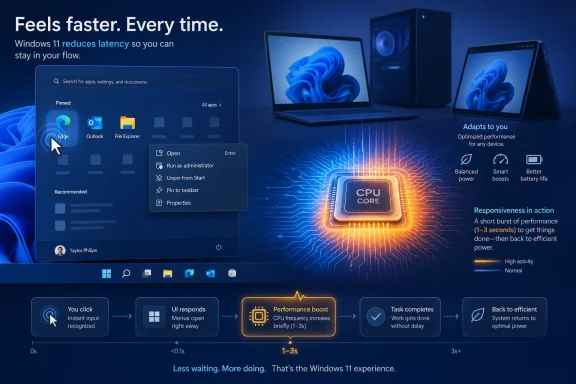
Microsoft is testing a Windows 11 “Low Latency Profile” that reportedly boosts CPU frequency for one to three seconds during app launches, Start menu opens, context-menu calls, and other high-priority interface actions in current Insider builds. The point is not to make Windows benchmark faster in the traditional sense. It is to make the operating system feel less like it is thinking about what the user just asked it to do. That distinction matters, because Windows 11’s performance problem has never been only about raw speed; it has been about trust in the moment between a click and a response.
Low Latency Profile sounds almost comically simple: when the user does something that Windows considers urgent, the processor is told to wake up aggressively rather than ramp gradually. Instead of waiting for normal power-management logic to decide that the workload deserves higher clocks, Windows briefly floors the accelerator, lets the foreground task complete, and then returns to a lower-power state.
That makes the feature easy to mock. If Windows feels sluggish, surely the answer should be cleaner code, fewer background services, and less shell complexity, not a tiny turbo button hidden in the scheduler. The reaction from power users has been predictable: why is Microsoft adding a special mode to paper over latency that should not exist in the first place?
But the criticism only gets halfway there. Modern PCs are already governed by layers of compromise among responsiveness, battery life, thermals, silicon limits, background activity, and user-visible animation. Windows is not running on one machine; it is running on fanless tablets, gaming towers, corporate laptops, mini PCs, handhelds, and aging desktops that barely made the Windows 11 cut. A blunt but well-timed CPU burst may be inelegant, but it is also the kind of practical engineering that can produce a visible win across messy real-world hardware.
The more interesting question is not whether Low Latency Profile is pure. It is whether Microsoft can use it without turning Windows responsiveness into another opaque subsystem that users and administrators cannot understand, measure, or control.
Those micro-delays matter because they occur in the operating system’s handshake with the user. A video encode that takes 40 minutes instead of 38 is annoying but legible. A Start menu that takes a moment too long to appear feels like the machine missed the click. Responsiveness is emotional before it is numerical.
That is why the reported early numbers around Low Latency Profile are so eye-catching. Testing cited by Windows Central points to app launches for built-in apps such as Edge and Outlook improving by as much as 40 percent, while Start menu and context-menu launches improved by as much as 70 percent. Those are not small synthetic gains tucked away in a benchmark table. They are exactly the sorts of interactions that shape a user’s sense of whether a PC is awake, cooperative, and modern.
There is a reason Apple has spent years obsessing over animation timing and perceived responsiveness, and a reason Linux desktop enthusiasts notice scheduler changes that most normal users never name. The desktop is a latency machine. The user does not experience the operating system as a list of services and APIs; the user experiences it as the delay before the thing appears.
That critique is fair. It is also incomplete.
Operating systems are built from compromises that accumulate over decades. Windows has to preserve compatibility with old applications, support new security models, handle modern standby, index cloud-synced files, surface enterprise policy, respect accessibility hooks, host widgets and web-rendered surfaces, and run on wildly different chipsets. Even a simple right-click can become a parade of shell extensions, policy checks, file metadata, graphics composition, and power-state negotiation.
In that world, the “cause” of latency is rarely one thing. It is often the sum of fifty small decisions that are each defensible in isolation. A scheduler-level hint that says this interaction is user-facing, treat it as urgent is not necessarily a hack. It can be a recognition that latency-sensitive work should be classified differently from routine background computation.
The problem is that Microsoft’s reported implementation sounds less like a subtle scheduler refinement and more like a momentary override. For one to three seconds, the CPU frequency rises sharply so the task in front of the user can finish faster. That is understandable, but it shifts the debate from software architecture to power policy. Microsoft is no longer merely saying Windows can do less work; it is saying Windows can spend more energy at the right instant and still come out ahead.
Still, laptop users and IT departments have earned the right to be skeptical. Windows power management is a labyrinth of OEM firmware, drivers, chipset behavior, user settings, enterprise policy, and thermal design. A feature that behaves benignly on one Intel ultrabook may have a different profile on an AMD laptop, an Arm device, a thin corporate machine with conservative cooling, or a budget PC with marginal thermals.
The stakes are not limited to battery graphs. A system that repeatedly spikes frequency during ordinary interaction could feel snappier while also generating more fan noise, warming the chassis, or changing how aggressively the machine throttles later. Those are not catastrophic outcomes, but they are the sorts of trade-offs users notice when a laptop is on their lap, in a meeting, or running on battery during travel.
Microsoft therefore needs more than a promise that the spikes are short. It needs telemetry, transparency, and hardware-specific tuning. If Low Latency Profile ships broadly, the feature should be smart enough to respect thermal pressure, power mode, battery saver, device class, and enterprise policy. “Fast when plugged in, careful when mobile” is not a slogan; it is the difference between a performance win and another mysterious Windows behavior users blame on bloat.
File Explorer in particular has become a symbol of Microsoft’s Windows dilemma. It has gained tabs, a refreshed design, cloud integration, richer context menus, and a more modern shell. It has also drawn persistent complaints from users who remember older versions feeling more immediate. Microsoft has already been testing File Explorer preloading to make launch times feel faster, which is another kind of performance trade: spend some memory in the background so the foreground moment feels cleaner.
Low Latency Profile belongs to that same family of changes. It is not merely optimizing code paths. It is changing the conditions around the code path so the user sees the result sooner. Preload the app. Boost the CPU. Prioritize the foreground. Hide the complexity behind a faster response.
That can be good product work. Most users do not care whether an improvement came from refactoring, caching, preloading, compilation, scheduler hints, or frequency scaling. They care that the menu appears. But Windows enthusiasts and administrators do care, because the technique affects how systems are managed, diagnosed, and trusted. A hidden performance mechanism that makes Microsoft apps look better while third-party behavior remains unclear will invite suspicion, even if the underlying intent is benign.
The reported scope matters here. Low Latency Profile is said to benefit common third-party programs as well, not just Microsoft’s own apps and shell surfaces. If that holds true, it is important. Windows cannot solve its responsiveness problem by making only the Start menu and Edge look good. The desktop’s credibility depends on the entire foreground experience, including the tools people install because Windows itself is not enough.
That ambiguity is part of the Insider bargain. Microsoft uses preview builds as a laboratory, and the Windows community treats them as both test environment and intelligence feed. Features are discovered before they are documented. Hidden IDs are toggled before release notes are written. Enthusiasts benchmark half-finished work and then argue about whether Microsoft is fixing Windows or disguising its flaws.
The company benefits from that ecosystem when excitement builds around a promising change. It also pays a price when a feature lands in the discourse before Microsoft has explained the trade-offs. Low Latency Profile is exactly the sort of mechanism that needs careful framing. If Microsoft says “Windows will briefly raise CPU frequency for important foreground interactions,” users may understand. If users discover “Windows is secretly maxing out my CPU to make the Start menu open faster,” the story writes itself.
That framing problem is especially acute because Windows 11 is already carrying baggage. Many users believe Microsoft has spent more energy promoting Copilot, widgets, ads, recommendations, and account integration than improving the fundamentals. Whether that perception is always fair is almost beside the point. Low Latency Profile lands in a climate where performance work is welcome, but trust is thin.
That is why Low Latency Profile is more than a technical tweak. It is a signal, however small, that Microsoft understands the platform’s credibility still depends on basics. The Start menu must open quickly. File Explorer must feel native. Context menus must not behave as though they are negotiating a treaty before rendering. The operating system has to disappear into the work.
There is a strategic angle, too. The PC market is fragmenting into more distinct categories: Arm laptops promising better efficiency, handheld gaming PCs stretching Windows into awkward shapes, enterprise fleets extending hardware lifecycles, and premium laptops marketed around AI acceleration. In all of those categories, perceived responsiveness is a competitive feature. A machine that wakes instantly and reacts cleanly feels more advanced even if its benchmark lead is modest.
Microsoft cannot sell an AI PC future on top of a desktop that feels hesitant. It can add copilots and agents, but if the shell stutters, the platform looks unserious. Low Latency Profile appears to be part of a broader recognition that Windows needs to feel faster before users will believe it is getting smarter.
IT departments dislike magic. A hidden scheduler or power-management behavior that changes foreground responsiveness may be welcome, but only if it does not complicate troubleshooting. If a user reports fan noise, battery drain, inconsistent performance, or heat after an update, administrators need a way to determine whether Low Latency Profile is involved. If the feature interacts with power plans, OEM utilities, security software, virtualization, or endpoint management agents, Microsoft needs documentation that arrives before deployment pain, not after.
There is also the matter of policy. Some environments prioritize responsiveness; others prioritize battery life, quiet operation, thermal stability, or predictable performance under sustained workloads. Call centers, classrooms, labs, kiosks, virtual desktop endpoints, and developer workstations do not all want the same behavior. A one-size-fits-all automatic boost could be fine for consumers and still insufficient for managed fleets.
Microsoft has an obvious path here. It can make Low Latency Profile adaptive by default but expose enough controls for enterprise. That does not necessarily mean every home user needs a switch in Settings. It does mean administrators should have documentation, telemetry hooks, and policy options. Windows has spent decades becoming manageable. Performance features should not be exempt from that discipline.
That is harder than it sounds. A good responsiveness system must know when to intervene and when to stay out of the way. It must boost the right foreground tasks without rewarding noisy applications that constantly demand priority. It must avoid turning every click into a thermal event. It must understand that a desktop tower plugged into the wall and a thin laptop at 12 percent battery are not the same machine.
It must also avoid the trap of treating frequency as the only answer. CPU speed is one piece of latency, but modern Windows delays can come from storage, shell extensions, network-backed content, graphics composition, security scanning, web-rendered UI, and background services. If Low Latency Profile becomes a substitute for slimming down bloated surfaces, Microsoft will have learned the wrong lesson from its own improvement.
The better lesson is that foreground intent deserves respect. When a user opens a menu, launches an app, or asks File Explorer to appear, Windows should marshal the system around that interaction. Sometimes that means a CPU burst. Sometimes it means preloading. Sometimes it means killing unnecessary waits, deferring nonessential work, or refusing to let background tasks steal the moment.
That scrutiny is healthy. Microsoft’s early reported gains are impressive, but “up to” figures always need context. A 70 percent improvement in a Start menu launch may be dramatic on a specific system under specific conditions and less visible on a high-end desktop already running at aggressive clocks. A 40 percent app launch gain may depend on whether the app was cold-started, cached, preloaded, signed, scanned, or already resident in memory.
There is also a philosophical question about what counts as improvement. If Windows opens a menu faster because the CPU briefly boosts harder, that is still an improvement for the user. But if the same menu remains architecturally heavy, then the performance debt remains. Enthusiasts are right to ask whether Microsoft is reducing debt or refinancing it.
Still, the desktop does not award points for ideological purity. A faster click is a faster click. If Microsoft can deliver a noticeable improvement without harming battery life or thermals, users will accept the win even while arguing that Windows should have needed less help in the first place.
Windows has too often relied on faster PCs to hide heavier software. That bargain is wearing thin. Users have seen premium laptops hesitate, gaming rigs stumble over shell interactions, and corporate machines bog down under layers of management and background services. The answer cannot always be “buy newer hardware,” especially when Windows 11 itself raised the baseline for supported machines.
Low Latency Profile hints at a different approach: use the hardware already present more intelligently at the moments that matter most. That is a defensible idea. It also demands restraint. Microsoft must not use short CPU bursts as permission to keep adding weight to the shell, nor should it reserve the best experience for its own applications.
The most promising part of this story is that Microsoft appears to be targeting the small frictions users actually feel. Not a benchmark trophy. Not a speculative AI demo. Not a new panel of recommended content. A click, a menu, a launch, a response. That is where operating systems either earn trust or lose it.
The concrete stakes are straightforward:
Source: ZDNET Microsoft is boosting the launch time of key Windows apps and features - here's how
 Microsoft Has Found the Most Windows Way to Make Windows Feel Faster
Low Latency Profile sounds almost comically simple: when the user does something that Windows considers urgent, the processor is told to wake up aggressively rather than ramp gradually. Instead of waiting for normal power-management logic to decide that the workload deserves higher clocks, Windows briefly floors the accelerator, lets the foreground task complete, and then returns to a lower-power state.That makes the feature easy to mock. If Windows feels sluggish, surely the answer should be cleaner code, fewer background services, and less shell complexity, not a tiny turbo button hidden in the scheduler. The reaction from power users has been predictable: why is Microsoft adding a special mode to paper over latency that should not exist in the first place?
But the criticism only gets halfway there. Modern PCs are already governed by layers of compromise among responsiveness, battery life, thermals, silicon limits, background activity, and user-visible animation. Windows is not running on one machine; it is running on fanless tablets, gaming towers, corporate laptops, mini PCs, handhelds, and aging desktops that barely made the Windows 11 cut. A blunt but well-timed CPU burst may be inelegant, but it is also the kind of practical engineering that can produce a visible win across messy real-world hardware.
The more interesting question is not whether Low Latency Profile is pure. It is whether Microsoft can use it without turning Windows responsiveness into another opaque subsystem that users and administrators cannot understand, measure, or control.
The Old Windows Complaint Was Never Just “Slow”
Windows 11 has always had a peculiar performance reputation. On good hardware, it can be fast, stable, and perfectly capable of running demanding workloads. Yet even on powerful systems, users have complained about small moments of hesitation: File Explorer taking a beat to draw, the Start menu arriving a fraction too late, right-click menus feeling heavier than they should, Settings pages pausing while they assemble themselves.Those micro-delays matter because they occur in the operating system’s handshake with the user. A video encode that takes 40 minutes instead of 38 is annoying but legible. A Start menu that takes a moment too long to appear feels like the machine missed the click. Responsiveness is emotional before it is numerical.
That is why the reported early numbers around Low Latency Profile are so eye-catching. Testing cited by Windows Central points to app launches for built-in apps such as Edge and Outlook improving by as much as 40 percent, while Start menu and context-menu launches improved by as much as 70 percent. Those are not small synthetic gains tucked away in a benchmark table. They are exactly the sorts of interactions that shape a user’s sense of whether a PC is awake, cooperative, and modern.
There is a reason Apple has spent years obsessing over animation timing and perceived responsiveness, and a reason Linux desktop enthusiasts notice scheduler changes that most normal users never name. The desktop is a latency machine. The user does not experience the operating system as a list of services and APIs; the user experiences it as the delay before the thing appears.
The CPU Burst Is a Workaround, but Workarounds Run the World
The cleanest critique of Low Latency Profile is that Microsoft should not need it. If the Start menu, File Explorer, Outlook, Edge, and shell flyouts are too slow to appear, make them lighter. Reduce dependency chains. Stop shipping panels that behave like web apps wearing native costumes. Remove background clutter. Fix the cause, not the symptom.That critique is fair. It is also incomplete.
Operating systems are built from compromises that accumulate over decades. Windows has to preserve compatibility with old applications, support new security models, handle modern standby, index cloud-synced files, surface enterprise policy, respect accessibility hooks, host widgets and web-rendered surfaces, and run on wildly different chipsets. Even a simple right-click can become a parade of shell extensions, policy checks, file metadata, graphics composition, and power-state negotiation.
In that world, the “cause” of latency is rarely one thing. It is often the sum of fifty small decisions that are each defensible in isolation. A scheduler-level hint that says this interaction is user-facing, treat it as urgent is not necessarily a hack. It can be a recognition that latency-sensitive work should be classified differently from routine background computation.
The problem is that Microsoft’s reported implementation sounds less like a subtle scheduler refinement and more like a momentary override. For one to three seconds, the CPU frequency rises sharply so the task in front of the user can finish faster. That is understandable, but it shifts the debate from software architecture to power policy. Microsoft is no longer merely saying Windows can do less work; it is saying Windows can spend more energy at the right instant and still come out ahead.
Battery Life Is the Test Microsoft Cannot Hand-Wave
The sources behind the early reports say the effect on battery life and heat should be minimal because the boost is brief. That may be true. In fact, there is a plausible argument that a short burst can be more efficient than a slow ramp if it lets the processor finish work quickly and return to idle sooner. Race-to-idle is not a new idea.Still, laptop users and IT departments have earned the right to be skeptical. Windows power management is a labyrinth of OEM firmware, drivers, chipset behavior, user settings, enterprise policy, and thermal design. A feature that behaves benignly on one Intel ultrabook may have a different profile on an AMD laptop, an Arm device, a thin corporate machine with conservative cooling, or a budget PC with marginal thermals.
The stakes are not limited to battery graphs. A system that repeatedly spikes frequency during ordinary interaction could feel snappier while also generating more fan noise, warming the chassis, or changing how aggressively the machine throttles later. Those are not catastrophic outcomes, but they are the sorts of trade-offs users notice when a laptop is on their lap, in a meeting, or running on battery during travel.
Microsoft therefore needs more than a promise that the spikes are short. It needs telemetry, transparency, and hardware-specific tuning. If Low Latency Profile ships broadly, the feature should be smart enough to respect thermal pressure, power mode, battery saver, device class, and enterprise policy. “Fast when plugged in, careful when mobile” is not a slogan; it is the difference between a performance win and another mysterious Windows behavior users blame on bloat.
The Start Menu Is Now a Performance Benchmark
It is revealing that the reported beneficiaries include the Start menu, context menus, system flyouts, Edge, Outlook, and File Explorer. These are not obscure corners of the operating system. They are the everyday surfaces through which users judge Windows 11.File Explorer in particular has become a symbol of Microsoft’s Windows dilemma. It has gained tabs, a refreshed design, cloud integration, richer context menus, and a more modern shell. It has also drawn persistent complaints from users who remember older versions feeling more immediate. Microsoft has already been testing File Explorer preloading to make launch times feel faster, which is another kind of performance trade: spend some memory in the background so the foreground moment feels cleaner.
Low Latency Profile belongs to that same family of changes. It is not merely optimizing code paths. It is changing the conditions around the code path so the user sees the result sooner. Preload the app. Boost the CPU. Prioritize the foreground. Hide the complexity behind a faster response.
That can be good product work. Most users do not care whether an improvement came from refactoring, caching, preloading, compilation, scheduler hints, or frequency scaling. They care that the menu appears. But Windows enthusiasts and administrators do care, because the technique affects how systems are managed, diagnosed, and trusted. A hidden performance mechanism that makes Microsoft apps look better while third-party behavior remains unclear will invite suspicion, even if the underlying intent is benign.
The reported scope matters here. Low Latency Profile is said to benefit common third-party programs as well, not just Microsoft’s own apps and shell surfaces. If that holds true, it is important. Windows cannot solve its responsiveness problem by making only the Start menu and Edge look good. The desktop’s credibility depends on the entire foreground experience, including the tools people install because Windows itself is not enough.
The Feature Microsoft Has Not Announced Is Already Being Judged
One complication is that Microsoft has not formally announced Low Latency Profile as a finished Windows feature. The current story is built from Insider build discoveries, testing, and reporting from Microsoft watchers with sources familiar with the plans. That does not make the information meaningless. It does mean the implementation, branding, availability, and final behavior could change before general release.That ambiguity is part of the Insider bargain. Microsoft uses preview builds as a laboratory, and the Windows community treats them as both test environment and intelligence feed. Features are discovered before they are documented. Hidden IDs are toggled before release notes are written. Enthusiasts benchmark half-finished work and then argue about whether Microsoft is fixing Windows or disguising its flaws.
The company benefits from that ecosystem when excitement builds around a promising change. It also pays a price when a feature lands in the discourse before Microsoft has explained the trade-offs. Low Latency Profile is exactly the sort of mechanism that needs careful framing. If Microsoft says “Windows will briefly raise CPU frequency for important foreground interactions,” users may understand. If users discover “Windows is secretly maxing out my CPU to make the Start menu open faster,” the story writes itself.
That framing problem is especially acute because Windows 11 is already carrying baggage. Many users believe Microsoft has spent more energy promoting Copilot, widgets, ads, recommendations, and account integration than improving the fundamentals. Whether that perception is always fair is almost beside the point. Low Latency Profile lands in a climate where performance work is welcome, but trust is thin.
The AI Era Has Made Basic Responsiveness Politically Important
Microsoft’s Windows messaging has spent the last few years leaning hard into AI. Copilot, Recall, neural processing units, AI PCs, and cloud-connected assistance have dominated the platform narrative. For some users, that is exciting. For many WindowsForum readers, it has been a source of irritation: Windows still has rough edges, yet the company keeps asking them to care about features they did not request.That is why Low Latency Profile is more than a technical tweak. It is a signal, however small, that Microsoft understands the platform’s credibility still depends on basics. The Start menu must open quickly. File Explorer must feel native. Context menus must not behave as though they are negotiating a treaty before rendering. The operating system has to disappear into the work.
There is a strategic angle, too. The PC market is fragmenting into more distinct categories: Arm laptops promising better efficiency, handheld gaming PCs stretching Windows into awkward shapes, enterprise fleets extending hardware lifecycles, and premium laptops marketed around AI acceleration. In all of those categories, perceived responsiveness is a competitive feature. A machine that wakes instantly and reacts cleanly feels more advanced even if its benchmark lead is modest.
Microsoft cannot sell an AI PC future on top of a desktop that feels hesitant. It can add copilots and agents, but if the shell stutters, the platform looks unserious. Low Latency Profile appears to be part of a broader recognition that Windows needs to feel faster before users will believe it is getting smarter.
Enterprise IT Will Ask Who Controls the Accelerator
For home users, the central question is simple: does the PC feel better, and does the battery suffer? For enterprise administrators, the question is more operational: can this behavior be predicted, governed, and supported across a fleet?IT departments dislike magic. A hidden scheduler or power-management behavior that changes foreground responsiveness may be welcome, but only if it does not complicate troubleshooting. If a user reports fan noise, battery drain, inconsistent performance, or heat after an update, administrators need a way to determine whether Low Latency Profile is involved. If the feature interacts with power plans, OEM utilities, security software, virtualization, or endpoint management agents, Microsoft needs documentation that arrives before deployment pain, not after.
There is also the matter of policy. Some environments prioritize responsiveness; others prioritize battery life, quiet operation, thermal stability, or predictable performance under sustained workloads. Call centers, classrooms, labs, kiosks, virtual desktop endpoints, and developer workstations do not all want the same behavior. A one-size-fits-all automatic boost could be fine for consumers and still insufficient for managed fleets.
Microsoft has an obvious path here. It can make Low Latency Profile adaptive by default but expose enough controls for enterprise. That does not necessarily mean every home user needs a switch in Settings. It does mean administrators should have documentation, telemetry hooks, and policy options. Windows has spent decades becoming manageable. Performance features should not be exempt from that discipline.
The Best Version of This Idea Is Boring and Invisible
If Low Latency Profile works, most users should never know its name. The best version of the feature is not a splashy toggle or a marketing bullet on a Windows update page. It is a quiet improvement that makes everyday actions feel more immediate without changing the user’s mental model of the PC.That is harder than it sounds. A good responsiveness system must know when to intervene and when to stay out of the way. It must boost the right foreground tasks without rewarding noisy applications that constantly demand priority. It must avoid turning every click into a thermal event. It must understand that a desktop tower plugged into the wall and a thin laptop at 12 percent battery are not the same machine.
It must also avoid the trap of treating frequency as the only answer. CPU speed is one piece of latency, but modern Windows delays can come from storage, shell extensions, network-backed content, graphics composition, security scanning, web-rendered UI, and background services. If Low Latency Profile becomes a substitute for slimming down bloated surfaces, Microsoft will have learned the wrong lesson from its own improvement.
The better lesson is that foreground intent deserves respect. When a user opens a menu, launches an app, or asks File Explorer to appear, Windows should marshal the system around that interaction. Sometimes that means a CPU burst. Sometimes it means preloading. Sometimes it means killing unnecessary waits, deferring nonessential work, or refusing to let background tasks steal the moment.
Windows Enthusiasts Will Measure What Microsoft Markets
The Windows community will not let this feature live on vibes alone. If Low Latency Profile becomes more broadly available, enthusiasts will test launch times, measure power draw, monitor CPU clocks, compare plugged-in and battery behavior, and run it across Intel, AMD, and Arm hardware. They will also compare clean installs with upgraded systems, budget laptops with premium machines, and Microsoft apps with third-party software.That scrutiny is healthy. Microsoft’s early reported gains are impressive, but “up to” figures always need context. A 70 percent improvement in a Start menu launch may be dramatic on a specific system under specific conditions and less visible on a high-end desktop already running at aggressive clocks. A 40 percent app launch gain may depend on whether the app was cold-started, cached, preloaded, signed, scanned, or already resident in memory.
There is also a philosophical question about what counts as improvement. If Windows opens a menu faster because the CPU briefly boosts harder, that is still an improvement for the user. But if the same menu remains architecturally heavy, then the performance debt remains. Enthusiasts are right to ask whether Microsoft is reducing debt or refinancing it.
Still, the desktop does not award points for ideological purity. A faster click is a faster click. If Microsoft can deliver a noticeable improvement without harming battery life or thermals, users will accept the win even while arguing that Windows should have needed less help in the first place.
The Real Upgrade Is Not Speed, but Confidence
The danger for Microsoft is that Low Latency Profile becomes another example of Windows complexity: a hidden feature, unevenly documented, inconsistently exposed, and debated through leaks and registry toggles. The opportunity is that it becomes part of a broader performance reset in which Microsoft treats responsiveness as a first-class product goal rather than a side effect of hardware upgrades.Windows has too often relied on faster PCs to hide heavier software. That bargain is wearing thin. Users have seen premium laptops hesitate, gaming rigs stumble over shell interactions, and corporate machines bog down under layers of management and background services. The answer cannot always be “buy newer hardware,” especially when Windows 11 itself raised the baseline for supported machines.
Low Latency Profile hints at a different approach: use the hardware already present more intelligently at the moments that matter most. That is a defensible idea. It also demands restraint. Microsoft must not use short CPU bursts as permission to keep adding weight to the shell, nor should it reserve the best experience for its own applications.
The most promising part of this story is that Microsoft appears to be targeting the small frictions users actually feel. Not a benchmark trophy. Not a speculative AI demo. Not a new panel of recommended content. A click, a menu, a launch, a response. That is where operating systems either earn trust or lose it.
The Performance Fix That Has to Prove It Is Not a Parlor Trick
Low Latency Profile should be judged less by its cleverness than by its honesty. If it ships, Microsoft needs to show that the gains are real, broadly applicable, and achieved without quietly worsening battery life, heat, or fan noise. It also needs to make clear how the feature behaves across power modes and managed environments.The concrete stakes are straightforward:
- Microsoft is reportedly testing Low Latency Profile in Windows 11 Insider builds as an automatic responsiveness feature, not as a user-facing performance mode.
- The mechanism reportedly boosts CPU frequency for roughly one to three seconds when Windows detects high-priority foreground actions such as app launches, Start menu opens, context menus, and system flyouts.
- Early testing cited by Windows watchers suggests large gains in some interactions, including up to 40 percent faster launches for apps such as Edge and Outlook and up to 70 percent faster responses for some shell surfaces.
- The feature’s success will depend on whether Microsoft can keep battery, heat, and fan impact genuinely minimal across different hardware classes.
- Enterprise adoption will require documentation, policy awareness, and troubleshooting visibility rather than another opaque Windows behavior.
- The broader lesson is that Windows 11’s reputation will improve only if Microsoft pairs tactical tricks like CPU bursts with deeper work on shell weight, app architecture, and background restraint.
Source: ZDNET Microsoft is boosting the launch time of key Windows apps and features - here's how
