

Microsoft’s latest Windows Insider preview quietly pulled a thread that could unravel into one of the biggest platform plays of the AI era: by adding a system-level registry for autonomous software “agents,” Microsoft is trying to make Windows the home for persistent, context-aware assistants — and it’s doing so by reusing a playbook that made Windows dominant three decades ago.
When Windows 3.0 arrived in 1990 it didn’t just give PCs a graphical face — it promised developers a reliable platform and users an ecosystem of apps that “just worked” together. That bargain — standardize the platform, attract third‑party developers, then reap the network effects — is the same formula Microsoft is applying to the new class of autonomous AI assistants now turning up in modern desktops and clouds.
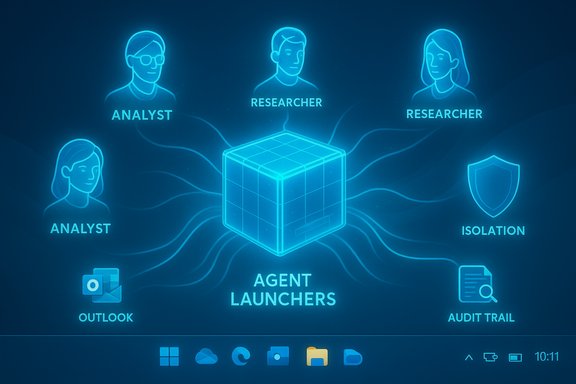
This time the prize is different. Rather than replacing command-line tools, these agents promise to orchestrate knowledge, actions, and services across multiple apps, accounts, and even the web. They aim to be persistent, remember context across sessions, take multi-step actions on behalf of users, and surface themselves across the operating system (taskbar, Copilot pane, file manager and more). Microsoft’s recent Windows Insider build introduced a formal mechanism for doing this: Agent Launchers, an OS‑level registration and discovery framework for agents.
If agents become the new atomic unit of desktop productivity, the vendor who owns the best distribution and orchestration layer gains enormous leverage. Microsoft believes Windows can be that layer.
In response, Microsoft is building guardrails:
Key UX design elements Microsoft and partners will need to get right:
For Microsoft the calculus is straightforward:
What will decide the outcome is not nostalgia for a dominant desktop OS but pragmatics: whether agents delivered through Windows are measurably safer, more capable, and more convenient than cloud or browser alternatives; whether enterprises can trust and govern those agents; and whether developers see an economic and technical case to build to this OS‑level integration.
Microsoft has the engineering base, enterprise relationships, and economic motive to make this work — but it must also prove that the conveniences of agents don’t come at the cost of security, privacy, or control. If it manages that balance, Windows could become the backbone for the next generation of productivity — a modern platform that supports autonomous assistants the way Windows 3.0 supported the desktop apps of the early PC era. If it fails, the agent revolution will likely unfold elsewhere: in clouds, browsers, and specialized agent platforms that don’t need Windows to thrive.
Source: GeekWire How Microsoft is betting on AI agents in Windows, dusting off a winning playbook from the past
 Background
When Windows 3.0 arrived in 1990 it didn’t just give PCs a graphical face — it promised developers a reliable platform and users an ecosystem of apps that “just worked” together. That bargain — standardize the platform, attract third‑party developers, then reap the network effects — is the same formula Microsoft is applying to the new class of autonomous AI assistants now turning up in modern desktops and clouds.This time the prize is different. Rather than replacing command-line tools, these agents promise to orchestrate knowledge, actions, and services across multiple apps, accounts, and even the web. They aim to be persistent, remember context across sessions, take multi-step actions on behalf of users, and surface themselves across the operating system (taskbar, Copilot pane, file manager and more). Microsoft’s recent Windows Insider build introduced a formal mechanism for doing this: Agent Launchers, an OS‑level registration and discovery framework for agents.
What Agent Launchers are and how they work
A simple metaphor: manifests, discovery, and system-level presence
At its core, Agent Launchers provides a way for developers to describe an agent with a manifest when an app is installed (or dynamically at runtime). That manifest tells Windows how to surface the agent — for example, placing it in the taskbar’s “Ask Copilot” area, making it appear inside Microsoft 365 Copilot experiences, or letting other apps discover and invoke the agent. The manifest approach is familiar to any developer who has registered a service or protocol with an OS: it’s declarative, centralized, and discoverable.- Agents register once with the operating system and become discoverable system-wide.
- Agents can be registered statically (install time) or dynamically (runtime), enabling availability to depend on sign‑in state, subscription status, or device capabilities.
- Registered agents can open their chat experiences or agent UI and are surfaced through multiple Windows entry points.
Model Context Protocol, manifests, and tool access
Agents don’t live only in a chat box. They often need access to tools and app contexts (files, calendar, inbox, third‑party services). Microsoft’s approach includes a standardized bridge — the Model Context Protocol (MCP) or similar protocols — that lets agents discover and use services and connectors securely. That makes agents able to:- Call out to specialized tools (format converters, data analyzers).
- Use connectors to accounts (OneDrive, Outlook, and — selectively — some third‑party services) to fetch the context they need.
- Persist and retrieve “scratchpad” memory or short-term state to coordinate multi-step tasks.
Copilot and first‑party agents
Microsoft 365 Copilot is among the first to use the framework for first‑party agents such as Analyst (data-focused insights) and Researcher (deep report building). Those agents serve as showcase examples: they demonstrate how agentic workflows can be surfaced from the system level while connecting to Microsoft’s broader productivity stack.Why Microsoft sees this as a platform opportunity
Platform economics, rewritten
The original Windows playbook was simple: make it compelling for developers to build apps that work consistently across PCs, and users will choose Windows because it has the best app catalog. Microsoft’s current bet is similar in structure but different in technology: instead of native apps only, the company wants developers to ship agents that integrate tightly with the OS, show up across entry points, and therefore become first‑class system entities.If agents become the new atomic unit of desktop productivity, the vendor who owns the best distribution and orchestration layer gains enormous leverage. Microsoft believes Windows can be that layer.
Enterprise angle: Azure, Microsoft 365, and Copilot monetization
Microsoft’s cloud and productivity businesses already tie enterprise customers into Microsoft infrastructure. Integrating agents with Windows and Microsoft 365 offers a way to extend those relationships to device‑level experiences while continuing to monetize in the cloud — via Copilot subscriptions, premium connectors, or cloud model usage. For a company with a large enterprise tenant base and the largest commercial productivity footprint, this is a logical move to capture more of the AI stack’s value chain.The security and privacy problem set
Agents need access to context — and that access is risky
Agents can be powerful precisely because they access documents, calendars, messages, and credentials to perform multi-step tasks. That power brings hard novel risks. Microsoft has been explicit about them: agentic AI introduces attack surfaces such as cross‑prompt injection (XPIA), where malicious content embedded in UI elements or documents tricks an agent into ignoring its original instructions and performing harmful actions. Examples include data exfiltration or unintended downloads and execution.In response, Microsoft is building guardrails:
- Agent workspaces: Agents are run in isolated workspaces with limited access to user data, and they execute under dedicated local user accounts that reduce direct exposure to the primary user profile.
- Scoped entitlements: Agents must declare what resources they need, and the OS enforces scoped access rather than giving blanket permission to everything on the device.
- Observation and auditability: Actions taken by agents are meant to be observable, logged, and distinguishable from direct user actions — an explicit attempt at non‑repudiation and audit trails.
- Opt‑in and admin control: Agentic features are off by default, and enabling them typically requires administrator action, reflecting the risk-reward tradeoff.
Cross‑prompt injection and practical limits
Cross‑prompt injection is not theoretical; it’s an acknowledged class of attack for systems that mix machine-read prompts and external content. Agents that ingest untrusted documents or web content without robust sanitization or policy constraints can be manipulated. Microsoft’s countermeasures — restricted accounts, runtime isolation, approval flows — reduce but don’t eliminate the risk. Any agent that can read, write, and interact with local apps and the internet will expand the attack surface. Enterprises and cautious users should treat agent activation as a high‑risk, high‑reward choice.The UX tradeoffs: convenience vs control
Agents promise convenience: hands‑free scheduling, automatic briefings, one‑click multistep tasks. But that convenience requires trust. Microsoft intends to surface agent actions visibly, require approvals, and give users the ability to supervise, but the real world will test how well those controls work in everyday flows.Key UX design elements Microsoft and partners will need to get right:
- Clear, granular permission dialogs that are meaningful (not just another “allow” checkbox).
- Lightweight indicators that signal when an agent is acting autonomously.
- Easy ways to review and undo agent actions.
- Admin controls that make enterprise enablement predictable and auditable.
The competitive landscape: not a single‑player race
Browsers and cloud-native agents (Google, Anthropic, OpenAI)
This is not solely a Windows battle. Major cloud and model vendors are pursuing agentic experiences across browsers and native clients:- Google is integrating agentic workflows into Gemini and browser/Workspace integrations, enabling model-driven automations that run across Google services and in web contexts.
- Anthropic ships Claude and desktop clients that support MCP-style connectors; developers and users can run agentic extensions that coordinate across apps.
- OpenAI and its ecosystem offer similar capabilities through plugins, hosted agent frameworks, and integrations across chat and productivity tools.
Amazon and the cloud-native agent push
Amazon Web Services introduced a new class of enterprise-focused agents — called “Frontier agents” — aimed at automating complex business operations across cloud services (DevOps, security, and software development workflows). AWS’s bet is that the cloud is the natural home for agent orchestration in enterprise environments, where governance, scale, and integration with cloud services matter most.Startups and the agent ecosystem
A wave of startups is building specialized agent platforms, mobile-first assistants, and toolchains for multi-agent orchestration. Some focus on vertical workflows (law, finance, engineering), others on developer productivity or personal automation. Those companies will be the talent and innovation engine Microsoft hopes to attract, but their loyalty will depend on how open and compelling Windows’ agent platform feels compared to cross-platform alternatives.Why the analogy to Windows 3.0 is useful — and where it breaks down
The comparison to Windows 3.0 is instructive because both moments represent a platform owner trying to convert technical innovation into a developer-driven ecosystem. But important differences mean the battle will not be a straightforward replay:- Then: Windows was the dominant endpoint — the PC was the primary computing platform. Now: computing is fragmented across phones, browsers, cloud services, and specialized devices. Windows is one screen among many.
- Then: Developers wrote local apps; distribution was harder and platform control mattered more. Now: many agents and experiences live in the cloud and can run cross‑platform from a browser.
- Then: User expectations for trust and privacy were lower and regulatory pressure was lighter. Now: privacy, security, and compliance are central, and enterprises will demand stronger governance before enabling autonomous agents.
Business reality: the incentives behind the engineering
Microsoft’s economics make the company’s eagerness clear. The company’s More Personal Computing segment — which includes Windows and Devices — reported roughly $17.3 billion in revenue for the most recent fiscal year, while Gaming and LinkedIn sit in similar revenue bands and Azure/cloud and Microsoft 365 constitute the majority of overall revenue. The cloud and productivity businesses already drive the lion’s share of enterprise dollars, and agents that tie endpoint usage back into Microsoft’s cloud services and Copilot subscriptions are a direct path to sustained revenue growth.For Microsoft the calculus is straightforward:
- If Windows becomes the natural home for productive AI agents, usage increases, which can be monetized via Copilot tiers, cloud compute, and enterprise packages.
- If agents make Windows more indispensable in the hybrid-device era, it can stem device attrition and maintain relevance among users who increasingly split attention across mobile and web platforms.
Practical implications for users and enterprises
For consumers
- Agent features are opt‑in and gated by admin controls — approach with caution.
- Expect convenience-first capabilities (summaries, file assembly, one‑click conversions), but be mindful of what agents can access.
- Turn on agent features only after checking whether you’re willing to give those agents read/write access to folders and apps.
For enterprises
- Treat agent enablement as a governance project: policies, audit trails, entitlements, and incident response plans must be in place before broad deployment.
- Use scoped entitlements and zero‑trust principles: agents should access only what they need.
- Expect a hybrid workflow: some agents will be enterprise‑hosted in the cloud (where governance and logging are centralized) while others will run on endpoints for latency or privacy reasons.
Strengths, weaknesses, and the path ahead
Notable strengths
- System integration: Windows’ OS‑level registry and discovery model gives Microsoft a distribution advantage for agents that need tight device access and consistent UX.
- Enterprise foothold: Microsoft’s tenant base, Entra identity controls, and cloud durability make it relatively straightforward to bundle agent governance into existing enterprise controls.
- End-to-end stack: With Azure, Microsoft 365, Copilot, and Windows, Microsoft can offer an integrated stack for building, deploying, and monetizing agents.
Major risks
- Security exposure: Agents that read, write, and execute across a device increase attack surfaces. Cross‑prompt injection and other novel attacks are real threats that require constant mitigation.
- User trust and adoption: If users, privacy advocates, or regulators perceive agents as invasive or poorly controlled, adoption could be slow or curtailed.
- Developer fragmentation: If agents are easier or more lucrative to build for cloud/browser-first frameworks, developers may not prioritize Windows integration.
- Competitive pressure: Google, Anthropic, OpenAI, and AWS are all building alternative agent models and orchestration layers that work across devices — Windows integration alone may not win the war.
What Microsoft must prove
- That OS‑level agents deliver materially better outcomes than cloud or browser‑based agents in ways users care about.
- That the security and governance model scales — both technically and operationally — without creating unacceptable attack vectors.
- That developers see business value in shipping agents that rely on an OS‑level registration model rather than pure cloud distribution.
Where to watch next
- The Windows Insider builds and Microsoft Learn documentation will reveal how Agent Launchers evolve from preview to supported APIs.
- Enterprise tooling — Entra identity integration, Defender for agents, and Purview governance — will determine whether IT organizations can safely adopt agentic workflows at scale.
- Third‑party developer adoption: the first wave of agent-enabled apps will be a key early indicator. If independent developers and ISVs start shipping agents that users actually find useful, momentum will follow.
- Competitor moves: watch Google, Anthropic, AWS, and major SaaS vendors for cross‑platform agent strategies that could blunt Windows’ advantage.
Conclusion
Microsoft’s Agent Launchers are more than a feature update; they’re a strategic gambit to make Windows the orchestration layer for a new era of persistent, autonomous assistants. The concept recycles a proven playbook — standardize, attract developers, create network effects — but the environment is profoundly different. Devices are fragmented, security expectations are higher, and multiple cloud-first competitors are racing to deliver the same value without relying on a single OS.What will decide the outcome is not nostalgia for a dominant desktop OS but pragmatics: whether agents delivered through Windows are measurably safer, more capable, and more convenient than cloud or browser alternatives; whether enterprises can trust and govern those agents; and whether developers see an economic and technical case to build to this OS‑level integration.
Microsoft has the engineering base, enterprise relationships, and economic motive to make this work — but it must also prove that the conveniences of agents don’t come at the cost of security, privacy, or control. If it manages that balance, Windows could become the backbone for the next generation of productivity — a modern platform that supports autonomous assistants the way Windows 3.0 supported the desktop apps of the early PC era. If it fails, the agent revolution will likely unfold elsewhere: in clouds, browsers, and specialized agent platforms that don’t need Windows to thrive.
Source: GeekWire How Microsoft is betting on AI agents in Windows, dusting off a winning playbook from the past
