

Forty years after the first boxed copies of Microsoft Windows left the factory, the operating system that defined the modern PC is both a testament to incremental engineering and the staging ground for Microsoft’s most ambitious pivot yet: embedding AI into the desktop experience.
When Microsoft shipped Windows 1.0 to manufacturing on November 20, 1985, it was deliberately modest: a graphical environment layered on top of MS‑DOS that introduced the mouse, bundled utilities such as Notepad and Paint, and a tiled-window approach that prioritized compatibility over spectacle. This date is the canonical starting point of the Windows lineage and appears consistently in contemporary product histories.
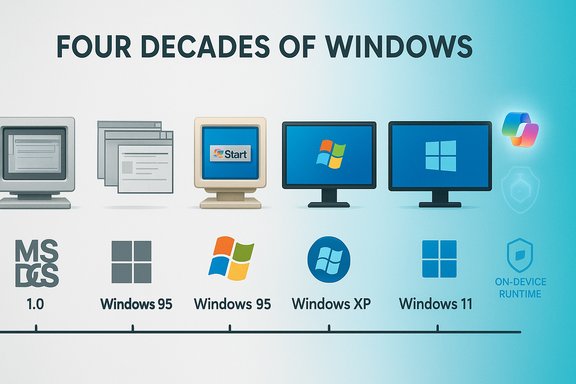
The arc from that experiment to today’s Windows 11 — now the platform for Microsoft’s Copilot experiences and on-device AI runtime — is a story of repeated tradeoffs: backward compatibility versus modernization, ubiquity versus hardware specialization, and stability versus rapid feature velocity. Major landmarks along the way include Windows 3.x (the first mass-market retail success), Windows 95 (which defined the Start menu and taskbar metaphors), Windows XP (the long-lived enterprise standard), the contentious Vista/Windows 7 transition, the tile-first Windows 8 era and its correction, and the “Windows as a service” cadence introduced with Windows 10. Each of these moments reshaped expectations about performance, security, and how the OS interfaces with apps, hardware and the cloud.
Windows 2.x introduced overlapping windows and more sophisticated keyboard shortcuts. Windows 3.0 and 3.1 (1990–1992) crystallized the developer ecosystem, added multimedia and TrueType font support, and brought entertainment staples like Solitaire and Minesweeper into the home — small features that dramatically increased familiarity and adoption. By introducing a stable platform for third‑party developers, Windows turned from a Microsoft product into an industry standard.
In parallel, Microsoft developed the NT line (Windows NT → Windows 2000 → Windows XP) to provide the enterprise-grade stability and security needed by businesses. Windows XP (retail release October 25, 2001) merged consumer polish and NT reliability into a single code base and became the cultural and enterprise default for many years.
Microsoft’s strategic posture since then has been to leverage that modern baseline to deliver AI experiences that require both cloud and on‑device capability. The company introduced Copilot as a cross‑product assistant and began layering on-device runtimes and Copilot+ hardware guidance so that latency‑sensitive features could run locally. The roadmap includes features like Windows Recall (contextual history and search), Studio Effects (real‑time capture enhancements), and other agentic automations — all of which depend on close hardware‑software co‑design.
If Microsoft executes this pivot thoughtfully, the payoff could be substantial: faster workflows, cheaper automation for routine tasks, richer local multimedia experiences, and a new class of device that blends cloud scale with local responsiveness. But the hazards are real: privacy erosion, regulator scrutiny, hardware‑led inequality, and the risk that poorly tested model updates degrade trust in a way that older, incremental UI changes never did. The balance of power will come down to engineering rigor, transparent governance, and sensible commercialization that widens access rather than narrows it.
The anniversary is a useful checkpoint: a reminder that a product that started as a floppy‑disk GUI shell in 1985 must now reconcile four decades of compatibility commitments with the operational realities of agentic AI. For users, IT leaders and hardware partners, the next few years will be about practical choices: which devices to buy or refresh, which Copilot behaviors to enable, and how to govern an OS that can act on users’ behalf. Those choices will determine whether Windows’ next forty years are defined by trusted, widely available AI assistance — or by a more fragmented landscape where premium features live behind a new hardware fence.
Source: PCWorld Microsoft Windows hits 40 years old: A visual walk down memory lane
 Background / Overview
When Microsoft shipped Windows 1.0 to manufacturing on November 20, 1985, it was deliberately modest: a graphical environment layered on top of MS‑DOS that introduced the mouse, bundled utilities such as Notepad and Paint, and a tiled-window approach that prioritized compatibility over spectacle. This date is the canonical starting point of the Windows lineage and appears consistently in contemporary product histories.The arc from that experiment to today’s Windows 11 — now the platform for Microsoft’s Copilot experiences and on-device AI runtime — is a story of repeated tradeoffs: backward compatibility versus modernization, ubiquity versus hardware specialization, and stability versus rapid feature velocity. Major landmarks along the way include Windows 3.x (the first mass-market retail success), Windows 95 (which defined the Start menu and taskbar metaphors), Windows XP (the long-lived enterprise standard), the contentious Vista/Windows 7 transition, the tile-first Windows 8 era and its correction, and the “Windows as a service” cadence introduced with Windows 10. Each of these moments reshaped expectations about performance, security, and how the OS interfaces with apps, hardware and the cloud.
The first decades: From an add‑on to the dominant platform
1985–1994: Experimentation and ecosystem building
Windows 1.0 was not the complete operating system we think of today. It arrived as a GUI shell on top of MS‑DOS, built to be lightweight for the era (minimum roughly 256 KB of RAM and basic CGA/EGA graphics support), and bundled a small set of apps that demonstrated graphical interaction. These constraints shaped design decisions that favored compatibility and conservative graphics over radical UI experimentation.Windows 2.x introduced overlapping windows and more sophisticated keyboard shortcuts. Windows 3.0 and 3.1 (1990–1992) crystallized the developer ecosystem, added multimedia and TrueType font support, and brought entertainment staples like Solitaire and Minesweeper into the home — small features that dramatically increased familiarity and adoption. By introducing a stable platform for third‑party developers, Windows turned from a Microsoft product into an industry standard.
1995–2004: Consumer mainstream and enterprise consolidation
Windows 95 (retail release in 1995) rewired the desktop with the Start menu, taskbar, and a system-first user metaphoric language that remains recognizable today. Plug & Play simplified hardware setup, 32‑bit support expanded application capabilities, and the Registry replaced INI files for system configuration. Windows 95’s mass-market launch made the PC a household appliance and amplified Microsoft’s influence over software distribution and OEM ecosystems.In parallel, Microsoft developed the NT line (Windows NT → Windows 2000 → Windows XP) to provide the enterprise-grade stability and security needed by businesses. Windows XP (retail release October 25, 2001) merged consumer polish and NT reliability into a single code base and became the cultural and enterprise default for many years.
2005–2015: Security, recovery and the cloud foreshadowing
Windows Vista (2007) attempted a visual and security overhaul with Aero and User Account Control, but performance and driver readiness tempered reception. Windows 7 (2009) repaired trust with improved performance and usability. The later Windows 8 experiment (2012) introduced a tile-first Modern UI to bridge desktop and touch — a strategy that alienated many desktop users and required a course correction with Windows 8.1 and later Windows 10. Windows 10 (2015) reframed the OS as a continuously serviced product with more frequent feature updates and a stronger emphasis on cloud‑integrated services.The last decade: Windows as a platform for services and AI
Windows 11 and the security/hardware baseline
Announced in June 2021 and broadly available on October 5, 2021, Windows 11 refreshed the shell (centered taskbar, Fluent visuals), tightened the hardware security baseline (TPM 2.0, Secure Boot), and established a stronger tie between OS features and modern hardware. Those choices polarized some users but created a clearer upgrade path for devices designed to host emerging platform capabilities.Microsoft’s strategic posture since then has been to leverage that modern baseline to deliver AI experiences that require both cloud and on‑device capability. The company introduced Copilot as a cross‑product assistant and began layering on-device runtimes and Copilot+ hardware guidance so that latency‑sensitive features could run locally. The roadmap includes features like Windows Recall (contextual history and search), Studio Effects (real‑time capture enhancements), and other agentic automations — all of which depend on close hardware‑software co‑design.
Migration pressure and lifecycle inflection
The lifecycle calendar created a real migration inflection for organizations: Windows 10 reached end of support on October 14, 2025, a date that pushed enterprises and consumers toward Windows 11 (or into managed extended support plans). The combined forces of security updates, new hardware baselines and premium AI experiences mean that migration planning is no longer optional for many fleets.Visual culture and Easter eggs: Windows as a collection of moments
Windows has always been as much cultural artifact as technical product. From bundled games that taught generations of computer users to the now‑legendary blue screen moments (Bill Gates famously saw a blue screen during a 1998 demo), the platform’s personality is woven into everyday computing lore. Community archivists and beta collectors have also uncovered Easter eggs going back to Windows 1.0 that name developers and include playful touches — a reminder that Windows began as a small, human project before growing into an industrial platform.What Windows got right — the platform’s core strengths
- Backward compatibility as an economic moat. Microsoft’s decades‑long commitment to compatibility allowed businesses and developers to rely on Windows as a stable target for applications and drivers. That continuity fueled enterprise adoption and a vast ISV ecosystem.
- OEM breadth and consumer choice. Windows ships on an enormous range of hardware, enabling price and capability tiers that serve consumers, gamers, creators and enterprises alike. That diversity gives Microsoft leverage and flexibility.
- Ecosystem scale for software and games. From Office to AAA PC gaming, Windows remains the default platform for many workloads that require low‑level system access or tight driver integration.
- Service integration and cloud linkages. Windows has evolved from a monolithic OS to a platform that stitches local state with cloud services — a crucial capability for hybrid work and device continuity scenarios.
Where risks concentrate today: privacy, fragmentation and trust
1. Privacy and governance of agentic features
Embedding Copilot and agentic automations into the OS changes the trust model: the OS can now act on behalf of users rather than simply host their actions. That introduces new vectors for unwanted data exposure and policy drift when third‑party extensions or on‑device models are permitted to access files, email and system signals. Enterprises and regulators will demand auditable controls, fine‑grained permissioning, and clear data residency guarantees if Copilot experiences are to scale without backlash. This is both a technical and governance challenge.2. Hardware fragmentation and a two‑tier experience
Copilot+ hardware guidance (including recommended NPU performance thresholds in the tens of TOPS) risks creating a two‑tier Windows: premium on‑device AI for new Copilot+ PCs and limited cloud‑dependent experiences for older devices. If Microsoft and OEMs do not broaden on‑device model support across price points, the Windows ecosystem could fracture into devices that enjoy low‑latency AI features and legacy devices that remain useful but excluded from the newest capabilities. This fragmentation would complicate IT procurement and increase e‑waste pressures.3. Backward compatibility as legacy debt
Compatibility is a strength but also a growing liability. Sustaining APIs, drivers and management tooling for decades increases the code surface and the potential for security bugs and unpredictable interactions. As Windows adds agentic capabilities, ensuring those older layers cannot be exploited via new extension points will require rigorous threat modeling and continued investment in engineering discipline.4. The trust problem with automatic updates and feature rollout
The “Windows as a service” model introduced regular, large feature updates that occasionally caused user-facing regressions, data loss or driver incompatibilities (the infamous 2018 1809 rollout is an example of how updates can go wrong). As update scope grows to include AI models and on-device runtimes, the stakes rise: model updates can change behavior in ways that are harder to test with traditional QA frameworks, and users/IT admins will demand improved control, predictable rollouts, and safe rollback paths.Practical guidance: what users, IT and OEMs should do now
For consumers and power users
- Audit device capabilities before chasing Copilot features — verify NPU, RAM and storage. If your device lacks an NPU, cloud‑assisted Copilot features may still work but with higher latency and different privacy characteristics.
- Back up system images before major feature updates and use local encryption (BitLocker) with stored recovery keys for disaster recovery. Regular image backups remain the safest hedge against update‑related breakage.
- Stay aware of lifecycle dates (for example, the Windows 10 end‑of‑support milestone) and plan upgrades on your own schedule rather than at the last minute; vendors and support partners get stretched during mass migrations.
For IT leaders and security teams
- Treat Copilot and on‑device runtimes like new platform services: require explicit approval, scope permissions conservatively, and run pilot programs on representative fleets. Emphasize logging, model explainability and the ability to audit agent actions.
- Budget for hardware refresh cycles that reduce the tail of unsupported machines; where replacement isn’t viable, enforce strict network segmentation and EDR controls. Plan for extended support windows if legacy apps bind you to older OS releases.
- Validate vendor driver stacks and require OEMs to deliver clear driver update roadmaps; driver and firmware problems remain a top cause of update regressions.
For OEMs and ISVs
- Invest in efficient on‑device model runtimes that can scale to midmarket price points, and provide firmware/driver update channels that are testable and rollback‑friendly. Partner with MS to certify Copilot experiences across a wider range of hardware.
- Make privacy defaults conservative: treat contextual signals as sensitive unless customers explicitly opt into richer Copilot behaviors. Expose clear enterprise controls and model governance APIs.
Long view: what the next decade of Windows could mean
Windows’ 40‑year history shows that Microsoft repeatedly favors practical continuity over radical, risky reinvention. That posture allowed Windows to become the default platform for enterprises and developers, but it also created legacy complexity. Now the company is attempting to pivot Windows from a compatibility substrate to an active AI workspace — a system that anticipates, automates and surfaces context for users.If Microsoft executes this pivot thoughtfully, the payoff could be substantial: faster workflows, cheaper automation for routine tasks, richer local multimedia experiences, and a new class of device that blends cloud scale with local responsiveness. But the hazards are real: privacy erosion, regulator scrutiny, hardware‑led inequality, and the risk that poorly tested model updates degrade trust in a way that older, incremental UI changes never did. The balance of power will come down to engineering rigor, transparent governance, and sensible commercialization that widens access rather than narrows it.
Conclusion
Windows at 40 is not a static relic. It is an evolving platform at the center of a strategic bet: make the OS more helpful, not just more powerful. That goal builds naturally on the platform’s historic strengths — ubiquity, ecosystem scale, and a backward‑compatible bedrock — but demands new disciplines in privacy, hardware inclusion, and model governance.The anniversary is a useful checkpoint: a reminder that a product that started as a floppy‑disk GUI shell in 1985 must now reconcile four decades of compatibility commitments with the operational realities of agentic AI. For users, IT leaders and hardware partners, the next few years will be about practical choices: which devices to buy or refresh, which Copilot behaviors to enable, and how to govern an OS that can act on users’ behalf. Those choices will determine whether Windows’ next forty years are defined by trusted, widely available AI assistance — or by a more fragmented landscape where premium features live behind a new hardware fence.
Source: PCWorld Microsoft Windows hits 40 years old: A visual walk down memory lane
