

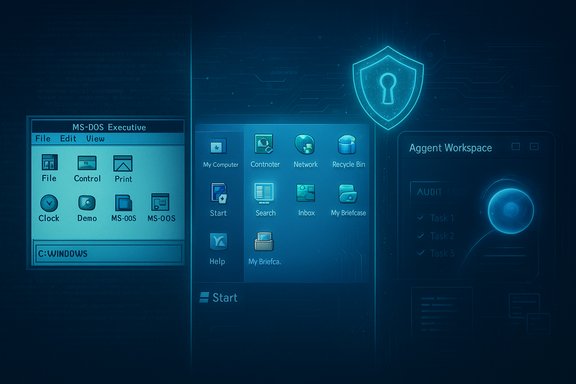
Forty years after the first Windows shell rolled out of Redmond, the operating system that reshaped personal computing is both an institution and a lightning rod — an evolving platform whose technical legacy, market dominance, and latest pivot toward agentic AI are provoking fresh debates about security, usability, and the very definition of a personal computer.
When Windows 1.0 shipped to manufacturing on November 20, 1985, it arrived not as a finished, market‑dominating OS but as a graphical shell layered on MS‑DOS, designed to run on modest hardware such as the Intel 8088 and machines with as little as 256 KB of RAM. Its bundled apps — Calculator, Notepad, Paint, a rudimentary File Manager — were proof‑of‑concept code showing that the PC could be more than a command line. From that humble start, Windows moved through a sequence of technical reinventions and commercial surges that together built the modern desktop ecosystem.
Over four decades the product line split, converged, and matured: the consumer‑facing Windows 9x lineage and the business‑grade Windows NT branch, eventual unification around the NT kernel, and repeated UX and platform redesigns. Those turns produced triumphs (Windows 3.x, Windows 95, Windows XP, Windows 7) and missteps (Windows Vista, Windows 8). Today Windows 11 formally continues the Windows 10 lineage but signals a deeper strategic shift: the operating system is being reimagined as an agentic platform where AI features not only assist but perform tasks on behalf of users.
This article revisits the key milestones in that 40‑year arc, evaluates the strengths that made Windows dominant, and probes the risks and trade‑offs of the latest AI‑first strategy — with practical guidance for users and administrators who must live with what comes next.
Why XPIA matters:
That ambition brings genuine promise: smarter automation, time saved, and new workflows. It also brings real technical and security challenges that cannot be solved by marketing alone. The next phase of Windows’ evolution will turn on engineering details and governance: how well the platform constrains agent actions, how transparently it logs and exposes behavior, and how quickly the ecosystem adopts safe patterns.
For users and administrators the prudent posture is cautious experimentation: test agentic features in controlled settings, demand auditable evidence of behavior, and insist on the ability to say “no” at both the device and organizational levels. The next decade will show whether agentic Windows becomes a seamless productivity multiplier or a new class of attack surface. Either way, the story that started on November 20, 1985, is far from finished — and the choices Microsoft, developers, and customers make now will define the shape of personal computing for years to come.
Source: hi-Tech.ua Windows operating system turns 40
 Background
When Windows 1.0 shipped to manufacturing on November 20, 1985, it arrived not as a finished, market‑dominating OS but as a graphical shell layered on MS‑DOS, designed to run on modest hardware such as the Intel 8088 and machines with as little as 256 KB of RAM. Its bundled apps — Calculator, Notepad, Paint, a rudimentary File Manager — were proof‑of‑concept code showing that the PC could be more than a command line. From that humble start, Windows moved through a sequence of technical reinventions and commercial surges that together built the modern desktop ecosystem.Over four decades the product line split, converged, and matured: the consumer‑facing Windows 9x lineage and the business‑grade Windows NT branch, eventual unification around the NT kernel, and repeated UX and platform redesigns. Those turns produced triumphs (Windows 3.x, Windows 95, Windows XP, Windows 7) and missteps (Windows Vista, Windows 8). Today Windows 11 formally continues the Windows 10 lineage but signals a deeper strategic shift: the operating system is being reimagined as an agentic platform where AI features not only assist but perform tasks on behalf of users.
This article revisits the key milestones in that 40‑year arc, evaluates the strengths that made Windows dominant, and probes the risks and trade‑offs of the latest AI‑first strategy — with practical guidance for users and administrators who must live with what comes next.
A brief technical and commercial timeline
The early experiments: Windows 1.x and 2.x (1985–1987)
The initial Windows releases were small graphical environments on top of MS‑DOS. System requirements were minimal by today’s standards — target machines used 8088/8086 CPUs, CGA/HGC/EGA (and later VGA) adapters, and floppy or hard drives — which made Windows accessible to early PC owners but limited its performance. The interface emphasized tiled windows and menu bars; many foundational UI patterns we take for granted were first sketched here.Breakthrough and mainstreaming: Windows 3.0/3.1 (1990–1992)
Windows 3.0 and the follow‑up 3.1 marked the first major commercial success, offering icon‑based program management, better memory handling, multimedia extensions, and a broadening third‑party software ecosystem. This period established Windows’ reach into businesses and homes, setting the stage for aggressive consumer marketing in the 1990s.The 1995 watershed: Windows 95
Windows 95 introduced the Start menu, taskbar, long file names, and tighter integration with networking and the nascent Internet. It was a cultural moment as well as a technical one: the UI paradigm shifted decisively toward ease of use, and the OS became the default on mass‑market PCs.Enterprise foundations: Windows NT and unification
Parallel to consumer innovation, Microsoft developed Windows NT — a re‑engineered, 32‑bit architecture intended for enterprise stability, security, and portability. Released in the early 1990s, NT eventually became the architectural base for later mainstream releases (notably through Windows 2000 to Windows XP and beyond), unifying consumer and business lines under a more robust kernel.Windows XP to Windows 7: consolidation and stability
Windows XP (retail availability in October 2001) unified the NT kernel with consumer features and enjoyed a remarkably long life thanks to stability and broad application compatibility. Windows Vista’s ambition around security and multimedia arrived before the ecosystem was ready, creating performance and driver pains. Windows 7 (2009) corrected course by blending polish with reliability.Experimentation and reaction: Windows 8 and 10
Windows 8 attempted to unify touch and desktop paradigms but alienated many users with a tile‑first interface on non‑touch devices. Microsoft responded with Windows 10, which reset the UX to be familiar while introducing cloud services, a twice‑yearly update cadence (later adjusted), and greater integration with online accounts and services.Windows 11 and the AI inflection
Windows 11 arrived with a refreshed user interface, stricter hardware requirements for some features, and an explicit move to integrate cloud services and AI capabilities. The most recent evolution — previewing agentic features that allow AI agents to act on user behalf within contained environments — represents a major strategic turning point.Why Windows mattered: ecosystem, compatibility, and scale
For decades Windows delivered three, interlocking advantages that explain its dominance.- Compatibility and ecosystem: Backward compatibility and a vast library of third‑party apps created a virtuous cycle: software vendors targeted Windows, which reinforced user adoption.
- Hardware reach and OEM partnerships: Broad hardware support and deep partnerships with OEMs turned Windows into the default desktop environment for millions.
- Familiar metaphors and incremental evolution: Microsoft’s conservative approach to major UX changes (with occasional exceptions) lowered cognitive switching costs and helped companies standardize on Windows.
The modern turning point: Windows as an “agentic” operating system
Microsoft’s public roadmap for Windows increasingly emphasizes AI integration — not merely as in‑app assistants but as system features that can plan and execute tasks. Features such as Copilot Actions and the Agent Workspace prototype change the endpoint threat model and the user experience in concrete ways.What agentic Windows means in practice
- Agent Workspace: A separate, contained session where an AI agent runs with its own account and scoped access to files and apps. This workspace is intended to let the agent perform multi‑step workflows — opening documents, extracting data, sorting files, even interacting with other apps.
- Scoped permissions: Agents operate with controlled access, typically limited to known folders (Documents, Downloads, Desktop, Pictures, etc., with the intent of minimizing blast radius.
- Auditable actions and human oversight: Microsoft’s design emphasizes tamper‑evident logs, step plans that users can review, and UI affordances to pause or stop agent actions.
Why this is ambitious — and contentious
Giving software the authority to act on behalf of users is a paradigm shift. Historically, assistants offered recommendations; today’s agents can execute operations. That expands convenience but also turns content into an active attack surface: documents, image OCR, or web previews that were previously passive may now carry instructions that an agent could follow.The new risk model: XPIA, hallucinations, and operational hazards
Agentic features introduce novel security classes that require fresh assumptions and defenses.Cross‑prompt injection (XPIA)
Cross‑prompt injection — a variant of prompt injection attacks tuned for agentic contexts — occurs when adversarial content embedded in a document, image (via OCR), or rendered UI is treated by the agent as a directive and causes it to perform unintended actions. Unlike classical malware that executes binaries, XPIA weaponizes data and presentation layers.Why XPIA matters:
- Agents convert a malicious prompt into a chain of real actions (data exfiltration, file transfers, or malware retrieval) rather than merely producing a wrong or misleading answer.
- Inputs that previously resulted in harmless “bad answers” can now produce destructive side effects if the agent is not tightly constrained.
- The attack surface includes PDFs, email previews, thumbnails, and even localized UI strings — places defenders traditionally treated as low risk.
Hallucinations and procedural errors
Large language models can confidently produce incorrect outputs. When an agent translates such hallucinations into UI actions — clicking the wrong control, sending a message to the wrong recipient, or deleting the wrong file — the consequences become operational rather than merely informational.UI automation brittleness and visibility gaps
Agents that simulate clicks and keyboard input are brittle: timing, localization, and layout changes can cause misclicks. If an agent lacks robust rollback semantics or if logs are incomplete, it becomes difficult to detect and remediate damage quickly.Microsoft’s mitigations — necessary but not sufficient
Microsoft’s design choices show awareness of the risks and include important mitigations:- Opt‑in and admin control: Experimental agentic features are disabled by default and require admin enablement, giving enterprises choice.
- Agent accounts and isolation: Agents run as standard accounts with scoped permissions, creating a boundary between user and agent actions.
- Auditing and tamper‑evident logs: The platform promises detailed activity logs to support forensics.
- Real‑time protections: Copilot Studio and associated tooling are introducing classifiers and runtime protections aimed at detecting XPIA patterns and blocking suspicious inputs.
- Signing and revocation: Agents and connectors are expected to be signed, with revocation mechanisms to mitigate compromised agents.
Community reception: performance, stability, and trust
Windows’ evolution has always been accompanied by trade‑offs. Users and administrators judge releases by three axes: performance, compatibility, and stability.- Performance complaints: As new layers (cloud integration, telemetry, AI workloads) get added, some users see increased resource use or regressions on older hardware.
- Compatibility fears: Enterprises are cautious about agents that may touch legacy applications or bespoke automation scripts, since unexpected interactions could break workflows.
- Trust and privacy questions: With agents accessing local files, questions emerge about telemetry, data retention, and whether content could be used to train models.
Practical guidance: what users and admins should do now
The arrival of agentic features demands operational choices. The following checklist distills practical steps for different audiences.- For individual users
- Keep agentic features disabled until you understand their behavior and risks.
- When trying agent previews, run them on test accounts or non‑production machines.
- Review permission dialogs carefully; do not grant blanket access to unknown agents.
- Back up important files and enable version history or File History to recover from accidental changes.
- For enterprise administrators
- Treat agentic features as a configurable platform capability: use Group Policy, device configuration tools, or MDM to enforce a policy.
- Pilot agentic features in a controlled environment with a small set of users and monitor telemetry closely.
- Ensure SIEM and endpoint detection tools ingest agent logs and that retention policies meet forensic needs.
- Separate duties and require human approval for sensitive operations; design escalation workflows for agent decisions.
- Establish signing and revocation procedures for in‑house agents and third‑party connectors.
- For developers and ISVs
- Design agents with the principle of least privilege: request the minimal scope required.
- Provide clear, machine‑readable manifests of intended actions and expected inputs for audit tooling.
- Implement robust input validation and provenance checks to resist XPIA vectors.
- Quick hardening checklist for admins:
- Block experimental agent features by default via policy.
- Require device‑wide admin enablement for any agentic capabilities.
- Enforce code signing for internal agents and connectors.
- Integrate agent logs with enterprise SIEM and run simulated XPIA test cases.
Strategic analysis: opportunity, risk, and the next five years
The agentic pivot represents both a huge opportunity and a set of complex risks.- Opportunity: Agents can automate tedious, error‑prone tasks, increase productivity for individuals and IT staff, and unlock new forms of human‑computer collaboration — especially when paired with secure enclaves for local processing (NPUs) or enterprise controls.
- Risk: Agents change the OS threat model from “protecting users from malicious binaries” to “protecting users from malicious content and prompts.” That shift requires new tooling, new developer patterns, and a security mindset that treats documents, previews, and rendered HTML as active attack vectors.
- Trust is the scarcest resource: Microsoft’s long‑term success with agentic Windows will depend less on raw capability and more on the company’s ability to demonstrate consistent security, transparent privacy practices, and predictable behavior under diverse, adversarial conditions.
What to watch next
- The shape of admin controls and whether policies allow granular enablement per user, group, or device will be decisive for enterprise adoption.
- The maturity of XPIA detection: real‑time classifiers and external policy gates must be usable and avoid false positives that degrade utility.
- Logging and retention guarantees: enterprises will insist on immutable, exportable logs for compliance and incident response.
- Local vs. cloud inference: the balance Microsoft strikes between on‑device NPUs and cloud processing will affect latency, privacy, and the attack surface.
- Third‑party ecosystem behavior: will ISVs follow least‑privilege principles, or will convenience lead to agents requesting broad, unnecessary access?
Conclusion
Windows at 40 is a paradox: simultaneously conservative and audacious. It remains the universal desktop substrate, trusted for compatibility, enterprise management, and breadth of applications. Its new ambition — to become an agentic platform where AI can act on behalf of users — is both a natural extension of decades of incremental capability and a radical rethinking of what an operating system does.That ambition brings genuine promise: smarter automation, time saved, and new workflows. It also brings real technical and security challenges that cannot be solved by marketing alone. The next phase of Windows’ evolution will turn on engineering details and governance: how well the platform constrains agent actions, how transparently it logs and exposes behavior, and how quickly the ecosystem adopts safe patterns.
For users and administrators the prudent posture is cautious experimentation: test agentic features in controlled settings, demand auditable evidence of behavior, and insist on the ability to say “no” at both the device and organizational levels. The next decade will show whether agentic Windows becomes a seamless productivity multiplier or a new class of attack surface. Either way, the story that started on November 20, 1985, is far from finished — and the choices Microsoft, developers, and customers make now will define the shape of personal computing for years to come.
Source: hi-Tech.ua Windows operating system turns 40
