

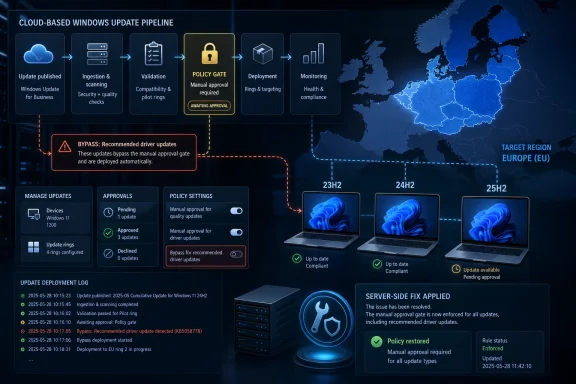
Microsoft has fixed a bug in Windows Autopatch that caused restricted driver updates to install unexpectedly on a limited number of Autopatch-managed Windows 11 devices in the European Union, affecting versions 23H2, 24H2, and 25H2, according to reports published May 13–14, 2026. The repair was made on Microsoft’s service side, so administrators are not being asked to deploy a client patch or change policy settings to stop the behavior. That is the comforting part. The less comforting part is that the incident cuts straight into the promise Autopatch makes to enterprises: let Microsoft automate the update treadmill, without taking away the administrator’s steering wheel.
Windows Autopatch exists because patch management has become too fast, too noisy, and too consequential for many organizations to run entirely by hand. It wraps Windows Update for Business, Microsoft Intune, deployment rings, reporting, and policy orchestration into a managed service that is supposed to reduce the operational drag of keeping endpoints current. For security teams, that bargain is attractive because slower patching means longer exposure. For endpoint administrators, it is acceptable only if policy boundaries remain intact.
The EU driver incident is not a story about a spectacular mass outage, at least based on what has been reported so far. Microsoft characterized the affected population as a limited subset of devices, and the issue appears to have been confined to Autopatch-managed Windows client systems in the European Union. But the technical substance is sharper than the scale suggests: devices received recommended driver updates even where administrators had configured policies requiring manual approval.
That distinction matters. A failed update can be annoying; a policy bypass is corrosive. Enterprise IT can forgive a service for making a bad recommendation more easily than it can forgive a service for ignoring an explicit approval gate.
Drivers are also not ordinary updates. A bad browser patch may break a workflow, but a bad storage, display, network, firmware, or chipset driver can strand a machine at boot, trigger repeated restarts, or produce failures that look random until enough telemetry accumulates. In a fleet with different laptop models, docking stations, GPUs, wireless adapters, and regional hardware variants, one “recommended” update can behave like several different changes at once.
That is the theory. In practice, drivers are where cloud-managed Windows most visibly collides with the physical world. A policy engine may see a driver as metadata, applicability rules, approval state, and deployment timing. The user sees whether the Wi-Fi adapter still works after lunch.
This is why manual approval exists. It gives IT teams time to test driver payloads against known hardware combinations, pilot them in smaller rings, pause a suspect update, and avoid pushing risk into business-critical users. The feature is not merely a convenience for cautious admins; it is the control surface that makes automated driver management tolerable.
The Autopatch bug reportedly short-circuited that surface for some EU devices. Recommended driver updates were installed automatically even where administrative policies said they should wait. Microsoft’s service-side fix may close the immediate defect, but it does not erase the operational question: how should administrators verify that a managed update service has obeyed the constraints they set?
That question becomes more important as Windows servicing shifts from local configuration toward cloud orchestration. When the service is the mechanism enforcing policy, the service is also a potential failure domain. In older endpoint management models, administrators feared misconfigured Group Policy, broken WSUS approvals, or imaging drift. In newer models, they must also fear remote orchestration behaving correctly for almost everyone, except for the subset that matters to them.
That combination suggests a cloud-service behavior rather than a simple Windows client bug. Microsoft’s statement that the issue was fixed server-side points in the same direction. The client did not need a new cumulative update to learn how to honor policy; the service needed to stop offering or approving something it should not have offered or approved.
Regional scoping is now a normal part of large-scale cloud operations. Services roll out by geography, regulation, capacity boundary, tenant location, and infrastructure stamp. The upside is containment: a bad change may not hit the entire planet. The downside is diagnosis: administrators in one region may experience behavior that their peers elsewhere cannot reproduce.
That makes communication harder. A global enterprise with EU subsidiaries may see policy violations in one part of its fleet while North American systems behave correctly. A consultant may dismiss the problem because their own tenant does not show it. A vendor support script may initially assume misconfiguration because the service works as designed elsewhere.
For Microsoft, regional containment is better than global breakage, but it is not a defense against the central criticism. If a tenant policy says manual approval is required, the region in which the device lives should not change that contract. Localized failure is still failure.
But “no action required” is not the same as “no review advisable.” If a driver landed unexpectedly on a device, the operational state of that device may have changed even after the service bug is fixed. The cloud behavior can be corrected while the endpoint remains on the driver version it already installed.
That is the quiet administrative burden such incidents create. IT teams may still need to check whether affected devices installed new drivers, whether those drivers correspond with incident tickets, whether any system failures were plausibly related, and whether pilot rings or manual approval workflows need extra scrutiny. Microsoft may not require action to stop the bug, but administrators may still want evidence of what happened in their fleet.
This is particularly true because driver rollback is not always a clean, centrally managed story. Some driver updates can be rolled back through Device Manager or vendor tooling; others are entangled with firmware, companion software, or Windows Update behavior. Even when rollback is possible, doing it at scale requires confidence that the cure will not be worse than the symptoms.
The phrase “service-side fix” should therefore be read in two layers. It resolves the policy enforcement problem going forward. It does not automatically audit every endpoint, undo every installed driver, or explain every reboot that may have occurred while the bug was active.
These are not identical bugs, and it would be lazy to pretend they all share one root cause. A server feature upgrade misfire, an Office installation regression in cloud PCs, and an Autopatch driver approval bypass may live in different service layers. But to the administrator receiving the incident tickets, they rhyme.
The common theme is not merely that updates sometimes break things. That has always been true. The common theme is that Microsoft is asking customers to trust more of the update decision chain to cloud services while the consequences of those decisions remain local, physical, and business-specific.
Autopatch embodies that shift. It does not just deliver patches; it schedules, stages, monitors, and recommends. It reduces toil, but it also moves judgment into Microsoft’s machinery. When that machinery makes a mistake, customers need more than a fix. They need visibility into blast radius, timing, affected policy types, and durable assurance that the same class of error will not recur.
This is the service-provider dilemma Microsoft has built for itself. The more it automates, the more it owns. If Autopatch is simply a convenience wrapper, administrators can blame themselves for bad configuration. If Autopatch is a managed service making fleet-level decisions, Microsoft inherits a higher duty to explain when those decisions violate customer intent.
In regulated or tightly controlled environments, update approval can be tied to change management, validation windows, help desk staffing, device certification, and vendor support matrices. The fact that an update is recommended by Windows Update does not mean an organization is ready to deploy it. It may need to test against VPN clients, endpoint detection agents, smart card middleware, disk encryption, accessibility hardware, medical devices, manufacturing controllers, or custom peripheral stacks.
Drivers often sit below the layer where ordinary application compatibility testing catches problems. A graphics driver can affect Teams calls, CAD tools, remote desktop sessions, display calibration, and sleep behavior. A network driver can affect VPN stability, certificate authentication, roaming, and wake-on-LAN. A storage or firmware component can turn a routine maintenance window into a recovery exercise.
That is why the phrase bypassing IT administrator policies is the heart of the story. If administrators had chosen automatic approval with a short deferral, the risk would have been accepted. If they chose manual approval, the service was supposed to wait.
This difference matters for accountability as much as technology. When an administrator approves a driver and it breaks machines, the organization can trace the decision. When a managed service installs a driver despite a policy requiring approval, the decision path becomes opaque. That opacity is exactly what enterprise tooling is supposed to reduce.
That agility is one reason organizations adopt services like Autopatch. The alternative is a patchwork of local agents, stale management infrastructure, disconnected laptops, and delayed remediation. For many enterprises, especially those managing hybrid workforces, cloud orchestration is the only realistic way to keep Windows fleets within acceptable security and compliance windows.
But the same architecture concentrates risk. A defective service rule can act faster and at larger scale than a human administrator would. It can also do so invisibly, because the endpoint may simply appear to have received an update from Windows Update. The policy violation may be noticed only after devices reboot, fail, or show unexpected driver versions in logs and support cases.
This is the paradox of Autopatch. The service is valuable because it reduces human intervention. The service is risky when it reduces human intervention even where humans explicitly required it.
Microsoft’s challenge is not to make Windows updates flawless. No vendor operating at Windows scale can promise that. The challenge is to make the boundaries reliable: pause means pause, defer means defer, manual approval means manual approval, and region-specific service behavior must not reinterpret those terms.
The first area to examine is driver history on EU-managed Windows 11 devices covered by manual approval policies. Administrators should compare recent driver installations against approval records in Intune and Autopatch, especially for systems reporting unexpected restarts, blue screens, device failures, docking issues, or network instability. Even a small number of anomalies can matter if they cluster around a model, driver class, or business unit.
The second area is reporting. Organizations that rely on manual approval should know how quickly they can answer a simple question: which devices installed which driver, when, and under which policy state? If that question requires days of log collection and spreadsheet work, the incident has exposed a visibility problem even if the Microsoft bug never touched the tenant.
The third area is operational communication. Help desks should know that some driver updates may have been installed unexpectedly on Autopatch-managed EU Windows 11 devices before Microsoft’s fix. That context can shorten troubleshooting. A user reporting sudden Wi-Fi instability or reboot loops after a routine day may not describe the problem as an update issue.
The fourth area is policy architecture. Microsoft’s own guidance generally favors clear assignment and avoiding conflicting driver update policies. This incident is not necessarily caused by policy conflict, but messy assignment makes every post-incident investigation harder. If a device is in multiple overlapping groups with different update intentions, determining whether a driver was unauthorized becomes far more difficult.
Driver updates on client Windows devices may sound less dramatic, but they are governed by the same enterprise principle. A vendor can recommend. A policy decides. The more Microsoft collapses recommendation, approval, scheduling, and delivery into one managed cloud pipeline, the more it must protect the line between vendor intent and customer consent.
This is where Microsoft’s public messaging often feels too sparse for the enterprise reality. “Fixed through a service-side fix” is useful but incomplete. Administrators would benefit from clearer timelines, detection guidance, affected policy configurations, audit locations, and a statement about whether installed drivers remain in place. They do not need a novella for every service incident, but they do need enough detail to close their own internal change records.
The issue is especially important for Autopatch because the service is marketed as reducing update management complexity. If the response to an Autopatch incident is “go manually reconstruct what happened,” some of that value evaporates. Managed services should not only automate deployment; they should automate accountability.
Microsoft has improved its Windows release health communications over the years, and the company now documents many known issues more visibly than it once did. But cloud-servicing incidents that live between Intune, Windows Update, Autopatch, and Microsoft 365 admin alerts still often feel fragmented. The administrator should not have to follow MVP sightings, security news briefs, and service health pages to assemble a reliable picture.
That means Microsoft should continue pushing toward stronger policy-state reporting for driver updates. Admins need to see not only that a driver is installed, but whether it was installed because it was automatically approved, manually approved, previously approved, superseded, paused, or unexpectedly offered. The difference between those states is the difference between a successful deployment and a governance failure.
It also means service incidents should come with tenant-ready detection logic whenever possible. If the affected devices are limited by region, OS version, Autopatch enrollment, and policy type, Microsoft can often describe those filters well enough for administrators to investigate quickly. A short advisory that says no action is required may be technically accurate, but it underserves organizations that must explain the event internally.
There is also a product-design lesson. If manual approval is a strong boundary, the system should treat crossing it as a high-severity exception, not a quiet deployment anomaly. Autopatch should be able to alert administrators when an installation occurs without a matching approval state. In mature enterprise tooling, the policy engine should not merely execute rules; it should detect when reality diverges from them.
That may sound like overkill for a limited EU incident. It is not. The whole case for Autopatch is scale. At scale, rare deviations become inevitable, and the difference between a manageable deviation and an enterprise incident is how quickly the system can identify, explain, and contain it.
Source: SC Media Microsoft fixes Windows Autopatch bug affecting EU devices
 Autopatch Broke the Rule That Makes Autopatch Palatable
Windows Autopatch exists because patch management has become too fast, too noisy, and too consequential for many organizations to run entirely by hand. It wraps Windows Update for Business, Microsoft Intune, deployment rings, reporting, and policy orchestration into a managed service that is supposed to reduce the operational drag of keeping endpoints current. For security teams, that bargain is attractive because slower patching means longer exposure. For endpoint administrators, it is acceptable only if policy boundaries remain intact.The EU driver incident is not a story about a spectacular mass outage, at least based on what has been reported so far. Microsoft characterized the affected population as a limited subset of devices, and the issue appears to have been confined to Autopatch-managed Windows client systems in the European Union. But the technical substance is sharper than the scale suggests: devices received recommended driver updates even where administrators had configured policies requiring manual approval.
That distinction matters. A failed update can be annoying; a policy bypass is corrosive. Enterprise IT can forgive a service for making a bad recommendation more easily than it can forgive a service for ignoring an explicit approval gate.
Drivers are also not ordinary updates. A bad browser patch may break a workflow, but a bad storage, display, network, firmware, or chipset driver can strand a machine at boot, trigger repeated restarts, or produce failures that look random until enough telemetry accumulates. In a fleet with different laptop models, docking stations, GPUs, wireless adapters, and regional hardware variants, one “recommended” update can behave like several different changes at once.
Driver Updates Are the Sharp Edge of Windows Automation
Microsoft’s modern driver update model tries to tame a messy ecosystem. OEMs and driver publishers publish updates through Windows Update, and Intune driver update policies let administrators decide whether recommended drivers are automatically approved or held for manual review. Recommended drivers are meant to represent the best match for required updates that Windows Update can identify for a device, while other drivers and firmware updates can be handled with more discretion.That is the theory. In practice, drivers are where cloud-managed Windows most visibly collides with the physical world. A policy engine may see a driver as metadata, applicability rules, approval state, and deployment timing. The user sees whether the Wi-Fi adapter still works after lunch.
This is why manual approval exists. It gives IT teams time to test driver payloads against known hardware combinations, pilot them in smaller rings, pause a suspect update, and avoid pushing risk into business-critical users. The feature is not merely a convenience for cautious admins; it is the control surface that makes automated driver management tolerable.
The Autopatch bug reportedly short-circuited that surface for some EU devices. Recommended driver updates were installed automatically even where administrative policies said they should wait. Microsoft’s service-side fix may close the immediate defect, but it does not erase the operational question: how should administrators verify that a managed update service has obeyed the constraints they set?
That question becomes more important as Windows servicing shifts from local configuration toward cloud orchestration. When the service is the mechanism enforcing policy, the service is also a potential failure domain. In older endpoint management models, administrators feared misconfigured Group Policy, broken WSUS approvals, or imaging drift. In newer models, they must also fear remote orchestration behaving correctly for almost everyone, except for the subset that matters to them.
The EU Boundary Makes This More Than a Geography Detail
The European Union detail is easy to treat as a footnote, but it is one of the most interesting parts of the incident. Microsoft’s known issue, as reported, was region-specific. The devices were in the EU region, managed by Autopatch, and running Windows 11 23H2, 24H2, or 25H2.That combination suggests a cloud-service behavior rather than a simple Windows client bug. Microsoft’s statement that the issue was fixed server-side points in the same direction. The client did not need a new cumulative update to learn how to honor policy; the service needed to stop offering or approving something it should not have offered or approved.
Regional scoping is now a normal part of large-scale cloud operations. Services roll out by geography, regulation, capacity boundary, tenant location, and infrastructure stamp. The upside is containment: a bad change may not hit the entire planet. The downside is diagnosis: administrators in one region may experience behavior that their peers elsewhere cannot reproduce.
That makes communication harder. A global enterprise with EU subsidiaries may see policy violations in one part of its fleet while North American systems behave correctly. A consultant may dismiss the problem because their own tenant does not show it. A vendor support script may initially assume misconfiguration because the service works as designed elsewhere.
For Microsoft, regional containment is better than global breakage, but it is not a defense against the central criticism. If a tenant policy says manual approval is required, the region in which the device lives should not change that contract. Localized failure is still failure.
“No Customer Action Required” Is a Fix, Not a Postmortem
Microsoft’s most reassuring sentence is also the one administrators should treat carefully: no client-side updates or further action are required. In a narrow sense, that is good news. No emergency remediation package, no registry workaround, no Intune script, no scramble to reverse a setting that administrators did not change.But “no action required” is not the same as “no review advisable.” If a driver landed unexpectedly on a device, the operational state of that device may have changed even after the service bug is fixed. The cloud behavior can be corrected while the endpoint remains on the driver version it already installed.
That is the quiet administrative burden such incidents create. IT teams may still need to check whether affected devices installed new drivers, whether those drivers correspond with incident tickets, whether any system failures were plausibly related, and whether pilot rings or manual approval workflows need extra scrutiny. Microsoft may not require action to stop the bug, but administrators may still want evidence of what happened in their fleet.
This is particularly true because driver rollback is not always a clean, centrally managed story. Some driver updates can be rolled back through Device Manager or vendor tooling; others are entangled with firmware, companion software, or Windows Update behavior. Even when rollback is possible, doing it at scale requires confidence that the cure will not be worse than the symptoms.
The phrase “service-side fix” should therefore be read in two layers. It resolves the policy enforcement problem going forward. It does not automatically audit every endpoint, undo every installed driver, or explain every reboot that may have occurred while the bug was active.
Microsoft’s Update Machine Is Carrying Too Many Kinds of Trust
The Autopatch driver bug arrives in the same orbit as other recent Windows servicing embarrassments. Microsoft recently fixed an issue that caused some Windows Server 2019 and Windows Server 2022 systems to be unexpectedly upgraded to Windows Server 2025. It has also acknowledged an Office installation issue affecting some Windows 365 devices after a service configuration change.These are not identical bugs, and it would be lazy to pretend they all share one root cause. A server feature upgrade misfire, an Office installation regression in cloud PCs, and an Autopatch driver approval bypass may live in different service layers. But to the administrator receiving the incident tickets, they rhyme.
The common theme is not merely that updates sometimes break things. That has always been true. The common theme is that Microsoft is asking customers to trust more of the update decision chain to cloud services while the consequences of those decisions remain local, physical, and business-specific.
Autopatch embodies that shift. It does not just deliver patches; it schedules, stages, monitors, and recommends. It reduces toil, but it also moves judgment into Microsoft’s machinery. When that machinery makes a mistake, customers need more than a fix. They need visibility into blast radius, timing, affected policy types, and durable assurance that the same class of error will not recur.
This is the service-provider dilemma Microsoft has built for itself. The more it automates, the more it owns. If Autopatch is simply a convenience wrapper, administrators can blame themselves for bad configuration. If Autopatch is a managed service making fleet-level decisions, Microsoft inherits a higher duty to explain when those decisions violate customer intent.
Manual Approval Is a Governance Control, Not a Preference Toggle
It is tempting to frame this as a niche endpoint-management glitch: a few EU devices, a few drivers, a server-side fix. That understates why administrators care. Manual approval is not just a user preference inside Intune; it is part of a governance model.In regulated or tightly controlled environments, update approval can be tied to change management, validation windows, help desk staffing, device certification, and vendor support matrices. The fact that an update is recommended by Windows Update does not mean an organization is ready to deploy it. It may need to test against VPN clients, endpoint detection agents, smart card middleware, disk encryption, accessibility hardware, medical devices, manufacturing controllers, or custom peripheral stacks.
Drivers often sit below the layer where ordinary application compatibility testing catches problems. A graphics driver can affect Teams calls, CAD tools, remote desktop sessions, display calibration, and sleep behavior. A network driver can affect VPN stability, certificate authentication, roaming, and wake-on-LAN. A storage or firmware component can turn a routine maintenance window into a recovery exercise.
That is why the phrase bypassing IT administrator policies is the heart of the story. If administrators had chosen automatic approval with a short deferral, the risk would have been accepted. If they chose manual approval, the service was supposed to wait.
This difference matters for accountability as much as technology. When an administrator approves a driver and it breaks machines, the organization can trace the decision. When a managed service installs a driver despite a policy requiring approval, the decision path becomes opaque. That opacity is exactly what enterprise tooling is supposed to reduce.
The Cloud Fix Shows the Power and Fragility of Modern Servicing
There is an upside to Microsoft’s service-side correction. Cloud-managed servicing can repair logic quickly, without waiting for every endpoint to download a new patch. If a deployment rule is wrong, fixing it centrally can stop new exposure faster than shipping a client update through the same channel whose behavior is in question.That agility is one reason organizations adopt services like Autopatch. The alternative is a patchwork of local agents, stale management infrastructure, disconnected laptops, and delayed remediation. For many enterprises, especially those managing hybrid workforces, cloud orchestration is the only realistic way to keep Windows fleets within acceptable security and compliance windows.
But the same architecture concentrates risk. A defective service rule can act faster and at larger scale than a human administrator would. It can also do so invisibly, because the endpoint may simply appear to have received an update from Windows Update. The policy violation may be noticed only after devices reboot, fail, or show unexpected driver versions in logs and support cases.
This is the paradox of Autopatch. The service is valuable because it reduces human intervention. The service is risky when it reduces human intervention even where humans explicitly required it.
Microsoft’s challenge is not to make Windows updates flawless. No vendor operating at Windows scale can promise that. The challenge is to make the boundaries reliable: pause means pause, defer means defer, manual approval means manual approval, and region-specific service behavior must not reinterpret those terms.
Where Administrators Should Look After the Fix
The most practical response is not panic. Microsoft says the issue is fixed, and the affected population was limited. But endpoint teams should treat this as a reason to validate assumptions, not as a reason to abandon Autopatch wholesale.The first area to examine is driver history on EU-managed Windows 11 devices covered by manual approval policies. Administrators should compare recent driver installations against approval records in Intune and Autopatch, especially for systems reporting unexpected restarts, blue screens, device failures, docking issues, or network instability. Even a small number of anomalies can matter if they cluster around a model, driver class, or business unit.
The second area is reporting. Organizations that rely on manual approval should know how quickly they can answer a simple question: which devices installed which driver, when, and under which policy state? If that question requires days of log collection and spreadsheet work, the incident has exposed a visibility problem even if the Microsoft bug never touched the tenant.
The third area is operational communication. Help desks should know that some driver updates may have been installed unexpectedly on Autopatch-managed EU Windows 11 devices before Microsoft’s fix. That context can shorten troubleshooting. A user reporting sudden Wi-Fi instability or reboot loops after a routine day may not describe the problem as an update issue.
The fourth area is policy architecture. Microsoft’s own guidance generally favors clear assignment and avoiding conflicting driver update policies. This incident is not necessarily caused by policy conflict, but messy assignment makes every post-incident investigation harder. If a device is in multiple overlapping groups with different update intentions, determining whether a driver was unauthorized becomes far more difficult.
The Server 2025 Echo Should Make Microsoft More Explicit
The comparison to the Windows Server 2025 upgrade issue is uncomfortable because it touches the same nerve: upgrades or updates arriving where administrators did not expect them. Server administrators were understandably alarmed by reports of Windows Server 2019 and 2022 systems moving to Server 2025 unexpectedly. Even if only some environments were affected, the category of failure was severe because server OS upgrades are supposed to be deliberate events.Driver updates on client Windows devices may sound less dramatic, but they are governed by the same enterprise principle. A vendor can recommend. A policy decides. The more Microsoft collapses recommendation, approval, scheduling, and delivery into one managed cloud pipeline, the more it must protect the line between vendor intent and customer consent.
This is where Microsoft’s public messaging often feels too sparse for the enterprise reality. “Fixed through a service-side fix” is useful but incomplete. Administrators would benefit from clearer timelines, detection guidance, affected policy configurations, audit locations, and a statement about whether installed drivers remain in place. They do not need a novella for every service incident, but they do need enough detail to close their own internal change records.
The issue is especially important for Autopatch because the service is marketed as reducing update management complexity. If the response to an Autopatch incident is “go manually reconstruct what happened,” some of that value evaporates. Managed services should not only automate deployment; they should automate accountability.
Microsoft has improved its Windows release health communications over the years, and the company now documents many known issues more visibly than it once did. But cloud-servicing incidents that live between Intune, Windows Update, Autopatch, and Microsoft 365 admin alerts still often feel fragmented. The administrator should not have to follow MVP sightings, security news briefs, and service health pages to assemble a reliable picture.
The Real Lesson Is That Autopatch Needs Trust Telemetry
Autopatch’s future depends less on whether this particular driver bug is remembered and more on whether administrators believe the service can prove its own compliance. Trust in automated patching is not built by saying “trust us.” It is built by producing evidence that the system did what policy required, and by making deviations obvious when it did not.That means Microsoft should continue pushing toward stronger policy-state reporting for driver updates. Admins need to see not only that a driver is installed, but whether it was installed because it was automatically approved, manually approved, previously approved, superseded, paused, or unexpectedly offered. The difference between those states is the difference between a successful deployment and a governance failure.
It also means service incidents should come with tenant-ready detection logic whenever possible. If the affected devices are limited by region, OS version, Autopatch enrollment, and policy type, Microsoft can often describe those filters well enough for administrators to investigate quickly. A short advisory that says no action is required may be technically accurate, but it underserves organizations that must explain the event internally.
There is also a product-design lesson. If manual approval is a strong boundary, the system should treat crossing it as a high-severity exception, not a quiet deployment anomaly. Autopatch should be able to alert administrators when an installation occurs without a matching approval state. In mature enterprise tooling, the policy engine should not merely execute rules; it should detect when reality diverges from them.
That may sound like overkill for a limited EU incident. It is not. The whole case for Autopatch is scale. At scale, rare deviations become inevitable, and the difference between a manageable deviation and an enterprise incident is how quickly the system can identify, explain, and contain it.
A Small EU Bug Draws a Big Boundary Around Microsoft’s Patch Ambitions
The concrete facts are limited, but the operational lesson is clear. Microsoft fixed a service-side Windows Autopatch issue that caused some EU-region Windows 11 devices to receive recommended driver updates despite manual approval policies. The company says customers do not need to take action to resolve the bug, but administrators still have reason to review affected fleets for unexpected driver installations and related failures.- The issue affected a limited subset of Autopatch-managed Windows 11 devices in the European Union, reportedly including versions 23H2, 24H2, and 25H2.
- The bug caused recommended driver updates to install even when administrator policies required manual approval before deployment.
- Microsoft resolved the problem on the service side, so customers are not being asked to install a client-side fix.
- Unexpected driver updates can cause more than cosmetic disruption because drivers can trigger reboots, device instability, and system failures.
- The incident reinforces the need for administrators to maintain visibility into driver installation history, approval state, and Autopatch policy assignments.
- The broader risk is not that Autopatch exists, but that cloud-managed update services must prove they honor customer policy boundaries every time.
Source: SC Media Microsoft fixes Windows Autopatch bug affecting EU devices
