

Windows PCs have been at the center of consumer photography workflows for more than two decades, and the story of how Windows handled cameras — from the quirks of Windows XP Beta 2 through the modern Camera app and metadata debates — is richer and more complicated than most retrospectives suggest. This feature traces that arc: why early Windows camera handling mattered to camera makers and photographers, how Microsoft’s design choices sparked industry pushback, how users and third‑party tools filled practical gaps, and why the privacy and interoperability issues that began in the XP era still matter for anyone who transfers, edits, or shares photos on Windows today.
When Microsoft shipped Windows XP (its Beta 2 public release was widely publicized in 2001), the company positioned the OS as a platform built for digital media and entertainment — including tighter integration with digital cameras and photo services. Microsoft’s own announcement framed XP as offering new media experiences, from Windows Media Player improvements to integrated photo-handling features. That integration did not go unnoticed by camera makers and industry partners. As consumer digital photography accelerated, companies such as Kodak publicly criticized Microsoft for how Windows XP handled camera imports, default photo applications, and partnerships with photofinishing services — arguing that Microsoft’s design choices risked tilting the ecosystem and constraining consumer choice. Digital Photography Review covered Kodak’s concerns at the time, documenting the dispute in detail. These tensions set the tone for a decade of evolving expectations: users wanted effortless transfer, trustworthy image management, and reliable metadata handling; camera makers and software vendors wanted an interoperable platform that wouldn’t automatically redirect users to Microsoft‑preferred services.
For photographers, the practical takeaway is simple and enduring:
Source: Born2Invest https://born2invest.com/?b=style-248225512/
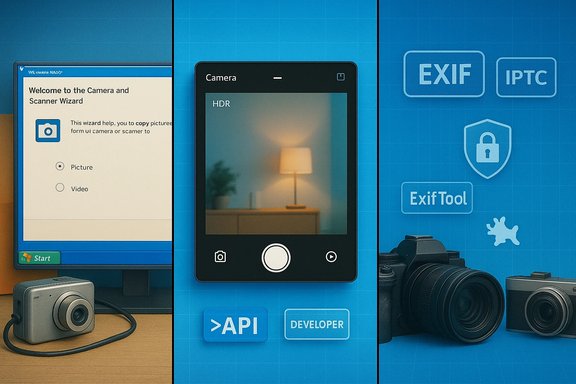 Background: a watershed moment in Windows and digital photography
When Microsoft shipped Windows XP (its Beta 2 public release was widely publicized in 2001), the company positioned the OS as a platform built for digital media and entertainment — including tighter integration with digital cameras and photo services. Microsoft’s own announcement framed XP as offering new media experiences, from Windows Media Player improvements to integrated photo-handling features. That integration did not go unnoticed by camera makers and industry partners. As consumer digital photography accelerated, companies such as Kodak publicly criticized Microsoft for how Windows XP handled camera imports, default photo applications, and partnerships with photofinishing services — arguing that Microsoft’s design choices risked tilting the ecosystem and constraining consumer choice. Digital Photography Review covered Kodak’s concerns at the time, documenting the dispute in detail. These tensions set the tone for a decade of evolving expectations: users wanted effortless transfer, trustworthy image management, and reliable metadata handling; camera makers and software vendors wanted an interoperable platform that wouldn’t automatically redirect users to Microsoft‑preferred services.Overview: what Windows XP actually changed (and what it didn’t)
Windows XP brought real technical additions that mattered to photographers and device makers:- Built‑in support for the Picture Transfer Protocol (PTP) and tighter out‑of‑box handling of cameras, intended to make image transfer as simple as plugging a camera into the PC. Microsoft public messaging positioned XP as an “end‑to‑end” digital photography platform.
- A default Scanner and Camera Wizard / import experience that attempted to surface basic import, catalog, and upload options directly from the operating system — an attempt to reduce friction for mainstream users. This behavior, however, could override or complicate third‑party camera software that shipped with many cameras. Kodak argued this limited consumer choice and unfairly advantaged Microsoft’s partner arrangements.
- Device visibility and live previews in Explorer for certain camera classes (notably DV/firewire and some USB cameras), which let users open camera devices from My Computer and see a live preview — a feature many XP users recall as convenient for quick snapshots and grabbing stills without extra software. Community threads from users and hardware forums confirm this behavior and show how users relied on it in practical workflows.
How the camera workflow evolved: from XP to modern Windows
The XP era: simple but contentious
Early XP-era workflows emphasized convenience: plug in a camera, run the import wizard, get your photos copied and optionally sent to an online print service. For many users, that solved a real problem: moving photos off a camera and into shareable formats. But the system-level defaults could also be prescriptive.- Kodak’s complaint in 2001 argued that Windows XP’s import behavior favored Microsoft‑chosen photofinishing partners and made it harder to set third‑party photo applications (like Kodak EasyShare) as the default import handler. That dispute illuminates a recurring tension between platform convenience and vendor interoperability.
- Enthusiasts and pros often bypassed the OS wizard in favor of dedicated tools (camera vendor suites, AMCAP, or later third‑party apps) to preserve advanced options such as RAW transfer, tethered shooting, and selective import. Community posts from the WindowsForum archives show users recommending third‑party viewers or capture utilities when the built‑in experience was insufficient for their needs.
The transition to richer APIs and UWP (HDR, MediaCapture)
Over the next 15 years Microsoft shifted toward developer‑facing APIs (MediaCapture in UWP) and OS‑level imaging pipelines that expose advanced capabilities such as HDR capture, multi‑exposure workflows, and real‑time image processing. UWP documentation and sample code show how developers can implement HDR capture, control exposures, and build camera experiences that match modern smartphone workflows. Those advances brought camera features into the app ecosystem rather than binding them to a single vendor-managed import wizard.Modern Camera apps and multi‑app streaming
In recent Windows 10/11 cycles, the Camera app and OS camera APIs have been redesigned to support:- A smartphone‑like Camera app for quick captures and simple edits.
- Multi‑application camera streaming (allowing a camera feed to be used by multiple apps simultaneously), a function targeted at creators and remote‑teaching scenarios.
- Simplified Basic Camera / Purification Modes to reduce complexity in troubleshooting and fallback when advanced streaming options cause conflicts.
The practical reality for photographers: tools, workflows, and trade‑offs
Photographers and hobbyists historically relied on a mix of built‑in OS importers and standalone tools. That balance persists:- Built‑in tools (Explorer import, Camera app) are convenient for casual use and quick transfers.
- Third‑party tools (vendor suites, IrfanView, PhotoDemon, FastPictureViewer, and camera tethering utilities) provide advanced features: bulk‑rename, robust RAW conversion, color‑critical ICC workflows, and scripting/batch operations that the basic importers do not deliver. The community continues to recommend portable, fast viewers for triage and rapid culling.
- Tethered shooting and live capture workflows are best served by vendor or specialist tools that maintain RAW fidelity, camera control, and stable tethering; OS-level wizards were never intended to replace that level of control.
- Benefits:
- Rapid onboarding for novices: plug‑and‑play transfers, simple slideshows, and quick sharing.
- Integrated cataloging options for mainstream users: thumbnailing, basic tagging, and web upload shortcuts.
- Limits:
- Interoperability friction when camera vendors ship bespoke software that expects itself to be the default import path.
- Limited support for advanced RAW workflows, complex PSD/PSB interchange, and high‑volume professional needs without dedicated apps.
Privacy and metadata: an unresolved technical debt
One of the most consequential threads running from Windows XP to today is metadata (EXIF/IPTC) handling and user privacy.- Windows has long provided a GUI path to remove metadata via File Explorer (“Remove Properties and Personal Information”) and via basic edits in the Photos app. These methods are convenient and suitable for many users. Windows Central and How‑To Geek document simple, built‑in workflows for removing EXIF before sharing.
- However, independent technical analyses show these built‑in removal tools are imperfect. Security researchers demonstrated that Windows Explorer’s “Remove Properties” option removes directory entries but may leave underlying string values embedded inside JPEG APP1 segments, meaning some identifying metadata can persist after the “removal” operation. That incomplete removal can lull users into a false sense of privacy.
- Casual users who rely solely on the Explorer or Photos "remove" option may still leave device or software identifiers in the file.
- Journalists, activists, and anyone sharing images from sensitive locations should not assume a File Explorer scrub is exhaustive; tools like ExifTool (for batch, full metadata stripping) or dedicated image sanitizers are recommended for robust removal.
- The operating system’s built‑in options are useful but not infallible; that gap has been repeatedly documented and independently replicated.
Industry dynamics and vendor friction: Kodak’s warning was not an isolated incident
Kodak’s early complaint — that Windows XP’s import defaults would limit software choice and steer users toward Microsoft‑preferred photofinishing services — illustrates a recurring ecosystem tension:- Platform vendors with dominant OS footprints change user flows simply by setting defaults.
- Camera vendors and software companies must adapt their installers and user recommendations to preserve visibility and user choice.
- For photographers, the bottom line is that a platform‑level convenience feature can sometimes be a competitive lever — and one that invites regulatory and industry scrutiny. DPReview’s coverage of Kodak’s stance shows that this was a public, industry‑level debate, not just a vendor squabble.
Strengths, weaknesses and long‑term risks
Strengths
- User convenience: Built‑in OS importers and a unified Camera app lower the barrier for casual photographers and families to move images from device to computer — a major win for mass adoption.
- Developer APIs: Modern MediaCapture and UWP capabilities enable richer camera apps and real-time processing (HDR, composition analysis), supporting a broader ecosystem of imaging apps.
- Ecosystem progress: The evolution from XP’s import wizard to modern multi‑app streaming and HDR-capable APIs shows real technical maturation.
Weaknesses and risks
- Incomplete privacy tooling: Built‑in metadata removal remains imperfect; users can inadvertently leak location and device information without realizing it. Independent analyses and security blogs document residual strings in files after Explorer “scrubbing.” Users with privacy requirements need stronger workflows.
- Default behavior lock‑in: Platform defaults still influence which apps users discover and use. History shows (Kodak vs Microsoft) that vendor relations and default settings can stifle competition or create user confusion.
- Fragmentation for pros: The OS-level convenience features aren’t a substitute for pro workflows; without robust third‑party tools, advanced photographers risk suboptimal color fidelity or lack of RAW/tethered capabilities. Community guidance continues to favor specialized tools for production work.
- Unverifiable or transient third‑party claims: Some modern articles or aggregated posts (including commercial aggregator pages) can mischaracterize feature rollouts or privacy behaviors. When a claim can’t be confirmed against a primary source or respected technical analysis, it should be labeled as unverified and handled with caution.
Practical, step‑by‑step guidance for photographers on Windows today
1. If you need privacy before sharing:- Use ExifTool for batch, full metadata removal, or a dedicated metadata scrubber that clearly documents the fields it removes. How‑To Geek and security analyses recommend third‑party tooling for high‑assurance removal. 2. If you need speed for culling and rating:
- Use a dedicated fast viewer (FastPictureViewer, IrfanView) or a compact portable app to quickly triage large shoots; these still outperform built‑in Photos for large datasets. 3. If you require RAW fidelity or tethering:
- Use vendor tethering apps, Lightroom/Camera Control or dedicated capture software that preserves RAW and provides stable camera control.
4. If you depend on OS-level convenience: - Understand the limits: “Create a copy with all possible properties removed” in File Explorer is convenient but not guaranteed to remove every metadata trace; validate with a metadata inspector if privacy matters.
Where claims remain uncertain — and what to watch
- Born2Invest and other syndicated outlets sometimes republish short analytical snippets or cookie‑consent copy that can be mistaken for substantive documentation of platform actions. If a claim (for example, an alleged new camera feature or privacy behavior) is only visible on thin aggregator pages and not on primary documentation or technical analysis, treat it as unverified until confirmed. The industry has many such transient pages, and several forum‑level threads highlight users copying uncertain information without primary confirmation. Exercise caution before re‑engineering workflows around such claims.
- When vendors announce OS‑level camera features (multi‑app streaming, Basic Camera Mode), the functional behavior and privacy implications are best cross‑checked against:
- Microsoft’s official documentation and developer guidance.
- Independent technical reviews and lab analyses.
- Community tests and reproducible experiments reported by security researchers and power users.
Conclusion: what the camera story of Windows XP tells us now
The arc from Windows XP Beta 2 to today’s Camera app is a microcosm of broader platform dynamics: convenience creates adoption but also responsibility. Microsoft’s early attempts to make photography easier on Windows delivered important user benefits — but also provoked legitimate industry concerns, and left a set of unresolved technical debts around metadata and interoperability.For photographers, the practical takeaway is simple and enduring:
- Use the OS tools for casual workflows.
- Use specialized tools for production work and privacy‑sensitive sharing.
- Assume built‑in metadata removal is helpful but not exhaustive; verify with a robust metadata inspector when the stakes are high.
- Keep an eye on platform defaults and vendor arrangements that can subtly alter your workflow or app choices.
Source: Born2Invest https://born2invest.com/?b=style-248225512/
