

Microsoft's Computex-era reveal of the Windows Collaboration Display quietly opened a practical, IoT-aware flank in its meeting‑room hardware strategy: a certified, sensor‑packed, multi‑touch display designed to run as the smart centerpiece of conference spaces while leaving the compute — and much of the cost — to the customer’s choice of PC. The product family is less a standalone “Surface Hub killer” than a modular alternative: large, pen‑friendly 4K panels from partners such as Sharp and Avocor that pair with Windows 10 PCs and Azure services to deliver room-scale whiteboarding, telepresence and environmental telemetry — bringing Microsoft’s Azure spatial intelligence into everyday meeting rooms.
The Windows Collaboration Display (WCD) category was announced as part of Microsoft’s Computex 2018 keynote, framed as a new platform for “teamwork devices” that integrate Office, Microsoft Teams and Whiteboard at room scale. Unlike Microsoft’s own Surface Hub, these displays are sold by OEM partners and require an external Windows PC to run full Microsoft 365 apps. This design choice lets customers mix and match hardware and compute, and lets partners deliver larger screens and richer sensor suites without Microsoft having to manufacture the physical displays itself. The core idea is straightforward: place high‑quality, certified displays in conference rooms that provide touch, pen input, cameras, microphones and environmental sensors, then leverage Windows PCs and Azure cloud services — especially Azure’s spatial intelligence / Digital Twins capabilities — to turn meeting rooms into managed, connected spaces. Early partners publicly targeting the spec included Sharp and Avocor; Sharp’s 70‑inch 4K model was the demo device shown at Computex.
Key differences:
As surface area for corporate IoT grows, the WCD concept underscores a broader shift: displays are no longer passive output devices, they are edge sensors and input conduits for cloud intelligence. That capability is valuable if implemented with transparent governance, auditable telemetry, and vendor commitments to long‑term support. When those boxes are checked, the Windows Collaboration Display becomes more than a screen — it becomes an instrument for smarter, more efficient workplaces.
Source: BetaNews Microsoft unveils IoT-ready Windows Collaborative Displays
 Background / Overview
The Windows Collaboration Display (WCD) category was announced as part of Microsoft’s Computex 2018 keynote, framed as a new platform for “teamwork devices” that integrate Office, Microsoft Teams and Whiteboard at room scale. Unlike Microsoft’s own Surface Hub, these displays are sold by OEM partners and require an external Windows PC to run full Microsoft 365 apps. This design choice lets customers mix and match hardware and compute, and lets partners deliver larger screens and richer sensor suites without Microsoft having to manufacture the physical displays itself. The core idea is straightforward: place high‑quality, certified displays in conference rooms that provide touch, pen input, cameras, microphones and environmental sensors, then leverage Windows PCs and Azure cloud services — especially Azure’s spatial intelligence / Digital Twins capabilities — to turn meeting rooms into managed, connected spaces. Early partners publicly targeting the spec included Sharp and Avocor; Sharp’s 70‑inch 4K model was the demo device shown at Computex. What exactly is a Windows Collaboration Display?
Hardware profile: what’s built into the screen
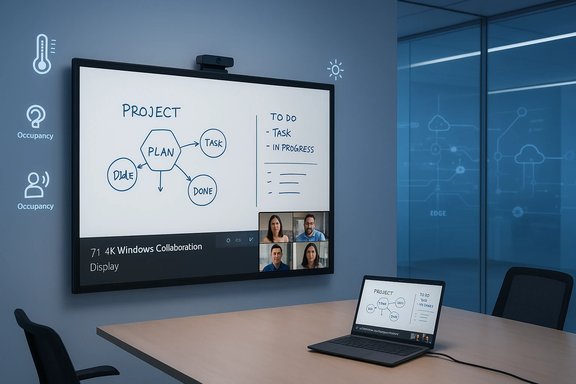
Windows Collaboration Displays are certified hardware platforms meeting Microsoft’s specification for interactive meeting-room displays. Typical elements found in announced models include:- 4K (Ultra HD) large panels — Sharp’s flagship is a roughly 70‑inch, 3840×2160 display.
- Multi‑touch and active pen support — OEMs implement PCAP touch with multi‑point gesture support and pen latency optimizations to approximate a “pen‑on‑paper” experience.
- Far‑field microphones and speakers — Designed for room‑scale voice pickup and integration with Teams/Skype calls.
- Integrated camera — Models incorporate conference cameras (some offer 4K sensors) for remote participants.
- IoT sensor hub — Environmental sensors for temperature, humidity, ambient light, and occupancy that can feed Azure Digital Twins / Azure IoT services.
- USB‑C single‑cable connectivity and wireless casting — Simplifies setup by allowing video, touch‑back and power over one link, and supports wireless casting for BYOD scenarios.
Software and cloud: how the pieces fit
The WCD is intended to be a hardware endpoint for standard Windows apps and the Microsoft 365 suite. When connected to a Windows 10 PC, the display becomes a room‑scale surface for Microsoft Whiteboard, Teams meetings, and Office applications. The built‑in sensor hub is the bridge to Azure: telemetry flows into Azure IoT services and Azure Digital Twins to enable spatial modeling and higher‑order automation (for example, adjusting HVAC based on occupancy). Microsoft has framed this as enabling partners to build “spatially aware solutions” by correlating environmental telemetry with digital workflows.How Windows Collaboration Displays differ from the Surface Hub
Surface Hub is Microsoft’s vertically integrated meeting‑room appliance: both the display and the compute (Windows‑powered, Surface‑branded hardware) are supplied and supported by Microsoft. The Windows Collaboration Display strategy, by contrast, separates the display from the PC.Key differences:
- Compute model: WCDs require you to supply your own PC (or docking laptop) to run full Windows apps. Surface Hub is an all‑in‑one appliance with integrated compute and a locked, managed OS image.
- Cost and flexibility: Because the display is decoupled from the compute, organizations can choose lower‑cost endpoints, reuse existing PCs, or provide more powerful machines where needed. This lowers the barrier to entry for large‑format interactive displays. Pricing and exact TCO vary by OEM model and configuration.
- Ecosystem and extensibility: WCDs are designed as an OEM ecosystem—partner devices must meet Microsoft specs. That creates variation in feature sets (camera quality, sensor granularity, pen feel) but enables choice across sizes and prices.
Azure Spatial Intelligence and the “IoT” promise
What Microsoft is offering
A major selling point of the Windows Collaboration Display is the integration with Azure IoT spatial intelligence (now commonly framed through Azure Digital Twins). Built‑in sensors feed environmental data into Azure where spatial models and topologies can be applied to turn raw telemetry into actionable insights: adaptive HVAC control, room‑usage analytics, space optimization, and integration with room‑booking systems are all cited examples. Microsoft’s platform emphasizes role‑based access control, support for multi‑tenant deployments, and higher‑level modeling primitives (topologies and ontologies) that let partners build repeatable spatial solutions. Sharp and other OEMs explicitly positioned their WCD hardware as a sensor gateway for Azure Digital Twins — reporting occupancy, CO2/air‑quality proxies, temperature and light to facility systems. Sharp’s 70‑inch model includes an “IoT sensor unit” intentionally for these use cases.Practical scenarios
- Automatic climate and ventilation adjustments — Use room occupancy and CO2 proxy data to optimize HVAC schedules and ventilation rates. This can reduce energy use while responding to actual usage patterns.
- Room utilization analytics — Aggregate occupancy signals across rooms to identify underused space, inform office layout decisions, or feed enterprise scheduling systems.
- Contextual meeting experiences — Integrate with calendar APIs and building systems so a room’s AV and lighting are set when a schedule entry starts; enable device handoff and simplified BYOD casting.
OEMs, models and technical variation
Microsoft intentionally left the displays to hardware partners. Early certified partners and revealed models included:- Sharp PN‑CD701 (70") — 4K UHD, multi‑touch, active pen, integrated camera, far‑field mics and an IoT sensor hub. Availability announcements from Sharp placed initial shipments in 2019, with regional variants and official certification for Skype for Business / Microsoft Teams.
- Avocor — Announced as a partner building certifiable WCDs to the Microsoft spec; product variations targeted different room sizes and price points.
- Pen latency and “pen‑on‑paper” feel
- Camera field of view and resolution
- Number and fidelity of environmental sensors
- Integration with OEM services (e.g., Sharp Synappx WorkSpaces) and certification status for Teams/Skype features.
Pricing, availability and support
At announcement, Microsoft and its partners did not publish fixed pricing for WCDs. Early announcements positioned availability in late 2018 to 2019 and emphasized OEM‑specific pricing tiers and channel distribution. Microsoft’s messaging focused on the specification and partner ecosystem; pricing, support contracts and regional availability were left to OEMs and resellers. Prospective buyers should treat headline shipment dates as indicative and expect staggered rollouts across regions and SKUs. Because the WCD model separates display and compute, total cost of ownership depends on:- Display model and size (OEM MSRP)
- Choice of PC endpoint (reused laptop vs. purpose‑built mini‑PC)
- Required Azure services and any subscription fees for analytics or advanced tenant services
- Deployment, cabling and AV integration costs
- Ongoing support and firmware update arrangements with the OEM.
Strengths: where Windows Collaboration Displays deliver value
- Lower entry cost for modern rooms — By decoupling compute, organizations can deploy large, interactive displays without buying an all‑in‑one appliance. This makes modern collaboration tech more accessible to mid‑sized organizations and schools.
- Sensorized meeting rooms — Built‑in IoT capabilities make the display more than a whiteboard; it becomes an instrumented node for space analytics and building automation. This is compelling where facilities teams want data‑driven optimization.
- Familiar Windows app ecosystem — Running standard Windows 10 apps on a connected PC means immediate compatibility with enterprise workflows, corporate images, single sign‑on and existing device management.
- OEM choice and flexibility — Organizations can pick displays optimized for AV, touch fidelity, or price, rather than being locked into a single vendor stack.
Risks and caveats: security, privacy and operational concerns
Data collection and privacy
The environmental sensors and occupancy telemetry that make WCDs useful also create privacy and compliance surface area. Even simple occupancy signals can be sensitive when correlated with calendars or badge data. Organizations must control:- Where telemetry is stored (cloud region and residency)
- Who can query or export spatial data (role‑based access and tenant separation)
- Retention policies and consent for any audio, imaging or personally identifiable telemetry that might be captured.
Security of the edge and update model
Large, fixed‑function displays in meeting rooms can become long‑lived IoT endpoints. Questions to evaluate:- Firmware and OTA update cadence — Does the OEM provide timely security patches for the display firmware and sensor hub?
- Endpoint management — Can the display and attached PC be enrolled in corporate device management (e.g., Intune), and is the sensor hub treated as a managed device?
- Network segmentation — Audio/video and telemetry flows must be network‑segmented to avoid exposing control planes or telemetry to guest Wi‑Fi.
Vendor lock‑in vs. interoperability
Because OEMs differ, customers may encounter fragmentation in management tooling, firmware update mechanisms and cloud connectors. IT organizations should demand clear SLAs and ask for documented integration paths into existing building management systems and security operations workflows.Practical guidance for IT buyers and facilities teams
Organizations evaluating Windows Collaboration Displays should follow a structured procurement and pilot plan:- Define use cases and data needs (whiteboarding, Teams video, occupancy analytics).
- Match use cases to hardware features (pen latency, camera FOV, sensor types).
- Run a short pilot across representative rooms to validate pen feel, audio pickup patterns and sensor accuracy.
- Validate the update and management model with the OEM — request firmware roadmaps and security‑patch cadence.
- Design network segmentation and privacy controls for telemetry ingestion (Azure tenant strategy, data retention and role‑based access).
- Factor in lifecycle costs for Azure services and any subscription fees for OEM software or analytics.
Future prospects and market reality
The WCD strategy anticipated several trends that have become mainstream: the hybrid office, sensorized buildings and the commoditization of large interactive displays. The modular model — letting customers choose their PC endpoint — proved prescient: it matches diverse enterprise endpoints and allows rapid refresh of compute without replacing expensive glass. OEMs like Sharp moved from announcements to shipping certified 70‑inch panels with Azure Digital Twins compatibility and Teams certification, demonstrating that the category moved from concept to production in the following year. The real test for the category will be operational: can organizations integrate telemetry safely at scale, and will OEMs commit to long‑term firmware support? If those two issues are handled, Windows Collaboration Displays can deliver tangible savings and improved space utilization compared with monolithic, proprietary room systems.Critical assessment: strengths, weaknesses and purchase checklist
- Strengths
- Cost flexibility: reuse of existing PCs can reduce capital expense compared to all‑in‑one appliances.
- Sensorization: built‑in telemetry unlocks automation and analytics when paired with Azure Digital Twins.
- Ecosystem fit: works with Microsoft 365 and Windows management tooling.
- Weaknesses / Risks
- Fragmentation: OEM variance demands careful spec and procurement work.
- Privacy & governance: telemetry collection must be governed by policy and controls.
- Support lifecycle: displays are durable goods; long‑term firmware support is not guaranteed by all OEMs.
- Confirm Teams/Skype certification status for the specific model.
- Request a clear IoT data map (what sensors, what telemetry, where it is routed).
- Verify single‑cable USB‑C workflows for your BYOD endpoints and docking stations.
- Ask for an enterprise firmware update SLA and documentation.
- Pilot at least one room for 4–8 weeks before a full rollout.
Conclusion
Windows Collaboration Displays represent a pragmatic, modular approach to modernizing meeting rooms: they bring large, pen‑ready touch surfaces into corporate spaces while adding a new class of environmental sensors that can feed Azure’s spatial intelligence services. For organizations that already run Windows and Microsoft 365, the benefits — lower entry cost, sensorized rooms and tighter integration with existing workflows — are compelling. The hard work, however, lies in operationalizing the telemetry safely, ensuring firmware and privacy governance, and choosing OEM models that match both AV and facilities requirements.As surface area for corporate IoT grows, the WCD concept underscores a broader shift: displays are no longer passive output devices, they are edge sensors and input conduits for cloud intelligence. That capability is valuable if implemented with transparent governance, auditable telemetry, and vendor commitments to long‑term support. When those boxes are checked, the Windows Collaboration Display becomes more than a screen — it becomes an instrument for smarter, more efficient workplaces.
Source: BetaNews Microsoft unveils IoT-ready Windows Collaborative Displays
