

Microsoft has started previewing a new, experimental capability in Windows that lets AI “agents” run in their own isolated workspace and take action on files and apps on your PC — a move that shifts Copilot from a conversational helper into a class of agentic automation that can open apps, click and type, move or edit files, and run multi‑step workflows with user‑granted permissions.
Microsoft’s recent rollout—delivered initially to Windows Insiders and through Copilot Labs—is branded around Copilot Actions and the concept of an Agent Workspace. The idea: provide an opt‑in runtime where an AI agent runs under a separate, limited Windows account and performs tasks in a contained desktop session rather than executing inside the signed‑in user’s profile. That containment is intended to make agent activity auditable, revocable, and visible to the user while enabling longer‑running, multi‑step automation. Microsoft frames the capability as experimental and conservative in scope during preview: agents are off by default, require an administrator to enable an “Experimental agentic features” toggle, and are initially restricted to known folders (Desktop, Documents, Downloads, Pictures) unless the user expands permissions. The company highlights four platform primitives to manage risk: user consent, agent accounts, agent workspaces (runtime isolation), and digital signing/revocation for agents.
Conclusion: Agentic AI in Windows is no longer a concept — it’s an experimental product reality rolling out to Insiders. The technical architecture and controls Microsoft describes are promising and grounded in established security primitives, but meaningful trust depends on operational detail: telemetry policies, enterprise policy hooks, audit completeness, and a proven, reliable UX for supervising agents. Until those pieces are matured and independently validated, the best practice is to treat Copilot Actions as a powerful but experimental capability: useful when controlled, risky when treated as “just another background service.”
Source: PC Gamer Microsoft is rolling out AI agents that can access some of your files
 Background
Microsoft’s recent rollout—delivered initially to Windows Insiders and through Copilot Labs—is branded around Copilot Actions and the concept of an Agent Workspace. The idea: provide an opt‑in runtime where an AI agent runs under a separate, limited Windows account and performs tasks in a contained desktop session rather than executing inside the signed‑in user’s profile. That containment is intended to make agent activity auditable, revocable, and visible to the user while enabling longer‑running, multi‑step automation. Microsoft frames the capability as experimental and conservative in scope during preview: agents are off by default, require an administrator to enable an “Experimental agentic features” toggle, and are initially restricted to known folders (Desktop, Documents, Downloads, Pictures) unless the user expands permissions. The company highlights four platform primitives to manage risk: user consent, agent accounts, agent workspaces (runtime isolation), and digital signing/revocation for agents. What Copilot Actions and Agent Workspaces actually do
The user promise: automation you can watch and control
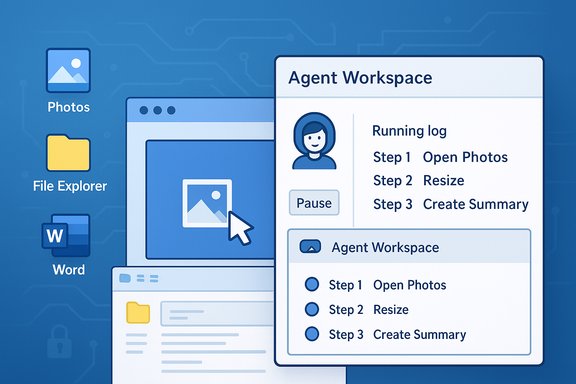
- Agents can accept a plain‑language instruction such as “organize my vacation photos, resize them for sharing, remove duplicates, and create a summary document,” then plan and execute the required steps across apps.
- Those steps include opening desktop apps (Photos, File Explorer, Office apps), performing UI interactions (clicks, keystrokes), manipulating files (resize/convert images, extract tables from PDFs), assembling results, and optionally drafting or sending emails when connectors are permitted.
- The action is executed inside an Agent Workspace — a separate, visible desktop session the user can monitor, pause, stop, or take over at any time.
The technical surface
- Agent accounts: Each agent runs under a dedicated standard (non‑admin) Windows account provisioned when agent features are enabled. Treating agents as principals lets Windows apply ACLs, auditing, and policy to agent activity in a familiar way for administrators.
- Agent workspace: Not a full VM, but an isolated child desktop session that keeps the agent’s UI actions separate from a user’s primary desktop while still offering visibility and performance advantages over full virtualization.
- Scoped permissions: By default agents have access only to a narrowly defined set of known folders; they must request explicit permission to access anything beyond that. Connectors to cloud accounts use standard OAuth consent flows.
- Operational trust: Agents must be digitally signed; signing enables certificate‑based revocation, AV/EDR blocks, and enterprise controls. Microsoft positions signing as a core part of its defense‑in‑depth strategy.
Why Microsoft is making Windows “agentic”
For years, assistants mainly suggested or generated content. The next step is agents that can act — carrying out repetitive, cross‑application chores without manual orchestration. That promise is compelling: tedious multi‑step tasks that used to require human attention can be handed to a background agent, freeing time for higher‑value work and improving accessibility for users who struggle with complex UI navigation. Microsoft’s product vision ties agentic capabilities to Copilot’s broader evolution across voice, vision, and automation. The company also sees hardware benefits: on Copilot+ PCs with NPUs, some inference can run locally to reduce latency and cloud exposure. That dual approach — lightweight on‑device spotters plus cloud reasoning for heavy tasks — is intended to balance responsiveness and privacy depending on device capabilities.What Microsoft says about security and privacy
Microsoft’s public documentation emphasizes multiple safeguards: the feature is off by default, agent workspaces provide runtime isolation, agent accounts separate agent actions from user actions, and users are given transparency and controls to authorize and supervise agent tasks. Microsoft also points to its existing privacy frameworks (Privacy Report, Responsible AI standards) as governance backstops for agent behavior. However, Microsoft’s materials stop short of answering every consequential question, especially around data handling beyond the device. The company promises that agent activity will follow the commitments in its privacy and responsible‑AI policies, but how exactly data from files an agent reads will be handled for telemetry, improvement, or model training is not exhaustively specified in the preview documentation. Independent reporting and early hands‑on accounts echo Microsoft’s stated controls while urging scrutiny of the remaining gaps.Independent verification and cross‑checks
Multiple independent outlets and Microsoft’s own blog corroborate the essential elements of Copilot Actions and Agent Workspace:- Microsoft’s Windows Experience blog details the four security primitives and preview constraints for Copilot Actions.
- Windows‑focused reporters confirm the Settings path (Settings → System → AI components → Agent tools → Experimental agentic features), the agent account/workspace model, and the known‑folder scoping during preview.
- Reputable news agencies noted the rollout to Insiders and the experimental, opt‑in posture while outlining sample use cases and the broader Copilot strategy.
Strengths: what’s positive and useful
- Productivity upside: Delegating repetitive multi‑app tasks (PDF table extraction, bulk photo edits, folder reorganization, report assembly) is a real time saver. Agents can chain actions that ordinarily require multiple manual steps, reducing context switching and accelerating rote workflows.
- Accessibility gains: Combined voice, vision, and automation could be transformative for users with motor impairments or those who find complex UIs difficult. The ability to watch, pause, and take over an agent provides important safety and control for such users.
- Platform governance primitives: Making agents first‑class principals (accounts that can be logged and policed) aligns with enterprise management tools and makes enforcement via Intune, ACLs, and SIEM feasible. That is a significant advantage over opaque background services that can’t be managed at the identity level.
- Visible containment: Running agents in a separate, observable workspace reduces the risk of silent, invisible automation and gives users a clear control surface to interrupt or assess behavior.
Risks, trade‑offs, and unresolved questions
1. Broadened attack surface
Giving agents scoped access to files and the ability to operate desktop UIs increases the OS’s attack surface. Agents that are compromised, misconfigured, or tricked by malicious content could read or exfiltrate files the user allowed the agent to access. Even with signing and revocation, the operational reality of timely revocation and detection matters.2. UI fragility and unintended actions
Agents that simulate clicks and keystrokes depend on UI stability. Dynamic web pages, localized layouts, or unexpected dialogs can cause misclicks—potentially destructive file moves, incorrect emails, or other unintended outcomes. Microsoft’s visible step logs and takeover affordances reduce but don’t eliminate this class of risk.3. Privacy and telemetry ambiguity
Microsoft states agents will “help adhere” to privacy commitments and that agent behavior will be subject to the Responsible AI Standard, but preview materials do not fully spell out whether content read from files by agents may be captured as telemetry, used to improve models, or retained in ways beyond the device. Until Microsoft provides precise, testable statements about telemetry flows and data retention for agent‑read files, these remain open questions and should be treated with caution. This is one of the most important unanswered items for privacy‑minded consumers and enterprises.4. Resource usage and background persistence
Agents can run persistently and perform background tasks; early reports note they may consume CPU, memory, or NPU resources depending on workload. On lower‑end systems this could be noticeable and have battery/thermals implications.5. Enterprise governance gaps (today)
While Microsoft is promising Intune, Entra and DLP hooks, much of that enterprise integration is still “coming soon” and will be required before enterprises can safely adopt agentic features at scale. Until centralized policy controls and robust audit forwarding are available, many companies will need to keep agentic functions disabled on managed endpoints.Practical guidance — what users and IT teams should do now
For individual users (short checklist)
- Keep Copilot Actions off until you understand the permissions dialogs for your device. The feature is opt‑in and disabled by default.
- If you try Copilot Actions, grant only the minimum folder access necessary for the task. Prefer using a dedicated folder with test files rather than giving broad access to Documents or Desktop.
- Watch the Agent Workspace while the agent runs; use the pause/stop/takeover controls liberally if anything looks unexpected.
- Keep local backups of important data before running new agent‑driven workflows that modify files. Undo semantics are not guaranteed across all apps.
For IT teams and security leads (recommended rollout posture)
- Treat agentic features as a new automation platform: pilot on non‑production devices and document potential failure modes.
- Maintain the feature‑off default in corporate images and enforce via policy until Microsoft supplies a mature set of MDM/Intune controls.
- Require agent signing verification, enforce revocation lists, and integrate agent events into centralized logging and SIEM. Validate audit fidelity by simulating agent actions and confirming logs capture non‑repudiable traces.
- Establish DLP rules that prevent agents from sending sensitive files out of the corporate perimeter, and test connector flows (OAuth, SharePoint, OneDrive) for leakage paths.
What remains unverifiable or requires close watching
- Whether or how file content that an agent reads will be used for model training or to improve services. Microsoft’s privacy materials reference Copilot telemetry and general data use policies, but specific, auditable guarantees about agent‑read files and whether they ever leave the device (even in anonymized form) were not fully enumerated in the preview documentation. Flag this as a high‑priority question for enterprises and privacy‑conscious consumers.
- Regional and build‑specific rollout semantics. Early reporting indicates staged, Insiders‑first rollouts and occasional region gating; single‑build package numbers reported by third parties are often ephemeral and should be validated against the Microsoft Store or official release notes on a per‑device basis. Treat per‑build claims as provisional until confirmed in your environment.
- The maturity and granularity of enterprise controls (DLP, Intune controls, Entra integration). Microsoft says these are coming, but the timing and depth of those integrations will determine whether the feature is enterprise‑ready. Until then, cautious adoption is prudent.
Final assessment
Copilot Actions and Agent Workspace represent a clear inflection point in how assistants interact with personal computers: moving from advice and content generation into autonomous action raises legitimate productivity and accessibility benefits while simultaneously expanding the platform’s threat model. Microsoft’s preview design shows careful thinking—separate agent accounts, visible workspaces, signing and revocation, and conservative defaults—but engineering controls are not the whole story. Trust will be earned through transparent, testable privacy guarantees, robust enterprise controls, and continued iterative hardening against UI fragility and adversarial misuse. For consumers and administrators alike, the sensible approach is cautious experimentation: try agentic features in tightly scoped, recoverable scenarios; require backups before broad use; and hold vendors accountable for clear, auditable statements on telemetry, data retention, and model training. The productivity gains are real and potentially transformative, but so are the long‑term governance obligations that come with giving automated software the keys to your files.Conclusion: Agentic AI in Windows is no longer a concept — it’s an experimental product reality rolling out to Insiders. The technical architecture and controls Microsoft describes are promising and grounded in established security primitives, but meaningful trust depends on operational detail: telemetry policies, enterprise policy hooks, audit completeness, and a proven, reliable UX for supervising agents. Until those pieces are matured and independently validated, the best practice is to treat Copilot Actions as a powerful but experimental capability: useful when controlled, risky when treated as “just another background service.”
Source: PC Gamer Microsoft is rolling out AI agents that can access some of your files
