

Microsoft’s Windows Insider program has begun previewing two tightly linked waves of Windows 11 updates at Microsoft Ignite 2025: an experimental rollout of Copilot Actions — a new agentic capability that lets Copilot perform multi‑step tasks on your PC inside a contained workspace — and Release Preview cumulative builds (KB5070311) for Windows 11 versions 24H2 and 25H2 that preview the December Patch Tuesday quality update.
Microsoft is accelerating the integration of Copilot across Windows with three interlocking pillars: Copilot Voice, Copilot Vision, and now Copilot Actions — the latter represents a fundamental shift from a purely suggestive assistant to an agentic assistant that can perform visible UI actions, manipulate files, and chain workflows across desktop and web apps. The feature is experimental, gated behind Copilot Labs and opt‑in Insider controls, and Microsoft packages the preview in the Copilot app while provisioning containment primitives in the OS itself.
At the same time, Microsoft has shipped Release Preview updates for Windows 11 that bring both quality fixes and Copilot+ hardware‑gated feature polish, letting Insiders preview the Patch Tuesday cumulative update for 24H2 and 25H2 (Builds 26100.7296 and 26200.7296, delivered as KB5070311). These builds include Copilot+ optimizations, File Explorer and Settings refinements, and a number of platform fixes.
Technical building blocks Microsoft describes:
A few specific claims require caution or further verification:
Practical implication: on non‑Copilot+ devices many agentic features fall back to cloud processing, with higher latency and potential privacy trade‑offs. Buyers and IT teams should verify OEM Copilot+ claims and NPU performance metrics if local inference and offline behavior are procurement criteria.
For Insiders and power users, the immediate path forward is cautious exploration: update the Copilot app via the Microsoft Store, enable Experimental agentic features in Settings only after preparing test data and backups, and report behaviors through the Feedback Hub.
For IT teams, treat Copilot Actions as a pilot opportunity, not a production rollout. Require signed agent manifests, validate revocation behavior, lock down agent toggles via policy where necessary, and demand telemetry that surfaces every agent action to security tooling.
Microsoft’s staged approach — previewing agentic automation to Insiders while packaging patch quality updates in Release Preview builds — is the right engineering cadence for such a consequential change. The promise of automation is real, and the safeguards announced so far are reasonable; the decisive factor will be how well Microsoft and the ecosystem operationalize those assurances at scale.
Copilot Actions and the associated Release Preview builds are available to Windows Insiders now as an experimental preview. Proceed with care: the potential productivity dividends are significant, but so are the governance responsibilities that come with granting software the power to act autonomously on a user’s behalf.
Source: Thurrott.com Windows Insider Program Releases Copilot Actions, New Release Preview Builds
 Background
Microsoft is accelerating the integration of Copilot across Windows with three interlocking pillars: Copilot Voice, Copilot Vision, and now Copilot Actions — the latter represents a fundamental shift from a purely suggestive assistant to an agentic assistant that can perform visible UI actions, manipulate files, and chain workflows across desktop and web apps. The feature is experimental, gated behind Copilot Labs and opt‑in Insider controls, and Microsoft packages the preview in the Copilot app while provisioning containment primitives in the OS itself.At the same time, Microsoft has shipped Release Preview updates for Windows 11 that bring both quality fixes and Copilot+ hardware‑gated feature polish, letting Insiders preview the Patch Tuesday cumulative update for 24H2 and 25H2 (Builds 26100.7296 and 26200.7296, delivered as KB5070311). These builds include Copilot+ optimizations, File Explorer and Settings refinements, and a number of platform fixes.
What Copilot Actions is — a clear, verifiable summary
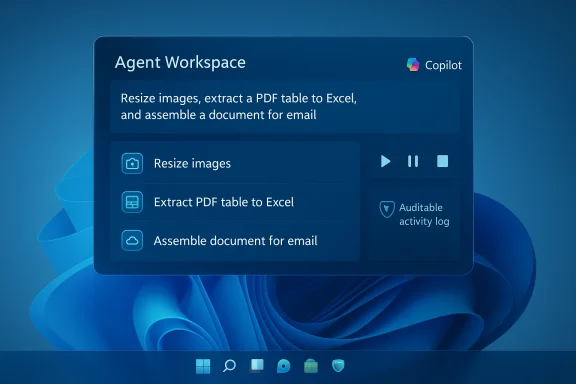
- Copilot Actions is an agent runtime integrated with Copilot on Windows that translates natural‑language instructions into sequences of UI interactions and file operations, executed inside an Agent Workspace — a separate, visible desktop session meant to contain agent activity and make it auditable.
- Agents run under dedicated, low‑privilege Windows accounts (agent accounts) with scoped access to known user folders (Documents, Desktop, Downloads, Pictures) and must request explicit permission for expanded access. Microsoft’s intent is to treat agents as first‑class principals in the OS so standard access controls, auditing, and revocation apply.
- The preview exposes a Settings path for enabling experimental agentic features: Settings > System > AI components > Agent tools > Experimental agentic features, which provisions the agent runtime and workspace when toggled on. Microsoft is rolling the Copilot app update through the Microsoft Store and gating visibility server‑side.
Release Preview build highlights (24H2 and 25H2)
The Release Preview cumulative package KB5070311 updates Insiders to:- Windows 11 build 26200.7296 (25H2) and 26100.7296 (24H2) — these are preview-quality cumulative updates packaging the December Patch Tuesday changes for testing in Release Preview.
- Key user‑visible changes include:
- Windows Studio Effects support extended to USB webcams and secondary cameras on Copilot+ PCs.
- Click to Do improvements: streamlined context menu and automatic invocation when the system detects a large image or table on screen (Copilot+ PC gating noted).
- Agent in Settings improvements: richer search results, recommended settings, and an information dialog (Copilot+ PC).
- File Explorer: updated search box placeholder to emphasize enhanced Windows Search (Copilot+ PC), broader dark mode support, context menu tweaks and assorted fixes.
- Desktop Spotlight and Drag Tray refinements (multi‑file sharing, ability to turn Drag Tray off).
- Settings enhancements for keyboard, Device Card, and About panes.
- Windows Hello Enhanced Sign‑in Security (ESS) broadened to support external fingerprint sensors.
- Share improvements, including the ability to share OneDrive files directly from other apps.
- Mobile Device settings and Quick Machine Recovery behavior changes to avoid scan loops.
- Widgets can now configure a default dashboard.
- A Canary release note also indicates a build bump to 26H1 build 28000.1199 for Canary devices via KB5068860 with no meaningful functional changes.
How Copilot Actions works in practice (examined)
Copilot Actions converts a single natural‑language instruction into a multi‑step plan executed by the agent. Example tasks demonstrated in preview coverage include:- Batch image operations (resize, deduplicate, group by date).
- Extracting tables from PDFs and exporting to Excel.
- Converting and transforming file formats.
- Assembling documents, drafting summarized reports, and attaching results to emails.
Technical building blocks Microsoft describes:
- Agent Workspace: a contained desktop instance for UI operations.
- Agent accounts: dedicated non‑interactive Windows accounts with standard ACLs.
- Scoped permissions: explicit opt‑in for folders and connectors (OAuth for cloud services).
- Signed agent binaries and platform trust to support revocation and enterprise governance.
Verification and cross‑checking of key claims
Multiple independent pieces of coverage and Insider notes corroborate Microsoft’s high‑level narrative: Copilot is moving beyond chat and vision into agentic automation, and Microsoft is intentionally staging these capabilities with opt‑in controls and containment primitives. Independent reporting referenced in the Insider materials aligns with the official messaging about opt‑in defaults and containment.A few specific claims require caution or further verification:
- Some Insider reporting lists a minimum Copilot app package version (for example, 1.25112.74) as the first package rolling out Copilot Actions; this package number appears in Insider communications but is not consistently documented in Microsoft’s public release notes, and independent public references are spotty. Treat specific build numbers in staged rollouts as provisional until verified against your device’s Microsoft Store package entry or official Microsoft release notes.
- Region exclusions (for example, EEA limitations) are mentioned in some preview notes; these are operational details that can change and should be validated against official enterprise channels if compliance is a concern.
Hardware and licensing contours: Copilot+ and on‑device NPU gating
Microsoft continues to differentiate experiences with the Copilot+ PC tier: devices with a validated Neural Processing Unit (NPU), sufficient RAM and storage, and specific platform attestations that enable richer, lower‑latency, on‑device AI (e.g., Recall, Studio Effects, Auto Super Resolution). On Copilot+ devices, many Copilot Actions features are faster or have additional capabilities (for example, Studio Effects on secondary cameras) and some Click to Do behaviors are Copilot+ gated.Practical implication: on non‑Copilot+ devices many agentic features fall back to cloud processing, with higher latency and potential privacy trade‑offs. Buyers and IT teams should verify OEM Copilot+ claims and NPU performance metrics if local inference and offline behavior are procurement criteria.
Security, privacy, and enterprise governance — what to watch
The Copilot Actions model changes the OS threat model by introducing agent principals that can operate programmatically in the UI. Microsoft’s design mitigations are sensible and necessary, but they don’t eliminate new risks:- Positive design steps:
- Opt‑in defaults, experimental toggles, and clearly visible Agent Workspace sessions.
- Agent accounts for identity separation, enabling standard ACLs and revocation.
- Scoped file access (known folders by default) and explicit OAuth connector consent for cloud services.
- Signing/revocation expectations for third‑party agents to make enterprise governance feasible.
- Remaining and emergent risks:
- Prompt injection and UI manipulation: agents that simulate clicks and keystrokes need robust defenses against adversarial UI states, deceptive overlays, and malicious web content that could trick an agent into harmful actions.
- Supply chain and signing compromise: the model relies on agent binaries being signed and revocable; a compromised signing key or supply chain could be catastrophic.
- Auditability gaps: enterprises must ensure agent‑level telemetry (start/stop, files accessed, network calls) flows into SIEMs and that incident response playbooks add agent‑specific scenarios.
- Data exfiltration paths: agents that have access to local files and cloud connectors create new channels an attacker could leverage; strict least‑privilege, token lifetimes, and monitoring are required.
Practical recommendations for users, Insiders, and admins
For Windows Insiders and enthusiasts:- Treat Copilot Actions as experimental. Use it on non‑critical files and within test folders at first.
- Keep backups and point agent permissions to copies of the data you want processed to reduce accidental damage risk.
- Monitor Agent Workspace activity, use pause/stop/takeover controls, and file feedback via Feedback Hub when behavior is surprising.
- Inventory low‑risk automation use cases (image resizing, table extraction, normalization) for initial pilots and block Experimental agentic features via policy/MDM until governance is validated.
- Ensure agent action telemetry is routed to logging and SIEM systems (action start/stop, agent identity, files used, network calls) and update incident response playbooks for agent scenarios.
- Test signing/revocation workflows and confirm how emergency disablement works in practice; require signed manifests and minimum permission requests for any organizationally authorized agents.
- Validate Copilot+ hardware claims and NPU performance with OEMs for procurement if low‑latency local inference is a requirement.
UX and developer implications
- Developers building agentic extensions should plan for UI resilience: robust selectors, graceful handling of dynamic content, and manifest‑based permission declarations that request minimal access. Agents that rely on brittle UI heuristics will be the most fragile in production.
- OEMs and silicon partners will increasingly market NPU TOPS and Copilot+ certifications; expect new device SKUs to advertise NPU capabilities (Intel Core Ultra, AMD Ryzen AI, Qualcomm Snapdragon AI variants). This will shift buyer conversations and place NPU specs alongside CPU/GPU in purchase decisions.
Notable strengths and potential risks — critical analysis
Strengths:- Real productivity gains: Copilot Actions can collapse multi‑step UI work into a single natural‑language instruction, reducing context switches and automating repetitive tasks that currently require scripting or manual labor. This lowers the barrier for non‑technical users to perform complex workflows.
- Defensible containment model: Agent Workspace, agent accounts, scoped permissions, and signing/revocation are pragmatic design choices that align with existing enterprise security models (service accounts, scheduled tasks) and make governance tractable.
- Phased, opt‑in rollout: server‑side flags, staged exposure, and Insider testing let Microsoft iterate before widescale exposure, providing time to harden the model and gather real‑world telemetry.
- Novel attack surface: agents that manipulate UI and orchestrate cloud connectors change the Windows threat model. A successful attack that leverages an agent or its credentials could automate exfiltration or destructive workflows at scale.
- Operational complexity: server‑side gating and device entitlement variability will complicate support and documentation; identical machines may exhibit different behaviors, making reproducible testing and incident triage harder.
- Fragmented experience: Copilot+ gating and regional or subscription constraints will fragment the end‑user experience, creating expectations mismatches for users and admins across different hardware, geographies, and licensing tiers.
The Release Preview builds in context — why they matter
The Release Preview packages (KB5070311 builds 26100.7296 / 26200.7296) offer a preview of quality changes headed to broadly distributed Patch Tuesday updates. They give administrators and enthusiasts a chance to:- Validate compatibility with enterprise apps and policies.
- Confirm how Copilot+‑gated features behave in your device fleet.
- Test updated behaviors in File Explorer, Settings, Windows Hello ESS, and recovery/backup paths without the risk of Dev/Beta instability.
Final assessment and next steps
Copilot Actions represents a material evolution in how Windows defines assistance: from advice to agency. The feature’s containment design — Agent Workspace and agent accounts — is a strong foundation, but turning that foundation into a secure, reliable, enterprise‑grade capability will require rigorous developer tooling, robust telemetry, proven revocation mechanics, and ironclad protections against prompt‑injection and supply‑chain attacks.For Insiders and power users, the immediate path forward is cautious exploration: update the Copilot app via the Microsoft Store, enable Experimental agentic features in Settings only after preparing test data and backups, and report behaviors through the Feedback Hub.
For IT teams, treat Copilot Actions as a pilot opportunity, not a production rollout. Require signed agent manifests, validate revocation behavior, lock down agent toggles via policy where necessary, and demand telemetry that surfaces every agent action to security tooling.
Microsoft’s staged approach — previewing agentic automation to Insiders while packaging patch quality updates in Release Preview builds — is the right engineering cadence for such a consequential change. The promise of automation is real, and the safeguards announced so far are reasonable; the decisive factor will be how well Microsoft and the ecosystem operationalize those assurances at scale.
Copilot Actions and the associated Release Preview builds are available to Windows Insiders now as an experimental preview. Proceed with care: the potential productivity dividends are significant, but so are the governance responsibilities that come with granting software the power to act autonomously on a user’s behalf.
Source: Thurrott.com Windows Insider Program Releases Copilot Actions, New Release Preview Builds
