

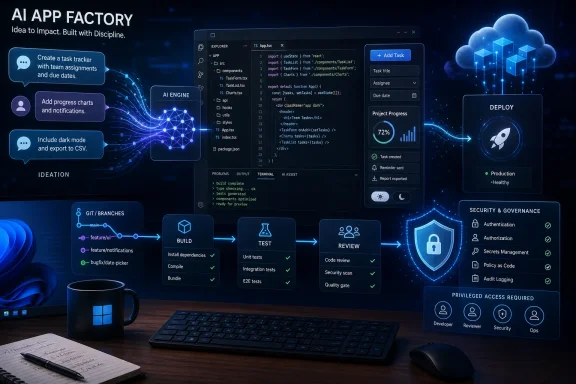
Microsoft Is Not Selling Coding Help Anymore — It Is Selling Intent
The Tom’s Guide framing gets the emotional truth right: vibe coding is less about learning syntax and more about describing desired outcomes. A user says they want a workout tracker, a class activity, a blog, or a tiny automation, and the AI produces the first draft. The change is not simply faster code generation; it is a shift in who feels entitled to make software.
That is why Microsoft is unusually well positioned here. It owns the desktop operating system, the dominant code-hosting platform, one of the default enterprise clouds, a sprawling productivity suite, and the developer tools many professionals already use every day. When Microsoft talks about Copilot as a creative layer, it is not talking about a lone chatbot floating above the web. It is talking about an assistant threaded through Windows, GitHub, Visual Studio Code, Microsoft 365, Power Platform, and Azure.
This is the difference between “AI can write code” and “AI can sit inside the workflow where software is conceived, edited, reviewed, deployed, and maintained.” The latter is much more consequential. If Microsoft can make the handoff from plain-English idea to working Windows app feel routine, it will have done for small software what Excel did for small business calculation: not eliminate specialists, but make a huge class of work newly accessible to people who never considered themselves technical.
The risk is that the metaphor is too seductive. “Vibe coding” sounds like creativity without consequence, as if code were a Canva poster or a Notion template. But software is not just an artifact; it is behavior. It stores data, takes permissions, calls APIs, handles identity, breaks under edge cases, and occasionally exposes private information to the world.
The Desktop Has Always Wanted to Be Programmable
Windows has a long history of trying to make computing programmable by ordinary people. Batch files, Visual Basic, Office macros, PowerShell, Access databases, Excel formulas, Power Automate, and low-code Power Apps all belong to the same lineage. Microsoft has spent decades teaching users that if a workflow is annoying enough, it can probably be automated.
Copilot gives that old dream a new interface. Instead of asking users to remember a syntax, record a macro, or assemble boxes in a flow designer, Microsoft can ask them to describe the outcome. That sounds like a superficial UI change until you remember how much software history has been shaped by lowering the cost of the first attempt.
Visual Basic mattered because it made Windows software feel approachable. Excel mattered because it turned business users into part-time programmers without forcing them to admit that was what they were doing. GitHub Copilot matters because it compresses the distance between “I wish this existed” and “here is something that runs.”
The bigger move is Windows itself becoming an AI development surface. Microsoft’s newer Windows AI platform work gives developers access to local models, AI APIs, ONNX-based execution, and hardware acceleration on Copilot+ PCs. That does not mean every user will become a professional developer. It means the operating system is being prepared for a world where many more applications contain AI features and many more users expect software to be malleable.
In that context, Tom’s Guide is right to compare this to a broader democratization wave. Canva did not make everyone a professional designer, but it changed what non-designers could reasonably produce. AI coding tools will not make everyone a software engineer, but they will change what non-engineers can reasonably attempt.
GitHub Copilot Is the Sharp End of the Spear
GitHub Copilot began as an autocomplete tool, and that history still shapes how many people think about it. The first Copilot experience was almost magical because it seemed to understand where a line of code was going. But line completion was only the opening act.
The more important transition is from completion to agency. Agent mode in editors such as Visual Studio Code and Visual Studio allows Copilot to perform multi-step tasks, inspect a codebase, modify files, run commands, respond to errors, and iterate. GitHub’s coding agent pushes that idea further by letting work be assigned and handled asynchronously inside the development process.
That is where “vibe coding” stops being a toy and starts becoming a workflow. A user does not merely ask for a function. They ask for a feature. The agent creates files, updates dependencies, edits tests, and explains what it did. The human becomes less typist and more reviewer, product owner, and final authority.
For experienced developers, this can feel like a productivity layer. For newcomers, it can feel like a ladder into a previously closed room. A teacher may not care whether the app uses React, WinUI, Python, or JavaScript. A small business owner may not know what an API endpoint is. A parent building a family scheduling tool may only know that the current spreadsheet is miserable. If Copilot can bridge that gap, Microsoft has expanded the addressable market for software creation.
But the sharp end cuts both ways. The less a user understands about what the AI produced, the harder it is for them to evaluate whether it is safe, maintainable, or even logically correct. A generated app that appears to work in the happy path can still mishandle authentication, leak data, fail silently, or collapse when the input differs from the example used during the prompt.
Windows Gives Copilot the One Thing Rival Coding Tools Lack: A Home Field
There are many AI coding tools, and Microsoft does not own the idea. Cursor, Replit, Claude, ChatGPT, Codex-style agents, JetBrains integrations, and open-source coding assistants all compete for developer attention. Some are faster in certain workflows, some are more adventurous, and some appeal more strongly to programmers who distrust Microsoft’s ecosystem gravity.
What Microsoft has is distribution and adjacency. Windows remains the default desktop for vast numbers of consumers, students, small businesses, enterprise workers, and IT departments. GitHub remains central to modern software collaboration. Visual Studio Code is a default editor across many language communities. Azure is already part of procurement and compliance conversations in large organizations.
That makes Microsoft’s “vibe coding ecosystem” plausible in a way that a standalone coding chatbot is not. The company can surround the user at every stage. Copilot can help imagine the app, GitHub Copilot can generate and edit the code, Windows can provide local AI capabilities and testing environments, Azure can host the backend, GitHub can manage source control and distribution, and Microsoft 365 or Teams can become the place where internal agents and automations are consumed.
This is not seamless today, and Microsoft’s product naming remains a maze. Copilot in Windows, Microsoft 365 Copilot, GitHub Copilot, Copilot Studio, Microsoft Foundry, Foundry Local, Windows AI APIs, and the older “Copilot Runtime” language are enough to confuse even technical users. Microsoft often behaves as if brand architecture is something customers should solve as homework.
Still, the strategic pattern is obvious. Microsoft wants Copilot to become the conversational front end to computing tasks, GitHub to become the workbench where software agents operate, and Azure or local Windows AI runtimes to become the execution layer. That is a big ambition, but unlike many AI visions, it maps onto assets Microsoft already controls.
The Real Breakthrough Is Not App Generation — It Is Iteration
The first version of an AI-generated app is usually the least interesting part. Anyone who has used modern coding assistants has seen the parlor trick: describe a to-do list, a dashboard, a calculator, or a landing page, and the model produces something that looks plausible. The demo works because the demo is narrow.
The hard part is iteration. “Make the sidebar collapsible.” “Add export to CSV.” “Use a darker color scheme.” “Store the data locally.” “Make this work on mobile.” “Fix the error that appeared after I updated the package.” “Explain why this function is slow.” That is where AI coding begins to feel less like autocomplete and more like collaboration.
This is also where non-programmers gain the most. Traditional software development punishes imprecision early. A vague idea must be translated into architecture, language choice, UI framework, data model, and deployment target before there is much to see. AI reverses some of that sequence. A user can get an imperfect artifact quickly, react to it, and refine it in natural language.
That is why the “intent over syntax” formulation matters. People often do not know what they want until they see the wrong thing. A coding agent that can absorb feedback and revise the artifact lets users discover requirements through conversation.
Professional developers already know this pattern under another name: prototyping. What changes is the cost. A prototype that once required a technically skilled friend, a freelancer, or several evenings of tutorials can now appear in minutes. The quality varies wildly, but the psychological barrier has collapsed.
The Small App Economy Could Get Strange
If Copilot makes software creation casual, we should expect an explosion of tiny, personal, disposable applications. Not every app needs to become a startup. Many useful programs are local, narrow, and boring: a lesson timer, a volunteer signup tracker, a custom invoice helper, a photo renaming tool, a household medication checklist, a neighborhood event page, or a workflow that stitches together files and emails.
This is where Windows still matters. The web won the distribution war for many consumer apps, but the desktop remains where people handle files, peripherals, legacy systems, local networks, and work documents. A “personal app factory” on Windows could be most useful not for launching the next Instagram, but for eliminating the weird friction that accumulates in everyday computing.
Small businesses are an obvious target. Many run on fragile combinations of spreadsheets, email threads, PDFs, and one employee who understands the sacred workbook. If Copilot can help create small internal tools without hiring a developer, the appeal is immediate. The same is true for educators, clubs, nonprofits, local governments, and households.
But this also creates a shadow IT problem at consumer scale. Enterprise IT already struggles with unsanctioned SaaS tools and rogue spreadsheets. Now imagine a wave of AI-generated internal apps built by well-meaning employees who do not understand data retention, access control, audit logging, or regulatory requirements.
Microsoft will likely argue that its ecosystem is safer precisely because identity, permissions, and governance can flow through Microsoft 365, Entra, GitHub, Azure, and Power Platform. That may be true in managed organizations. It is less true for the bedroom developer copying secrets into a prompt, the teacher pasting student data into a generated app, or the small business owner deploying a tool without understanding where the database lives.
The Security Story Is the Tax on the Dream
Every democratization wave creates new amateurs, and software is unforgiving to amateurs in ways design and writing are not. A badly designed flyer embarrasses you. A badly written internal memo confuses people. A badly built app can leak customer records, expose credentials, corrupt files, or become an attack surface.
AI-generated code compounds familiar risks. Models can produce insecure patterns, outdated library usage, weak authentication flows, poor error handling, and dependencies the user never intended to trust. They can also hallucinate APIs, misunderstand requirements, or optimize for a working demo rather than long-term maintainability.
The danger is not that AI writes uniquely bad code. Humans write plenty of bad code. The danger is scale. If the cost of generating software approaches zero, the amount of poorly reviewed software can rise dramatically. The bottleneck shifts from writing to verification, and verification is the part beginners are least equipped to perform.
This is where Microsoft’s professional tools matter. GitHub’s code scanning, secret scanning, Dependabot, branch protection, pull requests, test automation, and Copilot-assisted review features are not decorative extras. They are the guardrails that determine whether “anyone can build” becomes empowerment or a slow-motion security incident.
For Windows users, the lesson is blunt: if Copilot helps you build something that touches personal data, credentials, payments, customer information, or a business workflow, you are no longer just playing. You are operating software. That means backups, updates, permission boundaries, testing, and some understanding of what the generated code actually does.
Developers Are Not Being Replaced So Much as Repositioned
The easy headline says AI will turn everyone into a developer. The more accurate version is that AI will turn more people into software requesters, while changing what professional developers are asked to do. That distinction matters.
Writing code has never been the entirety of software engineering. The job includes understanding tradeoffs, modeling data, anticipating failure, securing systems, designing maintainable architecture, reading old code, reviewing changes, and deciding what not to build. AI can assist with many of those tasks, but it does not remove the need for judgment.
In fact, agentic coding may increase demand for review. If one developer can generate five times as many changes, someone has to decide which changes are correct. A team that floods itself with AI-generated pull requests without improving tests, observability, and review discipline has not accelerated; it has created a backlog of uncertainty.
This may create a new division of labor. Non-technical users and junior staff will generate prototypes and internal utilities. Professional developers will harden the successful ones, integrate them with real systems, define patterns, and build guardrails. IT departments will become less like gatekeepers of every request and more like maintainers of safe paved roads.
That is optimistic, but plausible. The pessimistic version is that organizations use AI as an excuse to ship more code with fewer experts, then rediscover through outages and breaches why expertise existed. The tool does not decide which future we get. Management does.
Microsoft’s Advantage Is Also Microsoft’s Temptation
Microsoft’s AI strategy has a familiar shape: bundle deeply, integrate aggressively, and make the default path run through Microsoft services. That can be convenient for users and irresistible for enterprises already paying for Microsoft subscriptions. It can also produce lock-in so gradual that customers only notice it after their workflows, data, models, repositories, identity systems, and deployment pipelines all point in the same direction.
The Copilot coding story intensifies that dynamic. If your AI assistant understands your GitHub repositories, your Azure resources, your Microsoft 365 data, your Teams conversations, your Power Platform automations, and your local Windows environment, it becomes more useful. It also becomes harder to replace.
That is why open standards and interoperability matter. Model Context Protocol support, multi-model tooling, open-source components in editors, and the ability to use different model providers are not just developer niceties. They are checks against a future where the interface to your work becomes another proprietary platform boundary.
Windows users should want Microsoft to succeed here, but not too completely. A powerful Copilot that can build, debug, and deploy across the Windows ecosystem would be genuinely useful. A Copilot that quietly makes Microsoft’s cloud, Microsoft’s identity stack, and Microsoft’s subscription tiers the unavoidable path for every serious workflow would be something else.
The tension is not new. Microsoft has spent decades balancing platform openness against ecosystem control. AI gives that old conflict a new surface area, and this time the surface area is not just file formats or browser defaults. It is user intent itself.
The Marketing Word Is Silly, but the Shift Is Real
“Vibe coding” is a ridiculous phrase, and its ridiculousness makes it easy to dismiss. It sounds unserious because some of its loudest examples are unserious: weekend projects, toy apps, half-working demos, and social media clips where a prompt becomes a product with suspicious speed. The phrase also irritates professionals because it can imply that software engineering is mostly typing, which it is not.
But bad terminology should not obscure the underlying change. Natural language is becoming a viable control surface for software creation. AI agents are becoming capable enough to make multi-file changes. Development environments are being redesigned around conversation and review. Operating systems are being prepared to host local AI capabilities. Cloud platforms are being wired for agent deployment.
That is not hype; it is product direction. The question is how much of it becomes reliable, affordable, governable, and comprehensible to ordinary users. The answer will vary by task. A personal webpage, a spreadsheet automation, or a classroom quiz app is one thing. A medical scheduling platform, payroll tool, or customer database is another.
The most useful mental model is not “AI replaces coding.” It is “AI lowers the activation energy for software.” More ideas will be tried. More prototypes will be built. More bad software will be created. More useful tools will appear in places where hiring a developer never made economic sense.
That mix is messy, but it is also how computing expands. The PC era was messy. The web was messy. Smartphones were messy. Every platform shift produces junk, scams, and overpromises alongside real productivity gains.
Where Windows Users Should Draw the Line
The practical takeaway for WindowsForum readers is not to sneer at vibe coding or surrender to it. It is to treat Copilot-generated software as powerful draft material. A generated app can be a starting point, a learning tool, a prototype, or a personal automation. It should not automatically be trusted as production software just because it runs.
For enthusiasts, this is a great moment to experiment. Windows is again becoming interesting as a place to build things, not merely consume them. For sysadmins, it is a warning that users will bring AI-made tools into the workplace whether policy is ready or not. For developers, it is a sign that the job is moving up the stack toward specification, review, security, and systems thinking.
The healthiest approach is neither panic nor boosterism. It is controlled adoption. Let people build, but make the boundary between personal tinkering and operational software explicit.
The Copilot App Factory Needs a Building Inspector
The most concrete lessons are already visible, even if the tooling keeps changing. Microsoft’s opportunity is enormous precisely because Windows sits where personal computing, enterprise work, and developer tooling overlap.
- Users should assume that AI-generated code is a draft until it has been tested, reviewed, and understood.
- Small personal tools are the safest early use case because their blast radius is limited when something breaks.
- Any app that handles identity, payments, health data, student records, customer information, or company secrets needs professional review before real use.
- IT departments should prepare policies for AI-generated internal tools instead of pretending employees will not create them.
- Developers should expect more work to arrive as prompts, prototypes, and messy AI-generated pull requests rather than clean specifications.
- Microsoft’s ecosystem will be most valuable when it provides guardrails as visible and accessible as the generation tools themselves.
The dream of an app factory in every home is not as far-fetched as it sounded a few years ago. The harder question is whether Microsoft can make that factory produce software that is safe enough, maintainable enough, and open enough to deserve a place on the Windows desktop. If Copilot becomes merely a faster way to create fragile code, the vibe will curdle quickly. If it becomes a disciplined bridge between ordinary intent and trustworthy software, Windows may be entering its most creative era since the first time users realized a PC was not just something they operated, but something they could bend to their own purposes.