

Microsoft's long-running experiment with desktop AI has moved decisively from sidebar novelty to a system-level assistant: Windows Copilot places an AI-powered helper directly on the taskbar, can read and act on screen content with user permission, integrates Bing Chat-style retrieval, and — critically — is being offered as a hybrid local/cloud platform with explicit enterprise controls and a hardware‑tier strategy for lower‑latency on‑device AI.
Windows has hosted a succession of assistants — from early Office helpers to Cortana — but the Copilot initiative signals a qualitatively different approach: instead of a single app or bot, Copilot is being positioned as an OS‑level interaction layer that can listen, see, summarize, and in some cases act across apps and files. Microsoft introduced AI integrations into the taskbar and search experience in early 2023 and expanded the Copilot concept across Microsoft 365 and Windows over the following years, culminating in a native Copilot app and an evolving set of voice, vision and action features. This shift is part product, part platform strategy. On the one hand Copilot supplies productivity shortcuts — drafting text, extracting tables, summarizing long documents — that reduce friction for common workflows. On the other hand Microsoft is building a hybrid runtime and a Copilot+ hardware tier that pairs cloud models with compact on‑device models executed on NPUs (neural processing units), a move intended to reduce latency and keep sensitive processing local where required. Expect two user experiences: broad cloud-backed Copilot features across Windows 11 machines, and richer, lower‑latency on‑device experiences on certified Copilot+ hardware.
Source: Mashable Microsoft has revealed Windows Copilot, its new AI assistant
 Background
Windows has hosted a succession of assistants — from early Office helpers to Cortana — but the Copilot initiative signals a qualitatively different approach: instead of a single app or bot, Copilot is being positioned as an OS‑level interaction layer that can listen, see, summarize, and in some cases act across apps and files. Microsoft introduced AI integrations into the taskbar and search experience in early 2023 and expanded the Copilot concept across Microsoft 365 and Windows over the following years, culminating in a native Copilot app and an evolving set of voice, vision and action features. This shift is part product, part platform strategy. On the one hand Copilot supplies productivity shortcuts — drafting text, extracting tables, summarizing long documents — that reduce friction for common workflows. On the other hand Microsoft is building a hybrid runtime and a Copilot+ hardware tier that pairs cloud models with compact on‑device models executed on NPUs (neural processing units), a move intended to reduce latency and keep sensitive processing local where required. Expect two user experiences: broad cloud-backed Copilot features across Windows 11 machines, and richer, lower‑latency on‑device experiences on certified Copilot+ hardware.What Windows Copilot actually does
Native placement and entry points
- A taskbar entry (Ask or Copilot in the taskbar) gives one‑click access to the assistant; new installs of Windows 11 and many OEM images pin Copilot to the taskbar by default. The assistant can also be launched from Start or via keyboard shortcuts (for example, Alt+Space in some builds).
- The Copilot interface supports text chat, voice, and — where available — vision inputs (screen captures, camera) so users can type, speak, or show Copilot the content they want it to act upon.
Practical productivity actions
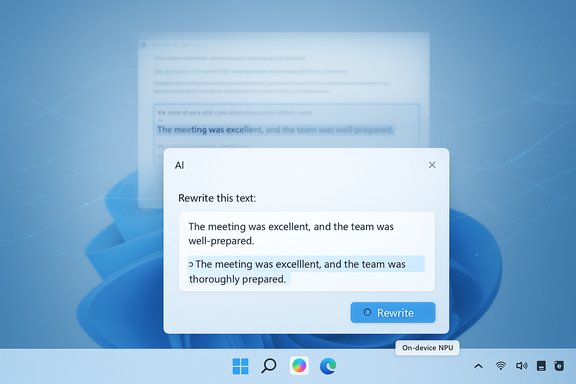
- Inline text operations such as rewriting, summarization, translation and stylistic edits (select text → ask Copilot to rewrite) reduce context‑switching between apps.
- Clipboard and Snipping Tool integration lets Copilot work with selected screenshots and copied content: drag an image into a chat, extract a table, or ask for a rewrite of selected text without opening a separate app.
- File Explorer gets contextual “AI actions” — right‑click a file to get quick image edits, document summaries, or conversions (for example, extracting a table from an image into Excel). These actions are surfaced as contextual shortcuts in the File Explorer UI.
Vision, voice and agentic actions
- Copilot Vision is permissioned, session‑bound screen awareness: when explicitly enabled it can perform OCR, summarize long documents, identify UI elements and even visually highlight where to click to guide the user. Vision does not run covertly; sessions are visible and must be allowed by the user.
- Copilot Voice introduces an opt‑in wake‑word model (for example, “Hey, Copilot”) and multi‑turn voice sessions. A small on‑device wake‑word spotter listens only when enabled; heavier speech transcription and reasoning occur in the cloud unless on-device models are available. Sessions are terminated by voice or UI controls.
- Copilot Actions is the most consequential capability: an experimental, permissioned agent framework that can execute multi‑step tasks across apps — open a set of files, extract data into a report and email it, or fill forms on the web — inside a contained, auditable workspace that shows each step. Actions are turned off by default in managed environments and are being previewed in controlled channels.
How Copilot works: architecture and the Copilot+ strategy
Windows Copilot uses a hybrid design combining local components with cloud services:- Small, optimized on‑device models (sometimes called SLMs or NPU‑run models) perform latency‑sensitive or privacy‑critical tasks where hardware supports them. These models are compact and quantized to run on NPUs found in Copilot+ machines.
- Large models and broader retrieval reasoning run in the cloud, especially for tasks requiring heavy context, cross‑document synthesis or long‑form generation. The OS routes tasks between local and cloud runtimes based on capability, user choice, and enterprise policy.
- Identity and data access are governed by tenant and user permissions: Copilot is designed to access only the data a signed‑in user already has the right to view, and Microsoft states that tenant data and prompts are not used to retrain underlying LLMs. That claim is central to corporate adoption messaging.
Privacy, compliance and Microsoft’s guarantees
Microsoft’s enterprise pitch centers on three claims:- Copilot inherits Microsoft 365 security, compliance and tenant boundaries.
- “Copilot’s large language models are not trained on your tenant data or on your prompts.”
- Prompts and data accessed by Copilot “stay within the compliance boundary,” and Copilot only reaches the data the requesting user is permitted to access.
- “Staying within the compliance boundary” is a technical and legal construct: it depends on tenant configuration, paid subscription features, and regional availability of data residency options. Organizations should audit how Copilot connectors to cloud services (OneDrive, Outlook, third‑party connectors) are configured and whether logs are retained in regions consistent with company policy.
- The claim that models are not trained on tenant data should be verified contractually for high‑risk workloads. For example, enterprises with special regulatory obligations should require explicit contractual language, SOC/ISO attestation evidence, and technical isolation guarantees before relying on Copilot to process regulated data. Public statements are important but do not replace contractual and audit checks.
Strengths: where Copilot can deliver measurable value
- Friction reduction for routine tasks. Rewriting, summarizing, extracting tables, image edits and right‑click conversions turn multi‑step chores into single interactions, saving time across knowledge‑worker workflows.
- Contextual, screen‑aware help. Copilot Vision narrows the context gap: rather than describing what’s on the screen, users can grant Copilot permission to see and act on that specific content, enabling faster problem solving and guided UI walkthroughs.
- Hybrid privacy model. The combination of local wake‑word detection, on‑device SLMs where available, and tenant‑bounded cloud routing offers a pragmatic middle ground between full cloud dependence and fully offline models. For many users and companies this balance will be persuasive.
- Platform scale and ecosystem. Copilot is embedded in Windows, Edge and Microsoft 365 — the integration surface is enormous, and that systemic presence makes Copilot a potentially high‑ROI productivity layer rather than a point tool.
Risks and the governance challenge
Data exposure and misconfiguration
The very features that make Copilot useful — screen reading, file access, cloud connectors — expand the attack surface and multiply failure modes. Misconfigured connectors or overly permissive agent actions could allow Copilot to access sensitive files or PII. Administrators must treat Copilot configuration like any other endpoint service: enforce least privilege, audit connectors, and use data loss prevention (DLP) to block risky flows.Model hallucination and business risk
Generative models can hallucinate: fabricate facts, produce plausible‑sounding but incorrect assertions, or misinterpret context. For knowledge‑intensive tasks, Copilot outputs should be treated as drafts or assisted summaries, not authoritative legal or financial advice without verification. Plugging Copilot’s output into business processes without human review introduces operational risk.Agentic actions and automation hazards
The nascent agent capability — Copilot Actions — can act on behalf of users. This is powerful but dangerous if not tightly governed. Agents that fill forms, place orders, or modify files should require explicit confirmations, audit trails, and the ability to pause or terminate actions. Enterprises must plan for rollback and forensics in case an agent performs incorrect or malicious actions.Privacy optics and user trust
Even with technical safeguards, visible features like a wake‑word or a personality avatar carry perception risks. Users and customers may be wary if Copilot is too proactive, too persistent, or appears to “remember” private details without obvious consent. Microsoft has tried to address this with opt‑in models, visible UI cues and memory controls, but governance will require clear communication and user education.Operational brittleness and quality control
Real‑world deployments have already surfaced issues: a Windows update in 2024/2025 unintentionally removed the Copilot app from some devices, illustrating how tightly integrated features can be affected by regular patching. That incident underscores the need for careful update testing and change management when Copilot becomes part of corporate images.Comparison with Cortana and prior Microsoft assistants
Cortana primarily offered voice‑search, reminders and basic productivity hooks; it was never deeply integrated with large generative models or with the kind of cross‑app agentic actions Copilot aims to provide. Copilot is built on modern LLM retrieval and synthesis patterns, is explicitly multimodal (voice + vision + actions), and is being embedded as an OS service rather than an app that offloads tasks to separate services. In short, Copilot is a strategic evolution: more capable, more intrusive, and therefore more valuable — but also more demanding of governance than Cortana ever was.Rollout, licensing and where to expect features
- Microsoft typically stages new Copilot capabilities via the Windows Insider program and controlled previews before broad release; some features are region‑locked at first. Enterprises should pilot in non‑production groups to validate policies and workflows.
- Copilot functionality intersects with Microsoft 365 licensing and with premium Copilot subscriptions; some advanced capabilities (long‑term memory, deep research, or certain connectors) may be gated by subscription tiers or enterprise agreements. Confirm entitlements and data residency options before scaling.
- Hardware matters: Copilot+ certified machines will provide faster, on‑device inference and unlock some features that are impractical on older hardware. For organizations planning large‑scale Copilot adoption, hardware refresh cycles and procurement strategy should include NPU capability as a purchasing criterion.
Practical guidance for users and IT teams
- Inventory and pilot: Start with a small, cross‑functional pilot that includes security, legal and end‑user representatives to test connectors, agent actions and DLP interactions.
- Harden defaults: Ensure Copilot features that can act (Agent actions, Vision) are disabled by default for managed devices until policies are in place.
- Enforce least privilege: Use role‑based access controls and restrict connectors (for example, Gmail/Drive) to only those users who need them.
- Monitor and audit: Enable logging, retention and alerting for Copilot accesses and agent actions; integrate logs into SIEM for anomaly detection.
- Educate users: Make the opt‑in nature and visible indicators of Copilot clear; train staff on when to verify outputs and how to revoke sessions or permissions.
- Contractual verification: For highly sensitive workloads, demand contractual assurances and compliance attestations about training practices and data handling.
Accessibility and usability considerations
Copilot’s multimodal inputs offer genuine accessibility benefits: voice and visual inputs can make tasks easier for users with mobility or vision challenges, and quick summarization aids those with cognitive load concerns. Design choices — such as respecting high‑contrast themes and providing typed fallbacks for Vision — are important for inclusion. Still, any accessibility gains depend on stable voice recognition, robust OCR and predictable behavior; language support and localization are also rollout constraints to watch.Final analysis: pragmatic adoption versus hype
Windows Copilot is a plausible step forward for desktop productivity: it compresses common workflows, brings multimodal inputs to everyday tasks, and leverages Microsoft’s scale to reach millions of users. The hybrid model — pairing local spotters and SLMs with cloud LLMs — is a pragmatic design that balances latency, cost and privacy. Corporate commitments that Copilot models are not trained on tenant data and that prompts remain within compliance boundaries are meaningful but must be validated through contracts, audits and hands‑on testing. However, this potential comes with tangible risks: hallucinations in critical workflows, agentic actions run amok, misconfigured connectors exposing data, and user‑trust erosion if Copilot behaves unexpectedly. The path to safe, high‑value Copilot adoption runs through rigorous pilot programs, conservative defaults, tight access controls and user education. For organizations willing to invest in governance and for users who treat Copilot as an assistant (not an oracle), the efficiency gains can be real. For those who skip governance, the downside can be severe.Conclusion
Windows Copilot reframes the PC as an active partner rather than a passive platform: it listens, sees and — when allowed — takes action. That makes compute more capable, but it also makes governance more consequential. The most successful early adopters will be teams that pair measured rollout with strict policy, clear user training and contractual assurance about data use. Copilot’s promise — faster drafting, instant extraction, guided navigation and hands‑free assistance — is compelling. Delivering that promise safely and sustainably will be the real test for Microsoft, enterprises and the Windows ecosystem at large.Source: Mashable Microsoft has revealed Windows Copilot, its new AI assistant
