

Microsoft’s sudden decision to pull back several high‑visibility Copilot integrations from Windows 11 marks a clear inflection point: after two years of aggressive, surface‑wide AI rollouts, the company is quietly prioritizing privacy, reliability, and administrability over ubiquity, and that shift matters for everyday users, enterprise IT teams, and the wider trajectory of desktop AI.
Microsoft’s Copilot initiative has been the centerpiece of the company’s consumer and enterprise AI story since it first appeared as a contextual assistant in Windows. Over the last 24 months the company moved fast: Copilot expanded from a task‑oriented sidebar into a system‑level presence that could listen (voice), see (screen‑aware vision), and — in restricted previews — act (agentic Actions) on behalf of users. Microsoft also introduced a hardware tier, branded Copilot+, that promised lower latency and richer on‑device experiences for PCs equipped with dedicated neural processing.
That experiment produced tangible innovation: Copilot in the taskbar, Copilot buttons inside File Explorer and Settings, early Copilot Vision features that could analyze on‑screen content, and a controversial “Recall” memory feature that ingested local context to enable photographic‑like search across a user’s past interactions. But the scale and visibility of those changes also created new problems: privacy concerns, UI clutter, edge‑case reliability failures, and a growing chorus of users and enterprise administrators asking for broader controls — or for Copilot to be removed entirely.
What’s changed now is Microsoft’s posture. Rather than continue pushing AI surfaces everywhere, product teams are pausing or rolling back specific integrations, re‑gating experimental features, and shipping tighter admin controls that let organizations and power users reclaim the desktop experience. The company has not abandoned Copilot — it’s recalibrating where and how Copilot appears.
For users, the immediate effect is reduced UI noise and better admin levers. For enterprises, it translates to clearer governance and the ability to standardize Copilot posture across devices. For the Windows ecosystem, it may mean a temporary slowdown in novelty placements, but a more durable, ultimately more useful Copilot experience when the company finishes this iteration of privacy, reliability, and manageability work.
Microsoft still controls the levers — platform investment continues, Copilot+ remains strategic, and experimental features will reappear when they meet a higher bar of value, safety, and control. The lesson for the rest of the industry is also clear: large software platforms can no longer treat AI as a free‑ranging growth vector. If AI is to be embedded into the fabric of everyday software, it must come with predictable, auditable governance, clear user consent models, and engineering discipline that treats privacy and reliability as product features in their own right.
In short: the age of “AI everywhere” on the desktop is giving way to a new phase of “AI where it helps, with control where it matters.” That is a good outcome for users — and the only sustainable path to making Copilot a credible, long‑lived companion on Windows.
Source: HotHardware Windows 11 Pulls Back Copilot Features As Microsoft Rethinks AI Strategy
 Background
Microsoft’s Copilot initiative has been the centerpiece of the company’s consumer and enterprise AI story since it first appeared as a contextual assistant in Windows. Over the last 24 months the company moved fast: Copilot expanded from a task‑oriented sidebar into a system‑level presence that could listen (voice), see (screen‑aware vision), and — in restricted previews — act (agentic Actions) on behalf of users. Microsoft also introduced a hardware tier, branded Copilot+, that promised lower latency and richer on‑device experiences for PCs equipped with dedicated neural processing.That experiment produced tangible innovation: Copilot in the taskbar, Copilot buttons inside File Explorer and Settings, early Copilot Vision features that could analyze on‑screen content, and a controversial “Recall” memory feature that ingested local context to enable photographic‑like search across a user’s past interactions. But the scale and visibility of those changes also created new problems: privacy concerns, UI clutter, edge‑case reliability failures, and a growing chorus of users and enterprise administrators asking for broader controls — or for Copilot to be removed entirely.
What’s changed now is Microsoft’s posture. Rather than continue pushing AI surfaces everywhere, product teams are pausing or rolling back specific integrations, re‑gating experimental features, and shipping tighter admin controls that let organizations and power users reclaim the desktop experience. The company has not abandoned Copilot — it’s recalibrating where and how Copilot appears.
What Microsoft is pulling back — the specifics
Microsoft’s course correction is surgical, not wholesale. The visible changes fall into three buckets: UI surface reductions, re‑gating of controversial experiments, and expanded administrative controls.UI surface reductions
- Microsoft has paused plans to add Copilot indicators and contextual buttons to several lightweight, built‑in surfaces. That includes proposed Copilot placements within the system Notification Center and deeper, persistent embeds inside the Settings app and other first‑party shells. The aim is to stop proliferating discrete Copilot buttons and micro‑nudges that many users found noisy or confusing.
- In some Insider channel builds, the Copilot button has been de‑emphasized or replaced with a link to the web‑style Copilot experience. That reflects a broader trend: instead of pressing Copilot into every toolbar and menu, Microsoft is testing fewer, clearer entry points.
Re‑gating controversial experiments
- Windows Recall — the feature that effectively builds a searchable “memory” of on‑device activity — has been re‑gated for additional review and iteration. Recall’s promise (instant retrieval of prior interactions) was compelling, but its surface area created complex privacy and UX questions that Microsoft appears unwilling to resolve through incremental patches alone.
- Other early “agentic” behaviors — Copilot Actions and Manus agent prototypes that could carry out multi‑step workflows on behalf of users — are being treated more cautiously. Microsoft is keeping the underlying platform investments but limiting public reach until telemetry, privacy safeguards, and admin controls reach a more mature threshold.
Administrative and management controls
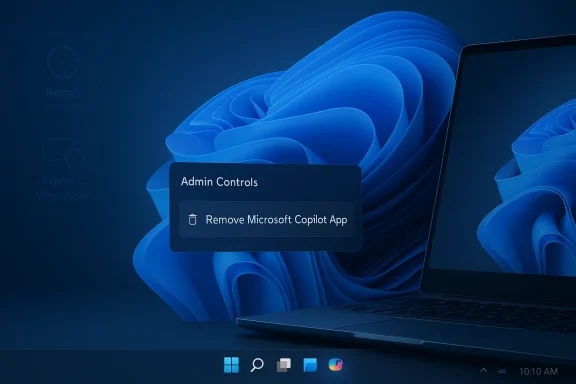
- Microsoft has added a narrowly scoped Group Policy (for Windows Insider channels initially) that can uninstall the consumer Microsoft Copilot app from managed devices under strict conditions. This is not a blanket “kill switch,” but it does offer enterprise administrators a sanctioned, one‑time cleanup mechanism to remove a consumer Copilot app that was previously auto‑provisioned on some devices.
- An explicit toggle for experimental agentic features now exists in Insider builds. This allows IT and power users to opt into or out of early automation behaviors without blocking the rest of Copilot’s capabilities.
Timeline: key events and absolute dates
- March 11, 2025 — A Patch Tuesday cumulative update (notably KB5053598 for certain builds) inadvertently removed the Copilot app from some Windows devices. That bug heightened public scrutiny and fed narratives about Copilot’s fragility and user resentment toward forced AI installs.
- October 14, 2025 — Microsoft marked the end of mainstream support for Windows 10. The company used this lifecycle milestone to reemphasize Windows 11 and its AI positioning, accelerating visibility for Copilot features in several builds and messaging cycles late in 2025.
- Late 2025 — Microsoft rolled out Windows Recall and other Copilot+ features to Copilot+ hardware tiers. The rollout was phased and privileged richer experiences for devices with dedicated neural hardware.
- Early 2026 (Insider previews and staged updates) — Microsoft introduced administrative controls (a RemoveMicrosoftCopilotApp Group Policy in certain Insider builds) and a toggle for experimental agentic features. At roughly the same time, product teams paused or rerouted work that would have added Copilot UI elements to the Notification Center and numerous lightweight system surfaces.
- March 2026 — Reports surfaced that Microsoft had quietly scaled back the “Copilot everywhere” approach, re‑gating Recall and pausing further dispersion of Copilot micro‑affordances while focusing engineering efforts on reliability and privacy hardening.
Why Microsoft is rethinking its AI strategy on Windows
Several interacting incentives drove the pivot — some technical, others political and user‑experience driven.1. User backlash and UX bloat
When features appear in many places, the net effect can be perceived as clutter or coercion. Users pushed back on multiple fronts: unwanted Copilot buttons in unexpected places, promotional prompts, and a perception that Copilot was being forced into workflows where it added little value. In consumer UI design, ubiquity is only a virtue when it maps to clear, repeatable user value; when it doesn’t, it becomes noise.2. Privacy and trust concerns
Features like Windows Recall — which index past screen content, windows, and activities to enable retrospective search — trigger legitimate privacy questions. Even when data processing is local or opt‑in, the optics of “your OS is remembering everything” require extra care. Enterprises, especially those governed by strict compliance regimes, are sensitive to any feature that could alter data residency, expose screen content to cloud services, or add unanticipated telemetry.3. Enterprise manageability
Large organizations prize predictability. The rapid proliferation of Copilot surfaces strained admin expectations: administrators wanted supported, auditable controls rather than ad‑hoc workarounds. The introduction of a supported Group Policy to remove the consumer Copilot app — albeit with constraints — is an explicit response: give IT a sanctioned lever rather than forcing manual, brittle removals.4. Reliability and engineering tradeoffs
Pushing AI into the OS makes the kernel of everyday computing dependent on complex models and cloud connections. That increases the attack surface for bugs and regressions. The March 2025 update that inadvertently removed Copilot from some machines — and previous incidents with Remote Desktop in 24H2 — underscored that aggressive surface expansion can produce brittle results that undermine trust.5. Business and competitive calculus
Microsoft has to balance three goals simultaneously: making AI a differentiator for Windows, protecting the broader Microsoft 365 and Copilot business lines, and retaining flexibility for OEM partners. Over‑entrenching Copilot in every UI element risks alienating segments of the Windows install base; it also complicates partnerships and hardware segmentation for Copilot+ devices.Technical implications — what this means under the hood
The pullback is not a retreat from AI technical investment. Rather, it changes prioritization:- Platform investment continues. Microsoft is maintaining and advancing the underlying Copilot platform, model connectors, and integrations with Microsoft 365. The company’s engineering focus appears to be moving toward robustness, telemetry interpretation, and clearer permissioning rather than new placement experiments.
- Copilot+ hardware tier remains strategic. Richer, lower‑latency experiences for Copilot+ hardware still exist as a premium plank. That hardware‑software pairing is Microsoft’s attempt to make on‑device AI work deterministic and performant, isolating the most ambitious agentic features to systems that can guarantee latency and privacy boundaries.
- Telemetry and permissioning frameworks are being hardened. Expect more explicit user prompts, clearer local processing affordances, and finer admin policy options. The experimental agentic toggle is an early example of letting administrators and power users control where automation runs.
- Legacy toggles and removal controls. The new Group Policy to remove the consumer Copilot app is a one‑time, supported mechanism useful for organizations that received provisioned Copilot installs. It does not erase deeper Copilot components tied to enterprise subscriptions or cloud services.
Risks and trade‑offs
Microsoft’s recalibration mitigates several risks but creates new trade‑offs.Risk reduction
- Privacy risk: Re‑gating Recall and limiting Copilot surfaces reduces the risk of accidental data exposure and lessens the likelihood of surprise behaviors that erode trust.
- Operational risk: Slowing the pace of UI expansion reduces the probability of regressions that cause real operational impact (bugs that remove apps, break RDP, etc.).
- Governance risk: Giving IT supported controls reduces the chance of unmanaged, unsupported Copilot footprints in regulated environments.
New trade‑offs
- Perception of retreat: Some enthusiasts and developers may read the pullback as a retreat from innovation or as evidence that Microsoft cannot effectively manage large‑scale AI changes in an OS.
- Fragmentation of experience: The tension between Copilot+ hardware and general Windows 11 means a two‑tiered user experience: richer AI on premium devices, a pared‑down presence elsewhere. That can fragment support and marketing narratives.
- Pace of value realization: Slowing surface expansion will delay when many users see emergent productivity benefits from agentic automation. Conservative rollouts mean fewer early adopters receiving full functionality.
What enterprise IT should do right now
For IT teams planning Windows refreshes, migrations, or governance policies, this moment is a clear call to action.- Inventory current Copilot footprint.
- Determine where Copilot appears across managed devices, what version is installed, and whether any provisioned Copilot app exists.
- Evaluate administrative controls in Insider builds (if you run them).
- Test the RemoveMicrosoftCopilotApp Group Policy in a controlled environment to understand scope and constraints before relying on it.
- Define an enterprise Copilot policy.
- Decide whether you will allow Copilot consumer apps on managed devices, allow Copilot features only for enterprise‑provisioned Microsoft 365 Copilot, or disallow Copilot entirely where compliance demands it.
- Harden telemetry and privacy posture.
- Audit which features access on‑device content, screen captures, or cloud connectors and document acceptable use for auditors and privacy teams.
- Prepare communication for users.
- Any change to Copilot visibility will cause questions. Prepare simple, non‑technical messaging that explains which Copilot features are allowed, why, and how users can request exceptions.
Recommendations for Microsoft (and what users should expect)
If Microsoft wants to regain trust and extract productivity from Copilot without provoking backlash, these are sensible priorities.- Design for discoverability, not ubiquity. Make Copilot entry points obvious where they deliver measurable value, and avoid duplicative placements that confuse users.
- Ship strong, visible permission dialogs. When Copilot accesses screen content or local files, present clear, contextual consent that explains what is being used and why.
- Make admin controls first‑class. Expand policy coverage beyond one‑time uninstall mechanisms to include per‑feature toggles, telemetry auditing, and enterprise whitelisting of agentic behaviors.
- Document and measure privacy guarantees. Concrete, auditable specs for how Recall-like features store, process, and purge data will reduce enterprise and consumer anxiety.
- Pilot agentic automations with clear rollback paths. When Copilot starts to act on a user’s behalf, let users preview actions, approve multi‑step sequences, and easily undo agent operations.
Strengths and potential upsides of the pullback
- Trust preservation: Prioritizing privacy and control rebuilds confidence among skeptical users and enterprises — a necessary step for long‑term adoption.
- Engineering focus: Fewer front‑end experiments free up resources to harden model safety, reliability, and performance.
- Better governance: Official admin controls reduce reliance on hacks and scripts, making institutional deployments safer and more predictable.
- Clarity of value: By forcing a discipline around where Copilot is useful, Microsoft can better identify and refine high‑impact scenarios (e.g., summarization in long workflows, contextual research assistance).
What remains uncertain or unverifiable
A few details reported in analysis and forum leak threads are still based on unnamed sources and corporate whispers. Specifically:- The exact internal directive language (if any) instructing engineering teams to “stop expanding Copilot’s surface area” is being reported by journalists and community insiders but has not been published as an official Microsoft engineering memo.
- Timing for when paused features (like Recall) will return, if at all, remains speculative. Microsoft’s public statements emphasize iteration via Insider channels rather than explicit removal or cancellation.
- The long‑term product segmentation between Copilot+ hardware and regular Windows 11 experience will evolve; how Microsoft prices and markets that differentiation is not yet finalized.
How this affects consumers and enthusiasts
If you’re an individual Windows user, the practical picture is straightforward:- Expect fewer surprise Copilot buttons appearing in casual areas of the OS.
- If Copilot was accidentally removed by a past update, Microsoft’s earlier fixes and reinstalls should have restored the app on most devices; if yours remains affected, reinstalling via the app store or consulting Microsoft Support is the reliable path.
- If you dislike Copilot, there are now clearer, documented ways for IT and savvy users to remove or restrict the consumer app in managed environments; for unmanaged home PCs, registry and script workarounds still exist but are not recommended for everyone.
Final analysis and outlook
Microsoft’s pullback is not a sign of retreat from AI. It is a classic organizational course correction: after moving fast to stake out space for AI on the desktop, the company is aligning product scope with the practical realities of deployment at scale. The change is a pragmatic response to three hard truths that AI in the OS encounters: human trust is fragile, enterprise governance is non‑negotiable, and engineering scale requires focused execution.For users, the immediate effect is reduced UI noise and better admin levers. For enterprises, it translates to clearer governance and the ability to standardize Copilot posture across devices. For the Windows ecosystem, it may mean a temporary slowdown in novelty placements, but a more durable, ultimately more useful Copilot experience when the company finishes this iteration of privacy, reliability, and manageability work.
Microsoft still controls the levers — platform investment continues, Copilot+ remains strategic, and experimental features will reappear when they meet a higher bar of value, safety, and control. The lesson for the rest of the industry is also clear: large software platforms can no longer treat AI as a free‑ranging growth vector. If AI is to be embedded into the fabric of everyday software, it must come with predictable, auditable governance, clear user consent models, and engineering discipline that treats privacy and reliability as product features in their own right.
In short: the age of “AI everywhere” on the desktop is giving way to a new phase of “AI where it helps, with control where it matters.” That is a good outcome for users — and the only sustainable path to making Copilot a credible, long‑lived companion on Windows.
Source: HotHardware Windows 11 Pulls Back Copilot Features As Microsoft Rethinks AI Strategy
