

Microsoft’s vision of a hands‑free, context‑aware Copilot baked into Windows 11 — the kind of assistant that identifies objects on screen, edits files for you, and changes system settings at voice command — has repeatedly fallen short in real‑world tests, leaving early adopters frustrated and skeptical about whether the technology is ready to deliver on its marketing promises.
Microsoft positioned Copilot as the anchor of an “AI PC” strategy: a persistent assistant available from the taskbar, with three headline features — Copilot Voice, Copilot Vision, and Copilot Actions — designed to let users interact with Windows multimodally and to allow agents to perform multi‑step tasks on their behalf. The company has staged rollouts through Insider channels and Copilot Labs, introduced a Copilot+ hardware tier with NPUs for on‑device acceleration, and emphasized opt‑in consent and safety guardrails.
Yet multiple hands‑on reviews and community threads document a consistent pattern: Copilot often misidentifies visual content, fails to verify or act on system state, offers procedural guidance instead of taking action, and behaves unpredictably when asked to manipulate local files or settings. These issues raise distinct technical and UX questions that go beyond individual bugs and expose deeper architectural tradeoffs in building an assistant that “uses a computer as well as a human.”
Why this matters: vision models see pixels, but they don’t automatically understand UI semantics, provenance, or how to prioritize on‑screen signals over file system metadata. Video compression artifacts, overlapping UI elements, and inconsistent lighting make robust object ID hard. When the assistant’s initial perception is wrong, every downstream step — from “where can I buy that nearby?” to “open the matching document” — compounds the error.
If Microsoft focuses on four priorities — perceptual robustness, state awareness, reliable automation primitives, and transparent governance — Copilot could evolve from a flashy demo into a dependable productivity layer that meaningfully changes how people interact with Windows. Until then, the technology remains promising but premature for many of the “magical” use cases showcased in marketing.
This is an inflection point for desktop AI: Copilot can either become a useful augmentation of everyday workflows or a cautionary example of hype outpacing product readiness. The path forward is clear — prioritize accuracy, context, and trustworthiness — and on those metrics, Copilot still has work to do.
Source: TECHi Why Microsoft Windows 11 Copilot AI Falls Short of Expectations: A Closer Look
 Background / Overview
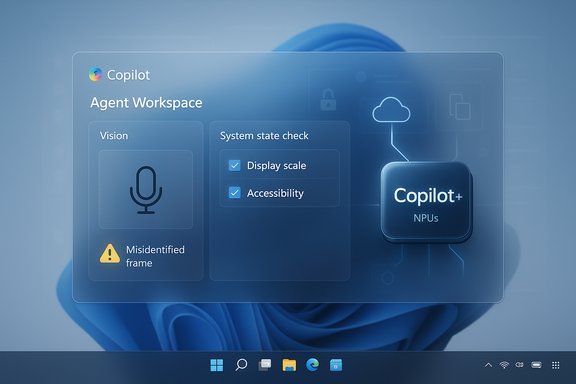
Microsoft positioned Copilot as the anchor of an “AI PC” strategy: a persistent assistant available from the taskbar, with three headline features — Copilot Voice, Copilot Vision, and Copilot Actions — designed to let users interact with Windows multimodally and to allow agents to perform multi‑step tasks on their behalf. The company has staged rollouts through Insider channels and Copilot Labs, introduced a Copilot+ hardware tier with NPUs for on‑device acceleration, and emphasized opt‑in consent and safety guardrails.Yet multiple hands‑on reviews and community threads document a consistent pattern: Copilot often misidentifies visual content, fails to verify or act on system state, offers procedural guidance instead of taking action, and behaves unpredictably when asked to manipulate local files or settings. These issues raise distinct technical and UX questions that go beyond individual bugs and expose deeper architectural tradeoffs in building an assistant that “uses a computer as well as a human.”
Why Copilot Fails to Meet Expectations
1) Vision: brittle object recognition and fragile context
A core promise in Microsoft’s demos is simple: show Copilot an image or a paused video frame and get an accurate identification. In practice, Copilot Vision has produced inconsistent and sometimes wrong answers — mislabeling consumer hardware, misreading slide text, or responding to filenames instead of visual content. In one documented test the assistant alternately guessed a first‑generation HyperX QuadCast, a Shure SM7B, or hedged with uncertainty when shown the same microphone in a YouTube frame. A clearly labeled Saturn V rocket slide was also misinterpreted, and renaming a file sometimes changed Copilot’s geographic identification of a photo — a sign that the model relied on metadata rather than pixels in some workflows.Why this matters: vision models see pixels, but they don’t automatically understand UI semantics, provenance, or how to prioritize on‑screen signals over file system metadata. Video compression artifacts, overlapping UI elements, and inconsistent lighting make robust object ID hard. When the assistant’s initial perception is wrong, every downstream step — from “where can I buy that nearby?” to “open the matching document” — compounds the error.
2) State blindness: failing to check the system before advising
A helpful assistant must inspect the current system state before proposing or performing an action. Multiple high‑visibility demos exposed that Copilot suggests changes without validating current settings — for example, recommending a different display scale while the machine is already set to that value, or guiding a user down the less appropriate Settings path instead of the Accessibility route. That pattern indicates either incomplete state‑inspection capabilities or a conservative design that avoids deep probes into system internals. Both outcomes reduce the assistant’s practical usefulness.3) Agency with weak guardrails: designed for safety, not instant utility
Microsoft intentionally limits agentic behavior. Copilot Actions is previewed in Copilot Labs for Windows Insiders and runs in a visible Agent Workspace with explicit permission prompts, step logs, and pause/stop controls. That sandboxed approach reduces risk, but it also prevents Copilot from delivering the seamless, hands‑free experiences shown in promotional clips. The tool can show what it could do without actually doing it for you in the moment — a frustrating tradeoff for users who expected agency rather than instructions.Technical Diagnosis: Architecture, Models, and UX Tradeoffs
Vision + Reasoning = integration challenge
Modern multimodal assistants combine separate subsystems: a vision model to parse pixels, an OCR/NER pipeline to extract text and named entities, and a reasoning model (LLM) to synthesize actions. Each pipeline has failure modes. When the vision system is uncertain, the LLM can hallucinate, latch onto available metadata, or escalate to a generic fallback that reads filenames or offers search links instead of practical steps.- Failure cascade: vision error → bad context → incorrect instructions or actions.
- Metadata bias: assistant sometimes privileges filenames or file metadata because those are higher‑confidence inputs than noisy visual cues. That leads to brittle behavior such as geographic misidentification that changes after renaming the file.
Action automation is brittle by nature
Automating UI interactions — clicking buttons, toggling settings, editing documents — is fragile. Differences in app UIs, localized labels, subtle timing issues, and nonstandard controls can all cause agents to misapply actions. Microsoft’s Agent Workspace design surfaces each step to address this, but it also means agents cannot be permissioned to operate confidently across the full spectrum of desktop apps without significant per‑app tuning and robust UI parsing. The result: promising automations that work in narrow, well‑tested cases but fail in general usage.Performance and resource concerns: pseudo‑native architecture
Although Copilot is marketed as integrated into Windows, many builds rely on web technologies and run inside WebView/Edge wrappers. That approach yields a heavier memory footprint — reports show Copilot consuming hundreds of megabytes and sometimes approaching a gigabyte of RAM — and it contributes to perceptions that the app is not truly native or optimized. This is compounded by the Copilot+ hardware tier messaging: some advanced experiences are optimized for devices with NPUs (40+ TOPS), leaving standard hardware to rely more heavily on cloud processing and to experience higher latency.Usability and Trust: The Human Factors That Break Adoption
Tone, personality, and perceived patronizing behavior
Beyond accuracy, reviewers note Copilot’s conversational tone sometimes feels personality‑laden without adding task value — an assistant that calls out the obvious, gives unrelated advice, or speaks with human‑like reassurance even while being wrong. Those stylistic choices erode trust when technical correctness is missing. Users judge assistants first by usefulness, then by pleasantness; Microsoft’s current balance is sometimes reversed.Privacy and the specter of “always‑on” assistants
Microsoft emphasizes opt‑in wake words and a local wake‑word “spotter” to reduce always‑listening concerns, yet the perception of a listening assistant lingers. The system sends voice data and context to cloud services for reasoning after wake activation, which raises legitimate questions about data flows, retention, and compliance for enterprise customers and privacy‑conscious consumers alike. Administrators must map Copilot’s data paths and apply policies before broad deployment.Remembering and regression: the Recall controversy
Microsoft’s earlier Recall feature — pulled and reintroduced after privacy backlash — left a residue of mistrust. Anything reminiscent of “memory” or persistent capture of user context now invokes skepticism. Even with clarified opt‑in controls, regaining user trust will take more than opt‑out toggles; transparent retention policies and strong auditability are required.Where Copilot Actually Helps Today
Despite these shortcomings, Copilot is not without value. Several practical, lower‑risk use cases already show benefits:- Summaries and drafts: Generating meeting minutes, email drafts, and content outlines are areas where Copilot reliably saves time, provided outputs are reviewed.
- Narrow local file helpers: Scoped operations like extracting tables from PDFs, deduplicating photos in a test folder, or batch renaming with explicit user supervision are feasible and useful.
- Accessibility gains: Voice input and on‑screen guidance can be valuable for users with motor impairments, where even imperfect assistance can reduce friction.
Enterprise Risks and Deployment Guidance
Compliance, data residency, and governance
Enterprises must be cautious. Agent actions that interact with internal portals, contracts, or PHI can create regulatory exposure. The uncertainty over what data gets sent to cloud models versus processed locally on Copilot+ NPUs complicates compliance mapping. Policies should be updated to control Connectors, limit agent permissions, and specify retention and logging.Operational controls for safe pilots
Recommended steps for IT teams before enabling Copilot broadly:- Audit endpoints and classify sensitive data locations.
- Pilot Copilot Actions in a sandbox with nonproduction data.
- Use group policy/MDM to restrict experimental agent features until validated.
- Integrate Agent Workspace logs into SIEM for monitoring and incident response.
- Require multi‑person approvals for agentic actions on high‑risk data.
Product and Engineering Recommendations
Improve perceptual robustness
- Invest in targeted vision datasets for consumer hardware and UI elements to reduce misidentification.
- Prefer direct pixel analysis over filename heuristics; when relying on metadata, present provenance clearly to the user.
- Add confidence bands and quick verification steps when vision certainty is low.
Close the state‑inspection gap
- Design Copilot to read and cache relevant system state (current display scale, accessibility toggles, app states) before recommending actions.
- Surface quick “I see this is already set to X — change to Y?” confirmations so users see checks, not assumptions.
Evolve agentic UX from demonstration to dependable workflows
- Expand signed, reviewable action libraries for common apps (Office, Settings, Edge) where automation can be made robust through per‑app connectors.
- Provide offline replay and rollback for multi‑step Actions so users can revert mistaken changes quickly.
Clarify native vs. web experience
- Commit to a roadmap that reduces WebView dependencies for performance‑sensitive components or explain tradeoffs transparently to users and enterprises considering Copilot+ hardware choices.
Practical Advice for Consumers and Power Users
- Treat Copilot Actions as experimental: use it on test folders before granting wider file access, and keep backups of critical data.
- Keep wake‑word features off in shared or sensitive environments and prefer push‑to‑talk where possible.
- When Copilot shows a confidence interval or a provenance note (where it got the answer), use that cue to decide whether to trust or double‑check the output.
Open Questions and Unverifiable Claims
Some details in early press and previews remain fluid and should be treated cautiously:- Specific regional rollout exclusions (for example, exact EEA gating) were mentioned in preview notes but could not be fully corroborated in public docs at the time of reporting; enterprises should verify regional availability directly with Microsoft before assuming coverage.
- Performance claims tied to specific NPU TOPS ratings are useful as procurement signals but do not substitute for device‑level testing with real workloads; marketing TOPS numbers should be validated in lab tests.
The Long View: Can Copilot Be Fixed?
The short answer is yes — but it will require disciplined engineering and product decisions that prioritize reliability over spectacle. The architectural foundation Microsoft is building (on‑device spotters, Agent Workspaces, signed agents, and connectors) shows thoughtful risk mitigation. These are the right scaffolds for agentic systems in enterprise environments. However, the current public experience leans more experimental than enterprise‑ready: useful in constrained scenarios, frustrating in broad, unsupervised use.If Microsoft focuses on four priorities — perceptual robustness, state awareness, reliable automation primitives, and transparent governance — Copilot could evolve from a flashy demo into a dependable productivity layer that meaningfully changes how people interact with Windows. Until then, the technology remains promising but premature for many of the “magical” use cases showcased in marketing.
Conclusion
Copilot’s current gap between marketing and reality is not just a matter of polish; it exposes real technical limits at the intersection of vision, language, and system control. The product’s safety‑first posture — sandboxed Actions, opt‑in voice, and permissioned Vision — is appropriate, but it paradoxically slows the arrival of the reliable automation that users expect. For consumers and enterprise buyers, the sensible approach is measured: pilot targeted scenarios, demand operational telemetry and governance, and require device‑level validation for Copilot+ claims. For Microsoft, the challenge is to turn visible promise into repeatable, auditable behavior — the difference between an assistant that occasionally amazes and one you can confidently let act on your behalf.This is an inflection point for desktop AI: Copilot can either become a useful augmentation of everyday workflows or a cautionary example of hype outpacing product readiness. The path forward is clear — prioritize accuracy, context, and trustworthiness — and on those metrics, Copilot still has work to do.
Source: TECHi Why Microsoft Windows 11 Copilot AI Falls Short of Expectations: A Closer Look
