

Microsoft’s bold promise — that you’ll “talk to your PC, have it understand you, and then be able to have magic happen” — now collides with a growing body of real‑world tests and user reports showing that Windows Copilot often falls short of that marketing vision, producing misidentifications, context failures, and an experience that can make modern PCs feel less competent than they are meant to be.
In public briefings and advertising, Microsoft positions Windows Copilot as the keystone of a new conversational, voice‑driven PC era: wake words, on‑device vision, and agentic actions that will let the assistant perform tasks across apps. The rhetoric is persuasive: voice as a “third input,” Copilot Vision that “sees” the screen, and an assistant that can execute multi‑step workflows with minimal user friction. But hands‑on tests and user reports paint a different picture. Independent impressions gathered from journalistic testing and community threads show that Copilot can misidentify objects, struggle to ground visual context, give generic or irrelevant instructions inside third‑party apps, and — critically for adoption — sometimes cannot perform the kind of simple Windows actions users expect. These problems are not isolated gripes; they are repeated patterns that raise real questions about reliability, trust, and what it means for users to perceive their computer as competent.
Source: Emegypt Engaging with Windows Copilot AI Diminishes Computer Competence Perception
 Overview
In public briefings and advertising, Microsoft positions Windows Copilot as the keystone of a new conversational, voice‑driven PC era: wake words, on‑device vision, and agentic actions that will let the assistant perform tasks across apps. The rhetoric is persuasive: voice as a “third input,” Copilot Vision that “sees” the screen, and an assistant that can execute multi‑step workflows with minimal user friction. But hands‑on tests and user reports paint a different picture. Independent impressions gathered from journalistic testing and community threads show that Copilot can misidentify objects, struggle to ground visual context, give generic or irrelevant instructions inside third‑party apps, and — critically for adoption — sometimes cannot perform the kind of simple Windows actions users expect. These problems are not isolated gripes; they are repeated patterns that raise real questions about reliability, trust, and what it means for users to perceive their computer as competent. Background: Microsoft’s Copilot Vision and Voice Ambition
Microsoft’s long‑term strategy is to turn Windows into an “agentic” surface — a system where an assistant can act on the user’s behalf, using voice triggers, on‑device vision, and cross‑app awareness. Features rolling into Windows 11 and Copilot+ hardware include:- “Hey, Copilot!” wake word and conversational voice input.
- Copilot Vision: the assistant can analyze on‑screen content or uploaded images to answer questions or execute tasks.
- Copilot Actions: agentic automations that attempt to change system settings, edit files, or perform multi‑step workflows.
What Tests and Early Reports Show
Real‑world testing: patterns of failure
Recent hands‑on reporting that exercised Copilot across a week found consistent failure modes:- Image recognition mistakes: Copilot mislabels or fails to recognize obvious objects and artifacts shown on screen, sometimes replacing precise answers with vague or wrong descriptions.
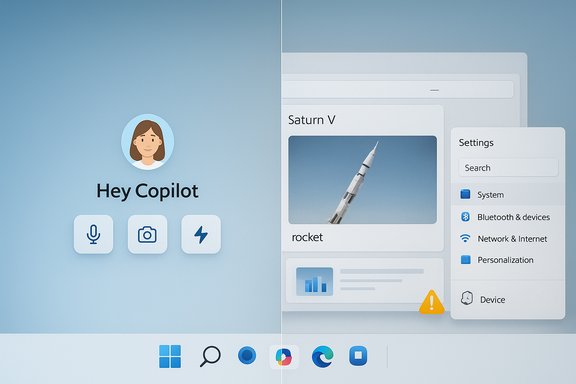
- Context blindness: In multi‑slide presentations or complex visual documents, Copilot struggles to maintain the presentation context and may not identify obvious items (for example, specific rockets in a slide).
- Weak system control: Basic Windows tasks such as toggling display settings or adjusting themes — actions users assume an integrated assistant should handle — are sometimes beyond Copilot’s execution abilities or require convoluted instructions.
- Overly verbose and generic answers: Instead of giving concise, solution‑oriented steps, Copilot sometimes replies with high‑level advice or platitudes that don’t translate to an actionable Windows solution.
Anecdotes vs. verifiable failures
Many of the most striking failures are anecdotal: forum posts describing misidentified people, rockets, or device models. Those posts are valuable signals about user experience, but some individual claims are hard to independently corroborate without access to the original prompts, images, and device configuration. When reporting on specific episodes — for example, an alleged misidentification of a Saturn V rocket or a particular microphone model — it’s important to treat them as user‑reported incidents rather than incontrovertible proof of a systemic problem. Independent journalistic testing corroborates the broader patterns (misidentification, context loss), but specific one‑off examples should be flagged as anecdotal when a reproduction is not available.Technical Limitations Driving the Experience Gap
Vision models and on‑device constraints
Copilot Vision is designed to operate with on‑device inference in some scenarios, which is positive for privacy and latency. But on‑device models have trade‑offs:- They may be smaller and less capable than cloud models, reducing accuracy on complex or ambiguous images.
- On‑device processing increases reliance on local compute and optimized model architectures — which can be brittle with unfamiliar or noisy inputs (screenshots of slides, low‑contrast images, or images containing multiple subjects).
Grounding and cross‑app context
One of Copilot’s hardest technical problems is grounding — correlating a user’s query with relevant content across multiple apps (Word, PowerPoint, browser, PDFs) and then taking correct action. Failures stem from:- Incomplete or brittle connectors between apps.
- Difficulty parsing visual context (is an object in a slide the subject, a background image, or a screenshot embedded for decoration?.
- Safety guardrails that intentionally limit aggressive agentic behavior, which can result in the assistant refusing or deferring tasks even when they would be harmless and helpful.
User Experience, Trust, and Perception of Competence
Why perception matters
Computers are tools, but they’re also social artifacts — people build mental models about what their machines can do. When an AI assistant behaves inconsistently, users update their trust downward and may generalize that the entire machine is less competent. That has two practical consequences:- Behavioral change: users stop relying on the assistant and revert to older workflows, reducing the intended productivity gains.
- Reputational cost: marketing claims about revolutionary voice‑driven PCs are undermined by everyday experiences, making future feature launches harder to sell.
Anthropomorphism and the friendliness problem
Microsoft’s designs — including a more conversational tone and friendly “avatar” experiments — can heighten anthropomorphism. A friendly voice or avatar increases perceived competence and trust, even when the underlying output is unreliable. That dynamic is risky: people may accept incorrect guidance from a warm‑sounding agent that they would challenge from a plain text dialog. Designers need to balance familiarity with explicit cues about uncertainty and provenance.Safety guardrails and the “usefulness gap”
Microsoft intentionally enforces safety constraints on Copilot (for instance, restricting certain politically sensitive queries and tightening how Recall works after privacy backlash). Those constraints aim to reduce harm but can widen a perceived usefulness gap: the assistant appears safe but not particularly useful for complex or nuanced queries. Users notice and comment; in some cases this leads to friction and even distrust of the entire AI rollout.Cognitive Effects: Does Using Copilot Change How People Think?
A broader, parallel debate concerns the cognitive impacts of habitual AI assistance. Recent research and industry studies suggest that routine delegation of tasks to AI can change task engagement and reduce practice opportunities for critical skills. The concerns are:- Cognitive offloading: users may store less procedural knowledge and rely more on the assistant for recall and reasoning, which can reduce retention over time.
- Skill atrophy: repeated delegation of problem‑solving tasks may erode the ability to handle exceptions when the AI is unavailable or wrong.
Accessibility and the Upside of Copilot
It’s important to balance critique with the clear accessibility benefits that a well‑implemented Copilot can bring. Voice and vision features can lower barriers for users with mobility or visual impairments:- Voice input can make complex workflows accessible to users with limited fine motor control.
- Visual descriptions can turn dense slides, charts, or UI elements into readable, navigable content.
- Learn Live‑style scaffolding can be repurposed to coach users rather than just hand them answers.
Enterprise and IT Implications
For IT leaders and Windows administrators, Copilot’s integration has operational and governance consequences:- Policy controls: enterprises must inventory where Copilot is enabled, which users have access, and set connector policies to limit data surfaces a model can access.
- Auditability: when an assistant can change system settings or act on behalf of a user, comprehensive logs and audit trails are essential for compliance.
- Testing and pilots: organizations should deploy Copilot features in controlled cohorts, measuring leakage, hallucination rates, and task outcomes before broad rollout.
Recommendations: What Users, Administrators, and Microsoft Should Do
For everyday Windows users
- Treat Copilot responses as drafts, not truth. Always verify critical outputs.
- Use staged workflows: draft unaided, then apply Copilot for refinement.
- If worried about privacy, review Recall, memory, and connector settings; disable long‑term memory and opt out of Recall unless you need them.
For IT and enterprise admins
- Inventory Copilot usage and enablement across your tenancy.
- Pilot features in small cohorts and gather empirical metrics on accuracy and error correction load.
- Implement strict connector and data residency policies before enabling agentic actions at scale.
For Microsoft and AI product teams
- Prioritize deterministic grounding between apps and make provenance explicit: show sources and confidence levels.
- Ship conservative defaults and clear opt‑in choices for features that collect or index user context (Recall, memory).
- Invest in on‑device model improvements, feedback channels, and developer APIs that enable controlled extensibility without sacrificing safety.
Strengths and Potential
- Copilot brings a compelling, future‑oriented vision: natural language and vision as primary inputs could dramatically reduce friction for many tasks.
- On‑device inference and privacy‑first design choices (where present) are strong differentiators that respond to regulatory and consumer privacy concerns.
- Accessibility potential is real: when the models are accurate, they will make Windows more accessible to a broader set of users.
Risks and Failure Modes
- Trust erosion: frequent, visible errors erode user trust faster than they can be rebuilt.
- Perceived incompetence: inconsistent agentic behavior leads users to downgrade the perceived competence of their PC as a whole.
- Cognitive offload: routine, uncalibrated use risks reducing users’ procedural knowledge and critical problem‑solving practice.
- Enterprise exposure: agentic actions executed without rigorous governance can create compliance or security incidents.
A Measured Outlook
The present moment is a classic technology inflection point: ambitious product goals meet the realities of messy inputs, model limitations, and human expectations. Copilot’s vision for conversational Windows is not dead; it’s early. The path forward requires iterations in three dimensions:- Accuracy: better vision and grounding models, more robust connectors.
- Design: UI that communicates uncertainty, provenance, and how to correct the assistant.
- Governance: enterprise controls, privacy defaults, and measurable safety metrics.
Conclusion
Windows Copilot’s marketing shows an elegant dream: a PC that listens, sees, and acts like a reliable partner. The reality today is uneven. Real‑world testing and community reports reveal a system that can be helpful for routine drafting tasks yet stumbles in vision, context, and agentic Windows actions — a combination that risks undermining user trust and altering how people perceive their machine’s competence. The solution is not to abandon the vision but to rebuild its foundations: more accurate models, transparent UX, conservative defaults, and enterprise‑grade governance. For users, that means treating Copilot as a helpful assistant rather than an infallible expert; for Microsoft, it means the hard work of engineering reliability and trust into the next generation of conversational PCs.Source: Emegypt Engaging with Windows Copilot AI Diminishes Computer Competence Perception
