

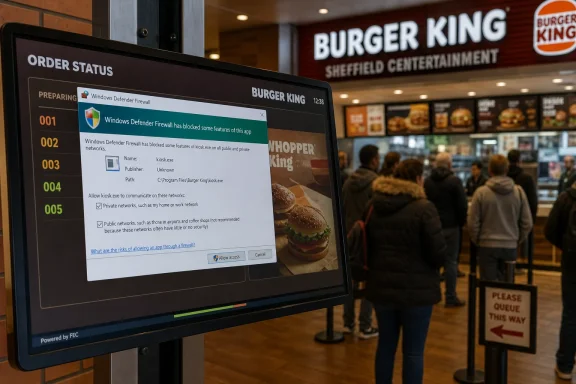
A Burger King order-status screen in Sheffield’s Centertainment leisure complex was photographed displaying a Windows Defender Firewall prompt on May 19, 2026, after a foreground application attempted network communication that Windows did not already trust. The gag writes itself, and The Register duly wrote it: Windows stood between customers and “greasy delight.” But the more interesting story is not that a fast-food screen borked in public. It is that two decades of Windows security design still collide, messily and visibly, with the thinly managed computers now embedded in everyday commerce.
The best public Windows failures are never catastrophic. They are mundane enough to be legible: a dialog box over a menu board, a taskbar beneath an airport sign, a Windows Update warning on a billboard. They remind everyone that behind the polished rectangle sits a PC, and behind the PC sits an operating system built for general-purpose work now conscripted into retail theater.
This Sheffield incident appears to be exactly that kind of failure. The screen was not a fryer controller, a payment terminal, or the restaurant’s core ordering system, at least from what is visible. It was a customer-facing progress display whose job was to transform kitchen logistics into reassurance: your burger is not lost, your number is moving, your wait has meaning.
Then Windows Defender Firewall stepped into the frame. That single pop-up punctured the illusion. The system was no longer a seamless restaurant appliance; it was a Windows endpoint, probably running a kiosk or display application, and some process had tried to accept or initiate network behavior that triggered a permission prompt.
The joke works because the message is so starkly out of place. A customer waiting for a Whopper is suddenly shown the machinery of host-based network filtering. It is not dangerous in itself. It is not even unusual. But it is the sort of operational rough edge that tells IT pros a lot about the estate behind the counter.
Microsoft’s answer, after the worm-ridden early 2000s, was Windows XP Service Pack 2. Released to manufacturers in August 2004, SP2 was not merely a bundle of fixes. It was a public admission that Windows needed safer defaults, stronger network posture, and user-visible warnings even if they broke the old “just make it work” model.
Before that shift, Windows included the Internet Connection Firewall, but it was limited and not front-and-center for ordinary users. SP2 renamed and elevated the firewall, enabled it by default, and made network access a policy question rather than a hopeful assumption. That decision created friction, but it also changed the culture of Windows administration.
Patch Tuesday belongs to the same era of normalization. What had once been an ad hoc patching exercise became a rhythm, then a ritual, then a permanent workload. An entire generation of admins learned Windows as a system that must be continually fed updates, exceptions, baselines, and compensating controls.
That is why a firewall prompt on a restaurant display is more than slapstick. It is a tiny fossil of Microsoft’s security turn: the moment Windows stopped pretending the network was benign and started asking, sometimes clumsily, whether software should really be allowed to talk.
That does not mean the application was malicious. It could have been a legitimate order display service, a local sync component, a kitchen display client, a remote-support agent, or a helper process after an update changed its path or signature. Windows firewall rules are often tied to executable paths and profiles, so even a mundane application update can make yesterday’s allow rule irrelevant.
The customer-facing problem is not the blocked packet. It is the unhandled prompt. A kiosk screen should not expose operating-system decision points to the public, especially when no one in the queue can act on them and the staff may not have rights, time, or training to resolve them.
This is the difference between security working and security being operationalized. The firewall did what it was designed to do: it stopped an unapproved network path and asked for a decision. The deployment failed to ensure that the decision had already been made by policy before the screen went live.
For home users, a prompt can be education. For enterprise endpoints, a prompt is often a change-control failure. For a restaurant kiosk, it is dead air with a Windows logo.
That is not inherently bad. General-purpose platforms are flexible, well-understood, and supportable. They can run commercial applications, accept standard monitoring agents, join domains or cloud management, and be replaced without custom embedded engineering.
The downside is that a general-purpose platform keeps behaving like one unless it is aggressively shaped into an appliance. Windows will display notifications. Applications will update. Network profiles may change. Agents will expire certificates. A driver dialog will find the one moment when a screen is most public and seize the foreground like a stage actor.
Good kiosk design is therefore not about pretending Windows is not there. It is about controlling every visible and interactive surface so the user sees the business function, not the operating system. That means assigned access or shell replacement where appropriate, policy-managed firewall rules, suppressed consumer prompts, monitored application health, and remote remediation that does not rely on someone plugging in a keyboard while customers stare.
The Sheffield screen is funny because it briefly forgot its role. It stopped being a restaurant status board and became a Windows session with a branding problem.
That tension matters because firewall prompts are about authority. Who decides that a process may accept inbound traffic? The application vendor? The franchisee’s IT contractor? The corporate endpoint team? The remote-support provider? The person who imaged the machine three years ago?
When those ownership lines are clean, the rule is created centrally and deployed before the app needs it. When they are fuzzy, Windows asks the person in front of the screen. In this case, that “person” was a queue of hungry customers who could read the warning but could not meaningfully respond.
There is also a profile problem. Windows Firewall applies different behavior depending on whether the system sees the network as domain, private, or public. A misclassified network, a broken domain-detection moment, or a reconfigured local segment can change which rules apply. A display that worked yesterday can become noisy today without any visible hardware failure.
This is why admins dislike one-off fixes. Clicking “Allow access” at the screen may silence the symptom, but it may also create local state no one can audit. The professional fix is boring: identify the process, validate the expected traffic, create the least-permissive rule, deploy it through management, and confirm the kiosk shell cannot expose the next prompt.
That is why the genre resonates with WindowsForum readers. We have all seen a machine that was “temporarily” deployed, a signage PC joined to the wrong OU, a retail endpoint with consumer defaults, or a kiosk that depends on a single autostart entry and hope. Public borks compress years of IT compromise into one photograph.
They also expose the gap between corporate brand design and endpoint reality. A fast-food chain can spend millions refining logos, typefaces, app flows, and in-store screens. But if a Windows dialog can appear over the experience, the brand inherits the visual language of Microsoft’s security stack for as long as the prompt sits there.
That is not Microsoft’s fault in the narrow sense. Windows is doing what a desktop operating system does. But it is a reminder that when companies build public experiences on desktop foundations, they must either manage the desktop fully or accept that it will occasionally introduce itself.
The burger screen is not embarrassing because Windows Defender Firewall exists. It is embarrassing because the customer-facing environment did not expect Windows Defender Firewall to speak.
The defaults are conservative where they should be. Inbound traffic is blocked unless solicited or explicitly allowed; outbound traffic is generally permitted unless a rule says otherwise. Public networks get stricter treatment than trusted private or domain networks. Administrators can centrally manage the policy through Group Policy, MDM, Intune, Defender for Business, or other tooling.
The public prompt sits at the boundary between that model and ordinary usability. It exists because Windows cannot always know whether an application’s network behavior is expected. On a personal PC, asking the user may be the least bad answer. On a managed endpoint, asking the user is often proof that management has not reached far enough.
That distinction is easy to forget because the same Windows UI appears in both settings. A prompt on a gamer’s desktop, a school laptop, a hospital workstation, and a burger queue display may look similar. Operationally, they mean different things.
In a public kiosk, trust should not be negotiated at runtime. It should be precomputed, documented, and enforced before customers ever see the screen. The fact that the firewall warning appeared does not mean the system was insecure; it means the trust decision escaped the back office.
The risk lies elsewhere. Public prompts suggest endpoints that may not be locked down tightly enough for their role. If customers can see a dialog, what else can reach the foreground? If staff cannot dismiss it, who monitors the screen state? If the application needs a firewall exception, was that exception reviewed or discovered only when the prompt appeared?
These are not dramatic questions, but retail security is built from undramatic answers. The boring controls matter: local admin restrictions, application allowlisting, patch cadence, network segmentation, log collection, remote management, and a tested recovery path. None of those would make the Register photo less funny, but all of them would make it less likely.
There is also a resilience angle. A blocked inbound connection might merely affect remote monitoring or local sync. Or it could interfere with a display’s ability to receive order updates, forcing staff and customers back into manual confusion. In retail, availability and presentation are part of the security story because a broken public system creates pressure for shortcuts.
The correct response is not panic. It is inventory. Which process triggered the prompt? Which profile was active? Which rule was missing? Did an update change the executable path? Did a policy fail to apply? The photograph is the punchline; the event log is the article.
The industry has tools for this. Assigned Access can constrain the user experience. Shell Launcher can replace Explorer in specialized editions and scenarios. Group Policy and MDM can suppress or redirect many interactive surfaces. Defender and firewall policies can be centrally applied. Monitoring can alert when the foreground window changes, the app crashes, or the device falls out of compliance.
The hard part is not the technology. It is sustaining ownership across the life of the device. A screen that is carefully built on day one can drift after six months of app updates, network changes, vendor maintenance, and emergency fixes. Kiosk discipline is not an imaging task; it is a lifecycle commitment.
Retail environments make that harder because the machines are physically accessible, operationally critical, and often maintained by rotating staff who are not IT specialists. The best design assumes no one on site should have to understand a firewall prompt. If human intervention is required, the system has already failed at being an appliance.
That is the deeper lesson behind the fast-food bork. Public Windows systems should not merely be functional. They should be quiet.
Those barriers are now so normal that we mostly notice them only when they appear in the wrong place. The firewall prompt is a relic of hard-won security pragmatism, not a design accident. It is also a reminder that security features designed for interactive users need careful handling when the “user” is a wall-mounted display.
The irony is that Microsoft’s defensive posture has largely won the argument. Nobody serious wants Windows to return to the days when listening services and permissive defaults ruled the consumer desktop. The modern complaint is not that Windows blocks things. It is that organizations still deploy Windows into public roles without fully deciding what should be blocked, allowed, hidden, or automated.
That is a mature problem, but not a solved one. The same flexibility that makes Windows attractive for signage and retail systems also lets unplanned UI escape into public view. Every bork is a reminder that the desktop is always waiting underneath.
The next generation of public Windows endpoints will be more cloud-managed, more locked down, and more observable, but they will still run into the same old truth: security defaults are only as polished as the operational model around them. If restaurants, retailers, airports, and advertisers want computers to disappear into the scenery, they must manage them like infrastructure rather than props. Otherwise, every so often, Windows will step forward, clear its throat, and ask the room whether this app should be allowed through the firewall.
 The Burger Screen Is Funny Because the Failure Is Familiar
The best public Windows failures are never catastrophic. They are mundane enough to be legible: a dialog box over a menu board, a taskbar beneath an airport sign, a Windows Update warning on a billboard. They remind everyone that behind the polished rectangle sits a PC, and behind the PC sits an operating system built for general-purpose work now conscripted into retail theater.This Sheffield incident appears to be exactly that kind of failure. The screen was not a fryer controller, a payment terminal, or the restaurant’s core ordering system, at least from what is visible. It was a customer-facing progress display whose job was to transform kitchen logistics into reassurance: your burger is not lost, your number is moving, your wait has meaning.
Then Windows Defender Firewall stepped into the frame. That single pop-up punctured the illusion. The system was no longer a seamless restaurant appliance; it was a Windows endpoint, probably running a kiosk or display application, and some process had tried to accept or initiate network behavior that triggered a permission prompt.
The joke works because the message is so starkly out of place. A customer waiting for a Whopper is suddenly shown the machinery of host-based network filtering. It is not dangerous in itself. It is not even unusual. But it is the sort of operational rough edge that tells IT pros a lot about the estate behind the counter.
Windows Security Won the Desktop by Becoming Annoying First
The firewall prompt on that burger screen is descended from one of the most important course corrections in Microsoft’s history. Windows XP originally shipped into a world where always-on broadband was spreading faster than consumer security literacy. The internet had become hostile, but Windows still behaved too much like a friendly LAN citizen.Microsoft’s answer, after the worm-ridden early 2000s, was Windows XP Service Pack 2. Released to manufacturers in August 2004, SP2 was not merely a bundle of fixes. It was a public admission that Windows needed safer defaults, stronger network posture, and user-visible warnings even if they broke the old “just make it work” model.
Before that shift, Windows included the Internet Connection Firewall, but it was limited and not front-and-center for ordinary users. SP2 renamed and elevated the firewall, enabled it by default, and made network access a policy question rather than a hopeful assumption. That decision created friction, but it also changed the culture of Windows administration.
Patch Tuesday belongs to the same era of normalization. What had once been an ad hoc patching exercise became a rhythm, then a ritual, then a permanent workload. An entire generation of admins learned Windows as a system that must be continually fed updates, exceptions, baselines, and compensating controls.
That is why a firewall prompt on a restaurant display is more than slapstick. It is a tiny fossil of Microsoft’s security turn: the moment Windows stopped pretending the network was benign and started asking, sometimes clumsily, whether software should really be allowed to talk.
The Prompt Is a Symptom, Not the Disease
A Windows Defender Firewall dialog usually appears when an application listens for inbound traffic and no existing allow rule covers it. In a normal desktop session, that can be a one-time nuisance. In a managed kiosk environment, it is a sign that the image, policy, application packaging, or deployment process did not fully anticipate runtime behavior.That does not mean the application was malicious. It could have been a legitimate order display service, a local sync component, a kitchen display client, a remote-support agent, or a helper process after an update changed its path or signature. Windows firewall rules are often tied to executable paths and profiles, so even a mundane application update can make yesterday’s allow rule irrelevant.
The customer-facing problem is not the blocked packet. It is the unhandled prompt. A kiosk screen should not expose operating-system decision points to the public, especially when no one in the queue can act on them and the staff may not have rights, time, or training to resolve them.
This is the difference between security working and security being operationalized. The firewall did what it was designed to do: it stopped an unapproved network path and asked for a decision. The deployment failed to ensure that the decision had already been made by policy before the screen went live.
For home users, a prompt can be education. For enterprise endpoints, a prompt is often a change-control failure. For a restaurant kiosk, it is dead air with a Windows logo.
Retail IT Runs on Computers That Pretend Not to Be Computers
The fast-food industry is full of Windows systems because Windows is everywhere software vendors need drivers, peripherals, remote support, and cheap hardware compatibility. Kitchen displays, order-status boards, menu controllers, back-office PCs, point-of-sale adjacent systems, signage players, and queue screens often share more DNA with office desktops than the glossy enclosure suggests.That is not inherently bad. General-purpose platforms are flexible, well-understood, and supportable. They can run commercial applications, accept standard monitoring agents, join domains or cloud management, and be replaced without custom embedded engineering.
The downside is that a general-purpose platform keeps behaving like one unless it is aggressively shaped into an appliance. Windows will display notifications. Applications will update. Network profiles may change. Agents will expire certificates. A driver dialog will find the one moment when a screen is most public and seize the foreground like a stage actor.
Good kiosk design is therefore not about pretending Windows is not there. It is about controlling every visible and interactive surface so the user sees the business function, not the operating system. That means assigned access or shell replacement where appropriate, policy-managed firewall rules, suppressed consumer prompts, monitored application health, and remote remediation that does not rely on someone plugging in a keyboard while customers stare.
The Sheffield screen is funny because it briefly forgot its role. It stopped being a restaurant status board and became a Windows session with a branding problem.
Security Defaults Collide With Franchise Reality
Large chains love standardization in theory. In practice, retail IT is an ecosystem of corporate platforms, franchise operators, regional integrators, hardware refresh cycles, vendor support contracts, and software that may be updated by someone who is not responsible for the physical screen. The result is a fleet that looks standardized from the customer side and heterogeneous from the admin side.That tension matters because firewall prompts are about authority. Who decides that a process may accept inbound traffic? The application vendor? The franchisee’s IT contractor? The corporate endpoint team? The remote-support provider? The person who imaged the machine three years ago?
When those ownership lines are clean, the rule is created centrally and deployed before the app needs it. When they are fuzzy, Windows asks the person in front of the screen. In this case, that “person” was a queue of hungry customers who could read the warning but could not meaningfully respond.
There is also a profile problem. Windows Firewall applies different behavior depending on whether the system sees the network as domain, private, or public. A misclassified network, a broken domain-detection moment, or a reconfigured local segment can change which rules apply. A display that worked yesterday can become noisy today without any visible hardware failure.
This is why admins dislike one-off fixes. Clicking “Allow access” at the screen may silence the symptom, but it may also create local state no one can audit. The professional fix is boring: identify the process, validate the expected traffic, create the least-permissive rule, deploy it through management, and confirm the kiosk shell cannot expose the next prompt.
The Register’s Bork Column Keeps Catching the Same Industry Habit
The Register’s long-running “Bork” sightings endure because they document a peculiar kind of digital infrastructure leak. They are not usually stories of deep technical collapse. They are stories of context collapse: a private admin surface appears in a public space, and everyone suddenly sees the scaffolding.That is why the genre resonates with WindowsForum readers. We have all seen a machine that was “temporarily” deployed, a signage PC joined to the wrong OU, a retail endpoint with consumer defaults, or a kiosk that depends on a single autostart entry and hope. Public borks compress years of IT compromise into one photograph.
They also expose the gap between corporate brand design and endpoint reality. A fast-food chain can spend millions refining logos, typefaces, app flows, and in-store screens. But if a Windows dialog can appear over the experience, the brand inherits the visual language of Microsoft’s security stack for as long as the prompt sits there.
That is not Microsoft’s fault in the narrow sense. Windows is doing what a desktop operating system does. But it is a reminder that when companies build public experiences on desktop foundations, they must either manage the desktop fully or accept that it will occasionally introduce itself.
The burger screen is not embarrassing because Windows Defender Firewall exists. It is embarrassing because the customer-facing environment did not expect Windows Defender Firewall to speak.
The Firewall Has Become Part of the User Interface of Trust
Microsoft’s current firewall model is straightforward in principle. The firewall filters inbound and outbound traffic, ships as part of Windows, and is enabled by default. It uses rules, profiles, and application identity to determine what should be allowed or blocked.The defaults are conservative where they should be. Inbound traffic is blocked unless solicited or explicitly allowed; outbound traffic is generally permitted unless a rule says otherwise. Public networks get stricter treatment than trusted private or domain networks. Administrators can centrally manage the policy through Group Policy, MDM, Intune, Defender for Business, or other tooling.
The public prompt sits at the boundary between that model and ordinary usability. It exists because Windows cannot always know whether an application’s network behavior is expected. On a personal PC, asking the user may be the least bad answer. On a managed endpoint, asking the user is often proof that management has not reached far enough.
That distinction is easy to forget because the same Windows UI appears in both settings. A prompt on a gamer’s desktop, a school laptop, a hospital workstation, and a burger queue display may look similar. Operationally, they mean different things.
In a public kiosk, trust should not be negotiated at runtime. It should be precomputed, documented, and enforced before customers ever see the screen. The fact that the firewall warning appeared does not mean the system was insecure; it means the trust decision escaped the back office.
The Practical Risk Is Small, but the Signal Is Real
It is tempting to overstate incidents like this. A firewall prompt on an order-status display does not prove a breach, does not show customer data, and does not imply the restaurant’s payment systems are exposed. A display application trying to communicate across a LAN is mundane.The risk lies elsewhere. Public prompts suggest endpoints that may not be locked down tightly enough for their role. If customers can see a dialog, what else can reach the foreground? If staff cannot dismiss it, who monitors the screen state? If the application needs a firewall exception, was that exception reviewed or discovered only when the prompt appeared?
These are not dramatic questions, but retail security is built from undramatic answers. The boring controls matter: local admin restrictions, application allowlisting, patch cadence, network segmentation, log collection, remote management, and a tested recovery path. None of those would make the Register photo less funny, but all of them would make it less likely.
There is also a resilience angle. A blocked inbound connection might merely affect remote monitoring or local sync. Or it could interfere with a display’s ability to receive order updates, forcing staff and customers back into manual confusion. In retail, availability and presentation are part of the security story because a broken public system creates pressure for shortcuts.
The correct response is not panic. It is inventory. Which process triggered the prompt? Which profile was active? Which rule was missing? Did an update change the executable path? Did a policy fail to apply? The photograph is the punchline; the event log is the article.
Kiosk Windows Needs Less Desktop and More Discipline
Windows can be a perfectly respectable kiosk platform, but only when treated as a managed appliance substrate rather than a cheap screen driver. That means the endpoint team must remove surprise from the equation. Prompts, taskbars, notifications, browser chrome, update restarts, and expired-agent pop-ups are all forms of surprise.The industry has tools for this. Assigned Access can constrain the user experience. Shell Launcher can replace Explorer in specialized editions and scenarios. Group Policy and MDM can suppress or redirect many interactive surfaces. Defender and firewall policies can be centrally applied. Monitoring can alert when the foreground window changes, the app crashes, or the device falls out of compliance.
The hard part is not the technology. It is sustaining ownership across the life of the device. A screen that is carefully built on day one can drift after six months of app updates, network changes, vendor maintenance, and emergency fixes. Kiosk discipline is not an imaging task; it is a lifecycle commitment.
Retail environments make that harder because the machines are physically accessible, operationally critical, and often maintained by rotating staff who are not IT specialists. The best design assumes no one on site should have to understand a firewall prompt. If human intervention is required, the system has already failed at being an appliance.
That is the deeper lesson behind the fast-food bork. Public Windows systems should not merely be functional. They should be quiet.
A Tiny Pop-Up Carries Two Decades of Windows History
There is a straight line from XP-era worms to the Sheffield burger screen. In the early 2000s, Windows was forced to become more defensive by default because the internet punished openness at scale. Microsoft added barriers, warnings, and structured patching because the alternative was worse.Those barriers are now so normal that we mostly notice them only when they appear in the wrong place. The firewall prompt is a relic of hard-won security pragmatism, not a design accident. It is also a reminder that security features designed for interactive users need careful handling when the “user” is a wall-mounted display.
The irony is that Microsoft’s defensive posture has largely won the argument. Nobody serious wants Windows to return to the days when listening services and permissive defaults ruled the consumer desktop. The modern complaint is not that Windows blocks things. It is that organizations still deploy Windows into public roles without fully deciding what should be blocked, allowed, hidden, or automated.
That is a mature problem, but not a solved one. The same flexibility that makes Windows attractive for signage and retail systems also lets unplanned UI escape into public view. Every bork is a reminder that the desktop is always waiting underneath.
The Whopper-Sized Lessons Hiding in the Dialog Box
The incident is minor, but it is useful because it turns abstract endpoint hygiene into a picture anyone can understand. A customer-facing Windows machine should not ask customers or crew to make security decisions. It should arrive with those decisions already encoded.- The firewall prompt most likely indicates a missing, changed, or misapplied rule rather than a dramatic security incident.
- A kiosk or display endpoint should receive centrally managed firewall policy instead of relying on runtime prompts.
- Public-facing Windows systems need shells and policies that prevent operating-system dialogs from interrupting the business experience.
- Application updates can break firewall assumptions when rules depend on executable paths, profiles, or locally created exceptions.
- Retail IT teams should treat visible borks as monitoring failures as much as user-interface failures.
- The safest fix is to validate the application’s traffic and deploy a least-permissive rule, not to click “Allow” and move on.
The next generation of public Windows endpoints will be more cloud-managed, more locked down, and more observable, but they will still run into the same old truth: security defaults are only as polished as the operational model around them. If restaurants, retailers, airports, and advertisers want computers to disappear into the scenery, they must manage them like infrastructure rather than props. Otherwise, every so often, Windows will step forward, clear its throat, and ask the room whether this app should be allowed through the firewall.
References
- Primary source: The Register
Published: Tue, 19 May 2026 09:15:00 GMT
Windows Firewall stands between you and greasy delight
You don't really want that entering your system, do you?www.theregister.com - Official source: microsoft.fandom.com
Windows XP Service Pack 2 | Microsoft Wiki | Fandom
Windows XP Service Pack 2 (SP2) was a major update for Windows XP Home and Professional editions, which was released by Microsoft on August 25, 2004. It was succeeded by Windows XP Service Pack 3 on July 10, 2008. Headline features included WPA encryption compatibility for Wi-Fi and usability...microsoft.fandom.com
- Related coverage: computerworld.com
R.I.P. Windows XP SP2 – Computerworld
 www.computerworld.com
- Official source: news.microsoft.com
Microsoft Releases Windows XP Service Pack 2 with Advanced Security Technologies to Computer Manufacturers - Source
Company Urges Windows XP Customers to Turn on Automatic Updates to Get the Stronger Security, Greater Manageability and Improved Experiences of Landmark Service Pack news.microsoft.com
- Related coverage: crn.com
Microsoft Releases Windows XP Service Pack 2 Beta on MSDN | CRN
As expected, the Windows XP Service Pack 2 beta was officially released this week.www.crn.com - Related coverage: itprotoday.com
ITPro Today, Network Computing, IoT World Today combine with TechTarget | TechTarget
ITPro Today, Network Computing and IoT World Today have combined with TechTarget.com. The page you are looking for may no longer exist.www.itprotoday.com
- Related coverage: petri.com
- Related coverage: technewsworld.com
Windows XP Service Pack 2 Goes Beta with Default Firewall
It may have been a long time coming, but Microsoft's newest Service Pack 2 for Windows XP represents several significant changes to the software. Many of the updates and new features, which analysts have said could amount to an entirely different operating system altogether, center on...www.technewsworld.com
- Related coverage: redmondmag.com
Gates Shows Off Windows XP Service Pack 2 -- Redmondmag.com
New security features promise more secure desktops, says Microsoft chairman at RSA Conference 2004.redmondmag.com - Related coverage: infoworld.com
Windows XP SP2 blocking tool expires Tuesday | InfoWorld
Automatic Updates will deliver Service Pack 2www.infoworld.com
- Related coverage: esj.com
Top 10 Security Modifications in Windows XP Service Pack 2 -- Enterprise Systems
Whether you run Windows XP Professional or Home, you will soon be able to install Service Pack 2, in beta (in release candidate stages) for almost one year. At press time, Microsoft is promising that the Service Pack will be released shortly, but a delay would surprise no one.esj.com

