

Microsoft’s Windows Developer Configurations became generally available on June 2, 2026, so the decision is no longer whether to test a coming preview. For most developers and IT teams, the supplied WinGet-based baseline should replace the generic portion of a bootstrap script, while personal tools, company policy, credentials and project-specific dependencies remain in a smaller customization layer above it.
Microsoft announced the general availability at Build 2026 and detailed the offering in the Windows Developer Blog and Microsoft Learn. The main
That makes Windows Developer Configurations a credible starting point for repeatable fresh installs, replacement PCs and disposable test systems. It does not automatically make every mature setup script obsolete.
The original case for watching Windows Developer Configurations before preview has expired. As of June 2, Microsoft presents the project as a generally available, open-source collection of declarative configurations rather than an experiment that administrators should keep away from production workflows.
Its most important property is not the length of the included software list. The real change is that Microsoft now supplies a maintained, inspectable baseline for turning a fresh Windows 11 installation into a development workstation.
Traditional bootstrap scripts often begin as a handful of package installations and then accumulate years of special cases. They may change registry values, enable Windows features, install command-line tools, modify environment variables and work around old installer behavior. By the time their original author leaves a team, they can be difficult to audit and risky to run on a newly issued PC.
Windows Developer Configurations address that problem through a declarative model powered by WinGet. The configuration describes the intended machine state, while the underlying tooling handles application of that state. Microsoft also says the project is tested automatically whenever changes are made and designed to be safe to re-run.
That combination—open source, declarative, automatically tested and repeatable—is more significant for engineering organizations than a one-command setup demonstration. It creates a base that can be reviewed like code rather than preserved as an opaque collection of imperative instructions.
The second category remains the responsibility of the organization. A standardized engineering PC may need internal applications, endpoint controls, approved package sources or settings determined by corporate policy. Microsoft’s baseline cannot infer those requirements, and general availability should not be mistaken for organizational approval.
The third category is where many bootstrap scripts become unnecessarily heavy. A developer working on Python services may not need the same stack as someone building Windows applications or infrastructure tooling. Installing every possible SDK on every engineering PC increases drift, expands the maintenance burden and makes failures harder to isolate.
Microsoft’s own structure acknowledges this distinction. Windows Developer Configurations are divided into a full Windows Dev Config, a WSL Comfort setup and language- or workload-specific configurations. That gives teams a reason to stop treating “developer workstation” as one indivisible image.
For an individual enthusiast, that can make a clean installation more predictable. The same principle complements WindowsForum’s coverage of setting up Windows 11 with Rufus: installation media gets Windows onto the hardware, while a declarative configuration defines what the machine should become afterward.
For an IT department, the stronger use case is standardization. A checked-in configuration can serve as the documented starting state for engineering laptops, lab PCs and temporary development systems. When the baseline changes, reviewers can inspect the configuration rather than reverse-engineering the latest version of a sprawling PowerShell script.
Safe re-execution is also valuable. Imperative scripts frequently assume a blank machine and fail when an application, feature or setting is already present. A configuration designed to be re-run is better suited to recovering an interrupted deployment or bringing an existing PC closer to the expected state.
That does not eliminate the need for testing. “Safe to re-run” describes the project’s design, not a promise that every local customization layered onto it will be harmless. Teams should validate their complete configuration on disposable Windows 11 systems before applying it broadly.
The workload-specific configurations take the modular approach further. Instead of packing every language and development dependency into one machine-wide bootstrap, teams can add the configuration appropriate to a particular role or project.
This separation can produce a cleaner lifecycle:
It also makes troubleshooting more disciplined. If a workload configuration fails, the team can investigate that layer without immediately questioning whether Git, PowerShell 7 or the underlying Windows settings were provisioned correctly.
The same applies to enterprise workflows. Windows Developer Configurations can provide a known starting point, but they are not a substitute for device management, security review or application governance. An open-source configuration is auditable, yet administrators still need to decide whether each component and setting belongs on managed endpoints.
This is why a layered replacement is safer than wholesale adoption. Forking or customizing Microsoft’s work is supported, but unnecessary divergence can recreate the maintenance problem the project is meant to solve. Teams should keep the upstream baseline recognizable and put local decisions in the smallest possible overlay.
Developer-oriented Windows settings deserve particular attention. Settings that make a personal coding PC more convenient may conflict with a company’s standard user experience or operational requirements. Administrators should review the resulting state rather than approving the configuration solely because the included packages are familiar.
The project’s automated testing is useful evidence about Microsoft’s repository, but it does not test an organization’s additions. Every package, setting and post-install action added locally becomes part of that organization’s own test responsibility.
That is a meaningful improvement over copying a bootstrap script from an old laptop and hoping its assumptions still hold. It also creates a cleaner discussion between developers and administrators: disagreements can focus on a specific package or setting rather than on whether an undocumented script is safe.
The baseline should therefore be evaluated with a rebuild test, not a package checklist. Start with a fresh Windows 11 test machine, apply the selected Microsoft configuration, add the organization or personal overlay, restart where required and verify that the resulting environment can perform representative development work. Then run the configuration again to expose actions that are not genuinely repeatable.
Keep the existing bootstrap available during this evaluation, but compare outcomes rather than line counts. A shorter declarative configuration is not automatically better if it omits a required dependency; an older script is not automatically more complete merely because it contains years of accumulated commands.
Keep the old script only where it performs necessary work that cannot yet be expressed cleanly in the new arrangement. Even then, reduce its scope so it runs after the declarative baseline instead of continuing to own the entire machine.
General availability on June 2, 2026 turns Windows Developer Configurations from a feature to monitor into an option that engineering teams can evaluate now. The durable model is not “Microsoft’s configuration or your script”; it is Microsoft’s auditable baseline beneath a thinner, locally owned layer.
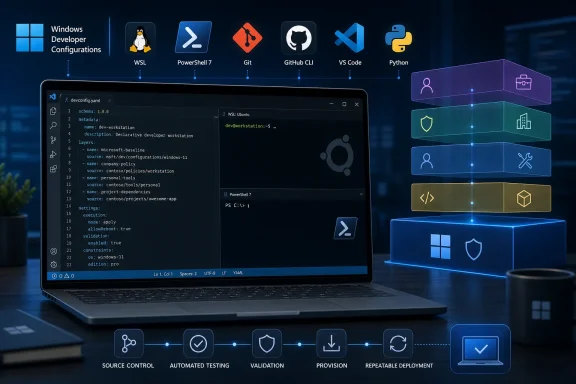
Microsoft announced the general availability at Build 2026 and detailed the offering in the Windows Developer Blog and Microsoft Learn. The main
dev-config.winget configuration can provision a Windows 11 development environment with WSL, PowerShell 7, Git, GitHub CLI, Visual Studio Code, Python and developer-oriented Windows settings.That makes Windows Developer Configurations a credible starting point for repeatable fresh installs, replacement PCs and disposable test systems. It does not automatically make every mature setup script obsolete.
 General Availability Changes the Adoption Question
The original case for watching Windows Developer Configurations before preview has expired. As of June 2, Microsoft presents the project as a generally available, open-source collection of declarative configurations rather than an experiment that administrators should keep away from production workflows.Its most important property is not the length of the included software list. The real change is that Microsoft now supplies a maintained, inspectable baseline for turning a fresh Windows 11 installation into a development workstation.
Traditional bootstrap scripts often begin as a handful of package installations and then accumulate years of special cases. They may change registry values, enable Windows features, install command-line tools, modify environment variables and work around old installer behavior. By the time their original author leaves a team, they can be difficult to audit and risky to run on a newly issued PC.
Windows Developer Configurations address that problem through a declarative model powered by WinGet. The configuration describes the intended machine state, while the underlying tooling handles application of that state. Microsoft also says the project is tested automatically whenever changes are made and designed to be safe to re-run.
That combination—open source, declarative, automatically tested and repeatable—is more significant for engineering organizations than a one-command setup demonstration. It creates a base that can be reviewed like code rather than preserved as an opaque collection of imperative instructions.
Make Microsoft’s Baseline the First Layer
A sensible migration does not begin by deleting a working setup script. It begins by separating everything that script does into three categories:- Move common Windows development prerequisites covered by
dev-config.wingetinto the Microsoft baseline. - Retain organization-specific settings and approved software in a separately reviewed configuration layer.
- Keep repository, workload and developer-specific choices outside the universal machine baseline unless every user genuinely needs them.
The second category remains the responsibility of the organization. A standardized engineering PC may need internal applications, endpoint controls, approved package sources or settings determined by corporate policy. Microsoft’s baseline cannot infer those requirements, and general availability should not be mistaken for organizational approval.
The third category is where many bootstrap scripts become unnecessarily heavy. A developer working on Python services may not need the same stack as someone building Windows applications or infrastructure tooling. Installing every possible SDK on every engineering PC increases drift, expands the maintenance burden and makes failures harder to isolate.
Microsoft’s own structure acknowledges this distinction. Windows Developer Configurations are divided into a full Windows Dev Config, a WSL Comfort setup and language- or workload-specific configurations. That gives teams a reason to stop treating “developer workstation” as one indivisible image.
The Full Configuration Fits Rebuildable General-Purpose PCs
The full Windows Dev Config is the closest replacement for a conventional dev-PC setup script. It targets a Windows 11 machine and establishes a broad, developer-oriented foundation rather than a single language toolchain.For an individual enthusiast, that can make a clean installation more predictable. The same principle complements WindowsForum’s coverage of setting up Windows 11 with Rufus: installation media gets Windows onto the hardware, while a declarative configuration defines what the machine should become afterward.
For an IT department, the stronger use case is standardization. A checked-in configuration can serve as the documented starting state for engineering laptops, lab PCs and temporary development systems. When the baseline changes, reviewers can inspect the configuration rather than reverse-engineering the latest version of a sprawling PowerShell script.
Safe re-execution is also valuable. Imperative scripts frequently assume a blank machine and fail when an application, feature or setting is already present. A configuration designed to be re-run is better suited to recovering an interrupted deployment or bringing an existing PC closer to the expected state.
That does not eliminate the need for testing. “Safe to re-run” describes the project’s design, not a promise that every local customization layered onto it will be harmless. Teams should validate their complete configuration on disposable Windows 11 systems before applying it broadly.
WSL Comfort and Workloads Keep the Baseline Smaller
Not every developer needs the full configuration. Microsoft’s separate WSL Comfort setup is aimed at developers who want a more usable Windows-and-WSL environment without necessarily adopting the entire Windows workstation baseline.The workload-specific configurations take the modular approach further. Instead of packing every language and development dependency into one machine-wide bootstrap, teams can add the configuration appropriate to a particular role or project.
This separation can produce a cleaner lifecycle:
- The Windows layer establishes common tools and operating-system settings.
- The WSL layer standardizes the shell environment where Linux-oriented work occurs.
- Workload configurations add the language or project tooling needed by a particular developer.
It also makes troubleshooting more disciplined. If a workload configuration fails, the team can investigate that layer without immediately questioning whether Git, PowerShell 7 or the underlying Windows settings were provisioned correctly.
Personal Scripts Still Own the Last Mile
A mature personal bootstrap script may encode details that Microsoft should not attempt to standardize. Editor extensions, shell preferences, repository locations, aliases and project-specific tooling can be essential to one developer while being noise—or an unwanted policy decision—for everyone else.The same applies to enterprise workflows. Windows Developer Configurations can provide a known starting point, but they are not a substitute for device management, security review or application governance. An open-source configuration is auditable, yet administrators still need to decide whether each component and setting belongs on managed endpoints.
This is why a layered replacement is safer than wholesale adoption. Forking or customizing Microsoft’s work is supported, but unnecessary divergence can recreate the maintenance problem the project is meant to solve. Teams should keep the upstream baseline recognizable and put local decisions in the smallest possible overlay.
Developer-oriented Windows settings deserve particular attention. Settings that make a personal coding PC more convenient may conflict with a company’s standard user experience or operational requirements. Administrators should review the resulting state rather than approving the configuration solely because the included packages are familiar.
The project’s automated testing is useful evidence about Microsoft’s repository, but it does not test an organization’s additions. Every package, setting and post-install action added locally becomes part of that organization’s own test responsibility.
Auditable Configuration Beats Script Archaeology
Windows Developer Configurations are most compelling when treated as source-controlled infrastructure for endpoints. The configuration becomes a readable declaration of what an engineering PC should contain, while changes can pass through the same review process used for other operational code.That is a meaningful improvement over copying a bootstrap script from an old laptop and hoping its assumptions still hold. It also creates a cleaner discussion between developers and administrators: disagreements can focus on a specific package or setting rather than on whether an undocumented script is safe.
The baseline should therefore be evaluated with a rebuild test, not a package checklist. Start with a fresh Windows 11 test machine, apply the selected Microsoft configuration, add the organization or personal overlay, restart where required and verify that the resulting environment can perform representative development work. Then run the configuration again to expose actions that are not genuinely repeatable.
Keep the existing bootstrap available during this evaluation, but compare outcomes rather than line counts. A shorter declarative configuration is not automatically better if it omits a required dependency; an older script is not automatically more complete merely because it contains years of accumulated commands.
The Replacement Line Is Now Clear
Replace a personal setup script outright when it mostly reproduces Microsoft’s supported baseline and contains little beyond common tools and developer-friendly Windows settings. Adopt Windows Developer Configurations as a base layer when the existing script also carries company software, specialized workloads or strongly personal choices.Keep the old script only where it performs necessary work that cannot yet be expressed cleanly in the new arrangement. Even then, reduce its scope so it runs after the declarative baseline instead of continuing to own the entire machine.
General availability on June 2, 2026 turns Windows Developer Configurations from a feature to monitor into an option that engineering teams can evaluate now. The durable model is not “Microsoft’s configuration or your script”; it is Microsoft’s auditable baseline beneath a thinner, locally owned layer.
References
- Primary source: learn.microsoft.com
Windows Developer Configurations | Microsoft Learn
Get from a fresh Windows install to a ready-to-code environment in minutes with declarative WinGet Configuration files for toolchains, OS settings, and shells.learn.microsoft.com - Independent coverage: blogs.windows.com
Build 2026: Furthering Windows as the trusted platform for development
Build is one of our favorite moments each year - a chance to connect with the global developer community and share what we’ve been building. Over the past year, we have connected with many developers pushing the boundaries of what’s possible onblogs.windows.com - Independent coverage: developer.microsoft.com
Microsoft Build 2026 recap: vision, launches, and top sessions - Microsoft for Developers
Catch up on Microsoft Build 2026 with the vision lead-off, top developer announcements, and must-watch sessions across the Microsoft developer ecosystem.developer.microsoft.com - Independent coverage: windowscentral.com
I break down 4 new Windows 11 tools from Build 2026 that genuinely stood out and show where the OS is heading | Windows Central
Microsoft unveiled a lot of AI projects at Build 2026, but these four Windows 11 tools caught my attention the most.www.windowscentral.com - Independent coverage: note.com
Build 2026: Advancing Windows as a Trusted Platform for Development|daka | Microsoft | AI
Build memo, the evolution of Windows never stopsBuild is one of our favorite moments every year. It is an opportunity to connect with the developer community around the world and share what we have been building.Over the past year, we have connected with many developers who are pushing the boundnote.com - Independent coverage: windowsmode.com
Build 2026: Improving Windows as the trusted platform for development - Windows Mode
Windows Build unveils AI‑ready Windows 11, Coreutils, WSL containers, MXC security, on‑device SLMs and developer‑optimized tools for faster app building.www.windowsmode.com