

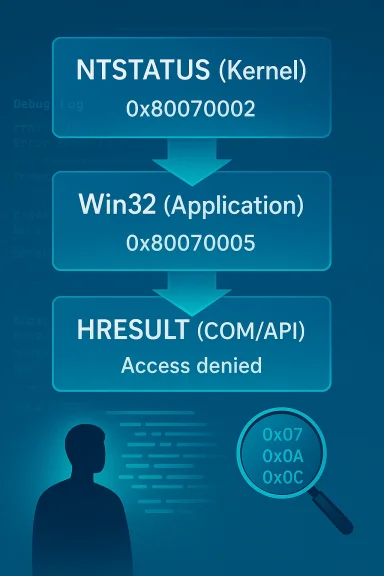
Windows error codes look like random hexadecimal noise because, in a sense, they were never designed to be read by ordinary users in the first place. Under the hood, Windows carries several overlapping error-reporting systems that evolved over decades, and the result is a mess of translated values, generic messages, and context that often disappears before it reaches the screen. Understanding the layers is the key to turning “something went wrong” into something actionable.
Background — full context
Windows has always been an engineering-heavy operating system, and its error model reflects that history. The platform was built around internal status codes, subsystem translation layers, and compatibility requirements that stretch all the way back through NT, Win32, OLE, COM, and the modern API surface. Microsoft documents the structure of HRESULTs as a 32-bit value with a severity bit, a facility field, and a code field, which is exactly the sort of compact machine-readable design engineers want—even if it’s not especially friendly to humans. (learn.microsoft.com)The important thing to understand is that Windows does not have one single error language. It has several, and they are stacked. At the lowest level, NTSTATUS values are used by the kernel and core OS components. Above that, Win32 error codes are used by many user-mode APIs and exposed through mechanisms like GetLastError. Above that again, HRESULTs provide a standardized 32-bit result format for COM and many Windows APIs, including a large set of HRESULTs that are simply Win32 errors wrapped into a new shell via HRESULT_FROM_WIN32. (learn.microsoft.com)
That structure is sensible from a developer’s point of view because each layer has a job. NTSTATUS is close to the metal, Win32 is a compatibility and application-facing layer, and HRESULT is a common transport format for returning success, warning, and failure results across interface boundaries. Microsoft’s own documentation says the facility field identifies the system service responsible for the error and notes that FACILITY_WIN32 is used to map ordinary Windows API errors into HRESULT form. (learn.microsoft.com)
What makes Windows frustrating in practice is not that the system is “too complex,” but that the complexity is hidden in the wrong direction. By the time an error bubbles up from one layer to another, it often loses detail. The result is a generic message that is technically correct, but operationally useless. Microsoft’s documentation acknowledges that many APIs return HRESULTs, but not all APIs expose equally rich, human-friendly error text, and some functions require extra work just to retrieve the right information. (learn.microsoft.com)
That is why a code like 0x80070005 can mean so many different things to a normal user. In its structured form, it says “failure,” identifies FACILITY_WIN32, and points to Win32 error 5, which is access denied. But that does not tell you whether the underlying problem is a locked file, a permission issue, a policy restriction, antivirus interference, or a protected system resource. The code is meaningful; the explanation is not yet enough. (learn.microsoft.com)
How Windows layers error reporting
NTSTATUS at the kernel level
At the deepest level, Windows uses NTSTATUS codes to describe conditions inside the kernel and core OS subsystems. These are the values you are least likely to see directly in everyday use, because they are typically translated before reaching applications. Microsoft’s error-structure documentation shows how the system reserves status fields and facilities for different layers of the OS, reflecting the idea that internal components need precise machine-readable states more than prose. (learn.microsoft.com)- NTSTATUS is close to hardware and kernel operations.
- Device drivers may return NTSTATUS values directly.
- File systems and memory management often use highly specific internal status values.
- Kernel-originated detail can disappear when translated upward.
- Exact cause may be more precise than any user-mode message will later suggest.
Win32 as the user-facing translation layer
Win32 error codes are the layer most Windows users encounter indirectly, whether through dialogs, command-line tools, or API results fetched by GetLastError. Microsoft’s GetLastError documentation explicitly notes that many functions may wipe or overwrite the last-error state and that HRESULT_FROM_WIN32 is the way to convert a system error into an HRESULT when needed. (learn.microsoft.com)- Win32 error 5 means access denied.
- Win32 error 87 means invalid parameter.
- Win32 error 14 commonly maps to out-of-memory conditions.
- Win32 errors are often simpler than the original NTSTATUS values.
- Translation can collapse distinct root causes into the same code.
HRESULT and the COM world
HRESULT is the format that makes Windows error handling look especially cryptic to casual users. Microsoft documents that HRESULT uses a severity bit, a facility field, and a code field, and that COM-style error handling relies heavily on this structure. Some HRESULTs are domain-specific, but many ordinary Win32 errors are wrapped into HRESULTs with FACILITY_WIN32, which means the original code is still inside the lower 16 bits. (learn.microsoft.com)- 0x80004005 is the classic generic failure.
- 0x80070005 is the HRESULT form of access denied.
- 0x80070057 is the HRESULT form of invalid parameter.
- FACILITY_NULL often represents broad, generic status values.
- FACILITY_WIN32 usually means the error started as a Win32 code.
Why hexadecimal is not the real problem
Hex is just the container
Hexadecimal gets blamed because it looks intimidating, but the real issue is not the number system. Hex is simply a compact way to express a 32-bit value. Microsoft’s own documentation explains the internal structure of HRESULTs precisely because the format is designed to pack information efficiently, not to hide it. (learn.microsoft.com)- Hexadecimal is efficient for machines.
- Hexadecimal is compact for logs and APIs.
- Hexadecimal is not inherently opaque.
- The real challenge is decoding the layers.
- Structure matters more than notation.
The meaningful bits are already there
Once you know the structure, codes become less mysterious. In an HRESULT, the high bit indicates success or failure, the facility identifies the originating subsystem, and the remaining bits contain the code itself. Microsoft’s documentation is very explicit about that layout, and tools like ERRLOOK were built for exactly this reason: to turn a numeric value into something you can actually interpret. (learn.microsoft.com)- Top bit set generally means failure.
- Facility 7 usually means Win32.
- Low 16 bits often carry the practical code.
- The same numeric pattern can be interpreted differently depending on context.
- Lookup tools exist because manual decoding is tedious.
Reading common Windows codes correctly
0x80070005: access denied
This is one of the most familiar Windows error values. Because it comes through FACILITY_WIN32, the useful part is the low 16 bits: 0x0005, which maps to access denied. Microsoft’s documentation around HRESULT_FROM_WIN32 and common facility fields makes this mapping straightforward. (learn.microsoft.com)- Permissions may be missing.
- A file may be locked by another process.
- UAC or policy may be blocking the action.
- Antivirus or endpoint protection may interfere.
- Protected system resources may reject the operation.
0x80070057: invalid parameter
This one frequently shows up when an app, installer, or system component passes bad data to a Windows API. Microsoft documents this as a common Win32 facility error mapped into HRESULT form. (learn.microsoft.com)- A setting value may be malformed.
- Registry data may be corrupt.
- An update package may be incomplete.
- An API call may have received an unsupported argument.
- A configuration parser may have rejected the input.
0x80004005: unspecified error
This one is infamous because it explains almost nothing. Microsoft documents E_FAIL as “unspecified failure,” which is precisely why it is so common in ZIP extraction, virtualization, update workflows, and other layered operations where the specific cause got lost before the message surfaced. (learn.microsoft.com)- The lower layer failed.
- The caller did not translate the reason cleanly.
- A subsystem returned a generic fallback.
- The app lacks richer diagnostics.
- The real cause may exist only in logs.
Why translations lose useful detail
Specific becomes generic
A low-level NTSTATUS code can describe a very exact failure. But by the time that value gets translated into a Win32 code, that precision may be flattened into something broader like busy, insufficient memory, or access denied. Microsoft’s own documentation about HRESULT and COM error handling recognizes that the code space is broad and context-dependent, which is useful for compatibility but not always ideal for diagnosing root causes. (learn.microsoft.com)- A specific storage issue may become “file not found.”
- A kernel pool shortage may become “out of memory.”
- A busy device state may become a generic “resource busy.”
- A detailed parameter mismatch may become “invalid parameter.”
- A subsystem-specific state may vanish entirely.
Why one code can mean many things
Windows favors reusable codes over an explosion of unique messages. That keeps APIs stable and manageable, but it also means one code can cover multiple situations. Microsoft’s error-handling guidance across COM and Win32 makes clear that callers are often expected to understand common values and handle them contextually rather than expect one code to explain every possible scenario. (learn.microsoft.com)- Same code, different subsystem.
- Same code, different root cause.
- Same code, different remediation.
- Same code, different reliability impact.
- Same code, different user experience.
BSODs are the exception, not the rule
Why blue screens are more readable
Blue screen stop codes occupy a separate psychological category because they often come with a human-readable stop name in addition to a numeric value. Microsoft has improved this area over time, and modern Windows builds generally make the stop-name layer more visible than older releases did. While BSODs remain technical, they are at least trying to communicate in language users can recognize. (learn.microsoft.com)- CRITICAL_PROCESS_DIED is more actionable than a raw hex dump.
- MEMORY_MANAGEMENT points you toward a class of failures.
- Stop-code labels reduce the decoding burden.
- The numeric code still matters for deep troubleshooting.
- Text-first presentation is a real usability win.
Why regular dialogs are worse
Application errors often strip away context. A dialog may say only that something failed, when the underlying cause has already been compressed through several abstraction layers. That is why a BSOD can sometimes be more informative than an installer pop-up: the crash path is narrower, and the final stop code may preserve more intent. (learn.microsoft.com)- UI dialogs favor brevity over detail.
- Installers often swallow nested errors.
- Apps may substitute generic fallback messages.
- System components may only expose HRESULTs.
- The most useful details may be buried in logs.
How to decode codes the practical way
Start with the format
If you see a code beginning with 0x8007, there is a good chance it is an HRESULT wrapping a Win32 error. Microsoft’s documentation and common HRESULT examples make this pattern clear, and the FACILITY_WIN32 mapping is the clue. (learn.microsoft.com)- Check whether the code is HRESULT-like.
- Look for the FACILITY_WIN32 pattern.
- Extract the low 16 bits.
- Convert those bits into the underlying Win32 code.
- Then interpret the code in context.
Use the right tools
Microsoft documents several ways to retrieve and interpret error values, and it also acknowledges tools for converting them into messages. The SDK’s err.exe is a classic example, and documentation for error text retrieval APIs shows that Windows expects developers to bridge the machine-readable code and the human-readable description themselves. (learn.microsoft.com)- err.exe can translate codes into names and descriptions.
- GetLastError exposes the thread-local last Win32 error.
- HRESULT_FROM_WIN32 converts system errors for COM-style APIs.
- API-specific docs often list the exact errors a function returns.
- Logs and event traces may reveal the deeper failure chain.
Apply diagnostic discipline
Once the code is decoded, troubleshooting still requires method. A permission error might be real, but it might also be a symptom of a locked file, a corrupted ACL, an endpoint policy, or a failed update staging step. The error code narrows the field, but it does not always name the culprit. (learn.microsoft.com)- Check permissions and ownership.
- Check whether another process holds the file.
- Check security software and enterprise policy.
- Check whether an update or installer is partially corrupted.
- Check logs before changing system settings blindly.
What Microsoft gets right
Stable low-level abstractions
There is a reason Windows still uses these systems. They are stable, compact, and backward-compatible across enormous amounts of software. HRESULT and Win32 error conventions let old and new components talk to each other without reinventing the entire error model every few years. Microsoft’s documentation emphasizes compatibility and defined facility spaces for exactly this reason. (learn.microsoft.com)- The model scales across decades of software.
- Old APIs can coexist with new interfaces.
- Multiple subsystems can share one error grammar.
- Developers get predictable numeric values.
- Compatibility stays remarkably strong.
Structured diagnostics for developers
For developers, HRESULT and NTSTATUS are not a flaw—they are a feature. The bits carry meaning, the facilities separate concerns, and the error model can be inspected programmatically. Microsoft’s COM and Win32 documentation shows how to interpret, convert, and handle these values with precision. (learn.microsoft.com)- Programmatic checking is reliable.
- Conversion macros are standardized.
- Interface-specific values reduce ambiguity.
- Binary compatibility is preserved.
- Automation can react to exact values.
Where Windows still falls short
Human-readable explanations are inconsistent
The biggest weakness is not the numeric system but the presentation layer. Windows still frequently surfaces codes without enough explanation, context, or recovery advice. Microsoft has documentation for the formats, but the OS itself does not consistently present a plain-English layer that tells users what went wrong, why it happened, and what to do next. (learn.microsoft.com)- Many dialogs lack next-step guidance.
- Error text is often too generic.
- Context is frequently omitted.
- Users are expected to search externally.
- The code is exposed before it is explained.
Translation without interpretation
Windows is very good at translating between internal code spaces. It is much less consistent at interpreting those codes for the person holding the mouse. A failure at one layer should ideally be expanded, annotated, and contextualized at the next layer, but too often the system simply forwards a more generic substitute. (learn.microsoft.com)- Translation preserves format.
- Translation often loses story.
- Translation does not equal diagnosis.
- Translation should not replace explanation.
- Translation should lead to actionable advice.
Strengths and Opportunities
- Stable compatibility across a huge software ecosystem.
- Compact machine-readable codes that developers can process reliably.
- Clear internal structure in HRESULT values, including severity and facility fields. (learn.microsoft.com)
- Documented conversion paths from Win32 error codes into HRESULTs. (learn.microsoft.com)
- Mature tooling for decoding and inspecting errors. (learn.microsoft.com)
- Room for a better user-facing layer without changing the underlying architecture.
- Opportunity to surface richer diagnostics in installers, update flows, and system dialogs.
- Potential for AI-assisted explanation layers that preserve the original code while adding plain-English guidance.
- Better event log integration could reduce confusion when errors bubble up.
- More API-specific guidance would help narrow root causes faster.
Risks and Concerns
- Generic codes can hide root causes and send users down the wrong troubleshooting path.
- Too much abstraction can erase actionable detail before the user sees it.
- Security and policy errors may look identical to simple file locks.
- Third-party apps often swallow nested errors and return unhelpful fallbacks.
- Users may overtrust a code lookup and miss environmental causes.
- Enterprise systems may inject additional policy layers that make the same error mean something different.
- Legacy compatibility can constrain improvements to Windows’ error presentation model.
- Overly broad messages increase support costs because the user cannot self-diagnose.
- Misinterpreting HRESULTs as raw Win32 codes can lead to wrong conclusions.
- Relying on a single code without logs is often insufficient for accurate troubleshooting.
What to Watch Next
Better user-facing diagnostics
The most meaningful improvement would be clearer, more contextual messaging in core Windows experiences. If Microsoft continues to invest in surfacing richer text in more places, the gap between internal engineering codes and end-user understanding could shrink significantly. (learn.microsoft.com)- More descriptive dialogs
- More actionable repair suggestions
- Better correlation with Event Viewer logs
- Better app-level error propagation
- Less reliance on raw hexadecimal as the first line of feedback
Smarter translation across layers
A future Windows could preserve the precision of NTSTATUS while attaching a clearer, user-facing explanation as the code moves upward. That would not require abandoning the current architecture; it would require presenting it better. Microsoft’s existing structure already supports the necessary metadata. (learn.microsoft.com)- Retain original low-level codes
- Attach human-readable context
- Preserve subsystem identity
- Expose likely causes and fixes
- Make logs and dialogs tell the same story
Better documentation in the product itself
Microsoft’s documentation is reasonably strong once you know where to look. The problem is that most users are not inside MSDN, COM references, or SDK notes when an error hits. Bringing some of that clarity into the product would do more than another round of vague error copy ever could. (learn.microsoft.com)- Inline code explanations
- Built-in code lookup
- Common root-cause guidance
- One-click log access
- Contextual repair actions
Conclusion
Windows error codes are not random strings; they are compressed stories about what went wrong, written for machines first and people second. NTSTATUS, Win32, and HRESULT form a layered system that is elegant in principle, practical for developers, and deeply confusing when the layers flatten away the detail users actually need. The real fix is not to abolish hexadecimal or rip out the architecture; it is to give Windows the human-readable explanation layer it should have had all along.Source: makeuseof.com Microsoft never intended you to understand Windows error codes — here's what they actually mean
Last edited:
