

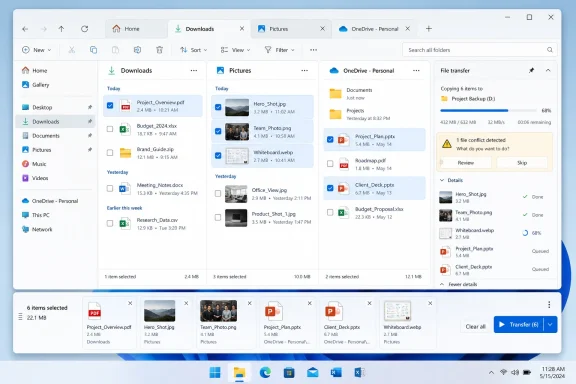
On May 23, 2026, Neowin highlighted a Windows File Explorer concept by designer Zee-Al-Eid Ahmad that reimagines Microsoft’s file manager with cross-folder selection, a persistent transfer panel, and a more heavily stylized Windows 11 interface. The mock-up is not a Microsoft roadmap, and that distinction matters. But it also lands because it focuses less on fantasy glassmorphism and more on two daily frictions that Windows users have tolerated for decades: collecting files from scattered locations and keeping file operations visible while doing other work.
The most interesting thing about this concept is not that File Explorer could look prettier. Windows has no shortage of pretty mock-ups, and many of them collapse the moment they encounter mapped drives, shell extensions, OneDrive placeholders, Group Policy, accessibility settings, or a folder containing 40,000 files. What makes Ahmad’s proposal worth discussing is that it asks a sharper question: why does the center of Windows file management still behave as if the user’s task begins and ends inside a single directory?
File Explorer is one of the most conservative pieces of Windows, and for good reason. It is not just an app in the casual sense; it is the visible surface of the shell, the place where local storage, cloud sync, removable media, network shares, libraries, search results, compressed archives, phones, cameras, and application hooks all try to coexist. Every design change has to survive not only Microsoft’s own expectations but decades of habits and integrations.
That is why File Explorer redesigns tend to invite both excitement and dread. Enthusiasts want a cleaner, faster, more modern tool. Administrators want something that will not break workflows, confuse users, or turn a mundane file copy into a support ticket. Microsoft wants to modernize the interface without detonating one of the oldest trust contracts in Windows: if you know where your files are, Explorer should let you get to them.
Windows 11 has already moved File Explorer toward that modern interface, with a simplified command bar, tabs, tighter OneDrive integration, Gallery, Home, Quick access, and a newer context menu that hides older shell verbs behind an additional click. Some of those changes are defensible. Some are still controversial. But none fundamentally changes the mental model of the app: you open a folder, select what is in that folder, and act on it.
Ahmad’s concept pokes at that model. It suggests that the bottleneck is not merely visual clutter or aging iconography. The bottleneck is that File Explorer still treats location as the primary unit of work, while users increasingly think in terms of projects, batches, collections, and outcomes.
A user collecting tax documents from Downloads, scanned receipts from Pictures, invoices from OneDrive, and exported reports from a project folder does not experience that as four separate file-management operations. They experience it as one job. Explorer, by contrast, insists that the user either copy each batch separately, stage files in a temporary folder, use search results carefully, open multiple windows or tabs, or resort to a third-party file manager.
The concept’s selection tray is essentially a visible, task-oriented clipboard. Instead of relying on a hidden state — “what have I copied, and from where?” — it makes the working set explicit. That sounds minor until you consider how often Windows users are asked to assemble attachments, move project assets, prepare upload batches, or clean up scattered files after months of ad hoc saving.
The most Windows-like version of this idea would not need to be flashy. It would need to be predictable. A user should be able to add files to a temporary collection, remove individual items, verify paths, and then perform a normal operation: copy, move, compress, share, delete, or open. The power is not in the panel itself; it is in separating selection from current folder location.
There are obvious risks. Cross-folder selection raises questions about duplicate file names, mixed permissions, unavailable cloud placeholders, removable drives, disconnected network paths, and conflicting file operations. But those are not reasons to dismiss the idea. They are reasons to design the feature like infrastructure rather than decoration.
File Explorer, however, still tends to snap back to the file cabinet metaphor when action is required. You can see things from many places, but acting on them as a durable set remains clumsy. Search results help, but search is not the same as intentional selection. Tabs help navigation, but they do not create a shared basket of files across those tabs.
That distinction matters. Tabs reduce the pain of moving around. A selection tray would reduce the pain of remembering and assembling. Those are different problems, and Microsoft has mostly solved only the first one.
For administrators and power users, the idea resembles a friendlier version of a staging directory or script-generated file list. For casual users, it could behave like a shopping cart for files. The metaphor is almost too obvious, which is perhaps why it is frustrating that Windows has never made it a first-class Explorer feature.
This is not a glamorous problem. It is exactly the kind of rough edge that accumulates in mature software because the workaround is obvious: Alt-Tab, look at the taskbar, bring the dialog forward, or use a third-party tool. Yet small visibility problems become bigger when the operation is long, risky, or user-supervised. A file transfer is not just animation; it is an operation with consequences.
Pinned transfer status would be useful precisely because file operations often run in parallel with the task that caused them. You copy a folder and keep working. You move files while preparing an email. You transfer logs while reading documentation. The progress dialog competes for attention badly: too intrusive when it jumps forward, too easy to lose when it falls behind.
A well-designed pin would let users decide that a particular operation deserves persistent visibility. It should not force every transfer to the foreground, and it should not become another always-on-top nuisance. The point is not drama; it is agency.
This is also where Microsoft’s enterprise caution enters the room. Always-on-top UI, transfer prompts, focus behavior, and shell dialogs all have long histories of annoying users when implemented bluntly. But that caution should lead to a restrained option, not permanent inaction. A pinned transfer panel, especially if integrated into the existing copy dialog or notification surface, is the kind of quality-of-life change that feels obvious only after someone else mocks it up.
But File Explorer is a brutal test for visual design. Transparency that looks elegant over a curated wallpaper can become visual noise over real content. Big spacing that looks calm in a small demo can become wasteful on a laptop display. Custom icons that look coherent in a mock-up can struggle once third-party file types, sync overlays, corporate branding, and legacy shell extensions enter the frame.
There is also a philosophical problem. File Explorer is not primarily a place to admire Windows design language. It is a place to make decisions quickly and safely. Users need to distinguish originals from shortcuts, cloud-only files from local files, folders from libraries, compressed folders from directories, and safe actions from destructive ones. Aesthetic experimentation is welcome only to the extent that it improves those judgments.
This does not mean Explorer should remain visually frozen. Windows 11’s design system can and should continue replacing older surfaces. But the strongest parts of Ahmad’s concept would survive even if the interface looked almost exactly like current File Explorer. That is telling. The durable ideas are functional, not cosmetic.
Some users want dual-pane layouts. Some want scripting, better batch renaming, folder comparison, tagging, color labels, queued transfers, persistent file lists, or deeper keyboard control. Some simply want a modern interface that feels less constrained by Windows’ shell legacy. The market is fragmented because file management habits are intensely personal.
Microsoft cannot and should not turn File Explorer into every power user’s dream console. The default file manager must remain approachable. But there is a difference between refusing niche complexity and ignoring broadly useful workflow improvements. Cross-folder selection and pinned transfer visibility are not obscure hacker features. They map to ordinary user intent.
The challenge is that File Explorer has to serve the first-hour Windows user and the twentieth-year administrator at the same time. That tends to produce conservative defaults and hidden options. The best path for Microsoft is not to bury advanced file operations in labyrinthine settings, but to introduce them in ways that feel discoverable, reversible, and safe.
A selection tray, for instance, could appear only when a user explicitly adds items to a collection. A pinned transfer view could remain opt-in per operation. These features do not require turning Explorer into a cockpit. They require acknowledging that simple workflows can span multiple locations.
A real implementation would need to handle files that move or vanish after selection. It would need to show when a file is online-only, unavailable, locked, duplicated, renamed, or blocked by permissions. It would need to avoid accidental deletion across unrelated locations. It would need to work with keyboard navigation, screen readers, high contrast themes, touch, pen, multi-monitor setups, and enterprise restrictions.
It would also need to decide what a selection is. Is it a temporary clipboard? A saved collection? A virtual folder? A file operation queue? Can it survive closing the window? Can it cross Explorer windows? Can apps receive it through drag-and-drop? Can PowerShell or the shell namespace understand it? Each answer changes the feature’s scope.
That is where Microsoft’s apparent slowness can look less absurd. Explorer sits on layers of shell architecture, compatibility obligations, and extensibility points that most concept designs never confront. A feature that delights in a static image can become a bug farm when exposed to real drives, real networks, and real enterprise policies.
Still, complexity should not become a veto. Microsoft routinely tackles harder problems when they align with corporate priorities, from cloud integration to AI surfaces to security baselines. The question is whether everyday file-management polish ranks high enough to earn that engineering attention.
That cycle can be shallow, but it also reveals something useful. Concepts are a form of complaint with pictures. They show not only what a designer wants, but what current software has failed to make feel obvious. In this case, the complaint is not merely that File Explorer is ugly or old. The complaint is that Explorer has not kept pace with the way people assemble work.
Modern computing has made files more scattered, not less. A single task may involve local folders, synced folders, browser downloads, Teams or Outlook attachments, screenshots, exported PDFs, phone imports, and shared drives. The user’s mental project cuts across storage boundaries. Explorer still makes the user repeatedly re-enter those boundaries.
That mismatch is why the concept resonates. It does not ask Microsoft to reinvent the file system. It asks Microsoft to add a lightweight layer of intent above it. The user says, “these are the files I care about right now,” and Explorer remembers long enough to do something useful.
For a company currently eager to place assistants and recommendations throughout Windows, this is almost embarrassingly practical. Before asking an AI to summarize a folder, many users would settle for a native way to gather five files from five folders without performing a little ritual of window juggling.
The current Explorer workflow encourages temporary folders, duplicated files, desktop clutter, and accidental version confusion. Those are not just cosmetic problems. They can create support costs and governance headaches. A selection tray that performs actions without forcing users to create unnecessary copies could reduce that mess.
The pinned transfer idea has enterprise relevance too. Long-running transfers to network shares, external drives, or redirected folders often fail in ways users do not notice immediately. Better visibility does not solve network reliability, but it helps users respond sooner when a transfer pauses for a conflict, permission error, or unavailable path.
Of course, enterprise environments would demand controls. Administrators might want policies governing persistent collections, cloud file behavior, deletion warnings, or whether cross-location batches can include removable media. But managed complexity is familiar territory for Windows. If Microsoft can govern clipboard history, cloud sync, shell extensions, and controlled folder access, it can govern a file selection tray.
The larger point is that these features could make Windows feel less like it is handing ordinary users a 1990s metaphor and asking them to adapt. They could make Explorer acknowledge how work actually happens in 2026.
A better Explorer would treat navigation, selection, and operation as related but distinct stages. Navigation is where the file lives. Selection is what the user intends to act on. Operation is what Windows does with that intent. Today, Explorer often collapses all three into the current folder view, which is why cross-folder work feels so clumsy.
This framing also leaves room for Microsoft’s newer priorities without making them intrusive. AI features, if they belong anywhere in file management, should operate on intentional sets of files, not just whatever folder happens to be open. A cross-folder collection could become the natural boundary for summarization, compression, sharing, metadata review, or permission checking. The humble selection tray might be a better foundation for “intelligent” file management than another sidebar full of suggestions.
But Microsoft would need discipline. A selection feature should not become an ad surface, a cloud upsell, or a mandatory Microsoft account funnel. It should behave like a tool. Users should trust that when they collect files, Windows is helping them act on those files — not interpreting the collection as an invitation to reorganize their digital life.
That trust is the currency File Explorer cannot afford to lose. People forgive a lot in an operating system, but they do not forgive uncertainty around their files.
A serious Explorer roadmap would make these mundane workflows first-class citizens:
Microsoft has spent years teaching Windows users to expect cloud continuity, search-driven discovery, tabbed navigation, and increasingly context-aware software. File Explorer now has to catch up with the consequences of that teaching. If the next meaningful Explorer upgrade gives users a better way to gather scattered files and supervise the operations that move them, it will not look like a revolution in screenshots — but it may feel like one on an ordinary workday.
The most interesting thing about this concept is not that File Explorer could look prettier. Windows has no shortage of pretty mock-ups, and many of them collapse the moment they encounter mapped drives, shell extensions, OneDrive placeholders, Group Policy, accessibility settings, or a folder containing 40,000 files. What makes Ahmad’s proposal worth discussing is that it asks a sharper question: why does the center of Windows file management still behave as if the user’s task begins and ends inside a single directory?
 File Explorer’s Real Problem Is Not Its Paint Job
File Explorer is one of the most conservative pieces of Windows, and for good reason. It is not just an app in the casual sense; it is the visible surface of the shell, the place where local storage, cloud sync, removable media, network shares, libraries, search results, compressed archives, phones, cameras, and application hooks all try to coexist. Every design change has to survive not only Microsoft’s own expectations but decades of habits and integrations.That is why File Explorer redesigns tend to invite both excitement and dread. Enthusiasts want a cleaner, faster, more modern tool. Administrators want something that will not break workflows, confuse users, or turn a mundane file copy into a support ticket. Microsoft wants to modernize the interface without detonating one of the oldest trust contracts in Windows: if you know where your files are, Explorer should let you get to them.
Windows 11 has already moved File Explorer toward that modern interface, with a simplified command bar, tabs, tighter OneDrive integration, Gallery, Home, Quick access, and a newer context menu that hides older shell verbs behind an additional click. Some of those changes are defensible. Some are still controversial. But none fundamentally changes the mental model of the app: you open a folder, select what is in that folder, and act on it.
Ahmad’s concept pokes at that model. It suggests that the bottleneck is not merely visual clutter or aging iconography. The bottleneck is that File Explorer still treats location as the primary unit of work, while users increasingly think in terms of projects, batches, collections, and outcomes.
Cross-Folder Selection Is the Small Idea That Changes the Workflow
The headline idea in the concept is the ability to select multiple files from different folders and keep those selections visible in a bottom panel. In today’s File Explorer, multi-select works well enough inside a single folder: drag a box, use Ctrl-click, use Shift-click, or enable item check boxes. The moment the task spans several folders, however, the workflow becomes awkward.A user collecting tax documents from Downloads, scanned receipts from Pictures, invoices from OneDrive, and exported reports from a project folder does not experience that as four separate file-management operations. They experience it as one job. Explorer, by contrast, insists that the user either copy each batch separately, stage files in a temporary folder, use search results carefully, open multiple windows or tabs, or resort to a third-party file manager.
The concept’s selection tray is essentially a visible, task-oriented clipboard. Instead of relying on a hidden state — “what have I copied, and from where?” — it makes the working set explicit. That sounds minor until you consider how often Windows users are asked to assemble attachments, move project assets, prepare upload batches, or clean up scattered files after months of ad hoc saving.
The most Windows-like version of this idea would not need to be flashy. It would need to be predictable. A user should be able to add files to a temporary collection, remove individual items, verify paths, and then perform a normal operation: copy, move, compress, share, delete, or open. The power is not in the panel itself; it is in separating selection from current folder location.
There are obvious risks. Cross-folder selection raises questions about duplicate file names, mixed permissions, unavailable cloud placeholders, removable drives, disconnected network paths, and conflicting file operations. But those are not reasons to dismiss the idea. They are reasons to design the feature like infrastructure rather than decoration.
Microsoft Has Already Taught Users to Think Beyond Folders
The irony is that Windows already contains several ideas that weaken the old folder-first model. Quick access surfaces important locations without forcing users through a tree. Search results aggregate files across locations. Libraries, though no longer central to the Windows pitch, were built around the idea that related content can live in multiple places. OneDrive overlays cloud state onto the local namespace. The Photos and Gallery experiences are explicitly about viewing content as a collection, not as a directory listing.File Explorer, however, still tends to snap back to the file cabinet metaphor when action is required. You can see things from many places, but acting on them as a durable set remains clumsy. Search results help, but search is not the same as intentional selection. Tabs help navigation, but they do not create a shared basket of files across those tabs.
That distinction matters. Tabs reduce the pain of moving around. A selection tray would reduce the pain of remembering and assembling. Those are different problems, and Microsoft has mostly solved only the first one.
For administrators and power users, the idea resembles a friendlier version of a staging directory or script-generated file list. For casual users, it could behave like a shopping cart for files. The metaphor is almost too obvious, which is perhaps why it is frustrating that Windows has never made it a first-class Explorer feature.
The Transfer Dialog Is Small, Annoying, and Surprisingly Political
The second practical feature in the concept is the option to pin the file transfer dialog so it remains visible. Anyone who has moved large folders, copied files to a USB drive, or transferred data across a network share knows the irritation: the progress window can disappear behind other windows just when you want to know whether the job is still moving, stalled, or waiting for a conflict decision.This is not a glamorous problem. It is exactly the kind of rough edge that accumulates in mature software because the workaround is obvious: Alt-Tab, look at the taskbar, bring the dialog forward, or use a third-party tool. Yet small visibility problems become bigger when the operation is long, risky, or user-supervised. A file transfer is not just animation; it is an operation with consequences.
Pinned transfer status would be useful precisely because file operations often run in parallel with the task that caused them. You copy a folder and keep working. You move files while preparing an email. You transfer logs while reading documentation. The progress dialog competes for attention badly: too intrusive when it jumps forward, too easy to lose when it falls behind.
A well-designed pin would let users decide that a particular operation deserves persistent visibility. It should not force every transfer to the foreground, and it should not become another always-on-top nuisance. The point is not drama; it is agency.
This is also where Microsoft’s enterprise caution enters the room. Always-on-top UI, transfer prompts, focus behavior, and shell dialogs all have long histories of annoying users when implemented bluntly. But that caution should lead to a restrained option, not permanent inaction. A pinned transfer panel, especially if integrated into the existing copy dialog or notification surface, is the kind of quality-of-life change that feels obvious only after someone else mocks it up.
The Concept’s Aesthetic Is the Least Convincing Part
The visual redesign is where the concept becomes more debatable. Neowin notes the use of transparency effects, new icons, and more dramatic grouping. That kind of presentation is common in enthusiast concepts, partly because screenshots must sell an idea instantly. A mock-up has to look new before it can argue that it works better.But File Explorer is a brutal test for visual design. Transparency that looks elegant over a curated wallpaper can become visual noise over real content. Big spacing that looks calm in a small demo can become wasteful on a laptop display. Custom icons that look coherent in a mock-up can struggle once third-party file types, sync overlays, corporate branding, and legacy shell extensions enter the frame.
There is also a philosophical problem. File Explorer is not primarily a place to admire Windows design language. It is a place to make decisions quickly and safely. Users need to distinguish originals from shortcuts, cloud-only files from local files, folders from libraries, compressed folders from directories, and safe actions from destructive ones. Aesthetic experimentation is welcome only to the extent that it improves those judgments.
This does not mean Explorer should remain visually frozen. Windows 11’s design system can and should continue replacing older surfaces. But the strongest parts of Ahmad’s concept would survive even if the interface looked almost exactly like current File Explorer. That is telling. The durable ideas are functional, not cosmetic.
Why Third-Party File Managers Keep Winning Hearts
The recurring popularity of alternative Windows file managers is a quiet indictment of Explorer’s pace. Tools such as Directory Opus, Total Commander, XYplorer, FreeCommander, Files, and others appeal to different audiences, but they share a premise: file management can be more flexible than Microsoft’s default.Some users want dual-pane layouts. Some want scripting, better batch renaming, folder comparison, tagging, color labels, queued transfers, persistent file lists, or deeper keyboard control. Some simply want a modern interface that feels less constrained by Windows’ shell legacy. The market is fragmented because file management habits are intensely personal.
Microsoft cannot and should not turn File Explorer into every power user’s dream console. The default file manager must remain approachable. But there is a difference between refusing niche complexity and ignoring broadly useful workflow improvements. Cross-folder selection and pinned transfer visibility are not obscure hacker features. They map to ordinary user intent.
The challenge is that File Explorer has to serve the first-hour Windows user and the twentieth-year administrator at the same time. That tends to produce conservative defaults and hidden options. The best path for Microsoft is not to bury advanced file operations in labyrinthine settings, but to introduce them in ways that feel discoverable, reversible, and safe.
A selection tray, for instance, could appear only when a user explicitly adds items to a collection. A pinned transfer view could remain opt-in per operation. These features do not require turning Explorer into a cockpit. They require acknowledging that simple workflows can span multiple locations.
The Hard Part Is Not Drawing the Panel
Concept designs often understate implementation difficulty. A bottom tray containing selected files is easy to draw. Making it robust across the Windows storage ecosystem is another matter.A real implementation would need to handle files that move or vanish after selection. It would need to show when a file is online-only, unavailable, locked, duplicated, renamed, or blocked by permissions. It would need to avoid accidental deletion across unrelated locations. It would need to work with keyboard navigation, screen readers, high contrast themes, touch, pen, multi-monitor setups, and enterprise restrictions.
It would also need to decide what a selection is. Is it a temporary clipboard? A saved collection? A virtual folder? A file operation queue? Can it survive closing the window? Can it cross Explorer windows? Can apps receive it through drag-and-drop? Can PowerShell or the shell namespace understand it? Each answer changes the feature’s scope.
That is where Microsoft’s apparent slowness can look less absurd. Explorer sits on layers of shell architecture, compatibility obligations, and extensibility points that most concept designs never confront. A feature that delights in a static image can become a bug farm when exposed to real drives, real networks, and real enterprise policies.
Still, complexity should not become a veto. Microsoft routinely tackles harder problems when they align with corporate priorities, from cloud integration to AI surfaces to security baselines. The question is whether everyday file-management polish ranks high enough to earn that engineering attention.
Windows Users Do Not Need Another Vision Deck
There is a familiar cycle in Windows enthusiast culture. A designer publishes a beautiful concept. Tech sites cover it. Users say Microsoft should hire the designer. Skeptics point out that concepts are not products. The conversation fades until the next mock-up arrives.That cycle can be shallow, but it also reveals something useful. Concepts are a form of complaint with pictures. They show not only what a designer wants, but what current software has failed to make feel obvious. In this case, the complaint is not merely that File Explorer is ugly or old. The complaint is that Explorer has not kept pace with the way people assemble work.
Modern computing has made files more scattered, not less. A single task may involve local folders, synced folders, browser downloads, Teams or Outlook attachments, screenshots, exported PDFs, phone imports, and shared drives. The user’s mental project cuts across storage boundaries. Explorer still makes the user repeatedly re-enter those boundaries.
That mismatch is why the concept resonates. It does not ask Microsoft to reinvent the file system. It asks Microsoft to add a lightweight layer of intent above it. The user says, “these are the files I care about right now,” and Explorer remembers long enough to do something useful.
For a company currently eager to place assistants and recommendations throughout Windows, this is almost embarrassingly practical. Before asking an AI to summarize a folder, many users would settle for a native way to gather five files from five folders without performing a little ritual of window juggling.
The Enterprise Case Is Stronger Than It Looks
It is tempting to frame this as a consumer convenience story, but enterprise IT may have the stronger argument. Office workers constantly collect documents from different locations: policy PDFs, spreadsheets, forms, exports, screenshots, scanned files, and archived correspondence. Help desk staff gather logs. Administrators collect configuration files. Legal and compliance teams assemble evidence bundles.The current Explorer workflow encourages temporary folders, duplicated files, desktop clutter, and accidental version confusion. Those are not just cosmetic problems. They can create support costs and governance headaches. A selection tray that performs actions without forcing users to create unnecessary copies could reduce that mess.
The pinned transfer idea has enterprise relevance too. Long-running transfers to network shares, external drives, or redirected folders often fail in ways users do not notice immediately. Better visibility does not solve network reliability, but it helps users respond sooner when a transfer pauses for a conflict, permission error, or unavailable path.
Of course, enterprise environments would demand controls. Administrators might want policies governing persistent collections, cloud file behavior, deletion warnings, or whether cross-location batches can include removable media. But managed complexity is familiar territory for Windows. If Microsoft can govern clipboard history, cloud sync, shell extensions, and controlled folder access, it can govern a file selection tray.
The larger point is that these features could make Windows feel less like it is handing ordinary users a 1990s metaphor and asking them to adapt. They could make Explorer acknowledge how work actually happens in 2026.
The File Manager Microsoft Should Be Building
The strongest future for File Explorer is not a radical visual reboot. It is a more capable default experience that lets the interface remain calm while the underlying workflow becomes more powerful. Microsoft should resist the temptation to solve Explorer dissatisfaction primarily with rounded corners, translucency, and new icons. Those things age quickly.A better Explorer would treat navigation, selection, and operation as related but distinct stages. Navigation is where the file lives. Selection is what the user intends to act on. Operation is what Windows does with that intent. Today, Explorer often collapses all three into the current folder view, which is why cross-folder work feels so clumsy.
This framing also leaves room for Microsoft’s newer priorities without making them intrusive. AI features, if they belong anywhere in file management, should operate on intentional sets of files, not just whatever folder happens to be open. A cross-folder collection could become the natural boundary for summarization, compression, sharing, metadata review, or permission checking. The humble selection tray might be a better foundation for “intelligent” file management than another sidebar full of suggestions.
But Microsoft would need discipline. A selection feature should not become an ad surface, a cloud upsell, or a mandatory Microsoft account funnel. It should behave like a tool. Users should trust that when they collect files, Windows is helping them act on those files — not interpreting the collection as an invitation to reorganize their digital life.
That trust is the currency File Explorer cannot afford to lose. People forgive a lot in an operating system, but they do not forgive uncertainty around their files.
A Mock-Up Accidentally Finds the Real Roadmap
The useful lesson from Ahmad’s concept is not that Microsoft should copy it wholesale. It is that the most compelling Explorer improvements are hiding in plain sight. They are not cinematic. They are not keynote-friendly. They are the sort of things users notice only because the absence has irritated them for years.A serious Explorer roadmap would make these mundane workflows first-class citizens:
- Windows should let users build a temporary working set of files from multiple folders without forcing them to copy those files into a staging directory.
- File operations should remain visible when users choose visibility, especially during long transfers, network copies, and conflict-prone moves.
- Any cross-folder selection model should make file paths, availability, and permission problems explicit before destructive actions occur.
- Visual modernization should support scanning, accessibility, and information density rather than treating translucency as a substitute for usability.
- Microsoft should view third-party file managers less as niche competition and more as a long-running user research program.
- File Explorer’s future should be measured by how well it supports real tasks, not by how convincingly it matches the latest Windows design mood.
Microsoft has spent years teaching Windows users to expect cloud continuity, search-driven discovery, tabbed navigation, and increasingly context-aware software. File Explorer now has to catch up with the consequences of that teaching. If the next meaningful Explorer upgrade gives users a better way to gather scattered files and supervise the operations that move them, it will not look like a revolution in screenshots — but it may feel like one on an ordinary workday.
References
- Primary source: Neowin
Published: Sat, 23 May 2026 19:30:00 GMT
This File Explorer concept explores ideas Windows users may actually want - Neowin
This bold Windows File Explorer concept imagines features many users have wanted for years, but not everyone will love the redesign. www.neowin.net
- Official source: support.microsoft.com
File Explorer in Windows - Microsoft Support
Find and open File Explorer in Windows, and customize Quick access by pinning and removing files and folders.support.microsoft.com - Official source: microsoft.com
File Explorer | Microsoft Windows
Get the most out of your Windows 11 experience with File Explorer. File Explorer in Windows makes it easier to find and access files.www.microsoft.com
- Related coverage: mspoweruser.com
Windows 10 File Explorer concept suggests virtual and tagged folders
The Windows 10 File Explorer has not seen massive innovation over the last 10 years, which means there is lots of scope for concept designers to suggest improvements. This is exactly what designer Zee-Al-Eid Ahmad Rana did, with some new ideas on how the Windows 10 File Explorer could be... mspoweruser.com
- Related coverage: it.environment.ucdavis.edu
Working with the File Explorer in Windows 11
File Explorer Parts Descriptionit.environment.ucdavis.edu
- Related coverage: nsaneforums.com
Windows 10 File Explorer concept suggests virtual and tagged folders - Software News - Nsane Forums
Windows 10 File Explorer concept suggests virtual and tagged folders The Windows 10 File Explorer has not seen massive innovation over the last 10 years, which means there is lots of scope for concept designers to suggest improvements. This is exactly what designer Zee-Al-Eid Ahmad Rana did, with... nsaneforums.com
- Related coverage: howtogeek.com
Customize File Explorer in Windows 11 With These 9 Tips
Keep File Explorer tidy and useful! www.howtogeek.com
- Related coverage: techradar.com
- Related coverage: makeuseof.com
11 File Explorer Tips and Tricks for Windows 11
File Explorer is a core part of the Windows 11 experience, so why not learn all the ins and outs of this handy feature? www.makeuseof.com
