

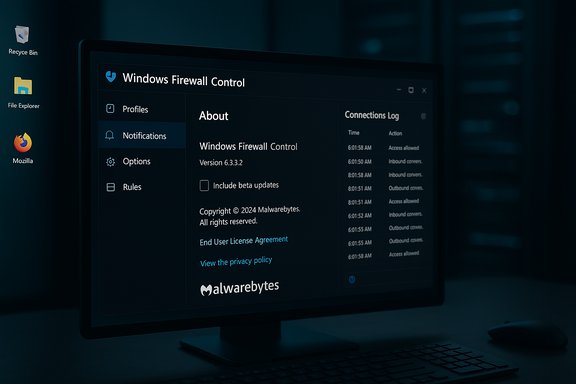
Windows Firewall Control’s newest maintenance release, version 6.24.0.0, arrived in early December with a small but purposeful set of changes: a user-facing checkbox to opt into beta updates and a reliability fix for the Connections Log that prevented entries from appearing on some machines. This is a minor update on the surface, but it’s the latest step in a long evolution — from a one‑man utility to a Malwarebytes‑owned Windows firewall manager that now sits alongside modern endpoint tools — and it’s worth a close read for IT pros, sysadmins, and security‑conscious Windows users.
Windows Firewall Control (WFC) began life as Binisoft’s lightweight front‑end for the built‑in Windows firewall. The program never attempted to replace Windows Defender Firewall; instead it extended it with an easier interface, outbound connection notifications, and workflow features aimed at power users and administrators. In May 2018 Malwarebytes acquired Binisoft and the WFC tech, promising to maintain the product and integrate the underlying technology into its endpoint platform; that deal shifted WFC from a donation‑supported hobby project into a component managed under a larger security vendor umbrella. That acquisition also precipitated a policy change: several formerly paid/donation features — most notably the outbound notifications system — were made available to all users without activation, effectively making the full feature set free to end users. Over time WFC has been updated, rebranded in places as Malwarebytes Windows Firewall Control, and gradually integrated into Malwarebytes’ Desktop Security tooling for Windows.
No security product is risk‑free: verify installer signatures, test interactions with existing security stacks, and adopt a measured update and rollout strategy. For power users and IT professionals who want precise, lightweight control of the Windows firewall, WFC 6.24 is a conservative step forward — adding a sensible beta opt‑in and fixing a key UI reliability issue — while the project’s broader lifecycle under Malwarebytes gives it a firmer enterprise track than the early Binisoft days.
Windows Firewall Control 6.24.0.0 is a maintenance‑level release that underscores the product’s current identity: a polished, vendor‑supported, tray‑centered control layer for Windows’ native firewall. For most users the new beta checkbox will be harmless (and disabled by default), while sysadmins should keep an eye on update mechanics and compatibility with the wider endpoint stack before rolling the release across production machines.
Source: Neowin Windows Firewall Control 6.24.0.0
 Background / Overview
Windows Firewall Control (WFC) began life as Binisoft’s lightweight front‑end for the built‑in Windows firewall. The program never attempted to replace Windows Defender Firewall; instead it extended it with an easier interface, outbound connection notifications, and workflow features aimed at power users and administrators. In May 2018 Malwarebytes acquired Binisoft and the WFC tech, promising to maintain the product and integrate the underlying technology into its endpoint platform; that deal shifted WFC from a donation‑supported hobby project into a component managed under a larger security vendor umbrella. That acquisition also precipitated a policy change: several formerly paid/donation features — most notably the outbound notifications system — were made available to all users without activation, effectively making the full feature set free to end users. Over time WFC has been updated, rebranded in places as Malwarebytes Windows Firewall Control, and gradually integrated into Malwarebytes’ Desktop Security tooling for Windows. What’s new in 6.24 (quick summary)
- New: “Include beta updates” checkbox in the About tab (disabled by default). This allows users to opt into experimental or pre‑release builds directly from the app’s update mechanism.
- Fixed: Connections Log not loading entries on some systems — a reliability fix addressing an intermittent UI/data retrieval issue.
Why the changes matter
The update is modest, but the “Include beta updates” option signals a deliberate shift in release management. Giving advanced users a sanctioned path to receive experimental features helps the developer gather wider real‑world telemetry and bug reports without forcing unstable changes on the mainstream user base. This is useful for enthusiasts, power users, and managed environments that want early access for testing. At the same time, because the beta channel is opt‑in and disabled by default, average users retain a conservative update posture by default. Fixing the Connections Log is a practical reliability improvement. For many WFC users the log is the primary means to triage blocked outbound attempts and create rules; if that log fails to populate the tool loses a core troubleshooting and rule‑creation workflow. Restoring consistent log behavior improves the tool’s day‑to‑day utility for network diagnostics and incident response.Feature set and behavior — what WFC really does
Windows Firewall Control does not replace Windows Defender Firewall. Instead, it provides a user‑centric control surface with utilities and workflows layered above Microsoft’s native rule engine. Important canonical features are:- Four filtering modes that change how outbound connections are handled:
- High Filtering — all outgoing connections are blocked.
- Medium Filtering — outbound connections that do not match allowed rules are blocked.
- Low Filtering — outbound connections that do not match a rule are allowed.
- No Filtering — turns Windows Firewall off (strongly discouraged unless another firewall is present).
- Notifications system for outbound blocked connections with configurable sensitivity and learning behaviors; historically this system moved from a donor‑locked feature to free after the Malwarebytes acquisition.
- Learning mode (aka “auto‑allow for signed programs”) that reduces noisy prompts by automatically permitting digitally signed applications while still alerting for unknown binaries.
- Rule management conveniences: create, edit, duplicate, merge and remove rules; import/export selected rules; view invalid or duplicate rules; shell integration; and temporary rules that auto‑expire or are removed on restart.
- Administrative protections: lockdown of unauthorized changes to the Windows Firewall rule set, restricted uninstallation, and Lock features for local control of the UI and settings.
- System requirements and compatibility focus: the product requires .NET Framework 4.8 and is listed as compatible with a wide range of Windows client and server releases in the vendor notes. Administrators should confirm the .NET dependency is present before deployment.
Practical deployment considerations
For home and power users
- Default to Medium Filtering while you configure WFC: it blocks unknown outbound connections and lets you build a clean rule set over time without immediately breaking network access. Use Learning Mode to auto-allow signed applications initially, and then switch to Display Notifications for tighter control.
- Keep the Notifications system enabled only if you’re comfortable responding to dialogs. Notifications are useful for catching suspicious activity, but on heavily used machines they can become noisy. Use Learning Mode to reduce prompts from signed/known binaries.
- Use temporary rules for transient tasks (installers, updates) rather than permanent allow entries; temporary rules expire and reduce long‑term rulebase sprawl.
For small business and enterprise
- Validate interaction with centralized security: many endpoint protection suites and network agents may insert their own firewall‑style logic or drivers. WFC’s vendor guidance explicitly warns of incompatibilities with software proxies, web filtering modules, or third‑party NDIS filters that redirect traffic away from the Windows Filtering Platform. Test in a lab before mass deployment.
- Consider central policy: while WFC makes local rule management easier for end users, in managed environments the authoritative firewall posture should still be dictated by group policy or centrally managed endpoint controls. WFC is a local management layer and can be used to complement, but not replace, enterprise policy.
- Document rollback and configuration backups: make use of the import/export features and keep verified backups of the baseline ruleset before changes. If you must disable WFC or revert to a previous state, you’ll want a clean rule file ready to import.
Integration with Malwarebytes Desktop Security — what changed since acquisition
Post‑acquisition, Malwarebytes folded parts of WFC’s functionality into its Desktop Security product set; for enterprise or commercial customers the central management and telemetry integration is the real payoff. The Malwarebytes Desktop Security Tools pane now exposes a Windows Firewall Control module that lets administrators change filtering modes and manage connection rules from within the broader Malwarebytes console — a consolidation that simplifies workflows for teams already using Malwarebytes for endpoint protection. That said, Binisoft’s standalone WFC still operates independently for users who prefer the lightweight tray‑based workflow without installing the full Malwarebytes endpoint stack. The ability to run it as a thin control layer remains an important differentiator for users who do not need or want an additional agent running full endpoint protection.Security and operational risks — what to watch for
- Conflicts with other security software
- WFC relies on Windows Firewall internals; any product that redirects or replaces that path (host‑based web filters, third‑party NDIS drivers, or proxy agents) can cause unpredictable behavior. Test interoperability carefully.
- Over‑reliance on the notifications dialog
- Notifications can be a double‑edged sword. They are excellent for manual vetting of outbound attempts, but they also require human attention. In high‑volume environments, reliance on notifications without a proper rule‑management policy can lead to fatigue and misconfiguration.
- Update mechanics and reliability
- Community reports indicate that some versions experienced issues with automatic updates (users receiving notifications but the automatic update not completing), requiring manual downloads and installers. If you manage fleets, consider a controlled update process rather than relying on the app’s auto‑update until the behavior has been validated on your images.
- Elevated privileges and installer risks
- As with any software that modifies firewall rules and requires elevation for installation, the installer is an attractive target. Ensure you download from official vendor mirrors, verify digital signatures and hashes, and run updates from trusted channels only. Binisoft now signs installers, and releases are distributed with SHA256 checksums on trusted mirrors — treat these as mandatory validation steps in secure environments.
- False sense of protection if Windows Firewall is disabled
- WFC includes a “No Filtering” mode that effectively turns the firewall off. This can be useful for testing, but disabling the firewall without a properly configured alternative removes a critical layer of defense. Avoid running production machines with No Filtering unless a compensating firewall is in place.
Cross‑checking the update: versioning and vendor listing discrepancies
A common operational snag for administrators is the disparity between vendor announcements, community changelogs, and third‑party download mirrors. For WFC 6.24:- Community changelogs and forum maintainers listed 6.24.0.0 with a December 5, 2025 changelog entry describing the beta checkbox and the Connections Log fix.
- Several mirrors and software repositories (Uptodown, MajorGeeks, Softpedia) list the newer installer build as available for download — Uptodown was showing 6.24.0.0 as of early December.
- The Binisoft product page, at the time of writing, reflected a slightly different “current version” value in its cached copy (6.23.0.0), which indicates a lag in vendor web updates or regional caching; this is not uncommon but it means administrators should verify checksums and release notes before pushing across a fleet. Always prefer the vendor’s signed installer and checksum pairing for verification.
Recommended best practices (condensed checklist)
- Pre‑install validation:
- Verify .NET Framework 4.8 is present and the host OS is among the supported list.
- Test in a lab:
- Confirm behavior with your endpoint agents, network proxies, and web filtering appliances.
- Start with Medium Filtering + Learning Mode:
- Build rules, then switch to stricter notifications as the rule set stabilizes.
- Use temporary rules and the import/export functionality:
- Keep the main rule set tidy and versioned; store copies off the endpoint.
- Sign installers and validate checksums:
- Only install signed binaries and compare SHA256/SHA512 values when available.
- Monitor update behavior:
- If auto‑updates are unreliable in your environment, pull installers centrally and deploy via your patching system rather than relying on client auto‑update. Community reports indicate that some users needed to manually download installers in past versions.
A few technical caveats and transparency flags
- Vendor compatibility statements list a broad range of server OS names (including “Server 2025”); while the vendor claims broad compatibility, production deployments should verify compatibility with your exact server OS build and patch level, because naming conventions and server SKU behaviors can differ across channels and documentation may lag. The Binisoft page lists supported servers and a .NET dependency; these are the primary authoritative signals for compatibility.
- Some community changelogs and message boards publish detailed notes sooner than the vendor web listing; these are valuable signals but are not substitutes for official signed installers and verified checksums—use them as early indicators and then validate against vendor artifacts.
Final verdict — who should use WFC, and why
Windows Firewall Control remains a highly useful utility for people who want granular, interactive control over outbound connections without deploying a full third‑party firewall. Its strengths are:- Speed and convenience — a small tray app that accelerates firewall workflows and rule creation.
- Practical features — temporary rules, learning mode, and a useful notifications system that make iterative rule management painless.
- Vendor backing — Malwarebytes’ acquisition has professionalized distribution, signing, and integration efforts while keeping the standalone product available.
No security product is risk‑free: verify installer signatures, test interactions with existing security stacks, and adopt a measured update and rollout strategy. For power users and IT professionals who want precise, lightweight control of the Windows firewall, WFC 6.24 is a conservative step forward — adding a sensible beta opt‑in and fixing a key UI reliability issue — while the project’s broader lifecycle under Malwarebytes gives it a firmer enterprise track than the early Binisoft days.
Windows Firewall Control 6.24.0.0 is a maintenance‑level release that underscores the product’s current identity: a polished, vendor‑supported, tray‑centered control layer for Windows’ native firewall. For most users the new beta checkbox will be harmless (and disabled by default), while sysadmins should keep an eye on update mechanics and compatibility with the wider endpoint stack before rolling the release across production machines.
Source: Neowin Windows Firewall Control 6.24.0.0
