

Microsoft quietly marked the Windows Insider Program’s 11th anniversary with a pair of high-resolution, theme-aware wallpapers — a small design gesture that’s easy to download, use, and interpret as both a thank-you and a public reminder that the Insider community still matters.
Microsoft launched the Windows Insider Program in October 2014 to give enthusiasts, developers, and IT professionals early access to pre-release Windows builds and to harvest feedback on features and stability. Over the past decade the program has evolved from a single “fast ring” experiment into a multi-channel preview pipeline (Canary, Dev, Beta, Release Preview) that balances novelty and stability. The 11th-anniversary wallpapers arrive at a notable moment in Windows’ lifecycle: Windows 10 recently reached the end of its mainstream servicing window, making symbolic gestures and community rituals like anniversary wallpapers feel both nostalgic and forward-looking.
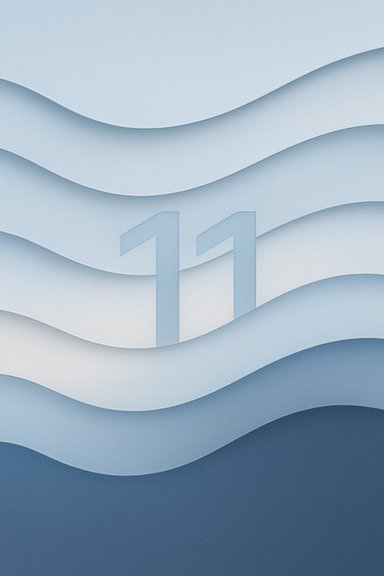
The newly published assets consist of two distinct artworks, each provided in light and dark variants and sized for multiple aspect ratios so they display cleanly on desktops, tablets, and phones. Microsoft’s Design team appears to have produced the images with an emphasis on layered materials and restrained gradients rather than overt marketing imagery — a calm, tactile aesthetic aligned with the current Windows visual language.
Important practical notes:
Insiders remain a public testbed where Microsoft can trial personalization features (for example, early traces of video/animated wallpaper experimentation were discussed in Insider channels earlier this year). These personalization tests highlight real platform engineering questions — codec support, hardware decode, power-consumption, and admin controls — that the community helps surface at scale. Wallpapers are the lightweight surface expression of that deeper technical collaboration.
These wallpapers are small — but for a community that tests products build by build, small things add up. Download the full files from the official Insider hub, set them on a test device, and enjoy the design craftsmanship; then keep holding Microsoft to a higher standard where symbolic gestures are matched by substantive follow‑through.
Source: YTECHB Download Windows Insider 11th Anniversary Wallpaper in 4K
 Background
Microsoft launched the Windows Insider Program in October 2014 to give enthusiasts, developers, and IT professionals early access to pre-release Windows builds and to harvest feedback on features and stability. Over the past decade the program has evolved from a single “fast ring” experiment into a multi-channel preview pipeline (Canary, Dev, Beta, Release Preview) that balances novelty and stability. The 11th-anniversary wallpapers arrive at a notable moment in Windows’ lifecycle: Windows 10 recently reached the end of its mainstream servicing window, making symbolic gestures and community rituals like anniversary wallpapers feel both nostalgic and forward-looking.The newly published assets consist of two distinct artworks, each provided in light and dark variants and sized for multiple aspect ratios so they display cleanly on desktops, tablets, and phones. Microsoft’s Design team appears to have produced the images with an emphasis on layered materials and restrained gradients rather than overt marketing imagery — a calm, tactile aesthetic aligned with the current Windows visual language.
What Microsoft shipped: file types, variants and design
A quick overview of the assets
- Two primary artworks created for the 11th anniversary.
- Each artwork is available in light and dark versions to match Windows 11’s system theme preferences.
- Multiple aspect ratios — widescreen for desktop and square/vertical options for phones/tablets — to reduce the need for user cropping.
- Packaged as downloadable image assets (typically delivered inside a ZIP that contains the various sizes and theme variants).
Design notes: Bloom-inspired, layered, minimal
Visually the anniversary backgrounds borrow from the Windows 11 “Bloom” aesthetic: layered, paper-like shapes that create a subtle wave pattern across the composition. One of the wallpapers integrates the numeral “11” as an irregular layer to mark the milestone, while blue remains the dominant color and 3D depth and soft material textures give the images a polished, modern look. These are design tokens meant to be wearable across the ecosystem rather than loud promotional art.How and where to download
The canonical distribution point for the anniversary assets is the Windows Insider download hub and related official Insider pages; Microsoft published the images there so Insiders and the public can download them directly. Community writeups and third‑party sites (including general wallpaper aggregators) repackaged the images and offered alternative hosts such as Google Drive or third‑party wallpaper apps, but the safest and recommended route is the official Insider download page.Important practical notes:
- The preview images shown on blog posts and social shares are compressed thumbnails — do not save previews if you want full quality. Always use the provided download links in the ZIP or download hub.
- The ZIP file may include platform-specific metadata folders (for example, a __MACOSX directory sometimes appears), which are packaging artifacts rather than intentional messaging. They can be safely ignored or deleted on Windows.
Step-by-step: set the wallpaper on Windows and phones
- Download the ZIP from the official Windows Insider download page and extract it to a local folder.
- Choose the variant that matches your device form factor and theme (light/dark + correct aspect ratio).
- On Windows: right-click the image file and select “Set as desktop background,” or go to Settings > Personalization > Background to control fit and slideshow options.
- On phones/tablets: open the image in your gallery app and use the device’s “Set as wallpaper” command, choosing home, lock, or both as desired.
- If you use a multi-monitor setup, test different fit presets (Fill, Fit, Center) to avoid unwanted cropping.
Why this small gesture matters
Community recognition and ritual
Wallpapers are low-friction tokens that land directly on users’ devices. They function as:- A public “thank you” to the active community of Insiders who file bugs, test features, and shape product direction.
- A continuity device — repeated anniversary art (10th, 11th, etc. builds ritual and nostalgia, anchoring a program that has existed through several major Windows cycles.
Brand continuity
These curated assets maintain a consistent Windows visual language as messaging shifts toward AI and productivity features. A subtle, design-first release helps the brand remain cohesive without leaning on product hype.Low-risk, high-visibility outreach
Unlike shipping preview features, wallpapers carry virtually no technical risk and are easy for Microsoft to produce and distribute. They generate good press and community chatter without changing system behavior or pushing potentially unstable code.Critical analysis: strengths, limitations, and risks
Strengths
- Immediacy and accessibility: Any user can download and install the wallpaper without touching Insider channels or system settings.
- Theme-aware design: Light and dark variants respect user preferences and reduce the likelihood of jarring presentation on dark-themed desktops.
- Cross-device readiness: Multiple aspect ratios reduce cropping and preserve composition across phones, tablets, and widescreen monitors.
Limitations
- Symbolic, not substantive: Wallpapers are a cosmetic token. They don’t address long-standing program governance questions Insiders raise, such as clearer channel purpose or faster remediation for high‑signal issues. Some community members may view repeated symbolic gestures without substantive follow-up as insufficient.
- Distribution noise: Third‑party rehosts, compressed previews, and reposts can create confusion and quality issues. Users who download preview thumbnails instead of the full files will get an inferior experience. The official download hub is the authoritative source.
Practical risks and security hygiene
- Packaging artifacts: A visible __MACOSX folder in the ZIP briefly sparked speculation about hidden signals; in reality it’s a common macOS zipping artifact and not evidence of product clues. Treat such artifacts as packaging metadata unless Microsoft explicitly says otherwise.
- Download provenance: Always prefer official distribution points. If you must use a mirror, verify file integrity and scan downloaded archives with an antivirus engine before extraction. Administrators should disallow untrusted download sources on managed systems.
For administrators and enterprise teams
While anniversary wallpapers are harmless gifts for consumer Insiders, administrators should view them through the lens of manageability and policy:- Maintain a whitelist for allowed personalization packages and insist on official downloads for any user personalization pushed at scale.
- If animated or dynamic wallpapers become a first‑party feature later, demand Group Policy or Microsoft Endpoint Manager controls to cap power usage, per‑monitor behavior, and VDI compatibility.
- Treat Insider builds and personalization experiments as test‑only: do not run pre-release OS builds on production machines. Use separate test devices and validate power, thermal, and codec implications before considering wide deployment.
The broader context: Windows 10 retirement and the program’s role
The timing of the wallpaper drop lands close to a major milestone in the Windows story: mainstream servicing for Windows 10 ended recently, prompting migrations, ESU (Extended Security Updates) conversations, and elevated attention on Windows 11 and Microsoft’s AI-first roadmap. In that context, the Insider anniversary art serves as both a farewell nod to long-time Windows 10 Insiders and a subtle reminder that the Insider program will continue to help refine Windows 11’s future.Insiders remain a public testbed where Microsoft can trial personalization features (for example, early traces of video/animated wallpaper experimentation were discussed in Insider channels earlier this year). These personalization tests highlight real platform engineering questions — codec support, hardware decode, power-consumption, and admin controls — that the community helps surface at scale. Wallpapers are the lightweight surface expression of that deeper technical collaboration.
How the community reacted (and what to watch next)
Early community chatter gravitated to three themes:- Appreciation for design polish and the availability of multiple theme/aspect variants that make the wallpaper actually usable across devices.
- Mild skepticism that a wallpaper release substitutes for substantive program improvements.
- Curiosity about packaging oddities (the __MACOSX folder) that inspired conspiracy theories but in practical terms had a mundane explanation.
- Whether Microsoft pairs symbolic gestures with tangible program changes such as more transparent feedback-to-action metrics, clarified channel descriptions, and admin-focused controls for new personalization features.
- Any movement from static wallpapers to managed, dynamic or animated desktop experiences — which would demand deeper platform commitments to power, codecs, and enterprise controls.
Practical FAQ
Are these wallpapers available in 4K?
Yes — Microsoft and community reports indicate the anniversary assets are offered in high-resolution variants suitable for large displays; however, content previews embedded in articles are compressed, so always download the original files to get the full resolution.Can I use them on mobile or tablets?
Yes. The images were published with square/vertical aspect ratios intended for phones and tablets, and widescreen ratios for PCs. Choose the appropriate file in the ZIP for the best result.I saw a __MACOSX folder in the ZIP — is that a clue?
No. The __MACOSX directory is a common artifact of archives created on macOS and is not evidence of hidden messaging or product hints. It contains macOS metadata that Windows systems don’t need. Delete it if you prefer.Step-by-step checklist for Insiders who want the best outcome
- Visit the official Windows Insider download hub for the anniversary assets.
- Download the ZIP and scan it with your antivirus software.
- Extract and pick the image variant that matches your device and Windows theme.
- Apply the wallpaper in Settings > Personalization > Background (Windows) or via your phone’s gallery app.
- If using multiple monitors, test different fit options to preserve composition.
- Avoid installing Insider builds on production machines; personalize test devices instead.
Final assessment
The Windows Insider Program’s 11th‑anniversary wallpapers are precisely what they present themselves to be: a tasteful, design-led thank-you packed into practical image files that respect modern theming and multiple aspect ratios. As a community gesture the drop works — it’s low-friction, broadly accessible, and visually consistent with Windows 11’s aesthetic. At the same time the release underscores a perennial tension: symbolic tokens help maintain goodwill, but the program’s long-term legitimacy rests on clearer channel governance, measurable responses to high‑signal feedback, and robust tooling for administrators as personalization features evolve. The wallpapers buy a moment of communal pride; the enduring value of the Insider program will be judged by how Microsoft translates that goodwill into concrete product and program improvements.These wallpapers are small — but for a community that tests products build by build, small things add up. Download the full files from the official Insider hub, set them on a test device, and enjoy the design craftsmanship; then keep holding Microsoft to a higher standard where symbolic gestures are matched by substantive follow‑through.
Source: YTECHB Download Windows Insider 11th Anniversary Wallpaper in 4K
