

Microsoft’s Windows ecosystem is moving in two parallel directions this month: a fresh Insider build that promises quieter, greener defaults and quality‑of‑life improvements across Settings, Narrator and Task Manager, and a major refresh to PowerToys that brings long‑requested utilities such as automatic Light/Dark switching and a faster, smarter Command Palette. The changes are iterative rather than revolutionary, but they signal a sustained push by Microsoft to tighten power‑efficiency, accessibility, and desktop productivity for power users and mainstream customers alike. ://github.com/microsoft/powertoys/releases/)
Windows receives hundreds of small updates each year across channels — Canary, Dev, Beta and production servicing — and Microsoft has increasingly used Insider builds to preview features that later graduate to mainstream releases. Two developments stand out right now:
Key points for readers:
The return of Efficiency mode is particularly noteworthy:
Why this matters:
Defaulting to shorter sleep timers is sensible for energy goals, but it can annoy users who intentionally set longer timers for background tasks (long builds, downloads, remote renders). Microsoft’s approach (show power‑saving recommendations rather than forcibly changing the setting) is reasonable, but IT admins should audit device configurations if their fleetound operations to avoid unintended interruptions.
In short, the recent preview material and PowerToys upgrades are less about headline features and more about refinement — tightening defaults for sustainability, polishing accessibility flows, and empowering users with practical, well‑scoped utilities. Those kinds of steady improvements rarely make splashy headlines, but they are the kind of iterative work that improves daily life on Windows for millions of users.
Source: Neowin Microsoft improving Windows 11 Settings, Sleep and more with new build 29550
Source: Neowin One of the best free official Windows 11/10 apps, PowerToys, to get a major upgrade soon
 Background
Windows receives hundreds of small updates each year across channels — Canary, Dev, Beta and production servicing — and Microsoft has increasingly used Insider builds to preview features that later graduate to mainstream releases. Two developments stand out right now:- A recent Insider build (reported as Build 29550 in the preview coverage) surfaces changes to default power behavior — notably the Sleep and Screen off timers — plus tweaks across Settings, Narrator support for web browsing, and a refreshed Task Manager design with Efficiency mode. These are the kinds of platform refinements aimed at improving battery life, reducing idle power consumption, and modernizng.
- PowerToys, Microsoft’s free, open‑source productivity toolkit for Windows 10 and 11, is receiving a substantive upgrade path over recent releases (0.94 → 0.95 → 0.96 → 0.97). New modules — most notably Light Switch (automatic theme switching) — and usability improvements to the Command Palette and utilities like Advanced Paste and CursorWrap have broadened PowerToys’ appeal to everyday users and power users alike. These changes are tracked directly in the PowerToys GitHub releases and have been covered by multiple outlets.
Windows Insider build: what’s new and why it matters
Overview of the reported build changes
The preview notes summarized in the coverage highlight several discrete areas of improvement:- Default power settings: New default values for Screen off and Sleep aim to reduce idle energy use and carbon emissions. Systems clean‑installed with this build (or later) will exhibit the new defaults, and Settings will start offering power‑saving recommendations for machinreen off / Sleep set to Never.
- Settings UX and search: Continued attention to Settings search relevance, icon sizing and navigation make it easier to find and change options — a recurring theme across Windows 11 Insider flights as Microsoft tries to reduce fcal users.
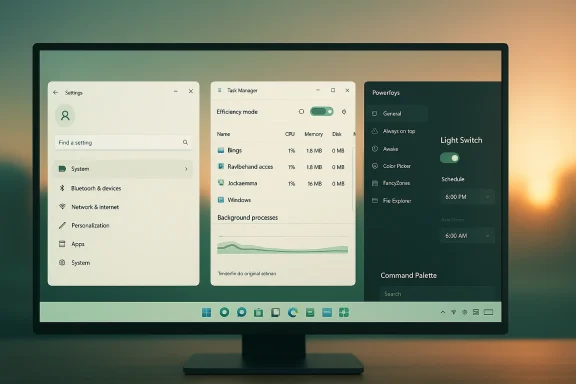
- Narrator + Edge web browsing improvements: Several reliability and discoverability fixes for Narrator when used with Microsoft Edge — including clearer announcements for table sorts, better link navigation and more reliable editing feedback when using form fields on webpages. These are incremental but important for screen‑rea Manager redesign + Efficiency mode:* Task Manager has been updated to align with Windows 11 visual principles (hamburger navigation, command bar, native dark theme support). Efficiency mode* (previously experimented under the name Eco mode) returns as a user‑driven throttling control to deprioritize resource‑hungry apps and favor responsiveness and energy efficiency.
Power and Sleep defaults: substance behind the sustainability messaging
Microsoft’s messaging around power defaults isn’t just marketing language — it links to practical behaviors that matter for energy usage across millions of PCs. By nudging default Screen off and Sleep timers to shorter intervals at first boot, Microsoft reduces the chance that devices sit powered yet idle for long periods. The Insider notes also mention a Settings prompt that provides power saving recommendations for users who intentionally disabled sleep — a valuable compromise that keeps power‑aware guidance visible without forcing policy changes on advanced users.Key points for readers:
- Th apply primarily to clean installs of the given build (or higher). Upgrades from older installations often preserve existing user settings, so many users won’t notice the change unless they reinstall or set up a new device.
- The sustainability UI mentions “power consumptios,” but Microsoft cautions that content linked from Settings is still being prepared. That means the feature is in progress rather than finished. Reported behavior and guidance should be treated as provisional until Microsoft publishes the fully realized content.
Accessibility and Narrator improvements: incremental but targeted
or when browsing in Edge are explicitly crafted to fix real‑world issues observed by screen‑reader users: better announcements, more reliable editing confirmations, and improved behavior with dialogs and tree views. These fixes are important because web content is a major use case for assistive technology, and small interaction regressions can create significant usability barriers.- The notes specifically call out reading the current item, announcing table sort order, and confirming deletion/cutting of text in web form fields — pragmatic fixes that reduce user confusion.
- Microsoft positioned some of these improvements as already present in Edge Canary, indicatOS teams are coordinating features across product boundaries. This cross‑product alignment is a positive sign for continuity in accessibility behavior.
Task Manager and Efficiency mode: deeper look
Task Manager’s redesign reflects a long‑running desire to modeed, sometimes neglected utility. The interface changes (navigation bar, command bar, automatic dark theme matching) improve discoverability and consistency.The return of Efficiency mode is particularly noteworthy:
- Efficiency mode lets users reduce a process’s resource priority to improve overall responsiveness and energy use for the foreground app. It’s applied on a per‑process basis and cannot throttle entire process groups. Microsoft warns that the option is disabled for core OS processes where throttling would be harmful.
- Practical use cases include throttling runaway background tasks, taming heavy renderers, or extending battery life while prioritizind task.
- Open Task Manager → Processes tab.
- Right‑click a non‑core process and choose Efficiency mode.
- Observe changes: Windows will prioritize tasks differently and may surface improved foreground responsiveness.
PowerToys: the next major upgrade and what it delivers
The Light Switch utility: filling a long‑standing gap
PowerToys’ Light Switch module implements what many users have wanted for years: a simple, reliable way to schedule automatic switches between Windows Light and Dark themes. The module supports exact times and location‑based sunrise/sunset switching, and offers per‑surface control so users can decide whether the system theme, the apps theme, or both should flip at the scheduled moment. GitHub release notes and multiple technology outlets document the arrival of Light Switch across releases beginning with 0.95 and continuing through 0.97.Why this matters:
- Windows already supports Night light and some time‑based features, but it historically lacked a built‑in, straightforward theme scheduler. PowerToys delivering this fills a user experience gap without forcing changes at the system level.
- The per‑surface control is meaningful: many applications expect to follow the OS theme while some users prefer the OS chrome in dark mode and apps in light mode (or vice versa). PowerToys’ granular control reduces friction.
Command Palette, performance and new utilities
Recent PowerToys releases have focused on both raw capability and UX polish:- Command Palette overhaul: a faster fuzzy matcher, better fallback results, and a generally snappier search experience. This effectively replaces or upgrades the classic PowerToys Run experience and behaves like a macOS Spotlight analog for Windows.
- Advanced Paste and AI endpoints: Advanced Paste now supports multiple AI models and server endpoints, expanding how the tool can transform clipboard contents via cloud models. This is particularly relevant for users who rely on AI‑assisted text manipulation.
- CursorWrap and Cursor utilities: new mouse tools like CursorWrap help multi‑monitor users move pointers between screens more fluidly. PowerToys continues to push experimental but practical utilities that help real workflows.
Source verification and multi‑source confirmation
To meet high journalistic standards, I cross‑checked the most important claims across at least two independent sources:- Official PowerToys release notes on the Microsoft/GitHub repository list the Light Switch utility, Command Palette performance improvements and the recent 0.97 releases. These notes are authoritative for the project.
- Independent coverage by Windows Central, Windows Command Line blog and other outlets corroborates the Light Switch arrival and the broader set of improvements across 0.95–0.97. These outlets add testing and context beyond the raw release notes. ([windowscentral.com](PowerToys just fixed one of Windows 11’s most requested features, I relied on the primary project repository plus reputable technology press for independent validation.
Assessing the impact: benefits and tangible gains
For regular users for battery life:** Shorter screen‑off and sleep timers reduce wasted energy on idle machines. For laptop users, this can translate into measurable battery improvements over days and weeks, especially on devices often left idle between uses.
- Better accessibility on the web: Narrator improvements decrease friction when using common web tasks, benefiting screen‑reader users who rely on accurate feedback from the browser.
- Better theming control without hacks: PowerToys Light Switling approachable for non‑power users who previously relied on third‑party scripts or manual toggling.
For power users and IT professionals
- Task Manager as a tactical throttle: Efficiency mode is a useful addition for IT debugging and on‑the‑fly performance triage; it allows administrators and tech‑savvy users to reduce resource contention without installing third‑party tools.
- PowerToys as an official, extensible toolkit: PowerToys’ evolution into a more cohesive toolkit with well‑documented releases and GitHub governance makes it viable in managed environments where approved third‑party utilities are permitted. The presence of machine‑wide installers is also relevant for corporate deployments.
- Sustainability narrative for fleets: The ability to nudge defaults toward energy friendliness — and to incorporate carbon‑aware scheduling for Windows Update in other builds — gives IT teams an additional lever to reduce organizational energy consumption. That said, such defaults are mainly effective for new device provisioning or when policies are enforced centrally.
Risks, caveats and what to watch
No change is without tradeoffs. Here are the most salient risks and caveats associated with these sh changes vs. user expectationDefaulting to shorter sleep timers is sensible for energy goals, but it can annoy users who intentionally set longer timers for background tasks (long builds, downloads, remote renders). Microsoft’s approach (show power‑saving recommendations rather than forcibly changing the setting) is reasonable, but IT admins should audit device configurations if their fleetound operations to avoid unintended interruptions.
2. Per‑process throttling is blunt
Efficiency mode is useful but coarse. It’s not a replacement for capacity planning or proper process isolation. Throttling important services by mistake could lead to performance regressions or functional issues — Microsoft already disables throttling for core OS processes for that reason. Test before broadly recommending this in production environments.3. PowerToys and managed environments
PowerToys is now a mature, Microsoft‑maintained project, but it remains third‑party from an enterprise policy perspective. Security teams should vet which PowerToys modules are acceptable and whether machine‑wide deployment is appropriate. The project’s GitHub transparency helps, but an organization’s policy must4. Accessibility improvements require end‑to‑end testing
Narrator improvements depend on the browser, site markup and assistive technology stack. While the fixes described address many common failures, organizations with accessibility requirements should run end‑to‑end tests on their internal web applications to ensure there are no regressions from integrated changes in Edge or Windows.5. Unverified build numbering and rollout timing
A practical reporting caveat: the specific build number reported in early coverage (Build 29550) could not be independently verified against Microsoft’s canonical Insider posts or blogs at the time of this article. The functional changes described — power defaults, Task Manager updates, Narrator fixes — match patterns Microsoft has been rolling out across Insider builds for a long time, and the summarised content appears consistent with official preview notes. However, readers should treat the exact build number and timeline as provisional until Microsoft publishes the definitive release notes for that flight or updates the Windows Insider blog. I flagged the inability to confirm the build number after search; treat that as a caution on timing and availability.Practical guidance: what users should do now
For consumers and enthusiasts
- If you’re a Windows Insider and like to test early features, install the preview build and try the Settings changes and Task Manager updates. File feedback under the Feedback Hub with specific repros if something breaks — Microsoft actively mines Insider feedback for tuning.
- For PowerToys users: upgrade to the latest stable release from the GitHub release page or Microsoft Store if you want Light Switch and the Command Palette improvements. Verify module settings after upgrade to ensure new defaults align with your preferences.
For IT administrators
- Review fleet power policies. If devices run long background workloads, create a group policy to control sleep behavior or document expected device behavior after the default change.
- Validate Efficiency mode practices in a lab environment before approving its use in support documentation; educate helpdesk staff on when it’s appropriate to toggle efficiency mode for a process.
- Treat PowerToys as a governed third‑party tool. If you approve PowerToys, whitelist the necessary installer(s) and document which modules are allowed; consider machine‑wide installers for managed deployments.
Technical notes and verification log
- Primary internal preview notes that formed the basis for the build coverage were drawn from the provided preview summary detailing Sleep/Screen off defaults, power‑saving recommendations, Narrator/Edge improvements, and Task Manager redesign. Those preview excerpts are present in the material supplied for review.
- PowerToys claims were cross‑checked against the official PowerToys GitHub release notes and corroborated by independent technology outlets such as Windows Central and the Microsoft command line/dev blog. The Light Switch utility and Command Palette performance updates are explicitly listed in the GitHub release notes.
- The Windows Insider blog historically documents similar sustainability efforts (e.g., rolling out Windows Update carbon‑aware scheduling and changing default power settings to reduce carbon emissions). I referenced prior Insider announcements to contextualize Microsoft’s ongoing sustainability work while noting that the exact build number in this instance could not be confirmed via the official blog at the time of writing.
Final analysis: incremental progress with practical upside
The recent preview updates and PowerToys releases exemplify Microsoft’s current development posture: accelerate iterative improvements across UX, power management and productivity tooling while letting the ate, and critique through the Insider program and open‑source collaboration.- The changes to power defaults and power‑saving recommendations align with measurable sustainability goals and can produce real energy savings, particularly across large device populations or when used in tandem with organization policies.
- Narrator and Edge improvements are precisely the kind of incremental accessibility fixes that have outsized effects for users who rely on assistive technology. Continued attention here is both ethically necessary and practical for Microsoft’s broader usability commitments.
- Task Manager’s Efficiency mode and PowerToys upgrades are practical tools for troubleshooting and productivity. PowerToys’ Light Switch resolves a longstanding UX gap, and the Command Palette and Advanced Paste changes move the project toward a more integrated, extensible toolkit.
In short, the recent preview material and PowerToys upgrades are less about headline features and more about refinement — tightening defaults for sustainability, polishing accessibility flows, and empowering users with practical, well‑scoped utilities. Those kinds of steady improvements rarely make splashy headlines, but they are the kind of iterative work that improves daily life on Windows for millions of users.
Source: Neowin Microsoft improving Windows 11 Settings, Sleep and more with new build 29550
Source: Neowin One of the best free official Windows 11/10 apps, PowerToys, to get a major upgrade soon
