

Enterprise IT teams should move devices according to their Windows core and required exit path, not according to whether the machines previously lived in Dev, Canary, or Beta. Keep production-representative pilots on Beta or Experimental 26H2, reserve Experimental 26H1 for validating hardware built around its targeted silicon platform, and place only disposable, easily reimaged systems on Experimental (Future Platforms).
Microsoft began the phased transition from Dev to Experimental and from the existing Beta experience to the new Beta model on April 24, 2026, as detailed by the Windows Insider Program team. Canary devices split according to build family: 28000-series systems move to Experimental (26H1), while 29500-series systems move to Experimental (Future Platforms).
The labels look simpler, but the underlying decision is not. A tester’s Windows core determines whether administrators can change channels through an in-place upgrade that preserves applications, settings, and data—or must erase and rebuild the machine.
The first enterprise action should be an inventory, not a mass channel change. Record each test device’s current build family, Windows core, hardware purpose, enrollment owner, management state, enabled feature flags, and acceptable recovery method.
Microsoft’s documented migration model produces four practical assignments:
This matrix separates two ideas that Microsoft’s new interface can visually blur. Experimental describes how early or changeable the tested functionality may be; 26H1, 26H2, and Future Platforms describe the platform foundation and therefore the recovery boundary.
Administrators should verify the installed version and build before approving any migration. The relevant settings are under Settings > Windows Update > Windows Insider Program, while the installed Windows version is visible under Settings > System > About or through
Do not treat the selected radio button as proof that a machine can return safely. Confirm that the destination is on the same core, document the rollback method, and test that method before the device receives work that cannot be easily recreated.
That makes Experimental 26H2 the most useful destination for many general enterprise labs. It exposes earlier changes than Beta while keeping the device on the branch that matters for organizations validating the mainstream Windows servicing path.
A suitable Experimental 26H2 ring should include representative combinations of:
Microsoft uses an in-place upgrade for these supported transitions. That process takes longer than an ordinary update but preserves applications, settings, and data, making it materially less disruptive than rebuilding a test endpoint.
Beta should remain the release-readiness ring rather than becoming the default home for every Insider device. Microsoft has ended the old gradual feature rollout behavior for the refreshed Beta experience: when a feature is announced for a Beta update and the device takes that update, the feature should be present, although Microsoft may still test variations within it.
That change makes Beta populations more consistent, but it also removes a source of accidental diversity. Enterprises must deliberately create representative cohorts instead of assuming Microsoft’s controlled rollout will produce a useful mixture of enabled and disabled devices.
Devices on 26H1 cannot move back to the 25H2/26H2 core without a clean reinstall. That makes Experimental 26H1 appropriate when the test question is explicitly about hardware, drivers, firmware, provisioning, security behavior, or management compatibility on that platform.
It is a poor choice for a generic application-compatibility machine that the organization expects to return quickly to its normal Windows pilot population. An application result obtained on 26H1 may still be useful, but the device’s lifecycle and recovery cost differ from those of the mainstream 25H2/26H2 estate.
IT teams should therefore give every 26H1 system a written validation charter. It should identify the hardware dependency being tested, the owner responsible for collecting results, the clean-install media and driver package needed for recovery, and the event that ends the test.
Existing Canary 28000-series devices moving into Experimental 26H1 deserve immediate review. Their automatic channel mapping does not establish that they still serve a valid enterprise test objective. If the organization no longer needs targeted-platform validation, administrators should plan a controlled rebuild rather than allowing those machines to become permanent exceptions.
That makes reimageability the admission requirement. Future Platforms devices should not hold unique local data, serve as an administrator’s primary workstation, or depend on a fragile configuration that the support team cannot reproduce.
The channel is most defensible for long-lead testing of platform changes such as kernel behavior, new APIs, low-level drivers, security tooling, and management agents. Even there, the test plan needs a known-good comparison system because a failure observed on Future Platforms may reflect unfinished platform work rather than an impending retail Windows change.
A clean-install requirement also changes incident response. If an endpoint becomes unstable or stops accepting policy, the recovery procedure is not simply to select Beta and wait for another flight. Administrators need installation media, firmware and driver dependencies, enrollment instructions, licensing readiness, and a method for restoring the test configuration.
Organizations unable to rebuild such a system on demand should exit Future Platforms now rather than after the machine becomes important.
A report that “the Experimental machine passed” is no longer sufficient. The result must identify the Windows core, build, channel, feature-flag state, policy set, management-agent versions, hardware model, and test timestamp.
Feature flags should be governed like configuration changes:
The removal of gradual feature rollouts from Beta creates the opposite governance challenge. Beta is more deterministic, but a uniformly enabled fleet may no longer reveal how an update interacts with systems that have not yet received an associated feature. Organizations that need both states must preserve them intentionally elsewhere in the lab.
Useful evidence should cover update installation and recovery, policy application, management check-in, authentication, application launch and workflow completion, endpoint-security health, driver stability, performance regressions, and support incidents. The exact thresholds will differ by organization, but they should be written before testing begins.
Rollback testing must be part of that evidence. On same-core Beta, Experimental, and Release Preview devices, administrators should validate the documented in-place upgrade path while confirming that applications, settings, data, encryption, management enrollment, and security controls remain intact afterward.
For 26H1 and Future Platforms, the corresponding test is a clean rebuild. Time the process, verify that the device can reenroll, and confirm that required drivers, policies, applications, and credentials can be restored without relying on undocumented local knowledge.
The migration is therefore less a renaming exercise than a chance to correct poorly defined Insider rings. Beta is the production-facing preview population, Experimental 26H2 is the mainstream early-validation population, Experimental 26H1 is a targeted hardware lab, and Future Platforms is a disposable platform-engineering environment.
Microsoft has made channel movement easier in many cases, but only within the boundary imposed by the Windows core. Enterprises that classify devices by that boundary now will retain a tested exit path; those that classify them by the familiar Dev and Canary ancestry may discover the clean-install requirement only when they urgently need to leave.
Microsoft began the phased transition from Dev to Experimental and from the existing Beta experience to the new Beta model on April 24, 2026, as detailed by the Windows Insider Program team. Canary devices split according to build family: 28000-series systems move to Experimental (26H1), while 29500-series systems move to Experimental (Future Platforms).
The labels look simpler, but the underlying decision is not. A tester’s Windows core determines whether administrators can change channels through an in-place upgrade that preserves applications, settings, and data—or must erase and rebuild the machine.
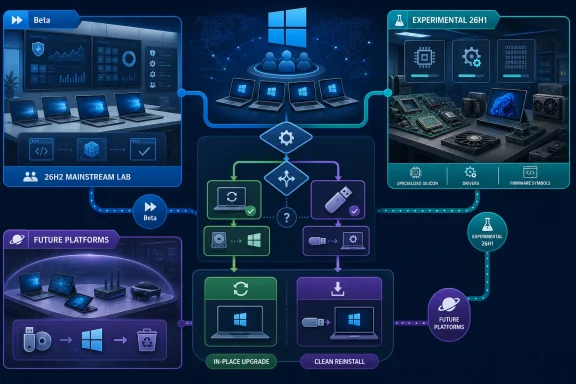 Sort the Fleet by Recovery Cost Before Channel Name
The first enterprise action should be an inventory, not a mass channel change. Record each test device’s current build family, Windows core, hardware purpose, enrollment owner, management state, enabled feature flags, and acceptable recovery method.Microsoft’s documented migration model produces four practical assignments:
| Test-device purpose | Recommended destination | Exit expectation |
|---|---|---|
| Production-representative application, policy, and servicing validation | Beta or Experimental 26H2 | Channel movement is generally available without wiping when the device remains on the same Windows core. |
| Early feature and management testing on the mainstream servicing branch | Experimental 26H2 | The device can generally return to Beta or Release Preview on the same core through an in-place upgrade. |
| Validation of hardware designed for the targeted 26H1 platform | Experimental 26H1 | Returning to the 25H2/26H2 core requires a clean reinstall. |
| Kernel, API, driver, and long-lead platform exploration | Experimental (Future Platforms) | Leaving the channel or switching cores requires a clean installation. |
Administrators should verify the installed version and build before approving any migration. The relevant settings are under Settings > Windows Update > Windows Insider Program, while the installed Windows version is visible under Settings > System > About or through
winver.Do not treat the selected radio button as proof that a machine can return safely. Confirm that the destination is on the same core, document the rollback method, and test that method before the device receives work that cannot be easily recreated.
Experimental 26H2 Is the Practical Mainstream Test Ring
Microsoft introduced Experimental 26H2 on June 19, 2026. The Windows Insider blog says Windows 11 version 26H2 shares the Windows 11 version 25H2 servicing branch and is delivered through an enablement package.That makes Experimental 26H2 the most useful destination for many general enterprise labs. It exposes earlier changes than Beta while keeping the device on the branch that matters for organizations validating the mainstream Windows servicing path.
A suitable Experimental 26H2 ring should include representative combinations of:
- Corporate security baselines, application-control rules, and endpoint-protection configurations.
- Microsoft and third-party management agents used for inventory, policy deployment, software distribution, and compliance reporting.
- Frequently deployed desktop applications, browser extensions, shell integrations, and authentication components.
- Common docks, displays, storage devices, network adapters, smart-card hardware, and other enterprise peripherals.
- Update, recovery, encryption, and provisioning workflows used by support teams.
Microsoft uses an in-place upgrade for these supported transitions. That process takes longer than an ordinary update but preserves applications, settings, and data, making it materially less disruptive than rebuilding a test endpoint.
Beta should remain the release-readiness ring rather than becoming the default home for every Insider device. Microsoft has ended the old gradual feature rollout behavior for the refreshed Beta experience: when a feature is announced for a Beta update and the device takes that update, the feature should be present, although Microsoft may still test variations within it.
That change makes Beta populations more consistent, but it also removes a source of accidental diversity. Enterprises must deliberately create representative cohorts instead of assuming Microsoft’s controlled rollout will produce a useful mixture of enabled and disabled devices.
Experimental 26H1 Needs a Hardware-Specific Charter
Windows 11 version 26H1 is not simply a more adventurous edition of 26H2. Microsoft describes it as a targeted platform release for specific silicon, built on a different Windows core from versions 24H2, 25H2, and 26H2.Devices on 26H1 cannot move back to the 25H2/26H2 core without a clean reinstall. That makes Experimental 26H1 appropriate when the test question is explicitly about hardware, drivers, firmware, provisioning, security behavior, or management compatibility on that platform.
It is a poor choice for a generic application-compatibility machine that the organization expects to return quickly to its normal Windows pilot population. An application result obtained on 26H1 may still be useful, but the device’s lifecycle and recovery cost differ from those of the mainstream 25H2/26H2 estate.
IT teams should therefore give every 26H1 system a written validation charter. It should identify the hardware dependency being tested, the owner responsible for collecting results, the clean-install media and driver package needed for recovery, and the event that ends the test.
Existing Canary 28000-series devices moving into Experimental 26H1 deserve immediate review. Their automatic channel mapping does not establish that they still serve a valid enterprise test objective. If the organization no longer needs targeted-platform validation, administrators should plan a controlled rebuild rather than allowing those machines to become permanent exceptions.
Future Platforms Belongs on Disposable Infrastructure
Canary 29500-series devices map to Experimental (Future Platforms), Microsoft’s earliest platform track. It is not tied to a retail Windows release, and Microsoft’s documentation states that moving to another channel or leaving the Insider Program still requires a clean installation.That makes reimageability the admission requirement. Future Platforms devices should not hold unique local data, serve as an administrator’s primary workstation, or depend on a fragile configuration that the support team cannot reproduce.
The channel is most defensible for long-lead testing of platform changes such as kernel behavior, new APIs, low-level drivers, security tooling, and management agents. Even there, the test plan needs a known-good comparison system because a failure observed on Future Platforms may reflect unfinished platform work rather than an impending retail Windows change.
A clean-install requirement also changes incident response. If an endpoint becomes unstable or stops accepting policy, the recovery procedure is not simply to select Beta and wait for another flight. Administrators need installation media, firmware and driver dependencies, enrollment instructions, licensing readiness, and a method for restoring the test configuration.
Organizations unable to rebuild such a system on demand should exit Future Platforms now rather than after the machine becomes important.
Feature Flags Turn Testing Into a Change-Control Problem
Microsoft’s new model gives Experimental testers more direct control over newly announced experiences through feature flags in Windows Update settings. This improves access, but it can undermine enterprise test quality if administrators cannot reproduce the tested state.A report that “the Experimental machine passed” is no longer sufficient. The result must identify the Windows core, build, channel, feature-flag state, policy set, management-agent versions, hardware model, and test timestamp.
Feature flags should be governed like configuration changes:
- Assign an owner who can authorize enabling or disabling each feature under evaluation.
- Capture the device’s baseline state before changing the flag.
- Record the flag state alongside the build and core version in the test result.
- Keep at least one comparable control device without the feature enabled when capacity permits.
- Repeat critical tests after a build change rather than assuming the feature’s implementation remained identical.
- Define who can advance a flagged feature from exploration into a production-readiness ring.
The removal of gradual feature rollouts from Beta creates the opposite governance challenge. Beta is more deterministic, but a uniformly enabled fleet may no longer reveal how an update interacts with systems that have not yet received an associated feature. Organizations that need both states must preserve them intentionally elsewhere in the lab.
Telemetry Must Decide When a Feature Advances
The channel should determine where a test starts, not whether it passes. Enterprises need explicit exit criteria before a feature or build can advance from Experimental to Beta-aligned validation and then toward production.Useful evidence should cover update installation and recovery, policy application, management check-in, authentication, application launch and workflow completion, endpoint-security health, driver stability, performance regressions, and support incidents. The exact thresholds will differ by organization, but they should be written before testing begins.
Rollback testing must be part of that evidence. On same-core Beta, Experimental, and Release Preview devices, administrators should validate the documented in-place upgrade path while confirming that applications, settings, data, encryption, management enrollment, and security controls remain intact afterward.
For 26H1 and Future Platforms, the corresponding test is a clean rebuild. Time the process, verify that the device can reenroll, and confirm that required drivers, policies, applications, and credentials can be restored without relying on undocumented local knowledge.
The migration is therefore less a renaming exercise than a chance to correct poorly defined Insider rings. Beta is the production-facing preview population, Experimental 26H2 is the mainstream early-validation population, Experimental 26H1 is a targeted hardware lab, and Future Platforms is a disposable platform-engineering environment.
Microsoft has made channel movement easier in many cases, but only within the boundary imposed by the Windows core. Enterprises that classify devices by that boundary now will retain a tested exit path; those that classify them by the familiar Dev and Canary ancestry may discover the clean-install requirement only when they urgently need to leave.
References
- Primary source: learn.microsoft.com
Experimental Preview Build 26300.8289 - Windows Insider Program | Microsoft Learn
Release notes for Experimental Preview Build 26300.8289learn.microsoft.com - Independent coverage: blogs.windows.com
We’re moving to Experimental and Beta! Announcing new builds for 24 April 2026
Hello Windows Insiders, Today is the day we’re beginning to move to the new Experimental and Beta channels as announced earlier this monthblogs.windows.com - Primary source: WindowsForum
Windows Insider Reboot: Experimental vs Beta, Feature Flags, Clearer Preview | Windows Forum
Microsoft is preparing one of the most meaningful resets in the history of the Windows Insider Program, and it is doing so at a moment when preview fatigue...windowsforum.com
