

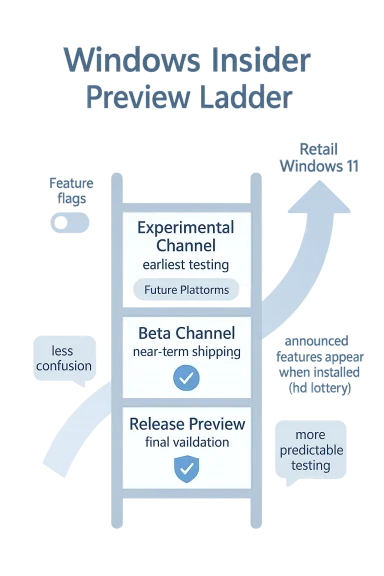
Microsoft is about to make its Windows Insider Program feel far less like a moving target and far more like a structured preview ladder. The company is preparing to consolidate its preview pipeline around a new Experimental Channel, keep the Beta Channel focused on near-term shipping features, and preserve Release Preview for final validation before public deployment. For longtime Insiders, the headline is less about branding and more about control: fewer ambiguous channel promises, fewer “why don’t I have the feature?” moments, and a clearer path for testing what comes next. Microsoft is also signaling that the days of opaque rollout behavior in the Beta Channel are ending, at least in the form Insiders have come to know.
The Windows Insider Program has always been more than a simple beta test. It is Microsoft’s public proving ground for new Windows ideas, a place where the company can collect feedback, harden the platform, and decide which concepts are worth shipping broadly. That mission has become more complicated over time because Windows development itself has become more modular, more service-driven, and more dependent on experimentation than the old “one release, one schedule” model ever was. Microsoft’s latest rework of the channel structure is a direct response to that complexity.
For the last several years, the Insider system has drifted toward a state that was technically flexible but operationally confusing. Dev and Canary were often hard to distinguish in practical terms, while Beta sometimes received features gradually, leaving users unsure whether a feature had been announced but not yet enabled, or whether it simply wasn’t present in their build. Microsoft acknowledged that frustration in its recent communications, saying the channel structure had become too confusing and that feature announcements did not always line up with what testers could actually see. That mismatch undercut the whole point of a preview program: if you cannot reliably tell what you are testing, feedback quality drops.
The company’s answer is a simplified model built around clearer intent. The new Experimental Channel is meant for the earliest public testing of in-development work, including a Future Platforms mode for platform-level changes that are even more foundational. The Beta Channel, by contrast, is being repositioned as the “what is coming soon to retail” lane, and Microsoft says features announced in Beta updates will be present for everyone who takes that update. Release Preview remains the stability-focused option for those validating the next monthly update or finalizing commercial deployments.
That shift matters because Windows Insider has increasingly become a communication product as much as a testing product. It does not just expose code; it shapes expectations. Microsoft’s new plan is really about aligning expectations with reality, which is something the old channel naming scheme had stopped doing very well. In practical terms, this is a move toward transparency, but it is also a move toward predictability, and in software preview programs, predictability is often the scarcest feature of all.
The company has now decided that the confusion is worse than the benefit in this part of the pipeline. According to Microsoft’s explanation, the most common frustration it heard from Insiders was not instability, but uncertainty: people did not know why a feature announced in a blog post was visible to some and missing for others. That is a subtle but important distinction, because it means the issue was not merely technical. It was about trust between Microsoft and the testers it depends on to validate the next version of Windows.
The company appears to be preserving the benefits of staged release while removing the emotional cost for testers. In Beta, the new rule is effectively: if it is announced in that update and you install it, you get it. That is a strong statement, and it should make Beta far more coherent as a near-retail validation channel. It also restores a cleaner contract with the audience: Beta is for what ships next, not for a lottery.
Key implications include:
That ambiguity was tolerable when the channel count was smaller and the messaging was simpler. It became less tolerable as Microsoft started shipping more features through the same program, particularly with partial rollouts, feature toggles, and build-dependent feature gates. The new Experimental Channel is Microsoft’s attempt to admit that the old Dev/Canary distinction had outlived its usefulness as a public-facing concept.
The most interesting addition is the new Feature flags page, which will let Insiders toggle visible features on and off. That is a meaningful shift because it turns some of the preview experience into something more deterministic. Instead of waiting for Microsoft’s rollout logic to grant access, testers will be able to flip visible features themselves, at least for the set Microsoft chooses to expose through this interface.
At the same time, the company is being careful not to overpromise. It has already said the Feature flags page will begin with visible new features announced in Windows Insider Program posts, while less visible work such as fixes and system changes may not appear there. That makes sense, because not every change should be exposed as a user-facing switch. Some changes need to remain internal until Microsoft is sure they are ready for direct experimentation.
This design suggests Microsoft wants a layered experimentation model:
The practical message is clear: if someone wants the earliest possible feature exposure, they should stay on a version aligned to a retail build. If they want to test the edges of Windows’ underlying direction, Future Platforms is the lane for that risk. That is a more honest framework than the old one, where channel labels sometimes implied a cleaner progression than actually existed.
This change transforms Beta into what many users assumed it was all along: a practical preview of nearly shipping features with a relatively high degree of completeness. It also makes the channel more valuable for enterprise validation, because IT admins and deployment teams need to know not just what Microsoft plans to ship, but what the actual build will contain when it lands. A predictable Beta channel is better for internal readiness planning than a partially masked one.
That may sound like a small change, but it has outsized consequences for feedback loops. When a feature is missing, the community spends time checking whether the absence is a rollout artifact, a bug, a locale issue, or a build mismatch. Removing that uncertainty should let testers focus on actual product feedback instead of distribution detective work. In theory, that should improve both the quality and speed of Insider feedback.
It also makes the Beta Channel easier to explain to newcomers. The old message—“features may be announced but not yet visible to you”—was accurate, but not intuitive. The new message is much simpler: Beta is where you test what Microsoft thinks is close to ready. That is the kind of wording that can scale to enterprise training materials, community guides, and support documentation without requiring a footnote every other sentence.
The company’s new structure should also help address a recurring complaint from advanced users: Beta has sometimes felt like a place where the label promised stability but the rollout behavior delivered inconsistency. By making Beta more deterministic, Microsoft is likely hoping to win back some of the audience that straddles consumer curiosity and professional validation. That audience is small, but it is influential.
This matters because the Windows servicing model has become increasingly dependent on confidence at the end of the pipeline. Enterprises want to know whether a patch breaks printers, authentication, application compatibility, or management workflows before those updates hit broad deployment rings. Release Preview exists to provide that confidence with less noise than the earlier Insider rings.
Microsoft’s decision to keep Release Preview accessible through Advanced Options is a small but sensible piece of continuity. It suggests the company does not want to disturb the channel that is most obviously aligned to enterprise predictability. In an era of more experimental upstream channels, having one ring that still feels boring is a feature, not a bug.
Historically, one of the biggest barriers to experimentation has been fear of being trapped. If users think leaving a channel means starting over, they are less likely to try the preview path in the first place. Easier channel mobility lowers that psychological cost and makes the Insider Program feel like a fluid test environment rather than a one-way door.
The caveat is that Microsoft says this will work “in most cases,” which is exactly the kind of phrasing that invites exceptions. Some build jumps will still be too large, some platform differences may still require a reset, and some channel transitions may not be fully seamless. But even partial relief is meaningful in a program where a clean install has often been the price of curiosity. That alone will make the Insider story easier to sell.
The fact that Microsoft is trying to soften those boundaries matters more than the exact limit cases. It shows the company recognizes that an Insider program cannot thrive if every move feels like a commitment. Lowering friction is one of the few ways to keep advanced users engaged without forcing them to become Windows plumbing experts.
This is also a signal that Microsoft still sees Windows 11 as a living platform rather than a static product. The company continues to treat the OS as a service that evolves through staged experimentation, feature gates, and controlled exposure. The reorganization does not change that philosophy; it merely tries to make it easier to understand.
The new structure could also simplify internal documentation. IT teams can now map channels more cleanly to operational goals: Experimental for curiosity and deep validation, Beta for near-retail validation, and Release Preview for final verification. That is a much cleaner story to explain to endpoint administrators than a patchwork of build-number caveats and gradual rollout disclaimers.
Release Preview remains especially relevant for organizations that want confidence without too much churn. It is the last meaningful stop before a broad Windows update is treated as production-safe. By preserving that ring and clarifying the others, Microsoft is giving enterprises a cleaner segmentation of risk.
There is also a messaging advantage here. Microsoft has often been criticized for making Windows development feel fragmented or inconsistent. A simplified Insider model gives the company a chance to present itself as more disciplined and more transparent. In a market where trust matters, that is not trivial.
That realization may also affect how competitors think about their own preview pipelines. If Microsoft can make a public preview program feel more coherent, then the bar for transparency rises across the industry. It is a reminder that software testing is no longer just for engineers; it is part of brand trust.
Microsoft’s next few Insider blog posts will reveal whether the company is truly changing the governance model or just the labels. Watch for how build notes are phrased, how feature flags are exposed, and whether the company keeps using the language of certainty in Beta while still reserving internal exceptions behind the scenes. The wording will matter almost as much as the code.
What to watch next:
Source: Thurrott.com Microsoft is Simplifying its Windows Insider Program With Just Two Channels
 Overview
The Windows Insider Program has always been more than a simple beta test. It is Microsoft’s public proving ground for new Windows ideas, a place where the company can collect feedback, harden the platform, and decide which concepts are worth shipping broadly. That mission has become more complicated over time because Windows development itself has become more modular, more service-driven, and more dependent on experimentation than the old “one release, one schedule” model ever was. Microsoft’s latest rework of the channel structure is a direct response to that complexity.For the last several years, the Insider system has drifted toward a state that was technically flexible but operationally confusing. Dev and Canary were often hard to distinguish in practical terms, while Beta sometimes received features gradually, leaving users unsure whether a feature had been announced but not yet enabled, or whether it simply wasn’t present in their build. Microsoft acknowledged that frustration in its recent communications, saying the channel structure had become too confusing and that feature announcements did not always line up with what testers could actually see. That mismatch undercut the whole point of a preview program: if you cannot reliably tell what you are testing, feedback quality drops.
The company’s answer is a simplified model built around clearer intent. The new Experimental Channel is meant for the earliest public testing of in-development work, including a Future Platforms mode for platform-level changes that are even more foundational. The Beta Channel, by contrast, is being repositioned as the “what is coming soon to retail” lane, and Microsoft says features announced in Beta updates will be present for everyone who takes that update. Release Preview remains the stability-focused option for those validating the next monthly update or finalizing commercial deployments.
That shift matters because Windows Insider has increasingly become a communication product as much as a testing product. It does not just expose code; it shapes expectations. Microsoft’s new plan is really about aligning expectations with reality, which is something the old channel naming scheme had stopped doing very well. In practical terms, this is a move toward transparency, but it is also a move toward predictability, and in software preview programs, predictability is often the scarcest feature of all.
Why Microsoft Is Changing the Insider Model
The simplest way to understand this shift is to see it as a response to tester fatigue. Microsoft has spent years layering more nuance into Insider builds, but that nuance created friction for people who expected the blog post and the installed build to line up one-to-one. When the company says a feature is available in a build, testers reasonably expect to be able to turn it on, use it, and file meaningful feedback. Gradual rollout systems like Controlled Feature Rollout blurred that expectation, especially in Beta, where many users assumed “Beta” meant more immediate access than they often got.The company has now decided that the confusion is worse than the benefit in this part of the pipeline. According to Microsoft’s explanation, the most common frustration it heard from Insiders was not instability, but uncertainty: people did not know why a feature announced in a blog post was visible to some and missing for others. That is a subtle but important distinction, because it means the issue was not merely technical. It was about trust between Microsoft and the testers it depends on to validate the next version of Windows.
The role of gradual rollout
Microsoft’s reliance on gradual rollout is not new. The company has used CFR-style mechanisms for years to expose features to subsets of users, monitor feedback, and then widen access if the data looks good. That approach is sensible in production and often sensible in preview, but it creates ambiguity when the audience is explicitly trying to test the feature set itself. A preview program is supposed to reduce ambiguity, not add another layer of probabilistic enablement.The company appears to be preserving the benefits of staged release while removing the emotional cost for testers. In Beta, the new rule is effectively: if it is announced in that update and you install it, you get it. That is a strong statement, and it should make Beta far more coherent as a near-retail validation channel. It also restores a cleaner contract with the audience: Beta is for what ships next, not for a lottery.
Key implications include:
- Less uncertainty about whether a feature is present.
- Better feedback quality because testers can verify the same code paths.
- Cleaner documentation in blog posts and release notes.
- Less channel anxiety for people trying to choose the right ring.
- More meaningful bug reports because testers know what should exist.
Why Dev and Canary became problematic
Dev and Canary were never identical, but over time they became difficult for non-Microsoft audiences to differentiate in a way that mattered day to day. Canary was supposed to be the earliest, least stable, least promise-laden option, while Dev sat somewhere between platform experimentation and feature preview. In practice, the overlap in messaging and the shifting build alignment made it hard to know what kind of risk each channel actually carried.That ambiguity was tolerable when the channel count was smaller and the messaging was simpler. It became less tolerable as Microsoft started shipping more features through the same program, particularly with partial rollouts, feature toggles, and build-dependent feature gates. The new Experimental Channel is Microsoft’s attempt to admit that the old Dev/Canary distinction had outlived its usefulness as a public-facing concept.
What the Experimental Channel Really Means
The new Experimental Channel is not just a renamed Dev Channel. Microsoft is positioning it as the home for the earliest public exposure to Windows ideas that may still be in flux. That includes user-facing features, but also the deeper platform changes that are usually invisible to most people until they become the foundation of a future release. In that sense, the new channel is both a promise and a warning: the promise of access, and the warning that access may come with volatility.The most interesting addition is the new Feature flags page, which will let Insiders toggle visible features on and off. That is a meaningful shift because it turns some of the preview experience into something more deterministic. Instead of waiting for Microsoft’s rollout logic to grant access, testers will be able to flip visible features themselves, at least for the set Microsoft chooses to expose through this interface.
Feature flags and user control
This is the most consumer-friendly part of the new design, even though it is aimed at advanced testers. Giving users a manual feature toggle acknowledges a long-standing complaint: preview builds can feel like a half-open box, where you know the feature exists but cannot always reach it. By making feature access more explicit, Microsoft reduces the gap between “installed” and “usable.”At the same time, the company is being careful not to overpromise. It has already said the Feature flags page will begin with visible new features announced in Windows Insider Program posts, while less visible work such as fixes and system changes may not appear there. That makes sense, because not every change should be exposed as a user-facing switch. Some changes need to remain internal until Microsoft is sure they are ready for direct experimentation.
This design suggests Microsoft wants a layered experimentation model:
- System-level changes can still be controlled behind the scenes.
- Visible features can be individually tested by Insiders.
- The blog post becomes a more accurate source of what should be available.
- Feature discovery becomes less dependent on rollout luck.
- Feedback can focus on usability rather than access issues.
Future Platforms mode
The Future Platforms option is even more revealing. Microsoft says it is aimed at users who want to be at the forefront of platform development, which suggests that not all Experimental builds will be equally experimental in the same way. Some testers will likely be focused on near-term product changes, while others will deliberately opt into platform shifts that are farther from retail reality. That is an important distinction, because it lets Microsoft separate feature preview from architectural preview without needing another public channel name.The practical message is clear: if someone wants the earliest possible feature exposure, they should stay on a version aligned to a retail build. If they want to test the edges of Windows’ underlying direction, Future Platforms is the lane for that risk. That is a more honest framework than the old one, where channel labels sometimes implied a cleaner progression than actually existed.
Beta Channel Becomes the Shipping Preview
The Beta Channel is arguably the biggest beneficiary of this reorganization. Microsoft is explicitly saying that the Beta Channel will continue to carry features intended for Windows 11 users “in the coming weeks,” but with a sharper promise: if you take the update and the feature is announced in that Beta build, you will have it. That is a major departure from the recent experience, where Beta often still relied on gradual rollout logic.This change transforms Beta into what many users assumed it was all along: a practical preview of nearly shipping features with a relatively high degree of completeness. It also makes the channel more valuable for enterprise validation, because IT admins and deployment teams need to know not just what Microsoft plans to ship, but what the actual build will contain when it lands. A predictable Beta channel is better for internal readiness planning than a partially masked one.
The end of Controlled Feature Rollouts in Beta
Microsoft’s decision to remove CFRs from the Beta Channel is the cleanest signal yet that the company wants to reduce ambiguity. Beta is no longer meant to be a place where a feature may or may not appear based on a staggered rollout queue. Instead, the channel is being recast as a consistent test bed where announced features are present for everyone who installs the build.That may sound like a small change, but it has outsized consequences for feedback loops. When a feature is missing, the community spends time checking whether the absence is a rollout artifact, a bug, a locale issue, or a build mismatch. Removing that uncertainty should let testers focus on actual product feedback instead of distribution detective work. In theory, that should improve both the quality and speed of Insider feedback.
It also makes the Beta Channel easier to explain to newcomers. The old message—“features may be announced but not yet visible to you”—was accurate, but not intuitive. The new message is much simpler: Beta is where you test what Microsoft thinks is close to ready. That is the kind of wording that can scale to enterprise training materials, community guides, and support documentation without requiring a footnote every other sentence.
Why this matters to retail release planning
A coherent Beta Channel is especially important because Windows feature work increasingly arrives in waves, not giant annual leaps. Microsoft uses Insider builds to test UX changes, platform improvements, AI-related additions, and servicing adjustments continuously. The Beta Channel has to serve as the bridge between that development cadence and retail readiness. If that bridge is muddy, the entire release process becomes harder to interpret.The company’s new structure should also help address a recurring complaint from advanced users: Beta has sometimes felt like a place where the label promised stability but the rollout behavior delivered inconsistency. By making Beta more deterministic, Microsoft is likely hoping to win back some of the audience that straddles consumer curiosity and professional validation. That audience is small, but it is influential.
Release Preview Stays the Enterprise Anchor
Release Preview is not changing in the same dramatic way, but its continued presence is important. For commercial customers and cautious Insiders, it remains the closest thing to a final checkpoint before a monthly update or feature package goes public. Microsoft’s mention of the channel in its latest guidance reinforces that Release Preview is still the place where stability matters more than novelty.This matters because the Windows servicing model has become increasingly dependent on confidence at the end of the pipeline. Enterprises want to know whether a patch breaks printers, authentication, application compatibility, or management workflows before those updates hit broad deployment rings. Release Preview exists to provide that confidence with less noise than the earlier Insider rings.
Commercial testing use cases
Commercial customers have always used Release Preview differently than hobbyist Insiders. They are less interested in discovering the next shiny thing and more interested in making sure a patch Tuesday update won’t trigger a support incident. That makes Release Preview uniquely valuable, because it gives them a live environment that is close enough to retail to be meaningful but early enough to catch problems.Microsoft’s decision to keep Release Preview accessible through Advanced Options is a small but sensible piece of continuity. It suggests the company does not want to disturb the channel that is most obviously aligned to enterprise predictability. In an era of more experimental upstream channels, having one ring that still feels boring is a feature, not a bug.
Channel Switching Gets Easier
One of the most practical parts of the change is the promise of easier channel switching through in-place upgrade support. Microsoft says it is making behind-the-scenes changes so Insider builds can use an IPU to hop between versions in most cases, allowing Insiders to move between Experimental, Beta, and Release Preview on the same Windows core version, or leave the program without a clean install. That is not glamorous, but it is probably the single most user-friendly improvement in the package.Historically, one of the biggest barriers to experimentation has been fear of being trapped. If users think leaving a channel means starting over, they are less likely to try the preview path in the first place. Easier channel mobility lowers that psychological cost and makes the Insider Program feel like a fluid test environment rather than a one-way door.
Why this is a big deal for testers
For enthusiasts, the ability to move between channels without nuking the machine is a quality-of-life win. For professionals, it is a scheduling win because it reduces the time cost of evaluation. And for Microsoft, it is a participation win because a less painful program is easier to recommend to others.The caveat is that Microsoft says this will work “in most cases,” which is exactly the kind of phrasing that invites exceptions. Some build jumps will still be too large, some platform differences may still require a reset, and some channel transitions may not be fully seamless. But even partial relief is meaningful in a program where a clean install has often been the price of curiosity. That alone will make the Insider story easier to sell.
What still may require a clean install
Not every channel movement will become effortless. Canary has historically been the most isolated ring, and Microsoft’s own guidance has repeatedly warned that leaving it may require a clean install depending on the build path. Even with IPU improvements, the more extreme the build divergence, the more likely some transitions will remain constrained. That is not a flaw in the announcement; it is a reminder that experimentation still has technical boundaries.The fact that Microsoft is trying to soften those boundaries matters more than the exact limit cases. It shows the company recognizes that an Insider program cannot thrive if every move feels like a commitment. Lowering friction is one of the few ways to keep advanced users engaged without forcing them to become Windows plumbing experts.
What This Means for Windows 11 Users
For consumers, the immediate impact is mostly indirect, but still real. A clearer Insider pipeline usually leads to faster iteration, better messaging, and fewer surprises when features eventually land in retail Windows 11. If Microsoft can make preview behavior more coherent, then the public release experience becomes more understandable as well.This is also a signal that Microsoft still sees Windows 11 as a living platform rather than a static product. The company continues to treat the OS as a service that evolves through staged experimentation, feature gates, and controlled exposure. The reorganization does not change that philosophy; it merely tries to make it easier to understand.
Consumer takeaways
- Less confusion about which channel is for what.
- Fewer missing features after reading release notes.
- More control in Experimental builds through feature flags.
- More predictable Beta behavior for near-term testing.
- Less pain when moving between rings or leaving the program.
Enterprise Impact and IT Planning
Enterprises should pay especially close attention to the Beta and Release Preview changes. A Beta Channel without gradual rollout uncertainty is much easier to use in test labs, especially when organizations are validating app compatibility, imaging workflows, and policy behavior against upcoming Windows 11 versions. Predictability is not just a convenience in enterprise IT; it is a control mechanism.The new structure could also simplify internal documentation. IT teams can now map channels more cleanly to operational goals: Experimental for curiosity and deep validation, Beta for near-retail validation, and Release Preview for final verification. That is a much cleaner story to explain to endpoint administrators than a patchwork of build-number caveats and gradual rollout disclaimers.
Why this helps deployment teams
Deployment teams often need to reproduce what a user will actually see before broad rollout. If Beta features are no longer hidden behind staggered exposure, then a test image is more likely to match the documented build state. That reduces time wasted on false negatives, where a team thinks a feature is broken when it is simply not enabled.Release Preview remains especially relevant for organizations that want confidence without too much churn. It is the last meaningful stop before a broad Windows update is treated as production-safe. By preserving that ring and clarifying the others, Microsoft is giving enterprises a cleaner segmentation of risk.
Potential enterprise benefits
- Clearer validation windows before rollout.
- Reduced support overhead from missing-feature confusion.
- Better lab reproducibility across test systems.
- More accurate patch readiness assessments.
- Simpler policy training for desktop engineering teams.
Competitive and Strategic Implications
At a strategic level, Microsoft is also refining how Windows competes with itself. The company is trying to make previewing Windows more like participating in a structured product roadmap and less like spelunking through feature fog. That is important because Windows now competes not only against macOS and Linux for users, but against apathy and churn within its own installed base. A better Insider story can help keep enthusiasts engaged.There is also a messaging advantage here. Microsoft has often been criticized for making Windows development feel fragmented or inconsistent. A simplified Insider model gives the company a chance to present itself as more disciplined and more transparent. In a market where trust matters, that is not trivial.
Why clarity is now a feature
Clarity has become a product feature because preview channels are part of the product experience. If users do not understand the channel, they cannot properly understand the product cadence. Microsoft seems to have concluded that its channel taxonomy had started working against the release narrative rather than supporting it.That realization may also affect how competitors think about their own preview pipelines. If Microsoft can make a public preview program feel more coherent, then the bar for transparency rises across the industry. It is a reminder that software testing is no longer just for engineers; it is part of brand trust.
Strengths and Opportunities
Microsoft’s redesign has several obvious strengths. It simplifies a program that had become too abstract for many users, it gives testers more direct control over visible features, and it restores a clearer relationship between release notes and actual build behavior. It also gives Microsoft a chance to rebuild confidence among enthusiasts who felt the old channel logic had become needlessly opaque.- Cleaner channel definitions for casual and advanced Insiders.
- More deterministic Beta behavior that should improve feedback.
- Feature flags that reduce rollout frustration.
- Future Platforms mode for deeper experimentation.
- Easier channel migration with fewer clean installs.
- Better enterprise predictability in Release Preview.
- Stronger trust between Microsoft and Insider participants.
Risks and Concerns
The main risk is that Microsoft may solve one form of confusion while introducing another. Users will need to learn what Experimental, Beta, Release Preview, and Future Platforms really mean in practice, and the addition of feature flags may create a new layer of toggle-related complexity. Simpler than before is not the same thing as simple.- Feature-flag overload could confuse newer Insiders.
- Experimental still implies instability, even with nicer naming.
- Future Platforms may blur the line between feature and platform testing.
- Channel migration edge cases could still require clean installs.
- Beta certainty may increase expectations for every feature to be present.
- Documentation drift could return if blog posts and toggles fall out of sync.
- Enterprise misuse could happen if teams treat preview labels as guarantees.
Looking Ahead
The real test of this redesign will not be the announcement itself, but how consistently Microsoft applies the new rules once the rollout begins. If Beta truly becomes fully visible for announced features, and if Experimental really does give testers meaningful feature control, the Insider Program will be easier to trust. If not, the simplification will look cosmetic.Microsoft’s next few Insider blog posts will reveal whether the company is truly changing the governance model or just the labels. Watch for how build notes are phrased, how feature flags are exposed, and whether the company keeps using the language of certainty in Beta while still reserving internal exceptions behind the scenes. The wording will matter almost as much as the code.
What to watch next:
- The first Experimental Channel build and how Microsoft explains its scope.
- Whether Feature flags expose only visible features or grow more expansive over time.
- How quickly Dev and Canary testers are migrated into the new structure.
- Whether Beta updates truly eliminate staggered feature visibility.
- How Release Preview messaging changes for commercial customers.
Source: Thurrott.com Microsoft is Simplifying its Windows Insider Program With Just Two Channels
Last edited:
