

Windows administrators are entering a sharper, less forgiving era for imaging and authentication workflows. Microsoft’s latest hardening changes for Kerberos, NTLM, and loopback detection are explicitly designed to stop privilege-escalation paths that depended on cloned machines, duplicated identities, or stale authentication state surviving a reboot. For organizations that have long relied on unsupported cloning practices, the message is blunt: the old shortcuts now fail by design, and the failure itself is a security signal rather than a bug. ange set centers on a deceptively simple principle: a Windows device should be able to prove it is still the same machine after a restart, but not in a way that lets an attacker reuse authentication artifacts to cross the trust boundary into elevated access. Microsoft’s support documentation for the September 2025 hardening wave says the goal is to prevent unauthorized privilege escalation in loopback scenarios, especially when cloned devices or devices with mismatched identities are joined to a domain. (support.microsoft.com)
That matters because Windows identity is no longer just a local operating-system concern. It is tightly interwoven with UAC, LSASS, Kerberos, NTLM, remote administration, and increasingly the security posture of the whole endpoint fleet. Microsoft says the computer ID now includes both per-boot and cross-boot components, which makes it much harder for stale authentication state to masquerade as current trust. (support.microsoft.com)
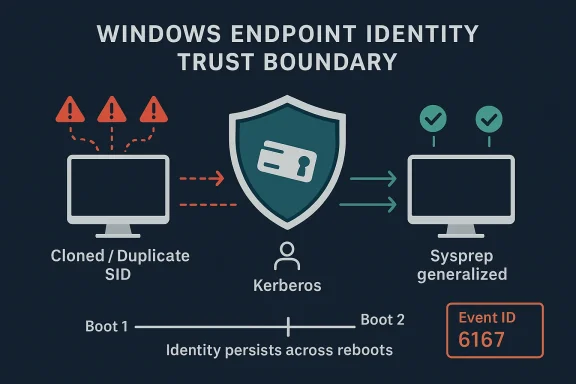
For IT teams, the practical impact is immediate. If a fleet was deployed without Sysprep, or if duplicate SIDs were inherited from old template workflows, authentication can now fail between machines that previously appeared to work. Microsoft documents symptoms including repeated credential prompts, failed SMB access, broken RDP, and Event ID 6167 in the System log with a partial machine-ID mismatch message. (support.microsoft.com)
The broader significance is that Microsoft is continuing to move Windows away from permissive legacy behavior and toward identity states that are both more persistent and more verifiable. That improves security, but it also forces administrators to confront practices that were tolerated for years because they were convenient. The new reality is less forgiving, but it is also more honest about what Windows deployment has always needed to be. ([s(Stärkung des Administratorschutzes und der Kerberos-Authentifizierung - Microsoft-Support))
Windows imaging has always lived in the tension between speed and correctness. Enterprises want repeatable deployments, hardware vendors want standardized golden images, and admins want to avoid spending hours customizing each machine by hand. In the old world, some shops cut corners by cloning systems directly and hoping the underlying identity artifacts would not matter enough to cause problems later.
That tradeoff became more dangerous as Windows leaned harder into identity-aware security. UAC, Kerberos, token filtering, and remote management all assume that a machine’s identity is stable, unique, and not trivially replayed from another endpoint. Microsoft’s October 2025 documentation makes the intent explicit: the new protections are meant to stop replay-like abuse in loopback scenarios and to ensure authentication tickets are rejected when they do not match the current machine identity. (support.microsoft.com)
The technical mechanism is not exotic, but it is consequential. Microsoft says older Windows behavior generated a new computer ID at every boot, which created opportunities for attackers to reuse authentication data in ways that bypassed loopback detection. The post-August 2025 behavior persists part of the machine identity across boots, making it much harder for the trust boundary to be fooled by a reboot or a cloned image. (support.microsoft.com)
That hardening is especially relevant for Windows 11 version 24H2, Windows 11 version 25H2, and Windows Server 2025. Microsoft’s duplicate-SID guidance ties the break in behavior to updates released on and after August 29, 2025 and September 9, 2025, with KB5064081 and KB5065426 called out as the landmarks where enforcement became visible in the field. (support.microsoft.com)
A second layer of background is the UAC side of the equation. Microsoft’s hardening note says the change also strengthens the UAC trust boundary by ensuring authentication tickets can be checked against the machine SID inside the Kerberos flow. In plain English, that means elevation paths are less likely to succeed if the machine presenting itself during auth is not actually the machine it claims to be. (support.microsoft.com)
Microsoft is now treating that debt as a security condition instead of a compatibility quirk. That is a subtle but important shift. Once a behavior moves from “works, but unsupported” to “blocked, by design,” operational teams no longer get to rely on legacy tolerance as a safety net. (support.microsoft.com)
This is not a cosmetic update. It changes the behavior of the OS at a foundational level, especially in environments that relied on machine cloning for speed. Windows now treats duplicate machine identity as a problem to be detected and blocked rather than a harmless artifact to be ignored. (support.microsoft.com)
Microsoft’s wording about the partial mismatch in machine ID is especially revealing. It tells us the enforcement logic is checking a cross-boot component against a per-boot component and rejecting cases where two cloned systems share the same longer-lived identity value. In other words, the machine may still look normal on the surface, but the auth pipeline knows enough to distrust it. (support.microsoft.com)
That means a build process that once seemed efficient can now produce a fleet of machines that behave inconsistently in the field. SMB access may fail, RDP may refuse to connect, and PAM-mediated admin workflows can break in ways that appear random until the SID issue is recognized. (support.microsoft.com)
The hardening also changes the support conversation. Microsoft is no longer describing these failures as an unexpected regression to be patched away. It is framing them as the expected outcome of unsupported cloning methods colliding with updated security enforcement. That distinction matters because it shifts responsibility back to deployment engineering. (support.microsoft.com)
The System event log is often the best early warning. Event ID 6167 from lsasrv.dll is the key one to look for, and Microsoft says the event text indicates the computer ID partially mismatched because the ticket either had been manipulated or belonged to a different boot session. That is a strong sign that the new machine-identity logic is doing exactly what it was designed to do. (support.microsoft.com)
This also explains why the problem can be difficult for frontline support to triage. Users often think they have a network problem, a password problem, or a server outage. In reality, the failing point may be the endpoint’s own duplicated identity. (support.microsoft.com)
That misdirection is costly. It can burn troubleshooting time on DNS, certificates, firewall rules, and account resets before anyone checks whether the machine was imaged in a supported way. In large fleets, that delay becomes a real support tax. (support.microsoft.com)
That is not just a paperwork recommendation. It is now the ne between a deployment process that still fits Windows’ security model and one that does not. The point of Sysprep is to strip device-specific identity and security material so the new system can generate a valid, unique context on first boot.
That creates a clear operational rule: unsupported cloning is no longer just non-ideal, it is a liability. The security update makes the consequence visible by refusing the auth handshake instead of silently allowing a dangerous equivalence beport.microsoft.com](Kerberos- und NTLM-Authentifizierungsfehler aufgrund doppelter SIDs - Microsoft-Support))
That matters because many environments have historically treated domain membership as the main identity problem. In reality, the machine image itself can be the source of the weakness. A rejoin does not cure a cloned identity if the clone still carries the same bad lineage. (support.microsoft.com)
A durable fix requires reimaging from a supported, generalized base. Anything else is a stopgap. That is the uncomfortable but necessary tradeoff when an OS hardening change finally forces old habits into the open. (support.microsoft.com)
That is an important warning. The workaround exists because Microsoft understands that some organizations have operational dependencies on unsupported cloning behavior. But the company also wants to make the risk unmistakable: if you use the workaround, you are knowingly reducing the very protection the update introduced. (support.microsoft.com)
This is one of those situations where convenience and security are genuinely in conflict. The shortcut keeps operations moving, but it also keeps the attack surface alive. For a short transition window, that may be acceptable; for normal operations, it is not. (support.microsoft.com)
That approach is sensible from a security governance standpoint. It makes exception handling explicit instead of hidden in a registry tweak that no one remembers a year later. It also reinforces the message that the registry key or policy is not a permanent feature, but a temporary concession.
The downside is obvious: smaller teams may struggle with the support process, and rushed admins may be tempted to leave the temporary state in place too long. That is precisely why Microsoft keeps stressing that the workaround expires and that the environment should be migrated before the end of 2027.
In the enterprise, the blast radius can be wide because one bad image can spawn dozens or hundreds of machines with the same identity debt. Once the hardening update is applied, those devices can begin failing on shares, remote admin sessions, or privileged workflows all at once. That turns a deployment shortcut into a fleet-wide incident. (support.microsoft.com)
For VDI and templated images, the best practice has become the only survivable practice: generalize, rebuild, validate, and then deploy. The update does not invent that requirement; it simply makes the cost of ignoring it impossible to miss. (support.microsoft.com)
That bet is easier to justify now than it would have been a decade ago. Today’s Windows devices are tied into identity, policy, cloud apps, and remote access in ways that make weak machine identity a much bigger problem than it used to be. The security cost of being lenient has risen sharply. (support.microsoft.com)
In that sense, the update is not just about SIDs or Kerberos. It is about aligning the deployment model with the reality of modern endpoint security. That is a cleaner architectural world, even if it is a messier migration. (support.microsoft.com)
The second response should be remediation planning. If a device or image was built in an unsupported way, the durable fix is reimaging from a supported source and retiring the clone lineage. Microsoft is clear that rebuilding is the permanent resolution, while the temporary policy path exists only as a bridge. (support.microsoft.com)
The same applies to help desks. Tickets should be classified correctly, and frontline technicians should know that repeated auth prompts on cloned systems after the update are not solved by password resets. That small process change can save hours of misdirected effort. (support.microsoft.com)
A good support playbook should also note that the issue is specific to duplicate-SID and loopback-hardening scenarios. That distinction prevents the team from conflating this issue with ordinary network outages, account lockouts, or certificate problems. (support.microsoft.com)
It also gives Microsoft and its customers an opportunity to improve deployment discipline. The more organizations standardize on supported imaging, the less they depend on hidden identity assumptions that can break at the worst possible moment. In that sense, the security change can also be a governance upgrade.
The second risk is security backsliding. Temporary compatibility options have a way of becoming permanent in overloaded environments, and Microsoft is clearly worried about that. If admins leave the exception in place too long, they reintroduce the exact exposure the update was meant to close.
Another concern is documentation drift. If teams do not update their deployment standards, the same mistake can keep recurring in new projects. The hardening change only solves the technical part; the process problem still needs explicit management.
The medium-term question is broader. As Windows continues to harden identity and authentication boundaries, more legacy deployment habits will stop working quietly and start failing loudly. That is good for security, but it also means IT teams will need to invest more in build hygiene, validation, and change control than they may have needed a few years ago. (support.microsoft.com)
In the end, this is less a story about a single update than about the cost of treating identity as optional. Microsoft has decided that cloned, duplicated, and poorly generalized systems no longer deserve the benefit of the doubt, and that is a meaningful statement about where Windows security is headed. The organizations that accept that reality now will spend less time firefighting later.
Source: Microsoft - Message Center Hardening administrative actions: What IT pros need to know - Windows IT Pro Blog
That matters because Windows identity is no longer just a local operating-system concern. It is tightly interwoven with UAC, LSASS, Kerberos, NTLM, remote administration, and increasingly the security posture of the whole endpoint fleet. Microsoft says the computer ID now includes both per-boot and cross-boot components, which makes it much harder for stale authentication state to masquerade as current trust. (support.microsoft.com)
For IT teams, the practical impact is immediate. If a fleet was deployed without Sysprep, or if duplicate SIDs were inherited from old template workflows, authentication can now fail between machines that previously appeared to work. Microsoft documents symptoms including repeated credential prompts, failed SMB access, broken RDP, and Event ID 6167 in the System log with a partial machine-ID mismatch message. (support.microsoft.com)
The broader significance is that Microsoft is continuing to move Windows away from permissive legacy behavior and toward identity states that are both more persistent and more verifiable. That improves security, but it also forces administrators to confront practices that were tolerated for years because they were convenient. The new reality is less forgiving, but it is also more honest about what Windows deployment has always needed to be. ([s(Stärkung des Administratorschutzes und der Kerberos-Authentifizierung - Microsoft-Support))
 Background
Windows imaging has always lived in the tension between speed and correctness. Enterprises want repeatable deployments, hardware vendors want standardized golden images, and admins want to avoid spending hours customizing each machine by hand. In the old world, some shops cut corners by cloning systems directly and hoping the underlying identity artifacts would not matter enough to cause problems later.That tradeoff became more dangerous as Windows leaned harder into identity-aware security. UAC, Kerberos, token filtering, and remote management all assume that a machine’s identity is stable, unique, and not trivially replayed from another endpoint. Microsoft’s October 2025 documentation makes the intent explicit: the new protections are meant to stop replay-like abuse in loopback scenarios and to ensure authentication tickets are rejected when they do not match the current machine identity. (support.microsoft.com)
The technical mechanism is not exotic, but it is consequential. Microsoft says older Windows behavior generated a new computer ID at every boot, which created opportunities for attackers to reuse authentication data in ways that bypassed loopback detection. The post-August 2025 behavior persists part of the machine identity across boots, making it much harder for the trust boundary to be fooled by a reboot or a cloned image. (support.microsoft.com)
That hardening is especially relevant for Windows 11 version 24H2, Windows 11 version 25H2, and Windows Server 2025. Microsoft’s duplicate-SID guidance ties the break in behavior to updates released on and after August 29, 2025 and September 9, 2025, with KB5064081 and KB5065426 called out as the landmarks where enforcement became visible in the field. (support.microsoft.com)
A second layer of background is the UAC side of the equation. Microsoft’s hardening note says the change also strengthens the UAC trust boundary by ensuring authentication tickets can be checked against the machine SID inside the Kerberos flow. In plain English, that means elevation paths are less likely to succeed if the machine presenting itself during auth is not actually the machine it claims to be. (support.microsoft.com)
Why the trust boundary matters
The trust boundary in Windows has always been easier to assume than to enforce. A machine can look healthy on the surface while still carrying identity debt underneath. Duplicate SIDs, cloned IDs, and stale tickets are the kinds of problems that do not always show up in pilot testing, but they do show up in a production incident when administrators least want them to. (support.microsoft.com)Microsoft is now treating that debt as a security condition instead of a compatibility quirk. That is a subtle but important shift. Once a behavior moves from “works, but unsupported” to “blocked, by design,” operational teams no longer get to rely on legacy tolerance as a safety net. (support.microsoft.com)
- Cloning without Sysprep is now much more likely to break auth.
- Duplicate SIDs can trigger visible authentication refusal.
- Loopback protections survive restarts instead of being reset away.
- Event ID 6167 is a diagnostic clue, not random noise. (support.microsoft.com)
What actually changed in Windows
Microsoft’s documentation points to a two-part shift. First, Windows now retains a persistent computer identity element across restarts. Second, authentication logic uses that identity to decide whether the current machine is truly the intended trust endpoint. Together, those changes close the gap that previously allowed repeated authentication artifacts to remain useful after a reboot. (support.microsoft.com)This is not a cosmetic update. It changes the behavior of the OS at a foundational level, especially in environments that relied on machine cloning for speed. Windows now treats duplicate machine identity as a problem to be detected and blocked rather than a harmless artifact to be ignored. (support.microsoft.com)
Machine identity is now part of the security decision
The most important architectural point is that Windows is treating machine identity as a live security input, not just metadata. That means an image created once and duplicated many times can no longer safely pretend to be a set of distinct endpoints if the underlying identity material was never generalized. (support.microsoft.com)Microsoft’s wording about the partial mismatch in machine ID is especially revealing. It tells us the enforcement logic is checking a cross-boot component against a per-boot component and rejecting cases where two cloned systems share the same longer-lived identity value. In other words, the machine may still look normal on the surface, but the auth pipeline knows enough to distrust it. (support.microsoft.com)
- The machine ID now has multiple components.
- Boot-time reset behavior is no longer sufficient to evade checks.
- Reused identity artifacts are considered evidence of risk.
- A mismatch is intended to fail closed, not fail open. (support.microsoft.com)
Why cloned devices are the flash point
Cloned devices are the easiest place for this change to surface because they often share the exact condition Microsoft is trying to eliminate: identity that was copied rather than created. Microsoft says unsupported duplication without Sysprep /generalize can produce duplicate SIDs, and those SIDs are now enough to cause Kerberos and NTLM authentication failures. (support.microsoft.com)That means a build process that once seemed efficient can now produce a fleet of machines that behave inconsistently in the field. SMB access may fail, RDP may refuse to connect, and PAM-mediated admin workflows can break in ways that appear random until the SID issue is recognized. (support.microsoft.com)
The hardening also changes the support conversation. Microsoft is no longer describing these failures as an unexpected regression to be patched away. It is framing them as the expected outcome of unsupported cloning methods colliding with updated security enforcement. That distinction matters because it shifts responsibility back to deployment engineering. (support.microsoft.com)
Symptom patterns admins should recognize
The most obvious symptom is repeated credential prompting, especially when the user supplies correct credentials and still gets rejected. Microsoft lists several related outcomes: failed logon attempts, “your credentials didn’t work” style messages, IP- and hostname-based share failures, RDP failures, and even failover clustering errors. (support.microsoft.com)The System event log is often the best early warning. Event ID 6167 from lsasrv.dll is the key one to look for, and Microsoft says the event text indicates the computer ID partially mismatched because the ticket either had been manipulated or belonged to a different boot session. That is a strong sign that the new machine-identity logic is doing exactly what it was designed to do. (support.microsoft.com)
Event ID 6167 is a signal, not a mystery
Admins should treat 6167 as a diagnostic marker tied to the new hardening layer. It is not a generic auth hiccup and not a reason to start resetting passwords in bulk. It is evidence that the current endpoint state does not satisfy the new trust rules. (support.microsoft.com)- Repeated credential prompts are a common symptom.
- SMB share access may fail by host name or IP.
- RDP sessions can be blocked.
- Failover clustering can surface access-denied errors.
- Event ID 6167 is the most useful log indicator. (support.microsoft.com)
Why SMB, RDP, and NTLM all fail together
These protocols are different on the surface, but they all depend on identity trust deep inside the stack. If the local machine identity cannot be validated, the protocol wrapper does not matter much. That is why the same underlying condition can affect file shares, remote logons, and legacy NTLM paths at once. (support.microsoft.com)This also explains why the problem can be difficult for frontline support to triage. Users often think they have a network problem, a password problem, or a server outage. In reality, the failing point may be the endpoint’s own duplicated identity. (support.microsoft.com)
That misdirection is costly. It can burn troubleshooting time on DNS, certificates, firewall rules, and account resets before anyone checks whether the machine was imaged in a supported way. In large fleets, that delay becomes a real support tax. (support.microsoft.com)
Sysprep is no longer optional in practice
Microsoft is unusually direct here: if you are cloning a Windows installation, you should be using Sysprep. The support article says the permanent fix for duplicate-SID failures is to rebuild the devices with supported methods so each machine has unique SIDs. The earlier hardening article goes further and says if a cloned device shows Event ID 6167, Sysprep should be used to generalize the image. (support.microsoft.com)That is not just a paperwork recommendation. It is now the ne between a deployment process that still fits Windows’ security model and one that does not. The point of Sysprep is to strip device-specific identity and security material so the new system can generate a valid, unique context on first boot.
Supported imaging is now a security requirement
For years, some adep as best practice. Microsoft is now treating it more like a boundary condition. If the image was not generalized, then the machine may inherit identity material that the updated OS is specifically designed to distrust. (support.microsoft.com)That creates a clear operational rule: unsupported cloning is no longer just non-ideal, it is a liability. The security update makes the consequence visible by refusing the auth handshake instead of silently allowing a dangerous equivalence beport.microsoft.com](Kerberos- und NTLM-Authentifizierungsfehler aufgrund doppelter SIDs - Microsoft-Support))
- Use Sysprep /generalize before capture.
- Rebuild affected clones rather than preserving them.
- Rejoin devices with unique identities after reimaging.
- Treat duplicate SIDs as a remediation trigger, not a cosmetic issue. (support.microsoft.com)
Why “unjoin and Sysprep later” is not enough
One of the most important operational warnings in Microsoft’s guidance is implicit rather than dramatic: it is not enough to detach a device from the domain and hope the cloned identity problem disappears. If the image itself is duplicated incorrectly, the underlying SID and machine identity issue remains. (support.microsoft.com)That matters because many environments have historically treated domain membership as the main identity problem. In reality, the machine image itself can be the source of the weakness. A rejoin does not cure a cloned identity if the clone still carries the same bad lineage. (support.microsoft.com)
A durable fix requires reimaging from a supported, generalized base. Anything else is a stopgap. That is the uncomfortable but necessary tradeoff when an OS hardening change finally forces old habits into the open. (support.microsoft.com)
The temporary workaround and why it is dangerous
Microsoft does provide a temporary compatibility path, but it is deliberately framed as a bridge, not a solution. The support article says administrators can contact Microsoft Enterprise Support to obtain a special Group Policy for temporary use, while the article on administrative action hardening says this approach weakens the security protections introduced by the recent updates. (support.microsoft.com)That is an important warning. The workaround exists because Microsoft understands that some organizations have operational dependencies on unsupported cloning behavior. But the company also wants to make the risk unmistakable: if you use the workaround, you are knowingly reducing the very protection the update introduced. (support.microsoft.com)
Why the rollback path is not a free pass
The temporary option is meant to buy time for remediation, not to preserve the status quo indefinitely. Microsoft’s guidance makes clear that the durable answer is to rebuild affected systems using supported methods and then remove the clones. Anything less leaves the old risk in place. (support.microsoft.com)This is one of those situations where convenience and security are genuinely in conflict. The shortcut keeps operations moving, but it also keeps the attack surface alive. For a short transition window, that may be acceptable; for normal operations, it is not. (support.microsoft.com)
- The workaround is temporary.
- It weakens the new hardening protections.
- It requires direct support engagement.
- It should be paired with a rebuild plan.
- It is not a long-term operating state. (support.microsoft.com)
The support case is part of the control
The fact that Microsoft wants organizations to go through an assisted support case is not accidental. It creates accountability. If an environment is going to deliberately relax security enforcement, Microsoft wants a documented reason and a documented remediation plan.That approach is sensible from a security governance standpoint. It makes exception handling explicit instead of hidden in a registry tweak that no one remembers a year later. It also reinforces the message that the registry key or policy is not a permanent feature, but a temporary concession.
The downside is obvious: smaller teams may struggle with the support process, and rushed admins may be tempted to leave the temporary state in place too long. That is precisely why Microsoft keeps stressing that the workaround expires and that the environment should be migrated before the end of 2027.
Enterprise impact versus consumer impact
This change lands hardest in enterprise and lab environments that use templated builds, VDI, or aggressive cloning workflows. Consumer systems are less likely to encounter the problem unless they were manually duplicated or repurposed from a managed deployment process. That means the largest operational burden falls on IT departments, not home users. (support.microsoft.com)In the enterprise, the blast radius can be wide because one bad image can spawn dozens or hundreds of machines with the same identity debt. Once the hardening update is applied, those devices can begin failing on shares, remote admin sessions, or privileged workflows all at once. That turns a deployment shortcut into a fleet-wide incident. (support.microsoft.com)
Why labs and VDI environments are especially exposed
Virtualized deployments often rely on fast replication. That is efficient, but it also makes identity mistakes easy to repeat at scale. The new enforcement means the lab habits that were acceptable for experimentation are now much more likely to trip auth protections when promoted into production-like use. (support.microsoft.com)For VDI and templated images, the best practice has become the only survivable practice: generalize, rebuild, validate, and then deploy. The update does not invent that requirement; it simply makes the cost of ignoring it impossible to miss. (support.microsoft.com)
- Enterprise fleets should audit cloning workflows now.
- Lab images should be checked for generalized identity.
- Help desks should separate auth failures from network incidents.
- VDI teams should confirm template hygiene before rollout.
- Policy exceptions should be documented and time-limited. (support.microsoft.com)
Why Microsoft is willing to inconvenience some admins
The answer is simple: the company is prioritizing the integrity of the trust model over the convenience of legacy deployment shortcuts. That can be painful in the short term, but Microsoft is betting that the long-term reduction in privilege-escalation risk is worth the support friction. (support.microsoft.com)That bet is easier to justify now than it would have been a decade ago. Today’s Windows devices are tied into identity, policy, cloud apps, and remote access in ways that make weak machine identity a much bigger problem than it used to be. The security cost of being lenient has risen sharply. (support.microsoft.com)
In that sense, the update is not just about SIDs or Kerberos. It is about aligning the deployment model with the reality of modern endpoint security. That is a cleaner architectural world, even if it is a messier migration. (support.microsoft.com)
Operational guidance for IT teams
The first response should be inventory, not improvisation. Admins need to identify which machines were created from cloned images, which ones were generalized properly, and which devices are already showing authentication failures after the August and September 2025 updates. That is the shortest path to understanding whether the issue is localized or systemic. (support.microsoft.com)The second response should be remediation planning. If a device or image was built in an unsupported way, the durable fix is reimaging from a supported source and retiring the clone lineage. Microsoft is clear that rebuilding is the permanent resolution, while the temporary policy path exists only as a bridge. (support.microsoft.com)
A practical remediation sequence
- Identify affected endpoints and images.
- Confirm whether Sysprep was used before capture.
- Check for Event ID 6167 and related auth failures.
- Decide whether a temporary policy exception is truly necessary.
- Rebuild or re-provision the affected machines from supported images. (support.microsoft.com)
Why change control matters more than ever
This is also a change-control story. If a team uses a temporary exception, the exception should be tracked like a risk acceptance, not buried in a troubleshooting note. Otherwise, the organization may still be relying on the workaround long after the timeline for migration has passed.The same applies to help desks. Tickets should be classified correctly, and frontline technicians should know that repeated auth prompts on cloned systems after the update are not solved by password resets. That small process change can save hours of misdirected effort. (support.microsoft.com)
A good support playbook should also note that the issue is specific to duplicate-SID and loopback-hardening scenarios. That distinction prevents the team from conflating this issue with ordinary network outages, account lockouts, or certificate problems. (support.microsoft.com)
Strengths and Opportunities
Microsoft’s handling of the problem does show some strengths. The company has documented the symptoms, named the affected builds and OS families, explained the security rationale, and provided both a temporary exception path and a permanent remediation path. That is not elegant, but it is operationally useful. (support.microsoft.com)It also gives Microsoft and its customers an opportunity to improve deployment discipline. The more organizations standardize on supported imaging, the less they depend on hidden identity assumptions that can break at the worst possible moment. In that sense, the security change can also be a governance upgrade.
- Stronger protection against privilege escalation.
- Clearer machine identity enforcement.
- Better detection of unsupported imaging practices.
- A clean migration path to supported deployment methods.
- Reduced long-term dependence on fragile auth assumptions.
- Better alignment between UAC and Kerberos security. (support.microsoft.com)
Risks and Concerns
The biggest risk is operational disruption during remediation. If a fleet contains many duplicate images, the authentication failures can ripple across file access, remote support, and privileged access tools almost simultaneously. That can create a messy transition period even when the right fix is already known. (support.microsoft.com)The second risk is security backsliding. Temporary compatibility options have a way of becoming permanent in overloaded environments, and Microsoft is clearly worried about that. If admins leave the exception in place too long, they reintroduce the exact exposure the update was meant to close.
- Temporary mitigations can become permanent shortcuts.
- Old cloning habits may persist in shadow IT.
- Event 6167 can be misread as a generic auth problem.
- Mixed environments may create inconsistent results.
- Help desks may waste time on password or network resets.
- The support process may slow urgent recovery. (support.microsoft.com)
Another concern is documentation drift. If teams do not update their deployment standards, the same mistake can keep recurring in new projects. The hardening change only solves the technical part; the process problem still needs explicit management.
Looking Ahead
The near-term question is how quickly affected organizations can move from exception handling to permanent remediation. Microsoft has set a clear expectation: rebuilt images, supported deployment methods, and eventual removal of any temporary bypass. The harder question is whether every enterprise will actually execute that migration before the workaround expires. (support.microsoft.com)The medium-term question is broader. As Windows continues to harden identity and authentication boundaries, more legacy deployment habits will stop working quietly and start failing loudly. That is good for security, but it also means IT teams will need to invest more in build hygiene, validation, and change control than they may have needed a few years ago. (support.microsoft.com)
What to watch next
- Whether Microsoft expands or refines the temporary exception path.
- Whether more detailed guidance appears for ADMX or policy deployment.
- How many enterprises discover duplicate-SID debt during rollout.
- Whether additional Windows components adopt similar persistence-based checks.
- How quickly help desks adapt their triage scripts. (support.microsoft.com)
In the end, this is less a story about a single update than about the cost of treating identity as optional. Microsoft has decided that cloned, duplicated, and poorly generalized systems no longer deserve the benefit of the doubt, and that is a meaningful statement about where Windows security is headed. The organizations that accept that reality now will spend less time firefighting later.
Source: Microsoft - Message Center Hardening administrative actions: What IT pros need to know - Windows IT Pro Blog
