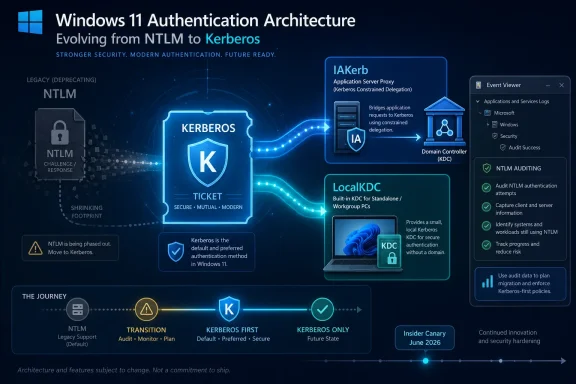
Microsoft is preparing new Kerberos capabilities for upcoming Windows 11 and Windows Server Insider builds, adding IAKerb and LocalKDC so Windows can authenticate in scenarios that have historically fallen back to NTLM, including blocked domain-controller access and local-account connections. The move is not a cosmetic protocol swap. It is Microsoft trying to remove the architectural excuses that have kept NTLM alive long after administrators learned to distrust it. If the plan works, one of Windows’ most stubborn security debts will finally start to look operationally removable rather than merely deprecated.
NTLM has spent years in the uncomfortable category of Windows technologies that everyone agrees should go away, but almost nobody can fully remove. It is old, widely understood by attackers, and still present in too many authentication paths to be treated as a museum piece. For enterprise defenders, that combination is especially toxic: the protocol is familiar enough to be operationally invisible, yet dangerous enough to keep showing up in relay, credential theft, and lateral movement playbooks.
Microsoft’s latest Kerberos work is significant because it attacks the problem from the other side. Instead of telling administrators to disable NTLM and then leaving them to discover which application, service, device, or workflow breaks, the company is trying to make Kerberos viable in the places where NTLM has been the fallback. That is the difference between a security aspiration and a migration plan.
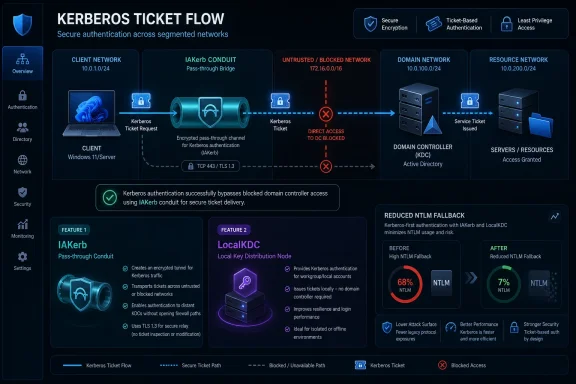
The two new pieces are Initial and Pass-Through Authentication using Kerberos, or IAKerb, and a Local Key Distribution Center, or LocalKDC. The names are dry even by Windows authentication standards, but the intent is direct: make Kerberos work when there is no clean line of sight to a domain controller, and make Kerberos work for local account scenarios that were never built around Active Directory in the first place.
That matters because NTLM has survived not because anyone loves it, but because Windows environments are messy. Remote offices, segmented networks, workgroup machines, old appliances, embedded systems, hardcoded authentication choices, and local administrator workflows all create openings where Kerberos cannot complete its usual dance. NTLM became the duct tape for those gaps. Microsoft is now trying to replace the duct tape with plumbing.
Kerberos has been the preferred Windows domain authentication protocol for more than two decades, but preference is not the same as universality. Kerberos depends on a working set of infrastructure expectations: names must resolve properly, service principal names must line up, clocks must cooperate, and the client must be able to reach the right domain services. When those requirements are met, Kerberos gives administrators stronger tools and a more modern trust model.
When those requirements are not met, Windows has often fallen back to NTLM. That fallback behavior was operationally convenient, but security teams have paid for it repeatedly. NTLM’s design makes it vulnerable to relay-style abuse in environments where protections are incomplete, and attackers have become very good at finding exactly those seams.
The difficulty is that a working enterprise is not a lab. A protocol that can be disabled cleanly in a diagram may still be buried inside help desk tooling, network shares, remote management habits, multifunction printers, line-of-business applications, and obscure service dependencies that nobody has touched in years. The fact that NTLM is risky has been known for a long time. The hard part has been finding a way to remove it without turning authentication into a company-wide outage.
IAKerb changes the shape of that exchange by allowing the target service to help pass Kerberos messages between the client and the domain controller. In plain English, the server being accessed can act as a conduit, allowing Kerberos to succeed even when the client does not have direct network visibility to the DC. That is a subtle change with potentially large consequences.
Modern enterprise networks increasingly rely on segmentation, conditional access models, VPN edge cases, cloud-adjacent management patterns, and constrained routing. Those designs can be good security architecture, but they can also produce authentication weirdness when older Windows assumptions meet newer network boundaries. If IAKerb reduces the need to punch holes just so clients can reach domain controllers directly, it could help both security and operations.
There is also a philosophical shift here. Microsoft is no longer treating “Kerberos cannot reach the domain controller” as a reason to tolerate NTLM indefinitely. It is treating that limitation as an engineering problem inside Windows. That is exactly what a serious deprecation effort requires.
This will not magically fix every broken authentication path. Kerberos still depends on identity hygiene, name correctness, and service configuration that many environments struggle to maintain. But IAKerb narrows one of the largest gaps between the ideal Windows authentication model and the networks administrators actually run.
The Local Key Distribution Center is Microsoft’s attempt to bring Kerberos-style authentication to local account environments. That includes standalone PCs, peer-to-peer access patterns, and other non-domain deployments where there is no Active Directory KDC to issue tickets. In practical terms, Microsoft is trying to stop local accounts from being a permanent carve-out in the NTLM retirement plan.
This is likely to matter beyond the obvious home-lab and small-office cases. Many enterprise environments still have pockets of non-domain infrastructure, isolated systems, break-glass workflows, and operational exceptions where local accounts remain part of the playbook. Security teams may dislike those exceptions, but they exist because production environments often contain systems that do not fit neatly into identity architecture diagrams.
LocalKDC gives Microsoft a way to say that Kerberos-first authentication should not be limited to domain-joined corporate devices. That is a big claim. It also places pressure on third-party software and Windows components that have historically assumed NTLM was the universal local-account answer.
The preview details matter here. IAKerb is expected to be enabled by default in the relevant Insider builds, while LocalKDC starts disabled and must be manually enabled for testing. That split makes sense. Microsoft can collect data on IAKerb with less risk, while LocalKDC touches enough sensitive local-authentication behavior that a slower rollout is prudent.
That is why the Insider phase should not be dismissed as a hobbyist preview. For enterprises with complex Windows estates, this is the point at which lab validation should begin. The organizations that wait until NTLM defaults change in mainstream releases will be the ones discovering ancient dependencies under deadline pressure.
The staged rollout also reflects Microsoft’s own constraints. The company cannot simply rip NTLM out of Windows because too much still depends on it. Instead, it has to add alternatives, improve auditing, give administrators policy controls, and then slowly change defaults once the escape routes are real. That is slower than security purists would like, but it is probably the only route that does not trigger mass compatibility pain.
For admins, the question is not whether IAKerb and LocalKDC are interesting. The question is where NTLM is still appearing today. Microsoft’s enhanced NTLM auditing work in Windows 11 and Windows Server is part of the same story because you cannot migrate what you cannot see. The new Kerberos features reduce the need for NTLM; the auditing features reveal where that need still exists.
A healthy test plan should include remote file access, RDP paths, management tools, service accounts, legacy applications, local administrator workflows, and third-party appliances. The riskiest NTLM dependency is not the one everyone knows about. It is the one embedded in a decade-old process that only fails during a crisis.
The better pattern is to let Windows negotiate the strongest available mechanism instead of forcing a legacy protocol. That sounds obvious, but a lot of old code was written when NTLM was the path of least resistance and Kerberos failures were treated as normal. Those assumptions are becoming liabilities.
IAKerb and LocalKDC improve the platform, but they do not absolve software vendors from updating bad authentication choices. If an application explicitly demands NTLM, a richer Kerberos implementation will not help unless the application changes. This is where Microsoft’s plan will meet the dull reality of procurement cycles, abandoned software, and “business critical” applications with no active maintainer.
The same applies to IT scripts and internal tools. PowerShell modules, scheduled tasks, custom services, monitoring agents, and remote management wrappers can all preserve old authentication habits long after official policy has moved on. Many organizations will find that their NTLM dependency is not a single product but a sediment layer of operational convenience.
The security case for fixing that layer is strong, but the budget case may need translation. NTLM reduction is not merely compliance housekeeping. It reduces the blast radius of credential abuse and makes identity behavior easier to reason about. In an era when attackers routinely move from one compromised host to another, that practical value matters.
The company has already described NTLM disablement as a phased effort, with future Windows client and server releases moving toward NTLM being disabled by default while still allowing explicit re-enablement through policy where necessary. That is a classic Microsoft enterprise transition pattern. First, make the secure path possible. Then make it observable. Then make it the default. Then force exceptions to become visible decisions.
That last step is the important one. Today, NTLM often survives because it is implicit. Something fails over silently, users continue working, and no one gets budget to fix the underlying dependency. Once NTLM requires explicit policy exceptions, those exceptions become governance artifacts. Somebody has to own them.
This is how Windows security changes often become real. Not through a single dramatic removal, but through default changes that make old behavior administratively uncomfortable. SMB signing, driver requirements, macro restrictions, and certificate hardening have all followed variations of that pattern. NTLM is simply a bigger and older target.
The risk is that Microsoft moves too slowly for defenders and too quickly for operators. That tension is unavoidable. But the arrival of IAKerb and LocalKDC suggests the company knows that “disable NTLM” is not a serious enterprise instruction unless Windows first stops needing NTLM for common scenarios.
The value is narrower and more practical: reducing reliance on a protocol whose weaknesses are deeply operationalized by attackers. NTLM relay and coercion techniques have become standard parts of offensive tooling because they take advantage of common Windows behaviors and common administrative gaps. Removing or reducing those opportunities makes attackers work harder.
Administrators should also expect a discovery period full of surprises. Some systems will authenticate differently depending on whether users connect by hostname, IP address, short name, fully qualified domain name, or alias. Some services will reveal missing SPNs. Some legacy devices will simply not participate in a Kerberos-first future without firmware, configuration, or replacement.
That is why Microsoft’s preview rollout should be treated as a planning signal. The right response is not to flip every switch in production. It is to map NTLM usage, reproduce business-critical workflows in a test environment, validate the new Kerberos paths, and classify exceptions before the defaults change under everyone’s feet.
Security teams should resist the urge to turn this into a purity contest. The goal is not to shame every remaining NTLM dependency. The goal is to make each dependency visible, justified, temporary where possible, and isolated where not. That is how legacy risk gets reduced in real companies.
Some vendors will adapt quickly because their customers demand it. Others will issue vague compatibility notes. A few will quietly depend on customers re-enabling NTLM and calling it a deployment requirement. That will put administrators in the familiar position of mediating between security policy and vendor reality.
The most interesting pressure may come from Windows Server. If future server releases move toward NTLM-disabled defaults, vendors that interact with file services, remote management, or Windows-integrated authentication will have less room to ignore the shift. Client-side changes matter, but server defaults tend to reshape enterprise assumptions faster.
There is also a documentation burden. IAKerb and LocalKDC are not consumer-facing features, and most users should never need to know their names. But administrators will need crisp guidance on where these mechanisms apply, how they interact with existing Kerberos policy, what event logs prove success or failure, and how to distinguish a Kerberos configuration bug from an application that still insists on NTLM.
Microsoft’s challenge is to make the secure path not only available, but diagnosable. Authentication failures are notorious for producing symptoms far from the real cause. If the tooling does not improve alongside the protocol work, many organizations will default to the oldest troubleshooting tactic in the Windows book: turn the legacy thing back on.
There will still be exceptions. Some old systems will not support Kerberos. Some third-party services will lag. Some isolated networks will have strange constraints. Some organizations will decide that replacing a fragile application is more expensive than containing its risk. None of that invalidates the effort.
What changes is the default expectation. Today, NTLM often functions as the assumed fallback. In the world Microsoft is building, NTLM becomes an explicitly tolerated exception. That is a profound administrative shift because it turns legacy authentication from background noise into accountable risk.
The best organizations will use this moment to clean up adjacent identity problems too. Kerberos migrations expose bad naming, stale SPNs, forgotten service accounts, and brittle network assumptions. Those fixes may feel like chores, but they improve the reliability of Windows environments beyond the immediate NTLM question.
The worst organizations will wait for a deadline, enable broad exceptions, and declare the migration done. That will preserve the same attack surface under a new policy name. Microsoft can provide the escape hatches, but customers decide whether those hatches become temporary bridges or permanent tunnels.
Microsoft’s new Kerberos work is a bet that Windows can finally outgrow NTLM without asking enterprises to choose between security and uptime. That bet will not be settled in Insider builds; it will be settled in branch offices, server rooms, vendor support tickets, and the forgotten corners of corporate networks where old authentication paths still quietly do their work. The direction is right, but the hard part starts now: proving that a Kerberos-first Windows can survive contact with the Windows environments that actually exist.
 Microsoft Is No Longer Asking Nicely
NTLM has spent years in the uncomfortable category of Windows technologies that everyone agrees should go away, but almost nobody can fully remove. It is old, widely understood by attackers, and still present in too many authentication paths to be treated as a museum piece. For enterprise defenders, that combination is especially toxic: the protocol is familiar enough to be operationally invisible, yet dangerous enough to keep showing up in relay, credential theft, and lateral movement playbooks.Microsoft’s latest Kerberos work is significant because it attacks the problem from the other side. Instead of telling administrators to disable NTLM and then leaving them to discover which application, service, device, or workflow breaks, the company is trying to make Kerberos viable in the places where NTLM has been the fallback. That is the difference between a security aspiration and a migration plan.
The two new pieces are Initial and Pass-Through Authentication using Kerberos, or IAKerb, and a Local Key Distribution Center, or LocalKDC. The names are dry even by Windows authentication standards, but the intent is direct: make Kerberos work when there is no clean line of sight to a domain controller, and make Kerberos work for local account scenarios that were never built around Active Directory in the first place.
That matters because NTLM has survived not because anyone loves it, but because Windows environments are messy. Remote offices, segmented networks, workgroup machines, old appliances, embedded systems, hardcoded authentication choices, and local administrator workflows all create openings where Kerberos cannot complete its usual dance. NTLM became the duct tape for those gaps. Microsoft is now trying to replace the duct tape with plumbing.
The NTLM Problem Was Always Bigger Than Nostalgia
It is tempting to describe NTLM as “legacy authentication” and move on, but that undersells why its persistence has been such a long-running problem. NTLM is not simply old. It is a challenge-response protocol from a different security era, one that predates many of the assumptions modern defenders now make about identity, network segmentation, endpoint compromise, and credential protection.Kerberos has been the preferred Windows domain authentication protocol for more than two decades, but preference is not the same as universality. Kerberos depends on a working set of infrastructure expectations: names must resolve properly, service principal names must line up, clocks must cooperate, and the client must be able to reach the right domain services. When those requirements are met, Kerberos gives administrators stronger tools and a more modern trust model.
When those requirements are not met, Windows has often fallen back to NTLM. That fallback behavior was operationally convenient, but security teams have paid for it repeatedly. NTLM’s design makes it vulnerable to relay-style abuse in environments where protections are incomplete, and attackers have become very good at finding exactly those seams.
The difficulty is that a working enterprise is not a lab. A protocol that can be disabled cleanly in a diagram may still be buried inside help desk tooling, network shares, remote management habits, multifunction printers, line-of-business applications, and obscure service dependencies that nobody has touched in years. The fact that NTLM is risky has been known for a long time. The hard part has been finding a way to remove it without turning authentication into a company-wide outage.
IAKerb Tries to Fix the “No Domain Controller” Excuse
IAKerb is aimed at one of the most common reasons Kerberos loses and NTLM wins: the client cannot directly reach a domain controller. In a traditional Kerberos flow, that lack of connectivity is fatal. If the client cannot talk to the KDC, it cannot obtain the required tickets, and the authentication path needs something else.IAKerb changes the shape of that exchange by allowing the target service to help pass Kerberos messages between the client and the domain controller. In plain English, the server being accessed can act as a conduit, allowing Kerberos to succeed even when the client does not have direct network visibility to the DC. That is a subtle change with potentially large consequences.
Modern enterprise networks increasingly rely on segmentation, conditional access models, VPN edge cases, cloud-adjacent management patterns, and constrained routing. Those designs can be good security architecture, but they can also produce authentication weirdness when older Windows assumptions meet newer network boundaries. If IAKerb reduces the need to punch holes just so clients can reach domain controllers directly, it could help both security and operations.
There is also a philosophical shift here. Microsoft is no longer treating “Kerberos cannot reach the domain controller” as a reason to tolerate NTLM indefinitely. It is treating that limitation as an engineering problem inside Windows. That is exactly what a serious deprecation effort requires.
This will not magically fix every broken authentication path. Kerberos still depends on identity hygiene, name correctness, and service configuration that many environments struggle to maintain. But IAKerb narrows one of the largest gaps between the ideal Windows authentication model and the networks administrators actually run.
LocalKDC Takes Aim at the Workgroup Problem
LocalKDC addresses a different historical weakness: Kerberos was designed around a trusted KDC, and in Windows that has usually meant Active Directory. Standalone machines and workgroup scenarios did not have that infrastructure, so local account authentication often remained tied to NTLM. That made sense in the old world. It makes much less sense in a world where even small deployments face enterprise-grade threat models.The Local Key Distribution Center is Microsoft’s attempt to bring Kerberos-style authentication to local account environments. That includes standalone PCs, peer-to-peer access patterns, and other non-domain deployments where there is no Active Directory KDC to issue tickets. In practical terms, Microsoft is trying to stop local accounts from being a permanent carve-out in the NTLM retirement plan.
This is likely to matter beyond the obvious home-lab and small-office cases. Many enterprise environments still have pockets of non-domain infrastructure, isolated systems, break-glass workflows, and operational exceptions where local accounts remain part of the playbook. Security teams may dislike those exceptions, but they exist because production environments often contain systems that do not fit neatly into identity architecture diagrams.
LocalKDC gives Microsoft a way to say that Kerberos-first authentication should not be limited to domain-joined corporate devices. That is a big claim. It also places pressure on third-party software and Windows components that have historically assumed NTLM was the universal local-account answer.
The preview details matter here. IAKerb is expected to be enabled by default in the relevant Insider builds, while LocalKDC starts disabled and must be manually enabled for testing. That split makes sense. Microsoft can collect data on IAKerb with less risk, while LocalKDC touches enough sensitive local-authentication behavior that a slower rollout is prudent.
The Insider Channel Becomes the Blast Chamber
Microsoft’s decision to introduce these features first through Windows Insider builds is predictable, but it also tells administrators how early this work still is. Authentication changes are among the least forgiving operating system updates. A glitch in a taskbar feature is annoying. A glitch in logon, remote access, file sharing, or service authentication can stop work cold.That is why the Insider phase should not be dismissed as a hobbyist preview. For enterprises with complex Windows estates, this is the point at which lab validation should begin. The organizations that wait until NTLM defaults change in mainstream releases will be the ones discovering ancient dependencies under deadline pressure.
The staged rollout also reflects Microsoft’s own constraints. The company cannot simply rip NTLM out of Windows because too much still depends on it. Instead, it has to add alternatives, improve auditing, give administrators policy controls, and then slowly change defaults once the escape routes are real. That is slower than security purists would like, but it is probably the only route that does not trigger mass compatibility pain.
For admins, the question is not whether IAKerb and LocalKDC are interesting. The question is where NTLM is still appearing today. Microsoft’s enhanced NTLM auditing work in Windows 11 and Windows Server is part of the same story because you cannot migrate what you cannot see. The new Kerberos features reduce the need for NTLM; the auditing features reveal where that need still exists.
A healthy test plan should include remote file access, RDP paths, management tools, service accounts, legacy applications, local administrator workflows, and third-party appliances. The riskiest NTLM dependency is not the one everyone knows about. It is the one embedded in a decade-old process that only fails during a crisis.
Developers Are Part of the Migration, Whether They Like It or Not
The NTLM retirement story is often framed as an administrator problem, but developers have a large role in whether it succeeds. Microsoft has repeatedly pointed to applications and components that hardcode authentication behavior or choose NTLM when they should rely on the Negotiate security package. Those choices turn an operating-system migration into an application compatibility minefield.The better pattern is to let Windows negotiate the strongest available mechanism instead of forcing a legacy protocol. That sounds obvious, but a lot of old code was written when NTLM was the path of least resistance and Kerberos failures were treated as normal. Those assumptions are becoming liabilities.
IAKerb and LocalKDC improve the platform, but they do not absolve software vendors from updating bad authentication choices. If an application explicitly demands NTLM, a richer Kerberos implementation will not help unless the application changes. This is where Microsoft’s plan will meet the dull reality of procurement cycles, abandoned software, and “business critical” applications with no active maintainer.
The same applies to IT scripts and internal tools. PowerShell modules, scheduled tasks, custom services, monitoring agents, and remote management wrappers can all preserve old authentication habits long after official policy has moved on. Many organizations will find that their NTLM dependency is not a single product but a sediment layer of operational convenience.
The security case for fixing that layer is strong, but the budget case may need translation. NTLM reduction is not merely compliance housekeeping. It reduces the blast radius of credential abuse and makes identity behavior easier to reason about. In an era when attackers routinely move from one compromised host to another, that practical value matters.
Microsoft’s Timeline Is a Warning, Not a Deadline Extension
Microsoft has not announced a clean public date when NTLM disappears from Windows entirely. That absence should not comfort anyone. The direction of travel is clear: more auditing, more Kerberos coverage, more policy control, and eventually stricter defaults.The company has already described NTLM disablement as a phased effort, with future Windows client and server releases moving toward NTLM being disabled by default while still allowing explicit re-enablement through policy where necessary. That is a classic Microsoft enterprise transition pattern. First, make the secure path possible. Then make it observable. Then make it the default. Then force exceptions to become visible decisions.
That last step is the important one. Today, NTLM often survives because it is implicit. Something fails over silently, users continue working, and no one gets budget to fix the underlying dependency. Once NTLM requires explicit policy exceptions, those exceptions become governance artifacts. Somebody has to own them.
This is how Windows security changes often become real. Not through a single dramatic removal, but through default changes that make old behavior administratively uncomfortable. SMB signing, driver requirements, macro restrictions, and certificate hardening have all followed variations of that pattern. NTLM is simply a bigger and older target.
The risk is that Microsoft moves too slowly for defenders and too quickly for operators. That tension is unavoidable. But the arrival of IAKerb and LocalKDC suggests the company knows that “disable NTLM” is not a serious enterprise instruction unless Windows first stops needing NTLM for common scenarios.
The Security Win Is Real, but It Will Not Be Automatic
Replacing NTLM with Kerberos-based flows should improve the security baseline of Windows authentication, but it will not turn messy identity environments into clean ones overnight. Kerberos has its own failure modes, and attackers have long exploited weak service account practices, misconfigured delegation, poor encryption choices, ticket theft, and sloppy Active Directory hygiene. A Kerberos-first Windows is not the same thing as an invulnerable Windows.The value is narrower and more practical: reducing reliance on a protocol whose weaknesses are deeply operationalized by attackers. NTLM relay and coercion techniques have become standard parts of offensive tooling because they take advantage of common Windows behaviors and common administrative gaps. Removing or reducing those opportunities makes attackers work harder.
Administrators should also expect a discovery period full of surprises. Some systems will authenticate differently depending on whether users connect by hostname, IP address, short name, fully qualified domain name, or alias. Some services will reveal missing SPNs. Some legacy devices will simply not participate in a Kerberos-first future without firmware, configuration, or replacement.
That is why Microsoft’s preview rollout should be treated as a planning signal. The right response is not to flip every switch in production. It is to map NTLM usage, reproduce business-critical workflows in a test environment, validate the new Kerberos paths, and classify exceptions before the defaults change under everyone’s feet.
Security teams should resist the urge to turn this into a purity contest. The goal is not to shame every remaining NTLM dependency. The goal is to make each dependency visible, justified, temporary where possible, and isolated where not. That is how legacy risk gets reduced in real companies.
The Windows Ecosystem Now Has to Catch Up
Microsoft can change Windows, but it cannot single-handedly modernize every product that plugs into Windows authentication. The next phase of the NTLM retirement will test the broader ecosystem: backup vendors, remote access tools, storage appliances, monitoring platforms, industrial systems, identity bridges, and the long tail of vertical-market applications.Some vendors will adapt quickly because their customers demand it. Others will issue vague compatibility notes. A few will quietly depend on customers re-enabling NTLM and calling it a deployment requirement. That will put administrators in the familiar position of mediating between security policy and vendor reality.
The most interesting pressure may come from Windows Server. If future server releases move toward NTLM-disabled defaults, vendors that interact with file services, remote management, or Windows-integrated authentication will have less room to ignore the shift. Client-side changes matter, but server defaults tend to reshape enterprise assumptions faster.
There is also a documentation burden. IAKerb and LocalKDC are not consumer-facing features, and most users should never need to know their names. But administrators will need crisp guidance on where these mechanisms apply, how they interact with existing Kerberos policy, what event logs prove success or failure, and how to distinguish a Kerberos configuration bug from an application that still insists on NTLM.
Microsoft’s challenge is to make the secure path not only available, but diagnosable. Authentication failures are notorious for producing symptoms far from the real cause. If the tooling does not improve alongside the protocol work, many organizations will default to the oldest troubleshooting tactic in the Windows book: turn the legacy thing back on.
The Real Test Is Whether Exceptions Become Rare
The success metric for IAKerb and LocalKDC is not whether they sound elegant in architecture diagrams. It is whether administrators can block NTLM in more places without breaking daily work. If that number moves meaningfully, Microsoft will have achieved something that years of warnings did not.There will still be exceptions. Some old systems will not support Kerberos. Some third-party services will lag. Some isolated networks will have strange constraints. Some organizations will decide that replacing a fragile application is more expensive than containing its risk. None of that invalidates the effort.
What changes is the default expectation. Today, NTLM often functions as the assumed fallback. In the world Microsoft is building, NTLM becomes an explicitly tolerated exception. That is a profound administrative shift because it turns legacy authentication from background noise into accountable risk.
The best organizations will use this moment to clean up adjacent identity problems too. Kerberos migrations expose bad naming, stale SPNs, forgotten service accounts, and brittle network assumptions. Those fixes may feel like chores, but they improve the reliability of Windows environments beyond the immediate NTLM question.
The worst organizations will wait for a deadline, enable broad exceptions, and declare the migration done. That will preserve the same attack surface under a new policy name. Microsoft can provide the escape hatches, but customers decide whether those hatches become temporary bridges or permanent tunnels.
The Kerberos-First Future Arrives One Broken Dependency at a Time
The practical message for Windows administrators is that NTLM retirement has moved from strategy slide to implementation work. IAKerb and LocalKDC do not finish the job, but they remove two of the most common reasons the job was considered impossible.- IAKerb is designed to let Kerberos authentication succeed when a client cannot directly contact a domain controller.
- LocalKDC is designed to extend Kerberos-style authentication to local account and standalone machine scenarios.
- Microsoft is expected to enable IAKerb by default in preview builds, while LocalKDC begins as an opt-in feature for testing.
- Organizations should use NTLM auditing now to identify where legacy authentication is still active before defaults become stricter.
- Application owners and vendors need to stop hardcoding NTLM and rely on modern negotiation paths where Windows can choose Kerberos.
- NTLM is not disappearing overnight, but it is being pushed toward explicit exception status rather than silent fallback behavior.
Microsoft’s new Kerberos work is a bet that Windows can finally outgrow NTLM without asking enterprises to choose between security and uptime. That bet will not be settled in Insider builds; it will be settled in branch offices, server rooms, vendor support tickets, and the forgotten corners of corporate networks where old authentication paths still quietly do their work. The direction is right, but the hard part starts now: proving that a Kerberos-first Windows can survive contact with the Windows environments that actually exist.
References
- Primary source: Windows Report
Published: 2026-06-04T10:10:08.254298
Microsoft Introduces New Kerberos Features to Help Replace NTLM in Windows 11
Microsoft is introducing IAKerb and LocalKDC in Windows Insider builds to reduce NTLM dependency and expand Kerberos authentication. windowsreport.com
- Official source: support.microsoft.com
Overview of NTLM auditing enhancements in Windows 11, version 24H2 and Windows Server 2025 - Microsoft Support
Summary of new auditing features and deployment detailssupport.microsoft.com - Related coverage: windowscentral.com
Microsoft will disable NTLM as standard in Windows | Windows Central
Microsoft recently highlighted a three-phase plan to disable NTLM by default and encourage stronger Kerberos-based alternatives.www.windowscentral.com - Official source: blogs.windows.com
Announcing Windows 11 Insider Preview Build 25951 (Canary Channel)
UPDATE 9/15: We are starting to roll out Cumulative Update Build 25951.1010 (KB5031089). This update does not include anything new and is designed to test our servicing pipeline for builds in the Canary Channel. Hello Windows Insidblogs.windows.com - Official source: techcommunity.microsoft.com
The evolution of Windows authentication | Windows IT Pro Blog
Discover how we’re securing authentication and reducing NTLM usage in Windows. techcommunity.microsoft.com
- Related coverage: techradar.com
Microsoft is killing off this authentication protocol in Windows - here's why | TechRadar
An old tool is finally being thrown out in Windows 11www.techradar.com
- Related coverage: argonsys.com
SMB NTLM blocking now supported in Windows Insider - Argon Systems
Configuring SMB NTLM BlockingGroup PolicyPowerShell (global)NET USENew-SmbMappingTroubleshooting SMB NTLM BlockingWhen NTLM is expectedTroubleshootingFinal notes Heya folks, Ned here again. Beginning in Windows 11 Insider Preview Build 25951 (Canary), the SMB client now supports blocking NTLM... argonsys.com
- Related coverage: petri.com
Microsoft to Disable NTLM Authentication in Windows 11
Microsoft is getting ready to say goodbye to NT LAN Manager (NTLM), a long-standing authentication support system, in favor of the more robust and secure petri.com
- Related coverage: pureinfotech.com
Windows 11 to eliminate NTLM authentication in favor of Kerberos - Pureinfotech
Microsoft is working to phase out NTLM for authentication on Windows 11 in favor of Kerberos with IAKerb and KDC. Details here. pureinfotech.com
- Official source: cdn-dynmedia-1.microsoft.com
- Related coverage: specterops.io