

A blunt verdict from a veteran voice — “Windows sucks” — has landed squarely in the middle of a fraught moment for Microsoft, and the critique is paired with a compact, engineer-first repair plan that deserves more than headline snark. The speaker is Dave Plummer, a retired Microsoft engineer widely credited with creating key Windows utilities such as the original Task Manager, NT ports of early games, and ZIP‑file support; his argument is that Windows hasn’t failed at the kernel level, but has slowly accrued noise, nudges, and monetization that make it feel like a shop window rather than a tool for people who want their PC to behave deterministically. Plummer’s prescription centers on a discoverable “Pro / Hardcore” mode, radical telemetry transparency (a plain‑English privacy ledger), safer rollback‑first updates, and making developer tooling first‑class — proposals that map directly to long‑running complaints from power users. This piece examines what Plummer actually said, validates the hard facts around timing and usage that make his critique urgent (Windows 10’s support deadline, the ESU program, and real market‑share figures), evaluates the technical and product feasibility of his proposals, and lays out practical next steps Microsoft — and Windows users — should consider. Wherever assertions are verifiable, they are cross‑checked against primary documentation and independent reporting; where claims cannot be measured from outside Microsoft, that uncertainty is flagged.
Microsoft ended mainstream support for Windows 10 on October 14, 2025, creating a real deadline for users and enterprises that were still on that OS. Microsoft’s consumer Extended Security Updates (ESU) program runs as a bridge — offering critical security updates for enrolled machines through mid‑October 2026 — but enrollment options and prerequisites have been a point of friction and discussion. Microsoft’s official pages describe the consumer ESU program and enrollment paths, and confirm the October 14, 2025 end‑of‑support date and the ESU window that runs through October 13, 2026. That lifecycle milestone matters because tens — possibly hundreds — of millions of PCs remain on Windows 10 months after mainstream EOL, and OEM/industry commentary suggests the transition to Windows 11 is slower than Microsoft expected. Dell’s public comments in earnings briefings noted roughly “500 million” PCs capable of upgrading that have not yet made the move; independent panel data from StatCounter shows Windows 11 holding a global desktop share above 50% in November 2025 while Windows 10 still commanded roughly the low‑to‑mid 40s percent range — a split that makes the platform’s user base a mix of newly upgraded machines and long‑serving Windows 10 installs. These numbers matter because they are the real world in which Plummer’s recommendations would have to operate.
Core implementation work would include:
However, this is not just technical; it is a product and business tradeoff.
Plummer’s fixes are pragmatic, incremental, and eminently implementable: they do not require rewriting Windows. They do require a product choice from Microsoft about who gets to set defaults and how durable those choices are. If Microsoft wants to preserve growth and monetization through embedded experiences, it will resist a wholesale Pro Mode; if it wants to rebuild trust with power users and IT professionals, the changes Plummer outlines are a direct path to doing that without sacrificing the on‑ramp for novices.
At scale, the most constructive outcome would be a durable compromise: a discoverable Pro Mode that respects expert choices, paired with explicit messaging and guardrails so that less technical users don’t accidentally disable critical security protections. That approach keeps Windows extensible and modern while giving people the predictability and clarity they need to trust their machines again.
Windows can stop “sucking” for a large segment of its user base without uprooting the platform. It starts with a single design choice: treat explicit user intent as authoritative. If Microsoft makes that choice, most of Plummer’s fixes are engineering and UX work that can be scoped, piloted, and shipped. If it doesn’t, the chorus of frustrated power users — now joined by voices who built the system in the first place — will keep asking the same question: who is Windows really built for?
Source: GB News Ex-Microsoft engineer says 'Windows sucks' and explains how it could be fixed
 Background: why the timing amplifies a former engineer’s critique
Microsoft ended mainstream support for Windows 10 on October 14, 2025, creating a real deadline for users and enterprises that were still on that OS. Microsoft’s consumer Extended Security Updates (ESU) program runs as a bridge — offering critical security updates for enrolled machines through mid‑October 2026 — but enrollment options and prerequisites have been a point of friction and discussion. Microsoft’s official pages describe the consumer ESU program and enrollment paths, and confirm the October 14, 2025 end‑of‑support date and the ESU window that runs through October 13, 2026. That lifecycle milestone matters because tens — possibly hundreds — of millions of PCs remain on Windows 10 months after mainstream EOL, and OEM/industry commentary suggests the transition to Windows 11 is slower than Microsoft expected. Dell’s public comments in earnings briefings noted roughly “500 million” PCs capable of upgrading that have not yet made the move; independent panel data from StatCounter shows Windows 11 holding a global desktop share above 50% in November 2025 while Windows 10 still commanded roughly the low‑to‑mid 40s percent range — a split that makes the platform’s user base a mix of newly upgraded machines and long‑serving Windows 10 installs. These numbers matter because they are the real world in which Plummer’s recommendations would have to operate. What Dave Plummer actually proposed
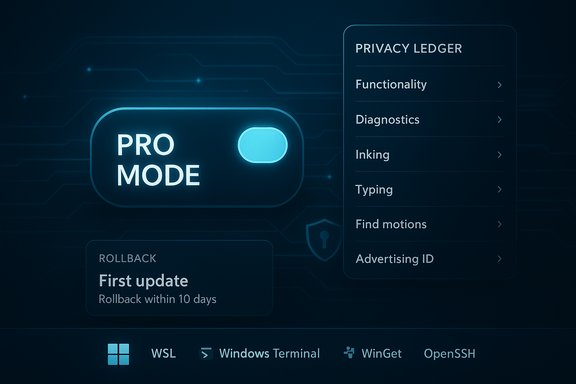
Plummer’s video and public commentary are terse and practical rather than nostalgic. The key proposals can be summarized as:- A single, discoverable “Pro/Hardcore/Expert” mode that flips the OS from “safe and chatty” to “deterministic and terse.” This would remove unsolicited nudges, promoted store entries, and UI advertising from core surfaces such as Start and Search, default local search to local results, and respect explicit user defaults.
- Radical telemetry transparency: every telemetry category and outbound diagnostic packet would be paired with a plain‑English explanation and logged in an always‑available “privacy ledger.” Users should be able to mute entire categories persistently and trust updates not to silently re-enable them.
- Clear account choices at Out‑Of‑Box Experience (OOBE): show the tradeoffs between local accounts and Microsoft Accounts without steering, to reduce coercion complaints that followed setup changes.
- Safer updates with rollback‑first semantics: no surprise reboots during active hours, health checks post‑update, and one‑click rollback when updates break things.
- Make developer tooling first‑class: ship and expose WSL, Windows Terminal, WinGet, curl/tar, OpenSSH and similar tools as defaults on Pro installs so developers and power users don’t need to hunt for them.
Verifying the factual anchors
Before unpacking feasibility and risks, the factual anchors in the debate were verified:- Windows 10 end of mainstream support: Microsoft’s own lifecycle documentation and support pages list October 14, 2025 as the end date for mainstream support and explain ESU enrollment and constraints. The consumer ESU program allows enrollment through October 13, 2026, with specified prerequisites (e.g., devices must be on Windows 10 version 22H2).
- Consumer ESU enrollment mechanics and the practical friction around account choices: Microsoft’s ESU pages and reporting from multiple outlets confirm that Microsoft provided both a free method (via Windows Backup/OneDrive sync tied to a Microsoft Account) and a paid local‑account option (a one‑time fee) to access consumer ESU updates, leading to public reporting about the tradeoffs for privacy‑minded users.
- Market share and installed base context: StatCounter’s November 2025 dataset shows Windows 11 at roughly 53.7% of desktop Windows pageviews and Windows 10 at 42.6%; Dell’s earnings commentary publicly noted that around 500 million upgradeable PCs had not been moved to Windows 11, underlining that many capable devices had not been migrated. These independent data points help explain why the UX design debates matter at scale.
- Plummer’s credentials: public profiles and contemporary reporting document Dave Plummer’s role in shipping components such as Task Manager, ZIP‑folders support, and the NT port of Space Cadet Pinball; his resume and interviews are a recognized part of the Windows engineering oral history. That lends credibility to an engineering critique focused on systemic UX and configuration mechanics.
Why Plummer’s critique resonates with power users — and where it’s already provably true
Plummer’s list of irritants reads like the checklist long‑time Windows tinkerers write in forum posts when they set up a fresh machine: unwanted promoted apps, persistent nudges to switch to Edge, telemetry categories that are hard to interpret, scattered settings surfaces (Settings vs Control Panel vs Group Policy vs Registry), and updates that reconfigure defaults without clear consent. Independent reporting and community audits over the past several years corroborate each of these problems as recurring sources of friction. Specific, provable examples:- Promoted or suggested content in Start/Search surfaces has been documented across Windows versions and is controlled by defaults that historically favored activation metrics. Power‑user guides often include steps to disable “occasionally show suggestions in Start.”
- Telemetry is categorized as required vs optional by Microsoft, and Microsoft ships tools such as the Diagnostic Data Viewer; nonetheless, those tools are often insufficient for non‑expert users to understand micro‑level data flows, which supports Plummer’s call for simpler, human‑readable transparency.
- Update regressions and surprise reboots remain a top complaint for enterprise and home users; the demand for safer rollbacks and update health checks has been a recurring theme in sysadmin forums and IT reporting.
Technical and product feasibility — what would it take to build “Pro Mode”?
Plummer’s proposals are deliberately scoped to defaults, discoverability, and configuration rather than rewrites of the kernel. That matters: many of the behaviors he dislikes are currently controllable by policy, but the controls are not discoverable or durable for typical users. Building a first‑class Pro Mode is largely an exercise in product engineering, governance, and backward‑compatibility guarantees.Core implementation work would include:
- A single, authoritative configuration profile at OOBE and in Settings that flips multiple subsystems at once (search behavior, Start menu behavior, promotion pipelines, telemetry defaults, update semantics). Each toggle would need an API surface mapping so that shell components, Store components, and services all read the same authoritative flag.
- A privacy ledger service that:
- Intercepts telemetry outbound calls (or records their intent) and logs them in a human‑readable queue.
- Exposes a UI that explains each category and who would read it (Microsoft, OEM, telemetry pipeline).
- Persists explicit user choices and resists silent reset by updates (or at least notifies the user if Microsoft must change a policy for security reasons).
- Update orchestration improvements:
- More robust pre‑update health checks, staged verification, and an automated rollback path with minimal UI friction.
- Respect for active hours with clearer user‑driven controls and enterprise policy integration.
- Developer/tooling improvements:
- Shipping WSL/Windows Terminal/WinGet/OpenSSH in the default image for Pro installs and ensuring the add/remove lifecycle and security posture are supported.
However, this is not just technical; it is a product and business tradeoff.
Business and product tradeoffs — why Microsoft might resist (or embrace) the idea
There are competing incentives at play:- Metrics that drive product teams often reward engagement, activation of paid services, and surface usage of Microsoft features (e.g., Edge adoption). A system‑wide Pro Mode that disables promotion pipelines would reduce those signals in a measurable way.
- Some telemetry categories are used to automate security responses and servicing; Microsoft will justify selective data collection as necessary for crash diagnosis, security triage, and safe rollouts. Making telemetry opt‑out for everything could hamper rapid incident response. Plummer’s proposal accepts telemetry for security but asks for clearer transparency and durable opt‑out for non‑critical categories.
- Enterprise customers already get many of the behaviors Plummer asks for: predictable update rings, policy controls, and reduced nudging. Extending similar autonomy to consumer power users may be a reasonable compromise, but Microsoft must design discoverable identity signals (a durable Pro Mode) to separate consumer experiments from an explicit power‑user configuration.
- The economics of ESU and the push to Windows 11 (and Copilot/AI features) create incentives for Microsoft to keep nudging consumers toward upgrades and cloud‑tethered experiences. That will complicate a wholesale shift away from upsell nudges unless product leadership decides to bifurcate the user experience more clearly.
Risks and unintended consequences
A thoughtfully implemented Pro Mode could solve many pain points, but it also raises risks that must be planned for:- Security blind spots: If Pro Mode automatically mutes certain telemetry categories, Microsoft and OEMs will have less visibility into crash signatures and distributed attacks. Any ledger/opt‑out model must preserve high‑assurance telemetry for security while allowing users to opt out of marketing or “tailored experience” data collection.
- Support fragmentation: A new durable Pro Mode could produce a bifurcated ecosystem where vendors and app developers need to test two distinct experiences. That increases QA costs and could slow feature rollout for everyone.
- Social engineering and user confusion: Presenting a single toggle that dramatically changes behavior is powerful but also a potential UX trap if users accidentally enable or disable it. The flow must include clear confirmations and easy reversal.
- Monetization and revenue impacts: Removing promotional surfaces reduces a potential channel for revenue or partner deals. Microsoft would need to weigh short‑term financial tradeoffs against long‑term trust and retention.
Practical recommendations (what Microsoft should do, and what users can do right now)
For Microsoft (prioritized):- Ship a discoverable “Expert / Pro” profile during OOBE and in Settings that aggregates existing policy points (nudges, promoted apps, web fallback for search, telemetry categories, update behavior) into a single durable toggle. Make it reversible and transiently confirm critical security‑relevant toggles when users change them.
- Pilot a privacy ledger in Insider channels that records telemetry intent and shows the plain‑English why; measure whether clarity reduces support calls and improves trust metrics.
- Introduce rollback‑first update semantics for consumer channels as an opt‑in for Pro Mode users and tighten canarying to reduce regressions reaching broad audiences.
- Make developer tooling first‑class on Pro installs: preinstall or auto‑expose WSL, Windows Terminal, WinGet, and other CLI utilities for the Pro profile.
- If you’re worried about running Windows 10 past October 14, 2025, evaluate the ESU options now: enroll through Settings > Update & Security if eligible, or plan a migration. Microsoft’s ESU documentation explains prerequisites and the enrollment window through October 13, 2026.
- For privacy‑minded users, weigh the consumer ESU enrollment options (cloud backup tied to a Microsoft Account vs a one‑time paid local‑account option) and choose the route that aligns with your threat model and upgrade plan.
- Power users who dislike nudges can already disable many suggestions, telemetry categories, and promoted content today — it’s just not centralized. Documenting and automating those changes via scripts or package manifests (WinGet / winget) can replicate a “Pro Mode” on existing installations while Microsoft considers a first‑class productization.
Final assessment: does Windows “suck” — and can it be fixed?
The blunt answer is nuanced. The foundation of Windows — the kernel, the storage stack, the enormous driver ecosystem — remains a mature, high‑performance platform. That’s not where the chief complaints lie. Instead, the friction is in the surfaces users interact with daily: onboarding, the shell, default behaviors, telemetry, and the steady presence of promotions and nudges that feel like the operating system is selling on the owner’s behalf. Plummer’s diagnosis — that Windows “sucks” when it forgets who it’s working for — is an engineer’s shorthand for the real problem: a mismatch between the OS’s default incentives and the expectations of experienced operators.Plummer’s fixes are pragmatic, incremental, and eminently implementable: they do not require rewriting Windows. They do require a product choice from Microsoft about who gets to set defaults and how durable those choices are. If Microsoft wants to preserve growth and monetization through embedded experiences, it will resist a wholesale Pro Mode; if it wants to rebuild trust with power users and IT professionals, the changes Plummer outlines are a direct path to doing that without sacrificing the on‑ramp for novices.
At scale, the most constructive outcome would be a durable compromise: a discoverable Pro Mode that respects expert choices, paired with explicit messaging and guardrails so that less technical users don’t accidentally disable critical security protections. That approach keeps Windows extensible and modern while giving people the predictability and clarity they need to trust their machines again.
Windows can stop “sucking” for a large segment of its user base without uprooting the platform. It starts with a single design choice: treat explicit user intent as authoritative. If Microsoft makes that choice, most of Plummer’s fixes are engineering and UX work that can be scoped, piloted, and shipped. If it doesn’t, the chorus of frustrated power users — now joined by voices who built the system in the first place — will keep asking the same question: who is Windows really built for?
Source: GB News Ex-Microsoft engineer says 'Windows sucks' and explains how it could be fixed
